It's Friday afternoon. You've got a bank app open on your phone, a spreadsheet on your laptop, and a stack of unpaid bills on your desk. Sales look good. But can you hire that new person next month. Can you buy the truck. You still don't know, because none of those reports talk to each other. That's the mess most owners live in, and it's fixable.
What Is a Financial Analytics Dashboard
Meet a version of this story I see a lot. An owner gets a profit report from last month. It says the business made money. Then she checks the bank and the cash is low. Both things can be true, but the report doesn't explain why, and it doesn't help her decide what to do on Monday.
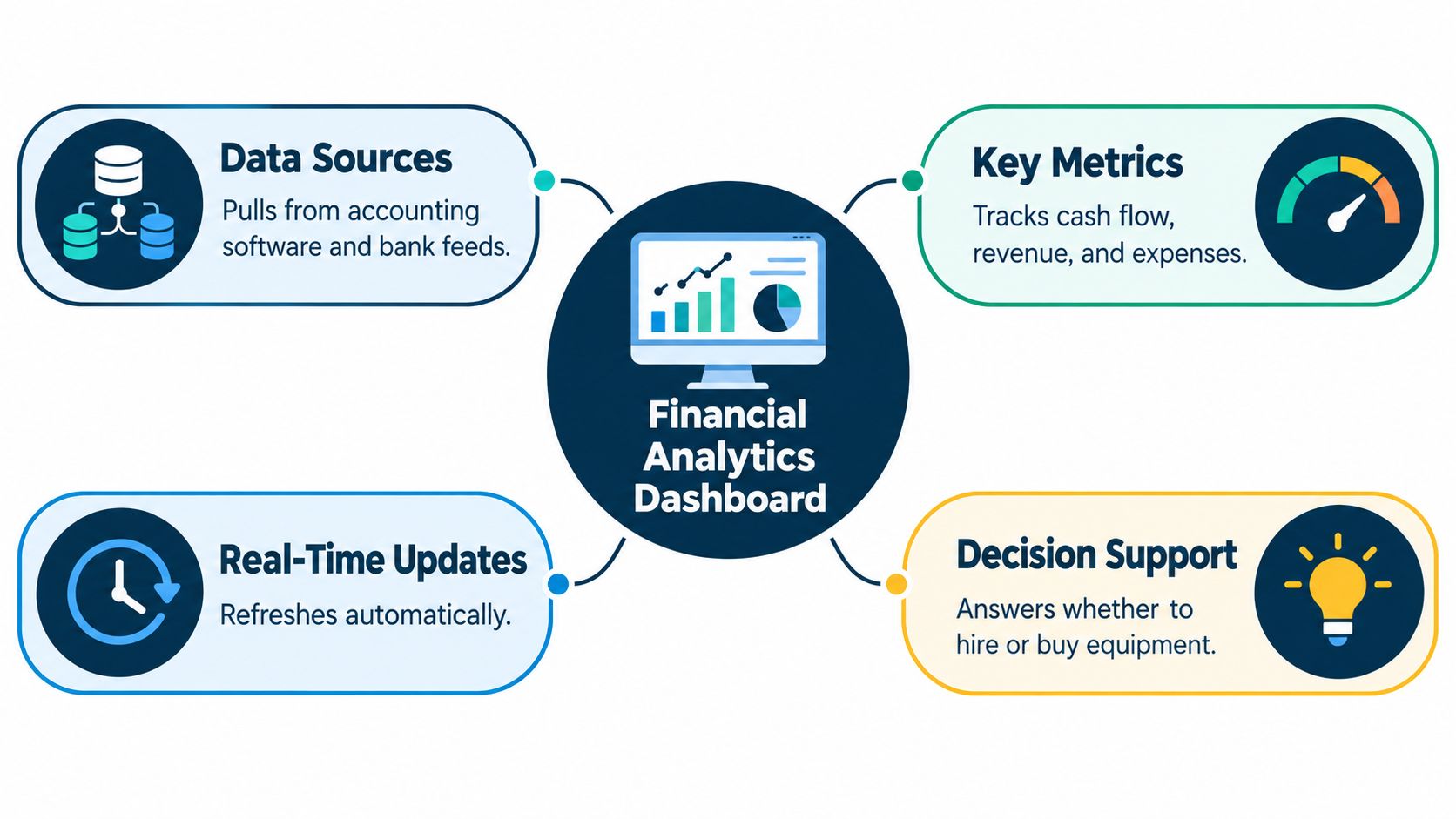
A financial analytics dashboard fixes that gap. It's one screen that pulls your most important numbers together so you can see the health of your business at a glance. Think cash balance, revenue, gross margin, money owed to you, and what you planned to spend versus what you spent, all in one place, updated often.
How It's Different From a Regular Report
A regular report is like a photo. It's still. You can't ask it questions. A dashboard is more like the screen in your car. You can tap, filter by month, compare this year to last year, and dig into the one number that looks off.
That ability to dig in matters. A peer-reviewed comparative study published in 2015 on dashboard use found that dashboard users were more confident in selecting a preferred option than users who relied only on a static, non-interactive table. The study looked at health care choices, not business. But the lesson fits here too. When complex numbers sit in one clear, interactive view, people feel surer about the choice in front of them.
A dashboard isn't a wall of pretty charts. It's a tool you use to run the week.
So the point isn't to admire your numbers. It's to act on them. Cash dipping next week means you call slow payers today. Margin slipping on one type of job means you check your prices before you sell more of it.
If you're still fuzzy on the bigger idea behind the numbers, start with what financial analytics means in plain terms. Then picture the dashboard as where that thinking shows up on screen, every day, in a form you can use.
The Key KPIs Every Dashboard Needs
KPI just means a number you watch on purpose. You don't need dozens. You need a small set that tells you if you're okay, and what to fix if you're not.
Cash runway is how long your cash lasts if money stops coming in. Accounts receivable aging shows who owes you money and how late they are. Gross margin shows what's left after the direct cost of the work. Burn rate is how fast you spend cash each month. Budget versus actual shows where reality drifted from the plan.
Why Cash Balance Alone Can Fool You
A big bank balance can look safe and still hide trouble. Payroll might hit Friday. A tax payment might be due next week. The U.S. Small Business Administration guide on cash flow timing explains that cash flow depends on both the amount and the timing of money moving in and out of a business. Its example is easy to picture. A contractor may show $100,000 in unpaid invoices and still lack cash to cover payroll if customers will not pay for 45 days.
That's why your dashboard should show more than today's balance. Show cash expected in, bills going out, and where cash lands week by week. A trend tells you far more than one lonely number.
| KPI | What It Tells You | Action It Triggers |
|---|---|---|
| Cash runway | How long cash lasts at your current spend | Cut or delay costs, speed up collections |
| Receivables aging | Who is late and by how much | Call, send reminders, tighten payment terms |
| Gross margin | If the work itself makes money | Reprice, fix job costs, drop weak work |
| Burn rate | How fast cash leaves each month | Review payroll, rent, and subscriptions |
| Budget versus actual | Where you beat or missed the plan | Ask why, then adjust the plan or the spend |
If you want help turning these numbers into a simple forward plan, a practical financial planning resource can give you a structure to work from. Pair that with a clear grasp of how to understand key performance indicators so each tile on your screen has a job. Read each KPI the same way. What changed. Why. What will I do about it this week.
How to Design the Dashboard and Choose Data Sources
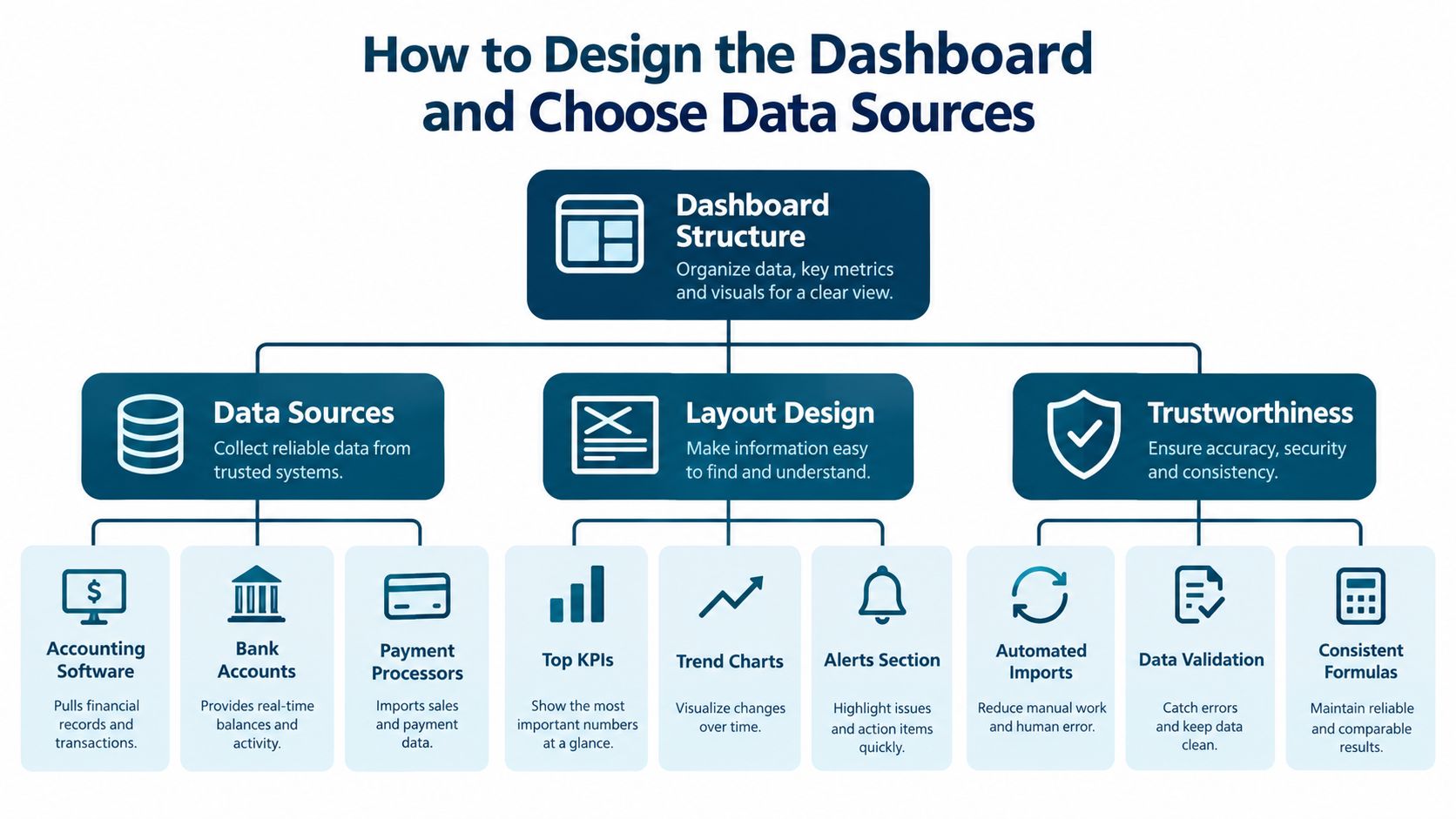
Start with where the numbers come from. For most small businesses, that's your accounting software, your bank feeds, your payroll system, and the general ledger underneath it all. If those sources don't agree with each other, your dashboard will look clean and still be wrong.
Here's a simple order that works. First, connect the sources you already trust. Next, match the dashboard totals back to your books. Then decide how often each number refreshes, and show that time on screen so nobody guesses.
Use Three Layers, Not One Crowded Screen
Trying to fit everything on one screen is the most common mistake I see. In a published dashboard design study with a three-layer model, researchers organized 85 candidate KPIs into 12 functional features and built a three-layer architecture, which let managers spot trends, strengths, weaknesses, and odd results faster than messy reporting did.
You can copy the shape of that idea in plain form:
- Top layer for the owner: Cash, revenue, gross margin, operating profit, and how far you are from forecast.
- Middle layer for managers: Who owes you money, how busy your team is, which jobs or clients make money, and budget gaps.
- Bottom layer for digging: The actual invoices, bills, and transactions behind a number.
This gives you a path. Cash looks tight at the top. You drop to the middle and see collections slowed. You drop again and find the two customers causing it. Now you have a name to call, not just a red chart.
One more thing keeps everyone sane. Write a short metric dictionary. It says, in plain words, how you work out gross margin, billable time, and operating cash flow. Two tools can use the same label and mean different things. When you set up accounting software integration that keeps your systems in sync, agree on those definitions first. It saves a lot of arguing about whose number is right.
Example Layouts for SMBs and Service Firms
Two businesses can use the same core numbers and still need very different screens. What matters is how each one makes money.
A product based business lives and dies by stock and weekly sales. Its biggest tiles should be cash runway, gross margin, stock on hand, and sales this week versus plan. If margin drops while sales rise, something's off with price or cost, and that needs attention before you order more stock.

What a Service Firm Watches Instead
An agency, law firm, or consultancy sells people's time. So its screen should lead with billable utilization, which is how much of the team's time clients pay for. Next comes profit by project or client, then who owes money and how late they are.
Service firms also hit a trap that product businesses don't. Money billed is not always money earned. The FASB revenue recognition standard for customer contracts.pdf) sets out a model where revenue is recognized when each promised service is satisfied. So a $12,000 contract covering three separate monthly deliverables should not automatically appear as $12,000 of earned revenue on the signing date.
Simple check: If you haven't done the work yet, don't count it as earned yet.
For that reason, a service firm dashboard should show four things side by side. The full contract value, what you've billed, what you've earned, and what work is still left to deliver. That stops a big signing from making a slow month look great.
Picture your own screen now. Put the number that decides your next move in the biggest tile. Everything else supports it. For a shop, that may be cash after the next stock order. For a consultancy, it may be earned revenue against payroll. Same idea, different shape.
Why Actionable Dashboards Beat Pretty Reports
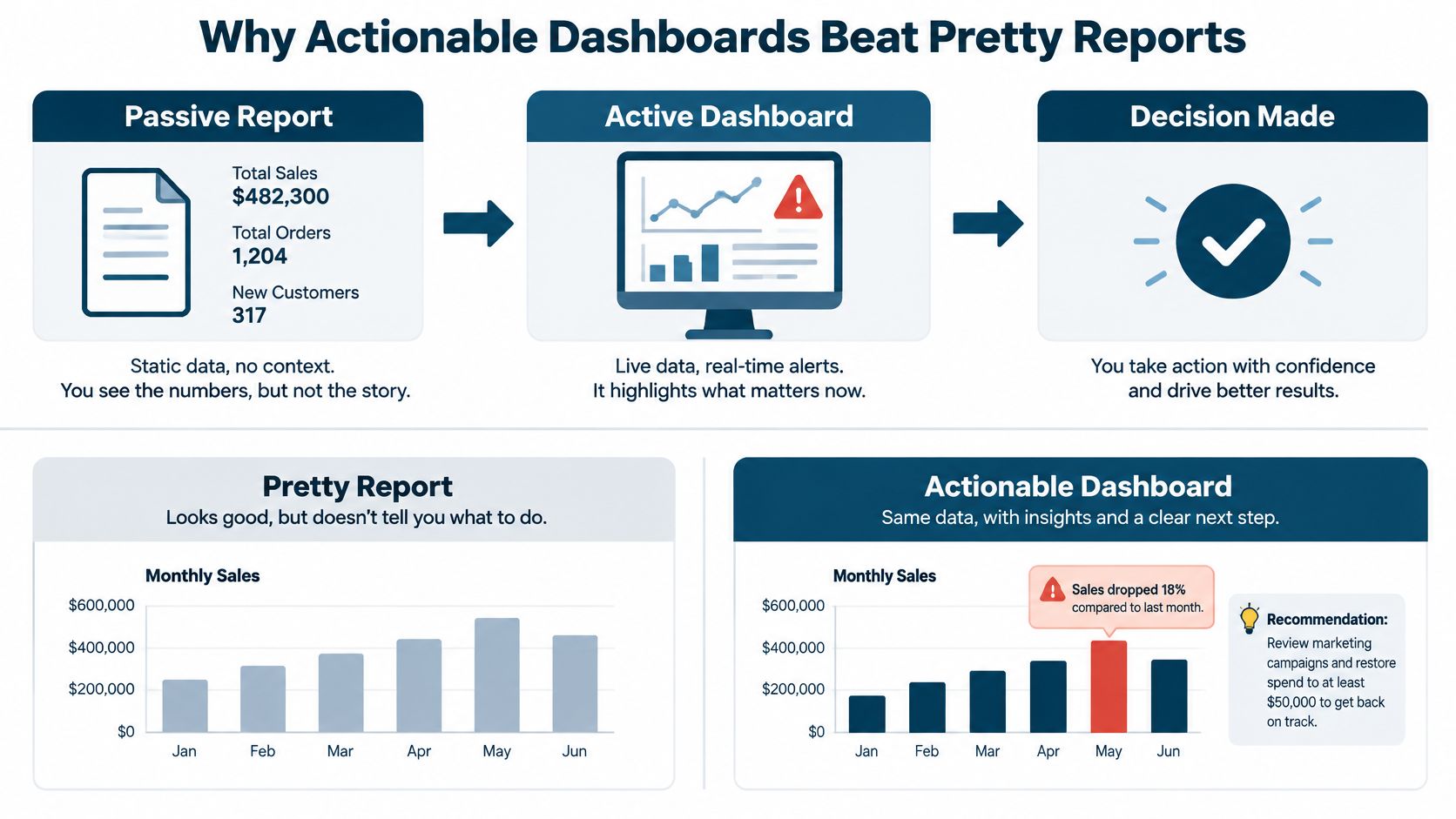
A report that only shows numbers asks you to do all the thinking. A good dashboard does part of that work for you. It flags the problem, shows the likely cause, and points to the next step.
Say your cash forecast dips in three weeks. A pretty report shows a line going down. An actionable dashboard says collections are short, names the late accounts, and prompts a choice. Tighten payment terms. Offer a small reason to pay early. Or delay that new hire by a month until cash recovers.
Look Forward, Not Just Back
Most screens I review only look backward. Last month's sales. Last month's profit. That's useful, but it won't warn you in time. Recent small business findings in a Main Street business optimism report show that 30% of surveyed small businesses identified cash flow as their primary challenge, while more than 73% reported having enough cash to cover at least one month of operating expenses.
Read those two facts together. Many owners have some cushion, and cash is still their top worry. That's because a balance today says nothing about payroll timing, a late payer, a tax bill, or a hire you promised to make.
So build tiles that answer next step questions:
- Cash after payroll: What's left once the team is paid.
- Collections needed this month: The smallest amount you must bring in to stay safe.
- Cost of one new hire: What that decision does to cash over the coming weeks.
Fewer numbers, but each one carries a trigger, an owner, and a deadline. That beats a wall of charts nobody acts on. If a tile never changes a decision, take it off the screen.
Data Trust and Security in Financial Dashboards
Here's an uncomfortable truth from messy books. A clean looking chart built on wrong data is worse than no chart at all, because you'll act on it with confidence.
Trust starts with dull checks. Does dashboard revenue match the ledger. Does money owed to you match the aging report. Does payroll match what your payroll system sent to the books. If a check fails, the dashboard should warn you in plain sight, not quietly refresh a bad number.
Who Can See What, and Can You Trust It
Security is the part many guides skip. A 2025 SMB survey report on technology and security readiness found that 52% of businesses lacked confidence in their cybersecurity preparedness and resources, while only 49% prioritized cybersecurity and compliance for new technology spending despite 59% recognizing them as key priorities.
Your dashboard holds bank data and payroll. Treat it that way. Limit who sees pay details by role. Protect bank feed logins. Keep a record of who changed how a transaction was categorized, and when.
Add a small "can I trust this number" panel to every screen. Show when data last updated, which accounts aren't reconciled yet, and what guesses sit behind any forecast.
That one panel changes behavior. If the feed went stale yesterday, you know to wait before making a big call. If a figure is a hand typed estimate rather than a source record, you can see that too. Good data habits aren't fancy. They're completeness, accuracy, freshness, and a clear trail from the big number down to the transaction under it. Get those right and the visuals finally earn their place.
Best Practices for Making Your Dashboard Work
A dashboard only helps if looking at it becomes a habit. Pick one short slot each week, same day, same time, and work through the same few questions. What does cash look like after the next payroll. Who is late paying us. Which job or client lost money, and why.
Keep it boring on purpose. Boring routines are the ones people stick with. End each review with one or two named actions, a person who owns each one, and a date. Next week, check those actions first before you look at anything new.
Watch Trends and Your Own Targets
One week's number can mislead you. A line moving the wrong way for a while is a real signal. Compare against your own targets too, not just broad averages that may have little to do with your trade, your town, or your size.
There's a sobering reason to catch these signals early. Bureau of Labor Statistics data on ten-year business survival found that 34.7% of U.S. private-sector establishments born in March 2013 were still operating in March 2023. That's about one in three. Those figures support tracking warning signs such as falling gross margin, shrinking cash reserves, overdue receivables, and customer concentration while there's still time to act.
A simple weekly order works well:
- Cash first: Today's position and what's coming in and out next.
- Late payers second: Names, amounts, and who will follow up.
- Margin third: One job, product, or client to inspect closely.
- Plan last: Where you stand against budget, and what changes now.
Every so often, prune the screen. If a metric hasn't changed a decision in months, remove it or move it to a deeper layer. Your future self will thank you for a shorter, clearer view.
If your reports leave you guessing about hiring, pricing, or cash, MyOfficeOps can build you a clean set of books and a KPI dashboard that turns those numbers into clear next steps, backed by bookkeeping, payroll integration, forecasting, and CFO level advice for small and midsize businesses. Visit MyOfficeOps to book a discovery call and see what your numbers would look like on one screen you can trust.