
The first sign that privacy has become a real business issue is usually boring. A customer asks, “What do you do with my information?” and the answer lives in three different tools, two folders, and one half-remembered email thread. That's when a lot of owners realize they're not dealing with a legal theory problem. They're dealing with a business process problem.
That matters because data privacy compliance isn't just for big tech firms or companies with in-house lawyers. By 2026, data protection frameworks were in place in 179 of 240 jurisdictions, covering roughly 80% of the world's population (Secureframe's global privacy statistics). In plain English, privacy rules now touch the way everyday businesses collect, store, share, and delete customer information. If you hold names, emails, invoices, health details, payroll data, or website form submissions, you're already in the middle of it.
For a simple reference point on why this matters to real people, a basic guide to protecting PII against identity theft helps explain why customers care so much when they hand over personal details. They're not being difficult. They're trying to understand whether your business treats their information carefully.
Why Data Privacy Suddenly Matters for Your Business
A salon owner, a contractor, or a clinic manager usually doesn't wake up worried about privacy law. They worry about payroll, jobs, appointments, vendors, and getting paid. Then a client asks where their data goes, and the owner realizes the answer isn't simple.
That marks an important shift. Privacy used to feel like a niche issue for giant platforms. Now it's part of normal business hygiene, like keeping clean books or carrying insurance. When laws spread across so many jurisdictions, the practical message is clear. If you do business across state lines or serve customers online, you can't treat privacy as an afterthought anymore.
Practical rule: if you can't explain your data handling in one calm conversation, your business probably doesn't have a usable privacy process yet.
The good news is that the goal isn't perfection. It's clarity. Customers want to know what you collect, why you collect it, who can see it, and what happens if something goes wrong. That's enough to start building trust without turning your website into a wall of legal language.
A helpful way to think about it is this. Privacy is part of how you keep promises. If your intake form, accounting system, email platform, and backup files all store personal information, then your promise to protect that information needs to work across all of them, not just in a policy PDF.
That's also why privacy and everyday operations now overlap so much. A business that handles customer data well looks more organized, more reliable, and easier to work with. That's not just good compliance. It's good commerce.
Find and Map Your Business Data
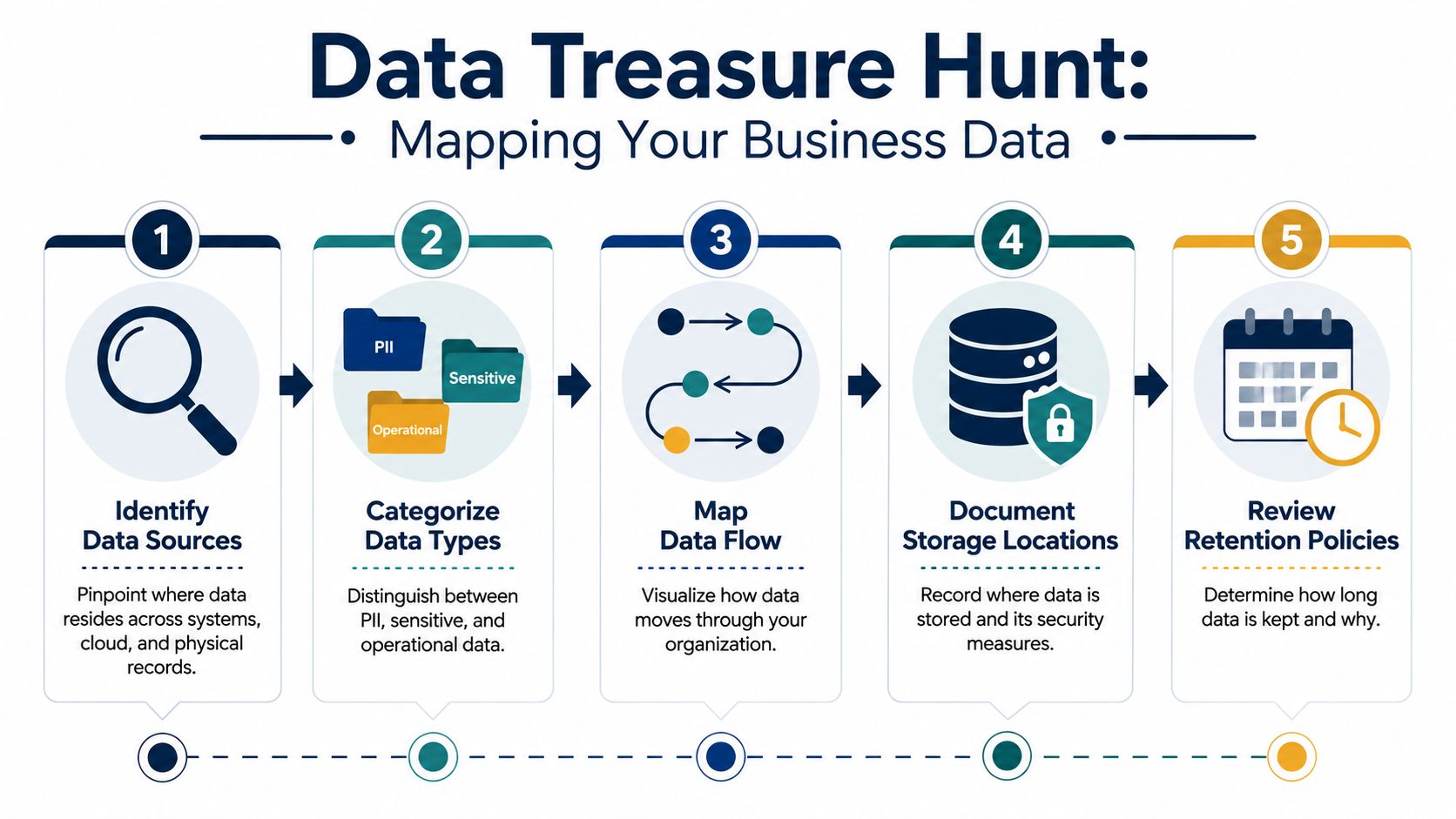
The fastest way to lose control of privacy is to guess where your data lives. A better approach is to run a data treasure hunt. The point is not to build a perfect map on day one. The point is to find the places where personal information sits, moves, and gets copied.
Start with the obvious places
Look first at the systems you already know about. Your CRM, accounting software, email marketing list, scheduling tool, help desk, and payroll system are the usual starting points. Then move to the places that get forgotten fast, like old spreadsheets, exported contact lists, shared inboxes, website contact forms, and paper sign-up sheets left in a drawer.
If you want a simple standard, treat any information that can identify a person as sensitive enough to track. Names, email addresses, phone numbers, home addresses, employee records, payment details, and health-related information all need a home on your map. The key is not to memorize legal categories. The key is to know where each type of data enters the business, who touches it, and where it ends up next.
A privacy map should show movement, not just storage. If data enters through a form, lands in email, gets copied into a spreadsheet, and then gets shared with a vendor, that path matters as much as the file itself.
Make the map useful, not fancy
Many small businesses often get stuck. The challenge is usually operational, not legal. Common barriers include inconsistent definitions of sensitive data, limited IT infrastructure, outdated systems, and a simple lack of inventory of where data lives and who can access it (PMC review on operational privacy barriers). That's why the best first draft is often a basic spreadsheet, not a complicated software project.
Use a simple table with five columns: data source, type of data, storage location, who can access it, and how long you keep it. If that feels too large, start with your three busiest systems and expand from there. You can even build the list the same way you'd build a chart of accounts, by organizing messy information into a structure people can use, as in this chart of accounts guide.
Cloud vendors and assessments can help too, especially when you're trying to decide whether a process needs a deeper review. For example, CloudOrbis Inc.'s PIA insights are useful as a model for thinking through privacy impact assessments without making them more complicated than they need to be.
The right question is not, “Do we have every detail?” The right question is, “Can we now see enough of the path to manage it?” That's where compliance starts.
Write Simple Policies and Set Up Controls
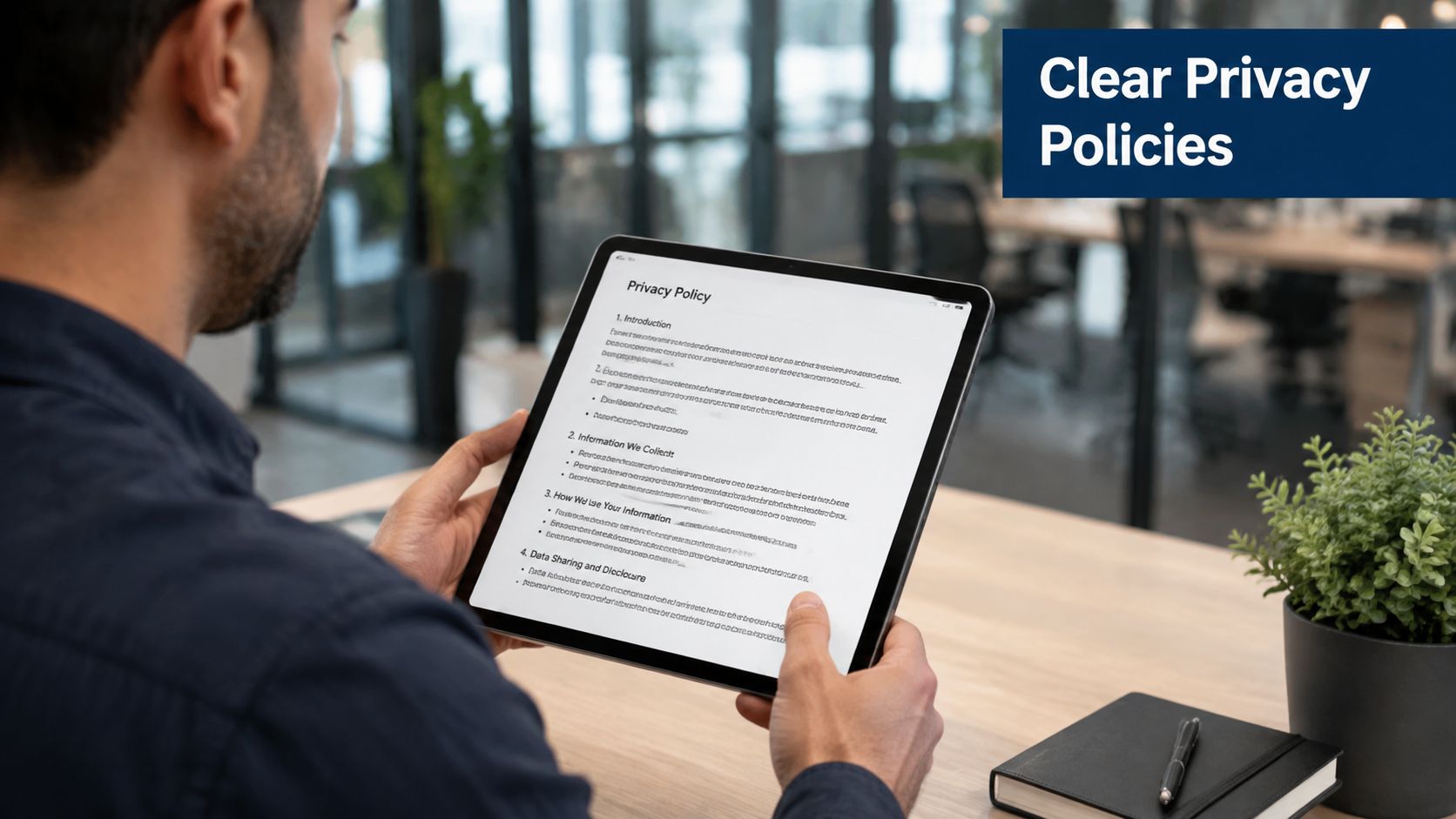
A privacy policy should read like something a customer can understand, not something a lawyer had to untangle. Under GDPR, a privacy notice must be “concise, transparent, intelligible and easily accessible form, using clear and plain language” (GDPR privacy notice guidance). That standard is worth using even if your business is nowhere near Europe. If a normal customer cannot understand it, the policy is not doing its job.
Keep the policy short and direct
A workable privacy notice usually answers three questions. What do you collect? Why do you collect it? How can someone reach you with a question or request? That structure is simple on purpose, because it keeps the document focused on what people need instead of burying the answer under legal background.
Short headings usually do the job better than one dense wall of text. “What we collect,” “How we use it,” “Who we share it with,” and “How to contact us” are easy for customers to follow. If your business uses vendors, payment processors, expense tools, or scheduling software, name the kinds of partners that receive data. If your team is also trying to tighten back-office records, a process like expense management automation can reduce the number of places sensitive financial data ends up. People do not expect a legal essay. They expect honesty.
One area that now needs explicit attention is AI. Recent U.S. state-law changes now require clearer notice about whether personal data is used to train large language models, and that creates a real gap for many businesses that still focus only on cookies and consent (Shumaker on recent state privacy developments). If your team uses ChatGPT, Gemini, or another tool with customer data, spell out how that use works in your policy and vendor review.
Put locks on the doors, not just signs on the wall
Policies are the sign on the wall. Controls are the lock on the door. If anyone can open customer files, download spreadsheets, or send data through personal email, the policy will not protect the business.
Start with the basics. Use strong passwords, multi-factor authentication where it is available, role-based access so people only see what they need, and secure website forms. Then check file-sharing settings and backups. If your website is a front door, your systems are the rooms behind it. Both need to stay secure.
For owners trying to tighten operations, this is also where tools matter. MyOfficeOps can support bookkeeping and reporting workflows that reduce the number of places sensitive financial data ends up, which makes privacy control easier to maintain in day-to-day work. That does not replace privacy planning, but it does help keep information from drifting all over the place, which is half the battle.
A practical privacy program is usually boring in the best way. Fewer copies. Fewer people with access. Clearer language. Less guessing.
Manage Your Team and Outside Vendors
Privacy breaks fastest when people assume someone else is handling it. One employee forwards a file to the wrong person. Another saves customer details to a personal laptop. A vendor collects data in a way your team never reviewed. Suddenly the business is dealing with a mess that started as a small shortcut.
A peer-reviewed study of SMEs found that programs built on documented policies rather than enforced controls underperform badly. In the firms studied, only 17% had privacy policies at all, and even those firms complied with only 12.15 of 31 privacy criteria on average (PMC SME compliance study). The lesson is simple. A policy sitting in a folder is not a control. Training and follow-through are what make it real.

Train people on the few things that matter most
You do not need a giant training program to start. You need a short one that gets repeated. Teach employees how to spot a phishing email, what to do if a customer asks for their data, and who to alert if they accidentally send information to the wrong person.
That kind of training works because it matches real work. People remember simple rules that fit their day. For example, “stop, verify, forward internally” is easier to follow than a long policy paragraph no one can quote back. The goal is to build a human firewall, not a paper one.
If your team can't describe the next step after a privacy mistake, the mistake will spread before anyone contains it.
Review vendors like they're part of your own office
Your vendors handle your data whether you remember it or not. Accounting tools, email platforms, payroll providers, marketing systems, and scheduling apps all matter. That's why vendor review should be a normal step, not an emergency task after something goes wrong.
A good checklist is straightforward. Ask what data the vendor collects, where it stores that data, who can access it, whether it uses subcontractors, and how it handles deletion. Then check whether the contract says the vendor will protect the data, notify you about incidents, and delete it when the relationship ends.
If you want a practical reference for structuring those checks, this best practices for vendor management guide is a useful place to start. It helps keep the conversation focused on accountability, not jargon. If a vendor can't answer basic questions clearly, that's a warning sign.
Central to this discussion is trust. A business is only as careful as the people and tools it relies on. One careless employee or one sloppy vendor can undo a lot of good work.
Plan for Requests and Respond to Incidents
Customer requests and security incidents both feel stressful when there's no process. With a process, they become tasks with names, owners, and deadlines. That's the difference between panic and control.
Build one calm workflow for data requests
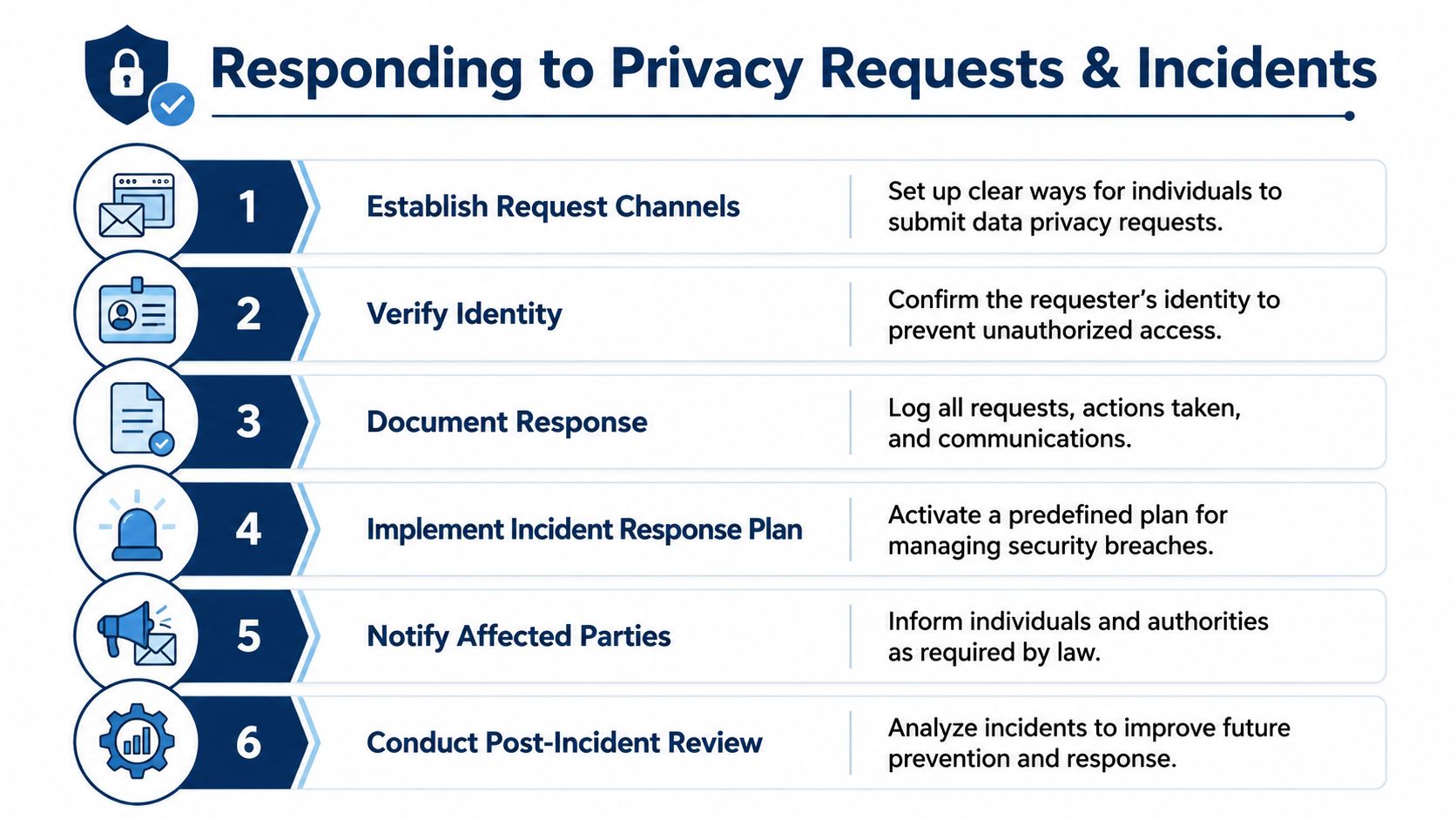
A customer may ask to see, correct, or delete their information. You don't need to improvise a response every time. Set up one intake path, like a dedicated email address or web form, then verify the person's identity before sharing anything.
After that, log the request, note which systems might hold the data, and assign someone to search those systems. If the data can be deleted or corrected, confirm what action was taken and when. If a request can't be fully granted because of another legal or business reason, explain the limit in plain language.
That's the part most businesses forget. A request isn't just a question. It's a record. Keeping a clean log helps you answer follow-up questions and show that the request was handled on time and in good faith.
Write the incident steps before you need them
A security incident does not have to be dramatic to matter. A lost laptop, a misdirected attachment, or a compromised login can all create privacy trouble. Under GDPR, a personal data breach often must be reported to the data protection authority within 72 hours (Osano on breach notice timing). That short window is why a pre-written response plan matters so much.
Your plan should say who gets notified first, who decides whether the issue needs outside help, how evidence is preserved, and who handles customer communication. Keep it simple enough that someone can follow it while under pressure. A plan that only makes sense on a good day is not much of a plan.
A useful habit is to do a quick review after every incident, even a small one. What failed? What worked? What needs to change in the process, training, or vendor setup? That review turns a bad day into better operations next time.
The bottom line is straightforward. Requests and incidents will happen. Businesses that prepare for them stay calmer, answer faster, and make fewer mistakes.
Key Privacy Tips for Your Industry
Privacy gets easier when you tailor it to the kind of business you run. The details change, but the pattern is the same. Find the data, limit access, train the team, and keep vendors on a short leash.
For healthcare practices, don't stop at the patient record. Billing platforms, appointment reminders, marketing tools, and intake forms all carry personal information, and they often live outside the core charting system. That means your privacy review needs to include the whole workflow, not just the medical file.
For professional services firms, confidentiality is part of the product. Client documents, project files, email threads, and shared drives often hold sensitive data that never gets formal protection until after a mistake. A simple rule helps here. If a file would worry a client if it were forwarded by accident, it probably needs tighter access and clearer retention rules.
For construction companies, privacy shows up in less obvious places. Employee records, subcontractor details, visitor logs, and job site paperwork can all contain personal information. These records are easy to overlook because they feel operational, not sensitive. They still deserve a basic inventory and a clear owner.
The larger business lesson is this. Data privacy compliance is part of being a trustworthy company. Customers, employees, and partners notice when you answer questions clearly, keep data organized, and respond without confusion. That kind of discipline doesn't just reduce risk. It makes the whole business look more serious and easier to trust.
If you want help turning this into a workable process, MyOfficeOps can support the clean-up work that makes privacy easier to manage, from organized books and clearer reporting to tighter day-to-day workflows. Visit MyOfficeOps to see how a more organized back office can help you handle customer data with less chaos and more confidence.