
You hired a nanny so you could make life simpler. Maybe you run a practice in Center City, manage a construction company on the Main Line, or own a small firm in West Chester and just needed reliable help at home.
Then someone asks, “Are you set up for household payroll?” and the whole thing gets annoying fast.
Many smart business owners get tripped up here because this does not feel like “running payroll.” It feels like paying a person who helps your family. But once you control the job, the schedule, and the way the work gets done, the government tends to see something different. You are not just a family paying for help. You are an employer.
That is why the household employee ein matters. It is the first thing that tells the IRS, the state, and the year-end forms that this is household employment and not just personal spending.
You Hired a Nanny, Now You're an Employer
A common Philly-area example looks like this. Two parents both work full time. They hire a nanny for weekdays, agree on hours, decide the child’s routine, and give instructions about meals, naps, pickups, and screen time.
That setup feels casual. It is not casual for tax purposes.

What makes someone a household employee
The simplest test is control.
If you decide when the person works, what work they do, and how they do it, that person is typically your employee. That can include a nanny, housekeeper, senior caregiver, or other in-home worker.
If someone runs their own business, sets their own process, and mainly controls the work themselves, that points more toward an independent contractor. But many families call someone a “contractor” when they are an employee.
That label can cause a mess later. The name you use does not matter much. The working relationship does.
If you are setting the schedule and the routine, start by assuming you may be a household employer until a payroll or tax professional confirms otherwise.
This confusion comes up in other parts of employment too. Understanding job classification, for example, can provide helpful background on why labels matter for pay rules.
Why your Social Security Number is not enough
This is the part many people miss.
Household employers in the United States are legally required to obtain an Employer Identification Number (EIN) from the IRS before filing any employment tax forms, and the IRS says you cannot use your Social Security Number instead on Schedule H. That requirement applies if you pay a household employee $2,700 or more in cash wages in 2024, and the EIN is free through the IRS website, according to GTM Household on EIN or SSN for household employers.
In plain English, your SSN identifies you as a person. Your EIN identifies you as an employer.
That split matters because household payroll is not supposed to be mixed in with your personal identity on employer forms. If you hand this off to a payroll company, a tax preparer, or your office manager, this is one of the first things they should get right.
What busy owners usually get wrong
The first mistake is thinking “I’ll just pay them and deal with taxes later.”
The second mistake is using an existing business setup from your company. Your home employee is not on the payroll of your dental practice, law firm, agency, or contracting company just because you own it. Household employment stands on its own.
A household employee ein is the line between those worlds. Once you understand that, the rest of the setup starts to make sense.
How to Get Your Household Employer EIN Online
The online application is not the hard part. Picking the wrong setup is the hard part.
Many applicants can complete the IRS application in one sitting. The trouble starts when they rush through the business type questions and choose something that sounds close enough.
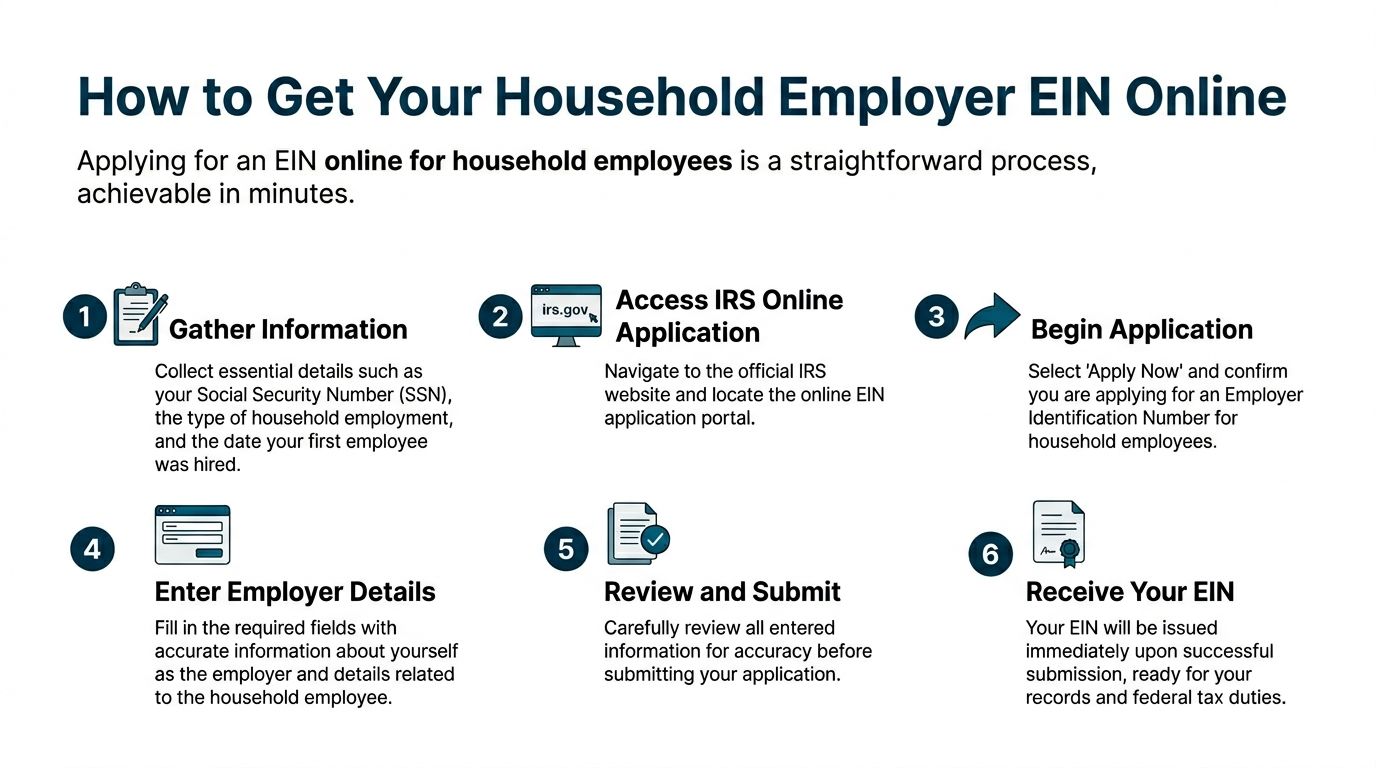
Start with the right information
Before you open the IRS application, gather the basics:
- Your legal name and SSN
- Your home address
- The date your household employee started work
- A clear idea of the employment type, such as nanny, caregiver, or housekeeper
You do not need to overthink this. You want clean, matching information so the application goes through without avoidable errors.
The click path that works
The online EIN application through IRS.gov can have a high instant success rate if done correctly, but a common problem is entity selection. An estimated 20% to 30% of first-time applicants are rejected for choosing the wrong type. The correct path is “Sole Proprietor” and then “Household Employer,” and you cannot reuse an existing business EIN for household employees, according to NannyKeeper’s household employer EIN guide.
That is the key point.
If you already own an LLC, S corp, practice, or consulting company, do not grab that EIN and try to force it into household payroll. That shortcut tends to create cleanup work later.
A simple step-by-step
Here is the practical version of the process:
Go to the IRS EIN application page
Use the IRS online application, not a third-party site that charges a fee.Choose the business type carefully
Select Sole Proprietor.Pick the correct reason
Choose Household Employer when prompted.Enter your own information as the responsible party
Use your name, SSN, and address exactly as they should appear.Review every screen before submitting
Many avoidable problems happen because people click too fast here.Save the confirmation right away
Download the EIN notice and save it as a PDF in a place you can find later.
What does not work
I have seen people make the same handful of mistakes over and over.
| Mistake | Why it causes trouble |
|---|---|
| Using an old business EIN | Household employment should be separate from your business payroll |
| Choosing the wrong entity type | The IRS application may reject it or create a mismatch later |
| Forgetting to save the confirmation | You will need the EIN for payroll and year-end forms |
| Letting someone “help” through a paid EIN website | The EIN itself is free from the IRS |
The best habit here is simple. Apply directly with the IRS, choose Household Employer correctly, and save the confirmation before you close the browser.
What to do right after you get the EIN
Once the number is issued, do not stop there.
Use that EIN consistently for household payroll records and tax filings. Keep a folder with the EIN confirmation, employee start date, payroll notes, and any forms collected at hire. If you use QuickBooks, Gusto, ADP, or another payroll system, make sure the household profile is separate from your company payroll.
That separation is what keeps your records clean.
Your Federal Duties After Getting an EIN
The EIN gets you in the door. It does not finish the job.
Once you hire a household employee, you take on federal employer duties. This is the part that feels bigger than people expect, but it is manageable when you break it down into payroll, paperwork, and year-end reporting.
The main taxes you need to know
The two federal buckets most household employers run into are FICA and FUTA.
FICA is the Social Security and Medicare side. This is the familiar payroll tax setup where part comes from the employee’s pay and part comes from the employer.
FUTA is federal unemployment tax. That one is generally paid by the employer.
For household employers, FUTA starts when you pay $1,000 or more in cash wages in any calendar quarter. The tax is 6% on the first $7,000 of each employee’s wages, but timely state unemployment payments usually reduce the effective federal rate to 0.6%. It is reported on Schedule H, which requires your EIN, according to WF CPAs on household employee tax obligations.
That is one reason state registration matters so much. It affects the federal side too.
What this looks like in real life
If you pay your nanny regularly, you should not wait until tax season and hope the math sorts itself out.
A cleaner approach is to run payroll each pay period. That means:
- Track gross wages so you know what the employee earned before withholding
- Withhold the employee share when required
- Match the employer share where needed
- Keep records each pay period instead of rebuilding the year from memory
If you try to reconstruct all of this from bank transfers and texts in January, it gets ugly fast.
Many owners already understand this from their business payroll. Household payroll works the same way in spirit, even though the forms and setup are different. If you want a refresher on the moving pieces, this guide on setting up payroll for small business is a useful comparison point.
Day one paperwork matters
Do not skip the hiring paperwork just because the employee works in your home.
You should collect and keep the right forms from the start, including:
- Form I-9 to verify work eligibility
- Form W-4 if federal income tax withholding applies in your setup
- Your internal pay records showing rate, schedule, and start date
These are not “nice to have” items. They are part of being able to prove what happened if a question comes up later.
The best payroll records are boring. Clean hire date, clean wage agreement, clean pay history, clean year-end forms.
A practical routine that works
Many household employers do best with a simple repeating process:
Each pay period
Record hours or agreed salary, calculate pay, handle withholdings if required, and keep a copy of what was paid.
Each quarter
Review whether tax thresholds have been triggered and whether state unemployment reporting is lined up with your payroll records.
At year-end
Prepare the W-2, complete the related filings, and make sure the Schedule H numbers match your payroll history.
Payroll software can assist with this. Gusto, ADP, and QuickBooks can be useful if the setup is done correctly from the beginning. The software is not the decision-maker, though. If the employee was classified wrong or the account was built under the wrong tax ID, the software will not magically fix that.
The trade-off with DIY payroll
DIY can work if you are detail-oriented, pay on a regular schedule, and stay on top of forms.
It does not work well if you are already stretched thin, delegate pieces to different people, or hate dealing with tax notices. Household payroll is one of those areas where a small setup mistake creates a bigger cleanup later.
That is why the EIN should be treated as the start of a process, not a one-time admin task.
Pennsylvania Employer Rules You Can't Ignore
Generic online advice often falls short in this area.
Federal setup gets most of the attention. Then a Pennsylvania household employer finds out there is still a state registration step, and sometimes local tax issues too. That gap causes more trouble than it should.

The Pennsylvania unemployment step
In Pennsylvania, you must register with the Office of Unemployment Compensation through Form UC-2 promptly after hiring. That step is frequently missed, but it matters because failing to register can lead to back taxes and penalties, and state audits in Pennsylvania have been rising, according to SurePayroll’s overview of household employer obligations.
This is the state piece many people never hear about until after the fact.
They get the household employee ein, assume they are done, and move on. Then the state side catches up later.
Why this matters so much in the Philly area
In the Philadelphia area, household employment frequently overlaps with long work hours and busy schedules. Doctors, lawyers, business owners, and consultants hire in-home help because they need real support, not because they want another admin job.
That is exactly why the state step gets missed.
You may have done the hard part mentally. You accepted that you are an employer. You got the EIN. You set up payments. But Pennsylvania still expects its own registration and unemployment process to be handled.
State and local tax reality
Pennsylvania household employers also need to think beyond federal withholding.
Depending on the facts, there can be PA state income tax withholding issues and local wage tax questions. In and around Philadelphia, local tax exposure is worth checking early if either the work location or the employee’s tax profile connects to the city.
Household payroll starts to look more like real payroll and less like “just paying someone” at this stage. Local rules are not consistently obvious, and they do not care that this started as a private family arrangement.
If you live or work in Philadelphia, do not assume federal setup covers local tax requirements. It often does not.
Workers' compensation is easy to forget
Another Pennsylvania issue that frequently gets ignored is workers’ compensation.
Household employers can have workers’ compensation obligations depending on the facts and pay levels. If someone works in your home and gets hurt, that is not the time to learn you should have asked about coverage earlier.
It is the kind of issue people skip because it feels unlikely. Then it becomes the only thing that matters.
A clean Pennsylvania checklist
If you are hiring household help in Pennsylvania, a practical checklist looks like this:
- Get the federal EIN first so you have the employer ID needed for the rest of the setup
- Register for Pennsylvania unemployment through the required state process within the hiring window
- Review state and local withholding needs based on where the work is done and where the employee is taxed
- Ask about workers’ compensation before assuming it does not apply
- Set up a payroll process that can support filings instead of just sending payments
What works and what does not
Here is the honest version.
What works is handling federal and Pennsylvania setup together at the beginning. What does not work is fixing federal first, paying casually for months, and hoping the state side can be patched in later without cleanup.
This also ties into broader leave and employer policy questions. If you are sorting through paid time off, sick leave, and time tracking for any employee setup, this practical resource on PTO and sick leave helps frame the policy side in a way owners can use.
The local mindset shift
Many owners resist this because it feels too formal for a home arrangement.
But if you already run a business, the logic should feel familiar. The cleanest systems are the ones built correctly up front. Pennsylvania household employment is no different.
Get the IDs right. Register on time. Keep the records clean. That is what avoids the ugly stuff later.
Annual Tax Filing with Schedule H and W-2s
If you handle payroll during the year, tax season becomes a wrap-up job instead of a rescue job.
For household employers, two key year-end items to remember are the W-2 and Schedule H. Your payroll records finally get turned into official filings at this point.
The employee gets a W-2 first
By January 31, you must give your employee a Form W-2. That form shows wages paid and the tax information tied to the year’s payroll activity.
This is not just paperwork for your files. Your employee needs it for their own tax return.
If you miss that deadline, the penalties can hurt. Missing the W-2 deadline can result in penalties from $60 to $660 per form, depending on the delay, according to KKCA’s guide to household employee tax filing.
Schedule H goes with your Form 1040
By April 15, household employers file Schedule H with their Form 1040 to report and pay the year’s FICA and FUTA taxes, as noted in the same KKCA guidance above.
This is the part that surprises many people. Household employment taxes often tie back to your personal return through Schedule H. That is another reason the records need to be accurate all year. Your tax preparer cannot guess what happened from scattered payments.
What you need before filing
Before year-end forms are prepared, gather these items:
- Your household employer EIN
- Your employee’s payroll history for the year
- Any withholding records
- State unemployment payment records
- Your employee’s identifying information for the W-2
If any of that is missing, year-end gets slower and more expensive.
A simple year-end flow
First
Confirm the total wages paid during the year and make sure your payroll records match what left your bank account.
Next
Prepare and deliver the W-2 by the January 31 deadline.
Then
Complete Schedule H and include it with your personal tax return by April 15.
This is one of those jobs that is easy when the records are clean and frustrating when they are not. If you paid consistently through payroll software, the process is often manageable. If you paid by Venmo, Zelle, checks, and cash with no system, expect extra work.
One good habit that saves time
Keep a single folder for the tax year.
Put the EIN confirmation, employee forms, payroll reports, state notices, and year-end drafts in one place. Digital is fine. It just needs to be organized. When tax time hits, that folder becomes your map.
The year-end forms should confirm your payroll records, not replace them.
Knowing When to Call a Payroll Partner
Some owners can handle household payroll themselves. They are organized, they follow deadlines, and they do not mind reading forms carefully.
Many owners should not do it themselves.
That is not a knock on intelligence. It is a time and risk issue. If you are already running a business, managing staff, handling clients, and trying to have a life, household payroll may be one more system than you want to own.
DIY is cheaper until it is not
The appeal of doing it yourself is obvious.
You avoid a service fee. You keep control. You figure it out once and hope it stays simple.
But household payroll stops being cheap when one of these happens:
- You use the wrong tax ID
- You miss Pennsylvania registration
- You pay casually and cannot recreate the records
- You miss a deadline at year-end
- You have local tax questions and no clear answer
At that point, you are not saving money. You are paying with your own time and stress.
What a payroll partner solves
A good payroll partner solves more than “run payroll.”
They help make sure the setup is correct, the household employee ein is used the right way, the state account is handled, the pay runs are consistent, and the year-end forms tie back to real records.
That matters because payroll problems are rarely caused by math alone. They come from bad setup, missing forms, and deadlines no one owned.
If you are comparing options, this article on How to Choose the Best Payroll Service for Your Needs is a solid starting point for thinking through support, service level, and fit.
The best time to get help
The best time is early.
Call for help when you hire the nanny, not after the first tax notice arrives. Cleanup is usually harder than setup. A provider can sort out the process, tell you what documents to collect, and make sure the payroll flow matches the filings that will be due later.
If you are already behind, get help anyway. Just do it before another deadline passes.
Who should probably outsource this
You will likely sleep better handing this off if any of these sound familiar:
- Your calendar is packed and you already postpone admin work
- You own a business and do not want household payroll mixed into company records
- You are not sure about Pennsylvania unemployment registration
- You are in Philadelphia and local tax issues make you nervous
- You want one clean system instead of piecing together forms and payments
For many busy owners, the right move is not learning every rule. The right move is choosing a provider who already works in payroll and bookkeeping every day. If you are weighing what that support looks like in practice, accounting and payroll services gives a useful overview of how this kind of help typically fits into a broader back-office setup.
The point is simple. If payroll admin is stealing focus from your business and home life, it is likely time to stop treating it like a side task.
If you want help setting up household payroll the right way, MyOfficeOps can help you get organized, stay compliant, and stop household employment from turning into a tax cleanup project later.