
You approve hours in one system. Then you retype them into payroll. Then you check deductions. Then you try to make the numbers match your books.
That routine feels normal for a lot of small businesses. It also creates the kind of mess that shows up later, when payroll is off, job costs are unclear, or your accountant asks why wage expense doesn't tie to the general ledger.
That's why owners ask what is payroll integration in the first place. The short answer is simple. It means your payroll system connects to the rest of your business software so data moves automatically instead of being copied by hand.
For a business owner, that matters because payroll is not just about paying people. It affects labor cost, taxes, reporting, compliance, and how confident you feel every payday.
What Is Payroll Integration and Why Should You Care
Friday afternoon is when this usually shows up. Payroll needs to be approved, someone notices an employee rate change never made it into the payroll system, and now the hours in one app do not match what accounting expects to see. The work gets done, but it gets done with extra checking, manual fixes, and a lot more risk than most owners realize.
Payroll integration means your payroll system is connected to the other systems that feed it or depend on it, such as time tracking, HR, benefits, and accounting. Instead of copying data from one place to another, the systems pass approved information through automatically and in the right format.
A simple way to look at it is plumbing. If the pipes are connected correctly, water reaches the right room without anyone carrying buckets down the hall. Payroll works the same way. Hours, pay rates, deductions, and employee updates flow where they need to go, with fewer manual touchpoints and fewer chances for something to break.
That matters because payroll errors are rarely isolated. A wrong pay rate can create an employee issue, a tax issue, a job costing issue, and a bookkeeping cleanup issue at the same time.
Why owners should care
Small business owners often start looking at payroll integration because they want to save admin time. That is a fair reason to start. The bigger reason is control.
When payroll data moves cleanly between systems, you get:
- Fewer costly mistakes because approved hours, pay changes, and deductions do not need to be re-entered by hand
- Cleaner books because wage expense, taxes, and related liabilities post more accurately
- Stronger compliance habits because employee data changes are less likely to sit in one system and get missed in another
- Better visibility into profit because labor costs can be tracked to the right jobs, departments, or classes faster
- Less owner stress because payday depends less on memory, spreadsheets, and last-minute fixes
There is also a longer-term business value here that owners often miss. Buyers, lenders, and outside investors pay attention to process quality. If payroll depends on one office manager knowing which spreadsheet to update first, that creates risk. If payroll runs through connected systems with a clear audit trail, the business is easier to trust, easier to diligence, and easier to hand off.
That does not mean every integration project is simple. Some setups cost more than owners expect. Some tools sync only part of the data, which can create a false sense of security. The goal is not to connect everything at once. The goal is to reduce the payroll risks that can hurt cash flow, compliance, and credibility.
If you're comparing systems in different markets, it also helps to review how other businesses approach connected HR and payroll tools. A practical example is this guide to best UK payroll integration software, which shows how buyers often evaluate payroll and employee management together rather than as separate purchases.
At a practical level, payroll integration helps you get accurate pay and cleaner records. At a business level, it protects margins, reduces compliance exposure, and makes the company more valuable if you ever plan to sell.
How Payroll Integration Actually Works
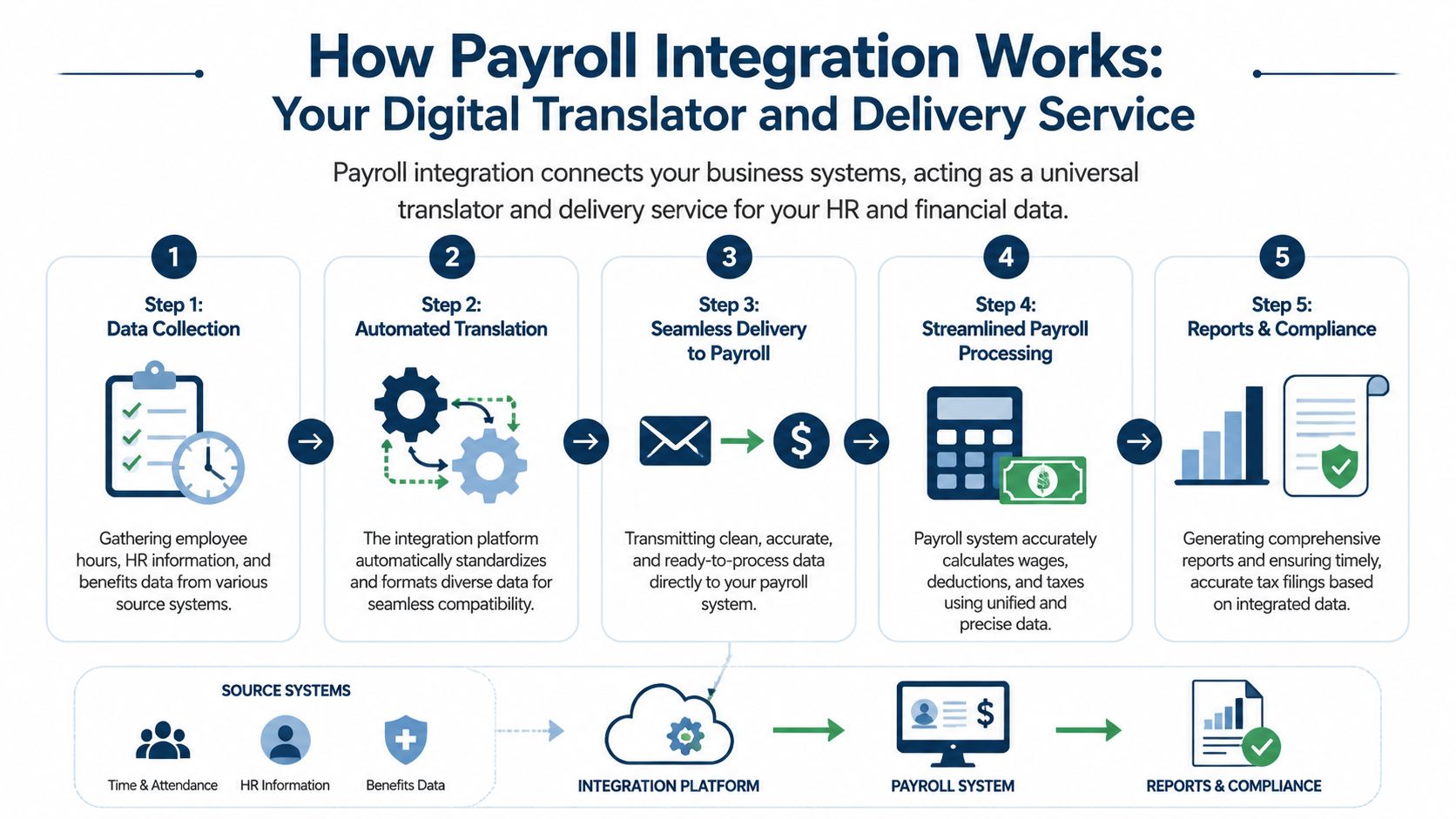
Payroll integration sounds technical, but the working idea is easy to understand. Your systems speak different languages, and the integration acts like a translator and delivery service at the same time.
A time-tracking app stores hours one way. Your HR system stores employee details another way. Your accounting platform wants payroll expense posted in its own format. Integration takes those pieces, maps them correctly, and sends them where they belong.
The three connections that matter most
Most small businesses don't need to start with every possible connection. They need the right ones.
Time tracking into payroll
This is usually the most immediate win.
An employee clocks in and out in a system like Homebase or another time app. A manager approves the timesheet. Then those approved hours move into payroll so regular time, overtime, and paid time off are ready for the pay run.
If your team still checks timesheets by converting minutes manually, a simple tool to convert hours to decimal can show how much friction lives in this step alone. Good integration removes that hand conversion from the process.
According to Homebase's payroll integration guide, manual data entry introduces error rates as high as 1 to 2%, but modern API-driven payroll integrations can achieve 99.9% accuracy by eliminating duplicate entries and automating the flow of information between systems.
HR system into payroll
This connection handles employee details.
When someone is hired, promoted, changes address, updates a bank account, or gets a pay change, that information should not live in one system and wait for someone to key it into another. Integration pushes that update into payroll so the next pay run uses the right information.
Businesses often encounter difficulties at this stage. The primary issue usually involves outdated source data rather than the payroll calculation itself.
Practical rule: If a pay rate changes in HR but payroll still needs a second manual update, your system is only half connected.
Payroll into accounting
This is the piece owners often ignore until month-end.
After payroll runs, the wage expense, employer taxes, benefits, and other payroll costs should post into the general ledger correctly. If they don't, someone has to clean up the books later.
That clean-up is expensive in attention, even when it doesn't show up as a line item. It also makes job costing harder for contractors, profit tracking harder for agencies, and provider compensation tracking harder for healthcare groups.
What happens behind the scenes
You don't need to code this yourself, but it helps to know what's happening.
In plain language, the integration does a few basic jobs:
- Collects data from source systems like HR, time, and benefits.
- Maps fields so employee IDs, pay categories, deductions, and departments match.
- Validates entries so bad or incomplete data gets flagged before payroll runs.
- Sends data one way or both ways, depending on the setup.
- Creates records that feed payroll reports and accounting entries.
Some businesses use direct integrations built by the software vendors. Others use a connector or iPaaS tool. The best choice depends on how many systems you have, how complex your payroll is, and whether you need custom job costing or department-level reporting.
What works is simple, tested data flow. What doesn't work is assuming a flashy software demo means your actual wage codes, tax settings, and GL mapping will magically line up.
Benefits Beyond Saving Time
A lot of owners feel the pain after payroll is finished, not while it is running.
The numbers hit the bank, but the reporting is muddy, a manager questions overtime, an employee spots a deduction problem, and your bookkeeper is still sorting out where payroll should have posted. That is where payroll integration starts to matter. It works like a relay system between your people data, time data, payroll, and books, so fewer things get dropped along the way.
Better reporting that protects margin
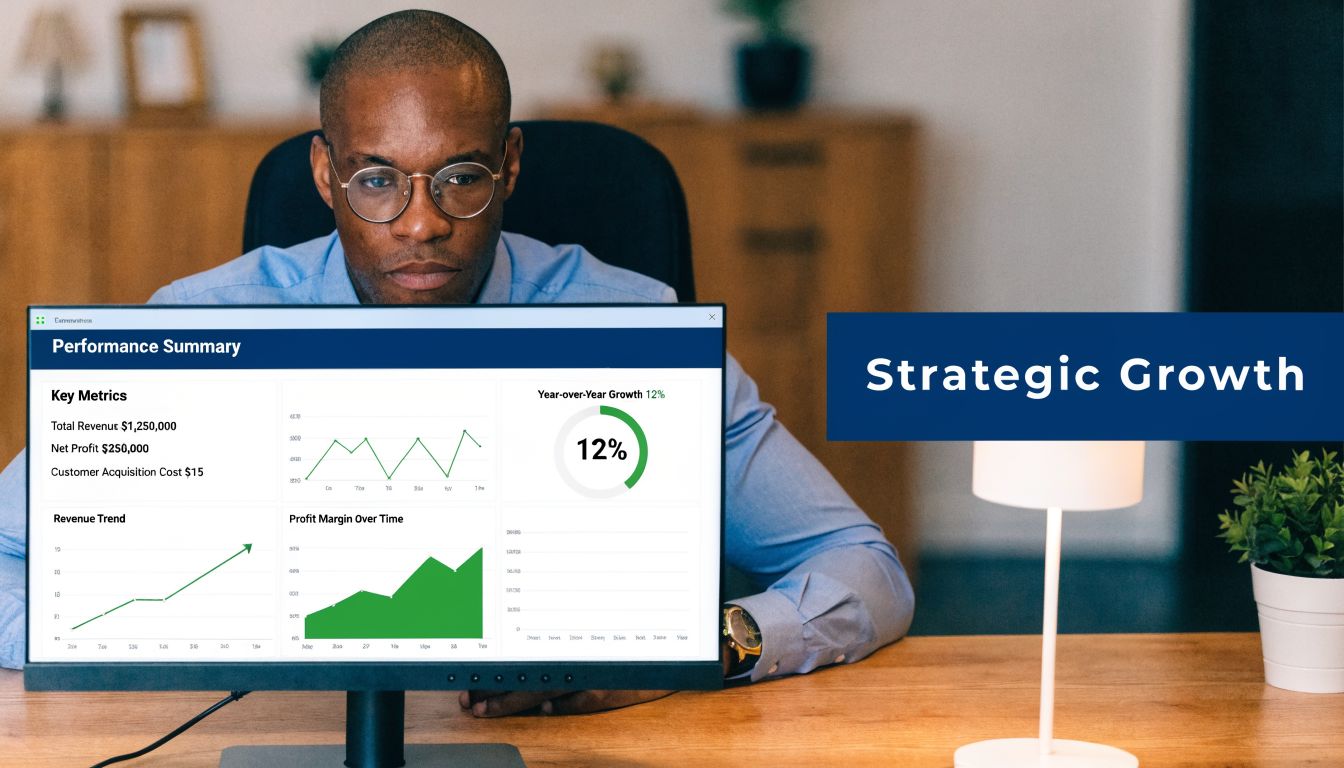
Owners rarely struggle to find total payroll. They struggle to see what payroll means.
If labor costs are posted late, lumped together, or assigned to the wrong class, department, or job, profitability analysis gets distorted. A contractor cannot trust job margins. A medical group cannot compare provider performance cleanly. A service firm cannot tell whether a team is priced right or busy.
Integrated payroll improves that picture because labor data reaches the books in a usable structure. That means you can review results while they still matter, not three weeks later during cleanup.
Useful questions get easier to answer:
- Which jobs are making money
- Which department is carrying too much labor cost
- Whether your pricing still covers payroll and overhead
- Whether overtime is an isolated issue or a staffing problem
If you want a clearer view of how the payroll side and bookkeeping side should fit together, this guide to accounting and payroll services is a practical reference.
Lower risk, fewer corrections, stronger compliance
This benefit gets overlooked because the cost of bad payroll often shows up in pieces.
One quarter it is a tax notice. Next it is an employee pay dispute. Then it is hours of bookkeeping cleanup before month-end close or before a lender asks for clean financials. None of those problems feel dramatic on their own. Together, they create risk, pull attention away from operations, and weaken confidence in your numbers.
Common gaps tend to look small at first:
| Common payroll gap | What it can cause |
|---|---|
| Hours entered by hand | Wrong regular or overtime pay |
| Deductions not updated | Incorrect net pay or benefit withholding |
| Payroll not tied to GL | Cleanup work and weak audit trail |
| Employee changes in the wrong system | Bad pay rates, titles, or tax setup |
For regulated businesses, the audit trail matters almost as much as the paycheck itself. Healthcare groups may need support for provider compensation. Contractors may need clean labor allocation by job. Professional firms may need consistent department reporting for owners, lenders, or buyers.
Clean payroll data helps you prove what happened, when it happened, and where it hit the books.
That matters even more if you plan to sell the business someday. Buyers look for repeatable processes, clean financial reporting, and low compliance risk. A payroll process that depends on one office manager, two spreadsheets, and memory lowers confidence fast. A documented integration setup can support diligence, reduce adjustment requests, and improve how transferable the operation looks to the next owner.
If your accounting system is QuickBooks, it also helps to understand how to integrate with QuickBooks before you choose tools or map payroll entries.
More trust from employees and less noise for management
Payroll errors create more than accounting mess. They create distraction.
Employees notice missing hours, wrong PTO balances, and deduction changes right away. Managers get pulled into questions they cannot answer quickly. Owners end up mediating issues that should have been prevented upstream.
Integrated payroll does not eliminate every problem, but it reduces the avoidable ones by keeping approved data consistent across systems. That usually means fewer payroll questions, faster closes, and less time spent chasing corrections.
The payoff is simple. Better numbers, fewer surprises, and more confidence that payroll is helping the business run cleanly instead of creating hidden drag.
Your Simple Checklist for Getting Started
Payroll integration usually starts after a familiar problem. Payroll runs, everyone gets paid, and then someone has to spend hours fixing the accounting entry, answering a department question, or tracing why a deduction changed. That is the point to clean up.

A good payroll integration setup works like a relay. Time, pay rules, approvals, and accounting entries pass from one system to the next without someone retyping the same information three times. The goal is not more software. The goal is fewer breakpoints, tighter controls, and cleaner records you can rely on later if a tax notice, audit question, or buyer diligence request lands on your desk.
Start with your current stack
List every system that touches payroll.
That usually includes payroll software, time tracking, accounting, benefits administration, and sometimes an HR platform. Include the messy workarounds too. Spreadsheets, emailed approvals, and side systems used by one manager often create the biggest risk because they fall outside normal review.
Find the point of failure
Pick the handoff that causes the most friction.
For some owners, that is timesheet approval. For others, it is new-hire data getting entered twice, or payroll journal entries posting incorrectly in QuickBooks. Start where an error would cost real money, create compliance exposure, or force cleanup at month-end. If you want to tighten the basics before adding automation, this guide on setting up payroll for a small business covers the foundation.
Check compatibility before features
A polished demo does not tell you how much manual work your team will still carry after implementation.
Ask direct questions before you sign anything:
- Does it connect to the systems we already use
- Is the connection direct, or will staff still need CSV exports and imports
- Can payroll entries post to accounting at the level of detail we need by class, department, or location
- How are pay rate changes, deductions, and employee updates synced and approved
- What audit trail exists when someone changes payroll data
- What support do we get during setup and after go-live
If QuickBooks sits at the center of your books, review how to integrate with QuickBooks before you choose a payroll tool. It helps you spot gaps early, especially around account mapping and posting detail.
The right payroll integration fits your actual workflow, control needs, and reporting requirements. Extra features do not help if the handoffs still break.
Test before you trust it
Run a pilot with one pay group first.
Check pay rates, overtime rules, deductions, PTO, and payroll posting to the general ledger. Compare the integrated result to your current process line by line. Owners often want to rush this step, but it's during this comparison that you catch the quiet errors that create compliance problems later.
Use a short rollout checklist:
- Choose one pay group or location
- Clean up employee records and missing fields
- Test deductions, reimbursements, and special pay items
- Review how payroll posts into the chart of accounts
- Confirm who approves time, payroll, and corrections
- Train the people who will use it every pay period
Done well, this gives you more than a faster process. It gives you cleaner books, fewer payroll surprises, and a system that is easier to hand to a controller, lender, or future buyer without a long explanation.
Common Pitfalls and How to Avoid Them
The most expensive payroll setup is often the one that looked cheapest at the start.
A lot of owners buy software based on monthly price, then discover they still need manual exports, duplicate entry, and end-of-month cleanup. The software isn't cheap anymore once your team spends hours babysitting it.
The cheap software trap
Low-cost tools can be fine if they connect well and fit your business. The problem is buying disconnected tools and expecting staff to glue them together forever.
That usually shows up as hidden labor. Someone checks every import. Someone rebuilds reports in Excel. Someone fixes the accounting entry after each payroll. None of that work improves the business. It just patches the gap.
Weak controls around sensitive data
Payroll contains some of the most sensitive information in your company. Pay rates, bank details, tax information, addresses, and benefits all live there.
If you're in healthcare or professional services, this deserves extra care. Ask vendors how access is controlled, who can edit what, what logs exist, and how corrections are tracked. If the answer is vague, keep looking.
Forgetting the people who use it
Even a strong system can fail if nobody knows the new process.
Managers need to know how time gets approved. Office staff need to know which system is the source of truth. Leadership needs to know what reports will change after integration. If that training doesn't happen, teams start making side edits and workarounds, which defeats the point.
Treating payroll integration like overhead instead of business value
This is the mistake that matters most if you ever plan to sell, transfer, or recapitalize the business.
Buyers want clean records. They want payroll that ties to the books, clear documentation, and a history they can trust. According to Merge's overview of payroll integrations, businesses with clean, verifiable payroll data from integrated systems can see their valuation increase by 0.5 to 1.5 multiples in M&A deals because buyers see less risk.
That doesn't mean software alone raises value. It means messy payroll lowers confidence. Integrated systems make due diligence easier because the records are easier to verify.
Buyers don't pay more for confusion. They pay more for clean numbers and lower risk.
How to Find Your Payroll Integration Partner
A lot of owners start looking for a payroll integration partner after the same kind of week. Payroll runs late. Labor costs do not match the books. Someone asks for a report by department or location, and nobody trusts the answer without checking three systems first.
That is usually not a software problem by itself. It is an operations problem with a software layer on top.
The right partner treats payroll integration like a wiring job for your back office. If the connections are wrong, numbers land in the wrong place, compliance gaps stay hidden, and every pay run depends on manual fixes. If the wiring is right, payroll flows into accounting cleanly, reports make sense, and your records hold up when a lender, buyer, or CPA starts asking questions.
What to look for in a partner
Start with how they assess your current process.
A good partner should ask how time is collected, who approves it, where payroll gets reviewed, how job costs or departments need to be tracked, and what has to tie back to the general ledger after each run. If they jump straight to a favorite platform, they are selling software. They are not solving your reporting and control problems.
Look for a partner who can handle the full setup, not just the initial connection:
- Workflow diagnosis to find where errors start
- System selection based on your current tools, reporting needs, and staff capacity
- Data mapping review so wages, taxes, benefits, and classes hit the right accounts
- Testing support before live payroll runs
- Compliance support for multi-state, local, and industry-specific requirements
- Documentation and controls so approvals, corrections, and responsibilities are clear
That last point matters more than many owners expect. Clean documentation and clear controls reduce risk now, and they also make due diligence easier later if you ever plan to sell, transfer, or recapitalize the business.
For Pennsylvania businesses, state and local payroll rules also need to be configured correctly. A capable partner should be able to explain how your setup handles withholding, local taxes, and filing responsibilities without giving vague answers.
Match the partner to your stage
The best fit depends on what your business is trying to fix.
If payroll keeps creating cleanup work in bookkeeping, choose a partner who can stabilize the basics and get payroll posting accurately every time. If you are growing, choose one who can give you labor reporting by department, location, or job so you can protect margins. If an ownership transition is on your horizon, choose a partner who understands audit trails, reconciliations, and documentation quality. Those are the details that lower buyer friction and protect value.
Software still matters, of course. If you are comparing options before implementation, this guide to best payroll software for small business can help you narrow the field.
The right payroll integration partner should leave you with fewer surprises, cleaner books, and less key-person risk. That means better decisions month to month, fewer compliance headaches, and a business that is easier to run and easier to hand off later.
If you're tired of chasing timesheets, fixing payroll entries, and wondering whether your labor numbers are telling the truth, MyOfficeOps can help. We work with small and midsize businesses in the Philadelphia area to clean up payroll workflows, connect payroll with accounting, reduce compliance risk, and build reporting that supports growth and exit planning.