
You open QuickBooks to check last month's profit and find a number you don't trust. The bank balance looks close, but the reconciliation won't finish. A pile of uncategorized transactions sits in the bank feed, an old clearing account still has a balance, and the Profit and Loss report changes every time you touch it.
That situation is frustrating, but it's fixable. QuickBooks cleanup works best as a controlled process, not as a late-night attempt to edit random transactions until the reports look right. Start with the oldest unreconciled period, protect the original records, and move through the file in an order that prevents one correction from creating another problem.
Why Your QuickBooks File Feels Like a Minefield
A business owner opens QuickBooks to answer a simple question and finds three different answers. The bank balance looks reasonable, but the reports do not. A former bookkeeper may have left behind incomplete work, a bank feed may have imported transactions twice, or personal spending may have mixed with business charges on the same card. Small shortcuts, such as using “Miscellaneous” or leaving payments unmatched, can remain invisible for months.
The problem is often technical debt rather than a few incorrect categories. Duplicate imports inflate activity, clearing accounts retain items that should have been matched, and inactive accounts still affect reports when old transactions point to them. Each issue makes the next correction harder to assess.
The owner starts checking the bank app instead of the financial statements. The CPA requests support that nobody can locate. A question such as “Which services made money?” becomes a manual investigation instead of a report.

Messy books can affect tax preparation, cash planning, borrowing decisions, and owner confidence. A wrong expense category can distort a margin, while a duplicate deposit can overstate revenue. An unreconciled credit card can leave recorded spending out of view.
Start by defining what each balance should represent and gathering the document that supports it. Do not delete unusual transactions just because they look inconvenient.
Practical rule: If you cannot explain a balance from a bank statement, invoice, payroll report, loan statement, or another source document, investigate it before forcing the account to balance.
Some files need targeted corrections. Others require work across several reporting cycles. One published guide describes QuickBooks projects involving “5+ years” of messes (the historical QuickBooks cleanup guide). Diagnose the duplicate imports, clearing account errors, and reporting impact first. Then decide whether a focused cleanup is enough or the file needs a full rebuild.
Preparing for a Safe Cleanup Process
Before changing anything, preserve the file as it stands. Save a QuickBooks backup where available, then export key reports into a dated folder that cannot be mistaken for the corrected version. A backup gives you a recovery point when a correction affects another account or report. It does not replace careful review.
Export the lists and reports that will help you identify changes:
- Chart of Accounts: Save account names and structure before merging accounts or making them inactive.
- Customer and Vendor lists: Preserve names, balances, and spelling so duplicate records are easier to identify.
- Transaction List by Date: Keep detailed activity supporting the financial statements.
- Financial reports: Save the Profit and Loss, Balance Sheet, Trial Balance, and relevant aging schedules.
Set the closing date to the last day of the most recently reconciled period, as recommended in the QuickBooks historical cleanup workflow. This limits casual edits to periods that have already been reviewed while you work on newer transactions. Before changing anything, check the existing closing date and password settings. If the control is incorrect, update it deliberately rather than deleting it.
Find the last trustworthy period
Review the latest bank and credit card reconciliation reports. For each account, record the statement ending date, ending balance, and reconciliation status. The next statement period should begin the day after the prior statement ending date, according to QuickBooks' reconciliation guidance. This check helps expose overlapping periods and missing activity before they affect the cleanup sequence.
Gather source documents before making adjustments. Bank statements, payroll records, invoices, loan documents, and fixed-asset records can explain balances that reports alone cannot. The IRS recordkeeping guidance summarized for cleanup work describes retention periods of at least 3 years for most business records, at least 4 years for employment tax records, and the ownership period plus 3 years for property records. Older documentation may therefore determine whether an account can be corrected confidently.
Avoid using QuickBooks Online's Purge Company option as a routine cleanup tool. QuickBooks Community guidance on purging and remigrating says the option is intended for very new files, generally those less than 60 days old, and the reset process requires confirmation before recreating accounts. For a mature file, correct the existing records or plan a controlled rebuild with professional review.
The Step-by-Step Cleanup Sequence
Work in chronological order. The oldest unreconciled month usually gives you the cleanest starting point because each correct ending balance becomes the next period's beginning balance.
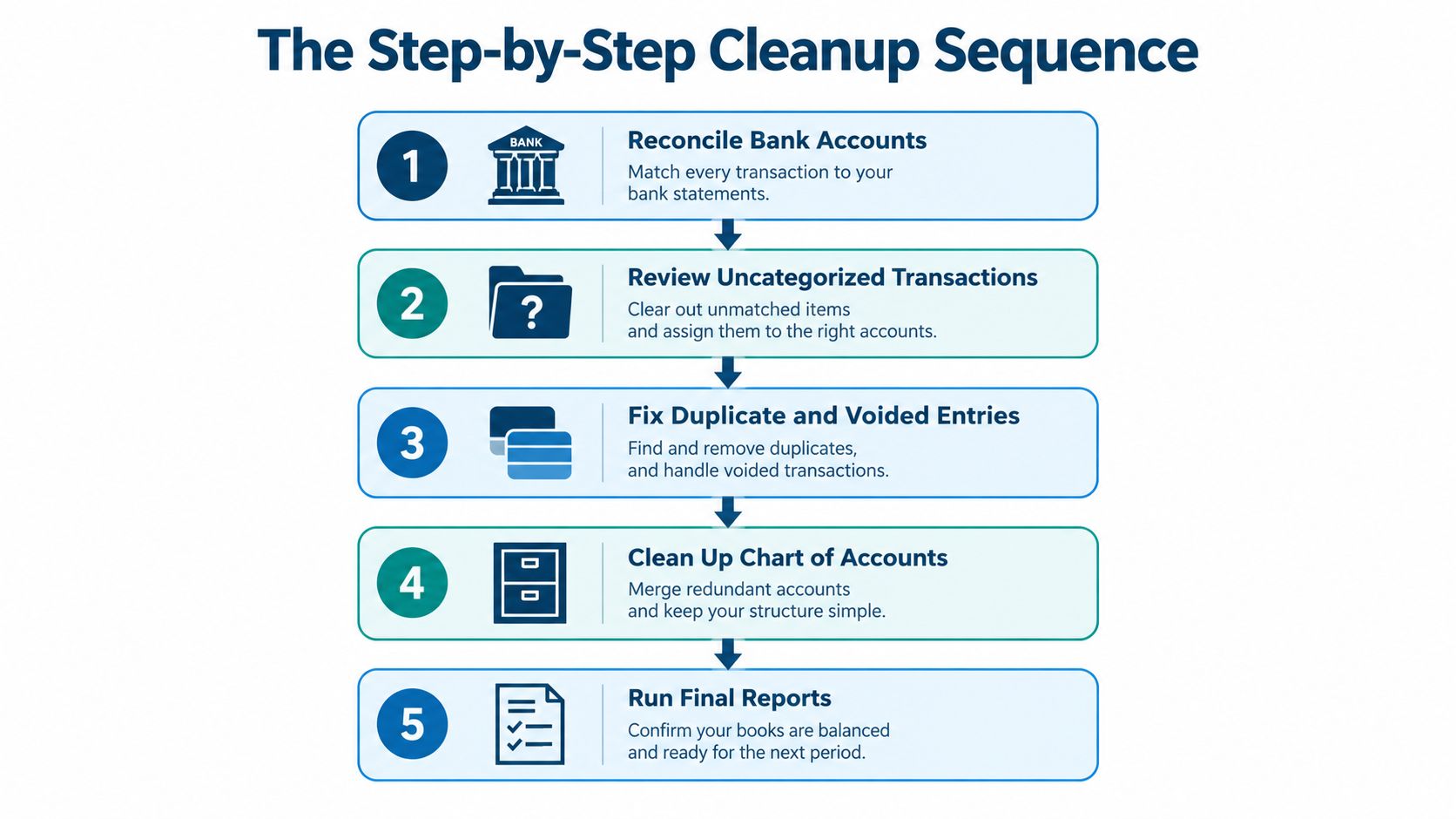
Reconcile the oldest open month. Compare QuickBooks' beginning balance with the bank statement. Check each deposit, withdrawal, fee, transfer, and payment until the difference reaches $0.00. QuickBooks explains that a zero difference means the account is balanced (QuickBooks' bank reconciliation instructions). If the beginning balance or reconciliation difference doesn't match, stop and investigate. Don't plug the gap with an unexplained journal entry. Use this bank reconciliation process as a separate reference when you need a more detailed control checklist.
Move forward one statement at a time. Reconcile bank, credit card, and loan accounts using the statement ending date and balance exactly as shown on the source statement. If a transaction is missing, identify whether it should be entered, imported, or matched. If it appears twice, determine which entry belongs to the statement before deleting or excluding anything.
Review uncategorized activity. Open the bank feed and uncategorized asset or expense accounts. Use the receipt, invoice, vendor history, and business purpose to assign the right category. A payment to a supplier isn't automatically an expense. It may be a bill payment, loan payment, transfer, or purchase of an asset.
Correct duplicates and bad entries. Search by date, amount, payee, and memo. Review voided transactions, duplicate imports, and manually entered entries that overlap with feed activity. Preserve the original audit trail where possible, and don't delete a transaction just because it looks old.
Clean the account structure and reports. Merge redundant accounts only after checking their history and reporting impact. Then review Accounts Receivable, Accounts Payable, Profit and Loss, Balance Sheet, Trial Balance, and aging reports. Confirm that customer and vendor balances reflect real open invoices, not old payments that were never matched.
The cleanup path in QuickBooks is designed as a distinct review step inside Books review, where you can select a month and move through dates. That structure is useful when errors span multiple periods because it keeps the work tied to a specific reporting window (the QuickBooks cleanup workflow overview).
Fixing Hidden Bookkeeping Issues
The visible problem is often a wrong category. The deeper problem may be the way data entered QuickBooks in the first place. Duplicate bank-feed imports, unreconciled activity, failed app syncs, payroll journals that disagree with payroll reports, and stale clearing or undeposited-funds balances can all weaken the financial statements (the bookkeeping cleanup checklist).

Trace the systems behind the balance
Start with bank-feed duplicates. Sort activity by amount and date, then compare similar entries against the statement. A duplicate may have been added manually and imported later, or entered by an app and then added again from the bank feed. Match the actual transaction to the correct record, exclude the duplicate only when appropriate, and document the decision.
Clearing accounts need a different approach. A balance in a payment clearing account may mean a processor deposit has not been matched, a transfer was recorded on only one side, or an integration created a partial entry. Review the underlying transactions rather than posting an adjustment to make the balance vanish.
Undeposited Funds tells a similar story. Check whether customer payments were deposited as a group, recorded individually, or left waiting because the bank deposit was entered separately. The fix should connect the payment to the actual deposit, not move the balance to an arbitrary income account.
Payroll deserves its own comparison. Match payroll reports to QuickBooks payroll entries, bank withdrawals, employee liabilities, and tax payments. If the journal doesn't agree with the payroll report, pause before changing expense categories. A payroll provider's report and the bank statement can show what happened, while QuickBooks shows how that event was recorded.
For teams operating across regions or entities, reliable processes matter as much as individual corrections. A business owner comparing providers may also review resources on how to streamline your Australian bookkeeping when building repeatable bookkeeping controls. Before posting a correcting journal, document the reason and supporting evidence, and use this guide to understand journal entries if the adjustment affects several accounts.
When Cleanup Is Enough vs. When to Rebuild
A clean-looking report doesn't prove that the history underneath it is reliable. The key question is whether you can trace the important balances back to source documents and correct the errors without changing facts you can no longer verify.
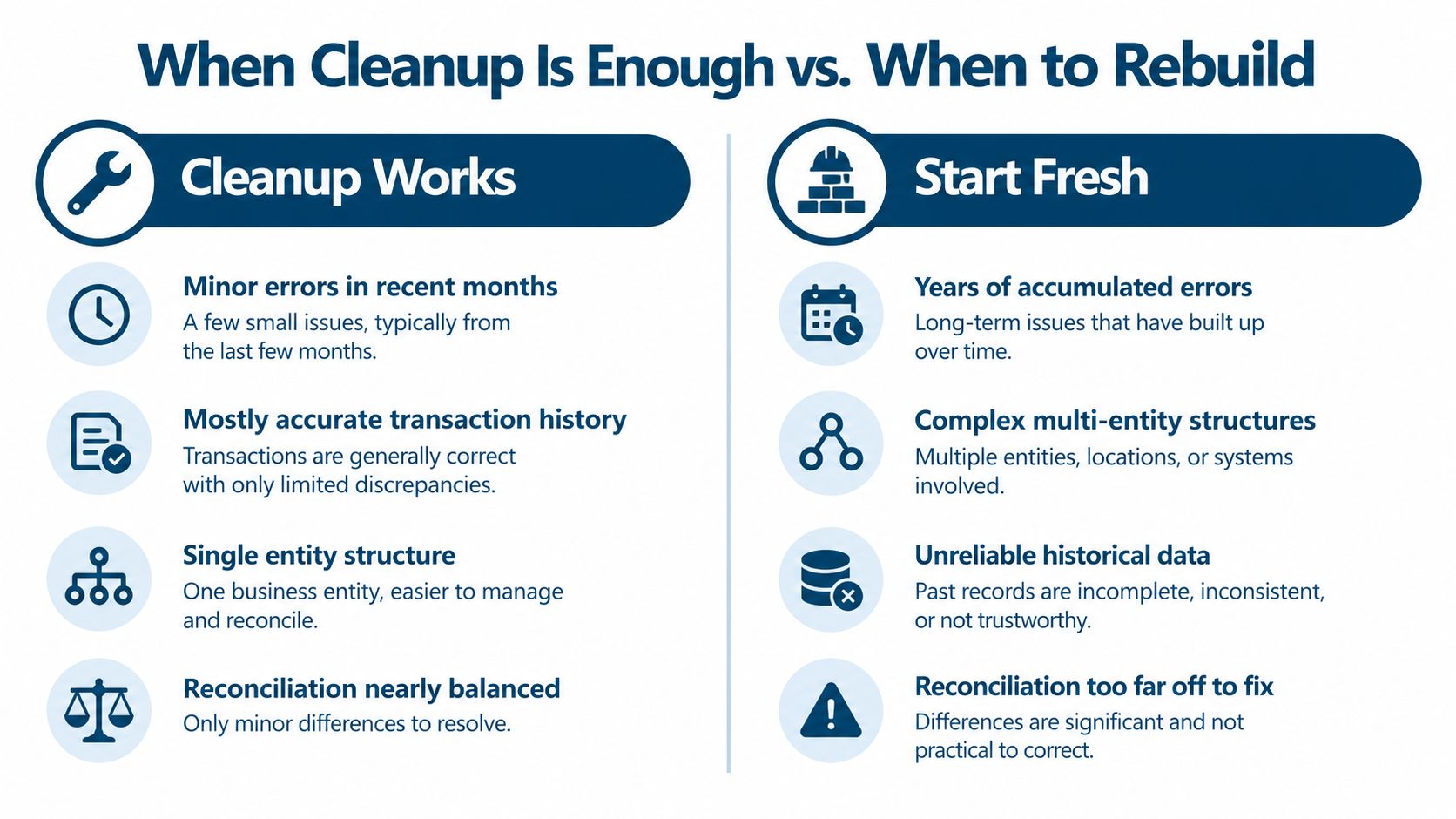
Use this practical test before committing to months of editing.
| Cleanup is usually reasonable when | A rebuild or forensic review is safer when |
|---|---|
| Errors are isolated and the transaction history is mostly trustworthy | Errors run through several periods and source records are unreliable |
| One entity uses a clear bank and credit card structure | The file combines multiple entities or needs separate reporting |
| Reconciliations are close and differences can be traced | Beginning balances cannot be supported or reconciliations are far off |
| Opening balance equity has a clear explanation | Opening balance equity contains unexplained historical corrections |
| You can match payments, deposits, payroll, and transfers to documents | Large parts of the activity were imported, duplicated, or manually overwritten |
The important distinction is between wrong classification and unknown history. If a legitimate expense is in the wrong account, reclassifying it may be sensible. If you don't know whether an old balance represents a real payable, owner contribution, loan, or duplicate, guessing creates a new problem.
Stop rule: Stop incremental cleanup when each correction requires another unsupported assumption.
A rebuild doesn't always mean throwing away every record. It may mean extracting verified transactions, establishing a clean opening position, and preserving the old file as historical evidence. A forensic review may be appropriate when ownership changes, multiple entities, major opening balance issues, or disputed transactions make the existing ledger difficult to defend.
Current cleanup guidance recognizes a difference between focused work and complex engagements involving multi-year accumulated errors, multi-entity files, or rebuild-from-extract work (the QuickBooks cleanup decision guidance). That distinction matters because the cheapest-looking option can become expensive when the team spends weeks correcting symptoms that keep returning.
Don't rebuild just because the chart of accounts looks untidy. Don't keep cleaning just because you've already invested time. Ask which path will produce financial statements that a tax professional, lender, owner, or buyer can understand and support.
Maintaining Clean Books Going Forward
Cleanup ends when the controls begin. A file stays reliable when someone owns the monthly close, follows the same review order, and investigates differences while the source documents are still easy to find.
Set a repeatable monthly routine:
- Reconcile every account: Complete bank and credit card reconciliations, then check that the ending balances agree with statements.
- Review the reports: Scan the Profit and Loss, Balance Sheet, Trial Balance, Accounts Receivable, and Accounts Payable for unusual changes.
- Clear temporary accounts: Investigate Undeposited Funds, payment clearing, payroll liabilities, and transfer accounts before they become old clutter.
- Check the feed: Look for duplicate imports, skipped transactions, and items that QuickBooks can't match confidently.
- Protect the period: Set a closing date after review and limit posting access so completed months don't change without approval.
Don't rely on the bank feed alone. Automation can save data-entry time, but connected apps can also create duplicates or partial records. Review the syncs that feed sales, payroll, payment processing, expenses, and inventory into QuickBooks. When a new integration is added, compare its first activity with the bank statement and the related report.
Use a short close checklist and keep supporting documents with the review. If a transaction is unusual, write down what it is and why it belongs in that account. That note can save time later when the same vendor, transfer, or journal entry needs to be understood.
Professional help makes sense when the file includes several entities, payroll complications, old unreconciled periods, or records that affect tax and financing. It also makes sense when the owner keeps postponing the work. A bookkeeping team can handle reconciliations and account review, while an advisor can connect clean financial data to pricing, hiring, cash flow, and profitability decisions.
Don't wait for tax season to discover that the books changed months ago. Pick a close date, assign responsibility, and review the reports every month.
MyOfficeOps provides bookkeeping cleanup, catch-up work, regular bank reconciliations, payroll integration, and financial reporting for small and midsize businesses. Visit MyOfficeOps to discuss the condition of your QuickBooks file and choose a practical path to cleaner, more useful books.