
Running a medical practice is hard enough. But are you also fighting with generic accounting software or a jungle of spreadsheets? If so, you're making things harder, and it's probably costing you money.
The right accounting software for medical practices isn't a fancy extra—it's a basic tool to help you get paid what you're owed, faster. This lets you focus on what really matters: your patients.
Why Generic Software Is Costing Your Practice Money

If you’re trying to run your practice’s finances with a basic tool like QuickBooks or just a bunch of spreadsheets, you’re leaving money on the table. It's that simple. These tools weren't built for the complicated world of healthcare, and that can cost you.
Think about it. Regular software doesn't know about medical billing codes, how insurance claims work, or the strict rules for protecting patient information. This forces your team to do hours of extra, manual work. They are likely stuck typing information from your patient system into a separate accounting program, one line at a time.
This isn't just annoying; it's a direct hit to your bank account. Every hour your team spends typing in data is an hour they aren't helping patients or chasing down unpaid bills.
The Real Cost of Doing Things the Hard Way
I once worked with a small clinic that was always short on cash. They thought they were saving money by using cheap, basic software. The truth was, they were losing thousands each month from simple mistakes and a slow insurance payment process.
The problem is that these small money leaks add up, fast. We see the same problems over and over:
- Delayed Payments: Without a system built to track insurance claims, it's easy for payments to get stuck for 60 or even 90 days. That's a huge problem for your cash flow.
- Costly Mistakes: One small error in a billing code can get a claim denied right away. Now your team has to spend even more time fixing it and sending it again.
- Wasted Staff Time: Manually matching payments to patient records is slow and full of errors. It's like an administrative black hole that keeps your staff from doing more important work.
This isn't a small problem. Using the wrong tools can easily cause private practices to lose 10-15% of their revenue. As more practices switch to better software, those who don't are just falling further behind. You can learn more about these money challenges in our guide to accounting for medical practices.
There’s a Reason for This Growing Market
Software made just for medical practices is becoming more popular because it fixes these exact problems. The market for these tools was valued at $2.5 billion in 2025 and is expected to hit $7.2 billion by 2033.
This tells a clear story: more and more practices are realizing that "saving" money with generic software is just an illusion. The real cost is hidden in lost money, wasted time, and constant frustration.
Your Checklist for Must-Have Software Features
When you start looking for accounting software, the number of choices can be a lot to handle. Every company promises to solve all your problems. But for a medical practice, only a few features are truly necessary.
This is your simple checklist to cut through the sales pitches. We need to look past basic features and focus on the tools that actually help a clinic's finances—the ones that stop wasting time and help you get paid faster.
Standard vs. Medical-Specific Accounting Features
First, it’s important to know the difference between what standard software like QuickBooks does and what a medical practice really needs. They aren't the same thing, and this table shows you why.
| Feature Category | What Standard Software Offers | What Medical Practice Software Needs |
|---|---|---|
| Integration | Connects to bank accounts. | Connects directly with your EHR/PM systems. |
| Billing | Creates simple invoices. | Handles complex insurance claims, co-pays, and patient bills. |
| Revenue Tracking | Shows who has paid an invoice. | Full Revenue Cycle Management (RCM) to track a claim from start to finish. |
| Accounts Receivable | A simple list of what people owe you. | Reports showing who owes you money, broken down by insurance vs. patient. |
| Compliance | General data security. | HIPAA-compliant to keep patient data safe. |
| Payments | Accepts credit card payments. | Patient payment websites with options for payment plans. |
This isn't about one being "bad" and the other "good." It’s about using the right tool for the job. Now, let’s look at the specific features that make a tool right for your practice.
Smooth EHR and PM Integration
Here’s the single most important feature: your accounting software must "talk" to your Electronic Health Record (EHR) and Practice Management (PM) systems. If it doesn’t, you’re just creating extra work and asking for mistakes.
Think of it like this: without a connection, your staff has to type patient details and billing codes from one system into another. Every key they press is a chance for a typo that can get a claim denied.
An integrated system means that when a patient visit is finished in your EHR, the money information automatically shows up in your accounting software. This one feature can save hundreds of hours and cut down on denied claims.
There’s a reason the entire medical practice management market, valued at over $10.49 billion, is filled with connected systems. They hold a massive 74.4% market share because they put patient info, claims, and financial reports all in one place. It’s not an extra anymore; it’s the standard.
Full Revenue Cycle Management
Your practice’s money story doesn't start with an invoice and end with a payment. It's a whole cycle. Revenue Cycle Management (RCM) tools give you a full view of a patient's bill, from when they book an appointment to when the balance is zero.
Good RCM features aren't just a list of who owes you money. They let you:
- Track Claim Status: See exactly where every insurance claim is—whether it’s waiting, approved, paid, or, most importantly, denied.
- Manage Denials: Quickly see denied claims, find out why, and manage the process of fixing and resubmitting them.
- Automate Patient Billing: After the insurance company pays, the software should automatically create and send bills to patients for what they still owe.
This isn’t just about watching your money. It’s about controlling it. You can finally see where your cash is getting stuck and do something about it.
Key Reports and Patient Payment Tools
Finally, your software has to make your financial data easy to understand and make it super simple for patients to pay you. Two things here are absolutely essential.
First, A/R Aging Reports. This isn't a complex financial document. It’s a simple list showing who owes you money, how much, and—most importantly—how long that bill has been sitting there unpaid. This report is your guide for collections, telling you which bills need attention before they get too old.
Second, Patient Payment Portals. In today's world, making patients call your office or mail a check is a great way to get paid slowly. Modern software must have a secure, easy-to-use website where patients can see their statements and pay their bills anytime. This convenience almost always leads to faster payments and less work for your staff.
By focusing on these specific, important features, you can feel good about looking at any accounting software. For a more detailed walkthrough, check out our guide on how to choose the right accounting software.
The Most Important Rule: HIPAA Compliance
Let's talk about the elephant in the room: HIPAA compliance. When it comes to your practice's finances, you can't ignore this. Choosing software that isn't fully compliant isn't just a mistake; it's a huge risk that can lead to big fines and, worse, a total loss of patient trust.
So what does "HIPAA compliant" really mean for your accounting software for medical practices? It’s about more than a strong password. It's about how every piece of patient data—even a name on a bill—is stored, sent, and accessed.
Imagine your practice has a data breach because your billing software wasn't secure. The fallout isn't just the fine; it's the damage to your reputation that you can never fix. Compliant software is your best defense, protecting both your patients and your practice.
Key Questions to Ask Any Software Company
When you're looking at software, don't just check a box on a feature list. You need to ask some direct questions. Think of yourself as an investigator protecting your practice's most important asset: patient data.
Here are the must-ask questions:
- Will you sign a Business Associate Agreement (BAA)? The only answer you should accept is "yes." A BAA is a legal contract where the company promises to protect your patient information according to HIPAA rules. If they hesitate, walk away.
- How is my data encrypted? Your data needs to be protected in two ways. It must be encrypted while it's stored on their servers ("at rest") and also while it's being sent over the internet ("in transit"). This makes the information unreadable to anyone who might try to steal it.
- What are your access controls? The software has to let you control who sees what. You need to be able to set different permission levels for each person, so team members only see the financial data they need for their job.
This protection isn't just about software. When it's time to get rid of old office computers, you also have to think about how to do it safely. Knowing the rules for HIPAA compliant electronics recycling for healthcare providers is key to keeping data from falling into the wrong hands.
A Real-World Example of a Compliance Failure
I’ve seen this happen. A small skin clinic was using a basic invoicing app to bill patients. An office manager, in a hurry, made a typo and sent a patient's bill to the wrong email address.
Because the software wasn't made for healthcare, it sent the full invoice—patient name, diagnosis, and cost—in a regular, unprotected email. That one mistake was a clear HIPAA violation.
The results were bad: an investigation, a large fine, and they had to tell all their patients about the breach. The damage to their reputation in the local community was awful.
If they had used proper accounting software for a medical practice, that bill would have been sent through a secure patient portal. The patient would have received an email with a secure link to log in and see their bill. The private data would have stayed safe, and the whole mess could have been avoided.
Connecting Your Systems for a Simpler Workflow
Your accounting software shouldn't be on an island by itself. The best systems for medical practices connect with the other tools you use every day. This creates one smooth financial workflow that saves you time and prevents major headaches.
When your front desk checks in a patient, that billing information should automatically pop up in your accounting system. No one should have to type it in twice. That’s the whole point of integration.
The Magic Behind the Scenes: APIs
To make this connection happen, different software programs need a way to talk to each other. They do this using something called an Application Programming Interface (API). You can think of an API as a secure translator that lets your approved apps share specific information back and forth automatically.
For a medical practice, this is a game-changer. When your EHR, practice management, and accounting software all talk to each other, you get rid of the dangerous and slow task of manual data entry. This one change can cut down on admin work and reduce costly billing errors.
Of course, with any data moving between systems, HIPAA compliance is a must. It's a three-part process:
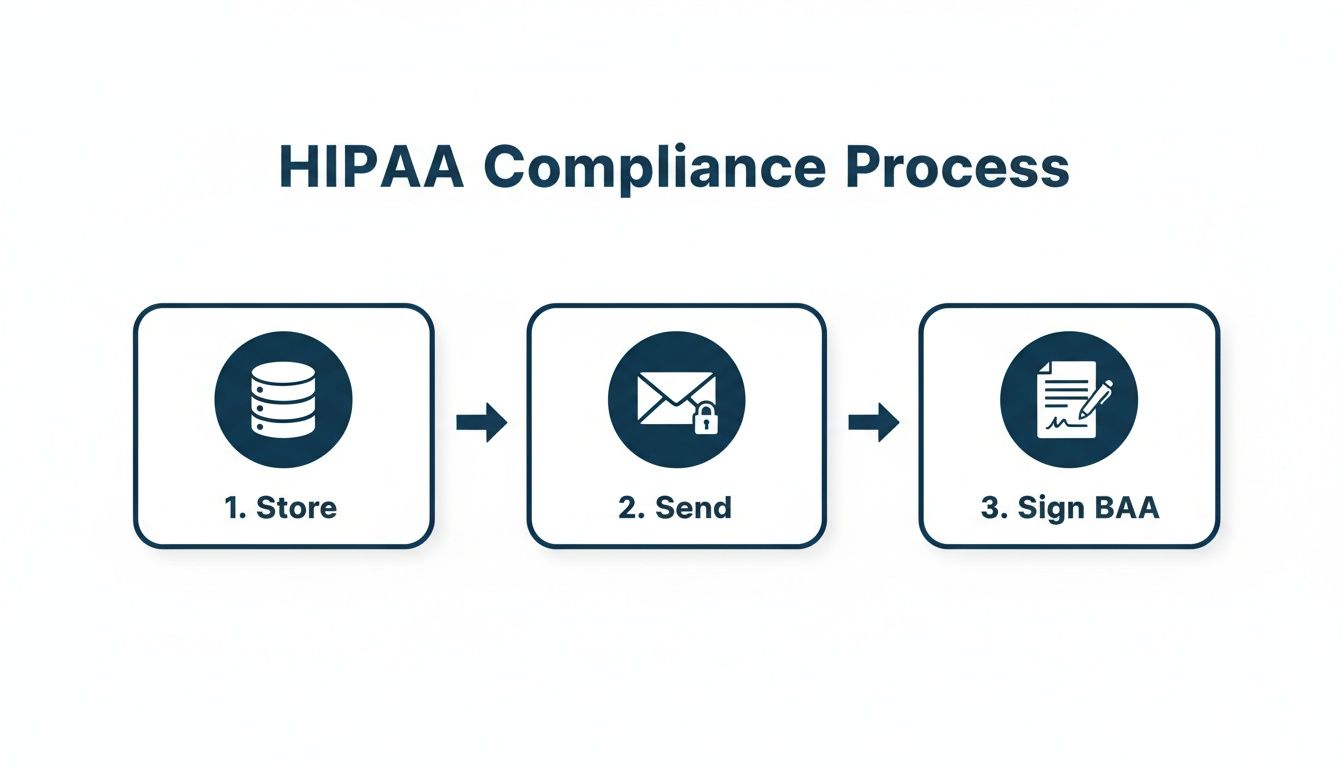
You have to make sure data is stored securely, sent through protected channels, and that you have a signed Business Associate Agreement (BAA) with every company that touches patient information.
A disconnected system is a broken system. I’ve seen practices constantly fight with mismatched data and frustrated staff. An integrated system, on the other hand, just works.
Creating One Smooth Financial Workflow
To really get your practice running well, your accounting software needs to plug into your other key systems. It’s worth exploring the different types of healthcare interoperability solutions to see what’s possible.
Getting this right makes a huge difference. It’s no surprise that modern practice management systems where EHR and financial tools are already connected have captured a 74.4% market share. They fix these workflow problems. We’ve seen practices using these connected systems cut their claim processing times from weeks down to just a few days.
A truly connected system gives you clear benefits right away:
- Faster Billing: When a patient visit is coded in the EHR, the bill can instantly be created. No double entry, no delays.
- Clearer Reporting: You get a complete, unified picture of your practice's financial health, all in one place.
- Fewer Denials: Automatic data transfer cuts down on the human errors that often cause claims to be rejected.
This kind of automation is key, especially when 80% of practices say they need better revenue cycle management to deal with insurance delays that can drag on for 45-60 days. This is a problem our team solves all the time by helping clinics optimize their healthcare revenue cycle management.
Simplifying Your Payroll Process
This connected approach also makes one of the most stressful back-office jobs much easier: payroll.
When your payroll system is connected, it can pull timesheet data directly from your scheduling software. You can easily track overtime and bonuses without digging through different spreadsheets. This ensures your team is paid correctly and on time, you follow labor laws, and you get hours of your week back.
Making the Switch to New Software—Without the Headaches
Thinking about changing your accounting software can feel like performing surgery on your own practice. It sounds scary, complicated, and risky.
But it doesn't have to be a nightmare. I've seen practices do this smoothly, and I've seen others create a total mess. The difference almost always comes down to having a clear, simple plan.
Let’s walk through how to get this done right, so your switch is smooth, not a chaotic mess.
Before You Even Think About Moving Data
The most important work happens long before you "flip the switch" on new software. Think of it like moving into a brand-new office—the last thing you want is to pack up boxes of junk just to clutter your new space.
The same idea applies to your financial data.
Start by doing a serious cleanup of your old records. This isn't optional. It means:
- Dealing with old Accounts Receivable. It's time to get serious about those bills that have been unpaid for 90+ days.
- Balancing every single bank account. Your books have to match what the bank says, right up to the day you switch.
- Getting rid of duplicate or old contacts. Clean out outdated patient records and vendor info that are just clogging up the system.
Starting with clean, accurate financials is the single best thing you can do to avoid big headaches later. Moving messy data into a new system doesn’t fix the problems; it just gives them a new home.
Here’s a key tip we've learned from helping dozens of practices with this: assign one person on your team to be the project leader. This person doesn't do all the work, but they own the schedule and keep everything on track. This one step prevents a lot of confusion.
Set a Realistic Timeline and Get Your Team Onboard
One of the biggest mistakes I see is underestimating how long this will take. Don't rush it.
For a small to midsize practice, a realistic timeline is usually between 4 to 12 weeks. This gives you enough time for moving your data, setting up the new system, and—most importantly—training your team well.
Your fancy new software is useless if your staff doesn't know how to use it. Proper training isn’t a quick webinar. It needs to be a hands-on process where your team can practice in a safe, test environment before the system goes live. Getting your staff comfortable early is the key to a good launch.
Here’s a pro tip: run both systems side-by-side for a week or two. This is called parallel running. It lets you compare the old and new systems to catch any problems before you turn off the old software for good.
Yes, it’s a bit of extra work. But it’s the best safety net, making sure everything is working right and giving your team confidence in their new tools.
When to Get Help from a Financial Expert
Your new accounting software is a great tool. For the first time, you have clear, organized numbers you can finally trust. It's a huge step up.
But then a familiar feeling comes back. The software is great at telling you what happened last month. It’s not so great at telling you what to do next.
It gives you the data, but it won’t tell you how to be more profitable or when the right time is to hire another doctor. That’s where a real person—a financial expert—comes in.
Looking Beyond the Numbers on the Screen
It's a common point for practice owners. You’re looking at your revenue reports, and the numbers look good, but you have no idea how to make them better. Or maybe you're spending so much of your own time on bookkeeping that you have no time left to focus on growing the practice.
This is a classic sign that you need a financial partner. It’s the point where you have to turn raw data into a real-world plan for success.
Here are a few moments when you know it's time to get help:
- You're making big decisions based on a "gut feeling." This includes pricing your services or buying expensive new equipment without a clear financial plan.
- You spend more than a few hours a week on bookkeeping. Your time is more valuable when spent with patients or leading your team.
- You don’t understand your key financial reports. If looking at a Profit & Loss statement feels like reading a foreign language, you need a translator.
A financial partner doesn't replace your software; they make it powerful. They take the data your system provides and give you the advice you need to make smarter, more confident decisions.
Think of it this way: your software is the heart monitor, giving you all the vital signs. Your financial expert is the doctor who reads those signs and creates a plan to improve your practice's health.
For instance, a partner like MyOfficeOps connects to your software to analyze your performance. We help you answer the big questions, like, "Are our current billing rates actually profitable?" or "What would happen to our cash flow if we hired another nurse?"
It's about having a guide who can see the story your numbers are telling and help you write the next chapter. This is how small and midsize practices move from just surviving to truly thriving.
Frequently Asked Questions
When it comes to choosing accounting software, we hear a lot of the same questions from practice owners. Let's answer a few of the most common ones.
Can I Just Use QuickBooks for My Medical Practice?
This is probably the number one question we hear, and the short answer is no. While QuickBooks is a great tool for many small businesses, it was never built for healthcare.
It doesn’t understand the medical billing cycle, can't handle billing codes, and most importantly, it is not HIPAA compliant on its own. Trying to make it work means using messy, manual workarounds to track insurance payments and what patients owe.
Starting with software designed for medical practices saves you from a mountain of headaches and helps you avoid major compliance risks from day one.
How Long Does It Take to Set Up New Software?
That's a great question, and the honest answer is: it depends. For most small or midsize practices, a typical switch takes somewhere between 4 and 12 weeks.
This timeline gives you enough time to move your financial data, set up the new system for your practice, and properly train your team so everyone feels confident using it.
The single biggest thing that speeds up this process is having clean, organized financial data to begin with. The less "mess" you have to clean up before you start, the faster and smoother the switch will be.
What Is a BAA and Why Do I Need It?
A Business Associate Agreement (BAA) is a required legal contract under HIPAA. It’s a formal agreement between your practice and any company—like an accounting software company—that will handle your patients' protected health information (PHI).
Think of it as the company's signed promise to protect your patient data according to strict federal law.
If a software company can't or won't sign a BAA, you cannot work with them. It’s a bright red line. End of story. This is a simple but critical step in protecting your practice, your patients, and your reputation.
Are you ready to stop guessing and start making confident financial decisions? The team at MyOfficeOps can help. We provide the expert bookkeeping and CFO-level guidance that turns your financial data into a clear plan for growth. Schedule a free consultation today.