Choosing the right accounting software is more than just logging expenses. Think of it as the brain for your business's money. It shows you where your cash is going, which jobs are actually making you money, and what you should do next.
The goal is to find a tool that fits how you work every day, from sending bills to tracking costs. This guide will give you a clear, simple plan to find the right one.
Why This Choice Is a Big Deal
Let's be real: picking accounting software isn't just about tech. It's a big decision for your business. It's like hiring an important person for your team. You wouldn't hire the first person who walked in, right? You'd want to know if they have the right skills and can help you grow.
The right software does just that. It stops you from guessing and gives you real answers. You can finally see which projects are making you money and which ones are secretly costing you.
See Your Business Clearly
I once helped a contractor who was lost in messy spreadsheets. He thought his big, flashy construction jobs were his main moneymakers. After we set him up with a proper accounting system, he was shocked.
For the first time, he saw clearly that his smaller, quicker repair jobs were bringing in more profit. That one discovery changed how he ran his business. He started focusing on the work that actually paid well, and his profits went way up.
This is the kind of clarity I'm talking about—making smarter choices because you have the real numbers in front of you, not just a gut feeling.
This guide will help you find that same clarity. We'll walk through a simple process to help you pick the best tool from a lot of options.
A Market Full of Options
The good news is you have more choices than ever. The accounting software market is expected to be worth over $33 billion by 2029. This means companies are working hard to win your business, which is great for you.
They are adding better features, making it easier to use on your phone, and even using AI to handle boring tasks. This competition means there are powerful tools made for businesses just like yours. You can learn more about the accounting software market and its projected growth here.
Figuring Out What Your Business Really Needs
Before you even look at a software website, stop. This is the most important step, and most people skip it. Rushing this step is like starting a road trip without knowing where you're going—you’ll just waste gas and end up lost.
Let's think about what your business does every day. Forget the fancy features for a moment and focus on the basics. Do you send a lot of invoices? Do you need to track products in a warehouse? Are you paying a team of people?
Getting this right means you won't be distracted by cool-looking tools you'll never use. You'll have a clear list to judge every option.
Must-Haves vs. Nice-to-Haves
Okay, let's get practical. It's time to separate what you absolutely need from what would just be nice to have. This list is unique to your business.
I worked with a marketing agency, and for them, a must-have was tracking time for each client project. Without it, they couldn't tell if a big client was actually making them money. A nice-to-have? Support for different currencies for that one international client they had.
Now, think about a coffee shop. Their must-have list is totally different. They need to track their inventory so they know when to order more beans and milk. For them, project time tracking is useless.
To make your own list, ask yourself these questions:
- What are the top 3-5 money tasks I do every week? (Like sending bills, paying suppliers, checking my bank account.)
- What's my biggest money headache right now? (Like chasing late payments or not knowing how much cash I have.)
- How do I pay my team and my bills? (Like direct deposit, checks, or online.)
This little exercise creates your personal checklist. You’ll use it to ignore the marketing hype and focus on software that solves your real problems.
When you understand your numbers, you make better decisions. That's what makes your business more profitable and efficient.
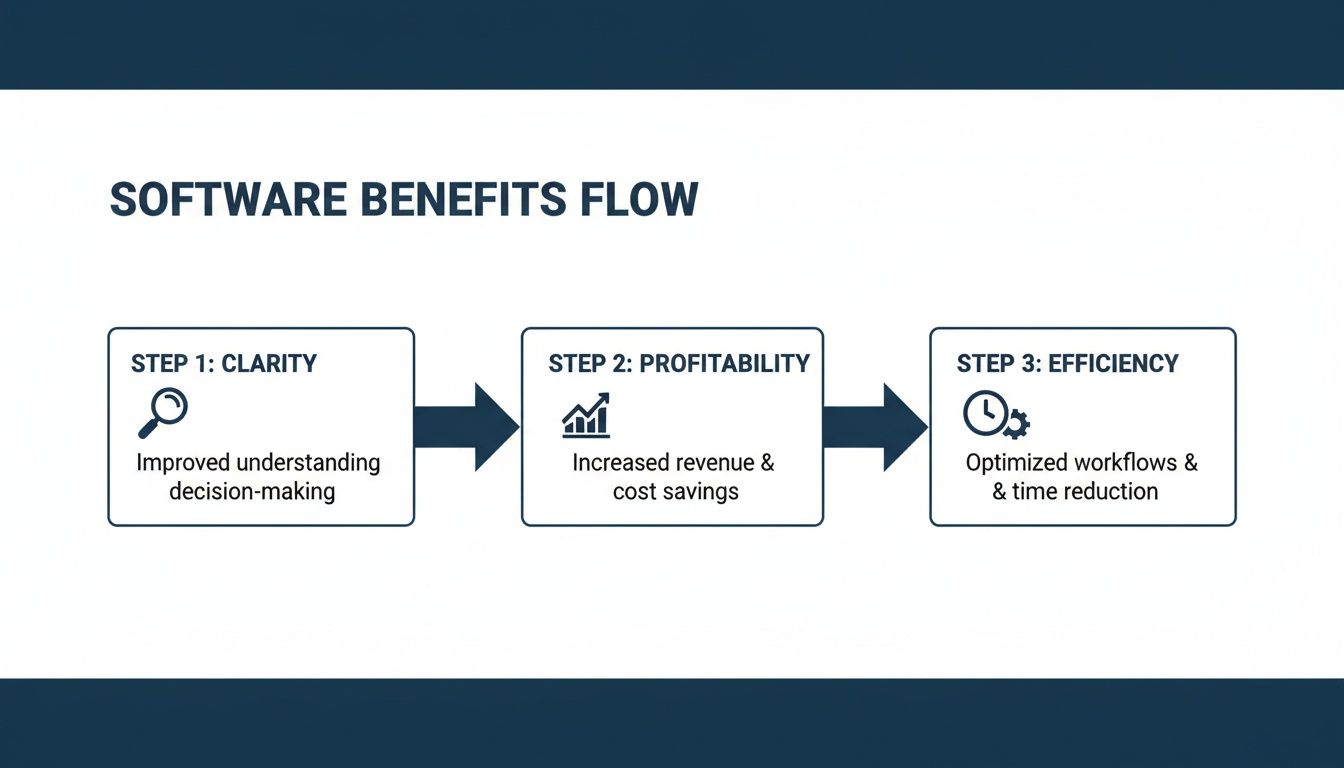
This whole process isn't just about finding software; it's about building a system that makes your business stronger.
Your Industry Makes a Difference
The kind of business you run changes what you need. A photographer needs different things than a law firm, and your software has to match that.
For example, a law firm must handle special trust accounts where they hold money for clients. Messing this up has serious legal consequences, so their software must have trust accounting. No excuses.
A construction contractor, on the other hand, needs good job costing. They have to know exactly how much they spent on workers and materials for each project to see if they made money. A generic tool won't work.
Your industry tells you what you can't live without. Don't pick a general tool if your business has special rules or billing needs. The right software will feel like it was made just for you.
When you're listing your needs, think about big things like payroll. A resource like this guide on choosing the best payroll company can help you think of things you might have missed. Payroll is a big piece of the puzzle, and how you handle it will affect what you need from your main accounting system.
Take a minute to write down your top three industry-specific needs. This could be anything from special privacy rules for a doctor's office to tracking batches of food for a bakery. These are the deal-breakers that will help you cross options off your list fast.
Understanding the Features That Matter
Software websites can throw a long list of features at you. It can be confusing. Let's cut through the noise and talk about what will actually help you run your business.
We'll start with the basics every business needs. Then, we'll talk about the cool features that save you time and headaches.
The Basic Stuff You Can't Skip
No matter what you sell, your accounting software has to do a few main jobs well. If it can't, nothing else matters.
- Simple Invoicing: You need to create and send professional-looking bills in just a few clicks. The goal is to make it easy for people to pay you. A good system shows you who has paid and who is late.
- Good Bookkeeping: This is the heart of it all. The software must track every dollar that comes in and goes out. It's your main record book, and it needs to be accurate and easy to read.
- Clear Reporting: You should be able to get a few basic reports anytime to see how you're doing. A Profit & Loss (P&L) report tells you if you're making or losing money. A Balance Sheet shows your company's overall financial health.
These three things are the minimum. Don't even think about a tool that makes these tasks hard.
Features That Make a Real Difference
Once you know a tool can handle the basics, you can look for features that make your life easier. These are the things that give you back hours of your time.
One of the best time-savers is automatic bank feeds. This feature connects to your business bank account. Instead of typing in every transaction by hand, the software pulls them in for you. All you have to do is check and sort them.
Another big one is a good mobile app. Imagine you’re out buying supplies. Instead of stuffing a paper receipt in your pocket (and probably losing it), you can just take a picture with your phone. The app will save it and record the expense right there.
The goal isn't to find software with the most features. It's to find software with the right features that do the boring tasks for you, so you can focus on growing your business.
To help you decide, here’s a simple breakdown of common features.
Essential vs. Advanced Software Features
| Feature Category | What It Does | Usually Standard | Often an Add-On |
|---|---|---|---|
| Bookkeeping | Tracks income and expenses | Yes | Multi-currency, advanced job costing |
| Invoicing | Creates and sends customer bills | Yes | Automatic payment reminders, recurring bills |
| Reporting | Creates P&L, Balance Sheet, etc. | Yes | Custom reports, industry-specific reports |
| Bank Feeds | Automatically imports bank transactions | Yes | Advanced bank matching rules |
| Mobile App | Lets you work and snap receipts from your phone | Yes | Full invoicing and reporting on mobile |
| Integrations | Connects to other apps you use (like Stripe) | Basic connections | Advanced or custom integrations |
| Payroll | Manages employee pay and taxes | No | Full-service payroll |
| Inventory | Tracks product stock levels | No | Advanced inventory (multiple locations) |
Seeing this can help you decide which plan makes the most sense. Don’t pay for an advanced feature you won’t use, but don’t hold back your business to save a few dollars a month, either.
It can be hard to know which features you need. A good idea is to look at different top accounting systems to see what they offer. This can help you find the features that will really help your business.
Why Connections to Other Tools Are a Big Deal
Your accounting software doesn’t work alone. It needs to “talk” to the other tools you use. This connection is called an integration.
For example, if you use Stripe or Square to take credit card payments, you want it to connect to your accounting software. When a customer pays you, the sale should show up in your books automatically. Without that connection, you’d have to type it all in by hand, which is slow and can lead to mistakes.
Think about the other tools you use:
- Your customer list (CRM)
- Your cash register (POS)
- Your payroll service
- Your project management tool
The more your tools can share information, the less manual work you have to do. This keeps your records accurate and gives you a clearer picture of your business.
Why “Cloud” Software Is the Way to Go
Years ago, you had to install accounting software from a CD onto one computer. Thankfully, things are different now. Today, most businesses use cloud-based software.
This just means the software is online instead of on your computer. You can get to it from any device with an internet connection—your office computer, your laptop at home, or your phone. This freedom is a huge help for any busy business owner.
There’s a good reason for this change. Over 68% of the accounting software market is cloud-based. It’s the standard choice because it comes with automatic security updates, easy connections to other apps, and pricing that grows with your business.
For a deeper look at the top choices, check out our guide on the best accounting software for small business.
A good cloud-based system keeps you connected to your finances wherever you are, which is key to running a modern business.
How to Test Drive Your Top Choices
Okay, you’ve done the hard work. You know what you need, and you’ve narrowed down your list. Now for the fun part: picking your top two or three and taking them for a test drive.
This isn’t about watching a perfect sales video. This is about you getting your hands dirty to see if the software actually feels right for you. The goal is to act like you’re using it for a real workweek and see what’s easy versus what’s annoying.
Go Beyond Just Clicking Around
Signing up for a free trial and just poking around is a waste of time. You need a plan. You want to try the real tasks you do every week.
Think of it like test-driving a car. You wouldn’t just sit in it in the parking lot. You’d take it on the highway and see how it handles. We’re going to do the same thing with this software.
Here’s a simple checklist to get you started. Try to do each of these things in every software you test:
- Create a tricky invoice: Don’t make a simple one. Bill one of your most complicated clients—the one with weird details or special discounts. See if the software makes this common job easier or harder.
- Run a real report: Try to create a Profit & Loss report for last month. How many clicks does it take? Is the report easy to read, or is it confusing?
- Find a specific transaction: Imagine a client calls asking about a payment from three months ago. How fast can you find that one transaction? The search tool is very important.
- Log an expense on the go: Download the mobile app and take a picture of a receipt from lunch. See how well it reads the text and how easy it is to categorize the expense from your phone.
Spending 30 minutes on these real tasks will tell you more than hours of watching videos. It’s all about how the software feels to use.
Test Their Customer Support
Most people skip this, but it’s super important. While you’re in a free trial, you are a potential customer. Their support team should be trying to impress you. This is the best service you will ever get from them.
During your trial, ask their support team a simple question. It doesn’t have to be hard. Something like, “How do I set up a new sales tax rate?” or “Where can I change my invoice design?” is perfect.
Then, pay attention to what happens.
How fast and how helpfully they reply tells you everything about what kind of partner they will be after they have your money. A slow or unhelpful response during a trial is a huge red flag.
A good software company knows that support is part of the product. They should be quick, clear, and want to help you. A bad one will just treat you like a number, and you don’t want to be stuck with them when you have a real problem.
Focus on How Easy It Is to Use
As you test, keep asking yourself one simple question: “Does this save me time?”
The whole point of new software is to make your life easier. If you’re always fighting the system or looking for basic buttons, it’s not the right fit, no matter how many cool features it has.
I once worked with a small online store testing a new system with great inventory reports. But making a simple refund for a customer return took eight different steps. Since they did returns every day, that one awkward process was a dealbreaker.
This is what the trial is for—to find those daily frustrations before you pay. The best software isn’t just powerful; it’s easy to use. It should feel like it was designed for someone like you. This is where you can see the true value of features like financial reporting automation in action; a good system makes getting information simple.
By the end of your trials, you should have a clear winner. It won’t be the one with the longest feature list, but the one that felt the most natural to use—the one that made you feel more in control of your money, not more confused.
The True Cost of New Accounting Software
That monthly fee you see on the pricing page? It’s just the beginning. I’ve seen it happen over and over: a business owner picks software because it’s cheap, only to get hit with hidden costs they never expected.
The real cost isn’t just the sticker price. It’s the total investment of money and time needed to get it working right for your business. Thinking about the big picture from the start helps you make a real budget and avoid picking a tool that seems cheap but costs you more later.
Looking Beyond the Monthly Fee
To figure out the true cost, you need to look at three things besides the monthly payment. These are the “hidden” costs that can surprise you. Let’s break them down.
- Setup Fees: This is a one-time charge for setting up the software for your business. It might include setting up your accounts, making custom invoices, or creating special reports.
- Data Moving Costs: You can’t start with an empty system. All of your old financial information needs to move from your old system—even if it’s just spreadsheets—into the new one. This can be tricky, and you might need to pay someone to do it for you.
- Training Costs: This is the big one people forget. Your team can’t use software they don’t understand. The biggest cost is often the time it takes for everyone to get comfortable with the new tool. A cheaper tool that takes your team twice as long to learn isn’t really cheaper.
The People Side of the Switch
Changing software isn’t just a tech project; it’s a people project. We are all creatures of habit. If your team is used to doing things one way, a new system can be frustrating at first, even if it’s better.
Think about it from their side. They have a job to do, and suddenly their tool is gone, replaced by something new. It’s normal for people to be a little resistant or slow down as they learn.
The biggest mistake is underestimating the time it will take for your team to learn. Plan for a dip in productivity for the first few weeks. Build this into your schedule so you’re not surprised.
To make the change smoother, get your team involved early. Show them how the new software will make their jobs easier. For example, show the person who handles billing how much faster they can send invoices. When people see how it helps them directly, they are more likely to get on board.
Creating a Real Budget and Timeline
Alright, let’s put this all together. Don’t just compare the monthly fees. Instead, make a simple chart to guess the total cost for the first year. This simple step can save you a lot of trouble.
| Cost Category | Software A ($50/mo) | Software B ($100/mo) |
|---|---|---|
| First Year Subscription | $600 | $1,200 |
| One-Time Setup Fee | $1,000 | $500 |
| Data Moving Service | $750 | $750 |
| Estimated Team Training Time (Hours x Rate) | $1,500 (30 hrs @ $50/hr) | $750 (15 hrs @ $50/hr) |
| Estimated First-Year Total | $3,850 | $3,200 |
See what happened? Software A looked cheaper at first. But when you add the higher setup fee and the longer training time (because it's harder to use), Software B is actually the better deal in the first year.
This helps you make a decision based on real value, not just a low price. It changes your thinking from "What's the cheapest?" to "What's the best investment for my business?"
You’ve done the research, run the tests, and figured out the real budget. It’s time to make a decision and plan for an easy switch.
Think of this as your plan for a smooth launch.
Here's a secret from someone who's seen this happen hundreds of times: the work doesn’t stop when you buy the software. In fact, that's where the real work starts.
The real win comes from getting your team to actually use the new tool well every day.
Your Go-Live Game Plan
Switching systems without a plan is a recipe for chaos. Before you flip the switch, you need to get your data and your team ready. This prep work makes the change feel more like a planned upgrade and less like a crisis.
Here are the key parts of your plan:
- Clean Up Your Data: Before you move anything, make sure your current financial records are clean and correct. This is a great time to fix old mistakes and get rid of old information. Moving messy data just creates a bigger mess in the new system.
- Schedule Good Training: Don't just give your team a manual and hope for the best. Set up training sessions that focus on the tasks they actually do. The person who sends invoices needs different training than the person running payroll.
- Set a Go-Live Date: Pick a day to make the official switch and stick to it. A slow time, like the start of a new month, often works well. This gives everyone a clear deadline and helps the team focus.
Remember, the goal isn't just to install the software; it's to use it. The best tool is useless if your team doesn't know how to use it right.
Ongoing support is what makes a tool great. Whether that support comes from the software company or an expert partner, having someone to call is important.
For many businesses, working with an outsourced bookkeeping for small business team can make sure you get the most value from day one. This lets you focus on what you do best—running your business.
Frequently Asked Questions
You've got questions, and that's a good thing. Choosing the right software is a big decision, so let's answer a few of the most common ones.
What Is the Difference Between Accounting Software and Bookkeeping Software?
This is a great question because people use these words to mean the same thing. I like to think of it this way: bookkeeping is recording your daily money moves—sales, expenses, bills. Accounting is using that information to see the big picture and make smart decisions.
The good news is that most modern software does both. It handles the daily bookkeeping automatically and then turns that data into the reports you need for accounting (the decision-making part). So when you shop for "accounting software," you're really looking for one tool that does both jobs.
How Much Should I Expect to Pay?
The price can be all over the place. You’ll find simple plans for around $20 per month, while bigger systems with more features can cost over $200 per month.
But here's a tip: don't let the monthly fee be your only guide. We talked about the "Total Cost," which includes setup fees and the time it takes your team to learn. A system that costs a bit more but is easy to learn often ends up being the cheaper choice in the long run.
Can I Switch to a Different Software Later?
Technically, yes, you can switch. But I can tell you from experience, it’s a huge headache you want to avoid. Moving years of financial history from one system to another is a difficult, slow, and often expensive project.
It is always better to spend a little extra time upfront to pick a tool that can grow with your business for the next five years or more. A smart choice today will save you a world of pain tomorrow.
Making the right choice in accounting software is about building a strong money foundation for your business. If you’ve gone through this process and decided you’d rather have an expert team handle the numbers so you can get back to running your business, MyOfficeOps can help. We provide the clarity and guidance you need to make smarter, more profitable decisions.