
You're staring at a decision that won't sit still. A hire looks expensive, the equipment quote feels high, the price increase might scare customers, and doing nothing has its own cost that nobody wrote down. That's the part most owners get stuck on.
The fix is cost-benefit analysis, but not the fluffy version that starts with a spreadsheet and ends with guesswork. The job is to ask a better question first, especially the hardest one: what happens if you do nothing? Public-sector guidance says you have to name the proposed action and the alternative baseline before you start measuring impacts, and that's exactly why the counterfactual matters so much in small business decisions too, as explained in this guidance. If you want a useful companion to thinking about long-term value and sustainable decisions, the sustainable growth model guide is worth a look after this.
The Decision That Keeps Stalling
You know the moment. You've got three tabs open, a half-finished spreadsheet, and a decision that should be simple but isn't. Maybe it's a new hire. Maybe it's a machine. Maybe it's a price change. The numbers are there, but they still won't tell you what to do.
That's because most owners aren't really choosing between “yes” and “no.” They're choosing between doing the investment and what happens if they don't. If you hire, what gets pushed off? If you don't hire, do you subcontract, work later, lose sales, or keep carrying the load yourself? That's the comparison, and it's where most analyses go wrong.
Practical rule: if you can't describe the no-action option in one plain sentence, you're not ready to build the numbers yet.
Cost-benefit analysis is the tool built for this kind of decision. The problem is that most guides make it sound like an accounting exercise. It isn't. It's a decision tool, and the spreadsheet is just the scoreboard.
For a small business, that shift matters. A decision can look weak on paper and still be smart if it frees capacity, reduces risk, or makes the business more valuable later. A lower-cost option isn't automatically the better option.
If you've been comparing a salary line to a revenue line and wondering why the answer feels off, you're not alone. The better question is what changes in the business if you move forward, and what changes if you stay put.
That's the lens I'd use every time. The rest of this article gives you a clear framework, a working example, and a simple template you can use.
What Cost-Benefit Analysis Is

Suppose you are comparing two job offers. One pays more today. The other offers better hours, more room to grow, and less stress. Salary alone cannot settle that choice. You compare the full trade-off over time, and that is the same work cost-benefit analysis applies to a business decision.
Cost-benefit analysis is a structured comparison between what a choice takes away and what it gives back. The method works because it makes you examine the full decision instead of stopping at the sticker price.
The plain-English terms
Costs are what the choice takes away: money, time, effort, and opportunity.
Benefits are what the choice gives back: more revenue, less waste, more capacity, less risk, or better control.
Counterfactual means the practical alternative, or what happens if you do not make the change.
Time horizon is the period you are examining, such as the next year or the next few years.
Discount rate adjusts for timing, because money received later is worth less than money received now.
These terms point to the part owners often miss. A spreadsheet can calculate figures, but it cannot decide what belongs in the comparison. If the scope is wrong, the result is precise but useless.
The work happens before the formulas. Choose the right baseline, set a sensible time window, and list the consequences of both choices. Include what the business gives up by acting and what it absorbs by staying put. A lower-cost option is not automatically better if it leaves capacity unused, preserves avoidable risk, or limits future revenue.
Start with the decision question and the no-action outcome. Then build the numbers around those two realities, rather than forcing a preferred answer into a tidy table.
Scoping the Decision the Right Way
A professional services firm is deciding whether to hire a senior accountant or keep subcontracting overflow work. The choice looks simple until the owner compares salary with expected billings and calls the result clear. That comparison misses the cost of staying put, which is often where the decision goes wrong.
Write the decision in one sentence
State the action and the alternative plainly: Should we hire a senior accountant now, or keep subcontracting overflow work and absorbing the extra pressure internally?
The sentence keeps the analysis tied to a decision. “Grow the firm” and “improve efficiency” may be worthwhile goals, but they are too broad to test. A useful question names the choice, the alternative, and the operating consequences attached to each one.
Define the counterfactual before opening a spreadsheet. If the firm does nothing, the owner may keep reviewing work at night, subcontracting may continue, billable projects may be delayed, and some opportunities may be declined. Those outcomes form the baseline. They are not background noise.
Don't compare against a fantasy baseline. Compare against the status quo as it actually operates, with all its mess.
Set boundaries before pricing anything
Choose the time window first. For this hire, a 12-month view captures onboarding, recurring payroll, and the first wave of benefits without treating later outcomes as certain.
List the people affected by the decision. The owner, accounting team, clients, and subcontractors will experience different effects. Public-sector CBA guidance also recommends considering distributional effects and impacts that do not convert neatly into dollars. That matters when a decision helps one group while adding pressure for another.
Avoid the common scoping traps
- Fantasy baseline: Compare the hire with the likely no-action outcome, not a version of the business where problems disappear.
- Missing owner time: If the owner still reviews work at 9 p.m., record that workload as part of the status quo.
- Ignoring capacity: A hire may matter even when direct profit looks thin, because released capacity can change the work the firm accepts.
- Vague boundaries: Keep the same time window and decision question throughout the analysis.
For a practical explanation of how costs behave as activity changes, use this cost behavior analysis resource before estimating figures.
Quick scoping checklist
- State the decision plainly.
- Name the no-action option.
- Set the time window.
- List who is affected.
- Include capacity, owner time, and risk.
- Leave out items that do not change.
A polished spreadsheet cannot repair a weak baseline. Define what happens if nothing changes first, then price the difference between that outcome and the proposed action.
Putting Real Numbers on the Table
Once the scope is right, pricing the decision gets much easier. The rule is simple, separate what changes from what doesn't. If a cost would exist either way, it doesn't belong in the decision math unless the choice changes it.
For the senior accountant example, the main costs are not just salary. There's recruiting effort, onboarding time, software access, management time, and the risk that the new hire takes a few months to settle in. Some of that is one-time spending. Some of it repeats. Keep them separate.
A simple way to think about the numbers
Treat the analysis like two columns. On the left, what the hire costs. On the right, what the hire changes for the better. Don't force everything into one bucket.
A solid pricing pass would usually include these items:
| Item | Type | Estimated Value |
|---|---|---|
| Recruiting and onboarding | One-time cost | Qualitative or local estimate |
| Salary and payroll burden | Recurring cost | Qualitative or local estimate |
| Owner review time saved | Benefit | Qualitative or local estimate |
| Less subcontracting overflow work | Benefit | Qualitative or local estimate |
| Lower rework and fewer errors | Benefit | Qualitative or local estimate |
| Better client response time | Benefit | Qualitative or local estimate |
| Reduced burnout risk for the owner | Unmonetized benefit | Qualitative |
| More capacity for higher-value work | Benefit | Qualitative or local estimate |
The mistake many make here is double-counting. They count revenue from new work, then count the same revenue again as “capacity gained.” Pick one. Another common mistake is ignoring onboarding time because it feels temporary. Temporary still counts.
Practical rule: if a change uses real hours, it has a real cost, even when nobody sends you an invoice for it.
For recurring costs, be strict. If rent, core software, or insurance doesn't change because of the decision, leave it out. If the new hire adds tools, training, or support time, include those because they are part of the choice.
How to treat soft benefits without faking precision
Not everything belongs in a dollar box. Morale, customer experience, and enterprise value are real, but they're not always easy to price. Write them down as decision factors instead of guessing. That's better than pretending fake precision is real precision.
If you want a straightforward reference for return math after you've built the list, the ROI guide fits naturally here. And if you're pricing broader operating choices, the guide to reliability-centered budgeting is a helpful way to think about spending that protects uptime and avoids surprises.
Discounting and Stress-Testing the Numbers
Future money is not the same as money in your hand today. That's the whole point of discounting. A benefit next year matters, but it matters a bit less than the same benefit today because today's cash can be used now.
For most small business decisions, a 5% to 10% discount range is a practical place to start, as a working assumption, not a magic truth. You don't need to turn this into a finance class. You just need to stop treating future benefits like they arrive with no delay and no risk.
Run the numbers through three lenses
Use the senior accountant hire again. In the base case, the hire covers overflow work, reduces owner strain, and lets the firm take on more profitable work. In the downside case, the work slows down, onboarding takes longer than expected, and the hire only partly replaces subcontracting. In the upside case, the new person quickly absorbs capacity, cleans up bottlenecks, and frees the owner for higher-value work.
That last part is the test. If the decision only looks good in the best case, it's too fragile.
Here's the right way to stress-test it:
- Lower revenue case: Ask what happens if the new work lands more slowly than expected.
- Higher cost case: Ask what happens if onboarding and management time take longer.
- Slower benefit case: Ask what happens if the hire doesn't free up capacity right away.
- Mixed case: Combine one downside assumption with one realistic upside assumption.
The point isn't to prove the decision wrong. It's to see how much room it has before it breaks.
If you want a clear example of how future value gets treated in a real-world valuation context, see how The Money Maniac values pensions. The idea is the same, future value has to be judged in present terms, not treated like cash sitting in your pocket today.
The scenario planning for business resource also fits well here if you want a cleaner way to map downside, base case, and upside before you commit.
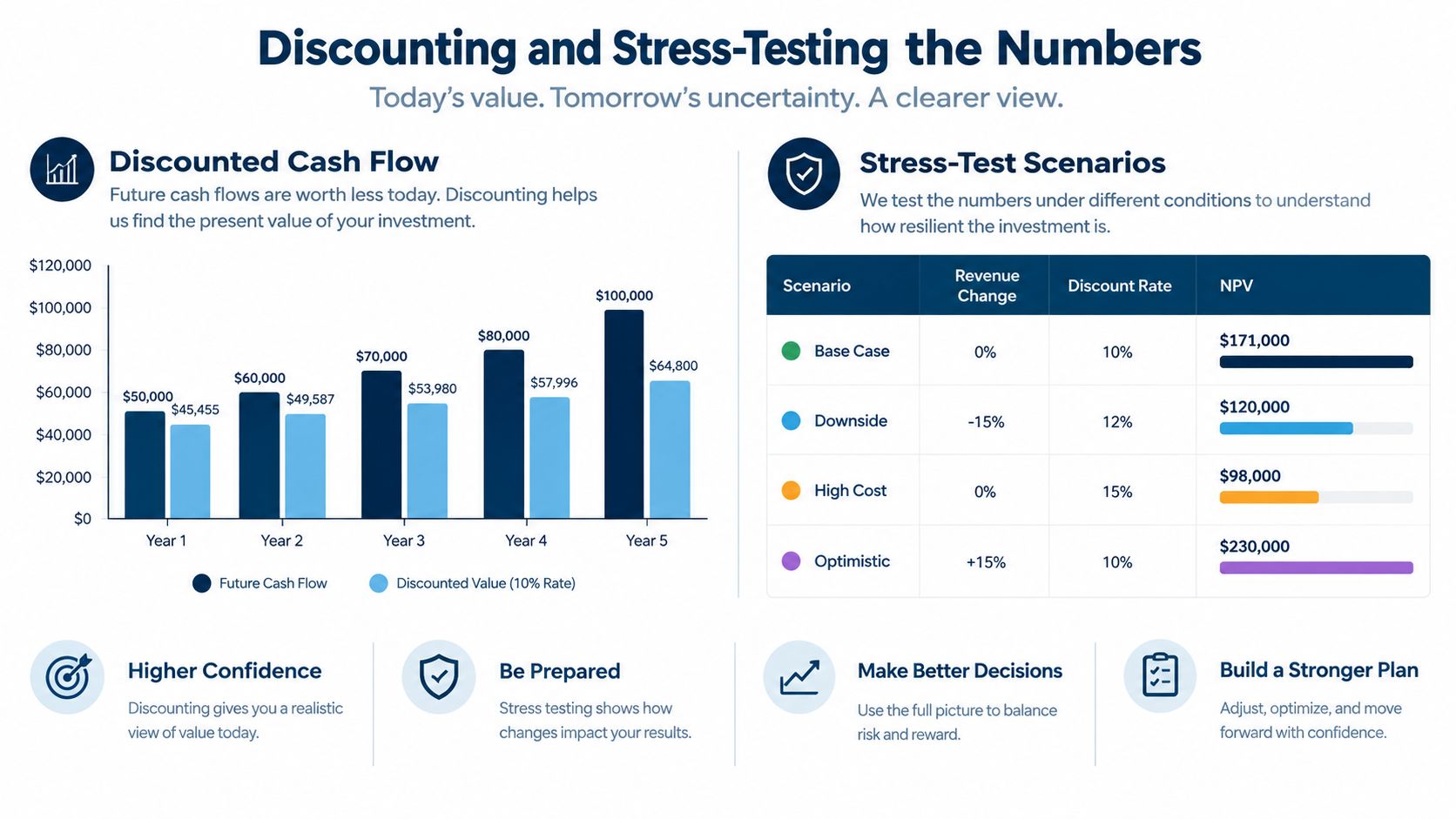
A decision that only works in the upside case is usually not a good decision. A good one still has room to breathe when reality gets messy.
Reading the Result and Knowing What to Do Next
Once the numbers are on the table, the answer usually falls into one of three buckets. If the hire creates clear net value, you probably move. If it loses money and doesn't solve a real problem, you probably don't. If it breaks even, the decision turns on the non-monetary stuff.
What each outcome really means
Net positive: The hire pays for itself and solves the capacity problem. That's a strong case, especially if the firm has the cash to support it.
Net negative: The hire doesn't earn its keep and doesn't remove enough strain. In that case, you either change the scope or don't hire.
Break-even: The numbers are close, so the tie-breakers matter. Capacity, client service, owner time, and future flexibility decide the call.
The lowest-cost option is not always the smartest one. A subcontractor might look cheaper, but if it keeps the owner stuck in review work and limits growth, the cheap option can be the expensive one. That's the bit generic analyses miss.
Where judgment still matters
Unmonetized factors belong in the final decision. Morale, customer experience, and enterprise value matter even when you don't turn them into a fake dollar figure. I'd rather see those written clearly than guessed badly.
A good advisor pushes on the assumptions, not just the totals. A fractional CFO or advisory partner would check whether the baseline is real, whether owner time was counted, whether the benefits were double-counted, and whether the decision fits the broader cash flow picture. That kind of pressure-test keeps the analysis grounded in the actual business, not just the worksheet.
MyOfficeOps fits here as one option for owners who want bookkeeping, financial reporting, budgeting, forecasting, variance reporting, and CFO-level guidance tied to day-to-day decisions. That matters when the question is bigger than one hire and starts touching profitability, pricing, and the long game.
A Simple Process You Can Use Tomorrow
Use this every time a decision feels fuzzy:
- Define the question.
- Set the counterfactual.
- List the costs and benefits.
- Put realistic numbers on them.
- Stress-test the result.
- Decide.
That framework works for a price increase, a machine purchase, a new service line, or a hire. If the decision is small and easy to reverse, a quick gut check plus one number may be enough. If it changes capacity, cash flow, or owner time, do the full analysis.
Pick one pending decision this week and run it through this process before you spend another hour debating it. If the call is bigger, messier, or tied to long-term growth, bring in an advisor who can pressure-test the assumptions and connect the result to the bigger picture.
MyOfficeOps helps small business owners turn messy decisions into clear financial calls with bookkeeping, reporting, budgeting, forecasting, and CFO-level advisory. If you want help weighing a hire, a price change, or a big purchase with cleaner numbers and less guesswork, visit MyOfficeOps.