
You're busy. Your calendar is full, your crew or team is working hard, and money is coming in. Then the month ends, you pay everyone, and there's almost nothing left. That's the moment most owners ask the same question. Where did the profit go? Learning how to do profitability analysis gives you a clear answer, job by job and client by client.
Why Revenue Alone Hides Your Real Profit
A contractor I talk with often had this exact problem. He had jobs lined up, trucks on the road, and a bank balance that looked fine in the middle of the month. By the end, after payroll, fuel, materials, and a few fixes, the money was gone. He wasn't lazy and he wasn't bad at his trade. He just couldn't see which jobs paid and which ones ate the profit.
Profit in plain words
Revenue is the money you charge. Cost of sales is what it costs to do that work, like labor and materials. Profit is what's left after those costs are paid. Think of a lemonade stand. If you sell cups for a set price but spend most of it on lemons, sugar, cups, and time, big sales don't mean you kept much money.
That same gap hides in bigger businesses. A high invoice can still be a weak job once you count extra hours, repeat visits, rushed shipping, and changes the client asked for but never paid for. You don't see that if you only look at total sales for the month.
What you'll learn to check
You'll learn which margins to calculate, which costs belong in the math, and how to spot work that looks good on paper but drains you in real life. You'll also learn how to test a result before you raise a price, drop a client, or hire more help. It's the same basic idea behind efforts to measure profit instead of revenue per ad euro, just applied to jobs and clients instead of ads. If you want a starting point from your statements, this guide to reading and using your income statement pairs well with the steps below.
A busy month isn't the same as a profitable month. You need to know what each job kept, not just what it billed.
Owners usually go wrong right here. They chase more sales when the actual problem is that some work costs too much to serve. More of the wrong work just makes you busier and more tired.
Gather the Numbers You Need Before Calculating
Don't start with formulas. Start with clean records. If the numbers going in are messy, the answer will be messy too, even if your math is perfect.
Pick one thing and one time period
First, decide what you're checking. It could be a customer, job, product, service line, project, or location. Then pick one time period, like one month or one quarter, and use it for everything. Mixing March sales with April costs will make a good job look bad or a bad job look fine.
Next, check that net revenue matches your invoices after credits, refunds, and discounts. Then pull the costs you can trace right to that work, such as labor, materials, subcontractors, payment fees, and shipping. This order, define the object, reconcile revenue, then assign traceable costs, is the base for customer profitability as revenue less costs generated by that customer.
The records owners forget most
Time records are the big one. If you don't know where staff hours went, you can't know what a client really cost you. Discounts, refunds, card fees, and small repeat trips also get missed a lot, and those small items add up fast.
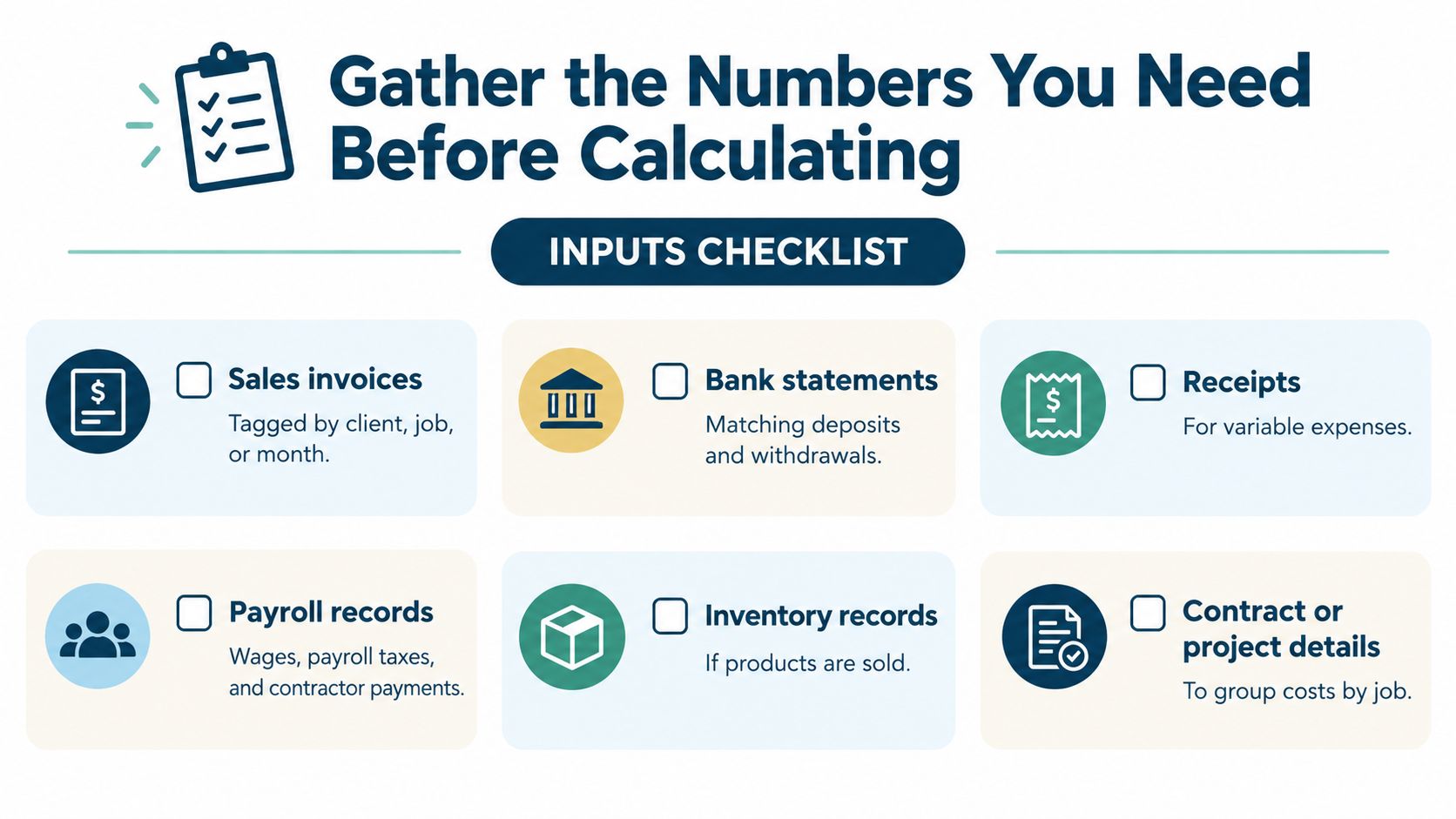
- Sales invoices: Tag each one by client, job, or product.
- Bank and card records: Match deposits, fees, and payments.
- Payroll and time logs: Show who worked on what, and for how long.
- Receipts and bills: Capture materials, subcontractors, and shipping.
- Contract or project notes: Group change orders and extras with the right job.
A repair shop that doesn't tag tickets by job ends up with one blended number for the whole month. It can't tell if quick fixes carry the business while big custom work loses money. Simple sorting helps, and some owners use guides on financial data workflows with PlotStudio AI to think through how they pull and clean data before they chart it.
Before you calculate, do a quick check. Does revenue tie to invoices, are direct costs tagged, and is time logged? If not, fix that first.
Calculate Gross and Contribution Margin the Simple Way
Now you can do the math. Keep it simple and use the same formulas every time. Changing the formula each month makes trends useless.
Start with gross margin
The Australian Taxation Office defines the gross profit ratio as (total business income minus cost of sales) divided by total business income. It defines the net profit ratio as (total business income minus total expenses) divided by total business income. In its example, a company with $500,000 of revenue, $200,000 of cost of sales, and $250,000 of total expenses has a 60% gross profit ratio and a 50% net profit ratio using those definitions.
Those two numbers tell different stories. Gross margin shows what's left after you deliver the work. Net margin shows what's left after all recorded expenses. If gross margin is fine but net margin keeps falling, your delivery may be okay while overhead, admin time, or other costs are growing too fast.
Then find contribution margin
Contribution margin is net revenue minus variable costs tied directly to the work. Variable costs move with the job, like labor hours, materials, subcontractors, and payment fees. This number tells you how much each job or sale gives you to help pay fixed costs like rent, then become profit.
Turn it into a ratio by dividing contribution margin by net revenue. That ratio helps you find your break-even sales. The U.S. Small Business Administration defines the break-even point as the point where total revenue equals total cost, so there's no profit and no loss. Its unit formula is fixed costs divided by (price minus variable cost). In its example, with monthly fixed costs of $10,000, a price of $100, and a variable cost of $60, the business must sell 250 units to break even.
For sales dollars, use fixed costs divided by the contribution margin ratio. That gives you a real target to hit each month. It beats a vague goal like grow sales, because you know the line you must cross before you make money.
| Metric | Formula | What it tells you |
|---|---|---|
| Gross profit ratio | (Income minus cost of sales) ÷ income | What's left after delivering the work |
| Contribution margin | Net revenue minus variable, directly tied costs | What each job gives toward fixed costs and profit |
| Contribution margin ratio | Contribution margin ÷ net revenue | The share of each sales dollar that helps cover fixed costs |
| Break-even sales | Fixed costs ÷ contribution margin ratio | The sales level where you stop losing money |
| Net profit ratio | (Income minus total expenses) ÷ income | What's left after all recorded expenses |
Don't mix the margins: Gross margin is not net profit. Compare gross to gross and net to net, or you'll think things changed when only the label did.
Owners often go wrong by putting fixed rent into one job one month and leaving it out the next. Pick a rule, write it down, and stick with it.
Find Which Jobs and Products Really Make Money
Company-wide profit can hide a lot. One strong service line can cover for a weak one for months. You won't see it until you check profit by job, product, and client.
Cost to serve, in plain words
Cost to serve is the time, effort, and side costs a client or job creates beyond the main work. Think meetings, revisions, support calls, travel, rework, and chasing payment. The literature on cost-to-serve measurement through activity-based costing describes customer profitability as product contribution margin less customer-service costs.
Activity-based costing, or ABC, traces shared costs to the work that causes them. Harvard Business School describes ABC as a method that can point to repricing unprofitable customer relationships, improving processes, redesigning products, and reducing unnecessary product variety. By 1991, companies were already moving toward activity-based cost-management systems to get better cost numbers and guide action.
A simple time-driven example
Time-driven ABC needs just two core estimates, the cost of supplying capacity and the time each activity takes, as explained in the time-driven activity-based costing method using capacity cost and time per activity. Say a support team costs $240,000 a year and has 8,000 practical service hours. Its rate is $30 per hour. A client with $20,000 of revenue who uses 300 support hours carries $9,000 of support cost. A same-size client who uses 75 hours carries only $2,250. That $6,750 difference matters, even though both clients paid the same amount.
This is why better tracking matters on the ground. For repair businesses, clear systems for tracking repair jobs make it easier to tie time and parts to each ticket. If you do project work, this primer on job costing basics for tracking work by job helps you set up the same idea.
The pattern can be stark. Harvard Business School research gives an example where the most profitable 40% of customers produced 130% of annual profits, while the least profitable 5% created losses equal to 30% of annual profits. You don't need that exact split to act. You just need to find your own top and bottom group.
Two clients can pay the same invoice and leave you with very different profit. The one who needs more time usually costs you more.
Don't spread all overhead evenly across every job just because it's easy. That can make a good client look bad and a heavy client look fine. Assign shared costs by what drives them, like hours, orders, visits, tickets, or change orders.
Build a Monthly Profitability Workflow in a Spreadsheet
One good analysis helps. A monthly habit helps more. You don't need fancy software to start, you need a simple file you'll keep updating.
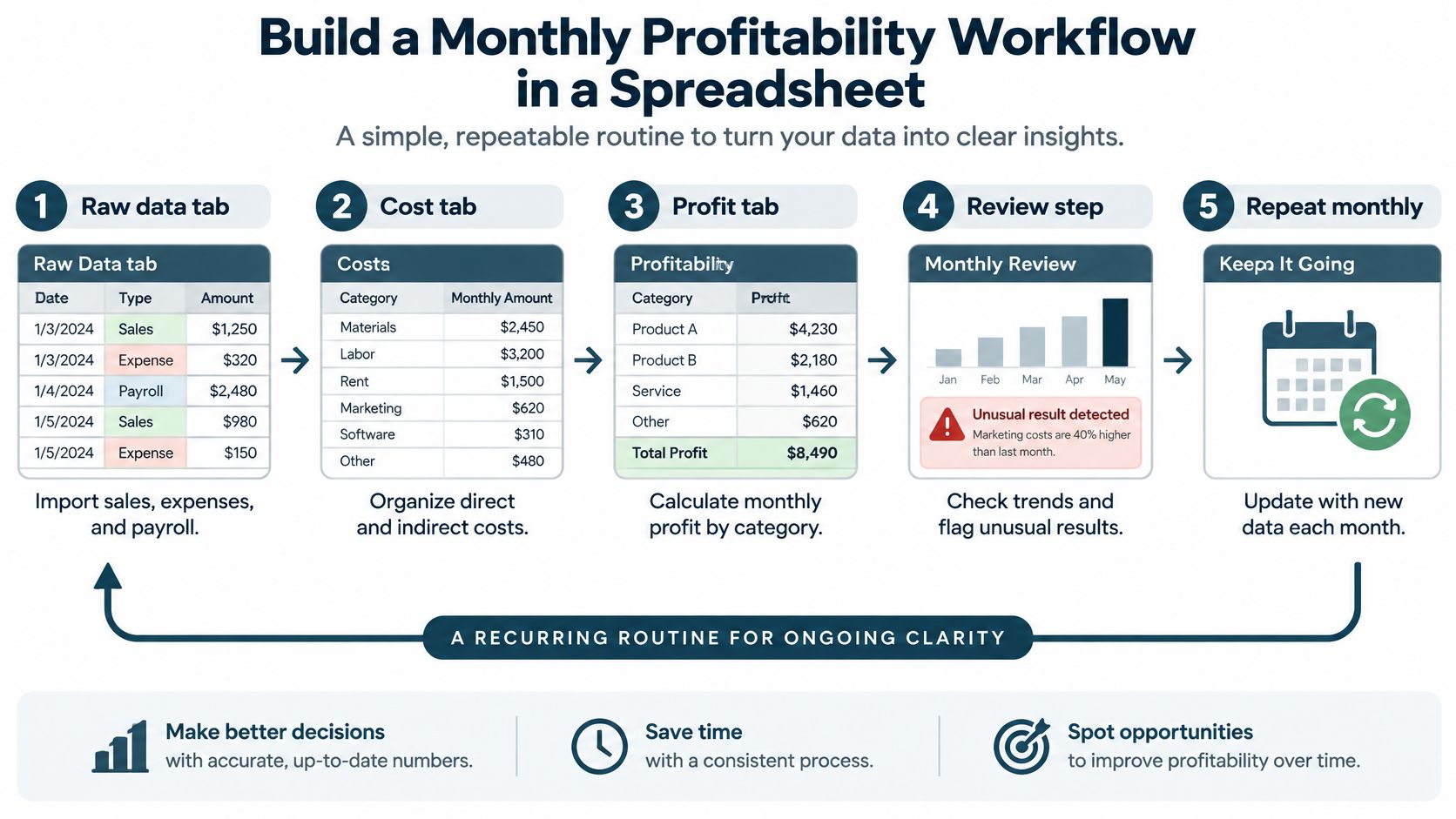
Set up four tabs
Keep the layout boring on purpose. Boring is easy to repeat.
- Raw data tab: Paste in sales, costs, and payroll exports.
- Cost pools tab: Group delivery labor, materials, subcontractors, sales, support, and collections.
- Drivers tab: List hours, visits, orders, tickets, or invoices for each job or client.
- Summary tab: Show gross margin, contribution margin, and segment-controllable margin.
Run the same steps each month
Export transaction-level revenue and cost data first. Fix items that landed in the wrong account, then calculate margins by job, client, or service line. Compare the results with your budget, last year, and your target price so you can see if you're drifting.
Then review only the exceptions. Look for jobs below target margin, clients who need a lot of support, or service lines where you bill less than planned for the hours spent. A small consulting firm once caught a pattern this way, one client always needed extra unpaid revisions and paid late, so the work looked fine on revenue but weak once time and collections effort were added.
Three pitfalls show up again and again. Owners rely on revenue alone, skip checking that allocated costs reconcile to the general ledger, and never test what happens if a driver guess is wrong. Try a second driver for your biggest cost pool and see if the ranking changes. If it changes a lot, slow down before you cut a client or change a price.
Choosing Between DIY Analysis and Outside Help
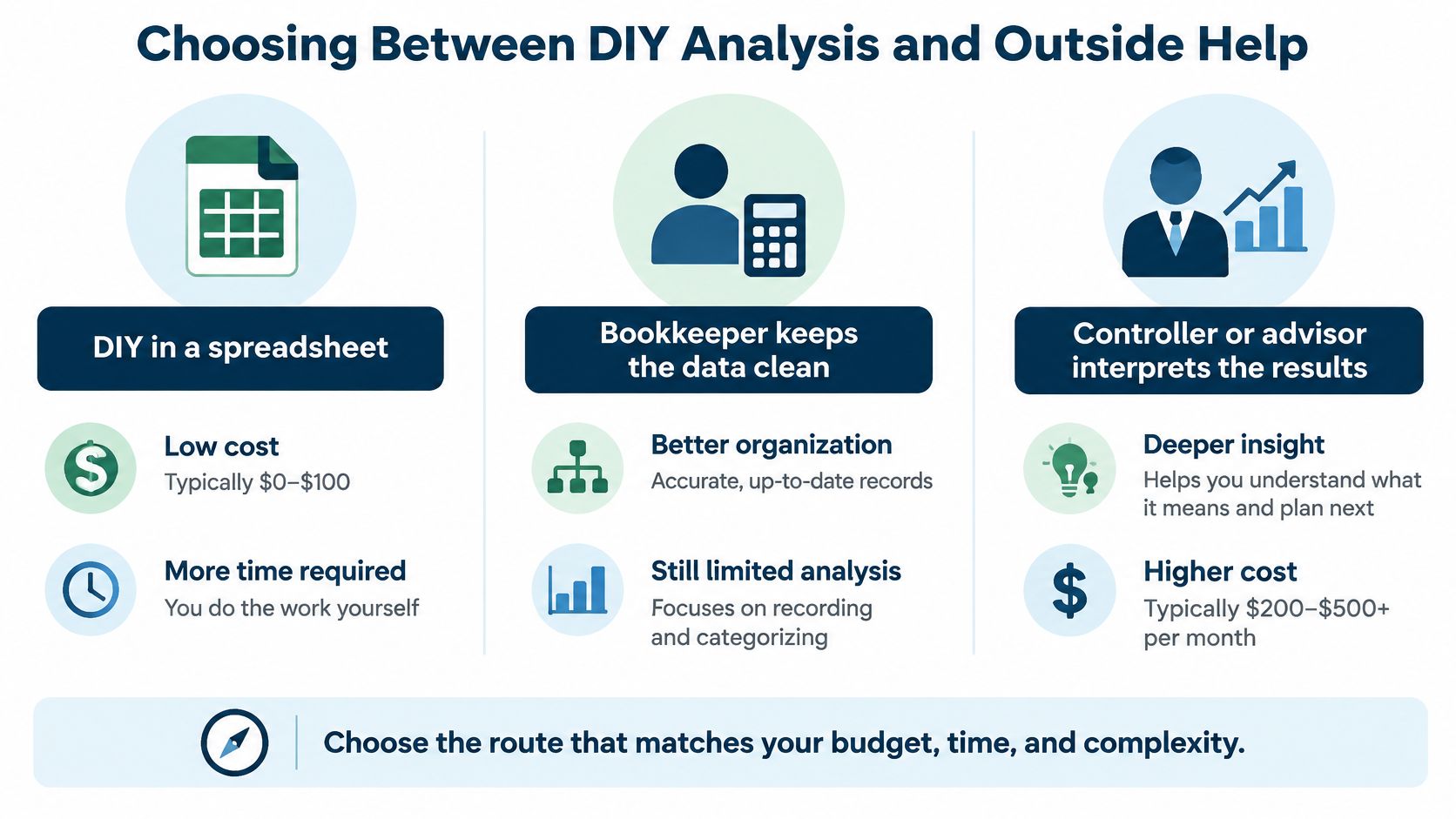
You have three main routes. The right one depends on your time, the state of your books, and how much a bad pricing call would cost you. There's no prize for picking the hardest route.
Compare the three routes
- DIY in a spreadsheet: Low cash cost, but you pay with your time. This works if you have few jobs, clean records, and a set hour each month to update it.
- Bookkeeper keeps data clean: You get tagged invoices, matched payments, and reports you can trust. You still decide what the numbers mean and what to change.
- Advisor interprets the results: You get help turning margins into pricing, hiring, and job choices. This costs more, but it can make sense when one wrong bid or hire hurts for months.
Ask yourself four quick questions. How many hours can you spare each month, how messy are your books right now, how many jobs or service lines do you run, and what happens if you price the next big job wrong? If the last answer scares you, outside help is worth a look.
MyOfficeOps is a Philadelphia-area bookkeeping and advisory partner based in West Chester, PA. It offers Core Accounting for clean books, Profit Optimization for turning data into pricing and job insights, and Exit Strategy for owners planning a sale. Its work includes monthly KPI dashboards, profitability consulting, and jargon-free reports, and engagements start with a Discovery Call.
A spreadsheet alone is enough for many small firms at first. If you keep it current and act on what it shows, you're ahead of owners who only check the bank balance. Get help when the file gets too messy, too slow, or too easy to ignore.
Protect Cash While You Improve Margins and Next Steps
Profit on paper doesn't pay the bills by itself. A job can show a good margin and still squeeze your cash if the client pays late while your crew and suppliers need payment now. That's why knowing the difference between cash flow and profit matters before you chase growth.
You're not alone if cash feels tight. KeyBank's 2025 small-business survey found that only 46% of owners were certain they could cover one month of operating expenses in an emergency, down from 49% the prior year. You can review the details in KeyBank's 2025 flash poll survey of small business owners. A 13-week cash-flow forecast, an accounts-receivable aging list, and a minimum cash amount you won't go below will show risk early.
Sort work by margin and cash speed
- High margin, fast cash: Protect these clients and look for more like them.
- High margin, slow cash: Tighten deposits, billing steps, and payment terms.
- Low margin, fast cash: Keep only if it fills idle time without crowding out better work.
- Low margin, slow cash: Reprice, reshape, or walk away first.
Price changes need care too. In 2025, 81% of surveyed U.S. small businesses reported significant effects from rising prices, while 72% said they had increased their own prices, according to the U.S. Chamber of Commerce quarterly spotlight on rising prices and small business pricing. Raising prices can still backfire if your best clients leave and your weakest work stays. Test the change against break-even and a few volume guesses before you roll it out.
Do three things this week. Pull the last three months of job or client data, calculate contribution margin for your top five jobs, then book a Discovery Call with MyOfficeOps to review what you find.
If your jobs keep you busy but your profit and cash don't keep up, MyOfficeOps can clean up your books, build clear monthly profitability reports, and help you price work with confidence. Visit MyOfficeOps to book a Discovery Call and see which jobs, clients, and service lines are really making you money.