
You're probably here because you have numbers, but they're not helping you decide anything.
A lot of owners I talk to are stuck in the same spot. They're trying to decide whether to hire, buy a truck, open a second location, bring on another provider, or finally raise prices. Then they open QuickBooks and get a pile of reports that technically exist but don't answer the key question: “Can I afford this, and what happens to cash if I do it?”
That's where remote bookkeeping services become useful. Not because someone else enters transactions for you, but because clean, current books turn into decisions you can trust. If the numbers are late, messy, or built by someone who doesn't understand your business model, you're driving with a fogged-up windshield.
Why Your Business Needs More Than Just Bookkeeping
It usually starts with a decision that should be simple. A Philly contractor wants to add a crew before spring gets busy. A medical practice is booked solid but keeps dipping into cash reserves. A marketing agency signs new work and still cannot pin down which clients are carrying the team and which ones are draining margin.
The problem is not a lack of activity. The problem is numbers that are technically finished but not useful.
Basic bookkeeping keeps records straight. Useful bookkeeping shows why cash is tight, why profit looks better on paper than in the bank, or why one service line carries the whole business while another barely breaks even. That gap matters more in remote work than people realize, because a remote bookkeeper who does not understand your industry can keep clean books and still miss the story.
I see that mistake all the time. A generalist may code transactions correctly and close the month on time, but construction books need job costing, retainage tracking, and change order discipline. Healthcare books need clean handling of insurance timing, provider payroll, and billing delays. If those details are wrong, the reports still look polished. They just lead you to bad decisions.
That is why businesses need more than categorized transactions and a year-end file for the tax preparer. They need reports that answer key operating questions. Can this job type support another hire? Is payroll rising faster than collections? Are overhead costs creeping up, or is pricing the core issue? Which location, crew, provider, or service line is generating profit?
The value is in the judgment.
A good remote bookkeeping setup should help an owner decide whether to hire, buy equipment, raise prices, or slow down spending for sixty days. The books should make those calls clearer, not harder. The American Institute of CPAs notes that outsourced accounting can give small businesses access to broader financial expertise than they would usually keep in-house, which is part of why many owners use outside support for more than data entry, as explained in the AICPA guide to outsourced accounting.
Industry context matters here too. In Philadelphia, I would not set up a union contractor the same way I would set up a private therapy group or a dental practice. The chart of accounts, reporting cadence, and performance markers should reflect how the business earns money and where it tends to leak it. Remote bookkeeping works well only when the person behind the screen knows what to watch for in your field.
Operations affect the books, too. If calls are missed, intake is sloppy, or messages sit too long, revenue gets delayed before it ever shows up in accounting. This breakdown that helps compare AI vs live answering services is useful if you are tightening the front end of the business along with the back office.
What Remote Bookkeeping Actually Means for You
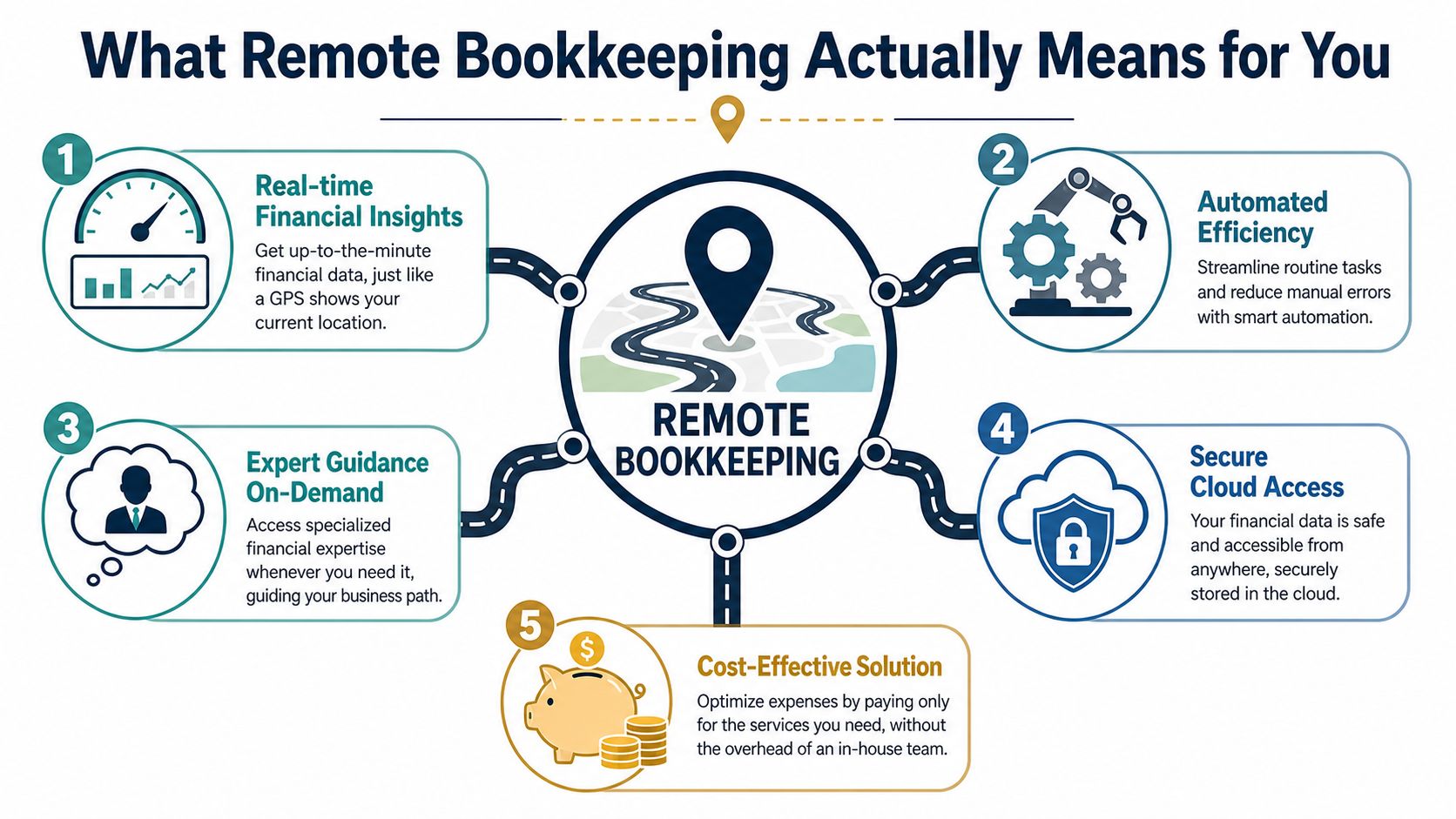
Remote bookkeeping sounds more complicated than it is. In plain English, it means your bookkeeper works in secure cloud software instead of sitting in your office with paper files.
It serves as a financial GPS.
Old-school bookkeeping often works like a rearview mirror. You look back and see where you were. Remote bookkeeping services work more like GPS navigation. You can see where you are now, what's ahead, and whether you're drifting off course.
How the system works day to day
Your bank accounts, credit cards, payment tools, and accounting software connect through cloud platforms like QuickBooks Online, Xero, or Zoho Books. Transactions sync into the system. The bookkeeper reviews, categorizes, reconciles, and checks for problems.
That matters because it cuts down on manual keying and duplicate work. Remote bookkeeping services operate on cloud-based accounting platforms that enable real-time transaction synchronization and automated reconciliation, reducing manual data entry errors by up to 40% compared to traditional paper-based systems, based on this remote bookkeeping overview.
What changes for the owner
You're not chasing receipts in shoeboxes. You're not waiting for someone to come in on Tuesday to tell you what happened last month. You and your bookkeeper are looking at the same live system.
That usually changes the relationship in a good way:
- Faster answers when you ask about spending, cash flow, or a weird transaction
- Less paper handling because documents are uploaded and stored digitally
- Cleaner month-end close because bank feeds and reconciliations happen inside the platform
- Better visibility when you need reports for a lender, partner, or tax preparer
Remote doesn't mean distant
This is the part people often get wrong. “Remote” describes location, not service quality.
A remote bookkeeper can still be responsive, still know your business, and still walk you through reports in plain English. In many cases, remote service is easier because the workflow is built around shared software, secure document collection, and regular communication instead of waiting for someone to stop by your office.
If your books only make sense when the bookkeeper is in the room, the process is too fragile.
The question isn't whether a bookkeeper sits nearby. It's whether the system gives you current numbers, clean records, and useful guidance when decisions need to be made.
Remote vs. In-House Bookkeepers: Key Differences
The hard part usually shows up after the hire. The books still close late, job costs still feel fuzzy, and the owner still has to ask three follow-up questions to understand what the numbers mean.
That happens because this decision is not only about where the bookkeeper sits. It is about how the work gets done, who reviews it, and whether the person handling your books understands your type of business. A general bookkeeper may keep a file organized. A bookkeeper who knows Philly construction, medical practices, or professional services can spot the issues that change decisions.
Cost is only one piece
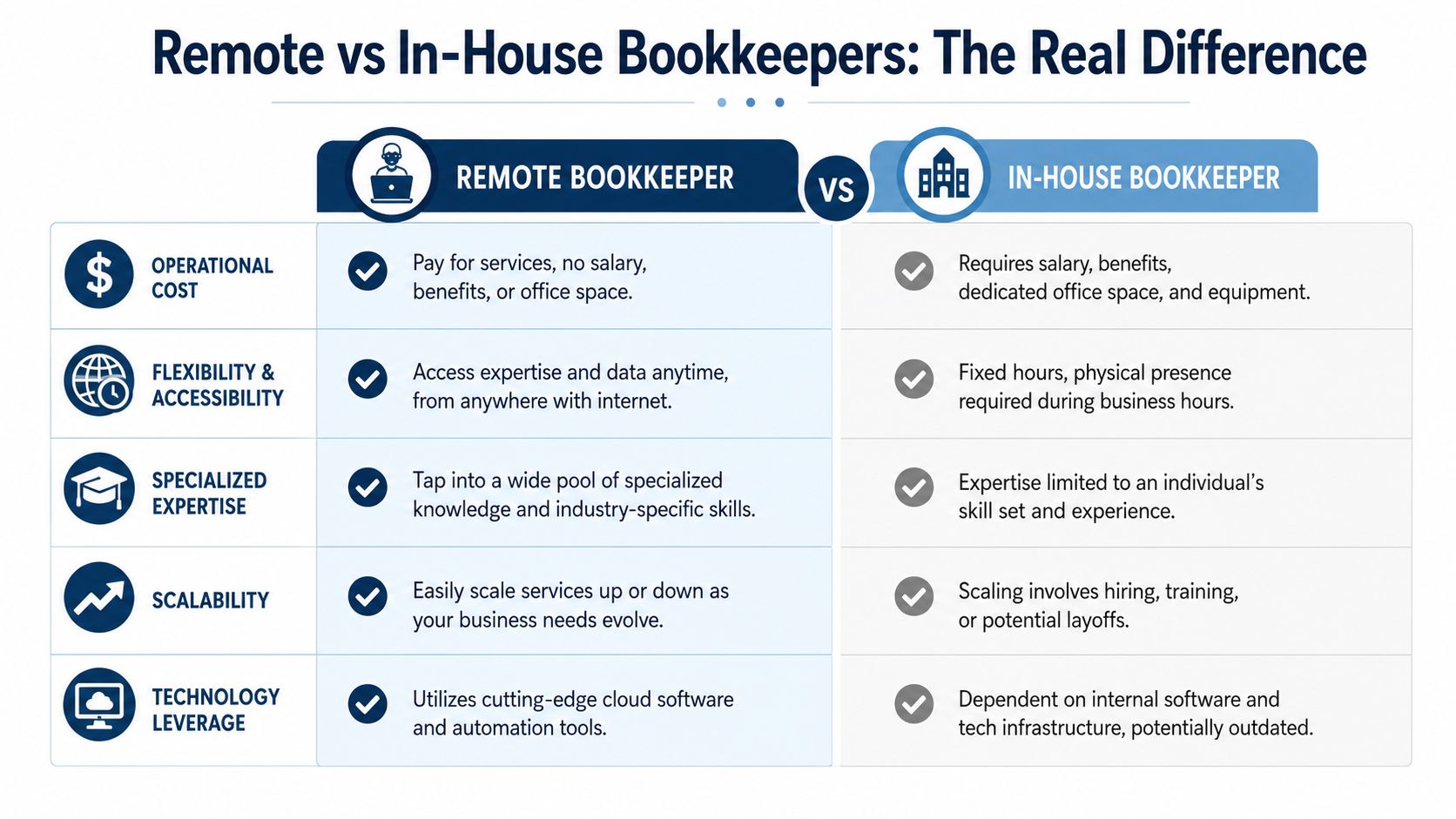
Owners often compare a monthly service fee to a salary and stop there. That misses the bigger question. Are you paying for data entry, or are you paying for accurate reporting, consistent review, and industry-specific judgment?
An in-house bookkeeper can be a strong fit if your office has daily paper flow, cash handling, or front-desk duties tied to the accounting seat. Remote support usually makes more sense when the goal is cleaner systems, faster closes, and access to a broader skill set without building a full internal department.
If you want a broader way to think about outsourced versus internal staffing, this guide for your marketing choice uses the same logic in another business function.
Side-by-side view
| Factor | Remote bookkeeper | In-house bookkeeper |
|---|---|---|
| Cost structure | Monthly service fee, often tied to workload and complexity | Salary plus taxes, benefits, equipment, and management time |
| Coverage | Usually process-driven, sometimes with review from more than one person | One person, one schedule, one set of strengths |
| Industry knowledge | Easier to find a specialist who already knows your reporting needs | Depends entirely on who you hire |
| Tools | Typically built around cloud systems and shared visibility | Depends on your current setup and internal habits |
| Scalability | Easier to add support during growth, cleanup, or catch-up periods | Hiring and training take longer |
For businesses weighing whether physical presence matters, it helps to compare that with how on-site accounting support works.
The specialist gap matters more than location
This is the piece generic advice usually skips.
A bookkeeper who has worked with contractors knows that one expense coded wrong can distort job profitability. Someone who understands healthcare knows timing issues between payroll, insurance payments, and provider-level reporting can make a month look stronger or weaker than it really is. A generalist may still reconcile the accounts correctly. They may not set up the books in a way that helps you price jobs, manage labor, or see where margins are slipping.
That is why remote can outperform in-house. Not because remote is automatically better, but because it can give you access to a specialist you would never hire full time.
Review structure changes the quality of the work
In-house bookkeeping often depends on one person protecting time for the books while office requests pile up. Phones ring. A vendor walks in. Payroll questions interrupt month-end work. Good people still make mistakes when the role becomes part bookkeeping, part office manager, part fixer.
Remote bookkeeping firms usually separate those duties. The work is documented. Reconciliations follow a schedule. Questions get answered inside the accounting workflow instead of in hallway conversations. That structure tends to produce cleaner reports.
A fresh set of eyes helps, too.
Where in-house still wins
Some businesses do need someone physically present. If checks arrive by mail every day, inventory paperwork moves by hand, or the accounting role includes regular face-to-face support for the team, an in-house hire may be the better choice.
But if the main goal is reliable numbers and useful reporting, the better question is this: who is more likely to give you timely books that reflect how your business runs?
For many owners, the strongest option is not “remote” versus “in-house.” It is specialist versus generalist, and systemized work versus one overloaded person trying to do everything.
How a Remote Bookkeeping Partnership Works
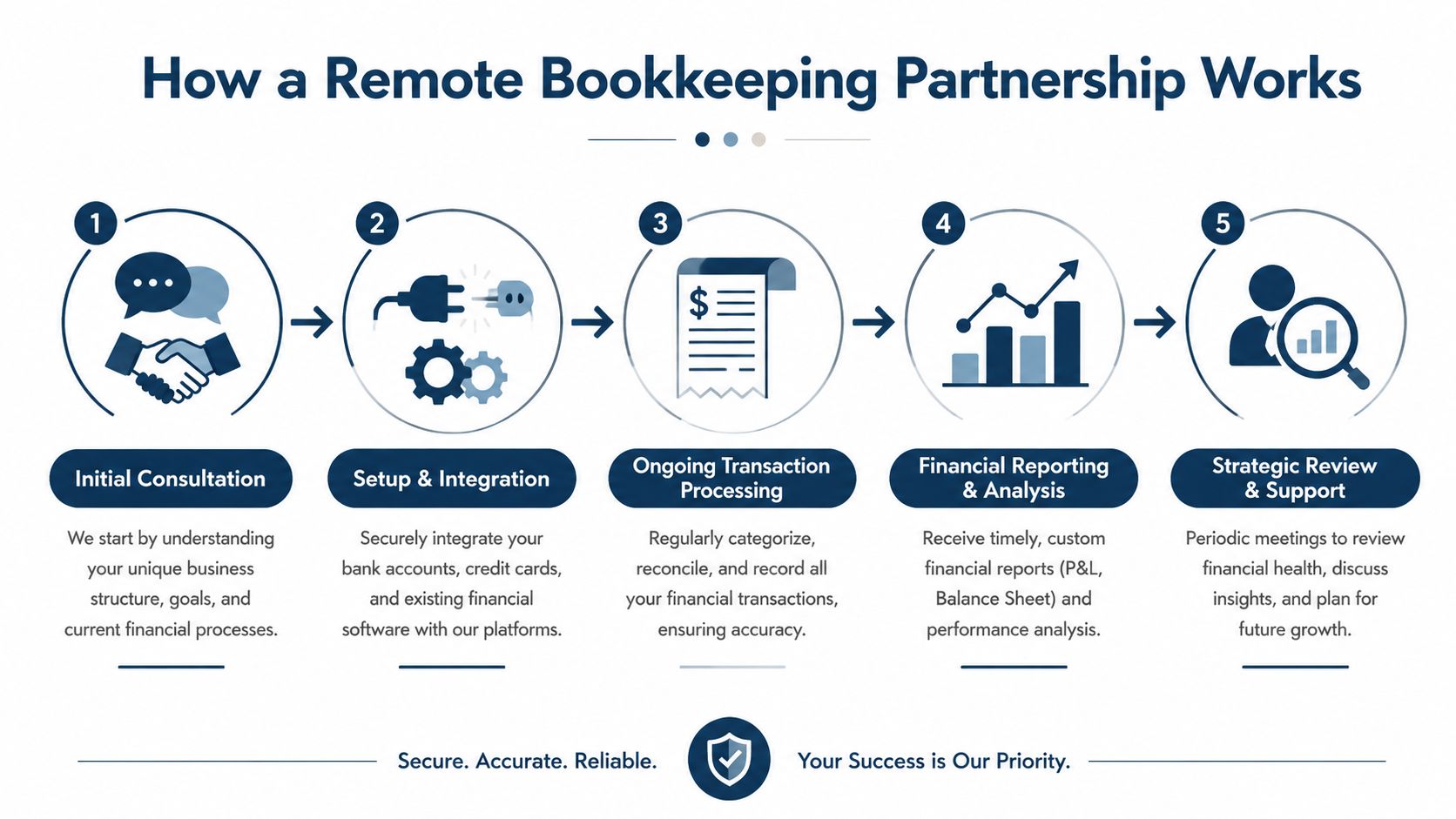
Most owners worry about the handoff. They assume remote bookkeeping will feel like sending their numbers into a black box. A good process should feel like the opposite. Clear, steady, and easy to follow.
First comes the discovery conversation
The first call should sound less like a software demo and more like a business conversation.
A good bookkeeper asks how you make money, how you get paid, what systems you use, who handles billing, whether payroll ties into your accounting, and where things tend to break down. For a Philly contractor, that might mean talking through change orders and job costing. For a medical practice, it might mean understanding provider payroll, insurance timing, or location-level reporting.
If the person on the call only talks about monthly reconciliations and never asks how your business runs, that's a warning sign.
Then the setup gets built around your workflow
This part usually includes connecting bank and credit card accounts, cleaning up the chart of accounts, reviewing existing books, and setting a process for receipts, bills, payroll data, and owner questions.
Some firms work in QuickBooks Online. Others may use Xero or connect apps for bill pay, payroll, or expense capture. The exact stack matters less than whether it's organized and easy to maintain.
Typical setup tasks include:
- Account connections so transactions flow into the accounting system securely
- Historical review to catch duplicates, missing reconciliations, or miscoded expenses
- Document process for bills, receipts, and statements so nothing lives only in email
- Role clarity so everyone knows who approves, who uploads, and who reviews
The monthly work should be boring in a good way
Consistency matters. Every month, transactions get reviewed, accounts get reconciled, odd items get flagged, and reports get prepared.
The best remote bookkeeping partnerships don't just “close the books.” They make the close predictable. You know when questions will come, when reports will be ready, and what needs your approval.
A healthy bookkeeping process should feel routine, not dramatic.
Reporting is where the value shows up
This is the part owners care about. The reports should make sense without a decoder ring.
That usually means a clean profit and loss statement, a balance sheet, and some explanation of what changed. In stronger setups, you also get help spotting issues like rising payroll burden, margin leaks, or slow receivables.
Some providers stay focused on bookkeeping only. Others combine bookkeeping with broader support like payroll integration, reporting, and analytics. MyOfficeOps is one example of a firm that offers remote bookkeeping along with accounting, payroll integration, and financial analytics for SMBs.
Communication should be simple
You shouldn't have to wonder who to contact. A good partner gives you a clear point of contact and a normal way to ask questions, usually by email, phone, or scheduled review calls.
If you ask, “Can I afford this hire?” and the answer is a week late, the process isn't serving the business.
Choosing the Right Remote Bookkeeping Partner
Many owners make an expensive mistake. They hire for convenience or price, then learn later that the person doing the work doesn't understand their industry.
That gap matters more than most articles admit.
Most content promotes remote bookkeepers as flexible generalists, but misses the bigger issue: only bookkeeping-first teams with industry chart-of-accounts knowledge can reliably handle job costing, trust accounts, or project-based expenses for fields like construction and professional services, as noted in this piece on choosing remote bookkeeping services.
The checklist that matters most
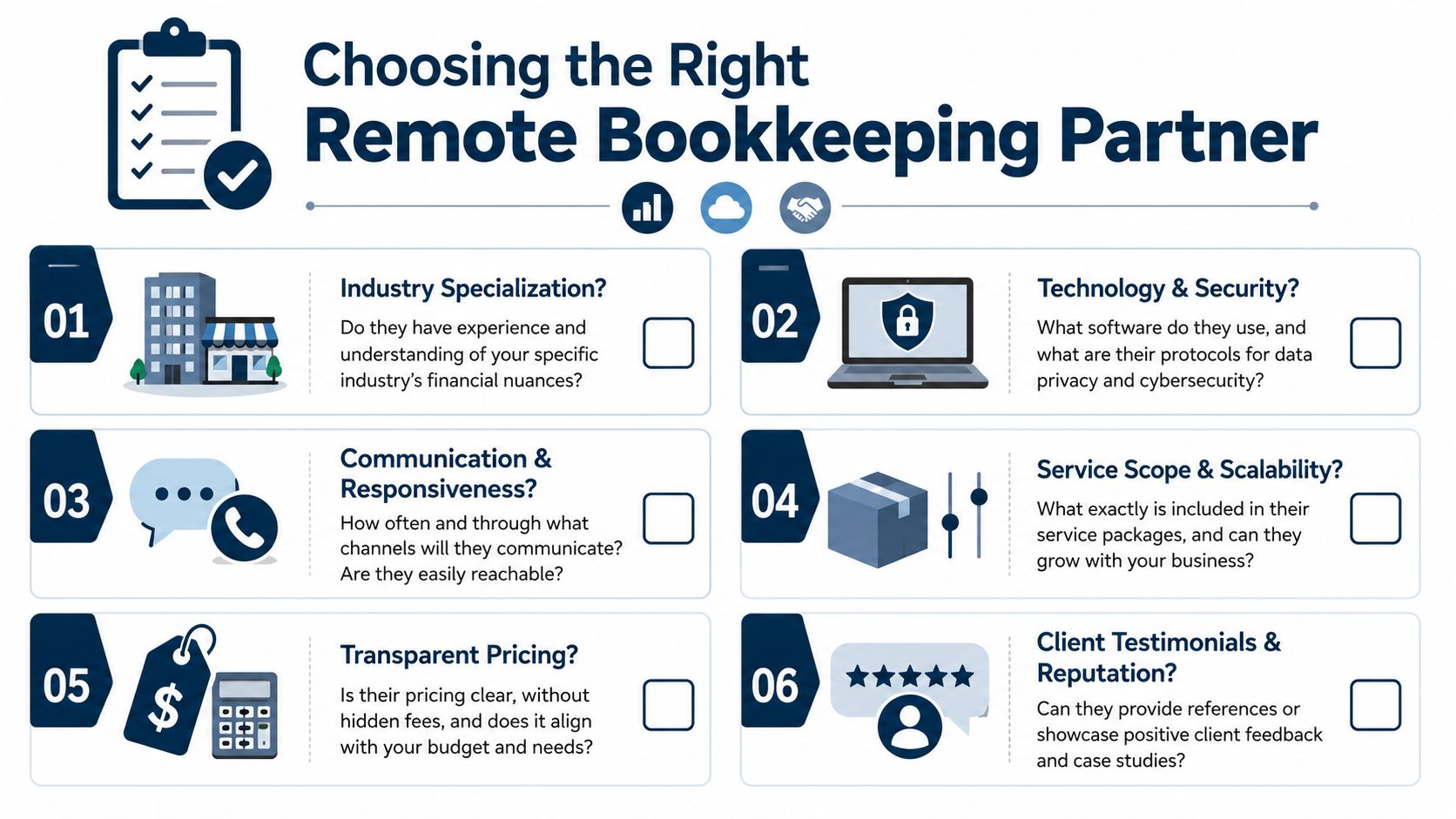
You don't need a flashy pitch. You need straight answers to practical questions.
Ask things like:
- Do you work with businesses like mine? A construction company needs someone who understands job costing. A healthcare practice needs someone who understands provider-level or location-level reporting. A law firm may need trust-account awareness.
- How do you build the chart of accounts? This sounds boring, but it drives reporting quality. If the chart is generic, your reports will be generic too.
- What software do you use? Ask whether they work in QuickBooks Online, Xero, payroll systems, bill-pay tools, and app integrations without leaning on spreadsheets for everything.
- Who is doing the work? Is it one person, a team, or a subcontractor you'll never meet?
- What happens if something is wrong? Ask how issues are corrected and who supports you if records are questioned later.
- How often will we talk? Good communication beats polished branding every time.
Specialist beats generalist in complex businesses
A generalist can be fine for a very simple company with low volume and few moving parts. But once you have project work, multiple service lines, insurance reimbursements, retainers, trust balances, or field labor, generic bookkeeping starts to break.
That's why local owners should look for partners who speak the language of their industry. In Greater Philadelphia, that often means understanding contractor workflows, healthcare reporting, real estate entities, or professional service billing models.
A broader framework can help here too. Even though it's focused on AI vendors, the criteria in Wispra on selecting AI partners maps well to bookkeeping because the core issues are the same: process, transparency, accountability, and fit.
A simple way to pressure-test a provider
Use one real scenario from your business and ask how they'd handle it.
For example:
- A contractor can ask how they track labor and materials by job.
- A clinic can ask how they'd separate provider performance from total practice overhead.
- An agency can ask how they'd report profitability by client or service line.
You can also review this resource on how to find a bookkeeper if you want a practical hiring lens before talking to firms.
If a provider can't explain your own business model back to you clearly, they're not ready to manage the books behind it.
Understanding Remote Bookkeeping Prices and Models
Pricing gets confusing because owners compare different service types as if they're the same thing. They're not.
Some firms price low because they're doing basic transaction coding only. Some charge more because they include reconciliations, reporting, cleanup support, and regular owner communication. The right question isn't just “What's the monthly fee?” It's “What work is included?”
The most common pricing setup
Most modern remote bookkeeping services use a flat monthly fee. That's usually easier for owners because you know what to expect and you're not afraid to ask questions every time the clock starts running.
According to Forbes Advisor's online bookkeeping pricing overview, remote bookkeeping services typically cost 30% to 50% less than in-house bookkeepers, with flat-rate monthly pricing for small to midsize businesses often ranging from $149 to $399, while QuickBooks Live starts at $300 per month.
That range usually fits businesses with straightforward monthly needs. More complex businesses may need a custom price if they have higher transaction volume, multiple entities, messy historical books, or special reporting needs.
What usually changes the price
A few factors move the monthly fee up or down:
- Transaction volume because more activity means more review and reconciliation
- Complexity such as multiple bank accounts, loans, locations, or entities
- Industry needs like job costing, trust tracking, or detailed class reporting
- Add-on support for bill pay, payroll coordination, or advisory meetings
For owners trying to budget, this breakdown of small business bookkeeping cost is useful because it shows how service scope affects the final number.
What works best for most SMBs
Flat pricing works better than vague hourly billing in most cases. It makes the relationship healthier. Owners reach out sooner, bookkeepers can build a stable monthly workflow, and there are fewer billing surprises.
If a quote sounds cheap, ask what's missing. Low prices often leave out cleanup work, reporting support, or the industry knowledge that makes the books useful.
Your Top Questions About Remote Bookkeeping Answered
Owners usually have a few concerns left after they understand the service. Most of them are reasonable.
Is my financial data safe in the cloud
It can be, if the provider uses secure systems and documented access controls. Cloud bookkeeping platforms are built for encrypted access, controlled permissions, and shared visibility. The weak point is often process, not the software itself.
That's one reason businesses are spending more attention and money here. More than 50% of small businesses increased their bookkeeping budgets in 2025 because of rising compliance demands and growing data security risks, according to bookkeeping industry statistics for 2025.
Is there any benefit to working with a local remote bookkeeper near Philadelphia
Yes. Remote delivery and local knowledge can work together.
A bookkeeper in the Philadelphia and West Chester area is more likely to understand the rhythm of local businesses, state and city filing realities, and the industries that are common here, especially construction, healthcare, real estate, and professional services. You still get cloud-based access and flexible communication, but the business context feels more familiar.
What happens if I get audited
A bookkeeper doesn't replace a tax attorney or CPA in every audit situation, but a good bookkeeping partner should help you produce organized records, reconciliations, and clean support files.
The best time to think about audit support is before you hire. Ask how documentation is maintained, who stands behind the work, and how they respond if records are questioned later. Clean books don't guarantee a stress-free audit, but they make the process far less painful.
Will I lose control if someone else handles the books
No, not if the setup is done right. You should gain visibility.
You still own the accounts, the records, and the decisions. The bookkeeper handles the routine work and gives you clearer reporting. That's not giving up control. That's getting better information.
Can remote bookkeeping help me make better decisions, not just file taxes
Yes. That's the main point.
If the books are current and built around your industry, they can help you answer everyday owner questions about hiring, pricing, job performance, cash flow, and profit. Tax prep matters, but most owners need decision support all year long, not just at filing time.
If you want a bookkeeping partner that can work remotely, explain the numbers plainly, and support day-to-day decisions for a growing business, take a look at MyOfficeOps. They work with Philadelphia-area and West Chester businesses across bookkeeping, accounting, payroll integration, reporting, and advisory support, with a process built around discovery, onboarding, and ongoing guidance.