
Accounts payable automation is software that handles the whole invoice-to-pay process, from reading a bill to sending the payment, so your team spends less time on data entry and more time on decisions that help the business. In mature setups, teams are seeing 95%+ OCR accuracy and 90 to 95% straight-through processing, which means a lot of invoices can move without anyone touching them (Peakflo).
If you've ever had a stack of vendor bills sitting on a desk while someone digs through email for approval, you already know why this matters. The invoices don't stop coming just because month-end is busy, and the work has a habit of landing on the same few people every time.

Why Your Invoice Pile Keeps Growing
A lot of small business owners know the same scene. Bills arrive by email, a scanner, or paper on somebody's desk, then they wait for someone to type in the details, check the purchase order, chase an approver, and finally send the payment. If one person is out sick or traveling, the pile just sits there, and vendors start asking where their money is.
That backlog usually isn't caused by one big failure. It's the small stuff, a missing date, a typo in the invoice number, a manager who forgot to approve something, or a receipt that never got attached. Over time, the work turns into a relay race where the baton gets dropped at every handoff.
What AP automation really is
Accounts payable automation is the software version of that relay race, but with fewer dropped batons. It captures the invoice, checks the fields, sends it to the right approver, matches it to the purchase order or receipt, posts it into the accounting system, and helps send payment with little human handling (ABBYY).
That's a lot more than storing PDFs in a folder. It's closer to a live workflow that keeps moving until the invoice is paid. Medius describes the same idea in plain terms, software that captures invoice data, routes approvals, syncs with ERP systems, and executes payments as part of one process (Medius).
Practical rule: if your AP process depends on people remembering the next step, it's already fragile.
For a busy owner, the appeal is simple. You stop paying staff to retype the same information over and over. You also get a cleaner trail when someone asks why a bill was paid late or why a vendor invoice was rejected. If you want a plain-English explainer on the error reduction side, this resource on reducing errors in accounts payable is worth a look.
If you're already organizing invoice intake, a focused invoice processing automation guide can help you compare the old way with a more structured flow.
How Accounts Payable Automation Works
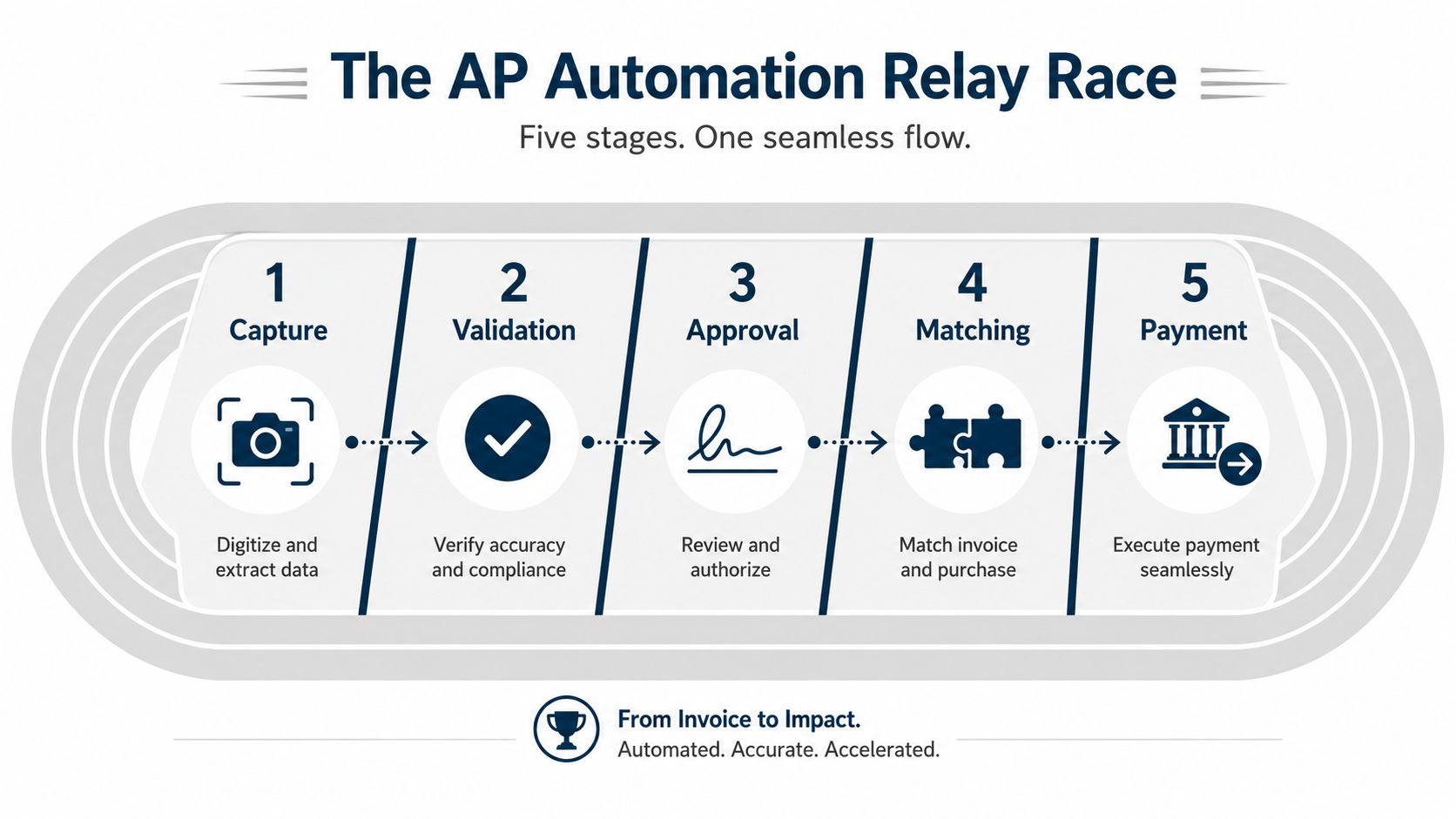
AP automation follows a clear workflow, with each step handing off to the next one in a controlled order. It starts by getting the invoice into the system, then checking the details, routing it for approval, matching it to supporting records, and finally preparing payment. The point is to keep routine bills moving without forcing someone to touch every step by hand.
Capture and validation
The first step is capture. The software reads invoices from email, uploads, or scans, then pulls out the important fields with OCR and AI. Those tools are used to catch the vendor name, invoice number, date, totals, and line items so nobody has to key them in by hand (ABBYY).
After that comes validation. The system checks whether the invoice looks right, whether required fields are present, and whether the values line up with business rules or master data. For a small business owner, that means the software can catch obvious mistakes early, like a missing purchase order number or a total that does not match the line items, before the bill reaches approval.
Approval, matching, and payment
Once an invoice passes validation, the system sends it to the right approver based on rules you set. In a professional services firm, that might mean a department head approves a consultant bill before finance sees it. In healthcare, it might route based on clinic or location. In construction, it often follows job cost or project rules so a bill does not land on the wrong manager's desk.
From there, the software matches the invoice to the purchase order or goods receipt and flags anything that does not line up. Mature deployments often aim for 90 to 95% straight-through processing, which means clean invoices can move from receipt to payment with no manual touch (Peakflo).
If the invoice matches, the system posts it to the ERP and helps execute payment. If it does not match, it moves into an exception path where a person reviews the problem instead of the whole team reviewing every invoice. That keeps the routine bills on track and leaves human attention for the cases that need judgment.
When AP automation works well, humans handle the exceptions, not the routine.
That boundary matters. Approval rules, matching logic, and payment timing are part of the workflow, but the software still depends on the setup you give it. For a broader look at where AP tools sit in the finance stack, MyOfficeOps has a practical accounts payable automation benefits guide that pairs well with this topic. If you want a closer look at the intake side, this invoice processing automation guide explains how invoice handling changes once the process is more structured.
The Financial Impact of AP Automation ROI
The payoff becomes easier to see when you stop talking about “efficiency” and look at the work itself. Manual invoice processing costs around $15 per invoice and takes about 14.6 days, while a fully automated AP employee can process over 23,000 invoices per year compared with about 6,000 in a manual setup (DocuClipper). That is not a small improvement. It changes how much work one person can carry without the process slowing down.
A separate view of the same issue says manual processing costs around $9.40 per invoice, which shows the exact dollar figure varies by study, but the direction stays the same. Automated AP cuts touches, cuts rework, and gives a small team room to breathe instead of living in spreadsheet triage. For a bookkeeping partner, the practical takeaway is simple. Fewer handoffs mean fewer chances for a bill to sit unnoticed or be entered twice.
Manual vs Automated Invoice Processing
| Metric | Manual Processing | Automated Processing |
|---|---|---|
| Cost per invoice | Around $15 or about $9.40, depending on the study | Lower processing cost through fewer touches |
| Cycle time | About 14.6 days | Much faster once capture and matching are in place |
| Throughput per employee | About 6,000 invoices per year | Over 23,000 invoices per year |
If you need to explain the value to a partner or manager, that table is the cleanest version of the story. It shows that AP automation is not just about convenience, it changes capacity. A front office bill processor can spend less time keying in vendor names and more time checking the exceptions that matter, which is exactly where human review still belongs.
A growing market also matters because it usually means better support and more mature tools for smaller companies. The global AP automation market was estimated at about $3.07 billion in 2023 and is projected to reach $7.1 billion by 2030, growing at a 12.5% CAGR (Grand View Research). That signals AP automation is becoming normal operating software, not a niche experiment built only for large enterprises.
If you want to compare savings against your own books, the accounts payable automation benefits overview gives a practical way to pressure-test the numbers against day-to-day AP work.
What AP Automation Does Not Handle
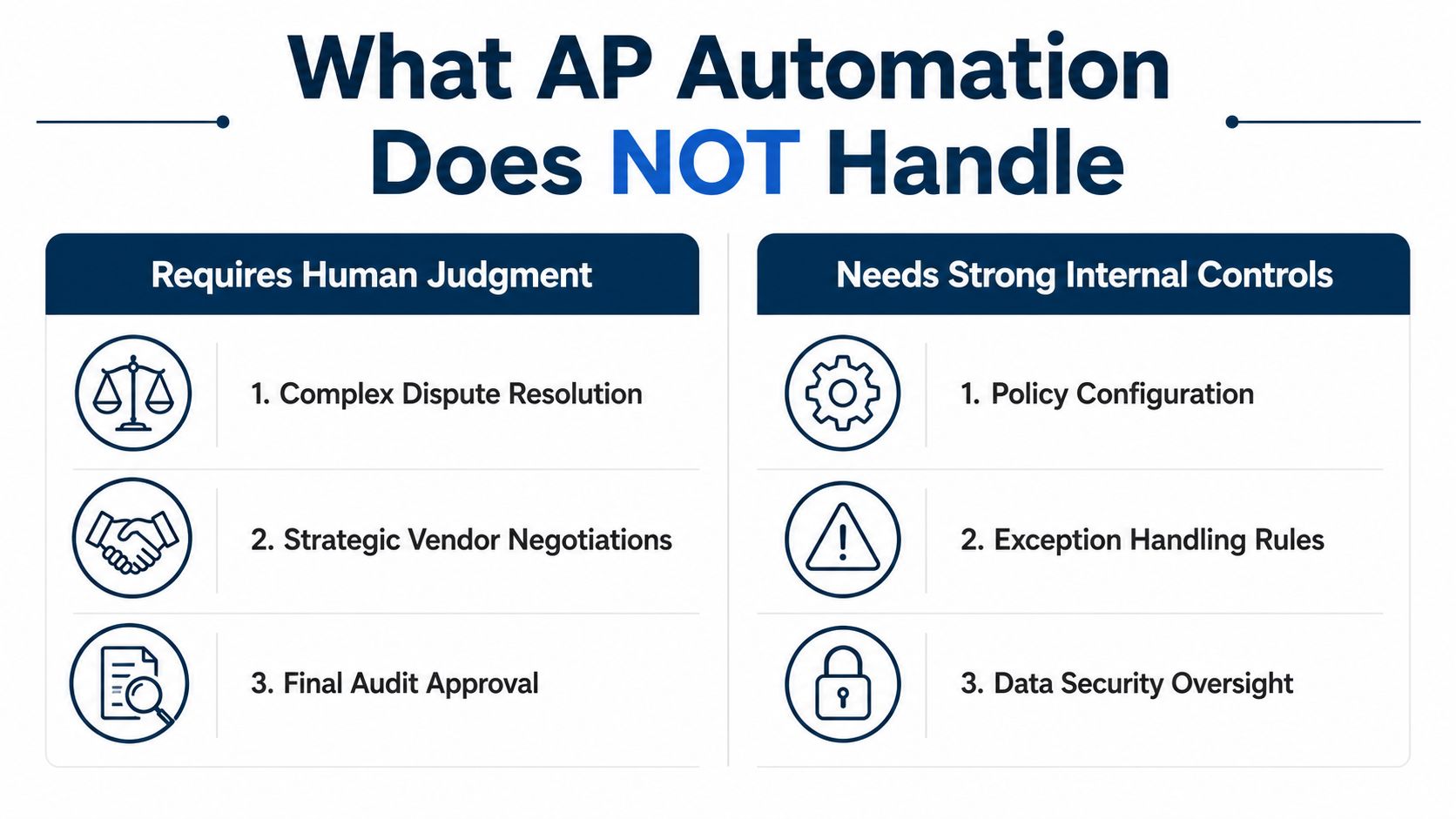
A lot of sales pages make AP automation sound like it should do everything except breathe. Real life is messier. The most useful systems handle the invoice flow well, but they still need human judgment around disputes, vendor setup, and policy decisions.
The parts that still need people
A good tool can flag a bad invoice, but it can't settle every disagreement. If a vendor says the price changed, or a project manager says the work wasn't complete, somebody still has to make the call. Approval chains for multiple entities also need real oversight, especially when one bill touches more than one department or location.
The same goes for vendor master data. If the supplier record is wrong, the automation will happily move the wrong information faster than a human could. That's why control work still matters even after software goes live.
The limits of the system
Recent AP guidance points out that the boundary around reconciliation, vendor master data governance, and exception handling is where many explainer pieces get thin. It also notes that the market is moving toward centralized controls and agentic AI, which raises fresh questions about fraud detection and approval governance (ApprovalMax).
That matters outside of theory. A cloud system can't fix a broken approval policy, and it can't decide whether a first-time vendor bank change is legitimate without a person checking the context. It can only surface the issue and apply the rules you gave it.
Good AP automation reduces manual work. It doesn't replace judgment.
That's the line SMB owners should keep in mind. If your current process has weak controls, automation will expose them faster. If your controls are sound, the software gives them a cleaner, faster way to run.
AP Automation in Action Across Industries
A healthcare practice, a construction contractor, and a professional services firm all feel AP pain in different ways, but the pattern is the same. In each case, the hard part is not whether invoices can be read. It's whether the workflow can survive messy approvals, job-costing, and audit needs without creating extra work (Ramp).
Healthcare, construction, and services
A healthcare clinic may get a steady stream of supply invoices from multiple vendors. AP automation helps keep those bills moving while preserving a clear approval trail, which matters when billing questions come up later. The software doesn't make the decision for the practice manager, it just keeps the paperwork from disappearing.
A construction contractor has a different headache. Invoices need to line up with job-costing codes, and one bad coding choice can blur the picture of project profitability. Automation helps route the invoice to the right approver and tie it to the right job, but the cost structure still has to be designed by the team.
A professional services firm often works across several client projects at once. Vendor bills may need to be split, approved by different managers, or coded against the right engagement. The automation can move the invoice through those steps, but someone still has to own the rules.
If you're comparing broader vendor tools for nonprofit-style controls and approvals, this guide to vendor software for nonprofits is a useful side reference because it shows how approval governance changes when the workflow gets more complex.
The common thread
The question for SMBs in these industries isn't “Will it automate invoices?” It's “Will it handle the messy parts without hiding new work?” That means thinking about audit trails, exception queues, and how many people still need to touch a bill before it gets paid.
For local firms around Philadelphia and West Chester, that's usually the deciding factor. A tool that looks clean in a demo can still fall apart if approvals live in email, job codes change often, or a vendor setup has to be checked by hand every time.
How to Evaluate and Choose an AP Automation Solution
Start with your current pain points, not the vendor demo. If invoice capture is the weak spot, look at OCR quality. If approvals are the problem, look at routing rules. If your accounting team spends its week fixing sync issues, integration should be the first thing you test.
What to ask before you buy
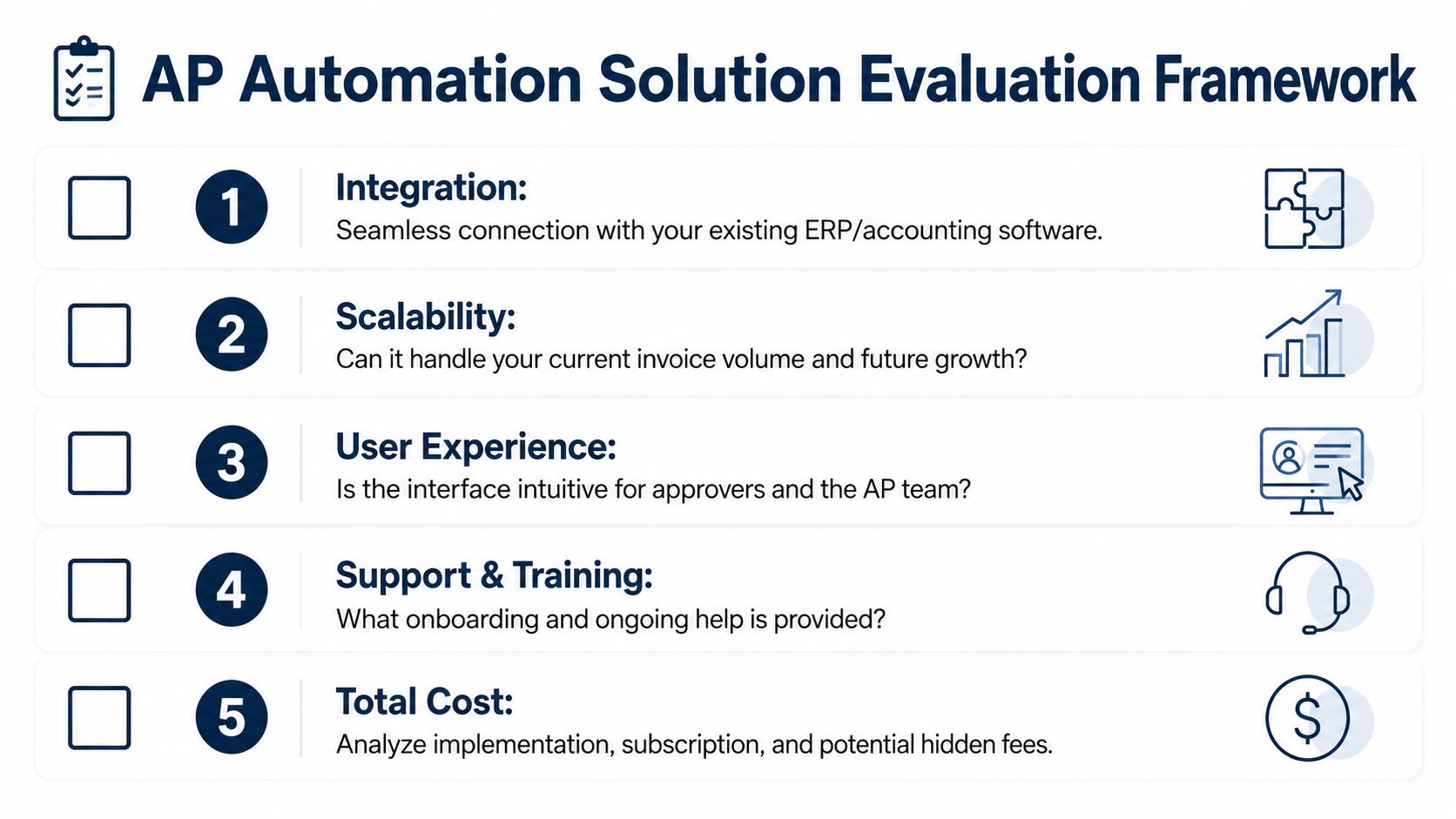
A useful checklist is simple:
- Integration fit: Does it connect cleanly with your accounting or ERP system, or will your team live in spreadsheets between systems?
- Workflow flexibility: Can you set approval rules by amount, vendor, class, or location without calling IT every time?
- Capture quality: Does the vendor show real extraction performance on invoices that look like yours, not just polished samples?
- Support and training: Will someone help during rollout, or are you on your own after the sale?
- Total cost: What's included, and what gets added later as setup, support, or extra modules?
Those questions matter because the best tool on paper can still be a poor fit if it's hard to run. In a small team, simple usually wins over fancy.
What a realistic rollout looks like
Modern AP automation platforms commonly combine OCR, machine learning, workflow engines, and ERP integrations, with reported OCR accuracy around 95% or higher and straight-through processing around 90 to 95% in mature deployments (Peakflo). That said, those numbers only help if your data, rules, and integrations are ready.
A pilot is usually the smartest first move. Test one workflow, get the exceptions under control, and make sure approvers use it before you expand. A full cutover sounds efficient, but it can create a bigger mess if the rules aren't right.
MyOfficeOps can fit into this evaluation phase as one option for SMBs that want bookkeeping and advisory support around the process, especially when the bigger issue is how AP ties into reporting, cash flow, and month-end close.
Your Next Steps Toward Smarter Bill Pay
AP automation works best as a control system, not a magic trick. It takes care of invoice capture, matching, routing, and payment when the rules are clear, while people still own vendor setup, exception handling, and approvals.
Start with your own invoice flow. A professional services firm may have bills waiting on a partner's sign-off because the coding is unclear. A healthcare practice may lose time fixing invoices tied to the wrong location. A construction company may slow down because the same subcontractor invoice gets routed through several people before anyone checks the job code. Count where bills stall, who keeps fixing the same issue, and which approvals happen because of habit instead of policy.
Then look at the work AP automation can remove. Re-keying invoice data, sending reminders, matching purchase orders, and flagging mismatches are the jobs that software handles well. Human review still matters for new vendors, unusual charges, split approvals, and payments that need judgment. If you want a plain-English way to compare your current process with a cleaner one, use this guide to managing accounts payable and compare it against the way your team works today.
A small pilot usually tells you more than a long planning meeting. Start with one approval path or one vendor group, then see whether the team can use it without making the process harder to follow. That gives you a clear read on where automation helps, where it creates exceptions, and whether your controls still make sense once the paperwork moves faster.
MyOfficeOps helps Philadelphia-area SMBs clean up bookkeeping, improve reporting, and make AP workflows easier to manage without adding extra chaos. If you are deciding whether automation fits your invoice process, visit MyOfficeOps and talk with a team that can help you map the workflow, review the controls, and plan a sensible next step.