
You've probably got a bill sitting out there right now, maybe from a client who said “net 30” like it was a promise and then treated it like a suggestion. You sent the invoice, you did the work, and now you're checking the bank app a little too often while trying to keep payroll, rent, and vendor bills straight.
That's the everyday problem accounts receivable automation is meant to solve. Not with magic, and not by “making finance digital” in some fuzzy way, but by taking the messy parts of getting paid and putting them on rails. For a lot of small businesses, that matters because manual AR is still the norm, even though 80% of respondents in a 2026 survey called AR automation important, high priority, or critical, while only 3% said they'd fully automated it, with budget and IT backlog named as the biggest barriers Financial Professionals.
The Late Invoice Problem Most Small Businesses Live With
A contractor finishes a job in Cherry Hill, sends the invoice on Friday, and by Tuesday the office manager is already asking, “Did they pay yet?” That's not drama, that's just cash flow making people nervous. The same story plays out in agencies, clinics, and property firms, where the work is done long before the money shows up.

The gap is bigger than most owners think. A 2026 industry report said 92% of businesses are typically paid after invoice due date, and 40% spend six or more hours per week on AR-related tasks Financial Professionals. That's a lot of time for someone to spend chasing money they already earned.
What that delay feels like in real life
It usually starts small. One reminder email, one awkward phone call, one promise that the check's “in process.” Then the aging report starts looking like a parking ticket stack, and the whole month gets harder to read.
If you want a plain-English way to think about the follow-up side, the Revcover dunning guide is a useful look at how reminder timing and tone affect collections. If you're still using spreadsheets to track who owes what, the older-school accounts receivable aging view is probably the closest thing you've got to a traffic light for cash.
Practical rule: if you're spending more time asking for payment than reviewing the actual numbers, your AR process is already costing you attention, not just money.
Accounts Receivable Automation Explained Like You Are Twelve
Think of AR automation like a smart office assistant who never loses a paper, forgets a follow-up, or misfiles a payment. You still tell it the rules, but once the rules are set, it handles the repetitive stuff without making you start from scratch every time. That's the simplest answer to what is accounts receivable automation.
It covers the full path from invoice to cash. A system can generate invoices from source data, send them by email or another electronic channel, match incoming payments to open invoices and remittance data, and flag what still needs attention. That's also why the more practical guides, like invoice processing automation, often talk about capture, routing, and matching together instead of treating them as separate chores.
The pieces that matter most
Invoice creation is the first piece. Instead of keying in the same customer details over and over, the software can pull them from your ERP, CRM, or order system.
Delivery is the next step. The system sends the invoice out on a schedule or when an event happens, so you're not relying on someone to remember to hit send after lunch.
Payment matching is where the grunt work shrinks. If a customer pays and sends remittance data, the software can line that payment up with the right invoice instead of making someone hunt through emails and bank feeds.
Reminders and status reporting keep the process moving. You get the visibility to see what's due, what's late, and what's already cleared without opening ten tabs and squinting at a spreadsheet.
The best way to explain it to a spouse or business partner is this. AR automation is the part of the office that keeps track of who owes you, who already paid, and what still needs a human to look at.
How the AR Workflow Changes When You Automate It
Manual AR usually looks like this. Someone builds an invoice in a spreadsheet or accounting system, emails it, waits, sends a reminder, checks the bank, and then tries to match the deposit to the right customer. If the payment is short, split, or missing remittance details, the whole thing turns into detective work.
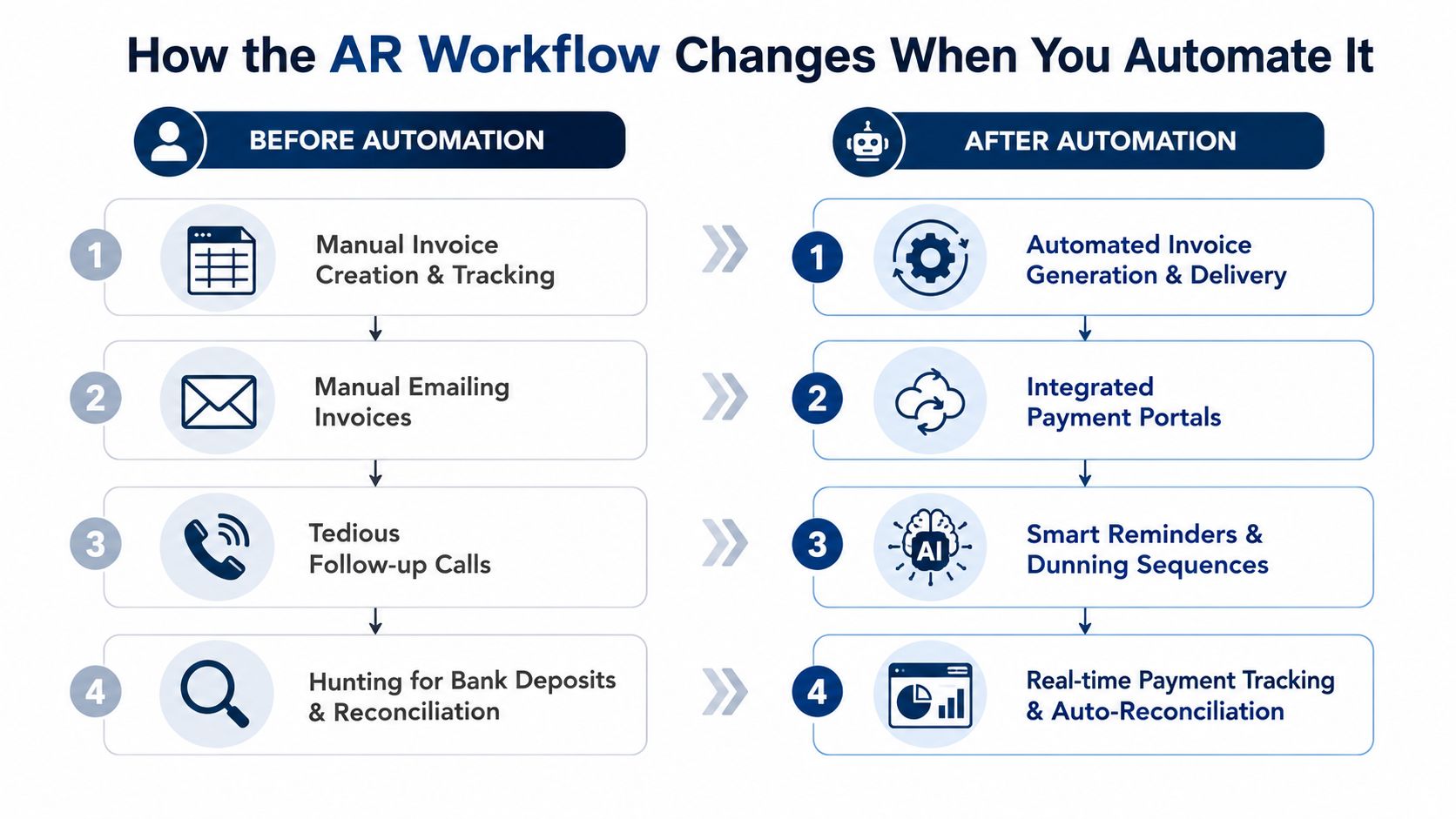
With automation, the sequence is cleaner. The invoice data can flow from the ERP, CRM, or order system into the billing step, the invoice goes out on a set rule, and incoming payment data gets matched automatically when bank feeds or lockbox files come in. That matches how stronger implementations are built, as a workflow and integration layer that connects source systems to invoicing, collections, cash application, and reconciliation NetSuite and Folio3.
Before and after, without the sales pitch
The manual version depends on memory and follow-up discipline. The automated version depends on clean inputs and agreed rules.
That shift matters because a tool can't fix a process nobody has defined. A firm that wants to dig deeper into the operating side can look at how to manage accounts receivable effectively, since the process has to be stable before software can help.
Good automation doesn't start with software. It starts with the same invoice getting created, sent, matched, and posted the same way every time.
For readers comparing AR and broader billing workflows, automated revenue cycle management 2026 is a useful reminder that the best systems are built around repeatable handoffs, not one-off fixes.
The Real Numbers Behind Faster Cash Collection
If you own a business, the numbers that matter are simple. How fast do you get paid, how many hours does your team burn chasing invoices, and how much cash is stuck waiting to be turned into payroll or inventory?
One ROI study says organizations that fully embraced AR automation reported a 40%+ reduction in Days to Pay Quadient. A separate benchmark report found average Days Sales Outstanding improved from 45 days in 2024 to 39 days in 2025, a six-day drop, while eDelivery went from 79.65% to 81.76% and touchless payments from 90.11% to 92.35% in the same period Quadient.
Ask the right question, not the flashy one
If your invoices move six days faster, what does that do to your month-end cash position? If most of your invoices move without a human touching them, what else could your bookkeeper do besides chasing status updates? If your team is already spending hours every week on AR tasks, what would that time be worth if it went back into cleanup, reporting, or customer calls?
The market side says this isn't a tiny niche. One estimate puts the global AR automation market at about $3.4 billion in 2025 and projects $5.95 billion by 2030 Quadient. Another report values the market at USD 4.79 billion in 2025 and projects USD 12.86 billion by 2033 with a 13.2% CAGR from 2026 to 2033 Grand View Research.
| AR Automation Metrics and What They Mean for SMBs | ||
|---|---|---|
| Metric | Reported Result | What It Means for a Small Business |
| Days to Pay | 40%+ reduction in a fully automated environment Quadient | Money reaches the bank faster, so bills are less stressful |
| DSO | 45 days to 39 days in one benchmark Quadient | Less cash sits tied up in unpaid invoices |
| eDelivery | 79.65% to 81.76% Quadient | More invoices move electronically instead of by hand |
| Touchless payments | 90.11% to 92.35% Quadient | Fewer payments need manual cleanup |
| Market size | $3.4B in 2025 to $5.95B in 2030 Quadient | The toolset is moving deeper into normal business use |
Getting Ready to Automate Without Setting Money on Fire
Buying software too early is how a lot of owners end up with a shiny dashboard and the same old mess underneath it. If the customer names are inconsistent, invoice data is incomplete, and no one agrees on who approves what, automation just moves the confusion faster.
That's why the smarter view is process control, not shopping. A good setup starts by mapping the current AR workflow, cleaning customer and invoice data, and getting the finance team, operations team, and whoever owns approvals to agree on the same rules Resolve Pay.
What to check before you buy anything
- Map the flow: Write down where invoices start, who touches them, and where delays happen.
- Clean the data: Fix duplicate customers, missing terms, and bad invoice fields before automation touches them.
- Confirm the system links: Make sure your ERP or accounting platform can talk to the new tool without ugly workarounds.
- Set exception rules: Decide what happens when a payment is short, disputed, or missing remittance details.
- Get buy-in: If the people who use the process don't trust it, they'll work around it.
If you need help with the system side, Osher Digital custom ERP services is one example of a team that works on ERP connections and custom builds. The bigger point is that the tool has to fit the workflow you run, not the one the demo slides show.
How Different Industries Use AR Automation in Real Life
A professional services firm usually bills by project, milestone, or retainer. The smooth version is simple, the invoice lines pull from project codes, the amount matches the work done, and the reminder goes out without someone rewriting the same note every month. The pain it relieves is milestone billing drift, where work is complete but the invoice is still sitting in someone's draft folder.
In healthcare, the workflow gets messier because patient balances and insurer remittances don't always line up neatly. Automation helps clinics match payments to invoices faster and surface the items that need a human to look at, instead of making staff dig through stacks of explanations and remittance notes. The pain it relieves is back-and-forth cleanup.
Construction has its own headaches. Progress invoices, job billing, and lien-waiver paperwork can slow everything down if someone has to chase each document by email. Automation helps keep the paperwork attached to the invoice flow, so the office isn't stalled by missing forms or a subcontractor's half-finished reply.
Real estate and property management firms deal with a steady stream of tenant charges, service fees, and recurring billing. Automation helps them send invoices on schedule and keep status reporting straight across multiple properties without turning the AR desk into a paper trail hunt. The pain it relieves is the daily pile-up of small invoices that become a big mess if no one standardizes them.
The common thread across all four
Different industries bill in different rhythms, but the pattern is the same. Clean input, repeatable sending, easier matching, fewer surprises. That's why AR automation works best when it fits the business model instead of forcing every customer into one generic billing pattern.
Where Automation Stops and Humans Still Need to Step In
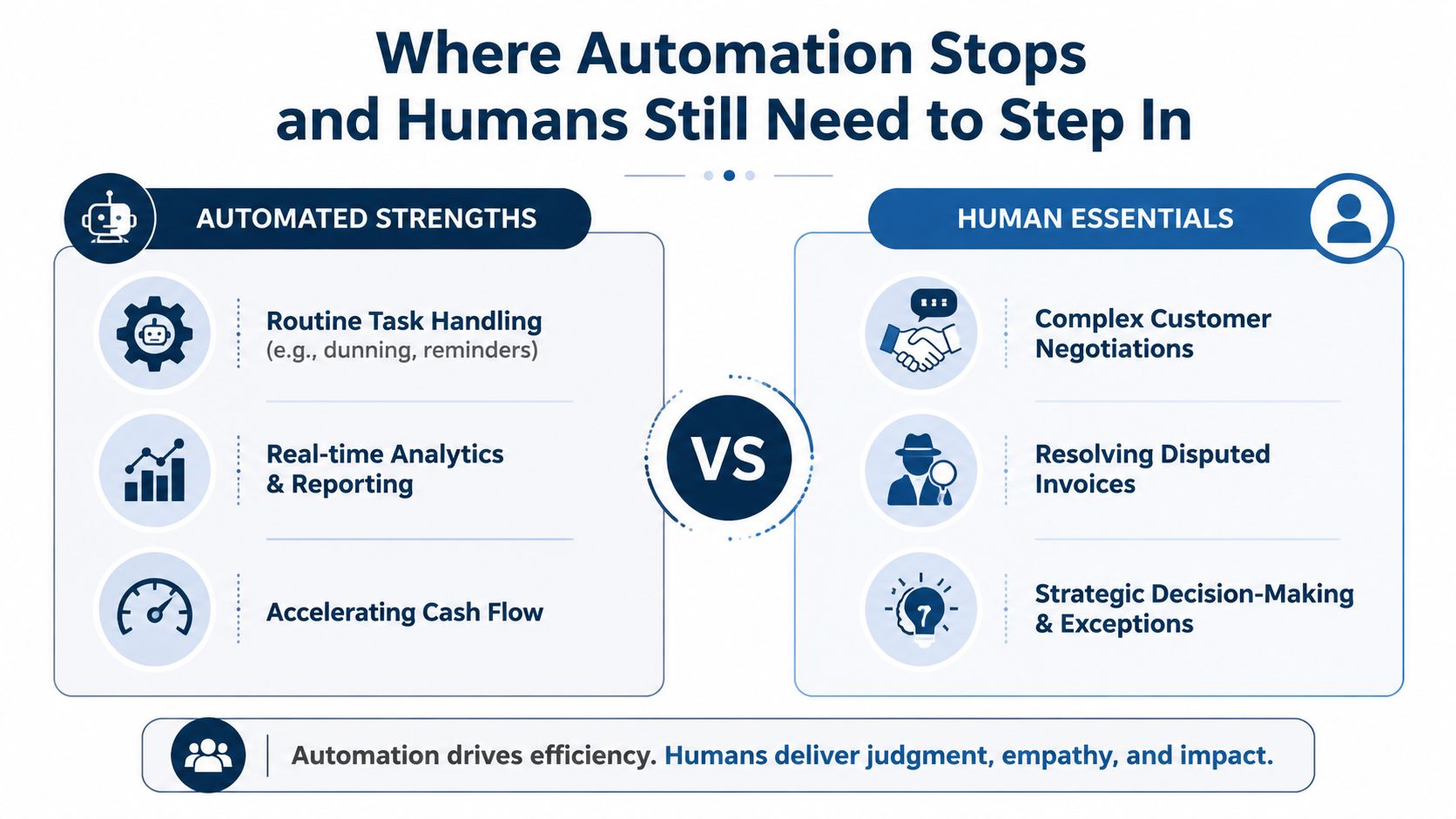
The “fully hands-free” pitch sounds nice until a customer disputes a charge, pays half the invoice, or asks for terms that don't fit the standard rule. Current guidance says AI can help with invoice generation, payment tracking, reminders, and some collections work, but it still depends on clean data, clear goals, and a vendor that fits the business NetSuite.
That's the part people skip when they think automation means fewer people across the board. In practice, staff usually move toward exception handling, customer follow-up, and resolution work. The routine gets lighter, but the human judgment matters more on the messy accounts.
What still needs a person
- Disputes and exceptions: Someone has to review bad invoices, short pays, and unusual terms.
- Customer conversations: A machine can send a reminder, but it can't negotiate trust.
- Process cleanup: If your source data is sloppy, software will expose the problem faster.
- Training and adoption: If the team doesn't know the new rules, they'll fall back to old habits.
Automation should reduce repetitive work, not hide broken rules.
That's also why it helps to walk into any software demo with a list of common pitfalls. Ask what happens with partial payments, who owns disputes, how the tool handles messy source data, and how the team gets trained after go-live. If those answers feel vague, the platform probably is too.
Putting It All Together and the Questions SMB Owners Ask Most
Accounts receivable automation is a process-control project that turns invoicing, reminders, payment matching, and reconciliation into a repeatable workflow. The software matters, but only after the business has decided how invoices should move, who handles exceptions, and what “done” looks like for each step.
A good first move this week is simple. Take one sheet of paper and map your current AR process from invoice creation to deposit posting. Mark every place where someone waits, retypes data, or chases a customer twice, because that's where automation can help first.
Quick FAQ
Does AR automation replace my bookkeeper?
Not really. It usually shifts the bookkeeper away from repetitive chasing and toward review, exception handling, and customer communication.
How hard is it to connect with accounting software?
That depends on the platform and how clean your data is. If your ERP or accounting system already holds the right customer and invoice data, the setup is usually much easier than trying to patch bad records later.
What should I expect from day one?
Expect better visibility before you expect a perfect outcome. The first win is usually cleaner tracking and fewer manual touchpoints, not a fully hands-off process.
What if my business has custom billing rules?
Then the workflow design matters even more. The system needs to reflect your terms, your exceptions, and your approval path, or it'll create extra work instead of cutting it.
MyOfficeOps helps small and midsize businesses clean up bookkeeping, build reporting that owners can use, and tighten the cash side of the business around real workflows. If you want a team that can help you look at AR process gaps, bookkeeping cleanup, and the reporting around them, visit MyOfficeOps and start with a conversation about where your invoices are getting stuck.