
A payroll mistake rarely arrives with a warning. It shows up when an employee asks about a short paycheck, when the bank balance looks lower than expected, or when a tax notice lands after the filing has already gone out. You may have run payroll correctly in your software, but that doesn't prove the money, tax liabilities, and accounting records all agree.
Payroll reconciliation is the routine check that connects those pieces. You compare what payroll says should have happened with what left the bank and what was recorded in the books. Done regularly, it gives you a chance to fix small errors before they become expensive corrections.
The Basics of Payroll Reconciliation in Plain English
A bakery owner opens the payroll report after payday and spots a costly slip-up. One barista was paid for 42 hours instead of 38, while a tax withdrawal on the bank statement does not match the payroll register. The software finished processing, yet the records still disagree.
Payroll reconciliation is the process of comparing payroll records against source data, including HR information, time and attendance, benefits, taxes, gross-to-net calculations, accounting records, and bank activity. The goal is practical: confirm that each employee received the right pay and that every payroll transaction is complete, accurate, and recorded in the proper place. ADP's payroll reconciliation guide describes reconciliation as a control that supports financial integrity and compliance.
A coffee shop closes the night by checking the till against the receipt book and sales log. If those records disagree, the owner checks the entries before closing the books. Payroll reconciliation applies the same cross-check to wages, taxes, and accounting records.
The three records you match
- Payroll register: This lists each worker's hours, wages, gross pay, deductions, taxes, and net pay.
- Bank or provider statement: This shows money that left the business account, including wage payments and tax remittances.
- General ledger: This shows where payroll expenses, tax liabilities, and cash movements were recorded in the accounting system.
A bookkeeper checks more than the final payroll total. The review also covers missing or incorrect hours, pay-rate changes, new hires, terminations, deductions, tax lines, and posting dates. Timing differences can place a transaction in a different reporting period, while a misclassified labor cost can distort the financial statements. The Payroll processing basics resource explains how these payroll records connect.
Practical rule: If the register, bank activity, and ledger do not agree, pause before closing the books.
The financial risk is real. One widely cited estimate says 33% of U.S. employers made payroll errors in 2023, with payroll mistakes linked to about $7 billion in IRS penalties and roughly $4.5 billion in recurring payroll tax penalties each year. Reconciliation cannot prevent every mistake, but it can expose the gap while timesheets, approvals, payment records, and tax details are still easy to trace.
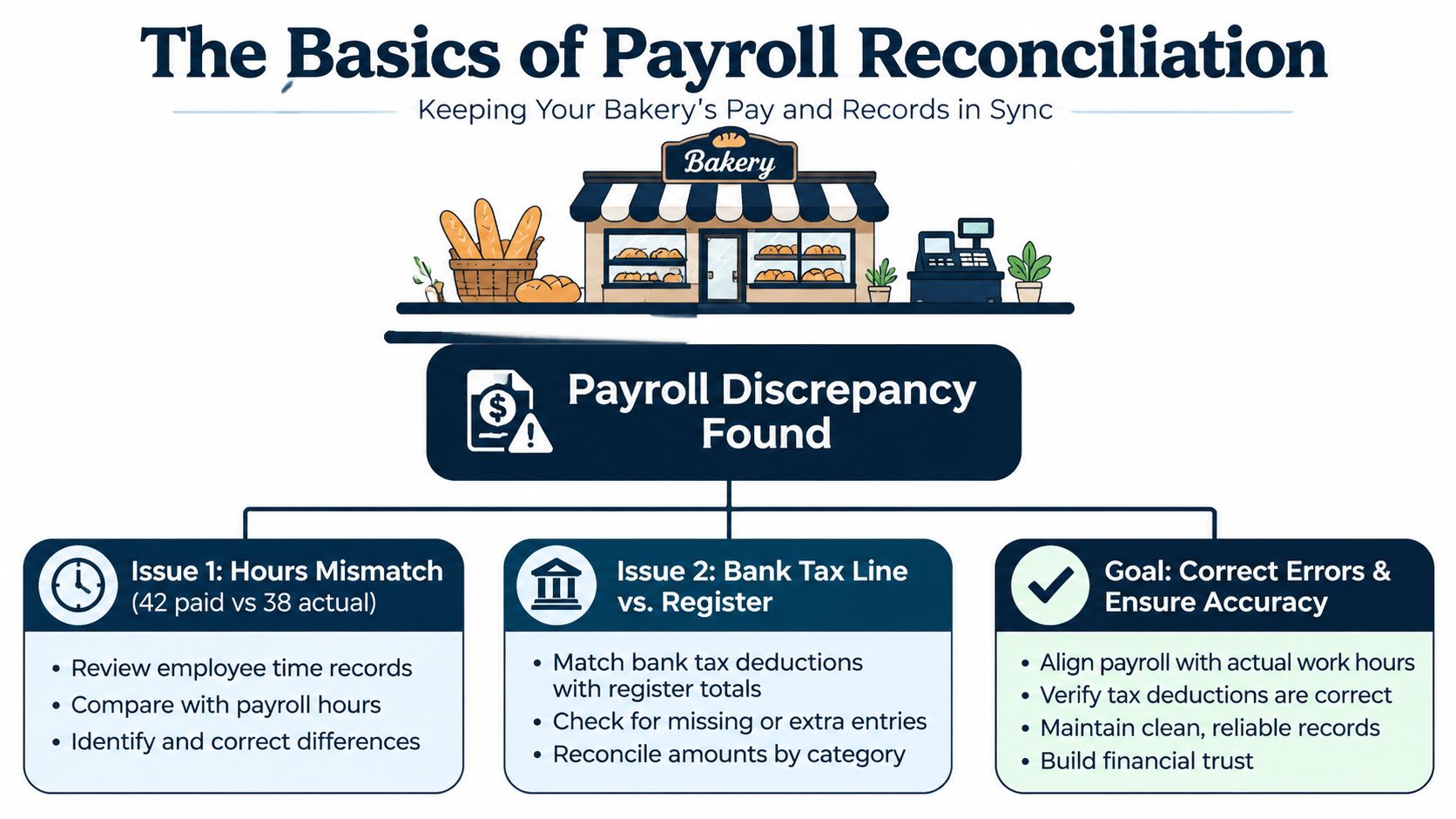
For more guidance on payroll controls and process design, the Paradigm International payroll guide offers a useful reference. The bakery example shows why reconciliation is more than a final check. It is the paper trail that helps a business find who was overpaid, which tax amount is missing, and where the accounting entry went wrong.
How the Reconciliation Process Actually Works
A good reconciliation feels less like a complicated accounting project and more like following a trail. Start with the payroll report, confirm the money movement, and then work through every difference instead of forcing the numbers to balance.
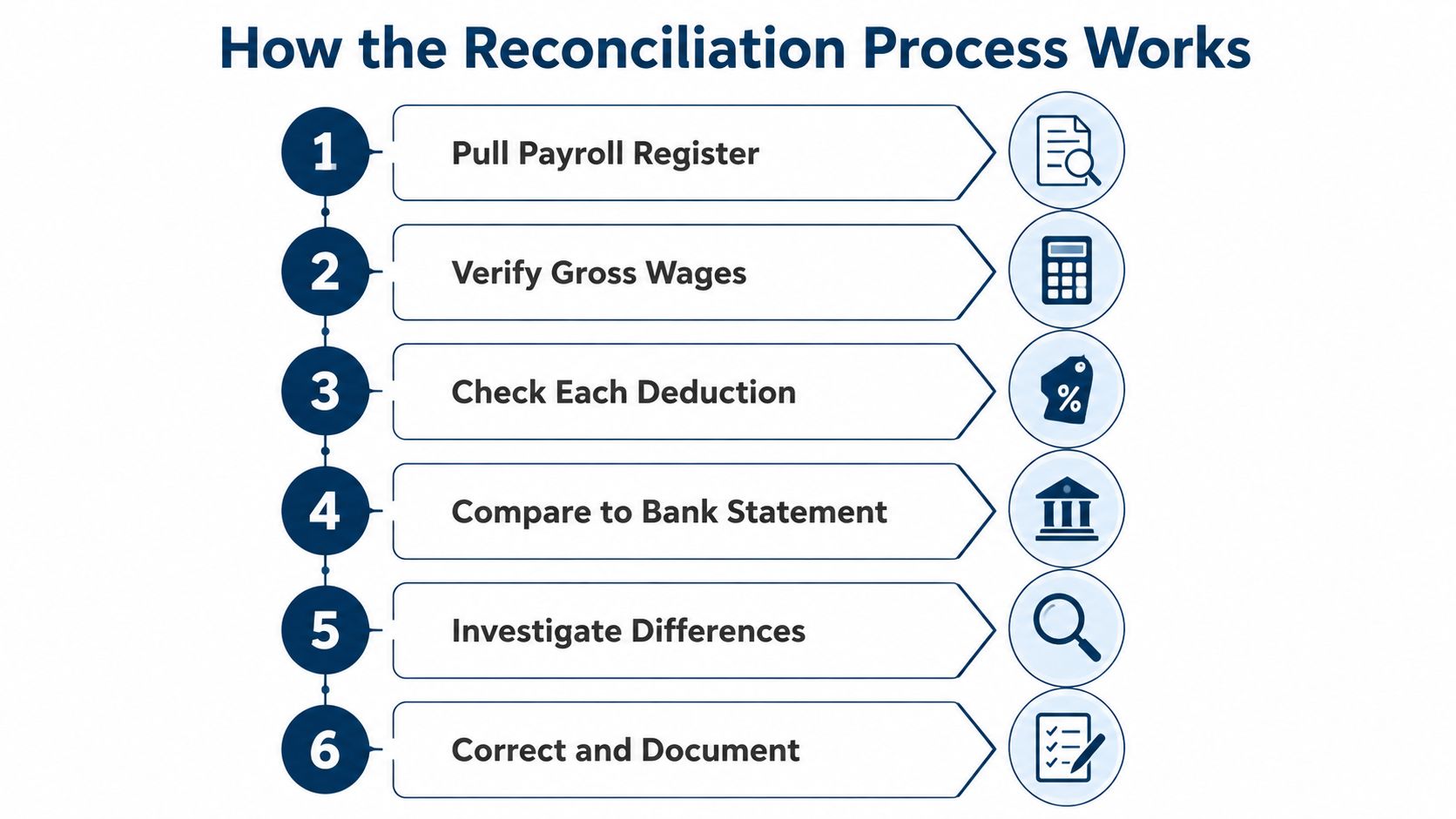
Six checks a bookkeeper follows
Pull the payroll register. Start with the period you're reviewing. Confirm gross wages, employee deductions, employer taxes, and net pay. Look for rate changes, new employees, terminations, bonuses, and unusual adjustments.
Download the bank or provider statement. Gather the statement that shows each payroll-related outflow. Include employee payments, payroll service withdrawals, tax remittances, benefits payments, and other payroll liabilities paid during the period.
Match the register to the cash activity. Line up each expected payment with the related bank line. Tick the items that match. Flag payments that are missing, duplicated, or posted on a different date.
Check tax deposits and filings. Payroll taxes deposited during a quarter should match the liability reported on that quarter's Form 941. If they don't, fix the mismatch before filing because it can lead to a penalty notice or an amended return, as explained in this Form 941 reconciliation guidance.
Post and review the ledger. Record the totals in the general ledger. Then verify that payroll expense, tax payable, benefits payable, and cash accounts agree with the payroll records.
Investigate and document. Find the cause of every difference. Correct the source, record what happened, and note who reviewed the correction. A clean sign-off creates an audit trail instead of leaving the next person to guess.
The tax calendar matters during the fourth check. For federal deposits, employers with $50,000 or less in lookback-period liability are usually monthly schedule depositors, while employers with more than $50,000 are usually semiweekly depositors. Monthly schedule depositors generally deposit by the 15th day of the next month, according to this federal payroll tax deposit guide. Form 941 is due by the last day of the month after the quarter ends, with quarterly dates of April 30, July 31, October 31, and January 31. Form 941 due-date guidance notes a possible 10-day extension when all deposits were made on time and in full.
Tools such as Gusto, ADP, and QuickBooks can pre-fill reports and suggest matches. They don't replace judgment. A person still needs to decide whether a difference is a legitimate timing item, a wrong employee record, or an actual payment error.
Common Payroll Errors That Slip Through
Most payroll errors aren't deliberate. They enter through a rushed time entry, an outdated employee record, or a correction made after the normal payroll run. Reconciliation gives you a structured place to find them.
The patterns worth watching
A worker might enter 50 hours instead of 5 on a Sunday. If the manager approves the timecard without noticing, gross pay, taxes, and the bank withdrawal can all be wrong. Employee-level review makes the unusual entry visible.
Tax settings create another trap. A state updates a tax rate, but the payroll setup still uses the old table. The tax remittance then differs from the amount recorded in the register. The difference may look small, but it affects both the liability account and the filing.
Bonuses and commissions often arrive after the main payroll run. A sales employee receives a commission adjustment, and someone creates a second payment without connecting it to the original payroll journal. The bank shows two payroll-related outflows, while the ledger may show only one complete posting.
Worker classification also matters. Moving someone between W-2 and 1099 treatment changes the tax handling and the accounting entry. Reconciliation can reveal that the payment was processed through the wrong path, but the classification decision should be reviewed with a qualified tax or employment professional.
A payroll rerun creates a different problem. Software glitches or rejected payments can lead someone to run payroll again, and both payments may clear. Finally, tax deposits can clear in the next month. The register and bank statement then look different until the bookkeeper records the proper accrual or timing entry.
| Common Payroll Errors and How They Slip In | How It Slips In | Reconciliation Check |
|---|---|---|
| Mis-keyed hours | A time entry contains the wrong number and receives approval | Compare approved time records with employee-level payroll hours |
| Outdated tax setup | A rate or tax table changes but the payroll system isn't updated | Compare tax liabilities with deposits and filings |
| Late bonus or commission | An adjustment is paid separately after the main run | Search for additional payroll outflows and supporting approvals |
| Worker misclassification | A worker is processed through the wrong payment type | Review worker status, tax treatment, and ledger account |
| Duplicate payment | A rerun sends the original payment again | Match each bank transaction to one approved payroll record |
| Timing difference | A tax payment clears after the accounting period ends | Review payment dates and record an accrual when appropriate |
The cost of these mistakes includes more than the incorrect payment. An EY-based estimate cited by Justworks says about 20% of payrolls contain errors, and each error costs an average of $291 to fix. A published example also attributes $71,705 in direct annual cost per 1,000 employees to incorrect time punches, plus 440 hours of correction labor. Those figures are discussed in Justworks' payroll reconciliation strategies. The lesson for a small business is straightforward: check the inputs, the payment, and the accounting entry together.
How Often to Reconcile and a Monthly Habit That Works
A monthly review gives many small businesses a useful rhythm. It fits the way owners review cash, close the books, and prepare management reports. If you run payroll more often, you can still review each pay run briefly and complete a fuller monthly check.
The important part is consistency. A reconciliation delayed until someone has time usually gets delayed again.
A simple monthly checklist
- Confirm the payroll register: Review gross wages, deductions, employer taxes, net pay, rate changes, new hires, and terminations.
- Match the bank feed: Tie wage payments and tax withdrawals to the payroll records. Separate legitimate timing differences from unexplained gaps.
- Verify tax records: Compare deposits with the liabilities reported or scheduled for filing.
- Review HR details: Check employee names, pay rates, approved hours, benefit changes, and termination dates against the payroll system.
- Log variances: Record the amount, cause, correction, reviewer, and date. Use a threshold that fits your business and apply it consistently.
Set a fixed appointment on the calendar, such as the first Wednesday after month-close. Give the bookkeeper access to the payroll register, bank feed, tax reports, and HR change list before the appointment. That small preparation step prevents the review from becoming a scavenger hunt.
Add a quarterly lookback
Monthly checks catch fresh errors. A quarterly review looks for drift across the year. Compare year-to-date wages, taxes, benefits, and payroll liabilities with the general ledger and filed payroll reports. Review unusual changes in labor cost, departments, job codes, and employee counts.
Don't treat a quiet month as a reason to skip the process. A month with fewer payroll changes can still contain a duplicate payment, a wrong tax deposit, or a posting made to the wrong account. The review may be faster, but the control still matters.
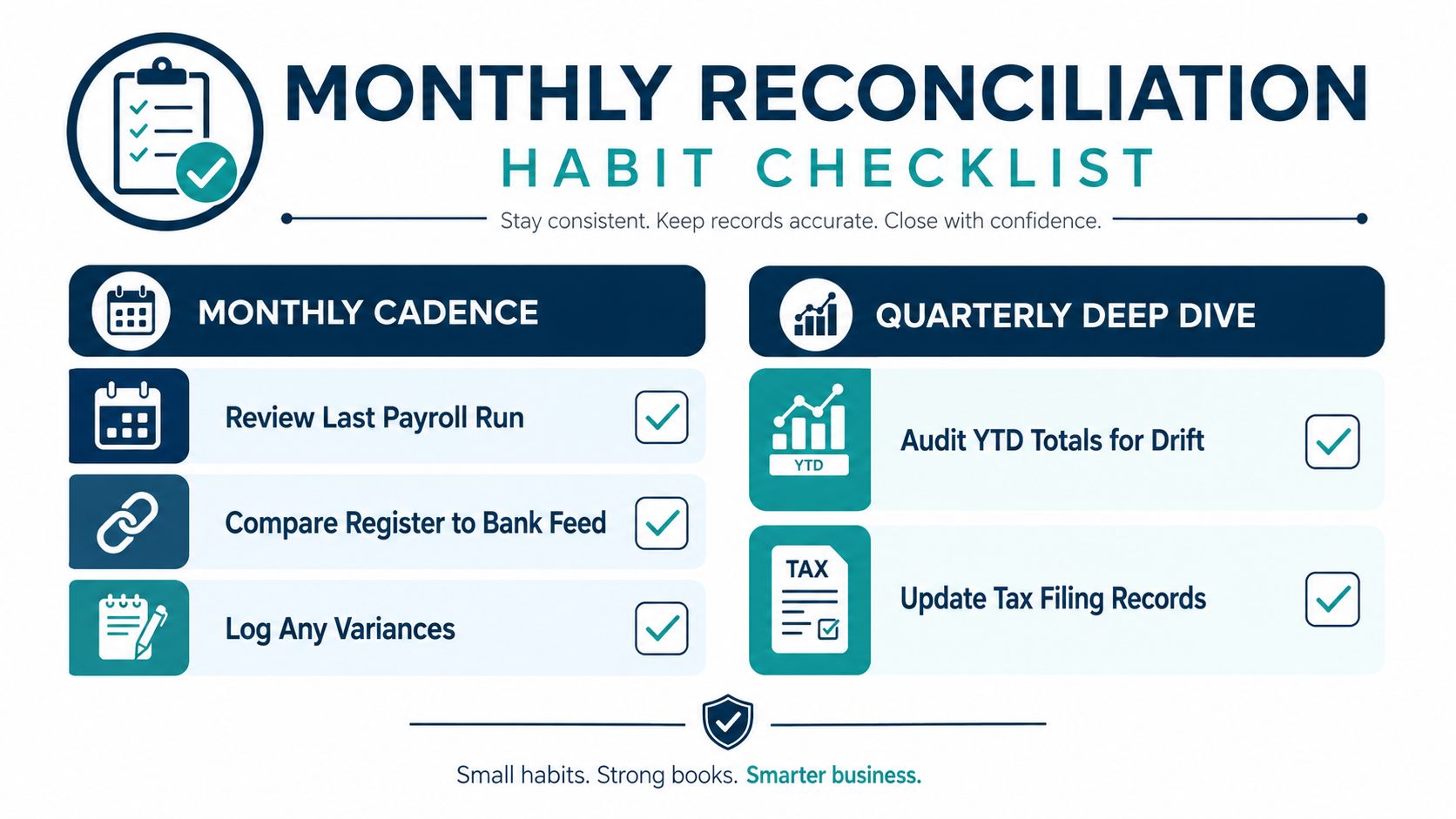
Share the calendar block with the owner, bookkeeper, and payroll contact. When the meeting has a named owner and a written sign-off, “we'll get to it next week” has less room to become a permanent backlog.
Doing It In-House Versus Hiring a Bookkeeper
Keeping reconciliation in-house can work. A very small team with simple pay, one location, and few changes may prefer to keep records close and handle the review internally. The owner or office manager gets immediate access to payroll details and can resolve a question without waiting for an outside partner.
The trade-off is time and focus. A 12-person company spending six owner hours per month on reconciliation is using six hours that could have gone toward customers, sales, scheduling, or staff development. That isn't automatically a bad choice, but it is an opportunity cost worth naming.
The two paths side by side
| Factor | In-House | Outsourced Bookkeeper |
|---|---|---|
| Record access | Immediate access for the internal team | Access depends on shared systems and permissions |
| Review quality | Depends on the employee's payroll and accounting experience | A dedicated reviewer can follow a repeatable control routine |
| Owner time | The owner may handle exceptions and final checks | The owner reviews decisions instead of doing every match |
| Process consistency | Can slip during busy periods or staff changes | A scheduled service routine keeps the review on the calendar |
| Complex payroll | Multi-state or changing payroll can stretch internal capacity | An experienced partner can coordinate payroll reports, liabilities, and ledger entries |
| Cost visibility | No separate vendor bill, but internal time still has value | A planned service fee makes the expense easier to budget |
Outsourcing doesn't mean handing over every decision. You still approve payroll, review unusual items, and control access. The bookkeeper handles the matching work, documents differences, and brings exceptions to you.
A business owner comparing staffing options may look for a remote bookkeeper when location or hiring capacity makes local recruitment difficult. The right choice depends on the person's accounting knowledge, payroll experience, communication habits, and ability to work inside your systems.
When the decision changes
In-house reconciliation may remain practical when payroll is simple and stable. Outsourcing usually becomes more attractive when the company adds states, hires frequently, uses commissions, tracks labor by job, or has an owner spending too much time fixing entries. A resource on when to hire a bookkeeper can help you judge the decision by workload rather than headcount alone.
The question isn't whether an outside bookkeeper is always cheaper. Ask whether the current process gives you reliable records without pulling a key person away from work that produces revenue.
What Reconciliation Really Protects and How to Make It Stick
Payroll reconciliation protects more than a tidy spreadsheet. It protects cash by showing whether the business paid the amount it approved. It protects employees by catching underpayments and overpayments before they become recurring disputes. It protects tax records by checking that deposited liabilities agree with reported amounts.
The process also supports clean financial reporting. If payroll expense or tax liabilities sit in the wrong account, your profit, cash position, job costing, and margin reports can all be misleading. Lenders, investors, and buyers reviewing the business need records they can trace, not totals that only appear to balance.
Build one repeatable control
The habit that makes reconciliation stick is a same-week, fixed-slot monthly review. Use the same reports, follow the same order, and require a short written sign-off. Don't rely on memory, especially when the person who normally handles payroll takes leave or leaves the company.
Keep a variance log beside the payroll reports. Each entry should state:
- What changed: For example, a duplicated payment or an incorrect deduction.
- Why it happened: Note the time entry, setup issue, timing difference, or processing mistake.
- What was fixed: Record the adjustment, corrected setup, or accounting entry.
- How to prevent a repeat: Add an approval step, system reminder, or responsibility assignment.
- Who reviewed it: Include the reviewer and date.
The best reconciliation process creates a small record of lessons, not just a balanced total.
A documented trail makes audits and year-end work easier. It also gives the owner a way to see patterns. If the same tax line keeps needing correction, the answer isn't to keep correcting it. The payroll setup or approval workflow needs attention. An audit-ready checklist can help organize the supporting records and review evidence.
Reconciliation is not about chasing perfect numbers on the first attempt. It's about finding drift early. A small rounding issue is easier to investigate than a tax notice that arrives after several reporting periods have passed.
Quick Answers to the Questions SMB Owners Ask Most
How long does it take for a small team?
It depends on the number of employees, pay frequency, systems, and exceptions. A simple payroll may take a short review, while commissions, multiple locations, or manual payments require more tracing. The first review often takes longer because you're organizing the reports and rules.
Can I skip it during a slow month?
You shouldn't. A slow month can still include a duplicate payment, an outdated tax setting, or a timing difference. Keep the review, even if the checklist takes less time.
Is this the same as a bank reconciliation?
No. A bank reconciliation compares the bank account with the accounting records. Payroll reconciliation goes deeper by checking employees, hours, rates, deductions, taxes, payroll liabilities, and the related bank activity.
Who can do the work?
An owner, trained office manager, accountant, payroll specialist, or outsourced bookkeeper can perform it. The reviewer should understand payroll reports, accounting entries, tax deposits, and how to document exceptions.
What records should I keep?
Keep payroll registers, approved time records, deduction details, tax deposit confirmations, filings, bank statements, journal entries, adjustment support, and review sign-offs. Organize them by period so someone else can follow the trail.
If you want an outsourced bookkeeper to handle the matching and exception review, MyOfficeOps can connect payroll activity with your bookkeeping records.
MyOfficeOps provides bookkeeping, payroll integration, payroll journal posting, and reconciliation support for small and midsize businesses. Visit MyOfficeOps to discuss a practical review routine that keeps your payroll records, bank activity, and general ledger aligned.