
You've just finished your first payroll run. The team was paid, the bank balance looks right, and you're ready to move on to customers, sales, and the work that brought you into business. Then an email arrives asking about a missed tax deposit. A worker you treated as a contractor may have needed employee treatment. A manager says overtime hours weren't included.
That's the part new owners often learn the hard way. Payroll isn't a task you complete once. It's a repeating system that connects employee records, time tracking, tax withholding, benefits, bank payments, bookkeeping, and deadlines. The basics of payroll processing become much easier once you see the full cycle and build checks around the places where errors repeat.
Why Payroll Is More Than Just Writing Checks
A first payroll can feel simple. You collect hours, multiply them by pay rates, subtract deductions, and send money to employees. The trouble usually appears after the first few cycles, when an employee changes their withholding, a new location creates another tax obligation, or a business owner realizes that employer taxes must be funded and remitted separately from take-home pay.
Payroll became a formal business function as U.S. tax and wage rules developed. The 16th Amendment was introduced in 1913, the Social Security Act created payroll-tax withholding obligations in 1935, and the Current Tax Payment Act established automatic federal income tax withholding at the source in 1943. By the 1960s and early 1970s, many payroll processes were still manual. Computerized payroll software began appearing in the mid-1970s, and integrated systems expanded in the 1990s, reducing paper handling and speeding calculations. This payroll history explains why payroll is more than a payment file. It exists to calculate wages, withhold taxes, and send amounts to the right places on schedule.
Three responsibilities sit inside every payroll run
Compliance is the obvious one. Federal rules may apply alongside state and local withholding, unemployment obligations, wage rules, and reporting requirements. A business can pay an employee the correct net amount and still have a problem if it sends withheld taxes late or reports wages incorrectly.
Employee trust is just as important. People plan rent, bills, and family expenses around payday. A missing hour, wrong deduction, or late deposit creates confusion quickly, especially in a small team where everyone knows the owner personally.
Cash flow can surprise new owners. Payroll liabilities include more than the amount employees receive. Your bank account also needs room for tax deposits, employer-side taxes, benefit payments, garnishments, and corrections. If you spend the full cash balance after issuing wages, the next deadline can become a crisis.
Practical rule: Treat every payroll run as a small financial close. Review the inputs, approve the result, move the liabilities, and save the records.
The volume adds pressure. The UK Statistics Authority reported 66,592 payslips processed from March 2024 through February 2025, an average of 5,549 per month, showing how payroll repeats at high volume even in a relatively small workforce setting. The published payroll services information makes the operational point clearly: payroll accuracy depends on a process that can repeat reliably, not on one careful afternoon.
The Payroll Cycle From Start to Finish
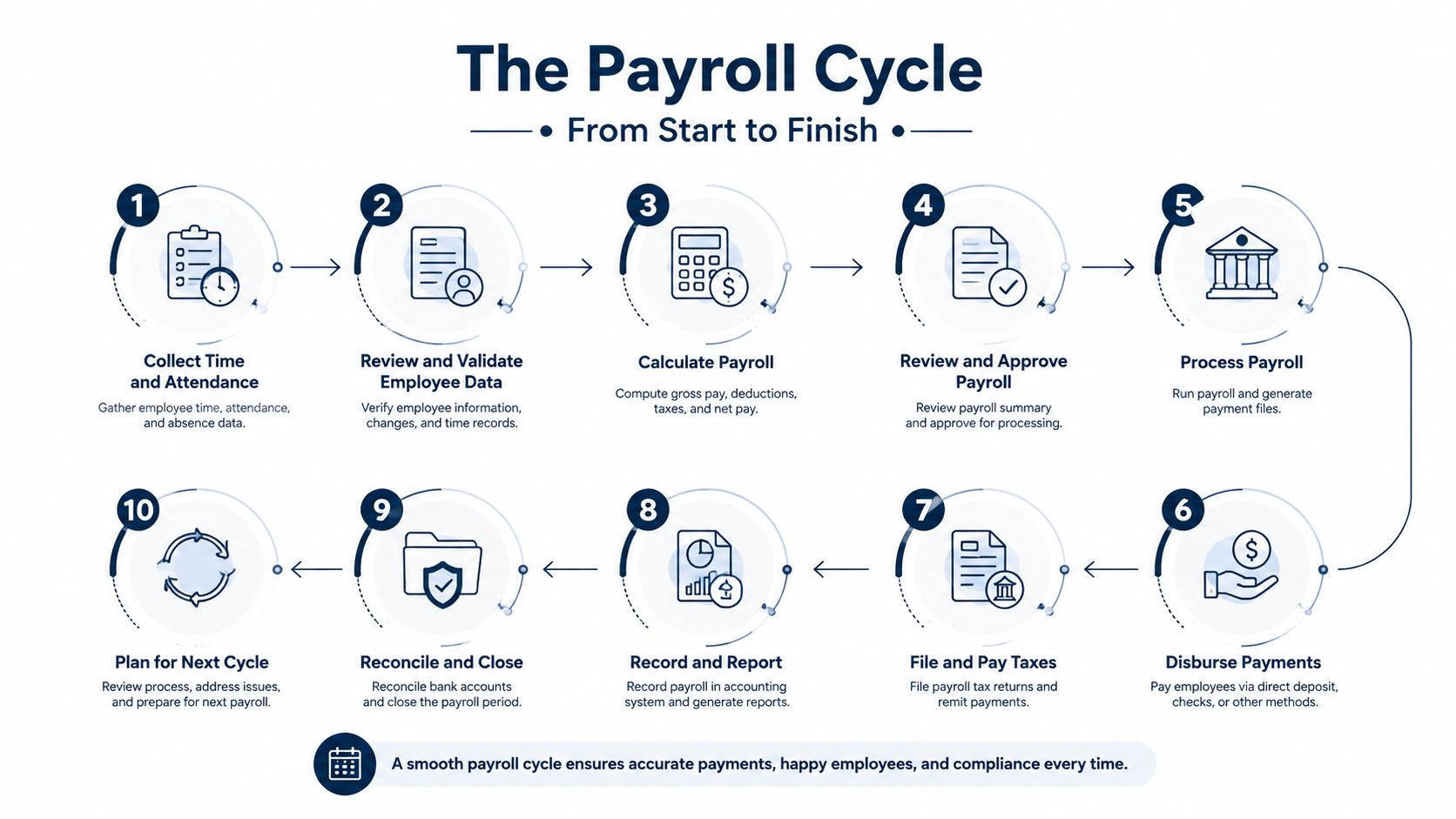
Think of payroll like a recipe. You can't fix missing ingredients by decorating the finished dish. If the hours are wrong at the beginning, the tax calculation and journal entry will be wrong at the end.
Gather the ingredients first
Start with employee status, pay rates, salary information, approved hours, overtime, paid time off, bonuses, commissions, benefit elections, and deductions. Ask managers to approve time before payroll is calculated, not after employees notice a problem.
For hourly staff, calculate regular hours and overtime under the correct workweek rules. For salaried staff, confirm whether there were unpaid absences, new compensation terms, or one-time payments. Check changes against the prior payroll. A sudden difference may be legitimate, but it deserves an explanation.
Calculate pay in the right order
Determine gross pay. Add regular wages, salary, overtime, bonuses, and commissions. Under the Fair Labor Standards Act, most covered non-exempt employees must receive at least the federal minimum wage for all hours worked and overtime at not less than time and one-half of the regular rate for hours over 40 in a workweek. The Department of Labor's regular-rate guidance explains the rule. If an employee works 45 hours in one workweek, the last 5 hours are paid at the overtime rate, not the normal rate.
Apply pre-tax deductions. These can include an employee's 401(k) contribution or health insurance premium, when the plan and payroll setup treat them as pre-tax. Confirm the deduction code instead of assuming every benefit works the same way.
Calculate withholding. Use current federal, state, and local rules. Form W-4 supplies information such as filing status, multiple-job adjustments, credits, other income, deductions, and extra withholding. Since the 2020 Form W-4, employees no longer use withholding allowances. The IRS explanation of Form W-4 describes the five-step form and notes that Steps 2, 3, and 4 apply only when relevant.
Apply post-tax deductions. Garnishments, union dues, and similar items may come out after taxes. Follow the order and limits required for each deduction.
Confirm net pay and issue payment. Net pay is what reaches the employee through direct deposit or a check. Review the payment file before release, especially bank-account changes.
Post the payroll journal entry. Record wages, employer taxes, benefits, deductions, and payroll liabilities in the proper accounts. Then reconcile the payment and liability balances.
Your schedule might be weekly, biweekly, semimonthly, or monthly. Pick a schedule you can support consistently and publish the payday clearly. The small-business payroll setup guide can help you document the underlying setup, while this guide for HR leaders offers broader process context. At year-end, prepare W-2 information and make sure wage, withholding, and benefit records agree before forms go out.
Understanding Payroll Taxes and Filing Deadlines
After the first payroll run, the paycheck totals may look correct while the tax obligations sit in the wrong place. Payroll taxes have two sides: amounts withheld from an employee's pay and amounts paid by the employer. Federal income tax withholding follows the employee's Form W-4. Social Security and Medicare include both employee withholding and employer contributions. FUTA covers federal unemployment tax, while SUTA refers to state unemployment tax. State and local rules can add another layer, such as Pennsylvania local earned income taxes and Philadelphia's city wage tax.
The tax calculation is only half the job. The business must also deposit the money on the right schedule, much like sending a payment through the correct lane before its deadline.
The IRS generally uses monthly and semiweekly deposit schedules, based on payroll tax liability during a lookback period. An employer with less than $50,000 in payroll tax liability during that period is generally a monthly depositor. An employer above that level is generally semiweekly. ADP's explanation of the semiweekly deposit schedule explains monthly deposits by the 15th day of the following month and the payday rule for semiweekly depositors.
A separate next-day rule applies when undeposited payroll tax reaches $100,000 in one day. The employer must deposit it by the next business day, as described in the IRS employment tax due-date guidance. A common post-payroll mistake is waiting until quarter-end to discover that the deposit schedule was configured incorrectly.
The deadlines belong on the calendar
Form 941 is due by the last day of the month following each calendar quarter. W-2 copies to employees and SSA filing are typically due by January 31. State wage reports and unemployment filings have separate deadlines, so add them to the calendar instead of assuming the federal schedule covers them.
| Tax Form | Purpose | Filing Frequency | Typical Deadline |
|---|---|---|---|
| Form 941 | Reports federal income tax withheld and employment taxes | Quarterly | Last day of the month following each calendar quarter |
| Form 940 | Reports federal unemployment tax | Annual | Check the IRS deadline for the applicable filing year |
| State wage report | Reports state wages and unemployment information | Often quarterly, depending on the state | Check the state agency schedule |
| W-2 | Reports employee wages and withholding | Annual | Typically January 31 for employee and SSA copies |
| 1099 filing | Reports qualifying nonemployee payments | Annual | Check the applicable federal and state instructions |
A business with $50,000 in quarterly payroll should not use wage volume alone to choose its deposit schedule. The IRS test uses tax liability during the lookback period, not just wages paid in one quarter.
Keep every deposit and filing date on a shared calendar. Assign an owner, then require confirmation after each payment. That small control helps catch a missed deposit before it becomes a larger reconciliation problem.
For a broader view of related tax planning, review this estimated tax payments resource. If year-end forms become a bottleneck, businesses can also automate W-2 with Matil. These tools do not replace checking the applicable rules, but they can keep recurring deadlines from depending on memory.
Common Payroll Mistakes and How to Fix Them
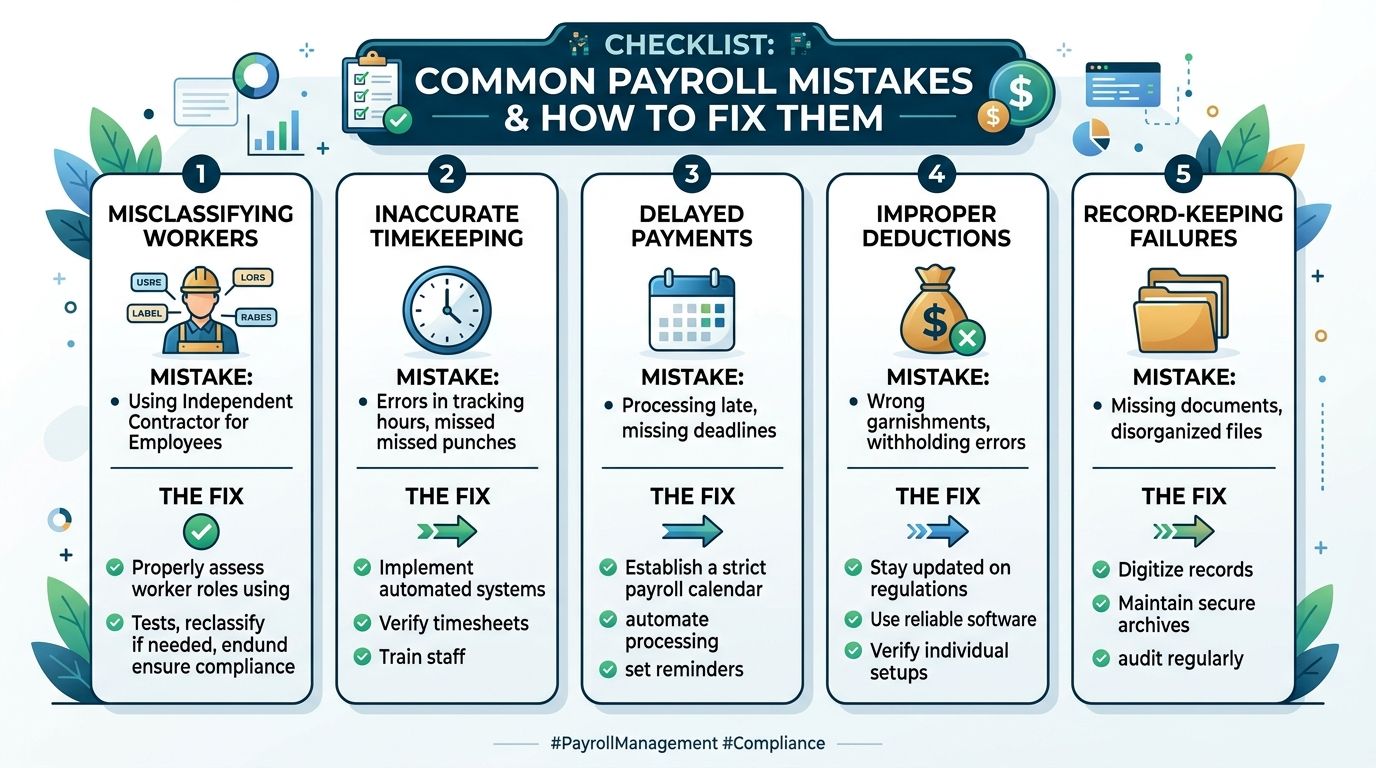
A payroll checklist can prevent more trouble than another hour spent staring at a spreadsheet. A 2025 survey of 1,000 small business owners found that 84% had made payroll errors and 40% had been penalized. The most common mistakes were incorrect wage calculations at 48%, late or missing payments at 38%, and incorrect hours tracking at 36%. The survey summary from Simply Business shows why the second and third payroll runs deserve as much attention as the first.
The errors usually repeat
Misclassification often starts with a shortcut. A part-time worker sets their own hours, so the owner assumes they're an independent contractor. But control, working arrangements, and the actual relationship matter. If the person should have been treated as an employee, the business may face back taxes, corrected reporting, and penalties. Review worker classifications when duties change and during a regular quarterly audit.
Late deposits happen when an owner confuses the payroll date with the tax due date. Paying employees on Friday doesn't mean the withheld taxes can stay in the bank account until the next payroll. Use the applicable IRS deposit schedule, set calendar reminders, and keep a separate cash forecast for payroll liabilities.
Overtime errors come from using the pay period instead of the workweek. An employee can cross the overtime threshold even when the total hours look ordinary across a longer pay period. Review hours by workweek and confirm the regular rate used for the calculation.
Outdated withholding can follow marriage, divorce, a second job, new credits, or other changes. Ask employees to review Form W-4 when their situation changes. Don't edit withholding based on a casual conversation. Use the updated form and keep it with the payroll records.
Catch mistakes before money leaves
Poor records turn a small correction into a tax-season search. Keep approved timesheets, pay-rate changes, deduction authorizations, tax filings, deposit confirmations, and payroll reports together. A spreadsheet with unexplained edits isn't a reliable audit trail.
Before submitting payroll, compare the current report with the prior one. Investigate unusual hours, new bank details, large deductions, negative net pay, missing employees, and unexpected tax amounts. If you find an error mid-cycle, pause the payment file, identify whether the source is time, rate, status, deduction, or tax setup, and document the correction. After payment, correct the payroll through the proper adjustment process instead of changing a later paycheck.
Choosing Between Payroll Software and Outsourcing
Software can be a sensible choice when your payroll is straightforward and you're willing to review the work. Outsourcing can make more sense when several states, benefits, local taxes, variable pay, or rapid hiring create too many points of failure.
A solo owner or very small team may manage routine payroll with tools such as Gusto or QuickBooks Payroll. That doesn't remove responsibility. You still need accurate employee data, approved hours, cash for liabilities, and someone who reviews the results.
| Factor | Payroll Software | Outsourced Payroll Service |
|---|---|---|
| Daily control | You enter and review the information | The provider handles recurring processing |
| Tax work | Software may calculate and support filings, depending on the plan | The provider may manage deposits and filings under the service agreement |
| Cost shape | Subscription plus possible employee or feature charges | Provider fees, often based on service scope and employees |
| Flexibility | Direct access to settings and reports | Less hands-on control, with support from specialists |
| Best fit | Simple, stable payroll with an attentive owner | Multi-state, benefit-heavy, or fast-changing payroll |
Don't compare only the subscription price. Include the time required to learn tax tables, check filings, fix rejected payments, and answer employee questions. A hybrid arrangement can work well: a bookkeeper runs the software, while the owner approves payroll and reviews cash requirements.
Know when the setup has outgrown you
Hiring your first W-2 employee in another state, adding 401(k) administration, introducing commissions, or opening a location with local withholding can justify professional help. Pennsylvania-specific withholding and Philadelphia wage-tax requirements can also push a local business toward a provider that understands the details.
Businesses looking for broader workflow coordination may explore centralised HR processes with Dynamics 365. For a narrower software review, compare the options in the small-business payroll software guide. MyOfficeOps is another option for businesses that want payroll processing, direct deposits, tax withholdings, automated payment processing, quarterly filings, year-end reporting, and W-2 preparation connected with bookkeeping support.
Connecting Payroll to Bookkeeping and Business Strategy
The first payroll run may go through smoothly, then create trouble during the next month-end close. A payroll journal is a recurring source of financial information, so it needs to map correctly to the general ledger. Wages, employer taxes, benefits, and payroll liabilities should flow into the books without repeated manual entry.
Start by mapping payroll accounts to your chart of accounts. Separate direct labor, administrative wages, employer taxes, benefits, and payroll liabilities where that detail helps you manage the business. Then classify labor by department, project, or location. A construction company may need labor by job. An agency may want labor by client or service line. A healthcare practice may review payroll by provider or location.
Clean payroll improves decisions
Suppose labor costs rise in one department. A properly categorized payroll report can show whether the change came from hiring, overtime, bonuses, benefit costs, or a pay-rate change. That gives you a stronger basis for pricing, staffing, and job-profitability decisions than one total on the income statement.
A bookkeeper should receive payroll reports before month-end close. Reconcile the payroll bank withdrawal, tax liabilities, benefit balances, and journal entry. If the liability account does not clear after payments, investigate the difference while the details are still fresh. A missed or misclassified item can otherwise remain in the books and distort later reports.
A fractional CFO can use the same information for cash-flow forecasting and headcount planning. Payroll trends help model whether a planned hire fits the budget, whether labor is growing faster than revenue, and how staffing changes could affect profitability. These are practical uses of payroll data, rather than extra reporting for its own sake.
A useful monthly habit: Review payroll with your financial statements, not in a separate folder. The connection is where the decision-making value appears.
Modern payroll also depends on clean data flows between HR, time tracking, accounting, finance, and compliance systems. The payroll processing trends report describes organizations connecting these functions through APIs, analytics, and AI, while identifying local compliance as a major challenge. The practical lesson is clear: automation helps only when employee, time, and account data are correct.
For a small business, that means checking the process after each payroll run. Confirm that hours reached the ledger, liabilities match the payment records, and department or project coding remains consistent. A recurring review catches errors before they affect financial statements, cash planning, or employee questions.
If payroll keeps pulling you away from customers and financial decisions, visit MyOfficeOps to discuss payroll integration, bookkeeping, reporting, and CFO-level support. Their team can help connect payroll activity to clean books, cash-flow planning, profitability reviews, and a process you can repeat with confidence.