
You finish a job. The customer is happy. Money finally hits the bank. On paper, it feels like a win.
Then the questions start. Did that job make money? Did labor run long? Did the material overage eat the margin? Did you price it right, or did you just stay busy?
That feeling is why accounting for small construction business matters so much. Not because your CPA needs cleaner records in March. Not because software companies say you need dashboards. It matters because construction can fool you. A full schedule can hide bad pricing. A strong bank balance can hide weak profits. One large check can make a rough month look healthy.
Most contractors don’t need more accounting theory. They need a system that matches how work happens in the field. Crews clock in on one site and stop at a supplier on the way to another. A change order gets approved in a text thread. A sub sends an invoice with almost no detail. Retainage sits out there for months. That’s real life.
Good books turn all of that into something useful. They show which jobs carry the company, which clients pay slowly, where overhead is getting heavy, and when cash is about to get tight. If your numbers are clean, they stop being a pile of receipts and become a map.
Your Numbers Should Tell a Story Not a Mystery
A lot of small contractors run the business from three places. The bank account, the inbox, and memory.
That works for a while. You know roughly what each job should cost. You remember which supplier invoice belongs to which site. You can tell, gut-level, when a project feels tight. The problem is that gut instinct gets weaker as jobs stack up.
Take a simple three-month remodel. You collect a deposit, buy materials, pay your crew, cut checks to a plumber and electrician, and finish strong. The final payment comes in. If you only look at the checking account, you might think the job was solid. But maybe labor took longer than expected, you paid for two extra material runs, and the project manager spent a lot of unpaid admin time chasing selections and schedule changes. The job looked good from the street. The books may tell a different story.
Good accounting answers one basic question fast. “Did this job make money, and why?”
That’s the difference between bookkeeping as a tax chore and accounting as a management tool. In construction, every job is its own little business. It has revenue, direct costs, hidden costs, timing issues, and risk. If you can’t see those pieces clearly, you’re estimating your next job with bad information.
What mystery numbers usually look like
A contractor’s books are usually heading toward trouble when you see things like this:
- Big buckets of expenses: Materials, labor, and subcontractors all dumped into broad accounts with no job attached
- Late data entry: Receipts and bills entered weeks after the work happened
- No estimate versus actual review: The original bid never gets compared to what the project really cost
- Profit guessed from the bank balance: Cash in the account gets mistaken for margin
- Retainage forgotten: Money earned but not collected sits out of sight
When owners say, “I stay busy but I’m not sure where the profit goes,” that’s usually the story underneath.
Build Your Financial Foundation Correctly
Before you can trust any report, your bookkeeping system needs structure. Not fancy structure. Just the right structure.
Think of your accounting setup like a work truck. If every tool is thrown in the back loose, you can still get to the job. But you waste time, lose things, buy duplicates, and miss problems. A clean accounting system works the same way. Every transaction has a place. Every cost has a label. Every job has a trail.
Your chart of accounts is your toolbox
Your chart of accounts is the list of buckets where money gets sorted. For a construction company, that list should match how jobs operate. If you use a generic setup built for a coffee shop or consultant, your reports will be messy from day one.
Here’s a simple construction-focused example.
| Account Type | Account Name | Example Usage |
|---|---|---|
| Income | Contract Revenue | Customer payments for project work |
| Income | Change Order Revenue | Approved scope changes billed to client |
| Cost of Goods Sold | Direct Labor | Field crew wages tied to jobs |
| Cost of Goods Sold | Materials | Lumber, drywall, fixtures, concrete |
| Cost of Goods Sold | Subcontractors | Electrician, plumber, painter invoices |
| Cost of Goods Sold | Equipment Rental | Lift rental or skid steer used on a job |
| Cost of Goods Sold | Permits and Inspections | Project-specific municipal fees |
| Asset | Accounts Receivable | Open customer invoices |
| Asset | Retainage Receivable | Amounts earned but withheld by client |
| Liability | Credit Cards Payable | Business card balances |
| Liability | Sales Tax Payable | Tax collected and owed |
| Expense | Office Rent | General business overhead |
| Expense | Insurance | General liability, office-side coverage |
| Expense | Admin Payroll | Office staff wages not charged direct to jobs |
| Expense | Software Subscriptions | QuickBooks, Foundation, project tools |
This list doesn’t need to be huge. It needs to be useful.
Cost codes are the labels inside the toolbox
The chart of accounts tells you what kind of cost you have. Cost codes tell you exactly where that cost belongs inside a job.
If the chart of accounts says “materials,” cost codes break that down into concrete, framing lumber, drywall, flooring, paint, cleanup, and so on. That matters because a single “materials” total won’t tell you why a kitchen remodel went sideways. A cost code report will.
A practical setup might include codes for:
- Site prep: Demo, dumpster, temporary protection
- Structural work: Framing, sheathing, hardware
- Rough trades: Plumbing rough, electrical rough, HVAC rough
- Finish work: Cabinets, trim, tile, paint
- Closeout: Punch list, final cleaning, inspections
If you want a simple starting point for organizing books before you get more advanced, this guide to small business bookkeeping basics is a useful first step.
Cash basis or accrual basis
This is one of the first big decisions in accounting for small construction business.
Under cash-basis accounting, you record income when money hits the bank and expenses when you pay them. It’s simpler. It usually fits smaller contractors better because it’s easier to maintain and easier to explain.
Under accrual accounting, you record income when it’s earned and expenses when they’re incurred, even if cash hasn’t moved yet. That gives you a truer picture on longer jobs, but it takes more discipline.
The IRS allows businesses with average annual gross receipts under $25 million, adjusted for inflation and now closer to $29M, to use cash-basis accounting, according to NetSuite’s construction accounting best practices guide. That’s helpful because cash basis is simpler. But it can also hide what’s really happening on projects that stretch across reporting periods.
Practical rule: If your projects are short and your books are still maturing, cash basis can be a workable starting point. If jobs run longer and outside parties want cleaner performance reporting, accrual often gives a better picture.
What works and what doesn’t
What works is a boring, consistent setup. The same accounts. The same cost codes. The same rules for entering bills, labor, and customer invoices.
What doesn’t work is trying to “clean it up later.” Later turns into year-end. Year-end turns into guesswork. Guesswork turns into bad bids and ugly tax prep.
Master Job Costing to Protect Your Profits
If I had to pick one discipline that separates healthy contractors from stressed-out contractors, it would be job costing.
Every project needs its own scoreboard. Not just total contract value and total money spent. A real scoreboard. Labor, materials, subcontractors, equipment, permits, and selected overhead tied back to the estimate you used to win the job.
Without granular job costing, U.S. construction projects exceed their budgets by 20-30% on average, and detailed cost tracking can boost profit margins by 5-15% per job by improving bids and preventing overruns, according to NSKT Global’s construction accounting guide.
That’s not a software feature. That’s operational control.
Treat every job like a mini business
A kitchen remodel is a good example because it looks simple until you break it apart.
You estimate demolition, framing changes, rough plumbing, rough electrical, drywall repair, cabinets, tops, flooring, paint, and finish carpentry. You include labor, materials, and subs. That estimate becomes your first financial plan for the job.
Then the work starts. If receipts, time, and invoices don’t get tagged to that job, the estimate becomes useless. You can’t learn from it. You can’t spot overruns early. You can’t tell whether the cabinet package was underbid or whether labor efficiency slipped.
A job costing workflow that holds up in real life
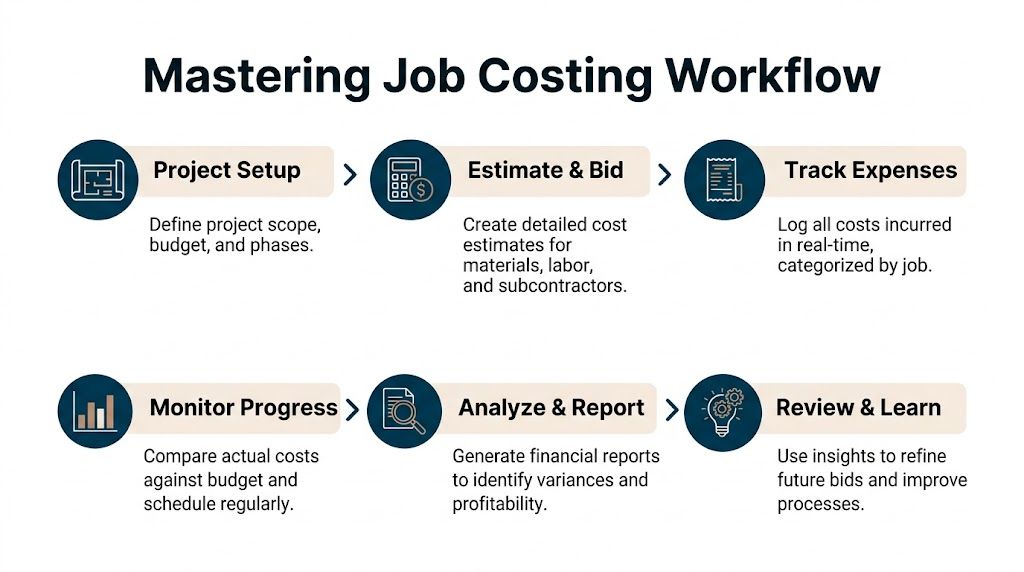
A practical workflow looks like this:
Set up the job before work starts
Create the customer record, contract value, budget, phases, and cost codes. Don’t wait until bills show up.Load the estimate into the accounting system
The estimate shouldn’t live only in Excel or inside the estimator’s head. Bring those line items into QuickBooks, Foundation, or your construction platform so you can compare actuals against budget.Capture field labor daily
Crew time has to hit the right job and the right cost code. If a worker splits the day between two sites, split the time. If the foreman spends time on punch work, record it there.Code every bill and receipt immediately
Supplier invoice, rental charge, permit fee, subcontractor draw. Every one of them gets tied to the correct job.Review variance while the job is active
Don’t wait until closeout. Compare estimate to actual every week or every billing cycle.Close the loop after completion
Review where you beat budget and where you missed. Feed that back into future estimates.
If you need a starting format, a job costing Excel template can help you build the habit before you move everything into a more automated system.
Direct costs first, then the tricky part
Most contractors understand direct costs. Those are the obvious job costs:
- Labor on site: Carpenters, laborers, lead techs
- Materials: Lumber, fixtures, concrete, wire, pipe
- Subcontractors: Trade partners and specialty crews
- Equipment and rentals: Lift, trailer, small equipment rentals
- Project-specific fees: Permits, inspections, dump fees
Where books often go wrong is the second layer. The costs that support jobs but don’t belong to only one line item. Things like supervision, office support, insurance, fuel, software, and small tools. If you ignore those costs, jobs can look better than they really are.
The estimate to actual loop
Good job costing isn’t just historical. It’s a loop.
You estimate the job.
You perform the work.
You compare actual cost to the estimate.
You learn.
Then you bid the next job smarter.
Here’s what that looks like in plain English:
| Cost Area | Estimated | Actual | What it tells you |
|---|---|---|---|
| Demo | Lower | Higher | Scope may have been undersold or site conditions were worse |
| Cabinets | On target | On target | Supplier pricing and ordering stayed under control |
| Labor | Moderate | High | Crew hours ran long, or schedule interruptions hurt efficiency |
| Electrical sub | Higher | Lower | Bid was conservative or scope was reduced |
| Paint | Lower | Higher | Rework or client changes pushed cost up |
That review matters more than most owners realize. If you consistently underestimate labor by a little on every job, that “little” can wipe out your year.
The best time to catch a bad job is while crews are still on site. The second-best time is right after closeout, before you bid the next one.
What works in the field
The contractors who usually get this right don’t overcomplicate it. They build habits:
- Foremen submit time daily
- Bills get coded before payment
- Project managers review budget drift regularly
- Change orders are documented before extra work keeps rolling
- Owners look at gross profit by job, not just total sales
What doesn’t work is entering everything at month-end and hoping the report tells the truth. By then, the field has moved on and the lessons are gone.
Get Paid Faster with Smart Billing and Retainage
A lot of profitable construction companies still feel broke. Usually the problem isn’t just margin. It’s timing.
If you wait until the end of a long project to send one big invoice, you’re financing the work yourself. You’ve already paid for labor, materials, permit fees, and subcontractors while waiting for the customer to catch up. That creates pressure fast, even on jobs that should make money.

Progress billing keeps cash moving
For projects that last more than a few weeks, progress billing usually makes more sense than end-of-job billing. You invoice based on milestones, phases, or work completed to date.
That does two things. It helps your cash flow, and it gives the client a clearer view of what they’re paying for.
A simple version might look like this:
- Deposit at signing: Covers mobilization, scheduling, and early materials
- Second invoice after rough work: Bills when a defined phase is complete
- Third invoice after major installs: Keeps the project funded as finish work begins
- Final invoice at completion: Cleans up remaining contract value, plus approved changes
The exact structure depends on your contracts, but the principle stays the same. Bill as value is delivered, not months later when your bank account is already strained.
Where percentage of completion fits
For longer projects, Percentage-of-Completion Method, usually shortened to PCM, gives a more accurate view of earned revenue. Over 60% of growing construction firms use PCM because it reflects profitability on long-term jobs more accurately. The basic idea is simple. If you’ve incurred 40% of the total expected cost, you recognize 40% of the revenue, as explained in NetSuite’s guide to construction accounting methods.
That doesn’t mean every small contractor needs to turn into a technical accountant overnight. It means you should understand the logic behind it, especially if a lender, surety, or outside advisor asks for cleaner financial reporting.
PCM helps smooth out the “cash flow rollercoaster” that happens when revenue only shows up at job completion even though work has been happening for months.
Retainage is not forgotten money
Retainage trips up a lot of small contractors because it sits in an awkward middle ground. You’ve earned it, but you don’t have it yet.
A client may hold back part of what you bill until substantial completion or final closeout. That means your books need to track retainage separately from normal receivables. If you mix it in with available cash expectations, you’ll think more money is coming in this month than comes in.
Keep a separate retainage schedule by job. If you can’t pull that list quickly, money will sit uncollected.
Billing discipline matters more than software
A decent system beats a fancy one. You need clear invoice dates, backup documents, signed change orders, aging review, and follow-up rules. Software can help, but it won’t replace discipline.
Two helpful resources on the collections side are this outside guide on Accounts Receivable Best Practices and this practical checklist on accounts receivable best practices. Both are useful if invoices go out late or if nobody owns follow-up.
A strong billing process usually includes:
- Approved backup: Schedule of values, milestone signoff, or supporting detail attached
- Fast invoicing: Bills sent right after the billing event, not when someone “gets around to it”
- Change order control: Extra work priced and approved before it disappears into the base contract
- Aging review: Open invoices reviewed on a schedule, with clear next steps
- Retainage follow-up: Final paperwork tracked so withheld funds don’t stall
Clients don’t pay faster because an invoice exists. They pay faster when the invoice is accurate, timely, and easy to approve.
Navigate Payroll and Subcontractor Compliance
Labor is usually the largest moving cost on a construction job, and it’s also one of the easiest places to create a mess.
A missed overtime rule, bad time coding, weak certified payroll records, or worker misclassification issue can cost far more than the bookkeeping time it would’ve taken to do it right. That’s why I push small contractors to treat payroll records like jobsite safety paperwork. It may feel tedious, but it protects the company.
Payroll needs job detail, not just gross wages
Running payroll is more than cutting checks.
In construction, the books need to answer questions like these. Which job did those hours belong to? Which phase? Was that employee doing direct field work, shop prep, warranty work, or admin support? Did the overtime hit the right project? If a worker used two rates in one week, was that recorded cleanly?
If payroll only lands in one broad expense account, job reports get distorted. The labor cost on paper won’t match what happened in the field.
A solid process usually includes:
- Daily time entry by job: Crews and foremen code hours to the right project
- Rate review: Pay rates, burden assumptions, and overtime treatment are checked regularly
- Payroll integration: The payroll system and accounting system agree with each other
- Labor burden tracking: Taxes, insurance, and related payroll costs are considered in job profitability
- Owner review: Someone reviews unusual labor spikes before payroll is finalized
Certified payroll is paperwork you can’t fake your way through
If you take on public work, certified payroll has to be exact. That means names, classifications, rates, hours, and supporting records all line up.
The main issue isn’t just filling out the report. The actual issue is whether your internal records support the report. If the field submits weak time data and the office tries to rebuild it later, errors creep in fast.
Sloppy certified payroll usually starts with sloppy timekeeping, not with the form itself.
That’s why the field process matters so much. Accurate reports start with accurate daily inputs.
Subcontractor compliance needs a checklist
Subs add flexibility, but they also create risk if the paperwork is loose. Before the first payment goes out, you need a clean file. Agreement, tax form, insurance documentation, payment terms, and a way to match invoices to approved work.
The biggest practical problem I see is confusion between a true subcontractor and someone who should really be on payroll. That’s not something to guess at casually. If the relationship looks and operates like employment, weak classification can become expensive.
For a plain-language overview of process basics, this guide on paying 1099 contractors is a helpful reference.
A workable subcontractor checklist looks like this:
- Before work starts: Signed agreement and tax paperwork collected
- Before payment: Invoice reviewed against contract, schedule, and completed work
- During the job: Insurance and compliance documents kept current
- At year-end: Vendor records reviewed early so required tax reporting doesn’t become a scramble
Cheap recordkeeping beats expensive cleanup
A lot of owners think strong payroll and subcontractor compliance means more admin for no reason. I see it differently. It’s cheap insurance.
When labor records are clean, you price future work better. When subcontractor files are complete, year-end reporting is smoother. When certified payroll is accurate, public work is less stressful. None of that is glamorous, but all of it saves time and money.
Use Your Numbers to Build a Stronger Business
You know the feeling. The crew stayed busy, the calendar looks full, and the bank balance still feels tighter than it should. That usually means the books are recording activity, but they are not showing the true economics of the work.
Clean bookkeeping gives you more than a tax-ready file. It gives you a way to see which jobs made money, which customers slow your cash down, and whether growth is helping or hurting. For a small contractor, that is the difference between running the company and reacting to it.

Start with a simple KPI dashboard
A useful dashboard should fit on one screen or one printed page. If it takes too long to review, it will not get reviewed.
I usually want an owner looking at a short set of numbers every month, and in some shops every week:
| KPI | Why it matters |
|---|---|
| Gross profit by job | Shows which projects are holding margin and which are drifting |
| Estimate versus actual variance | Exposes bidding errors, production issues, or weak cost control |
| Open receivables | Shows what needs collection follow-up now |
| Retainage outstanding | Keeps delayed cash visible instead of buried in reports |
| Cash position | Helps plan payroll, vendor payments, and tax obligations |
| Overhead trend | Shows whether the business is becoming more expensive to run |
The software matters less than the habit. QuickBooks, Foundation, or a spreadsheet can all work if the numbers are current and someone reviews them on purpose.
Indirect costs are where good-looking jobs disappoint you
A lot of small contractors judge a job by direct costs only. Labor looked fine. Materials were close. The subcontractors stayed near budget. On paper, it feels like a win.
Then the month closes.
Project management time, fuel, small tools, supervision, insurance, office support, software, and vehicle costs all have to be paid by the business somewhere. If those costs never get assigned or at least considered, profit gets overstated and the next estimate gets built on bad assumptions. Taxfyle discusses this problem in its guide to bookkeeping for small construction business.
A job can be busy and still be weak. I see that all the time.
Forecasting keeps problems small
Good reports should help you look ahead, not just explain last month. In construction, cash trouble rarely starts on the day you feel it. It starts weeks earlier with timing. Payroll hits before collections. A supplier needs payment before the next draw clears. Retainage sits out there longer than expected.
That is why a basic forecast matters. Look at signed work, expected billings, collection timing, committed costs, payroll dates, loan payments, and tax deadlines. Then ask a simple question. What does the next 30 to 90 days look like?
That helps with decisions such as:
- Seasonal planning: Spot slower collection periods before cash gets tight
- Hiring: Check whether backlog and margin support another crew member or PM
- Equipment purchases: Decide whether now is the right time to replace a truck or finance a machine
A forecast will not make construction predictable. It will give you time to act while your options are still good.
Use the numbers to make field decisions
This is the part owners often miss. The reports are not the finish line. They are feedback.
If one type of job consistently burns labor, tighten the estimate or change the crew plan. If a customer always pays late, adjust terms or price that risk in. If overhead keeps rising faster than gross profit, stop adding cost before you add more volume. Good accounting for small construction business is supposed to change decisions in the field, in the office, and at bid time. Otherwise it is just organized history.
From Messy Books to a Clear Growth Plan
Most construction owners don’t start their company because they love bookkeeping. They start because they know how to build, lead crews, solve problems, and get work done.
But growth changes the game. Once you have multiple jobs, more field labor, subcontractors, billing cycles, and overhead to carry, financial clarity is not optional. It becomes part of the work. If the books are weak, bidding gets weaker. Cash gets tighter. Stress gets louder.
The fix is not complicated, even if it takes discipline.
- Use a construction-ready chart of accounts: Keep the books organized in a way that matches how jobs run
- Track costs by job and cost code: Don’t let labor, materials, and subcontractor costs float around unassigned
- Bill in a way that supports cash flow: Send invoices on time and track retainage on purpose
- Keep payroll and subcontractor files clean: Strong records prevent expensive compliance problems
- Review job results and overhead regularly: Use the numbers to improve the next estimate, not just explain the last mistake
If your current books feel messy, start smaller than you think. Clean up the chart of accounts. Make sure every active job has a budget. Code this week’s bills correctly. Tighten the timekeeping process. Follow up on old receivables.
That’s how a construction company gets control back. One clean process at a time.
If you want help turning scattered receipts, weak job reports, and late billing into a system you can run the business from, MyOfficeOps works with contractors on bookkeeping, payroll integration, forecasting, and profitability reporting. A good next step is getting your current setup reviewed, finding the gaps, and building a process that fits the way your jobs really move.