
If your bills live in five places, your cash flow feels like a guess.
A vendor emails one invoice to your office manager. Another mails a paper copy to the shop. A subscription renews on a card nobody checks. Then Friday hits, and you're asking the same question a lot of owners ask: “What do we owe right now?”
That's a key problem with accounts payable. It's not just paperwork. It's the part of your business that tells you what cash is already spoken for. If it's messy, every decision after that gets harder. Hiring feels risky. Buying equipment gets delayed. Even a decent sales month can feel stressful because you don't trust the timing of what's about to leave the bank.
Knowing how to manage accounts payable means building a system that gives you control. You want bills captured in one place, approved by the right people, checked before payment, and scheduled in a way that protects both cash and supplier relationships. You also need fraud controls built into that system, not taped on later when something goes wrong.
The Unpaid Bill Problem Most Owners Face
A lot of small business owners are running AP by memory, inbox search, and luck.
One bill gets paid early because someone happened to see it. Another sits too long because it was sent to the wrong person. A third gets paid twice because one person entered it and another person paid the emailed copy. Nobody planned for any of that. It just happens when there isn't a real process.
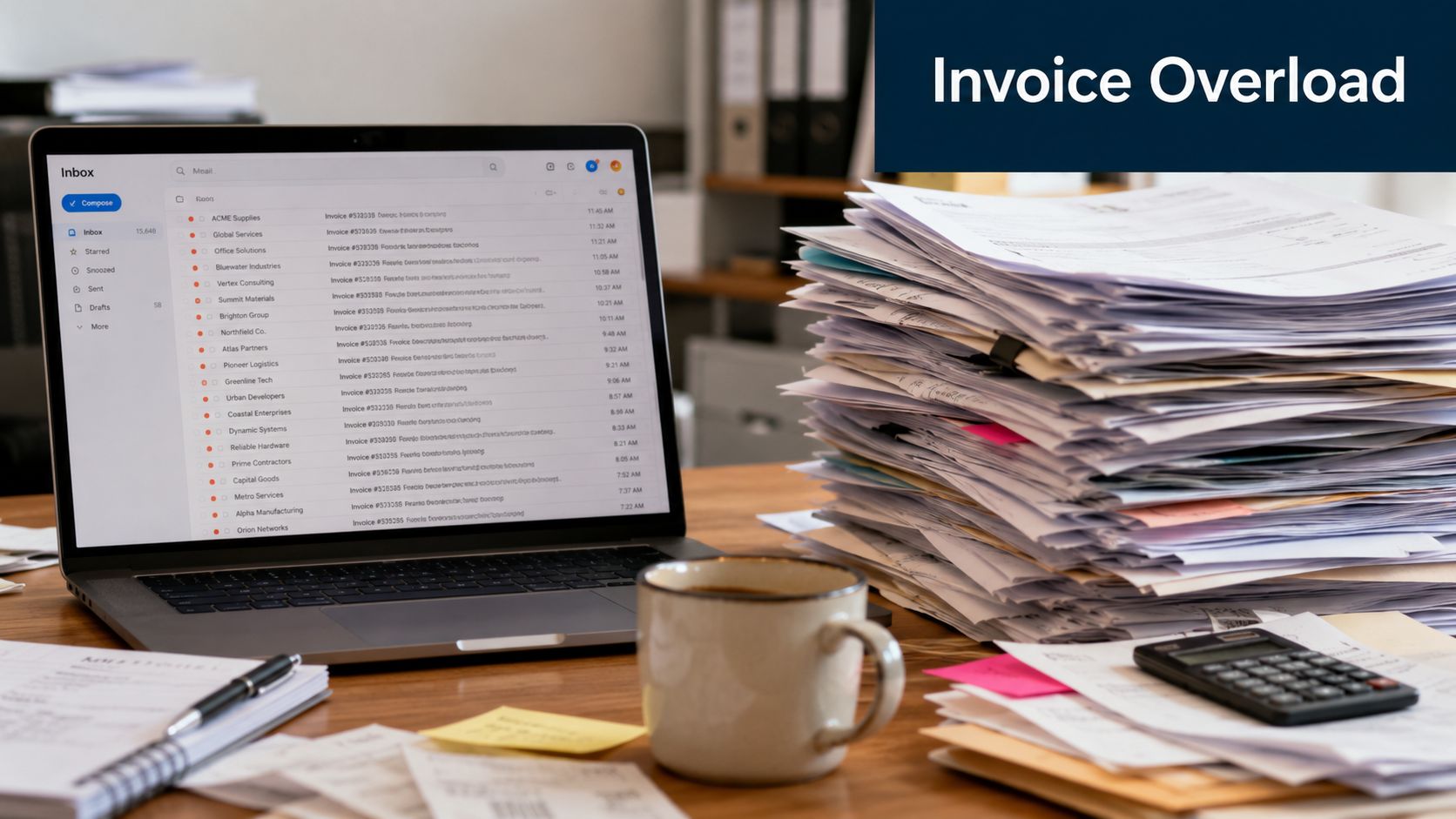
What AP chaos looks like in real life
Here's a common pattern. The owner approves purchases in text messages, the office manager collects some invoices, department heads approve others verbally, and the bookkeeper tries to clean it all up at the end of the week. That setup works for a while. Then the business grows a bit, invoice volume rises, and the whole thing starts wobbling.
The problem isn't that people are careless. The problem is that the process depends on people remembering things.
Good AP feels boring. You know what came in, who approved it, when it's due, and when it will be paid.
When AP is loose, you usually see the same symptoms:
- Cash surprises: Money leaves the bank before you expected it.
- Late approvals: Bills wait because nobody knows who has the final say.
- Supplier friction: Vendors start following up because payment timing is inconsistent.
- Owner bottlenecks: Small invoices still land on the owner's desk because nobody trusts the rules.
- Weak records: At month-end, your team scrambles to figure out what was paid, what's still open, and what belongs in the current period.
Why this matters more than most owners think
Accounts payable is often treated like a back-office chore. It isn't. It's one of your main control points for cash, accuracy, and trust.
A stable AP process gives you something owners rarely get enough of: predictability. When you can see upcoming obligations clearly, you stop reacting and start deciding. You can keep key vendors happy, avoid sloppy rush payments, and look at your bank balance with more confidence.
That's why learning how to manage accounts payable well is less about bookkeeping mechanics and more about running a calmer business.
Build Your Accounts Payable Foundation
If the foundation is weak, software won't save you.
A lot of owners jump straight to tools, approvals apps, or OCR scanners. Those can help, but they only speed up whatever process you already have. If the process is sloppy, the software just helps you make sloppy decisions faster.
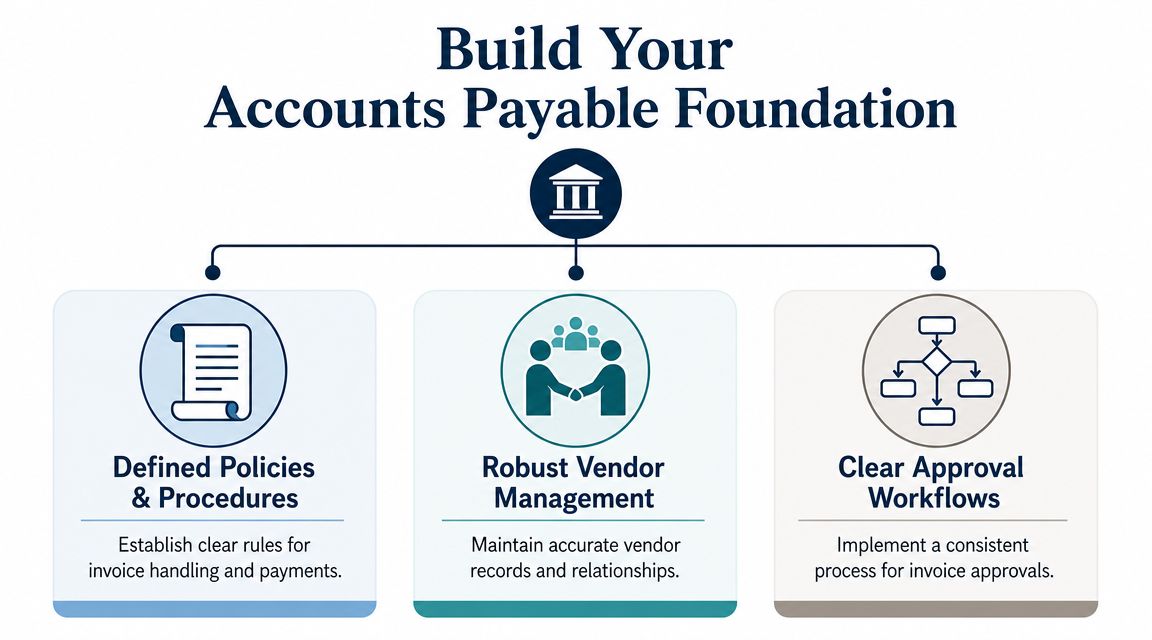
Start with your vendor master file
Your vendor master file is just your official list of who you pay and how you pay them. For a lot of small businesses, this file is messier than it should be. Duplicate vendor names, outdated addresses, old bank details, missing tax info. That's where trouble starts.
Keep one clean record for each vendor and lock down who can change it.
Include basics like:
- Legal vendor name: Use the legal business name, not nicknames.
- Payment method: ACH, check, card, or another approved method.
- Terms: Net terms, due dates, and any early-pay discount terms.
- Primary contact: Who handles billing issues on the vendor side.
- Verification notes: Record how bank details or payment changes were confirmed.
A clean vendor file does two jobs. It reduces payment mistakes, and it gives you a first line of defense against fraud.
Put approval rules in writing
Verbal approvals are where a lot of AP confusion begins. Someone says “go ahead” in the hallway, then later nobody remembers what was approved, for how much, or by whom.
Write down a simple approval policy. Keep it short enough that people will use it.
A basic SOP can look like this:
| Step | Rule | Owner |
|---|---|---|
| Invoice received | Send all bills to one intake email or upload folder | Admin or AP clerk |
| Coding review | Assign expense account and vendor | Bookkeeper |
| Approval | Route by department and spending authority | Manager or owner |
| Payment release | Separate from invoice approval | Finance lead |
| Filing | Save invoice, approval record, and payment confirmation | AP team |
A strong AP workflow includes segregating invoice approval, payment authorization, and vendor setup across different staff to reduce fraud risk. It also includes batch payment scheduling to help treasury manage cash more predictably and maintaining a complete audit trail so every action is attributable, as noted in Stampli's AP management guidance.
If you need a better way to track what's already overdue versus what's coming due next, Elyx AI's guide on AP aging is a useful reference for setting up the report owners need to review.
Use the pizza test for three-way matching
Three-way match sounds technical, but it's simple.
You ordered a pizza. The order says large pepperoni. The delivery shows up with a large pepperoni. The bill says one large pepperoni. Those three things match, so you pay.
That's how AP should work with:
- Purchase order
- Receiving document
- Vendor invoice
If one says ten units, another says eight, and the invoice bills for twelve, stop and review it before payment.
Practical rule: Don't pay from the invoice alone if the purchase should have supporting documents.
This one control catches a surprising amount of mess. Wrong quantities, wrong prices, duplicate billing, and plain fake invoices all stand out faster when someone has to match the paper trail.
Capture and Process Invoices Without the Headaches
A vendor says they sent the bill last week. Your office manager swears it was forwarded for approval. The approver never saw it. Now the due date has passed, the supplier is asking about payment, and nobody is fully sure whether the invoice is real, duplicated, or just stuck in someone's inbox.
That is the AP mess this section should fix.
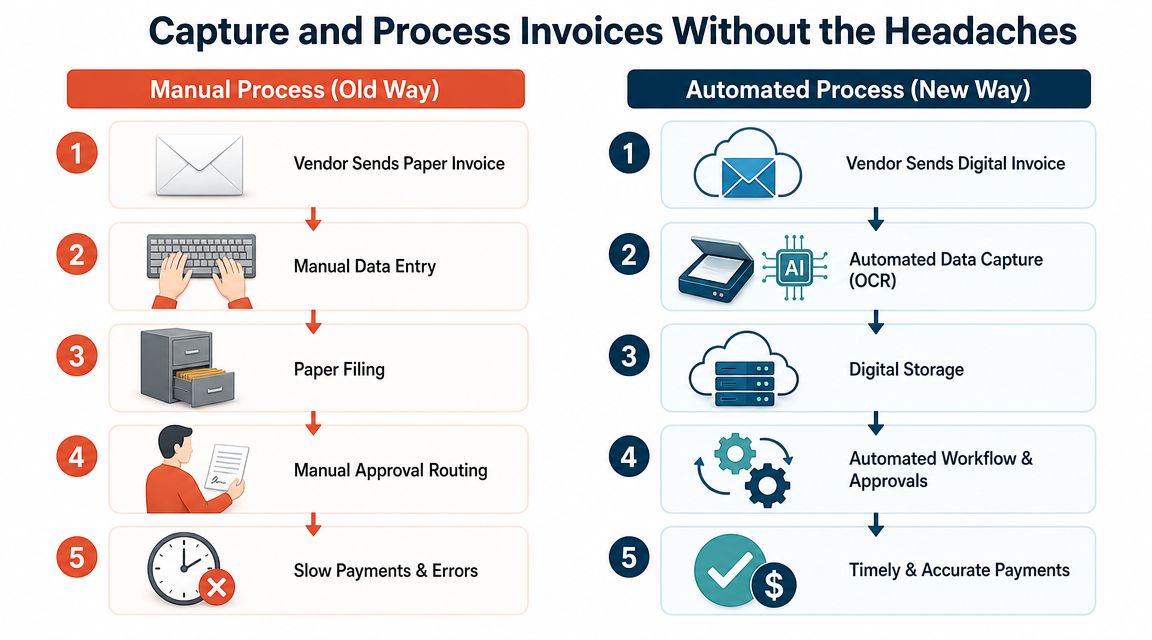
One intake channel cuts confusion fast
Start with one rule. Every vendor invoice enters the business through one channel.
For a small business, that is usually a dedicated AP email address. In some cases it is a vendor portal or shared upload folder. The exact tool matters less than consistency. Vendors need one destination. Your team needs one place to check. If invoices still arrive through personal inboxes, text messages, or paper piles on a desk, the process will stay fragile.
A single intake channel also helps with fraud prevention. It creates a record of when the invoice arrived, who sent it, and whether the sender matches the vendor contact on file. That makes fake invoice attempts and last-minute “please change the payment details” messages easier to spot before they turn into a real loss.
Manual entry creates rework
Manual AP asks staff to do low-value work over and over. Open the PDF. Type the vendor name. Type the invoice number. Type the amount. Save the file. Email the approver. Follow up. Re-enter something when a typo shows up later.
Digital capture shifts that work. Software pulls the basic fields, stores the document, and routes it for review. Your team checks exceptions instead of acting like data-entry clerks.
The practical difference looks like this:
| Old way | Better way |
|---|---|
| Paper and emailed invoices arrive in different places | All invoices go to one intake channel |
| Staff type invoice details by hand | Software captures fields for review |
| Approvals depend on chasing people | Workflow sends invoices to the right approver |
| Filing depends on folders and memory | Documents stay attached to the transaction |
| Problems show up at payment time | Exceptions are flagged early |
The IOFM invoice processing benchmark report has long tracked the gap between manual and automated AP teams, including higher processing costs and slower cycle times when invoices rely on hand entry and email-based approvals. For an owner, the takeaway is simple. Manual processing costs more than payroll time. It also creates more chances for duplicate payment, missed approvals, and fraud slipping through because nobody sees the full trail in one place.
Process invoices in the same order every time
Good AP processing is boring on purpose. The same steps should happen every time an invoice comes in:
- Receive it through the approved intake channel
- Check that the vendor matches your approved vendor list
- Review key fields such as invoice number, date, amount, and payment terms
- Match it to supporting documents when the purchase should have them
- Route it to the right approver based on dollar amount or department
- Post it to the accounting system with the document attached
- Mark any exception for review before it reaches the payment queue
That order matters. If your team codes bills before confirming the vendor is legitimate, fraud review becomes an afterthought. If they approve first and ask questions later, bad invoices gain momentum and become harder to stop.
What to automate first, and what to leave with a human
Small businesses do not need a giant AP system on day one. They need to automate the repetitive steps and keep human review on the risky ones.
Start with these:
- Invoice capture for emailed PDFs and scans
- Approval routing based on vendor, amount, or department
- Document storage so the invoice stays attached to the bill record
- Status tracking so anyone can see whether a bill is pending, approved, or on hold
- Duplicate detection to catch repeat invoice numbers or matching amounts from the same vendor
Keep a person involved in these areas:
- New vendor review
- Bank detail changes
- Unusual rush invoices
- Exceptions on price, quantity, or terms
- Invoices from vendors with a history of billing problems
That split is where many owners make the right trade-off. Automate speed. Keep judgment where mistakes are expensive.
If you want a practical setup model, this guide on how to automate accounts payable shows how to build the workflow without overcomplicating it.
Decide early who should own the intake step
This is also where outsourcing decisions start to matter. If your volume is low, an internal bookkeeper can usually manage invoice intake and coding. If invoices come from many vendors, arrive in several formats, or need daily follow-up, handing intake and first-pass processing to an outside AP service can make sense.
The trade-off is control versus capacity.
An internal team usually knows your vendors and purchasing habits better. An outsourced team can often process invoices more consistently and keep coverage in place when staff are out. Either model works if responsibilities are clear, approval rules are documented, and vendor master changes stay under tight control. Either model fails if invoices can bypass the system through side channels.
Clean intake is what makes the rest of AP work. If invoices enter the business in a controlled, visible way, approvals move faster, fraud risk drops, and payment decisions become easier later.
Turn Your AP into a Cash Flow Tool
Most owners think AP is just the line where cash goes out. That's too narrow.
AP is also a timing tool. If you use it well, you keep more control over working capital without damaging supplier relationships. If you use it poorly, you either pay too early and starve cash, or pay too late and create problems with vendors you depend on.
Stop paying reactively
A reactive AP process sounds like this: “That invoice is approved, so let's just pay it now.”
That feels responsible, but it can be expensive in a different way. Paying too early gives up cash you could have used for payroll, inventory, marketing, or a short-term squeeze somewhere else in the business.
Days Payable Outstanding, or DPO, becomes useful. DPO tells you how long you're taking to pay suppliers on average. You don't need to obsess over the formula to use the idea well. The practical question is simpler: are you paying at the right time for your business, or just whenever somebody remembers?
High-level AP guidance points to DPO, invoice processing time, and error or rework rates as core operating measures, and it recommends tying payment timing to cash strategy rather than speed alone, as described in HighRadius on accounts payable management.
Pay on time by default. Pay early only when there's a clear financial or operational reason.
A simple way to decide when to pay
Not every bill should be treated the same. Your internet provider, key subcontractor, software vendor, and office snack delivery do not carry the same business risk.
Use a short ranking system:
- Critical vendors: Pay carefully and predictably. If they stop serving you, operations suffer.
- Discount vendors: Consider early payment when the discount is worth more than holding the cash.
- Standard vendors: Schedule payment close to the due date.
- Problem vendors: Review disputes before release. Don't rush payment just to clear the queue.
Payment timing is strategic, especially as late-payment risk remains high globally. A 2025 Atradius survey found a substantial share of businesses report overdue invoices as a material issue, which is why a cash-flow model that ranks vendors by operational dependence and discount economics makes more sense than a blanket rule, as summarized by Wise Pay's AP guidance.
When an early-pay discount is worth it
Owners often ask about discount terms. The answer isn't “always take it” or “always hold cash.”
Ask three questions:
- Do you have the cash without creating stress somewhere else?
- Is this a supplier you need to keep especially happy?
- Is the savings better than the value of keeping cash in the bank right now?
That's the whole framework. If cash is tight during a seasonal dip, preserving liquidity may matter more. If the vendor is essential and the discount is meaningful, paying early may be smart.
If you're working on the bigger working-capital picture, this resource on how to improve working capital helps connect AP decisions to the rest of your cash plan.
Use Automation to Save Time and Money
By the time an owner starts asking about AP automation, the usual pattern is already in place. Invoices are sitting in someone's inbox. Bills get approved in text messages or hallway conversations. A payment goes out twice because one copy came by email and another came through the vendor portal. Then month-end turns into a cleanup project.
Automation helps because it removes repetitive handling from a process that already has too many touchpoints.
The business case is labor, visibility, and control
Manual AP costs more than the hourly wage of the person entering bills. It also includes time spent hunting for approvals, answering vendor follow-ups, correcting coding mistakes, and tracing who changed what. Ardent Partners has repeatedly found in its AP benchmarks that manual invoice processing is slower and more expensive than automated workflows, while top-performing teams process invoices faster and with fewer exceptions, as summarized by Ardent Partners' AP metrics overview.
That matters to a small business because AP automation is not just an efficiency purchase. It is also a control decision. A system that captures invoices, logs approvals, and limits who can release payments reduces the chance that speed turns into sloppiness or fraud.
What to automate first
Start with the points where work gets stuck or duplicated.
For most small businesses, that means:
- Invoice capture: Pull bills from email, uploads, or vendor portals into one queue.
- Data entry: Use OCR and coding rules to reduce manual keying.
- Approval routing: Send invoices to the right approver based on amount, vendor, class, or location.
- Payment scheduling: Queue approved bills for the right payment date without handling them one at a time.
- Audit trail: Keep the invoice, approval record, payment confirmation, and any note about exceptions in one place.
A good AP system works like a traffic manager. It sends ordinary invoices down a standard path and flags the few that need human review.
What small businesses should look for in an AP tool
Do not buy software based on a feature list alone. Buy it based on the problems it will remove this quarter.
A small business usually needs five things:
- Clean sync with the general ledger: It should post correctly to QuickBooks, Xero, or the ERP you already use.
- Permission-based roles: The person entering bills should not have the same rights as the person approving or paying them.
- Simple exception handling: Disputed invoices, duplicate bills, and missing POs should be easy to hold and review.
- Vendor record controls: Bank changes and new vendor setup should require review, not a casual edit.
- Useful reporting: You should be able to see pending approvals, aging by vendor, and upcoming cash requirements without building a spreadsheet from scratch.
Those last two points matter more than many owners expect. The same system that saves admin time should also make fraud harder to pull off.
What automation will not fix
Software will not clean up bad vendor files by itself. It will not resolve vague approval authority. It will not stop a team from paying unsupported invoices if nobody reviews exceptions.
Get the foundation right first, then automate the routine parts:
- Clean vendor records.
- Set approval limits.
- Standardize where invoices come in.
- Turn on automated capture and routing.
- Review exceptions every week.
That order matters. If a broken process goes into software, you get a faster broken process.
Some owners should still keep AP in-house with better tools. Others are better served by combining software with outsourced bookkeeping or AP support, especially when nobody internally has the time to monitor queues, resolve exceptions, and maintain approval discipline. The right answer depends on volume, staff capacity, and how much payment risk you are carrying.
Set Up Controls to Prevent Fraud and Errors
A lot of owners think fraud controls are for bigger companies. That's backwards.
Small businesses are often easier to trick because one person handles too much, vendor changes happen informally, and people trust familiar names in an email thread. That's why fraud prevention belongs inside your AP process from the start.
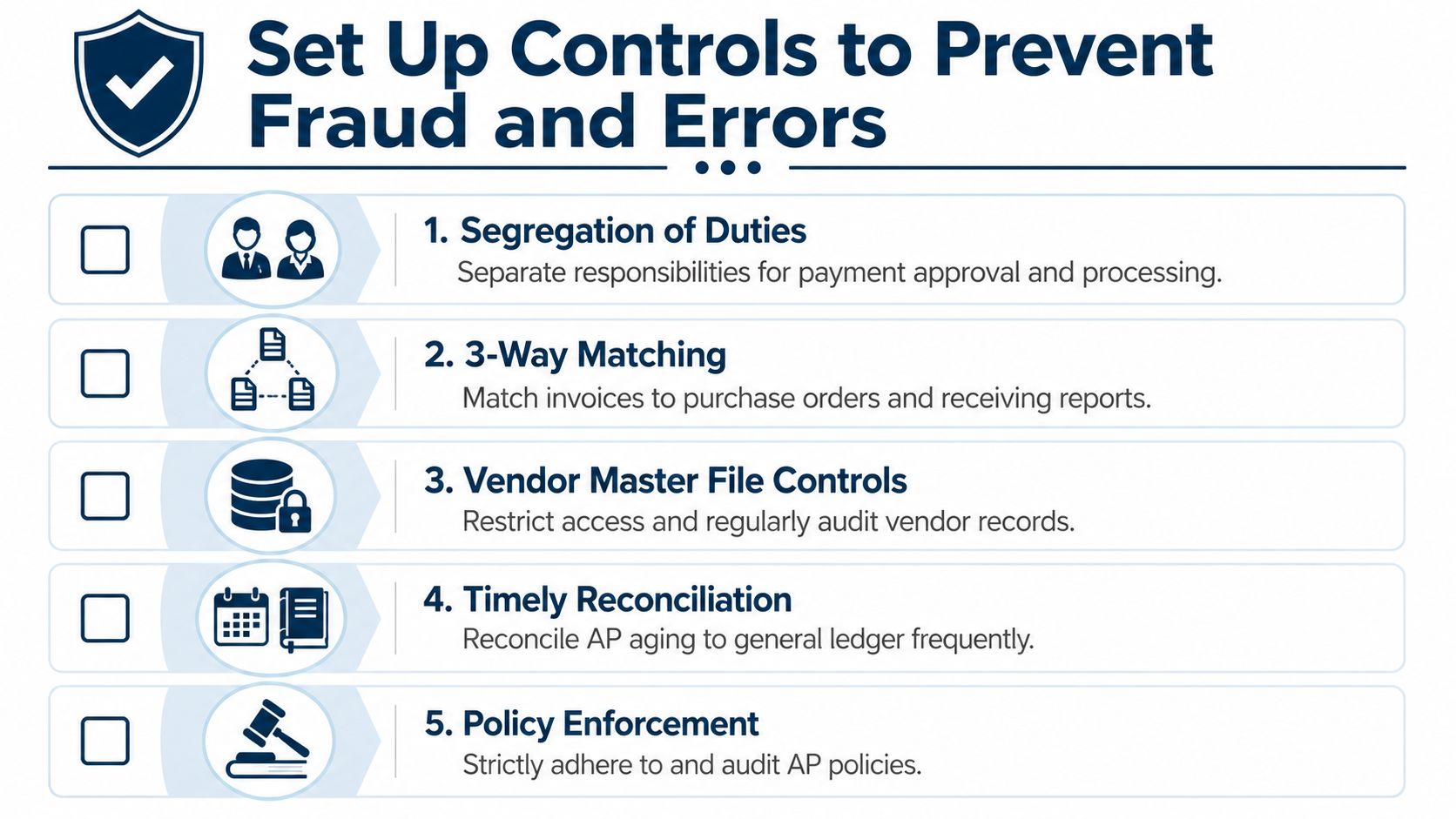
The scams are usually boring, not clever
Most AP fraud doesn't look dramatic. It looks normal.
A fake invoice comes in for a believable service. An email says a longtime vendor changed bank accounts. A staff member sets up a new vendor too quickly. A rushed payment gets approved because “we've worked with them forever.”
The 2024 Association for Financial Professionals survey found that 80% of organizations experienced payment fraud attempts in 2023, with checks being the most targeted method, as summarized in Paystand's AP fraud overview.
That's why dual approvals and vendor verification shouldn't be treated like optional extras.
Controls that actually work
You don't need a huge finance department to build real protection. You need a few rules that people follow every time.
Use controls like these:
- Separate the roles: The person who enters a bill should not be the same person who releases payment.
- Verify vendor changes offline: If bank details change, call a known contact using a trusted phone number. Don't rely on the email that requested the change.
- Require support for payment: Match invoices to the right documents before money goes out.
- Limit vendor file access: Only a small number of people should be able to add or edit vendor records.
- Review unusual activity: New vendors, duplicate amounts, rushed payments, and off-cycle requests deserve a second look.
A fast AP process without controls is just a fast way to make expensive mistakes.
Watch for warning signs in your own system
Fraud controls aren't only about stopping criminals. They also catch normal human errors before they hit cash.
A few useful warning signs:
| Warning sign | What it may mean |
|---|---|
| New vendor paid quickly after setup | Weak onboarding review |
| Same amount paid twice | Duplicate invoice or duplicate entry |
| Payment requested outside normal cycle | Rush pressure, possible scam, or poor planning |
| Missing receipt or PO support | Approval gap or documentation issue |
| Too many check payments | Higher fraud exposure and weaker tracking |
You don't need to stare at a dashboard all day. You just need someone reviewing exceptions with enough independence to ask, “Does this make sense?”
Know When and How to Outsource Your AP
Some owners read a playbook like this and realize something important. The issue isn't knowing what good AP looks like. The issue is having enough time and separation of duties to run it properly.
That's where outsourcing starts to make sense.
Signs your business has outgrown DIY AP
If the owner is still approving every minor invoice, the process is already strained. If one bookkeeper handles vendor setup, bill entry, approvals follow-up, payment runs, and reconciliation, you have an efficiency problem and a control problem at the same time.
Outsourcing can help when:
- The owner is the bottleneck: Too many invoices wait for one person.
- One employee does everything: There's no separation of duties.
- Cash feels unclear: Bills are being paid, but nobody can explain upcoming obligations cleanly.
- The books close late: AP cleanup keeps spilling into month-end.
- Vendor issues keep popping up: Missing invoices, duplicate payments, and payment timing problems keep repeating.
A good outsourced partner doesn't just “pay bills.” They help build the workflow, maintain the records, run approvals properly, and produce reporting the owner can use.
What to hand off and what to keep
Outsourcing works best when responsibilities are clear. You don't need to give away every decision.
A practical split looks like this:
| Phase | Timeline | Key Actions |
|---|---|---|
| Stabilize | First month | Centralize invoice intake, clean vendor list, document approval rules |
| Control | Next month | Add approval routing, separate duties, set payment calendar, tighten vendor changes |
| Optimize | Following month | Review aging, improve cash scheduling, track exceptions and recurring issues |
If you're already comparing support partners across finance, payroll, and HR, the same logic applies in other areas too. This overview on choosing your HR partner is a good example of how to think about service scope, accountability, and fit before you outsource.
For businesses that need someone to own the day-to-day process, outsourced bookkeeping for small business is often the most natural starting point. MyOfficeOps is one example of a firm that can handle bill workflows, reporting, and advisory support as part of a broader bookkeeping and finance function.
The right partner should leave you with fewer surprises, cleaner records, and better decisions. Not more software logins and more confusion.
If your bills are scattered, approvals are inconsistent, or too much AP lives in one person's head, MyOfficeOps can help you put a real process in place. That includes organizing invoice flow, tightening controls, improving visibility into upcoming payments, and giving you cleaner reporting so cash decisions get easier.