
An accounts receivable aging report is a list of unpaid customer invoices sorted by how long they've been outstanding, usually in 30-day buckets like 0 to 30, 31 to 60, 61 to 90, and 90+ days. It matters because the older an invoice gets, the harder it usually is to collect, so this report helps you see where your cash is stuck and which customers need attention first.
If you've ever looked at your sales numbers and thought, “We had a great month, so why does the bank account still feel tight?” this is the report that answers that question.
A lot of owners assume revenue and cash move together. They don't. You can do the work, send the invoice, book the sale, and still be waiting weeks or months to get paid. That gap is where stress starts. Payroll still hits. Rent is still due. Vendors still want their money.
That's why understanding what is accounts receivable aging is more impactful than commonly assumed. It sounds like an accounting term. In real life, it's a simple tool that tells you which invoices are fresh, which are slipping, and which ones are becoming a real problem.
The Difference Between Sales and Cash in the Bank
A business owner calls me after a strong month. Sales are up. The team is busy. Work went out the door on time. But there's one problem. Cash is tight.
That usually means the money exists on paper, not in the bank.
Maybe you invoiced three big clients near the end of the month. Maybe one customer pays like clockwork, one always needs a reminder, and one has been “processing it” for weeks. On your profit and loss statement, things can look fine. In your checking account, it can feel like something is off.

That missing piece is often accounts receivable, which is just money customers owe you for work you've already done. The aging report turns that pile of open invoices into something useful.
Why this report changes the conversation
Instead of asking, “Who still owes us money?” you start asking better questions:
- Which invoices are still current: These usually need monitoring, not panic.
- Which customers are drifting late: Gentle follow-up helps.
- Which balances are old enough to threaten cash flow: These need direct action.
If your cash feels tighter than your sales numbers suggest, your aging report is often the first place to look.
I like to think of it as a map. It shows what's collectible now, what may come in soon, and what could turn into a headache if you keep ignoring it. Once you start reading it that way, it stops being a boring spreadsheet and becomes a decision tool.
What an Accounts Receivable Aging Report Really Means
Think about unpaid invoices like mail on a counter. Some arrived today. Some have been sitting there for a couple of weeks. A few are buried underneath and nobody wants to deal with them. An aging report sorts your unpaid invoices the same way.
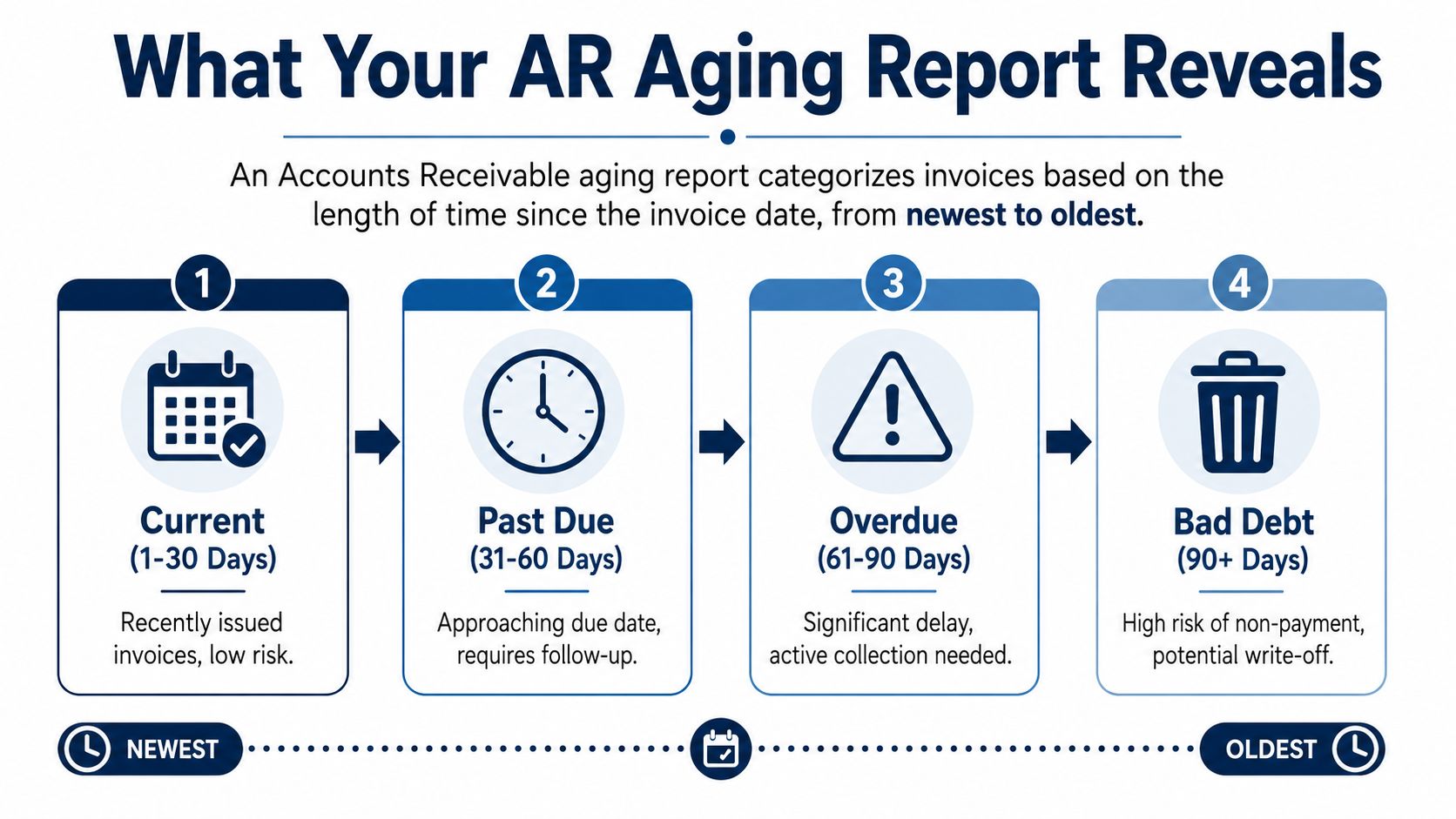
Technically, accounts receivable aging is a bucketed classification of open invoices by days past due, usually in 30-day increments, and the age is measured from the due date to the report date, not from the day the invoice was created, as explained in NetSuite's guide to accounts receivable aging.
The basic buckets
Most reports group invoices like this:
- Current or 0 to 30 days: These are recent invoices. Usually normal.
- 31 to 60 days: Now you're watching for slippage.
- 61 to 90 days: This is no longer casual. Someone needs to follow up.
- 90+ days: This is the danger zone. Collection risk is much higher.
Each bucket tells a different story. A customer with everything in the current bucket probably just hasn't reached the normal payment date yet. A customer with balances sitting in older buckets may have a process problem, a dispute, or a habit of paying late.
Why the buckets matter
The report isn't just listing open invoices. It's ranking your receivables by urgency.
That's why a plain spreadsheet with invoice totals isn't enough. You need to know age, not just amount. A customer owing a modest amount that's very old can be a bigger issue than a larger current balance.
If you want a simple starting point, this accounts receivable aging report template gives you the same bucket structure most businesses use.
Older invoices deserve more attention than newer ones. The report helps you stop treating every unpaid balance the same.
How to Read an AR Aging Report Example
A lot of owners freeze when they see an aging report because it looks like a lot of columns and a lot of unpaid money. The trick is to read it like a story, one customer at a time.
Start with three things. Who owes you money, how much they owe in total, and where that balance sits in the aging buckets.
A simple sample report
Here's a basic example of what a Sample Accounts Receivable Aging Report might look like:
| Customer Name | Total Due | Current (0-30 Days) | 31-60 Days | 61-90 Days | 90+ Days |
|---|---|---|---|---|---|
| ABC Corp | $5,000 | $2,000 | $0 | $3,000 | $0 |
| Green Field Studio | $3,200 | $3,200 | $0 | $0 | $0 |
| Northside Services | $4,400 | $0 | $1,400 | $1,000 | $2,000 |
| River Tech | $1,800 | $600 | $1,200 | $0 | $0 |
This table is made up as an example, but the layout is the part that matters.
What each column tells you
Customer Name is obvious, but it matters because this report is about behavior, not just balances. Over time, you'll start seeing patterns. Some clients always pay late. Some only pay when reminded. Some are reliable until one invoice gets disputed.
Total Due tells you the full balance outstanding for that customer. That gives you the size of the issue.
The aging bucket columns tell you how old each part of that balance is, making the report useful.
Take ABC Corp. The total due is $5,000. At first glance, you might think, “Okay, they owe us five grand.” But the split reveals the full picture. $2,000 is current, which is probably fine. $3,000 sits in the 61 to 90 day bucket, which means one older invoice has been hanging around and needs attention.
That's very different from Green Field Studio, where the whole balance is current. Same idea with Northside Services. Their total due is spread across several older buckets, including a chunk in 90+ days. That customer belongs near the top of your follow-up list.
Practical rule: Don't start with the customer who owes the most. Start with the customer whose balance is both large and old.
How to scan the report fast
When I review one of these, I don't read left to right like a novel. I scan for risk:
- Look down the 90+ days column first.
- Check which customers also have large total balances.
- See whether the same names keep showing up in older buckets.
If you also track collection speed with DSO, this plain-English guide to what days sales outstanding means helps connect the aging report to the bigger cash flow picture.
Why This Report Is Your Secret Weapon for Cash Flow
A lot of owners feel fine about cash right up until payroll week. Sales looked strong, invoices went out, and the month seemed solid. Then the bank balance says something else.
That gap is where the aging report earns its keep.
What healthy usually looks like
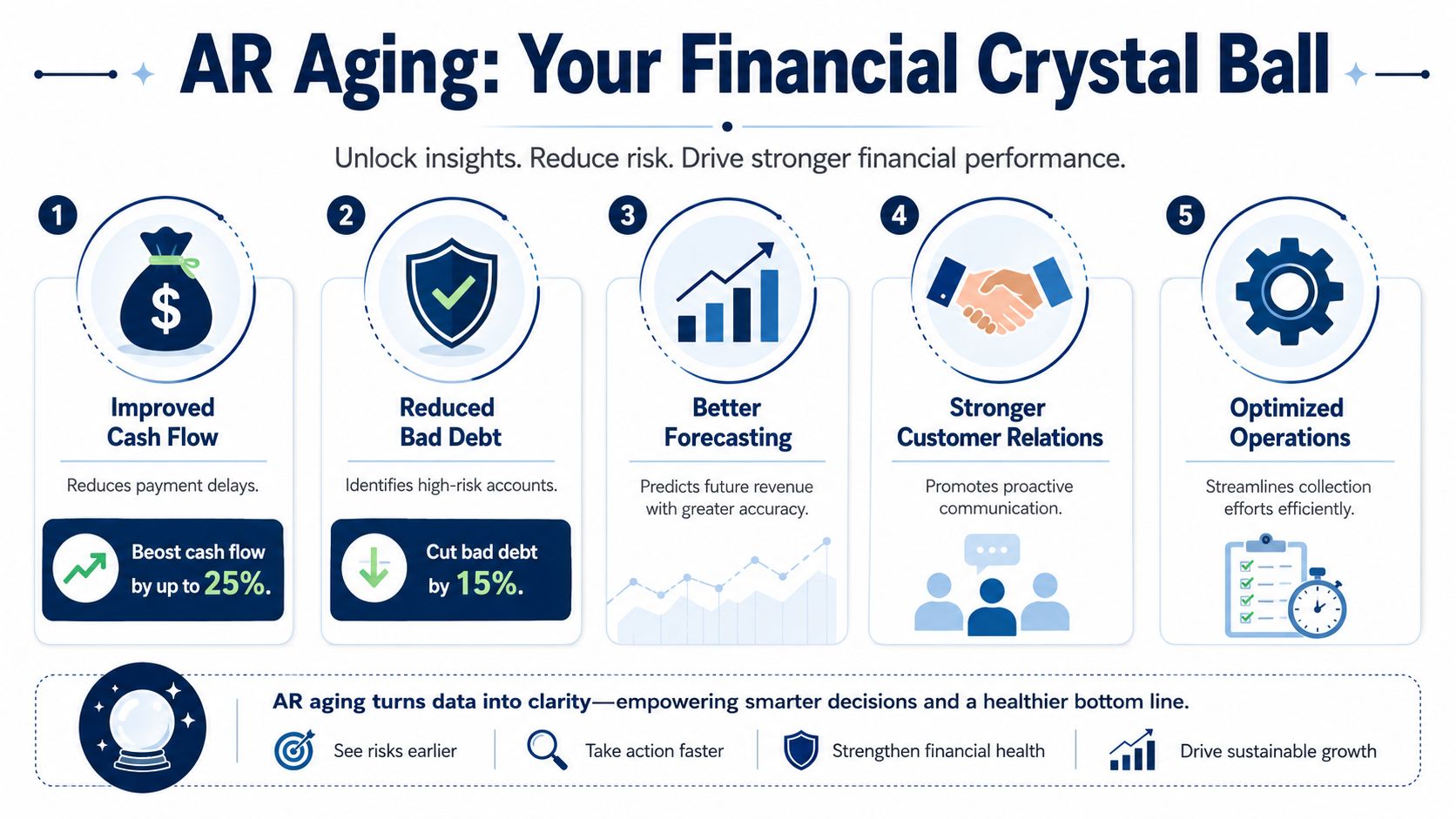
A healthy receivables report is weighted toward current invoices, not old ones. Stripe notes that many businesses aim to keep 80% or more of receivables in the current 0 to 30 day bucket, and that once more than 20 to 25% slips into 90+ days, collection trouble starts to affect financing conversations and cash reliability, according to Stripe's explanation of accounts receivable aging.
In plain English, current invoices are still behaving like receivables. Old invoices start behaving like wishful thinking.
That matters long before you talk to a bank. If too much of your AR is aging out, the business starts making decisions based on money that has not shown up yet.
Why owners should care before a lender does
I've seen this pattern more than once. A company has a profitable month on paper, but three large invoices drift past 60 days. Nothing looks alarming in the sales report, yet the owner delays inventory purchases, pushes a tax payment, or taps a credit line just to stay comfortable.
That is a cash flow problem, not a sales problem.
An aging report helps you catch it early because it shows whether incoming cash is likely to arrive on time, arrive late, or need real follow-up. That makes it one of the most useful reports for short-term planning.
- Cash forecasts get sharper: You stop treating every open invoice like near-term cash.
- Spending decisions get safer: Hiring, equipment buys, and owner draws are easier to judge.
- Credit risk shows up sooner: Repeat slow payers stand out before the balance gets painful.
If overdue balances are starting to crowd out current invoices, tightening receivables is usually the fastest way to improve cash on hand. That is also a practical first step in improving working capital without cutting into operations.
The report also helps you face reality
Older invoices have a lower chance of getting paid in full. Good bookkeeping does not ignore that. It forces a hard look at which balances still look collectible and which ones may need extra follow-up, a payment plan, or eventually a write-off.
That is why the 90+ column deserves attention. It is not just a record of old invoices. It is an early warning that future cash may be weaker than the profit and loss statement suggests.
Practical Ways to Collect Your Overdue Invoices
A client says, “We mailed the check last week,” and you want to believe them because they've been a good customer for years. Meanwhile, payroll is Friday, a vendor is waiting, and that invoice is now old enough to deserve more than another polite nudge.
That is where the aging report becomes useful in real life. It gives you a clear next step for each overdue balance, so collections stop depending on memory, mood, or how stressed you feel that day.
What to do by bucket
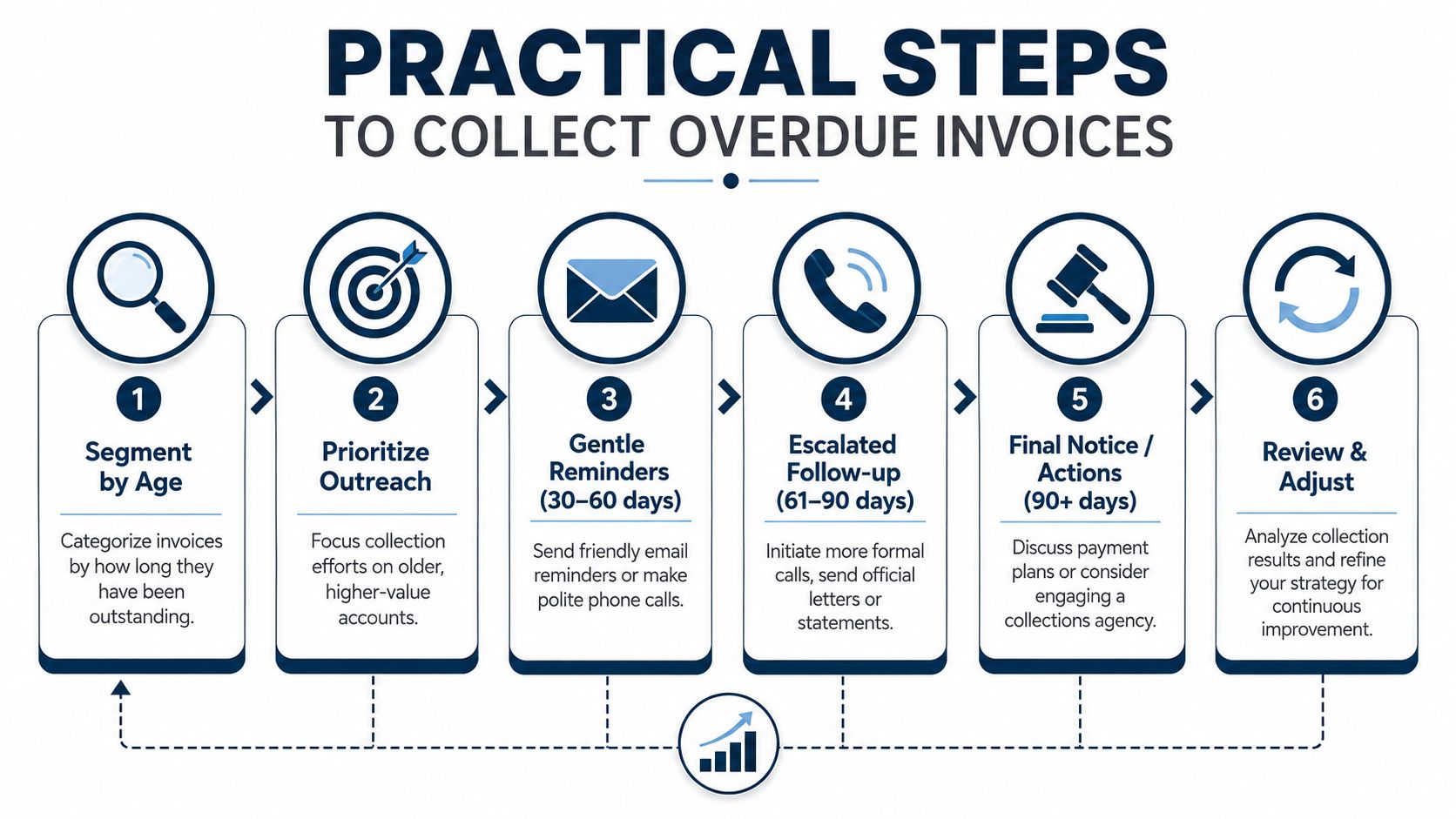
Older invoices usually need firmer follow-up than newer ones. That sounds obvious, but plenty of businesses treat every overdue invoice the same and wonder why nothing changes.
Here's a practical approach.
- Current or just past due: Send a short reminder with the invoice, due date, and payment link. Keep the tone professional and assume the delay is administrative.
- 31 to 60 days: Follow up directly. A short email works, but a phone call often gets faster answers if the customer is known for slow approvals.
- 61 to 90 days: Ask specific questions. Is there a dispute, missing paperwork, or a cash issue on their side? You need a reason, not another vague promise.
- 90+ days: Treat it as a collection problem, not a routine reminder. Call, ask for a firm payment date, and decide whether a payment plan, credit hold, or stronger action makes sense.
The goal is not to sound tougher. The goal is to get clarity fast.
What works better than chasing late forever
The easiest invoice to collect is the one that was set up properly from the start. I see more collection problems caused by sloppy process than by bad customers.
Clean up the front end
- Set terms clearly: Put payment terms in the proposal, agreement, and invoice.
- Invoice promptly: If the work is done, bill it. Waiting two weeks to send the invoice usually leads to waiting longer to get paid.
- Confirm the right contact: Know who approves the invoice and who releases payment.
- Make payment easy: If paying you takes extra steps, some clients will keep putting it off. Tools that automate small business invoicing can help tighten that process.
Make follow-up routine
Owners often avoid collections because they do not want to damage the relationship. In practice, silence usually does more damage than a calm reminder process. A customer who hears from you regularly knows your terms matter.
Use a simple cadence:
- Send the invoice right away.
- Send a reminder close to the due date.
- Follow up shortly after it becomes overdue.
- Escalate based on age and risk.
A steady process beats a frustrated email sent after two months of avoidance.
Watch for patterns, then change the terms
One late invoice can be an exception. A customer who lands in the same aging bucket every month is showing you how they pay.
That is the point to tighten terms, ask for a deposit, shorten payment windows, or pause new work until the account is current. Good collections are not only about chasing old money. They are about preventing the same problem from repeating.
When DIY Bookkeeping Is Holding Your Business Back
At the start, doing your own books makes sense. You know your customers. You know which invoices are open. You can send reminders between meetings.
Then the business grows.
Now there are more invoices, more exceptions, more back-and-forth, and less time to stay on top of it. That's usually the point where DIY bookkeeping stops saving money and starts costing you money.
Signs you've hit the limit
Some warning signs are easy to miss:
- Your aging report keeps getting older: More balances sit in late buckets month after month.
- Follow-up happens only when cash gets tight: That creates a feast-or-famine rhythm.
- Nobody owns collections: Invoices go out, but reminders are inconsistent.
- You don't trust the numbers: You know money is owed, but you can't quickly tell what's collectible.
A related metric is Days Sales Outstanding, calculated as (Average Accounts Receivable × 360 Days) / Credit Sales. A consistently high or rising DSO is a sign that collection processes are failing and outside help may be needed, according to HubiFi's guide to the aging of receivables formula.
What getting help actually changes
This isn't about handing your books to someone because you “can't do it.” It's about deciding your time matters more elsewhere.
A good bookkeeping and advisory partner can clean up invoice timing, tighten follow-up, track aging trends, and give you reports you can act on without translating accounting language. If your team is still handling invoicing manually, tools that automate small business invoicing can also reduce delays and make follow-up easier.
For businesses that want more structure around receivables, reporting, and cash visibility, MyOfficeOps is one option that provides bookkeeping, financial reporting, and advisory support for small and midsize companies.
The tipping point is simple. If chasing payments is pulling you away from sales, service, or running the business, the process needs help.
If your receivables report feels messy, confusing, or overdue balances keep piling up, MyOfficeOps can help you turn that data into a clean process and clearer decisions. The goal isn't more bookkeeping for its own sake. It's better cash flow, cleaner reports, and more time for you to run the business.