
Monday morning hits, and someone drops a stack of gas receipts on the front desk. Two project managers still haven't turned in last week's expenses. A nurse manager bought supplies on a personal card and wants reimbursement. Your office admin is trying to decode faded paper slips while QuickBooks sits open in one window and a spreadsheet sits open in another.
That's a normal week for a lot of small businesses around Philadelphia.
If you run a construction company in West Chester, a clinic on the Main Line, or a professional services firm in Center City, you already know the problem. It's not that your team is careless. It's that the process is old, slow, and built around chasing paper after the money is already gone. That creates delays, mistakes, and a lot of wasted payroll time.
Expense management automation fixes that system problem. It replaces the shoebox, the email chain, and the spreadsheet with a process that captures expenses as they happen, checks them against your rules, and pushes clean data into your books. The point isn't fancy software. The point is getting your time back and seeing where your money is going before month-end turns into a fire drill.
The End of the Shoebox Full of Receipts
A lot of owners think expense reporting is just one of those annoying admin tasks that comes with running a business. It isn't. It's a leak.
In a manual setup, the leak shows up everywhere. A foreman buys materials and forgets the receipt until two weeks later. A doctor pays for a conference meal and submits it after payroll closes. A consultant books travel, emails a PDF to one person, texts a photo to another, and leaves accounting to sort it out. By the time someone enters the expense, codes it, and asks follow-up questions, the original purchase is old news.
What the old process really costs
The obvious cost is labor. Someone has to collect receipts, type the details, compare them to card statements, route them for approval, and file them somewhere. The hidden cost is distraction. Your admin team isn't working on billing, collections, job costing, or month-end cleanup. They're playing detective.
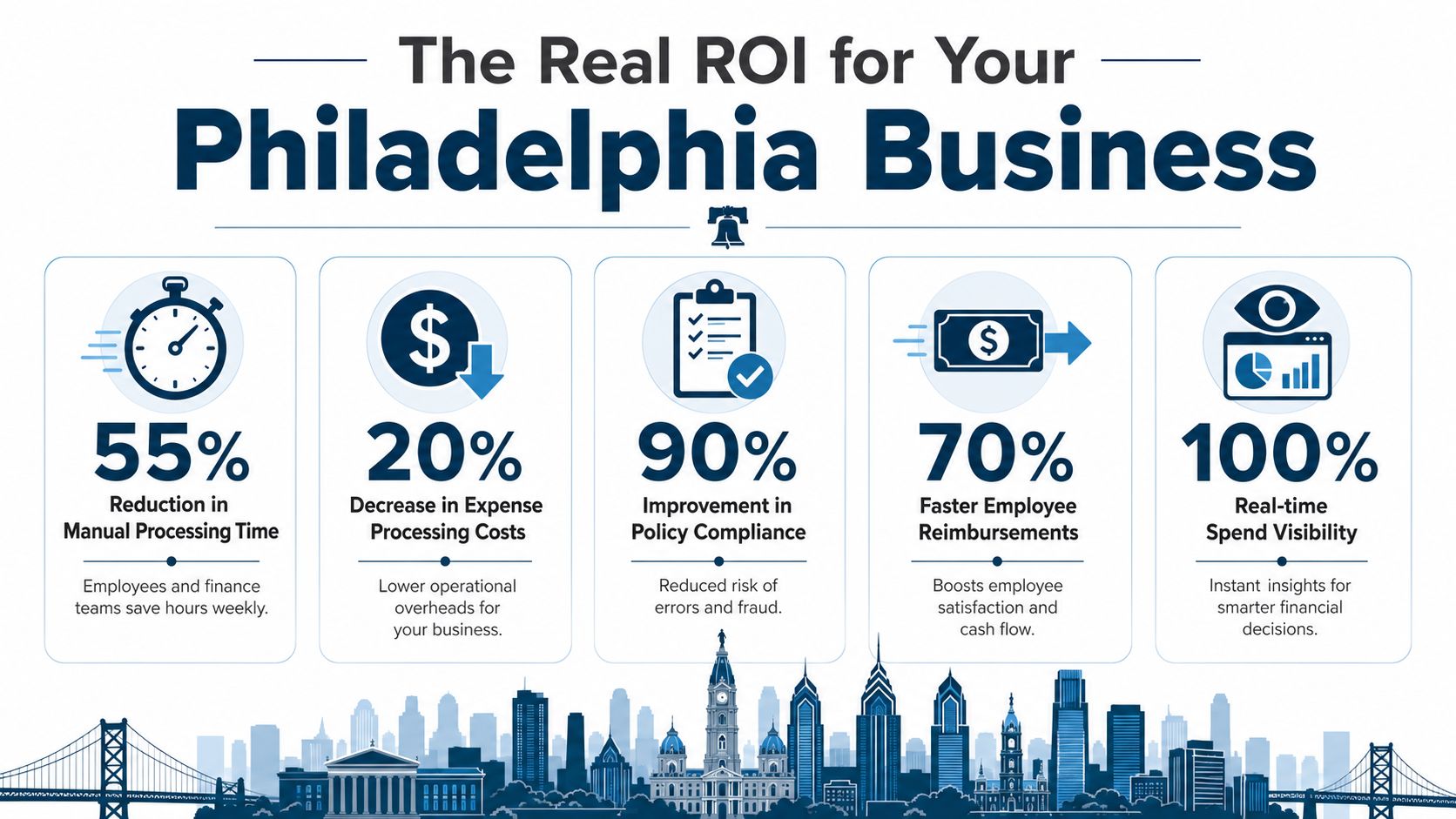
Research cited by the Financial Executives Networking Group says automating expense management cuts the cost of processing every single expense report transaction by more than 50%. The same source notes that for a Philadelphia small business processing 200 reports a month, that can save thousands of dollars in administrative labor each year (daily.financialexecutives.org on expense management technology).
Practical rule: If your team spends more time finding receipts than reviewing spending, the process is broken.
That's why more owners are moving away from paper and spreadsheets. Sometimes the first step is as simple as using an AI invoice scanner tool to turn messy documents into usable data instead of retyping everything by hand.
A good cleanup process also starts with better habits around categorizing and documenting expenses. If your current system is loose, this guide on how to track business expenses is a solid place to tighten the basics before you automate.
What changes when you stop chasing paper
The biggest shift is simple. Expenses get recorded closer to the moment they happen.
That matters because real businesses don't run on perfect memory. Your field team is moving. Your providers are seeing patients. Your attorneys are bouncing between client work and court. The longer expense capture waits, the more details get lost. That's when miscoded charges, missing receipts, and late reimbursements start piling up.
Expense management automation gives you a cleaner path. Your people submit from their phone. Managers approve inside a defined workflow. Accounting gets organized data instead of scraps. You stop building your books from leftovers.
What Is Expense Management Automation Really
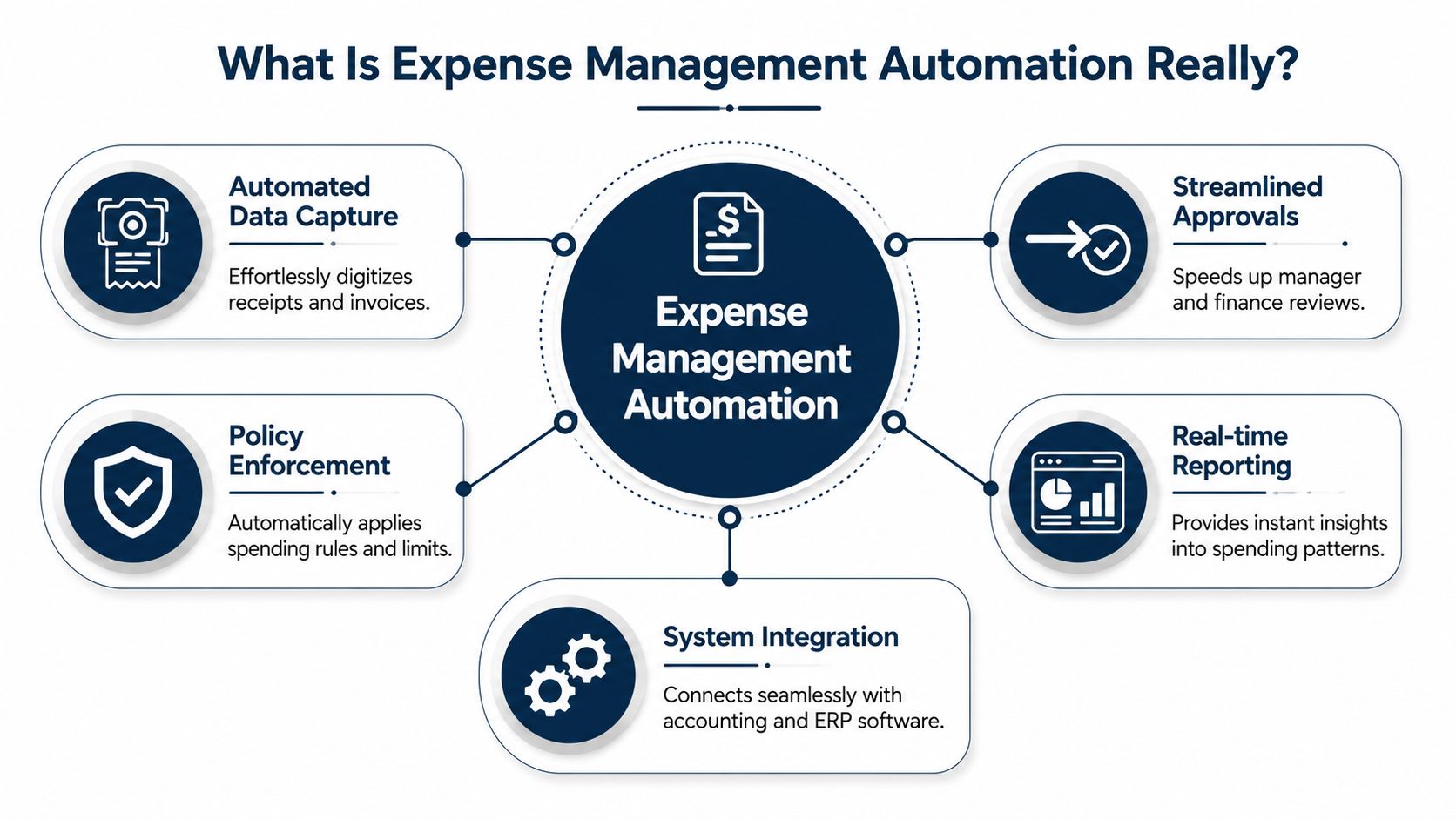
Think of expense management automation like a front-desk person for your spending. Every receipt, card swipe, and reimbursement request comes through one place. The system reads it, checks it, routes it, and records it.
It's not replacing your bookkeeper. It's taking the repetitive work off their plate.
How it works in plain English
An employee buys lunch for a client. Instead of stuffing the receipt into a wallet, they take a photo with an app. The software reads the receipt, pulls out the merchant, date, and total, and starts building the expense record.
That reading step comes from OCR, short for optical character recognition. When OCR is paired with AI, the system can pull data from receipts and reduce manual data entry errors by up to 90%, which helps speed up reimbursement because employees no longer have to fill out every field by hand (Paylocity on expense management automation).
The five parts that matter most
Here's what you'll see in a working system:
- Receipt capture means your team snaps a photo or uploads a digital receipt.
- Auto-reading means the software pulls key details off that document.
- Policy check means the system compares the expense to your rules.
- Approval routing means it goes to the right manager instead of bouncing around in email.
- Accounting sync means approved data moves into your books without someone typing it again.
That's the practical version of expense management automation. It's a chain of small jobs getting handled automatically instead of by memory and manual entry.
A good system catches a missing receipt or out-of-policy charge before it lands on your accountant's desk.
What employees and managers notice first
Employees usually notice one thing first. It's easier.
They don't need to save every paper receipt until Friday. They don't need to remember exact dates later. They don't need to guess how to code a charge with no help. That lowers friction, which usually means better compliance because the process isn't annoying.
Managers notice a different benefit. They stop getting random texts and emails asking, “Can you approve this?” Instead, they see a clean queue. The expense already has the receipt, category, and notes attached. They approve what fits policy and kick back what doesn't.
What automation is not
It's not magic, and it's not a full financial strategy by itself.
If your chart of accounts is messy, if no one knows your reimbursement rules, or if half the team uses personal cards with no documentation, software won't fix that on its own. It will make a good process faster. It will also expose a bad process faster.
That's a good thing. Once you can see the problem clearly, you can fix it.
The Real ROI for Your Philadelphia Business
Most owners hear “automation” and think “time savings.” That's part of it. The bigger issue is control.
If you run a construction company, bad expense tracking muddies job costs. If you run a clinic, delayed reimbursements frustrate staff. If you run a law firm or consulting practice, small missed expenses can slip through the cracks and never make it into client billing or internal reporting. The return on expense management automation comes from cleaning up those everyday misses.
Where the savings show up
A study referenced by Fyle says businesses that switch to automated systems see a 58% reduction in overall processing costs compared with paper receipts and manual entry. The same source explains that OCR reads receipts instantly and the software flags policy violations automatically (Fyle on automated expense reporting).
That number matters, but the day-to-day impact matters more. Here's what it looks like on the ground:
| Business type | Manual headache | Better result with automation |
|---|---|---|
| Construction | Job expenses come in late and get coded after the fact | Costs are tied to jobs faster, which helps job profitability reviews |
| Healthcare | Staff wait on reimbursements and managers chase missing backup | Submissions are cleaner and approvals move with less back-and-forth |
| Professional services | Client-related expenses get scattered across inboxes and cards | Expenses are easier to document, review, and assign correctly |
ROI is more than admin labor
The obvious return is lower processing cost. The less obvious return is what your finance team can finally work on once they're not stuck doing data entry.
That might mean reviewing margins by project. It might mean spotting one department that keeps overspending on travel. It might mean finally getting monthly reports out while they still matter. If you want a bigger picture look at adjacent finance gains, this overview of accounts payable automation benefits helps connect expense processes to the rest of your back office.
Clean expense data helps owners make decisions sooner. Hiring, pricing, and budgeting all get easier when the numbers are current.
Local examples that make the case
For a West Chester contractor, speed matters because fuel, materials, and travel costs hit different jobs every week. If receipts sit in trucks or glove compartments, the books won't tell the truth until long after the work is done.
For a healthcare practice, the issue is often trust. Staff members who pay out of pocket for approved supplies don't want to wait while someone sorts through a pile of paperwork. A simple mobile submission process can reduce that tension and keep the back office from becoming the bottleneck.
For a Center City professional services firm, the ROI often shows up in accuracy. When client-facing expenses are documented right away, there's less guesswork later. That protects both reimbursement and reporting.
How Automation Fits into Your Current Workflow
The biggest fear I hear from non-tech businesses is simple. “This sounds good, but I can't afford to break what already works.”
That concern is fair. A lot of Philadelphia-area businesses have a mix of older habits and newer tools. Maybe bookkeeping lives in QuickBooks, payroll runs somewhere else, and company cards sit in a separate portal nobody checks until month-end. Expense management automation has to fit into that reality, not pretend it doesn't exist.
The workflow most small businesses need
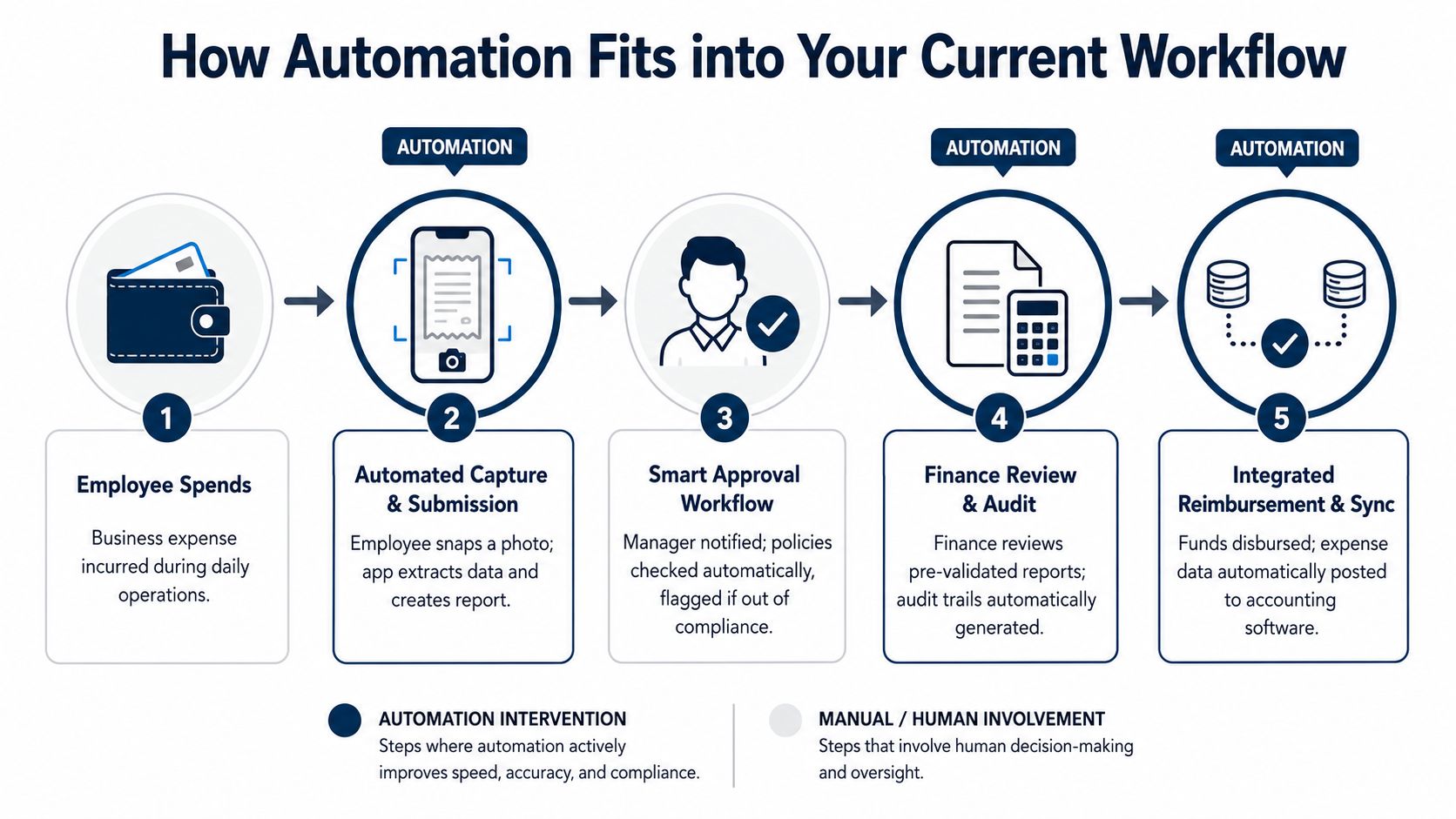
In a solid setup, the process looks like this:
- An employee spends using a company card or pays an approved business cost.
- The transaction appears in the expense tool.
- The employee adds the receipt with a phone photo or upload.
- The system checks the rules and routes the item for approval.
- Approved data syncs into accounting without rekeying everything.
That's the part many owners miss. Automation doesn't sit beside the workflow. It connects the workflow.
The real challenge is integration friction
Non-tech SMBs need a realistic view. The software may be modern, but your operating environment might not be. Fyle notes that many guides skip the integration friction small businesses face, especially in non-tech sectors. The same source says automation can cut processing time by 25%, but syncing new tools with traditional accounting systems used by 68% of SMBs in the US can be a real challenge if you're trying not to disrupt month-end close (Fyle on SMB expense automation integration friction).
That's why the right rollout usually starts small.
A construction firm might begin with card-based field purchases only. A clinic might start with staff reimbursements. A law office might focus on travel and client meals first. You don't have to automate every expense type on day one. In fact, that usually makes adoption harder.
What works and what doesn't
Here's a practical view:
- Works well when you map your approval path before setup.
- Works well when account codes and job or class tracking are decided early.
- Works well when one person owns the rollout and answers team questions.
- Doesn't work well when everyone gets a login but nobody gets training.
- Doesn't work well when owners expect software to fix policy gaps.
- Doesn't work well when you go live in the middle of month-end close.
Start with the expenses that cause the most friction, not the feature list that looks best in a demo.
If your books, payroll, and reporting already touch multiple systems, the goal is one connected flow. That's where integrated back-office planning matters more than chasing one app after another.
Your Practical Roadmap to Getting Started
Most failed rollouts have the same problem. The business buys software first and thinks about policy later.
That's backwards.
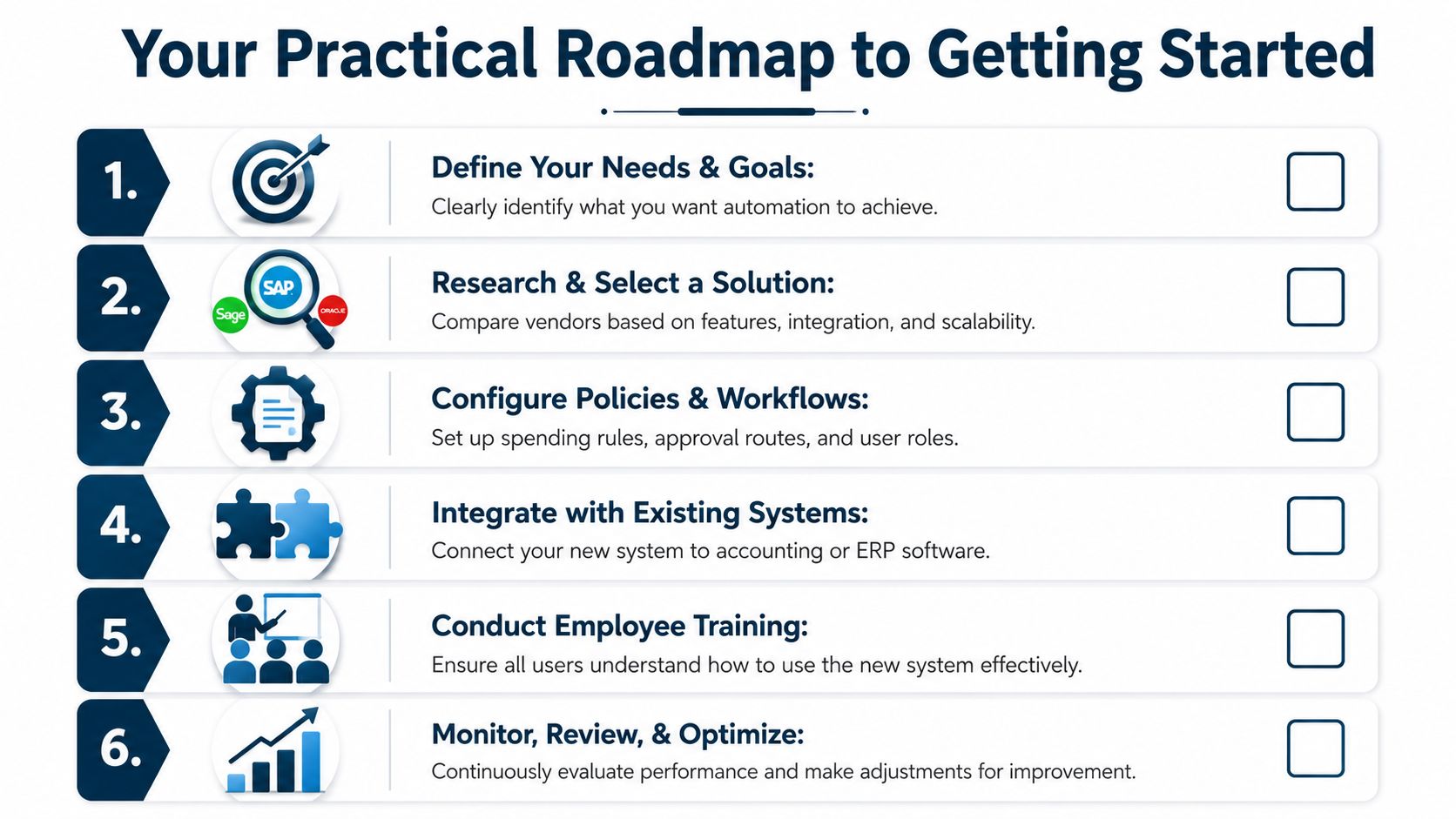
If you want expense management automation to stick, start with your real-life process. Who spends money? Who approves it? What backup do you need? Where should it land in the books? When those answers are clear, the software choice gets easier.
Step one is policy, not platform
Write down the basics before you look at demos.
- Allowed expenses should be obvious. Travel, meals, supplies, mileage, job purchases, dues, and anything else your team regularly spends on.
- Required backup needs to be clear. Receipt, client name, project code, business purpose, or supervisor note.
- Approval rules should match the way your business already makes decisions.
- Deadlines matter because late submissions create month-end problems.
When the rules live only in one manager's head, employees guess. Automation works best when it enforces something specific.
Choose for fit, not flash
A strong tool for a Philly-area contractor may not be the best fit for a therapy practice or a design agency. Ask sharper questions than “Does it have OCR?”
Try these instead:
| Question | Why it matters |
|---|---|
| Does it sync cleanly with our accounting system? | If not, your team will still be entering data twice |
| Can it handle class, location, or project coding? | That matters for job costing and service-line reporting |
| How easy is mobile receipt capture? | If field staff hate using it, adoption will stall |
| Can managers approve quickly from phone or email? | Slow approvals kill the process |
| What does exception handling look like? | You need a clean way to review odd or incomplete items |
If your business also deals with newer payment models, it helps to understand how automation principles show up in other workflows too. For example, teams exploring digital asset billing can learn a lot from this guide on how to streamline web3 payments with OneSafe. The tools are different, but the lesson is the same. A payment process only helps if it fits the way your business operates.
Build the approval path carefully
Sage notes that automated approval workflows with dynamic routing logic can reduce average expense report processing time by 50% or more, and that enforcing rules at the point of submission improves policy compliance (Sage on expense management automation).
That only happens if the routing reflects reality.
A simple setup might send normal team expenses to a direct manager and route higher-risk categories to finance. A more layered setup might require a project manager on job-related costs and a department lead on overhead spending. Keep it as simple as you can. The more approval hops you build, the easier it is to create a new bottleneck.
Run a pilot before full rollout
Don't force the whole company onto a new process at once.
Pick one team, one card program, or one expense category. Then watch what breaks. This allows you to pinpoint practical issues. Maybe field staff need a faster receipt upload method. Maybe healthcare supervisors need a simpler approval screen. Maybe your chart of accounts needs cleanup before sync rules make sense.
A short pilot also gives you internal examples to share with the rest of the company. People trust a process more when they hear, “Here's how our own team used it,” instead of, “The software company says it's easy.”
Field note: The best pilot group is not your most tech-savvy team. It's the group with the most common expense headaches.
Train for behavior, not buttons
Most training fails because it focuses on where to click.
Your team also needs to know when to submit, what counts as valid backup, how to handle missing receipts, and who to ask when something gets rejected. Managers need separate training because approval delays often start there, not with employees.
Give everyone a one-page standard they can use. Keep it short. Show examples from your business, not generic vendor screenshots.
Watch the first close after go-live
The first month tells you whether your setup is helping or just shifting work around.
Check for duplicate entries, unmapped categories, stuck approvals, and reimbursement timing problems. Review whether the data coming into accounting is clean enough for reporting. If it isn't, fix the rules early.
This is also the point where connected systems start to matter more. If you want smoother reporting across bookkeeping, payroll, and operations, this overview of integrated accounting solutions is worth reading.
From Financial Chaos to Complete Clarity
A significant benefit isn't that your team spends less time typing numbers. The true advantage is that your books stop lagging behind the business.
When expense management automation is set up well, you stop chasing people for receipts at the end of the month. Managers stop approving through random emails and text messages. Employees know what to submit and how to submit it. Accounting gets cleaner records with less rework.
That kind of clarity changes how owners lead.
A contractor can review job costs with more confidence. A clinic owner can see spending patterns without waiting for a manual cleanup. A professional services firm can tighten internal controls without making employees miserable. The process gets simpler for the team and more useful for the owner.
There are trade-offs, of course. Setup takes thought. Policies need to be clear. Some workflows need to be rebuilt. And if your current books are messy, automation may expose problems you've been working around for years. But that's still progress. A visible problem is easier to solve than one buried in paper receipts and disconnected spreadsheets.
The best systems don't just move faster. They make the numbers easier to trust.
If your business is still running expenses through inboxes, envelopes, and memory, it's probably costing more than it seems. Not just in admin time, but in delayed decisions, weak visibility, and unnecessary friction across the company.
If you're ready to clean up expense reporting without disrupting the rest of your back office, MyOfficeOps can help you map the process, choose a system that fits your business, and roll it out in a way that is effective for your team. For Philadelphia-area construction companies, healthcare practices, and professional service firms, that means less paperwork, cleaner books, and better visibility into where the money is going.