You know the routine. A vendor emails an invoice. Another comes in as a PDF. One gets forwarded from your office manager. One is still sitting on someone's desk. By Friday night, you're trying to figure out what's been entered, what's waiting for approval, and what's already overdue.
That's where a lot of small business owners get stuck. The books aren't exactly wrong, but they aren't current enough to help you make decisions. You can't see cash clearly. Your team is chasing paperwork. Bills get paid late, or they get rushed through with barely any review.
Invoice processing automation is just a simpler way to handle that mess. It uses software to read invoices, pull out the key details, route them for approval, and send the data into your accounting system. It's not magic, and it doesn't replace judgment. It takes the repetitive parts off your plate so your team can focus on the invoices that require attention.
For small and midsize businesses, that matters. A lot of invoice automation content is written for giant finance departments. If you process fewer than 500 invoices a month, you need a setup that works in real life, not a flashy demo that falls apart once oddball vendor bills start showing up.
That Pile of Invoices Is Costing More Than You Think
A growing business usually hits the same wall. At first, handling invoices by hand feels manageable. Then volume creeps up. You add vendors. Approvals get slower. Your bookkeeper or office manager starts spending chunks of the day typing in data that already exists on the invoice.
By the time you feel the pain, it's not just an admin problem. It's a money problem.
What invoice processing automation actually does
Invoice processing automation functions as a digital assistant for accounts payable. It captures invoices from email, scans, or uploads, reads the bill, pulls out fields like vendor name, invoice number, date, and amount, and sends that information where it needs to go.
It can also route invoices for approval, match them to the right records, and keep a cleaner trail of what happened and when. For a small business owner, the primary benefit is simple. You stop relying on memory, inbox searches, and paper stacks to know what you owe.
Practical rule: If your team still has to ask, “Did we get that invoice?” more than once a week, your process is already too manual.
Why the old way gets expensive fast
Manual work feels cheap because you're not writing a separate check for it. But the labor is still there. The delays are still there. The missed details are still there.
The cost gap is bigger than most owners expect. Manually processing one invoice costs an average of $15 and takes nearly 15 days, while an automated system cuts that cost to between $2 and $5 according to accounts payable automation statistics from Factura.
That doesn't just hit large companies. Even a smaller firm feels it when one person is buried in data entry instead of handling collections, reconciliations, payroll questions, or customer issues.
The real-world version of the problem
A lot of SMBs don't have a formal AP department. The “process” is often some mix of these:
- Email forwarding: Invoices get sent to whoever happens to be available.
- Shared folders: PDFs sit in a drive until someone remembers to enter them.
- Manual approval: Owners approve bills from memory, text message, or a quick hallway chat.
- Late visibility: You don't see total payables clearly until after entry is done.
That creates messy books. It also creates stress. When your liabilities aren't current, your cash picture is fuzzy. You hold back spending because you're unsure what's about to clear, or you spend too freely because unpaid bills haven't made it into the system yet.
Automation won't fix every accounting issue. But it does remove a lot of the repetitive drag that keeps books behind and owners in the dark.
How Automation Actually Boosts Your Bottom Line
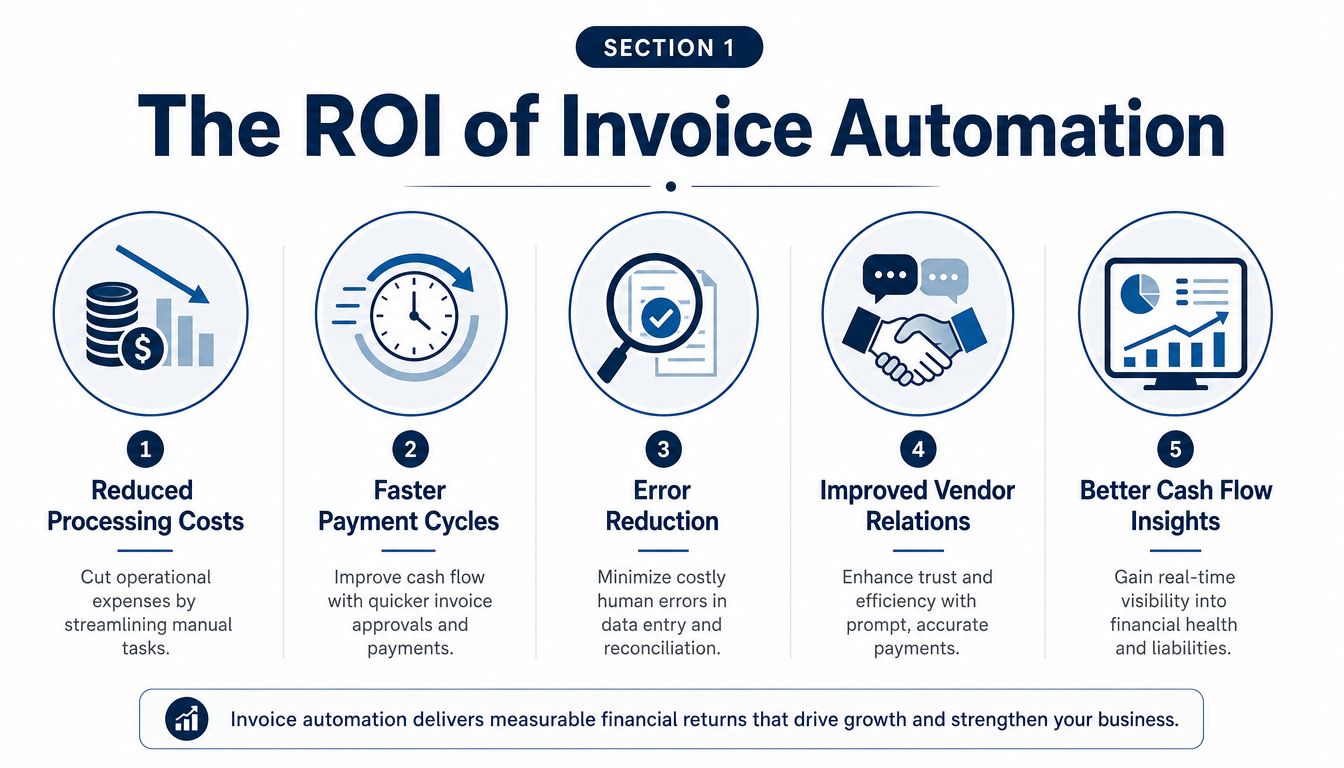
The biggest mistake I see is treating invoice automation like a speed tool only. Yes, it saves time. But its key benefits show up in lower processing cost, fewer mistakes, and better visibility into what the business owes.
That's what changes the bottom line.
Fewer errors means less money leaking out
Manual entry invites mistakes. Wrong vendor code. Duplicate invoice number. Bad amount. Missing approval. Those errors cost time to unwind, and sometimes they cost real cash.
Manual invoice processing has an error rate of around 39% and costs an average of $15 to $16 per invoice. Purpose-built automation reduces costs to $3 or less and cuts the error rate by up to 80% based on invoice processing benchmark statistics from Factura.
For a small business, that matters because mistakes don't stay isolated. A bad bill entry can throw off job costing, department spend, reimbursements, and cash planning. If your business also deals with healthcare admin or coded reimbursements, adjacent workflows can benefit from automation too. A useful example is how teams boost reimbursement with coding automation when they need cleaner, faster data handling in another part of the back office.
Faster approvals improve cash control
When invoices move quicker, you can make smarter payment decisions. You know what's approved, what's pending, and what's due. That means fewer surprises at the end of the month.
Here's what that looks like in practical terms:
| Process area | Manual approach | Automated approach |
|---|---|---|
| Data entry | Staff types invoice details by hand | System captures key data automatically |
| Approval flow | Email chains and follow-ups | Rules send invoices to the right approver |
| Status tracking | Someone has to check manually | Dashboard shows where invoices are stuck |
| Cash visibility | Liabilities show up late | Bills appear in the system sooner |
This is why owners often feel calmer once invoice processing automation is in place. The books don't just get cleaner. They get current.
For a deeper look at what that can mean operationally, MyOfficeOps has a plain-English resource on accounts payable automation benefits for growing businesses.
Clean AP data gives you better decisions. It's hard to manage cash when half your bills are still sitting in someone's inbox.
Better vendor relationships are a side effect worth keeping
Vendors notice when your process is sloppy. They notice late payments, duplicate questions, and remittance confusion. They also notice when your team can answer quickly and pay consistently.
That doesn't mean every small business needs a full AP platform. It does mean your invoice flow should be reliable enough that you're not fixing the same problems every month.
Choosing Your Automation Path Software vs Service
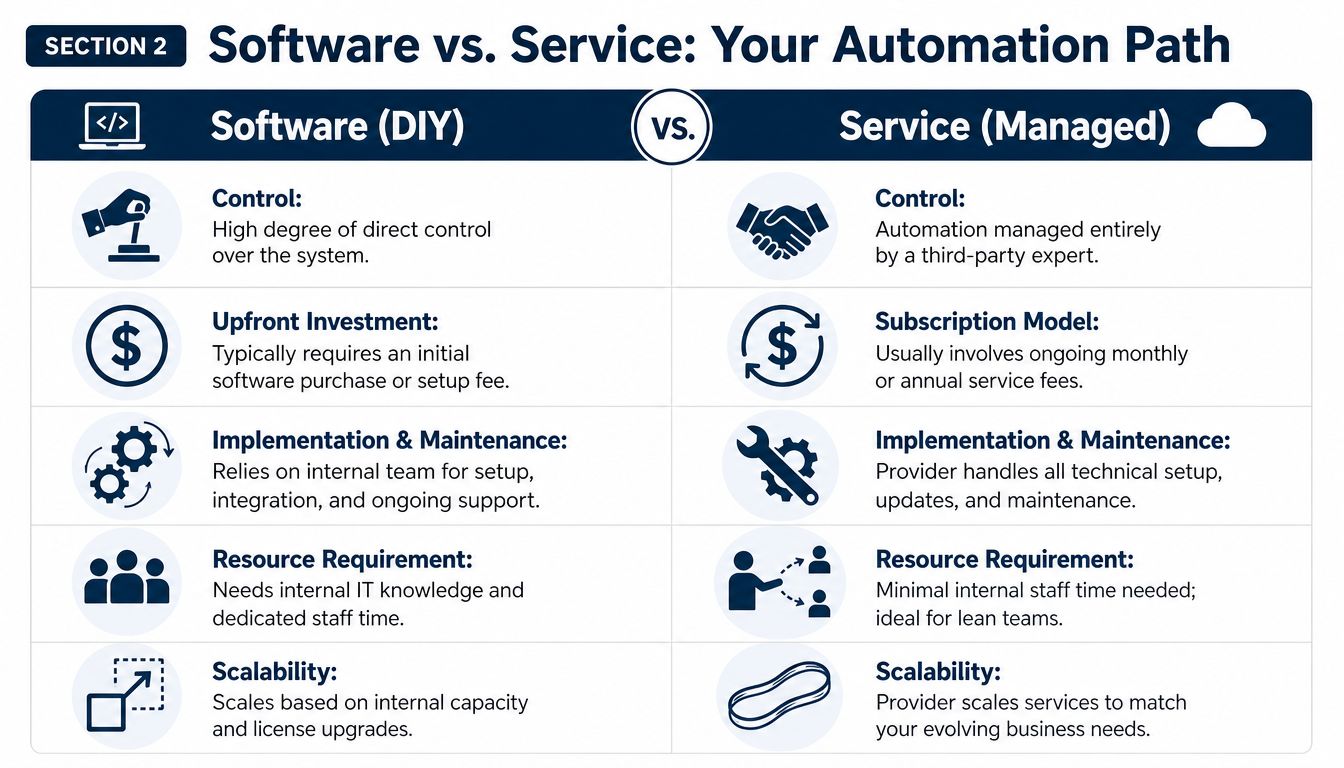
Once you decide to clean up invoice processing, the next question is practical. Do you buy software and run it yourself, or do you hand the process to a service partner who manages it with you?
There isn't one right answer. It depends on your team, your systems, and how much time you want to spend on setup and maintenance.
The DIY software path
If you like control and don't mind digging into settings, a software-first approach can work. This usually means choosing a tool, connecting it to QuickBooks or your accounting system, building approval rules, and training your team to use it.
The upside is clear. You control the workflow. You decide how invoices come in, who approves what, and how coding is handled.
The downside is also clear. Someone on your side has to own it.
That includes things like:
- Setup work: Building rules, testing invoice capture, and mapping fields.
- Vendor cleanup: Fixing duplicate names, bad addresses, and old records.
- Exception handling: Reviewing invoices the software can't process cleanly.
- Ongoing support: Updating rules as your vendors, staff, or approval structure changes.
This path tends to work best for hands-on owners or teams with a strong admin lead who can stay on top of it.
The managed service path
A managed service is better for businesses that want the outcome without becoming AP system administrators. The provider helps set up the workflow, handles process management, and supports the invoices that don't pass straight through.
For lean teams, that can be a better fit than buying another piece of software and hoping someone has time to maintain it.
One reason this matters is that a 2024 analysis found 62% of SMBs abandon automation after 6 months due to high setup costs and lack of support for complex exception handling, according to this SMB automation analysis from Mesh Payments.
That stat tracks with what small businesses run into every day. The tool works fine in the demo. Then a subcontractor sends a blurry invoice with no PO, a recurring bill changes format, and approvals start getting skipped because nobody finished the workflow logic.
The software rarely fails first. The process around it does.
A side-by-side way to think about it
| Decision point | Software DIY | Service managed |
|---|---|---|
| Control | You manage settings and workflows directly | You set the rules, provider helps run them |
| Time required | Higher internal time commitment | Lower internal time commitment |
| Technical burden | Falls on your team | Falls mostly on the provider |
| Best fit | Hands-on teams with process capacity | Owners who want support and consistency |
| When problems show up | Internal team troubleshoots | Provider usually handles the issue path |
If you're reviewing broader small business systems at the same time, this guide on tools that streamline operations and boost efficiency can help you think through where AP fits with the rest of your admin stack.
And if you're still deciding whether your current bookkeeping setup can support automation, it helps to look at your core accounting tools first. This MyOfficeOps resource on how to choose accounting software for your business is a good place to start.
For some businesses, a hybrid model works best. Use software for capture and routing, but keep a service partner involved for review, coding support, or exception handling. That's often the most realistic option when you have limited staff and steady but not massive invoice volume.
A Practical Plan for Your First Automated Workflow
It usually starts the same way. A stack of emailed bills, a few paper invoices on the corner of the desk, one vendor asking why they have not been paid, and someone on your team staying late to key everything into QuickBooks.
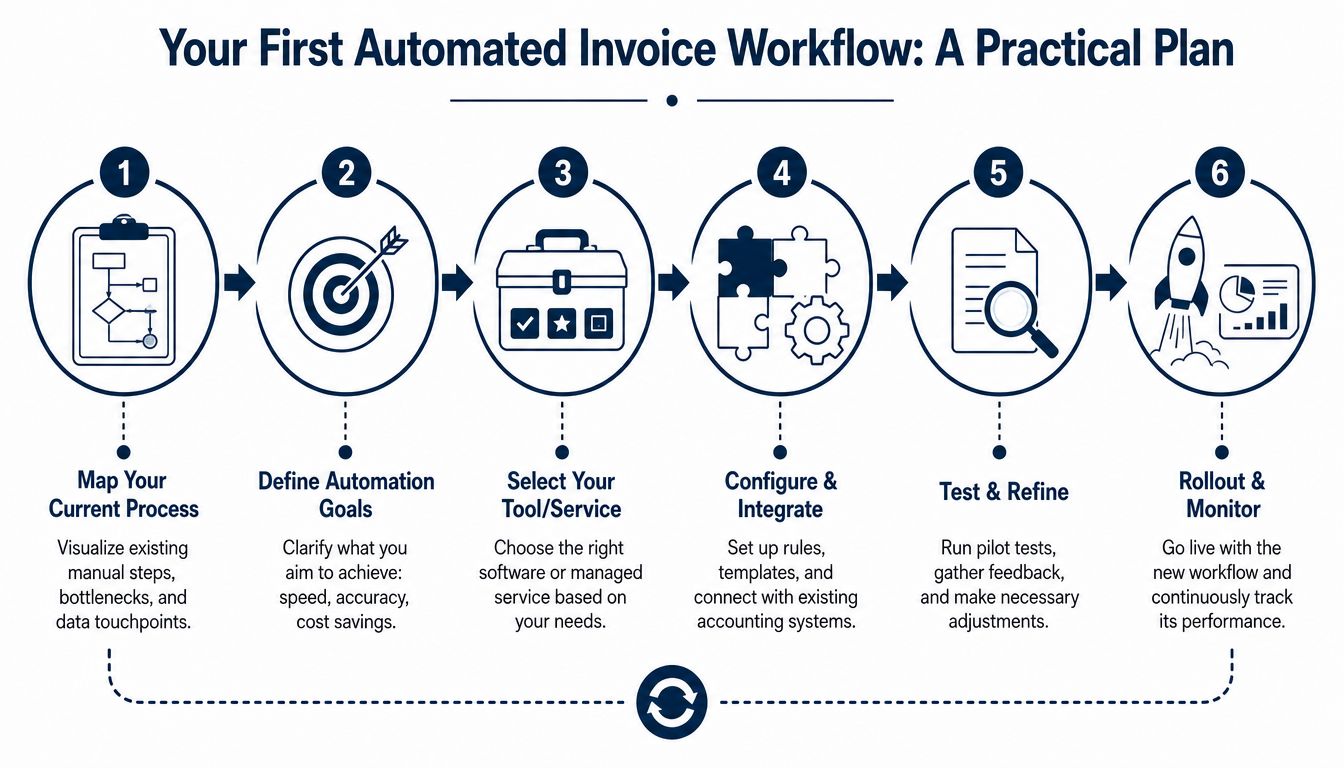
For a business handling fewer than 500 invoices a month, the fix is rarely a big AP overhaul. A small, well-defined workflow gets better results. The goal is simple: fewer manual touches, fewer missed approvals, and a clear path for the invoices that still need a human review.
Start by mapping what already happens
Write down the current path of an invoice from receipt to payment. Keep it simple. One page is enough for most small businesses.
Include who receives the invoice, where it lands, who codes it, who approves it, and what happens when something is missing. Analysts at Artsyl note that companies that assess their workflow before rollout tend to get better ROI and clearer performance targets in automation projects, including lower processing costs and faster cycle times in mature setups, in their invoice processing automation guide.
That matters because automation does not clean up confusion. It repeats it faster.
Use questions like these:
- Where do invoices arrive now
- How many handoffs happen before approval
- Which vendors send invoices every month
- Which approvals happen every single time
- Which exceptions keep slowing the process down
Clean up vendor data before you automate
Bad vendor records create bad automation results. Duplicate suppliers, outdated payment terms, and inconsistent expense coding all lead to extra review work later.
Fix the basics first:
- Vendor names: Merge duplicates and use one standard name for each supplier.
- Default coding: Set normal expense accounts for repeat vendors where appropriate.
- Approval owners: Assign one person or role to each approval step.
- Submission method: Give vendors one billing email address instead of letting invoices scatter across inboxes.
One shared AP inbox solves more problems than owners expect.
Pick one narrow workflow and test it
Do not start with every bill type. Start with invoices that are predictable and easy to review. For smaller teams, that usually means recurring monthly bills, digital PDF invoices, or one or two high-volume vendors.
That first workflow should be boring on purpose. If the process works on simple invoices, you can expand it later.
Good pilot candidates often include:
| Good first invoices to automate | Why they work well |
|---|---|
| Recurring monthly bills | Same vendor, same layout, familiar coding |
| High-volume suppliers | Less manual entry on the bills that eat the most time |
| Simple approval paths | Easier to test routing and catch mistakes early |
| Digital PDF invoices | Better capture quality than paper or phone photos |
For many small businesses, a software tool, an outsourced AP workflow, or a bookkeeping partner such as MyOfficeOps can help manage bill capture, coding, and handoff into the accounting process. If you need help deciding whether a managed approach makes more sense than doing it all in-house, this guide to outsourced accounting for small business gives a practical starting point.
Connect the workflow to your accounting system
Capture alone is not enough. If someone still has to re-enter approved invoices into QuickBooks, Xero, or another ledger, you have only shifted the work.
The first workflow should pass key data into the accounting system correctly: vendor, invoice number, date, due date, amount, and coding. Approval status should be visible too. That gives your team one record to work from instead of a spreadsheet, an email thread, and an accounting entry that may not match.
Measure a few numbers that matter
Skip the giant dashboard. Track a short list your team will review each week.
For SMBs, these are usually the most useful:
- Processing cost: Is staff time per invoice going down
- Cycle time: Are invoices getting from receipt to approval faster
- Exceptions: Which invoices still need manual review, and why
- Error cleanup: Is less time being spent fixing coding, duplicates, or missing details
Expect exceptions. They are part of the job, especially with low-volume vendors, handwritten invoices, credit memos, and bills that arrive without a PO or clear approver. A good first workflow does not eliminate every exception. It gives the clean invoices a faster path and gives your team a consistent way to work the problem ones without derailing the whole month-end close.
How to Pick the Right Partner or Tool
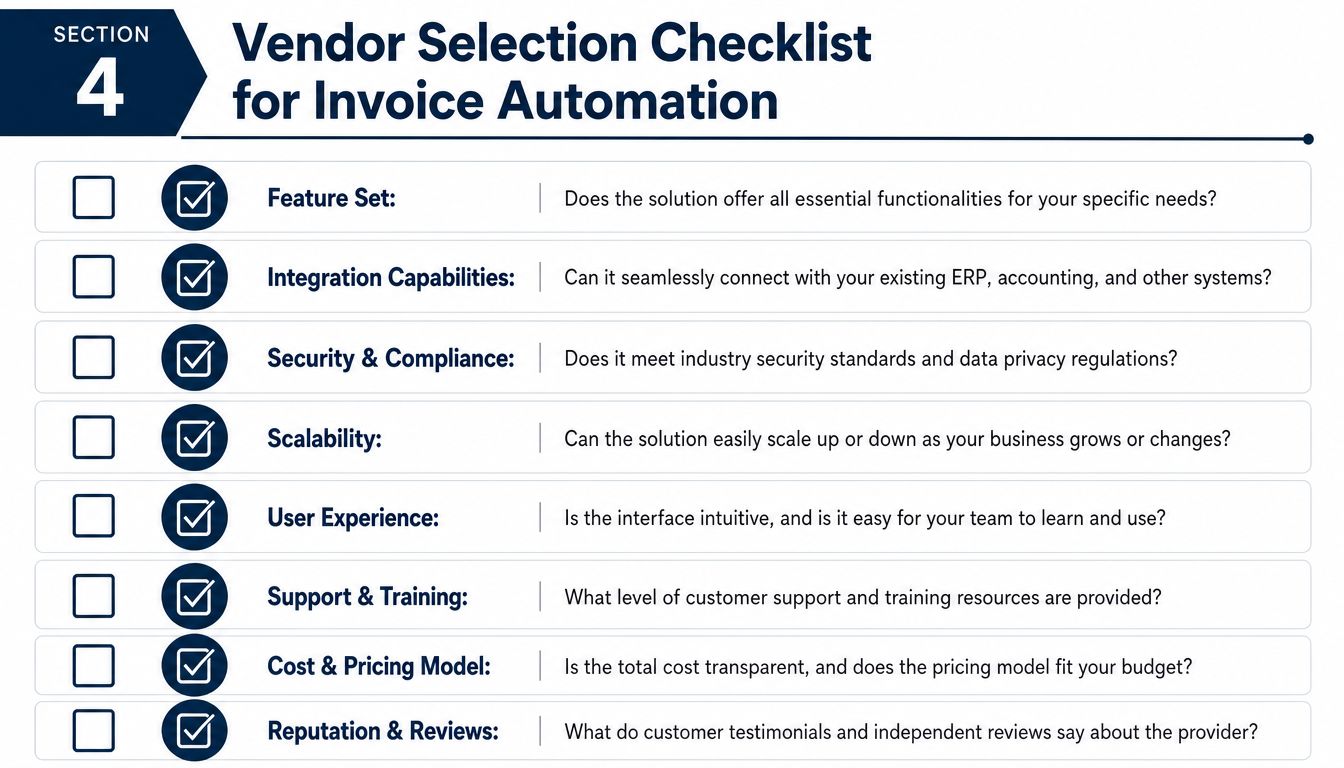
Once you know your process and your starting point, vendor selection gets easier. You're not shopping for the prettiest demo. You're looking for something that fits your volume, your accounting system, and your team's patience level.
A good tool should save work. It shouldn't create a second job.
Ask how it handles the basic work
Speed matters, but only if the data lands in the right place and your team can trust it.
A useful benchmark is that automated systems can process 30 invoices in the time it takes a human to process 5, and AI can extract data from an invoice in 1 to 2 seconds compared to 10 to 30 minutes for manual entry, according to AI invoice processing benchmarks from Parseur.
That sounds great, but don't stop at the headline. Ask what happens after extraction.
Use questions like these in demos and sales calls:
- Does it capture the fields you use: Vendor, date, invoice number, due date, amount, line detail, class, location, or job code.
- Can it route approvals your way: Not just a generic chain, but your real approval flow.
- Will it sync with your current accounting platform: Without manual re-entry.
- Can your team correct mistakes easily: Some tools hide errors behind complicated screens.
Press hard on exception handling
This is the part most demos gloss over.
Your business will get invoices with missing PO numbers, odd layouts, split charges, or confusing backup. If the vendor can't explain how those get reviewed, corrected, and approved, you're not hearing the full story.
Ask them:
| Question to ask | Why it matters |
|---|---|
| What happens when an invoice can't be read cleanly | You need a clear review path |
| Can someone override coding or approval routing | Real businesses have edge cases |
| How are duplicates flagged | Duplicate payments are expensive to unwind |
| What support do you provide after launch | Most issues show up after go-live |
If a vendor only shows the smooth invoices, ask to see the ugly ones.
Look at the full cost, not just the monthly fee
Some systems look affordable until setup, implementation help, support, and transaction limits start stacking up. For SMBs, simple pricing often matters more than endless features.
Also ask who on your team will own the process. If the answer is “we'll figure it out,” that's a warning sign.
If you think you may want outside help instead of owning the entire AP workflow internally, this overview of outsourced accounting for small business can help you compare what you'd keep in-house versus what you'd hand off.
Keep your shortlist practical
A good short list for an SMB usually comes down to a few plain questions:
- Does it fit our current invoice volume
- Does it work with the accounting system we already use
- Can a non-technical person run it
- Is support available when exceptions pile up
- Can we grow into it without replacing it too soon
If you can't get direct answers to those, keep looking.
Common Pitfalls and How to Sidestep Them
A lot of small businesses buy an AP tool expecting the pile to disappear. Then the first batch hits a vendor name mismatch, a missing PO, or an approval that stalls for three days, and the process falls right back onto someone's desk at 6 p.m.
That does not mean automation failed. It means the business skipped the part where exceptions get handled.
For companies processing fewer than 500 invoices a month, that is usually the make-or-break issue. You do not need an expensive enterprise setup. You do need a simple way to catch the invoices that will never flow through cleanly.
Exceptions are part of the job
Invoice exceptions stay near the top of AP teams' problem lists. In a 2025 survey discussion about touchless invoice processing and exception handling, AP leaders ranked exceptions as a leading challenge, as noted in this discussion of touchless invoice processing and exceptions.
The practical takeaway is straightforward. Plan for review work before go-live, not after.
A low-cost exception process can be very simple:
- Missing information: Send it to one designated person to contact the vendor or internal requester.
- Coding questions: Route it to the bookkeeper or controller. Keep the owner out of routine decisions.
- Approval conflicts: Assign one backup approver so bills do not sit during vacations or busy weeks.
- Unreadable formats: Save a corrected example and update the rule so the next invoice has a better chance of posting cleanly.
That kind of setup is boring. It also works.
Bad inputs create bad outputs
Automation will not clean up a messy AP process on its own. It will expose every weak spot faster. If invoices come in through three inboxes, vendor names are inconsistent, and managers approve bills by text message, the software will struggle because the process is unclear.
Fix the basics first:
- Use one invoice intake channel
- Write down approval rules
- Train everyone who touches AP
- Review exceptions every week for the first month or two
Small teams often skip this because they want quick relief. I get it. But a one-hour cleanup of vendor records and approval rules usually saves more time than another month of chasing missing details.
Automation works best when everyone agrees on where invoices go and who owns the next step.
Do not promise “no more AP work”
This is another common mistake. If you sell automation internally as a way to remove work completely, the team will lose trust in it the first time invoices need review.
A better pitch is more accurate. The system cuts down data entry and repetitive routing. Your staff still needs to review exceptions, follow up on missing details, and keep the books clean.
Start small. Pick a handful of repeat vendors, get the workflow stable, and let people see that it saves time without creating new confusion.
If your invoices are still scattered across inboxes, PDFs, and paper piles, MyOfficeOps can help you put a workable process in place. We support small and midsize businesses with bookkeeping, bill pay, accounting workflow cleanup, and practical back-office systems that fit the way real teams operate. The goal is cleaner books, fewer late nights, and a process you can rely on.