
You finish the job, send the invoice, and expect the bank balance to make sense. Then tax time shows up, a supplier wants payment, and you realize the numbers on paper and the money in the account are telling two different stories. That's the usual mess in a small construction business, and it usually isn't caused by bad work. It's caused by weak bookkeeping.
Construction is rough on books because the money moves in pieces. You bill by milestone, the owner holds back retainage, subs send invoices late, and labor gets spread across more than one job. If you're mixing personal spending with business spending on top of that, the books stop being a tool and turn into a pile of guesses. Bookkeeping for small construction business isn't about receipts in a shoebox. It's the control system that tells you what each job earned, what it cost, what's been billed, and what's still sitting out there uncollected, which is exactly why construction guidance stresses job costing, monthly reconciliation, and project-level records for profit visibility and cash flow control. See the construction bookkeeping guidance from Deltek for the core idea behind that structure.
Why Most Small Contractors Finish Jobs Broke
A contractor can look busy all month, keep three jobs moving, and still not have enough cash to cover payroll tax or quarterly estimates. That's the ugly part of construction. The jobs are active, the backlog looks healthy, and the bank account still feels empty.
Here's the problem in plain English. Construction money is split across progress billing, retainage, and work-in-progress, so profit doesn't always show up in cash right away. A job can be doing fine on paper while the owner still hasn't been paid for work already done. If the books aren't built to show that gap, the contractor ends up spending money that was never really in hand.
The trap most owners fall into
A three-job contractor tells me the same thing every year. “I'm busy, the jobs are moving, but I can't make the tax payment.” That usually means the books are hiding the truth, not that the business is failing. The money is tied up in billing delays, retainage, or unbilled work, and nobody noticed soon enough.
Practical rule: if you can't tell what was estimated, what was spent, what was billed, and what's still open on each job, you don't have bookkeeping, you have cleanup.
That's why construction bookkeeping has to be project-based from day one. Industry guidance emphasizes a chart of accounts built for job costing, tracking each expense to a job number, and reconciling bank and credit-card accounts monthly so overruns show up before they snowball. A construction business also needs to treat retainage separately from normal receivables, because withheld money is not the same as cash you can spend. That point shows up clearly in construction bookkeeping tips for construction companies, especially around retainage and monthly reconciliation.
The blunt truth is this. Most small contractors don't fail because they can't build. They get squeezed because they can't see the money clearly enough to control it.
Picking Software and Setting Up the Right Chart of Accounts
Don't buy bookkeeping software because it's popular with other small businesses. Buy software that can handle job costing, separate project tracking, and clean reports you can use. Construction work needs more than simple income and expense categories. It needs a system that follows each job from estimate to final payment.
Start with the basics. Open separate business bank and credit-card accounts, connect them to the software, and turn on project tracking right away. If you wait until tax season to organize the data, the software won't save you. It'll just hold a bigger mess.
Build the chart around how construction works
A generic chart of accounts usually lumps too much together. That hides the numbers. A construction-specific chart should separate income by job type, then break costs into labor, materials, subcontractors, and equipment, with retainage handled in its own bucket so it doesn't blur into ordinary receivables.
That structure matters because your reports should answer simple questions. Which job made money? Which phase blew the budget? Which costs are still unpaid? If the chart of accounts can't answer those questions, it's too vague.
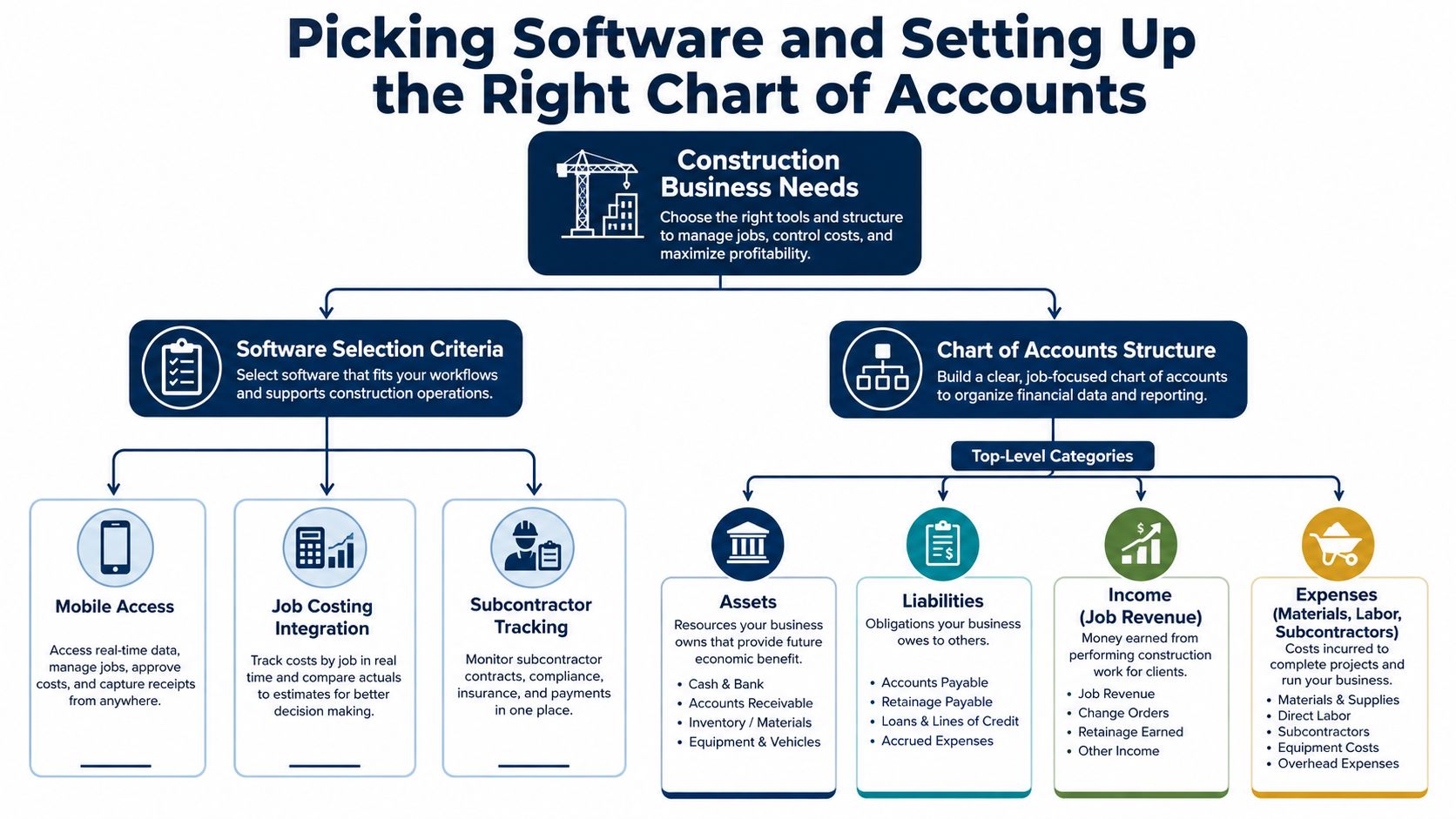
Keep the list lean at first. You don't need fifty accounts just to prove you're serious. You do need the right buckets, the right project tracking, and the discipline to code each transaction the same way every time. Xero's construction accounting guidance recommends weekly updates, and that advice lines up with how contractors stay ahead of missed costs and cash-flow surprises. For software ideas that fit contractors, this contractor bookkeeping software roundup is a useful starting point.
The mistake to avoid is overbuilding the chart before the crew has any rhythm. Keep it practical. If the team can't use it on a busy Tuesday, it's the wrong setup.
Job Costing Without Losing Your Mind
Job costing gets messy when people treat it like a quarterly task. It isn't. It's a weekly habit. If labor, materials, subs, and equipment don't hit the job number while the work is happening, you're just guessing at profit later.
Start with a job number for every project. Then break the job into cost codes or phases, like demo, framing, rough-in, finish, and punch list. That gives you a way to see where the money went instead of staring at one giant labor bill at the end of the month.
The weekly routine that works
Use whatever your crew will use. A phone app is fine. A clipboard is fine. A text message is fine if that's what gets the hours captured. The expensive mistake is labor without a job number, because once time is lost, you can't rebuild it cleanly.
If a foreman waits until Friday night to remember where the crew was on Tuesday, the books are already behind.
A simple weekly routine looks like this. Post labor to the right job, enter material receipts, code subcontractor bills to the phase they belong to, and compare actual costs to budget. That comparison is where the truth lives. If a kitchen remodel was supposed to use a certain tile allowance and the price is off, you catch it while there's still time to correct the estimate or push a change order.
A real-world example makes this obvious. On one remodel, the tile allowance was off by $1,200, but the contractor didn't spot it until year-end. By then, the margin was already gone. Weekly job costing would've flagged it early enough to fix the estimate on the next job, or at least explain the overage before it became a pattern.
The goal isn't perfect data. The goal is usable data. Deltek, Xero, and Intuit all point to job costing as the control point, and that's because it keeps you from finding out too late that a busy job was a weak one. If you need a practical layout, this job costing Excel template can help you build the habit before you automate it.
Billing, Retainage, and Change Orders Done Right
Progress billing should follow the job, not the owner's mood. If the contract is milestone-based, bill by milestone. Don't wait until the end and don't front the whole job with your own cash. Construction guidance is clear on this point, owners should not be financing every project out of pocket when the billing schedule can follow the work.
Retainage is where a lot of small contractors lie to themselves. If the owner holds back money, that money is not spendable operating cash. It belongs in a separate retainage account or at least a separate retainage receivable, not mixed into normal A/R where it looks available. Intuit recommends tracking retainage on a per-project basis and setting reminders for release dates, because the withheld amount can distort liquidity if you treat it like cash in the bank. See QuickBooks' construction bookkeeping guidance for that retainage approach.
Keep earned, billed, and collected revenue separate
These three numbers are not the same thing. Earned revenue is work you've completed. Billed revenue is what you've invoiced. Collected revenue is what's in the bank. If you blur them together, you'll think a job is healthier than it really is.
Now look at change orders. Book them as soon as they're approved in writing, not when the check finally arrives. If you wait for payment before recording them, your margin report lies. Keep each change tied to the original job so you can see actual project profit from start to finish.
A $200,000 build with 10% retainage means $20,000 is held back until punch list completion, and that money is not yours to spend yet. Treating it like free cash is how a contractor ends up short on payroll or estimates.
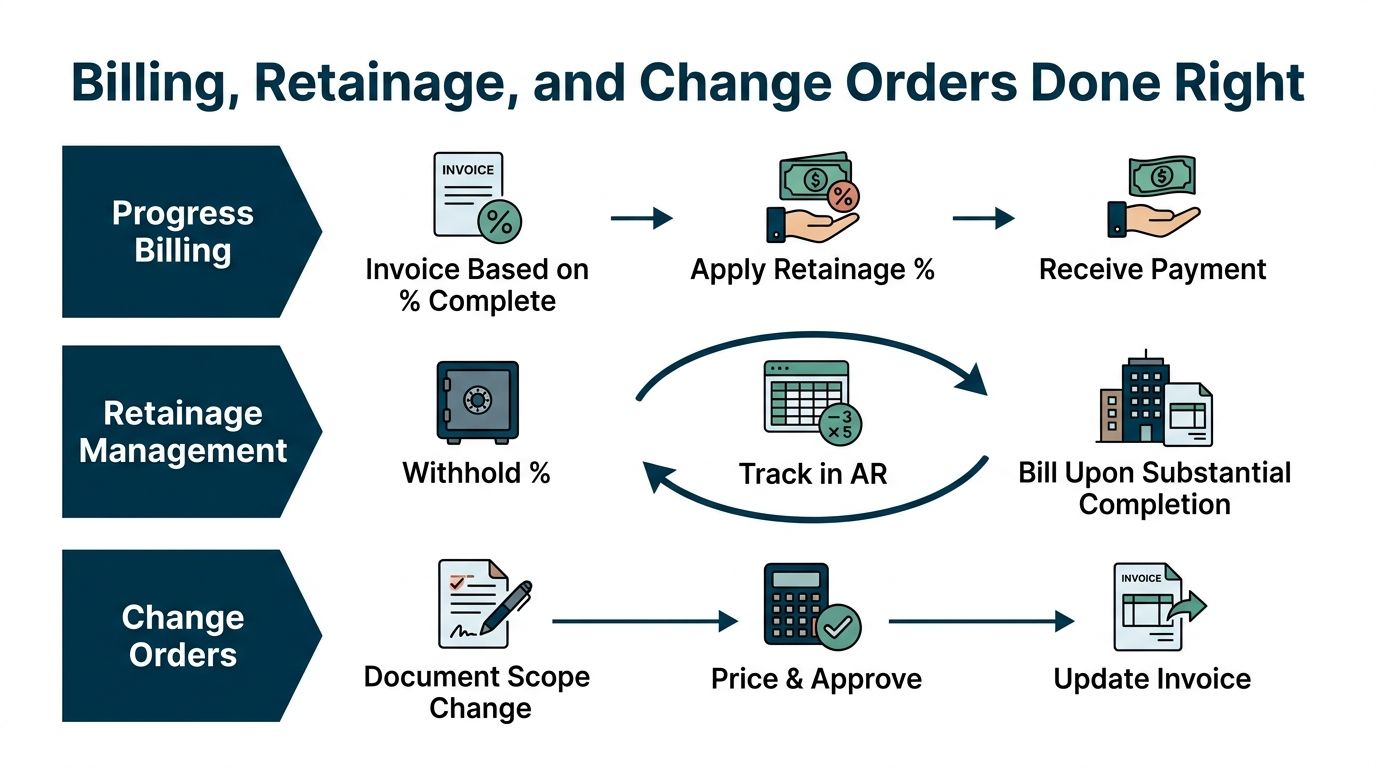
If you want a cleaner billing rhythm, use this construction draw schedule template and match it to the contract before the first invoice goes out. That way, the billing schedule and the work schedule stay lined up.
Payroll and Subcontractor Compliance
Construction payroll gets ugly fast when the labor data lives in one place and the job costing lives somewhere else. Use the same software for payroll and job costing if you can. That lets labor hours land on the right job without a bunch of manual cleanup later.
There's also a clean line between an employee and a subcontractor, and small contractors get burned when they blur it. An employee is on payroll, gets withheld taxes handled through the business, and should be recorded that way. A subcontractor runs through vendor records, invoices for work, and needs clean paperwork from the start. Misclassification is expensive, and it gets worse when records are sloppy.
The paperwork habit that saves headaches
Before you pay a subcontractor's first invoice, collect a W-9 and store it in the same system as the vendor record. Track every payment through the year so you can confirm what needs to go into 1099 reporting. Build that habit now, not at year-end when you're trying to remember who did what.
Build Folio notes that paying a subcontractor $600 in a year triggers 1099 reporting for the sub, and it also points to quarterly estimated tax payments on the 1040-ES schedule. That's the kind of detail that belongs in the bookkeeper's process, not in the owner's memory. See Build Folio's contractor bookkeeping guide for that reporting threshold.
Keep the vendor file clean, and year-end gets easier. Let the paperwork drift, and you'll spend January playing catch-up.
Construction bookkeeping now has more moving parts than just expense coding. Newer guidance for small contractors highlights subcontractor classification, digital receipts, time tracking tied to payroll, GST/HST and remittance handling in cross-border contexts, and disposal or permitting records. If insurance questions are part of your vendor setup, the contractor coverage options from My Policy Quote are worth a look because coverage records often sit right next to compliance records in a contractor's files.
The point is simple. If the payroll file, the vendor file, and the job cost file don't talk to each other, the business will pay for it later.
Cash Flow Tracking and the Few KPIs That Matter
A contractor can have a full board, profitable jobs, and still miss payroll. That's not a mystery. The money is stuck in receivables, retainage, and unbilled work-in-progress while bills keep showing up on time.
Work-in-progress is just the value of work done but not yet billed. If you update it monthly, you can see whether a job is drifting before it turns into a cash problem. If you wait until quarter-end, you're reacting instead of managing. The practical reason to keep WIP current is that it shows how much work has been earned but not yet turned into money you can use.
The weekly numbers worth looking at
You do not need a thick report packet to run a small construction business. You need a short list of numbers you can scan without squinting.
| KPI | What It Tells You | Target Signal |
|---|---|---|
| Cash balance | Whether you can cover payroll and bills | Stay ahead of upcoming obligations |
| Receivables aging | Who owes you and how long it's been open | Pay special attention to anything over 60 days |
| Work-in-progress | How much earned work still isn't billed | Keep it current and believable |
| Gross margin per job | Which jobs are actually making money | Watch for jobs that drift below plan |
| Retainage outstanding | How much money is still held back | Track release dates so nothing gets forgotten |
A short weekly review can save a contractor from a bad surprise. One owner looks at cash, aged receivables, WIP, and retainage every Friday for 15 minutes. When a client slips past the normal payment window, he sees it before it becomes a crisis and starts the follow-up early instead of pretending it will sort itself out.
If you want a dashboard instead of a pile of reports, use a simple setup that shows the same handful of numbers every week. Transactional LLC's dashboard setup for HVAC SEO is an example of how a focused dashboard can keep attention on the few signals that matter, even if the industry is different.
The point isn't fancy reporting. It's visibility. If you can't see the cash problem coming, you'll keep calling it a surprise when it's really just delayed bookkeeping.
Monthly Checklist, Common Mistakes, and When to Bring in Help
Run the same monthly cleanup every month and the books stay usable. Reconcile the bank and credit-card accounts, review job margins, check retainage release dates, confirm subcontractor records, and follow up on aged receivables before they turn into write-offs. A clean month-end also gives you something reliable to hand to your CPA instead of a pile of guesses.
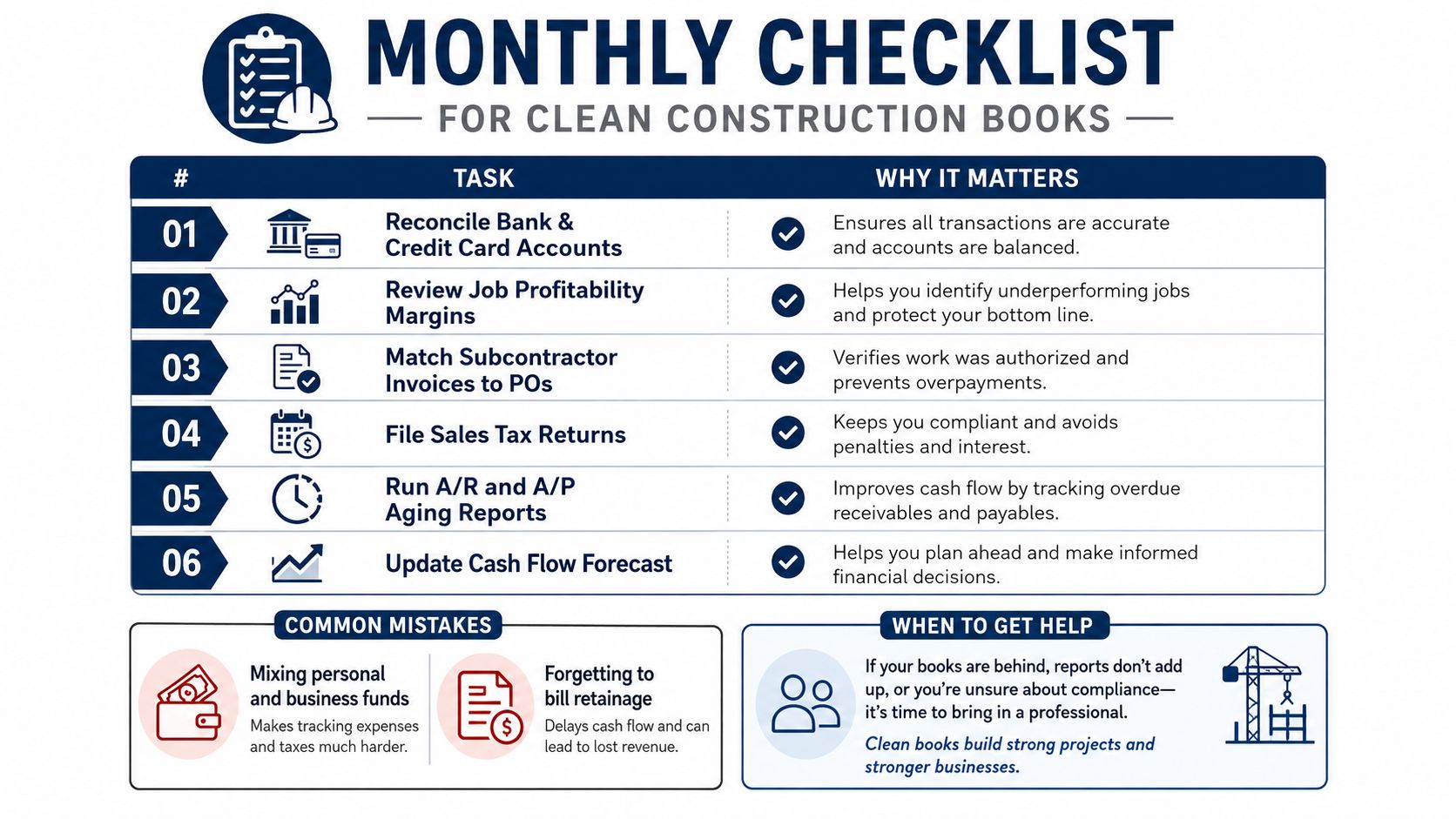
The common mistakes are boring, and that's why they keep winning. Mixing business and personal spending muddies the trail. Skipping weekly job-cost updates hides overruns. Treating retainage like cash sets you up for a short bank balance. Letting change orders sit in email means your books never catch up to the actual work.
When DIY stops being smart
There's a point where doing it yourself becomes a tax on the business. That usually happens around the second full-time hire, the first prevailing-wage job, or the moment you're spending more than two hours a week on books instead of selling and managing work. At that point, bring in outside help that knows construction, not just general small business bookkeeping.
If you want a practical resource on getting cash in faster, these tactics to get paid faster line up well with the billing habits that keep construction books healthy. The right outside partner should know job costing, retainage, payroll integration, and monthly reporting without making you translate contractor language for them.
MyOfficeOps handles bookkeeping, payroll integration, cash flow tracking, and construction-friendly reporting for owners who want cleaner books without babysitting the process. If you're tired of guessing at job profit or chasing paperwork at month-end, visit MyOfficeOps and see how a construction-aware bookkeeping setup can help you keep cash visible, jobs organized, and profit easier to protect.