

It's the last Friday of the month. You're sorting bills before closing the books when the same HVAC repair seems to appear twice. One invoice is numbered 4471, the other 4471-B. Same date. Same amount. Did the vendor send a correction, or are you about to pay for the same repair again?
That's where the invoice reconciliation process earns its place. Not by checking a box, but by stopping a payment until someone can explain what happened.
What Invoice Reconciliation Is and Why It Pays Off
A vendor sends an invoice without a purchase order. The work was completed, but the approval trail is thin. Reconciliation means checking what the vendor billed against what was ordered, received, approved, and paid, then deciding whether the available evidence is enough to release payment.
That evidence can sit with different people. A technician may confirm the repair, a manager may have approved the work by email, and the vendor may hold the account history. Matching totals alone cannot resolve a disputed or repeated charge. The bookkeeper needs to connect the records and ask what changed before the bill enters the payment queue.
What the check catches
Reconciliation deals with exceptions as much as routine matching:
- Duplicate bills: The same purchase appears again, perhaps with a slightly different invoice number. Confirm whether a later bill corrects an earlier one before paying either twice.
- Overcharges: The invoice lists a higher price or more goods than were agreed. Check the order, approval, or other evidence of the agreed terms.
- Missing credits: A return or adjustment has not reduced the balance. Ask the vendor to apply the credit and keep the response with the invoice.
- Wrong-month costs: The bill is recorded in a period different from the one the goods or services belong to. Check service dates and receiving records to code it correctly.
When there is no PO, a small business still needs a defensible record. An approved email, service report, delivery confirmation, or manager sign-off can help show what was requested and completed. The right evidence depends on the purchase, but undocumented assumptions are a poor basis for payment.
Payment details need scrutiny, too. A changed bank account or an unfamiliar payment instruction should be independently confirmed before funds are sent. Reconciliation can reveal suspicious changes alongside ordinary billing errors, so it belongs in payment control, not just month-end bookkeeping.
Duplicate payments are a costly control gap, and recovering the money can take time. You do not need a large accounting department to reduce that risk. Consistent checks help keep vendor balances, cash records, and project costs accurate, while giving staff a clear reason to pause a questionable bill.
Checks to Make Before You Match Anything
Start with the vendor master, your official supplier list. Keep one approved record for each supplier, with any legitimate branches or payment arrangements clearly documented. Duplicate supplier records can let the same bill travel through separate paths without looking like a duplicate.
Next, give vendors a consistent place to submit invoices. The Association of Certified Fraud Examiners' invoice-control guidance recommends a central electronic submission portal, required invoice information, independent confirmation of bank changes, and separation of approval duties. Missing information should lead to rejection or review, not a guess by the bookkeeper.
Required invoice fields and what to check
| Invoice field | What to check | Why it matters |
|---|---|---|
| Vendor name and tax ID | Matches the vendor master record | Stops look-alike vendors from slipping in |
| Invoice number and date | Unique for that vendor | Catches a bill that was sent again |
| PO number | Present and still open | Ties the bill to an approved order |
| Line items and quantities | Matches the order and receiving record | Confirms what was actually bought |
| Unit price and tax | Within tolerance and coded correctly | Prevents overcharges and tax errors |
| Service dates | Falls inside the billing period | Puts the cost in the right month |
| Payment terms and currency | Matches the vendor agreement | Supports correct payment timing |
| Vendor contact and bank details | Unchanged, or confirmed by callback | Helps block payment fraud |
Also confirm the description explains the purchase and that the purchaser's contact information is available. If your business permits non-PO purchases, route those bills into a documented exception process rather than letting the missing field pass unnoticed.
Screen for duplicates when the invoice enters the system. The Washington State Auditor's accounts-payable guide recommends duplicate-screening software and matching before payment. A repeated software-subscription bill is easier to stop at entry than to recover after payment.
Keep bank changes outside routine approval
For a clinic receiving new banking instructions, the right response is a callback to a vendor contact already on file. Don't use the phone number printed on the changed invoice. Keep invoice approval separate from vendor-bank updates and payment authorization.
These are practical internal controls for small businesses, not paperwork for its own sake. In a small team, an owner can provide independent review where staffing limits separation.
Finally, set tolerances, the differences you're willing to accept, before processing starts. A minor price difference might qualify. A bank change, suspected duplicate, or unresolved tax issue shouldn't pass merely because the amount is small.
How to Reconcile an Invoice Step by Step
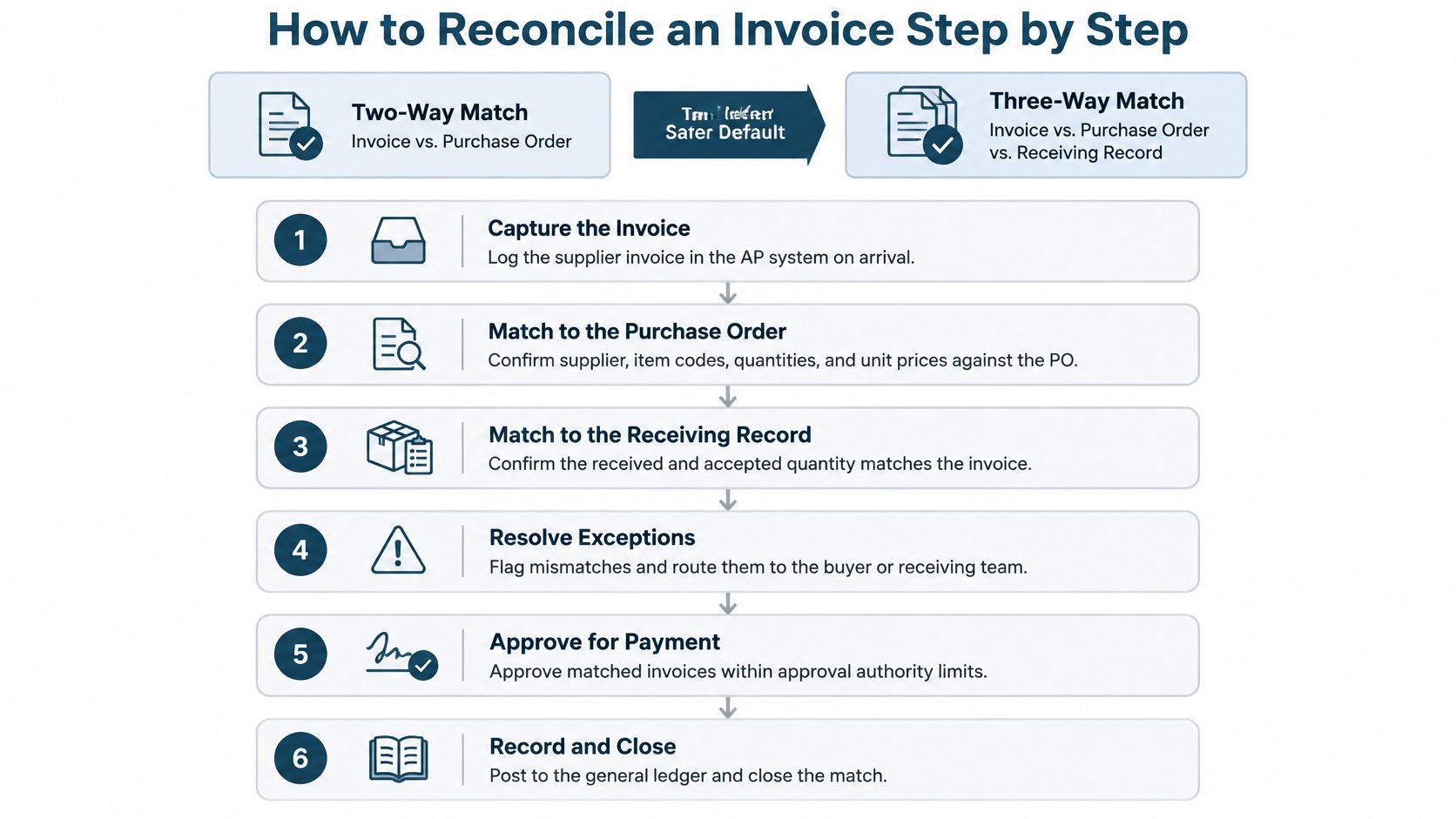
A two-way match compares the invoice with the purchase order, or PO. A three-way match adds the receiving record, which shows what arrived. For goods, three-way matching is the safer default because an approved order doesn't prove delivery.
Reconciliation sits inside the broader accounts-payable process. Approval, posting, payment, and settlement are connected, but they're not interchangeable. An approved invoice isn't proof that the payment cleared.
Check the purchase before approving payment
Check for duplicates. Use supplier ID, invoice number, invoice date, and amount together as a matching key. Flag close matches too, especially when only the invoice suffix or formatting differs. A possible duplicate goes on hold until you establish whether it's a replacement, an additional charge, or a copy.
Compare each line's price and ordered quantity with the PO. Check the item description as well. Similar names don't necessarily mean the same product, and a correct total can hide an incorrect line.
Verify receipt. Compare billed quantities with the receiving record, including whether the goods were accepted. For services, use a signed timesheet, completion approval, or other evidence that the agreed work happened. Ask the person responsible for receiving or supervising the work, rather than treating the invoice itself as proof.
Apply the approved tolerances. Microsoft's three-way matching documentation shows sample limits of 8% for net unit price and 15% for total invoice amount. Those are software examples, not recommended limits for every business. As an illustration, a contractor billed for 100 feet of wiring can pass the quantity check when 100 feet arrived; a bill for 150 feet should go on hold.
Don't widen a tolerance just to get a bill through. If the approved price changed, obtain evidence of the change and record who accepted it.
Check the vendor balance and settlement
Compare the supplier statement with your open items. Look for invoices the vendor lists but you don't, unapplied credits, and partial payments. A statement is a useful cross-check, but it isn't permission to book every listed charge without support.
Confirm payment records. Establish whether anything already cleared, which payment method was used, and how much reached the vendor. Check references and allocation, especially when a payment covers several invoices. A payment marked as prepared in your software may still need confirmation from the bank record.
Decide, document, and post. Approve a supported bill, hold an unresolved one, or reject an invalid charge. Record the reason next to the invoice and attach the PO, receipt, approval evidence, and any adjustment explanation. Post according to your accounting policy without putting a disputed bill into the payment run by accident.
At month-end, reconcile the detailed supplier balances, called the payables subledger, with the general ledger's payables control account. Separately match recorded payments to bank activity and explain outstanding or timing items. The unpaid payables balance shouldn't equal the bank balance. The records should agree on which bills remain unpaid and which payments cleared.
Practical rule: Every check needs a clear pass or a documented reason it hasn't passed. “Probably fine” isn't an approval status.
Keep unresolved items visible. A bill waiting for a receipt needs an owner and a next action, not just a folder named “pending.”
Common Mismatches and How to Resolve Them
A supplier invoice arrives with no PO, the amount differs from the quote, and the service owner has not signed off. The matching fields alone cannot settle the bill. The work is to identify the exception, assign an owner, and decide what evidence supports a clear outcome.
Common invoice mismatches, causes and fixes
| Symptom | Likely cause | Fix |
|---|---|---|
| Invoice price is higher than the PO | Price increase wasn't updated, or scope changed | Approve within tolerance; otherwise obtain written approval or a credit memo |
| Billed quantity is more than received | Late receiving or partial delivery | Pay only the supported received quantity where terms allow; hold the rest |
| Invoice has no PO number | Purchase happened outside the purchasing system | Check the contract and approval evidence, or require a retroactive PO |
| Service invoice has no receipt | Work hasn't been signed off | Obtain sign-off; assess an accrual at month-end if work occurred |
| Same bill arrives twice with a changed number | Vendor resent after delayed payment | Compare vendor, date, and amount; reject the copy and request a statement |
| Vendor statement shows a balance you don't have | Unapplied credit or unrecorded payment | Pull payment records; request or trace the relevant credit memo |
| Payment cleared but no invoice is booked | Payment entered without the bill | Identify the vendor and obtain support before recording the invoice |
| Tax or currency doesn't match | Wrong tax code or exchange rate | Correct tax treatment and confirm the applicable rate |
| Bank details changed on the invoice | Genuine change or payment fraud | Hold payment and call a known vendor contact |
Decide what counts as enough evidence
For a non-PO invoice, gather evidence that answers three practical questions: what was authorized, what price was agreed, and what the business received. A signed quote or written buyer approval can establish authorization. A contract or agreed price list supports the amount, while delivery records or confirmation that the work was completed support receipt.
Record that the purchase had no PO and identify the approver. For recurring vendors, use a properly authorized retroactive PO if company policy allows it. Then route future purchases through the regular ordering process. Never backdate approval or imply it was granted before the purchase.
Choose and document an outcome: approve, reject, request a credit memo, accrue, or escalate. An accrual records an estimated liability for work already completed when the final bill has not arrived. It does not authorize payment or resolve a dispute.
Weak follow-up can leave duplicate or erroneous payments undetected. APQC research cited in NTT DATA's payment-anomalies paper reports a gap in such payments between top and bottom performers, including estimates of about 0.8% of annual disbursements for top performers and more than 2% for bottom performers. The paper translates that range to roughly $8,000 to more than $20,000 on $1 million of supplier payments.
Track each exception's age, owner, and promised action. Review older items even when the amounts are small. A missing receipt should have a person responsible for obtaining it and a clear next step.
When the problem may be fraud
The 2025 AFP Payments Fraud and Control Survey highlights report that 79% of organizations experienced attempted or actual payments fraud in 2024. Matching invoice details does not confirm that new payment instructions came from the vendor.
Treat a bank-detail change as an exception. Hold the payment and call a vendor contact using a number already on file, not one supplied with the change request. If a control fails, preserve emails and payment records, freeze further affected payments, and contact the bank promptly. Escalate internally and assess whether vendors or customers need notification. Reconciliation can reveal a problem after payment, but it cannot reliably recover funds that have already cleared.
Automating the Workflow and Tracking Results
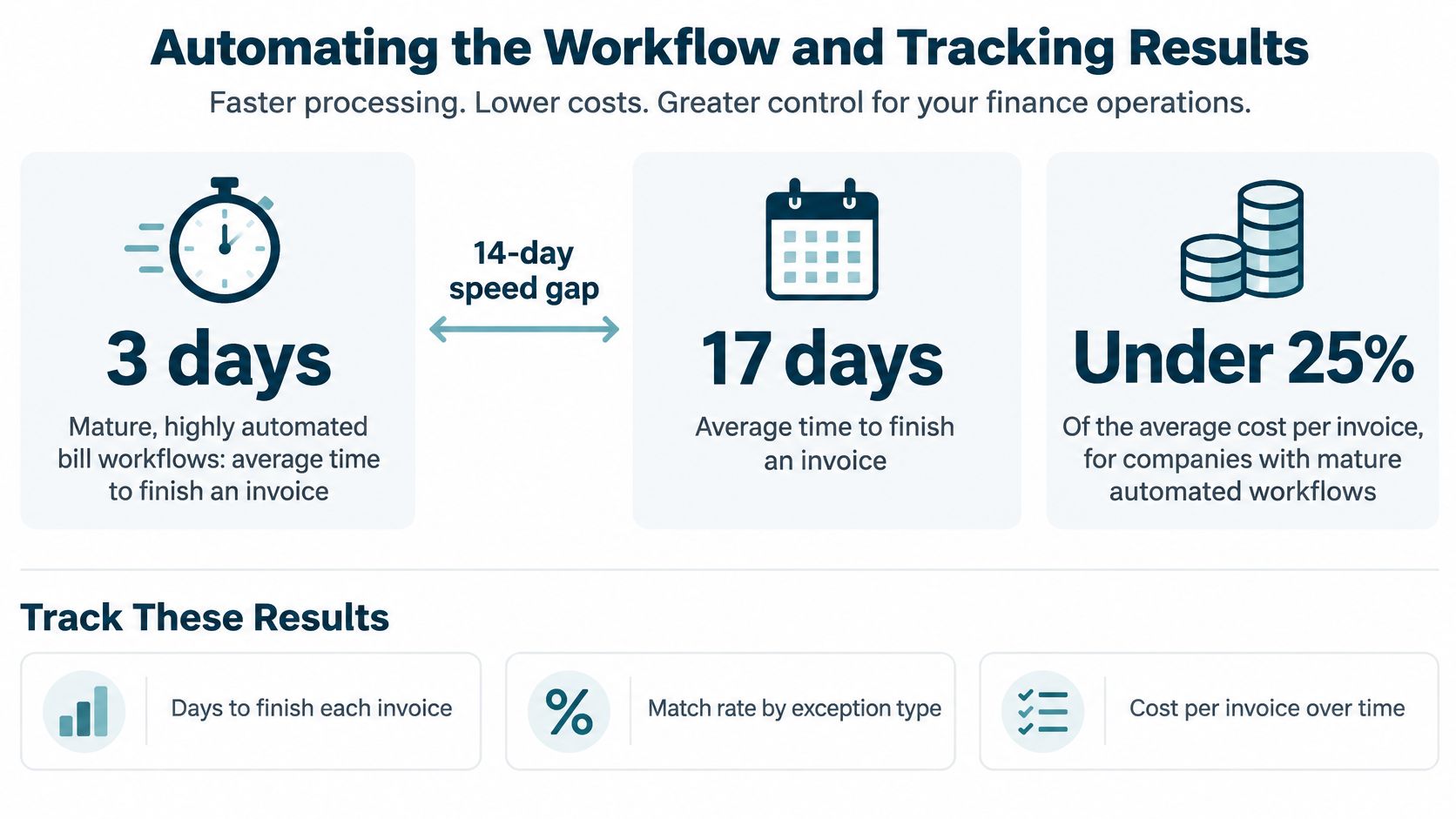
A 2024 comparison summarized by IBM reported roughly 3 days to complete an invoice for mature, highly automated AP teams, versus 17 days overall, at less than one-quarter of the average cost. The same article cites a 2025 Institute of Financial Operations and Leadership survey finding that nearly three-quarters lacked fully automated AP and 27% had no automation capabilities.
Software is useful for consistent field comparisons, duplicate alerts, routing, and recordkeeping. It can't settle a disputed scope change just because the totals happen to match.
Set rules before enabling automatic posting
Auto-post only when supplier identity, uniqueness, quantities, price tolerances, tax treatment, and approval authority pass. Route anything else to a coded queue, such as price variance or missing receipt, with a named owner. Use invoice-processing automation to organize decisions, not bury them in email.
Reconciliation KPIs and what they tell you
The numerical benchmarks below come from Nexus's summary of Ardent Partners AP metrics.
| Metric | What it tells you | Benchmark |
|---|---|---|
| Straight-through processing rate | Share processed without human intervention | 35.4% average; 51.0% best-in-class |
| Invoice exception rate | Share flagged for review | 18.4% average |
| Cycle time | Days from receipt to approved posting | 8.2 days average |
| Cost per invoice | All-in processing cost | $9.84 average |
| First-pass match rate | Share matching on the first attempt | Establish your own baseline |
| Exception aging and recovered value | Time unresolved and money recovered | Track by vendor and cause |
These benchmarks and IBM's comparison describe different datasets. Don't combine them into a promised result.
A high automation rate isn't a success if disputed contract changes slip through without review.
Watch exception aging and recovered money alongside speed. Fast processing helps only when the decision is sound.
How Reconciliation Changes by Industry
One process won't fit every business without adjustments. A delivery note works for materials, but it won't tell you whether a consultant's hours were authorized. Choose evidence that fits what you bought.
The following are practical review priorities, not claims that every business in an industry has the same problems.
Typical mismatches and adjustments by industry
| Industry | Common mismatch | Adjustment that helps |
|---|---|---|
| Professional services | Subcontractor or software bills with no PO; hours beyond scope | Tie invoices to project codes and check hours against timesheets |
| Healthcare practices | Supply invoices missing service dates or PO numbers; unapplied vendor credits | Require intake fields and reconcile vendor statements monthly |
| Construction and trades | Partial deliveries, substitutions, and change orders | Match deliveries line by line and code costs to each job |
| Real estate | Repeat contractor bills across properties that look like duplicates | Split invoices by property and match each to a work order |
For an agency, law office, or IT consultancy, approved hours aren't the whole check. The reviewer also needs to know which project used them and whether the client approved the added scope. Otherwise, a valid supplier bill can still create an unexpected project loss.
A healthcare practice should distinguish a missing document from a genuine billing disagreement. Ask the staff member responsible for supplies to confirm receipt, and keep vendor credits visible until they're applied. Don't treat a credit as resolved merely because someone emailed the vendor.
Match the work location as well as the amount
Consider a hypothetical property manager reviewing a plumber's bills. A repair appears again under a different invoice number, but checking the unit number and work order shows that the charge covers the same visit. Holding the second bill avoids paying twice.
The reverse matters too. Similar repairs at different units may both be valid. Rejecting every similar-looking charge would delay legitimate vendor payments.
For contractors, a substitution needs more than a matching delivery quantity. Confirm that the replacement material was accepted and that any price change was authorized. Keep that approval with the job record so the person reviewing profitability can understand the cost without reopening the whole conversation.
Run Your First Reconciliation This Month
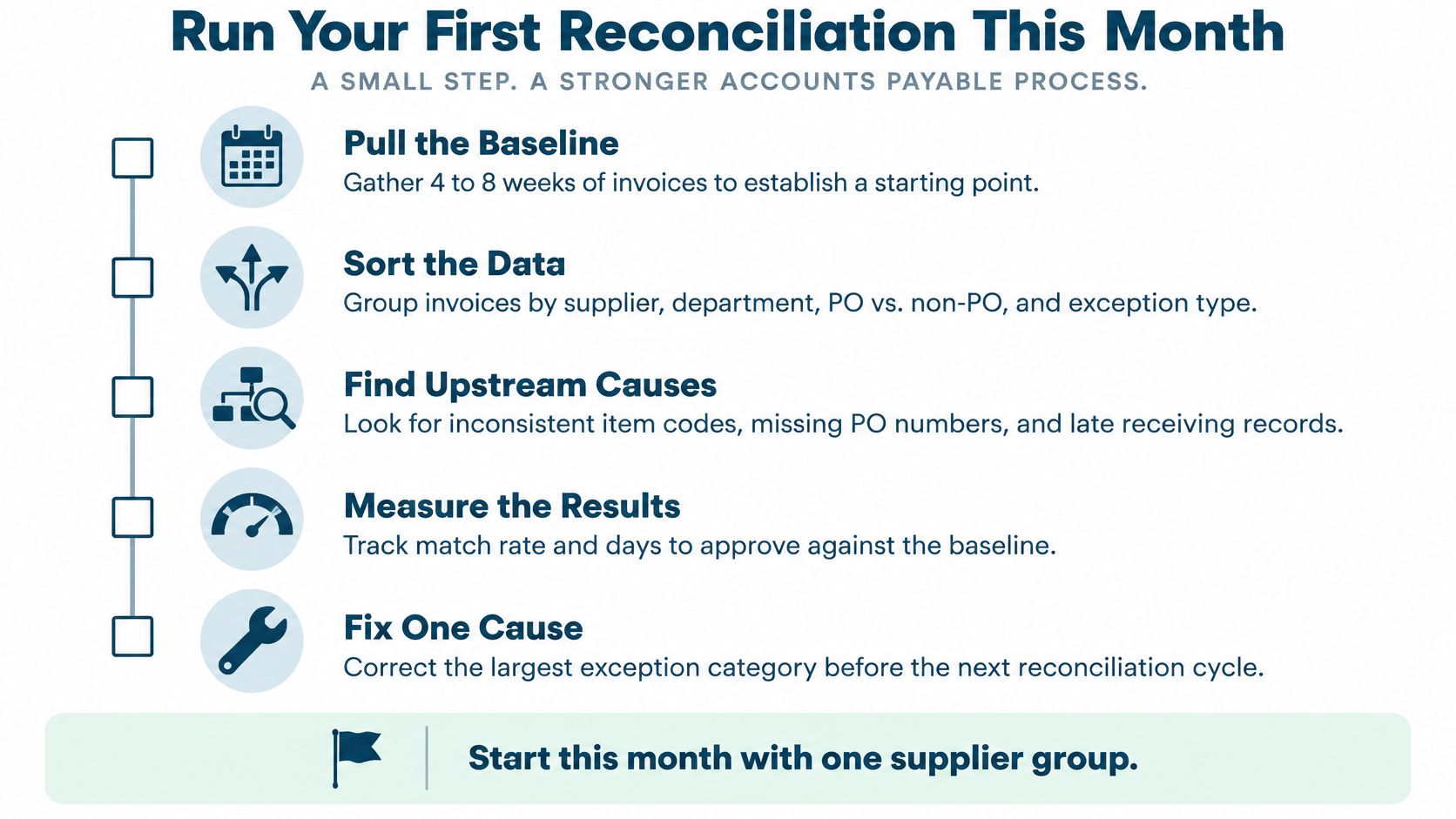
Start with four to eight weeks of invoices. Use that sample to build a first-pass baseline: group invoices by supplier, department, PO versus non-PO, and exception type. Note how often each kind of exception appears and where it starts. Look for upstream causes such as inconsistent item codes, late receiving records, missing order references, and duplicate supplier records.
Fix the cause, not just the invoice. If receiving records arrive late, assign someone to record deliveries when they happen. Matching software cannot fix a handoff no one owns.
Monthly reconciliation checklist
- Confirm supplier records. Check that each supplier has one approved record, with legitimate exceptions documented.
- Check every new invoice for required fields. Return incomplete bills or assign them for review.
- Run duplicate screening. Use the last 60 days of bills as a starting review window, extending it when billing or payment patterns warrant.
- Match invoices to supporting orders and receipts. Log tolerance breaches instead of overriding them.
- Assign every exception. Record the reason, responsible person, and next action. Clear items only when the evidence supports the decision.
- Compare statements from your most-used vendors with open items. Investigate missing bills, credits, and payment allocations.
- Reconcile the accounting records. Complete the payables control-account and bank checks described earlier, and explain timing differences.
- Update the log. Review false alarms and missed errors to improve decisions in the next cycle.
Keep a log someone else can understand
Use these columns: invoice number, vendor, PO, receipt status, status, reason, approver, date, and days open. Link supporting documents to each entry, rather than relying on someone's inbox.
“Waiting” doesn't explain an exception. Write what you're waiting for and who must provide it. A colleague should be able to take over without reconstructing the conversation.
Start with the five vendors who bill most often. Treat this as a manageable pilot, not a benchmark. Expand when the team follows the routine consistently and can explain every open item.
MyOfficeOps offers bookkeeping, bill pay, account reconciliation, and advisory support for small and midsize businesses. If invoice exceptions keep delaying your close, visit MyOfficeOps to discuss a workflow for checking bills, documenting approvals, and matching payments to your books.