

The flooring bill is $4,800 and it has been sitting in the shared inbox for nine days. The crew finished the job, the supplier has called twice, and nobody in the office can say for certain whether the work was approved before it started. The one person who would know is on holiday until Thursday.
That's not a lazy team. It's a missing rule. Someone has to decide whether the job was authorised, and nobody wrote down who that someone is.
An accounts payable approval workflow is the written answer to four questions. Who approves this bill. What do they check before they approve it. Who takes over when they're away. And how do we prove all of it six months from now when someone asks. Answer those four and most of the chasing stops.
Software doesn't fix this on its own. A workflow tool enforces decisions you've already made. If you haven't made them, it just moves the confusion faster. I'd write the rules on paper before I opened a single vendor demo.
Map the Invoice Path From Receipt to Payment
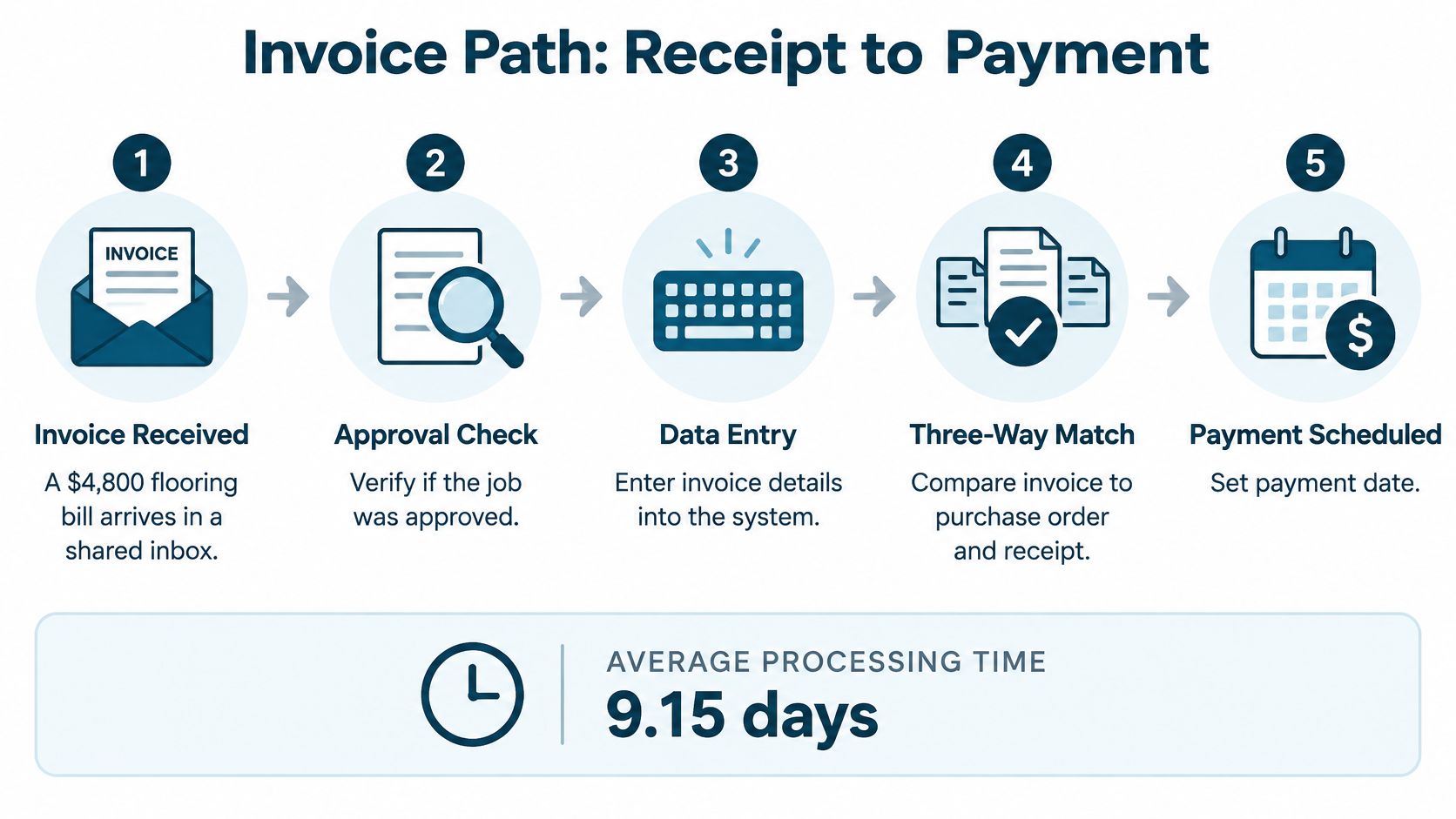
A supplier's invoice arrives, but the purchase order is in one folder and the delivery record is somewhere else. Until the workflow names who connects those documents, the bill can sit untouched. Map each handoff, from arrival through payment and recordkeeping.
| Stage | Owner | Control | Evidence kept |
|---|---|---|---|
| 1. Capture invoice and validate supplier | AP clerk | Check supplier against the approved vendor list | Invoice image and supplier record |
| 2. Decide PO or non-PO | AP clerk | Confirm whether a purchase order exists | PO number or budget owner name |
| 3. Match to PO and receipt | AP clerk or system | Compare quantities and prices across documents | Match result and variance note, if needed |
| 4. Code the invoice | AP clerk | Set entity, department, project, tax and GL account | Coding details on the invoice |
| 5. Route approval | Budget owner | Route by amount and budget owner | Approver name and approval time |
| 6. Escalate overdue approvals | AP lead | Send a reminder after the set interval, then contact the backup approver | Escalation log |
| 7. Release approved invoices | Payment releaser | Pay only invoices with approved status | Payment batch number and date |
| 8. Retain for audit | Controller or owner | Keep invoice, match, approvals and exception fixes together | Filed audit trail |
The stages are clear; the handoffs are where control can fail. A supplier entered under several spellings weakens duplicate checks. A missing delivery record leaves the matcher without proof of what arrived. A bill coded to general office expenses may be hard to trace back to the project that incurred it.
Where routing usually goes wrong
Routing only by amount can leave the owner approving every bill, or leave invoices waiting without a clear next step. Set a threshold for routine invoices and name the budget owner who handles them. Route higher-value bills for an additional review.
A non-PO invoice can be legitimate. A Sunday plumbing callout, software renewal or filing fee may not have a purchase order. The budget owner should confirm the expense and accept responsibility before it is paid.
For a team setting up the intake stage, invoice processing automation can help with scanning, extracting invoice details and routing them for review.
Do this first: Draw the eight stages on one page and name an owner for each. Mark where invoices wait, who follows up, and who can authorize an exception. Then choose tools that support those rules.
Assign Roles and Approval Limits That Fit Your Team
Three jobs sit inside every payment, and they shouldn't all sit with the same person: entering the bill, approving it, and releasing the money.
The Washington State Auditor's segregation of duties guide describes the split as distributing related tasks among different people. In practice, the person who sets up or edits a vendor should not approve the invoice and should not release the payment. The reason is simple. One employee controlling the whole chain can create a supplier, approve a fake or inflated invoice, and send the money, and nothing in the system would flag it.
Approval limits do the rest. The tiers below are a starting shape, not a rule from a textbook. The dollar cutoffs are yours to set against your own spend.
| Invoice amount | Who approves | Extra check |
|---|---|---|
| Up to $1,000 | Department budget owner | Matches PO or a receipt exists |
| $1,001 to $10,000 | Department head and AP lead | Budget line confirmed and coding checked |
| $10,001 to $50,000 | Controller or owner | Reviewed against the monthly budget |
| Above $50,000 | Two people at payment release | Dual authorization |
When three people is a luxury
A five-person agency can't split every role. Pretending otherwise leads to a policy nobody follows. The workable fallback, which the state guide also allows for, is compensating review: the owner or an outside bookkeeper checks the payment list and the vendor bank details before funds go out.
What matters is that the workflow records who prepared, who approved, and who released. Three names on every payment. If two of them are the same person, at least you know, and you can build the review around that gap instead of hoping nobody notices.
Absence and overrides need a written answer
Name a backup approver for every role, give the backup the same limit, and set a clock. Two business days untouched, then it escalates automatically. After that, it goes to the owner. Without a clock, the invoice waits until someone shouts, and urgency starts beating the rule.
Overrides need a rule too. Decide who can approve outside the normal path, usually the controller or owner, and require a written reason on every one. An override with no note is just a control that failed.
A test you can run this week: can any single person in your business create a vendor, approve a bill and release the payment? If yes, pick one fixed check, say Friday morning, where the owner or an outside accountant reviews new vendors, the payment batch and anything unusual. Put that check in the roles sheet with a name against it.
When the rules get complicated across tools and teams, it helps to look at how Wisely streamlines business workflows before choosing software, because the approval logic should drive the tool and not the other way round.
Set Matching Rules and Tolerances for Exceptions
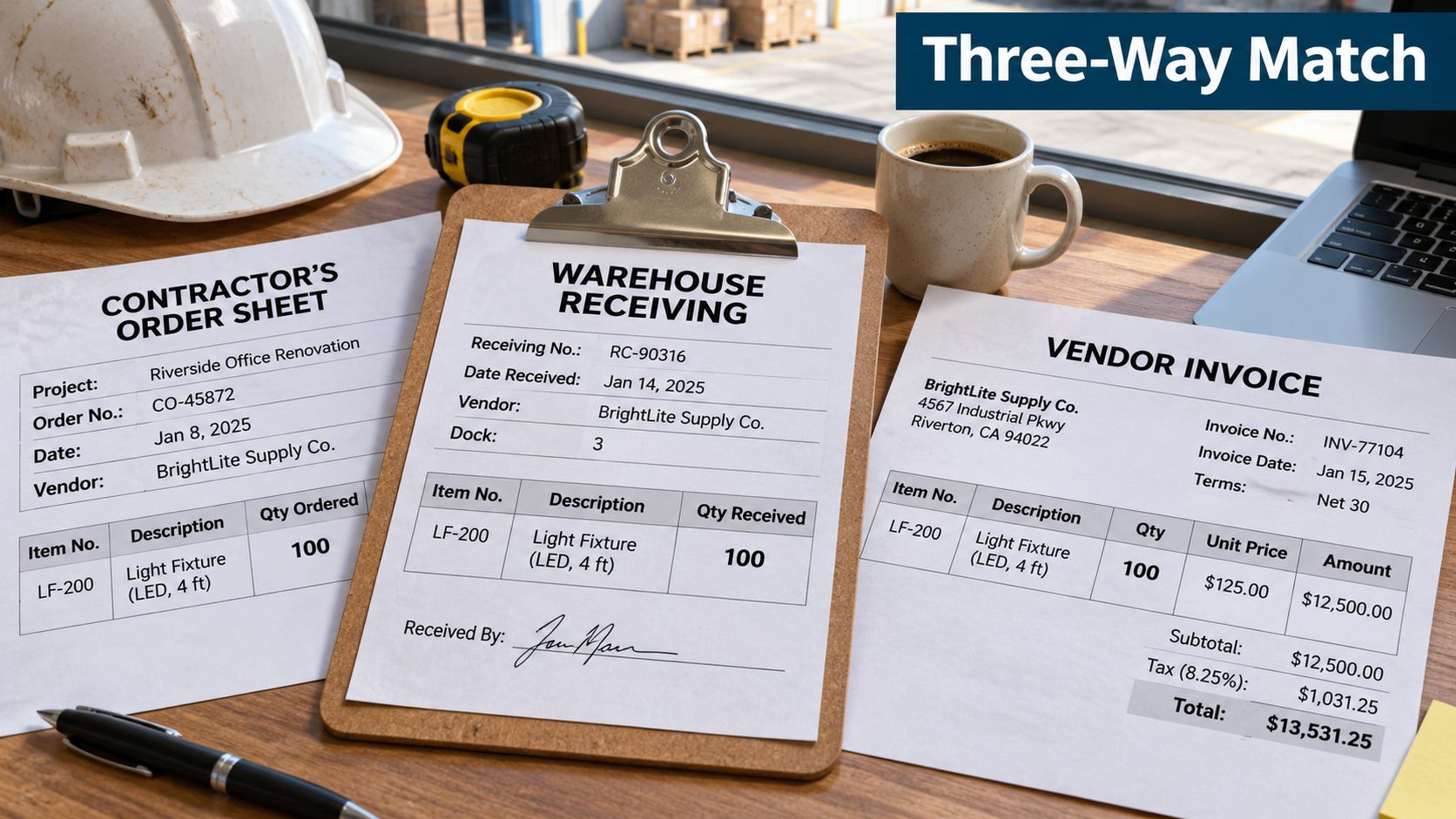
A three-way match compares the purchase order, the receiving record, and the invoice before approval. If a contractor ordered 100 light fixtures, the warehouse recorded 100 received, and the invoice charges the agreed price, the bill can pass. If the invoice charges for 120, the workflow should stop and assign the mismatch to a person. The Washington State Auditor's accounts payable guide describes the check as comparing quantity and price across the three documents.
Tolerances are a choice you make on purpose
A 40-cent rounding difference should not need the same review as an unexplained quantity increase. Set tolerances before invoices arrive, and define who can approve an exception. Microsoft Dynamics 365 documents a three-way matching setup that allows a 15% price tolerance against purchase order totals and can require approval before posting invoices with matching errors (Microsoft three-way matching policies).
Use example ranges as starting points, then adjust them to the contract terms and the risk of each purchase. The percentages below are illustrative policy choices, not universal thresholds.
| Spend type | Example tolerance | What to check hardest |
|---|---|---|
| Professional services | 0% to 5% on billed hours or fees | Hours billed against the agreed scope |
| Medical or clinical supplies | 0% to 2% on unit price | Unit price against the contract |
| Construction materials | 5% to 15% on price; 0% on unreceived quantity | Quantity received against the delivery note |
| Utilities and subscriptions | 5% to 15% on invoice amount | Whether the account is still needed |
A wider price tolerance can reduce unnecessary holds, but it also lets larger differences pass without review. Keep quantity checks strict when the receiving record should show exactly what arrived. For fees or subscriptions that do not match a purchase order, route the bill to a named reviewer rather than treating the percentage as permission to pay.
The exception queue is the real control
Each mismatch needs an owner with authority to resolve it. The queue should show what failed, the expected figure, and who must decide whether to correct, reject, or approve the invoice. An exception with no owner can sit unnoticed or move forward unchecked.
Some mismatches need job-specific context. A construction change order may add labour; a healthcare purchase may replace a backordered item with a substitute. Route those cases to someone who understands the work, while software handles routine comparisons. Automated invoice data capture and validation can reduce manual entry, but a person still needs to decide whether an exception is justified.
One page, one signature: document each matching rule and tolerance on one page, then have the approver sign it. If a supplier disputes a short payment later, the written rule shows how the decision was made.
Control Vendor Changes and Release Payments Safely
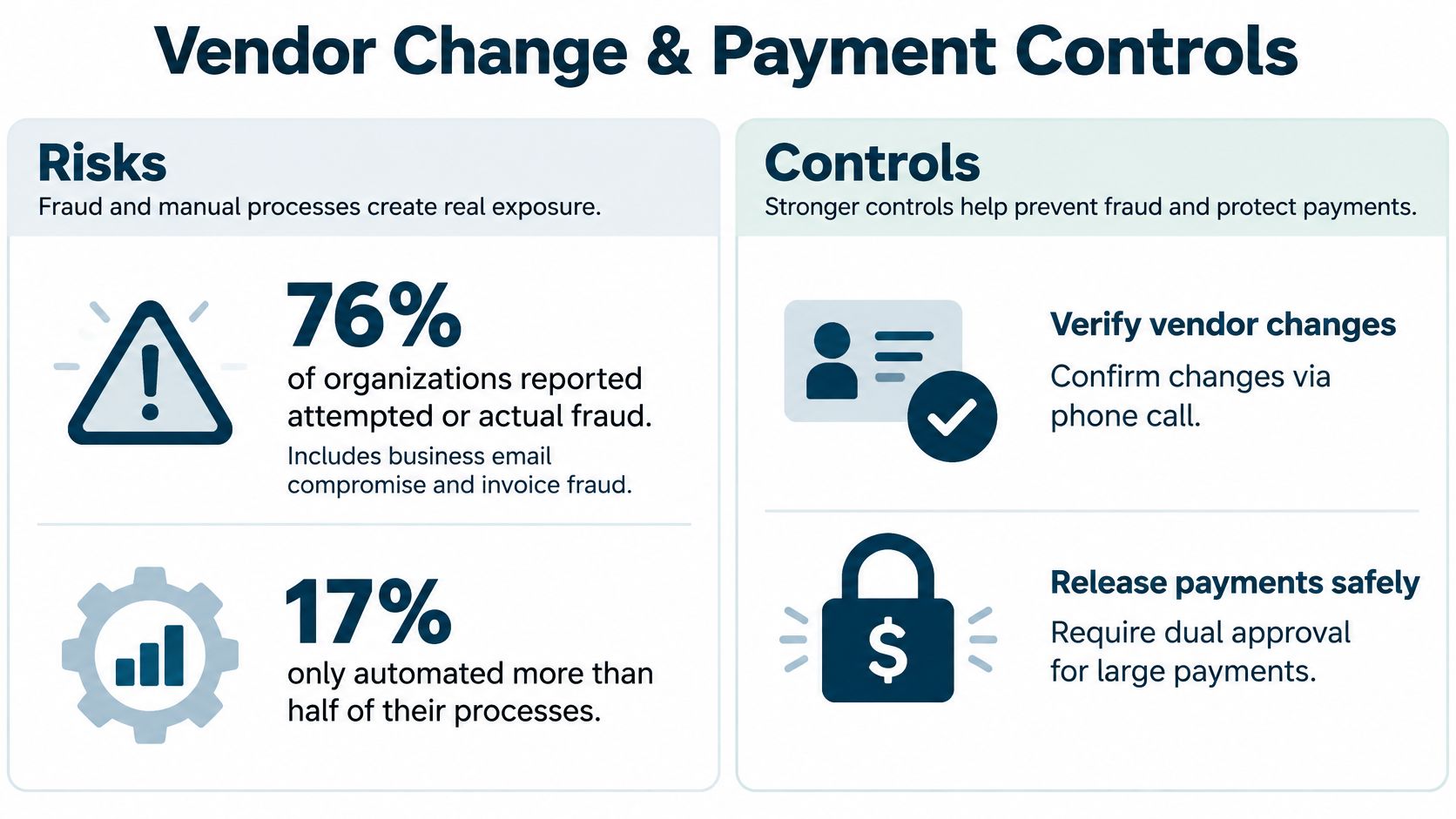
The riskiest moment in accounts payable isn't approval. It's the change that happens around it. In a 2025 survey, 76% of organisations reported attempted or actual fraud, including business email compromise and invoice fraud, while only 17% had automated more than half of their finance processes and only 17% were using AI to detect payment fraud (Medius closes the AP fraud gap). That leaves the most dangerous steps, bank detail changes and payment release, sitting with email and one employee.
The 2024 ACFE Report to the Nations shows what that costs. Across 1,921 occupational fraud cases and more than $3.1 billion in losses, the average case came to about $1.7 million. A lack of internal controls appeared in 32% of cases and overriding existing controls in another 19%. Together, that's more than half of all cases.
The release routine that closes the gap
Separate approving an invoice from releasing the money, and build these steps into every run.
- Check approved status. Confirm every invoice in the batch shows approved, not "pending" or "approved verbally".
- Reconcile the batch. Export the approved list and compare the batch total against it before anything leaves.
- Verify bank details against the change log. Every change gets a callback to a number you already hold on file, recorded, and approved by someone who didn't receive the request.
- Run payments from the accounting system. If a payment can bypass approval, the approval was decoration.
- Require a second releaser above your limit. Two people on anything large, no exceptions.
- Write the detail back. Payment date, releaser and batch number go on each invoice.
- Schedule for the due date. Take early-payment discounts when cash allows.
Duplicate checks belong here too. Run them automatically on supplier, invoice number, date, currency and amount, because a duplicate rarely looks identical to the original.
What good looks like against the clock
Speed and control aren't opposites. Published benchmark data places manual or bottom-performing invoice cycles around 14.6 days, against 3 to 5 days for automated or top performers, with cost per invoice at roughly $10 to $15 manually versus $2.82 for automated top performers. Best-practice teams also capture more than 85% of available early-payment discounts (Amazon Business accounts payable process guide).
That same guidance flags the pitfalls that undo all of it. Routing every invoice to one senior approver. Accepting email approvals with no auditable record. Letting a requester approve their own purchase. Leaving access open for people who have left. Treating non-PO invoices as invalid.
Practical rule: if you can't show who released a payment and when, you don't have a control, you have a habit.
The wider set of internal controls for small business covers the reconciliation and review habits that keep these checks alive after the initial push.
Track the Numbers That Show It Works
An invoice can meet every approval rule and still sit untouched in a queue. Track both overall performance and the exceptions that need someone to act. These five measures show where the workflow is working and where accountability is missing.
| Measure | What it tells you | What to track |
|---|---|---|
| Average invoice processing time | How long invoices take from receipt to payment | Days, measured consistently |
| Exception rate | How often an invoice needs manual review | Share of invoices flagged for review |
| First-pass match rate | Whether purchasing, receiving and invoice records agree | Share matched without correction |
| Duplicate or erroneous payments | Whether payment checks catch errors | Count and value of identified payments |
| On-time supplier payment | Whether invoices are approved and scheduled by the due date | Share paid on time |
Use the same start and end points each month. For example, measuring processing time from invoice receipt to approval will produce a different result from measuring receipt to payment. Record both if you need to distinguish approval delays from payment scheduling.
Averages hide the invoices that hurt
An average can look healthy while one large invoice sits untouched for weeks. Review approval dwell time, the time an invoice waits for a decision, alongside exception aging, the time an unresolved issue remains open. Give every stuck invoice a named owner and a next action. That makes an exception visible instead of letting it disappear in a queue.
Set a baseline over 30 to 60 days before changing the workflow. Then sort delays by cause: incomplete invoice data, a purchasing mismatch, an approver's queue, or payment scheduling. Each cause points to a different fix. A missing approval limit, for instance, calls for a clear rule, not more staffing.
Track automation alongside control. A high no-touch rate means little if exceptions have no owner or risky changes pass without review. Pair processing measures with a regular check of unresolved exceptions and their outcomes.
Monthly review: bring one chart and a list of open exceptions. Assign an owner and next action to each one before the meeting ends.
The key performance indicators that help businesses measure performance can sit alongside these workflow measures, giving owners a clearer view of how invoice handling relates to cash and margin.
Test the Workflow Before Your Next Bill Run
You don't need a project plan to find out whether your approval workflow holds. You need twenty invoices and an hour.
- Pull the last 20 invoices. Any twenty. Mix suppliers, sizes and departments.
- Trace each one through the eight stages on the map from earlier.
- Mark where it stalled, where it passed with no record, and where it skipped a check entirely.
- Fix the single rule behind the most failures first. Usually that's a missing approver or a matching tolerance nobody wrote down.
- Run the same twenty again next month and compare.
In practice the pattern is the same. Two or three invoices account for most of the delay, and the cause isn't volume. It's a person who was away, a vendor whose bank details changed with no record, or a bill coded to the wrong department so it sat in the wrong queue.
If the test shows wider gaps, fix the order
Don't start with matching automation. Start by measuring for 30 to 60 days so you have an honest before. Send every invoice through one monitored intake channel, so nothing arrives as a photo in a chat thread. Add OCR or structured electronic invoices so the data is typed once. Then automate matching, so people only see the variances.
Within a day of running the twenty-invoice test, you'll know which of three options fits. A spreadsheet and a written rule sheet. A workflow tool wired into your accounting system. Or an outside team doing the processing while you keep the approvals. A one-person finance function can still get a second pair of eyes from an outside accountant, and that's often the cheapest control you'll ever buy.
MyOfficeOps is one outside option for accounts payable processing and payments, worth comparing against a tool or a bigger in-house role. We can also put a full team around the work, since clients get bookkeepers, CPAs and CFO-level advisors together, and virtual CFO support can start within a week.
Before the next bill run, confirm five things: roles named, approval limits written down, matching rule signed by the approver, bank-change verification in place, and the five numbers on a monthly review. If any of those is missing, fix that one before you touch anything else.
If your bills keep stalling in an inbox and you'd rather hand the processing to people who do it every day, MyOfficeOps handles accounts payable processing and payments with approval rules routed to the right person on your team. You keep the approvals and the final say on payment release. Visit MyOfficeOps to talk through how that would work for your business.