If you're using a spreadsheet to track your business money—or maybe even a shoebox full of receipts—you're not alone. Lots of business owners start that way. But as your business grows, trying to keep track of everything feels like trying to catch rain in a cup. It's tiring, and you always feel like you're missing something.
The good news is, the best free bookkeeping software can do a lot of this work for you. This gives you your time back and shows you a clear picture of how your business is doing. For people working for themselves or just starting a small business, tools like Wave and Zoho Books are great first steps. They have free plans that are actually useful and don't cost a thing.
Choosing Your First Bookkeeping Software
Switching from tracking things by hand to using software is a big, smart move. You don't have to become a money expert overnight. You just need a tool that's made for the job.
Think of it like this: you could use a paper map to get somewhere, or you could use a GPS. Both work, but the GPS does all the hard work for you, finds new routes if you get stuck, and lets you focus on just driving.
Why Ditch the Spreadsheet?
Look, spreadsheets are fine, but they're a lot of work. They don't automatically grab your bank transactions or send reminders to clients who haven't paid you. You have to do all of that yourself. That's time you could be spending on what you're good at—running your business.
Bookkeeping software does that stuff for you. It connects to your bank, helps you sort your spending as it happens, and shows you who owes you money right now. You can't get that kind of up-to-the-minute info from a spreadsheet without a ton of manual updates. For a deeper look at what to consider, check out our guide on how to choose accounting software.
The goal isn’t to turn you into an accountant. It’s to give you simple tools that make sense for a business owner, so you can see where your money is going.
Key Benefits of Dedicated Software
The biggest benefit? Feeling sure about your numbers. When you know your money is tracked correctly, you can make better, faster decisions for your business.
Here are a few good things you’ll notice right away:
- Saves Time: It handles boring tasks like making invoices and logging expenses, so you can work on growing your business.
- Fewer Mistakes: Since it pulls information straight from your bank, you avoid the typos and math errors that happen when you type everything in yourself.
- Better Cash Flow: You can see who owes you money in a second and set up automatic reminders. This is one of the best ways to get paid faster.
What to Look for in Free Bookkeeping Software
Let’s be real, "free" usually has a catch. Some "free" software is just a short trial. Others hide the important features behind a price tag you don't discover until you really need them. When you're looking for good free bookkeeping software, you want a tool that helps your business without any nasty surprises.
It’s not about finding the software with the most features. It’s about finding the one with the right features for what you actually do every day.
The Absolute Must-Haves
Before you get wowed by fancy extras, make sure any free software you're looking at can do the basics really well. These are the main jobs that will save you the most time and trouble.
Think of it like building a house. You wouldn't pick out the curtains before you have walls. These features are the foundation for your business finances.
- Invoicing: You need to be able to make and send professional-looking invoices. A freelance photographer needs to bill a client for a wedding shoot right away, not spend an hour fighting with a template. A dog walker needs to send a clear bill for a month of walks. It has to be quick and easy.
- Expense Tracking: This is just knowing where your money goes. The best tools let you connect your business bank account so your spending shows up automatically. At the very least, you should be able to take a picture of a receipt to log a purchase.
- Basic Financial Reports: You must be able to create a Profit and Loss report. This one report answers the most important question for any business owner: are you making more money than you're spending?
Features That Make Life Easier
Once you have the must-haves covered, you can look for things that make your day smoother. The number of businesses using accounting software is growing fast, with the market expected to reach $42.17 billion by 2032. This isn't just big companies; it's small businesses who want tools that do more than just record what happened. They want tools that actually save them time today.
A good free tool shouldn't just tell you what happened last month. It should help you run your business better today and get ready for tomorrow.
Look for features that make your work easier, like going digital with paperless accounting software. This is a perfect example of something that cuts down on clutter and saves a surprising amount of time.
Here are a few other things to look for:
- Easy to Use: Is the software simple to figure out? If you have to read a giant manual just to send one invoice, it's not the right tool. Your time is too valuable for that.
- Bank Connection: Being able to link your business bank account is a huge deal. It automates the painful job of typing in every transaction and cuts way down on mistakes.
- Room to Grow: Think about your business in a year. If you suddenly need to pay employees or track products, does the software have a paid plan you can move up to? You don't want to be forced to switch to a whole new system right when your business starts taking off.
A Detailed Comparison of Top Free Software
Alright, let's get to the important part. Talking about features is one thing, but seeing how the best free bookkeeping software actually stacks up against each other is what really matters. We’re going to look at the two big players—Wave and the free plan from Zoho Books—and see how they handle real-world tasks.
This isn’t about which one has more buttons. It's about which one solves the problems you actually have. If you're a consultant sending out 20 invoices a month and tracking lunch receipts, your needs are very different from a freelance designer juggling three big projects.
Wave: The Truly Free Contender
Wave has made its name by being truly free for the main stuff: accounting, invoicing, and scanning receipts. There are no monthly fees, no hidden charges, and no limits on how many invoices you can send or expenses you can track. This makes it a great place to start for freelancers, solo business owners, and small service businesses.
Imagine you run a small pet-sitting business. You're always buying pet food and supplies, and you need to send invoices after each job. Wave feels like it was made for you. You can snap a picture of a receipt from the pet store, and it's logged. You can create and send an invoice from your phone before you even leave the client's house.
The whole market for online bookkeeping is growing fast, from $4.46 billion in 2025 to an expected $5.03 billion in 2026 as more small businesses stop using spreadsheets. Companies like Wave and paid options like FreshBooks are focused on making simple tools for owners who aren't accountants. You can learn more about this market in this report on online accounting solutions from The Business Research Company.
Zoho Books: A Powerful Free Plan with Clear Limits
Zoho Books does things a bit differently. It's a big, powerful accounting tool with a free plan made for very small businesses that are just starting. It's part of a bigger family of business tools, but its free plan is more limited.
The free plan is for businesses that make less than $50,000 a year and is for one user (plus their accountant). That might sound small, but it's often plenty for someone just starting out. For example, if you’re a freelance writer who gets a few big projects each year, that income limit might not be a problem for a while.
Where the Zoho Books free plan is really cool is in tracking time and projects. You can set up a project, track the hours you work on it, and then easily turn that time into an invoice for your client. This is a huge help for anyone who bills by the hour. For a wider look at your options, check out our guide to the best accounting software for small businesses.
Wave is like a basic toolkit with unlimited uses, perfect for sending lots of simple invoices. Zoho Books' free plan is more like a specialized tool that's great for project work but has clear limits.
Feature Face-Off: Wave vs. Zoho Books
Let's break down the key differences in a simple way. Seeing them side-by-side makes it easier to tell which one is a better fit for you.
Here is a side-by-side look at the core features, limitations, and ideal users for the leading free bookkeeping software options.
Free Bookkeeping Software Feature Comparison
| Feature | Wave | Zoho Books (Free Plan) | Other Contenders |
|---|---|---|---|
| Invoicing | Unlimited invoices, clients, and estimates. Highly customizable. | Limited to 1,000 invoices per year. Good customization options. | Often have much lower limits (e.g., 5-20 invoices/month). |
| Expense Tracking | Unlimited receipt scanning and automatic categorization. | Manual expense tracking and receipt attachment are included. | Basic manual entry, often without receipt scanning. |
| Bank Connection | Yes, connects to most major banks for automatic transaction import. | Yes, connects to your bank account for automated transaction feeds. | Hit-or-miss; some free plans lack this entirely. |
| Users | Unlimited users, including collaborators and accountants. | Limited to 1 user and 1 accountant. No other collaborators allowed. | Almost always limited to a single user. |
| Project Tracking | No dedicated project tracking or time billing features. | Yes, includes basic project management and time tracking tools. | Very rare in free plans; usually a premium feature. |
| Revenue Limit | None. Use Wave no matter how much your business generates. | Strictly for businesses with under $50,000 in annual revenue. | Some have low revenue caps, others have none. |
| Best For… | Freelancers, consultants, and service businesses with many clients. | Solopreneurs and project-based freelancers needing time tracking. | Very small side hustles or micro-businesses. |
This table makes one thing clear: "free" doesn't always mean the same thing. The limits and included features can make a huge difference in your day-to-day operations.
What These Differences Mean for You
The table gives you the facts, but let's talk about what that means for your business.
- If you're a freelance graphic designer with 30 different clients a year, sending many invoices to each, Wave's unlimited invoicing is the clear winner. You’ll never have to worry about hitting a limit.
- If you're a business consultant working on three big projects, Zoho Books' ability to track your hours for each project will keep you much more organized.
- If you plan to hire an assistant in the next six months, Wave’s unlimited users means you can add them for free. With Zoho, you'd have to upgrade to a paid plan as soon as you hire them.
Choosing the best free bookkeeping software is about understanding how you work. Don't get distracted by a long list of features you'll never use. Focus on the one or two things that cause you the most headaches right now—whether that's making invoices, tracking project time, or just getting your expenses in one place—and pick the tool that fixes that problem.
How Free Software Works in The Real World
Hearing about features is one thing, but how these tools handle everyday business stuff is what really counts. Let's walk through a couple of common situations to get a better feel for how one of these programs might fit into your daily work.
Imagine you're a freelance writer. You need to send nice-looking invoices, get paid easily, and track your business spending for tax time. You don't need complicated inventory or project tools, but you do need to look professional and keep your money organized.
This is where a tool like Wave is great. You can make a custom invoice with your logo, send it to a client, and they can pay you right away with a credit card. Wave takes a small fee for the payment—just like Stripe or PayPal—but the bookkeeping itself is free. When you buy a new computer, you just take a picture of the receipt with your phone, and it’s logged in your books. No more shoeboxes.
A Tale of Two Businesses
Now, let's think about a different business. Say you run a small online shop from your home, selling handmade candles on Shopify. You have products to track, sales coming in from your website, and expenses for things like wax and wicks.
You could use Wave to see how much profit you're making by connecting your bank account, which is a good start. But the free plan from Zoho Books might be a better fit if you need more detail, like tracking certain costs against your sales. It’s made for businesses making under $50,000 a year, so it's perfect for a new or growing side business.
This quick visual shows how Wave and Zoho Books are set up for different types of small business owners.
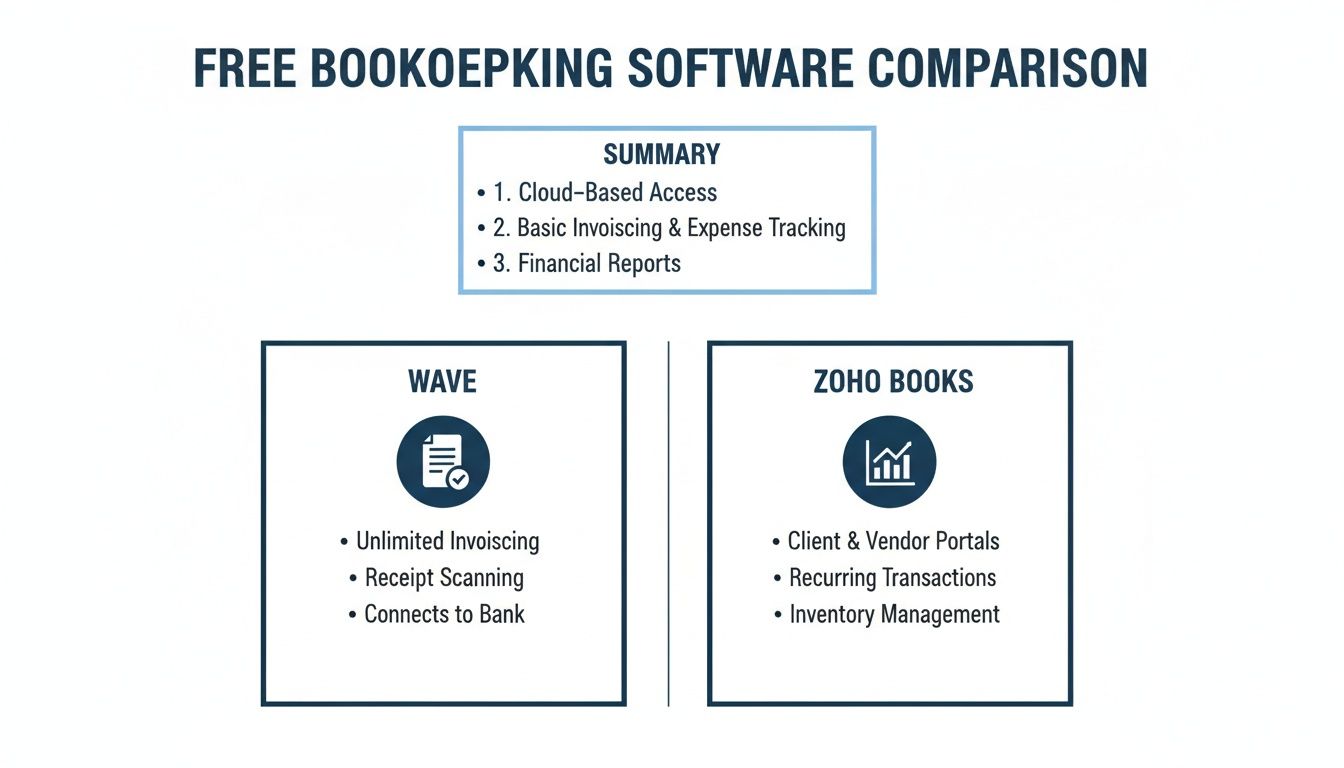
The main point is pretty clear: Wave is great for service businesses because of its unlimited invoices. Zoho Books gives you more detailed reports, which is good for people who need a close look at their numbers.
Practical Steps for Getting Started
No matter which tool you pick, the first few steps are about the same. The idea is to set things up right so the software can do most of the work for you.
- Connect Your Business Bank Account: This is the most important step. It lets the software pull in all your transactions automatically. This one thing saves hours of typing and cuts down on mistakes.
- Customize Your Invoices: Take ten minutes to add your logo and choose your brand colors. A professional-looking invoice helps people trust you and can even help you get paid quicker.
- Set Up Payment Processing: Let clients pay you with a credit card or bank transfer. Yes, there's a fee (usually around 2.9% + $0.60 per transaction), but making it easy for clients to pay you is one of the best things you can do for your business.
The real power of this software isn't just in tracking money you've already made. It's about building a system that helps you get paid faster and see the health of your business at any moment.
Good bookkeeping is key to your financial health. It helps you see and tackle cash flow problems before they get serious. When your transactions come in automatically and your invoices go out smoothly, you get a clear, live look at your money. This lets you spot potential problems weeks ahead of time, giving you time to fix them instead of being surprised. Choosing the right free software for your business is the first step to getting that control.
Free software sounds great, and for many new businesses, it really is. But it’s smart to know what you're getting into. “Free” doesn’t always mean everything is free, and understanding the catch now can save you from big headaches later.
I like to think of it like a free video game. You can play the game without paying, but if you want the cool new sword or a special character, you have to pay. Free bookkeeping software works the same way. The main tools are free, but the company makes money on the extra, helpful things they sell.
Where You’ll See the Extra Charges Pop Up
The most common "hidden cost" isn't really hidden—it's payment processing. If you want to let clients pay you with a credit card (and you should), you'll pay a small fee on each payment. This is usually around 2.9% + $0.60. It's important to know this isn't a fee from the software company. It's what payment companies like Stripe or Visa charge for their service.
Other costs usually show up as your business gets bigger.
- Payroll Services: The moment you hire someone, you need to pay them. This is almost always a paid add-on service.
- Live Customer Support: Need to talk to a real person for help? Many free plans only offer email support. You often have to pay extra for phone or chat help.
- Advanced Features: Need a detailed report for a loan or want to manage inventory? Those powerful tools are usually part of the paid plans.
How Companies Like Wave Make Money
So, if the main software is free, how do these companies stay in business? They're betting that you'll like their free product so much that when you need more, you’ll pay them for their built-in services.
Wave is a perfect example. They are so popular because their main bookkeeping, invoicing, and receipt scanning are really free—with no surprise limits. The company, which H&R Block bought in 2019, makes its money from optional paid services. You can learn more about how Wave’s model compares to others from this bookkeeping software analysis.
The business model is simple: Give away the accounting tools for free and make it super easy to pay for things like payroll or payment processing when your business is big enough to need them.
Common Limitations to Watch Out For
Besides costs, free plans always have limits. Think of these as walls you might run into as your business grows.
A common one is a limit on users. A free plan might only let one person—you—use the account. If you want to give your new assistant access, you’ll have to upgrade. Other plans might limit how many clients you can have or how much money you can make, like Zoho Books' free plan, which is only for businesses making under $50,000 a year.
These limits are designed to work perfectly for you when you're starting out, but gently push you toward a paid plan as you become more successful.
Knowing When to Upgrade to a Paid Solution
Free software is a great place to start. I've seen so many businesses use it to get their finances organized without spending any money. But just like you might outgrow your first apartment, most growing businesses eventually need more.
So, how do you know when you've hit that point? It's usually not a single moment. It's more of a slow build-up of little annoyances that add up until you realize you’re spending more time trying to work around the software than actually doing your books.
Signs You Have Outgrown Your Free Plan
The biggest sign is when your software starts making more work for you instead of saving you time. You might find yourself using spreadsheets to create reports the software can't make or manually tracking things it can't handle. Think of it this way: your free software was a good bicycle, but now your business needs to drive on the highway.
It’s time to look for a car. Here are a few clear signs you’re ready to upgrade:
- You need more details. A basic profit and loss report is great, but now you need to make bigger decisions. To answer questions like, "Can I afford to hire someone?" or "Which of my services makes the most money?" you need better reports that free plans don't have.
- You’re managing inventory or projects. If you start selling products or handling big client projects, a simple invoice tool won't be enough. You need software that can track how many products you have or which costs go with which jobs.
- Your team is growing. Most free software is built for one person. The second you need to give an employee or a partner access to the books, you’ll almost always have to move to a paid plan.
Your bookkeeping software should make things clear, not create a puzzle. If you spend more than an hour a month fighting its limits, the time you’re losing is already costing you more than a paid plan would.
Your Next Steps
When you hit this wall, you have two main choices. The first is to upgrade to a paid version of the software you're using or move to a more powerful one like QuickBooks Online. This is often the next logical step and solves your immediate problems.
The second choice is to realize that you don't just need better software—you need an expert to help you. As your business gets bigger and more complicated, having a professional who can manage your books, explain the numbers, and give you advice is a huge help. If this sounds like the kind of support you need, you might be interested in learning about outsourced bookkeeping for your small business. This lets you focus completely on growing your business, knowing that your finances are in expert hands.
Frequently Asked Questions
You have questions, and that's good. Picking the right tool to manage your business's money is a big decision. Let’s go over some of the most common questions people have about free bookkeeping software.
Is My Financial Data Safe with Free Software?
This is probably the most important question, and the short answer is yes—your information is generally very safe. Good companies like Wave and Zoho spend a lot of money on security because their whole business relies on you trusting them. They use bank-level encryption to protect your data, which is the same technology your own bank uses.
Think of it like putting a secret message in a locked box. Only you and the software have the key. Even if someone got the box, they couldn't read what's inside.
Are These Software Options Truly Free?
Yes, the main bookkeeping features are really free. You can send invoices, track spending, and run basic reports without ever paying a monthly fee. So what's the catch? They make their money on extra, paid services that work with the free software.
The most common examples you'll see are:
- Payment Processing: If a client pays you with a credit card through the software, you’ll pay a standard fee (usually around 2.9% + $0.60). This is normal for any service that processes payments.
- Payroll: If you have employees and need to pay them, that’s always a paid service.
The software itself is free, but the helpful services that connect to it are not.
Can I Switch from a Spreadsheet to This Software Easily?
Definitely. Moving from a spreadsheet is a lot easier than you might think. Most of these programs were made for business owners who are doing exactly that. You won’t have to spend days re-typing years of old information.
The best way to start is to connect your business bank account. The software will automatically pull in your recent transactions, giving you a starting point. You don’t need everything to be perfect to get going.
You can start using the software for all your new business and then slowly organize your past records over time. The goal is to start saving time now, not get stuck trying to recreate the past.
Even the best free bookkeeping software has its limits. When you're ready for more than just software—when you need an expert to interpret the numbers and guide your growth—the team at MyOfficeOps is here to help. Learn how our bookkeeping and advisory services can give you financial clarity and peace of mind.