
You've got invoices on your desk, a spreadsheet that refuses to balance, and a vendor asking why payment hasn't arrived. Meanwhile, you're trying to sell, serve customers, manage employees, and keep the bank account healthy. Bill pay becomes a Sunday-night task, even though it's one of the clearest windows into your cash flow.
Bill pay services for small business can take that work off your plate. But the right choice isn't always the tool with the most automation. A good setup captures invoices, routes approvals, schedules payments, protects against fraud, and gives you a clear view of what cash is leaving the business and when. In many cases, a bookkeeping partner with the right software delivers more value than a fully automated system nobody properly maintains.
What Bill Pay Services Actually Do for Your Business
A contractor I've worked with used to keep vendor invoices in three places: a folder beside the printer, an email inbox, and a spreadsheet shared with the office manager. On payment day, the owner checked each document, asked whether the work had been completed, wrote checks, and later tried to match everything to the accounting records. A vendor call about a late payment usually meant another search through old emails.
A bill pay service replaces that scattered routine with one controlled process. It receives invoices through email, upload, or another intake channel, reads the key information, records the bill, sends it to the right person for approval, and schedules the payment. After payment, the transaction is matched to the accounting ledger and the supporting invoice stays attached to the record.
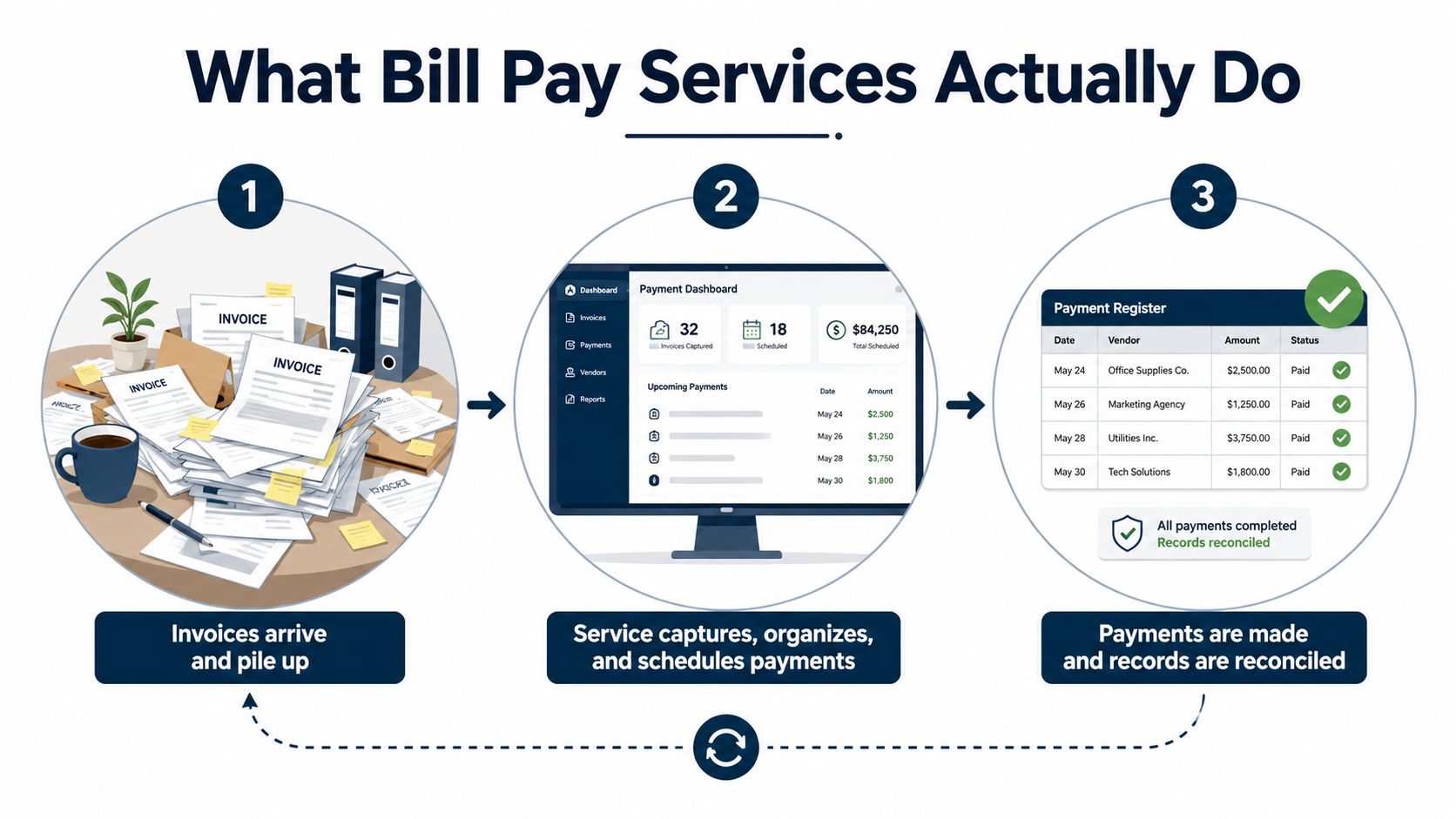
The three parts of the workflow
Think of the service as a reliable assistant who never loses a receipt:
Capture: Invoices arrive in a central inbox or dashboard. The system extracts vendor names, dates, amounts, due dates, and coding details instead of requiring someone to retype every field.
Review and approval: The invoice follows rules based on its amount, department, vendor, project, or general ledger code. The right person approves it, asks a question, or sends it back for correction.
Payment and reconciliation: The service sends payment by an approved method, such as ACH, check, wire, or card, then records the payment and helps match it to the bank activity.
That matters because small-business payables remain heavily manual. Forty-eight percent of small businesses still use paper invoices, 86% manually enter invoice data, and only 20% of accounts payable teams are fully automated, according to HighRadius' AP automation statistics. Those conditions create opportunities for duplicate entries, missed due dates, incorrect coding, and payments made without proper review.
Your accounting platform still matters. If you use Xero and receive bills from overseas vendors, a practical multi-currency Xero bills guide can help you understand how currency settings and payment records fit together. You can also review this accounts payable management resource for a broader look at organizing the workflow.
The main point is simple: you aren't buying a button that sends money. You're buying a system for controlling the complete path from invoice receipt to reconciled payment.
In-House Versus Outsourced Bill Pay
Keeping bill pay in-house gives you direct control, but direct control only helps if someone has the time, training, and discipline to use it well. Many owners start by handling payments themselves. Then the business grows, invoices arrive from more vendors, and the owner becomes the final checkpoint for every small purchase.
A construction owner might spend Sunday evenings reviewing subcontractor bills and writing checks because nobody else knows which project each invoice belongs to. That approach feels inexpensive because there's no separate bill pay fee. The owner is still paying, though, with time that could have gone toward estimating jobs, meeting customers, or solving field problems.
Outsourcing changes the trade-off. A bookkeeping team can collect invoices, maintain vendor records, follow approval rules, prepare payment batches, and reconcile activity. The owner keeps control over approvals and cash decisions without doing every data-entry task. A professional services firm that moved bill pay to its bookkeeping team reclaimed 15 hours a month, a qualitative example of how delegation can create useful capacity without adding an internal finance employee.
The real comparison
| Factor | In-House | Outsourced |
|---|---|---|
| Cost | Software plus employee or owner time | Service fee plus software or bundled support |
| Time | Internal staff captures, codes, follows up, and pays bills | Partner handles routine processing and escalates exceptions |
| Control | Direct control, but often concentrated with one person | Shared control through permissions, approvals, and reporting |
| Risk | Turnover, weak documentation, duplicate payments, and fraud exposure | Vendor oversight, communication gaps, and dependence on service quality |
| Flexibility | Processes can change quickly if the owner is available | Processes are repeatable, but changes need clear communication |
| Knowledge | Often held by one employee or owner | Documented and shared across the partner's team |
Hidden costs owners miss
Manual invoice handling carries a measurable cost. Hand-processing one invoice typically costs about $12.88 to $19.83, while automated processing costs about $3 or less, and the average manual invoice cycle takes around 14.6 days, according to AutoPayables' AP automation benchmark.
The invoice fee isn't the only issue. Consider training a new employee after turnover, correcting a bill coded to the wrong project, recovering from a duplicate payment, or explaining a late payment to a key supplier. Fraud risk also rises when one person can receive invoices, approve them, change vendor details, and release payments without review.
Practical rule: Keep payment authority inside the business, but outsource the repetitive preparation and reconciliation when your team can't perform them consistently.
In-house makes sense when invoice volume is manageable, responsibilities are separated, and someone owns the process every week. Outsourcing makes more sense when bill pay depends on the owner's memory, payments are frequently late, or the bookkeeper is spending valuable time on clerical work instead of reporting and analysis.
Key Features to Evaluate in a Bill Pay Service
A polished dashboard doesn't make a bill pay service useful. During a demo, ask the provider to show what happens when an invoice arrives, needs correction, exceeds an approval limit, and gets paid by a vendor that won't accept ACH.
Start with workflow, not features
A sound service should centralize invoice intake, extract the important fields, validate the information, route the bill for approval, and post the approved transaction to your accounting ledger. That architecture reduces rekeying and keeps the invoice, coding, approval, and payment connected. DocuClipper's AP automation overview describes this type of flow from capture through payment scheduling and ledger posting.
Use this checklist when evaluating a tool:
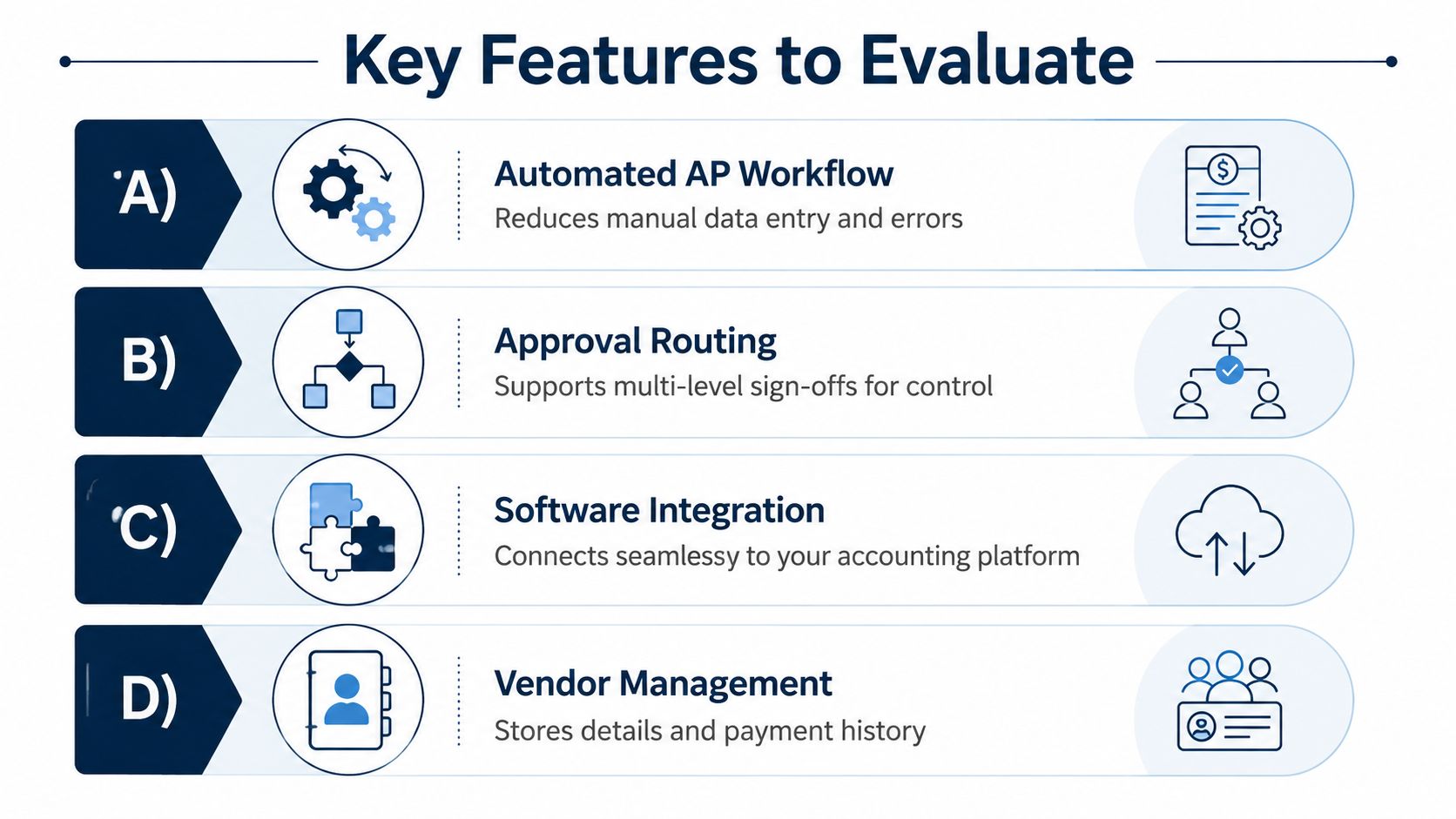
Automated invoice capture: The system should read invoices from email or uploads and suggest vendor, amount, date, and account information. If it can't, your team may still be typing the same data into multiple systems.
Approval routing: Rules should send invoices to the right reviewer based on amount, department, vendor, or project. A $200 recurring software bill shouldn't follow the same path as a large equipment purchase.
Accounting integration: Confirm that the service connects cleanly with QuickBooks or Xero, preserves account coding, and sends payment records back to the ledger. Ask to see how it handles edits, voids, credit memos, and closed accounting periods.
Payment flexibility: Vendors may prefer ACH, checks, wires, or cards. A service that supports only one method can force you into manual work or create avoidable vendor friction.
Build controls into the process
Segregation of duties is not just for large corporations. The person who enters an invoice shouldn't also be the only person who approves and pays it. Business.com's guidance on automating AP for SMBs recommends separating invoice entry, approval, and payment release, with escalation based on payment value or vendor risk.
Security should include role-based access, 2-factor authentication, strong password rules, automatic logout after inactivity, and an unalterable, timestamped audit trail, as outlined in Peakflo's AP approval workflow guide. If a fake invoice gets paid, you need to know who entered it, who approved it, and which account released the funds.
Also check vendor management. The service should store payment details, contact information, invoice history, and remittance records in one place. When a vendor says payment is missing, your team should be able to answer without searching through separate email threads and bank screens.
Understanding Bill Pay Pricing and True Costs
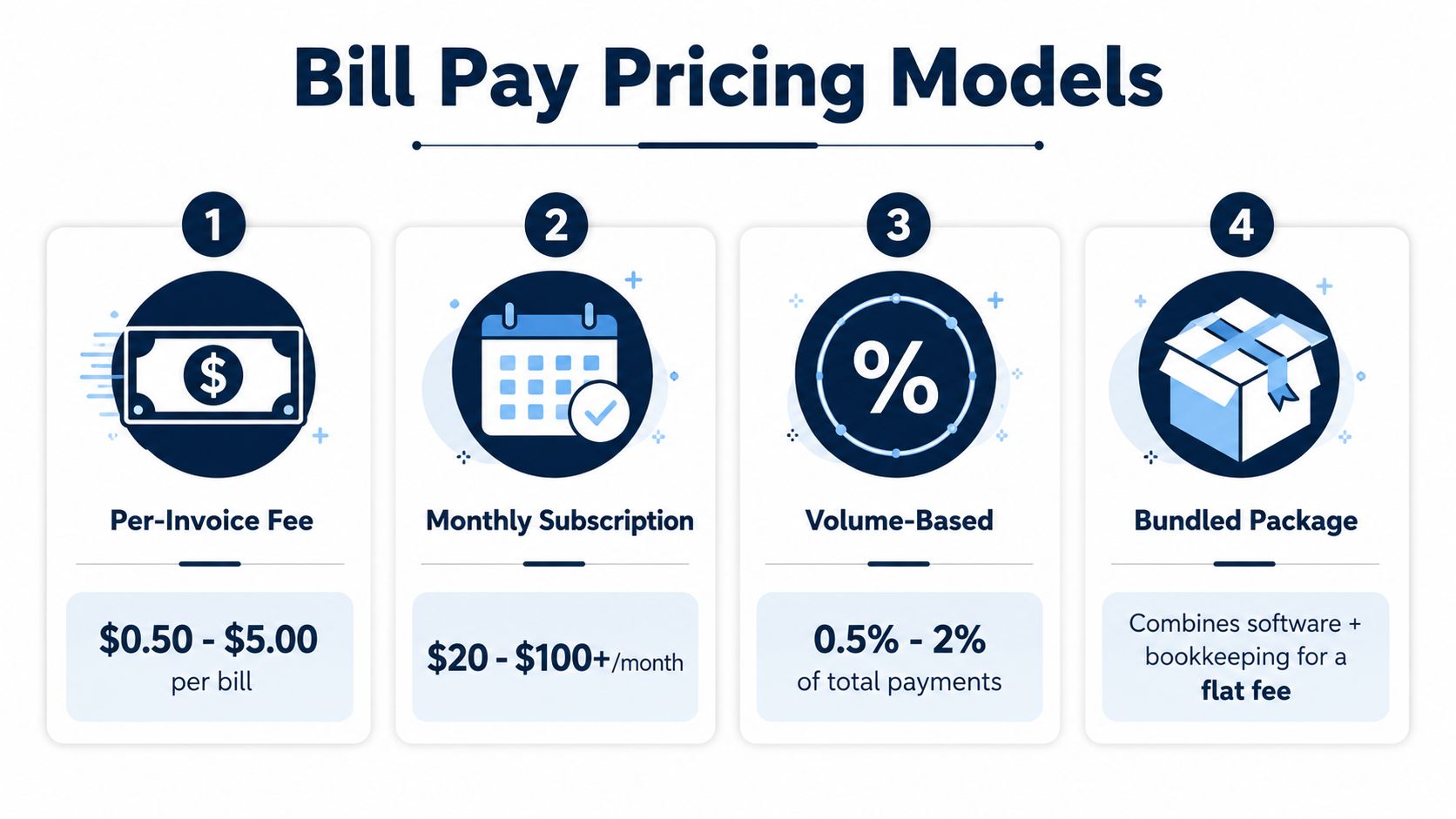
Bill pay providers usually charge in one of four ways: a fee per invoice, a monthly subscription, a charge tied to payment volume, or a bundled bookkeeping fee. Each model can work. The mistake is comparing the headline price without calculating what the service includes.
A per-invoice model can suit a business with irregular activity. A subscription may be easier to budget when invoices arrive steadily. Volume-based pricing may fit a company with large payment activity, but read the definition of volume carefully. A bookkeeping package can be the cleanest option when you also need reconciliations, reporting, and cash-flow guidance.
Calculate your actual cost
Start with the work you're doing now. Count the invoices received, the time spent entering and reviewing them, the time spent chasing approvals, and the time spent reconciling payments. Assign a reasonable internal cost to that labor, even if the person is the owner and doesn't receive an hourly paycheck.
Then add the costs that show up later:
- Late payments: Missed due dates can damage vendor relationships and interrupt service.
- Errors: Incorrect amounts, accounts, or vendors create rework.
- Duplicate payments: Poor invoice tracking can send money out twice.
- Payment fees: ACH, expedited payments, cards, and wires may carry different charges.
- Cleanup work: A cheap tool can become expensive if bookkeeping staff must repair sync problems.
The benchmark gives you a useful starting point. Manual processing generally costs about $12.88 to $19.83 per invoice, while automated processing costs about $3 or less, according to AutoPayables' invoice processing data. Apply those figures to your own invoice count, then compare the result with the full proposal.
Don't accept pricing ranges from a graphic or sales email without asking what they cover. Ask whether invoice capture, approval routing, vendor support, payment execution, bank reconciliation, integrations, implementation, and exception handling are included. The cheapest option is only cheaper if it prevents the same work from returning through another door.
Why Full Automation Is Not Always the Right Answer
Full automation sounds attractive because nobody wants to touch invoices twice. In practice, small businesses often have unusual vendors, incomplete documentation, changing project codes, and bills that need judgment. A system can process a clean recurring invoice well and still struggle with a disputed charge, a partial delivery, or a vendor bank-detail change.
The adoption data supports a more practical view. Only 4% of surveyed mid-market firms had fully automated AP from invoice to payment, 89% were partially automated, and 48% saw little to no cost savings from their AP automation tools, according to Flexpoint's AP trends report. That doesn't prove automation is pointless. It shows that buying software alone doesn't fix a broken workflow.

Where partial automation works better
A hybrid process usually handles the real world better:
- The system handles repetition: Capture invoices, identify duplicates, apply recurring coding, send reminders, and prepare payment batches.
- A person handles judgment: Review unusual charges, resolve missing purchase details, approve exceptions, and decide whether a vendor dispute should pause payment.
- The owner handles material decisions: Approve significant payments, protect cash reserves, and decide when payment timing affects operations.
Some businesses also want automation for reminders more than autonomous payment decisions. A small-business survey cited by Flexpoint says 73% use automated bill systems, 23% are fully automated, and 38% want AI mainly for payment reminders, according to the same Flexpoint trends source. Those preferences make sense. A reminder that prevents a missed approval is useful. An automatic payment that releases cash during a tight week may not be.
Before automating, clean up your vendor list, define account coding, document approval rules, and decide who handles exceptions. This guide to AP automation benefits can help you assess the operational case without assuming that maximum automation is the goal.
Choose automation for the tasks that are repetitive and predictable. Keep human review where context matters.
Your Vendor Selection Checklist
Don't choose a bill pay provider because the demo looked smooth. Test the parts of the process that usually break.
Ask these questions during the demo
Where do invoices enter the system? Ask whether the service supports email, uploads, mobile capture, and recurring bills.
What does the system extract automatically? Have the provider show vendor names, invoice numbers, dates, amounts, tax, project codes, and general ledger coding.
How are approvals assigned? Approval rules commonly route invoices by amount, department, or vendor type, and BILL's security guidance notes that tiers should be standardized before automation. Many mid-market companies need no more than three approval tiers, so don't accept a complicated design unless your business needs it.
What happens when something goes wrong? Ask how the service handles duplicate invoices, disputed charges, missing coding, rejected payments, changed bank details, and partial payments.
How does it connect to QuickBooks or Xero? Confirm whether vendor records, account codes, attachments, approvals, payments, and reconciliation data sync in both directions.
What security controls are included? Ask about permissions, 2-factor authentication, audit logs, vendor verification, and alerts for changes to payment information.
Review the contract, not just the feature list
Look for implementation fees, payment charges, minimum commitments, cancellation terms, support limits, and fees for expedited or international payments. Ask who owns the data and how you'll retrieve invoices and payment history if you leave.
Request references from businesses with a similar payment pattern. A professional services firm, medical practice, and construction company may all need bill pay, but their approval chains, vendor risks, and cash cycles differ. A testimonial from a company that looks nothing like yours tells you very little.
Red flags include pressure to give one person broad payment access, vague answers about exceptions, no clear audit trail, weak accounting integration, and support that disappears after setup. The provider should be able to explain the workflow in plain English and show you the controls without changing the subject.
How a Bookkeeping Partner Integrates Bill Pay Into Your Financial Strategy
Bill pay becomes more valuable when it connects to decisions outside accounts payable. A bookkeeping partner can use upcoming bills to update cash forecasts, compare spending with the budget, monitor vendor concentration, and show how payment timing affects profitability.
Consider a professional services firm with uneven client collections. Its finance partner can schedule routine bills around expected receipts, flag a large software renewal before it hits the bank, and help the owner decide whether hiring now is sensible. A healthcare practice may need to coordinate supplies, payroll, rent, and equipment payments. A construction company may need bills coded by job so the owner can see whether material and subcontractor costs are eroding project profit.
Treat payment timing as a management decision
The goal isn't to delay every bill. Late payments can damage trust and disrupt supply. The goal is to pay according to vendor terms, cash availability, discounts, project needs, and the importance of the relationship.
This is the underused side of bill pay. Recent coverage of embedded cash management and bill pay describes tools that can let sellers pay vendors by card even when those vendors don't accept cards, while reward-backed bill pay is becoming a working-capital tool rather than only an administrative feature. That flexibility can help, but it must be evaluated alongside card costs, repayment terms, and cash discipline.
Automation tools such as AY Automate for finance automation may help teams connect repetitive finance tasks. The software still needs clean books, sensible approval rules, and a person who understands the business. Otherwise, you're moving confusion into a faster interface.
A partner like MyOfficeOps' outsourced bookkeeping service can connect bill payments with bookkeeping, forecasting, budgeting, reporting, and CFO-level review. That's the right model when you want someone to manage the routine work while helping you decide what the numbers mean.
MyOfficeOps provides bookkeeping, bill payment, accounts payable support, forecasting, and financial reporting for small and midsize businesses. If late invoices, unclear cash timing, or owner-managed payments are slowing you down, visit MyOfficeOps to discuss a practical bill pay and bookkeeping setup for your business.