You're looking at your numbers, but they're not answering the question you actually care about.
Revenue looks okay. Cash feels tight. Payroll is coming up. A new hire might help. A piece of equipment might save time. You can see what happened last month, but you still can't tell what's safe to do next.
That's where most owners get stuck. They have reports, but not clarity. The bookkeeping may be current. The bank balance may be visible. Yet key decisions, hiring, pricing, expansion, debt, owner draws, still feel like educated guesses.
Budgeting and forecasting software is supposed to fix that. Sometimes it does. Sometimes it just gives you cleaner-looking confusion. The difference usually comes down to whether the tool fits your business, your team uses it, and someone translates the numbers into decisions.
Tired of Guessing About Your Business's Future
A common small business scene looks like this. The owner opens QuickBooks, checks the bank account, scans a profit and loss report, and then asks a question the software doesn't answer well on its own.
Can we afford another project manager?
Can we survive a slow quarter?
If we buy now, will cash get squeezed in two months?
Those aren't bookkeeping questions. They're planning questions.
The problem isn't missing data
Most businesses already have data. They have invoices, payroll records, bills, job costs, and sales reports. What they often don't have is a clean way to pull those pieces together and turn them into a working plan.
That's why more companies are moving beyond spreadsheets and basic accounting reports. The Global Accounting and Budgeting Software market is projected to grow from USD 17.90 billion in 2023 to USD 54.63 billion by 2033 at a CAGR of 11.80%. That projection matters because it reflects a real shift. Owners want faster decisions, cleaner reporting, and better control.
If cash flow is one of the areas that feels hardest to pin down, this guide on optimizing route business cash flow gives a useful practical look at how businesses can tighten daily financial control.
You don't need more reports. You need a report that helps you decide what to do next.
What this looks like in real life
A healthcare practice may look profitable on paper but still struggle because insurance payments arrive later than expected. A construction firm can land strong work and still hit a cash crunch between billing cycles. A consulting company may have plenty of revenue booked but weak margins because labor hours drift beyond plan.
In each case, the owner isn't asking for accounting theory. They want a simple answer to a simple question. Are we on track, or not?
Good budgeting and forecasting software helps answer that by showing where the business is headed, not just where it's been. It gives structure to decisions that otherwise get made from instinct, stress, or whatever number is easiest to find in the moment.
Budgeting vs Forecasting What Is the Difference
A lot of business owners use these two words like they mean the same thing. They don't.
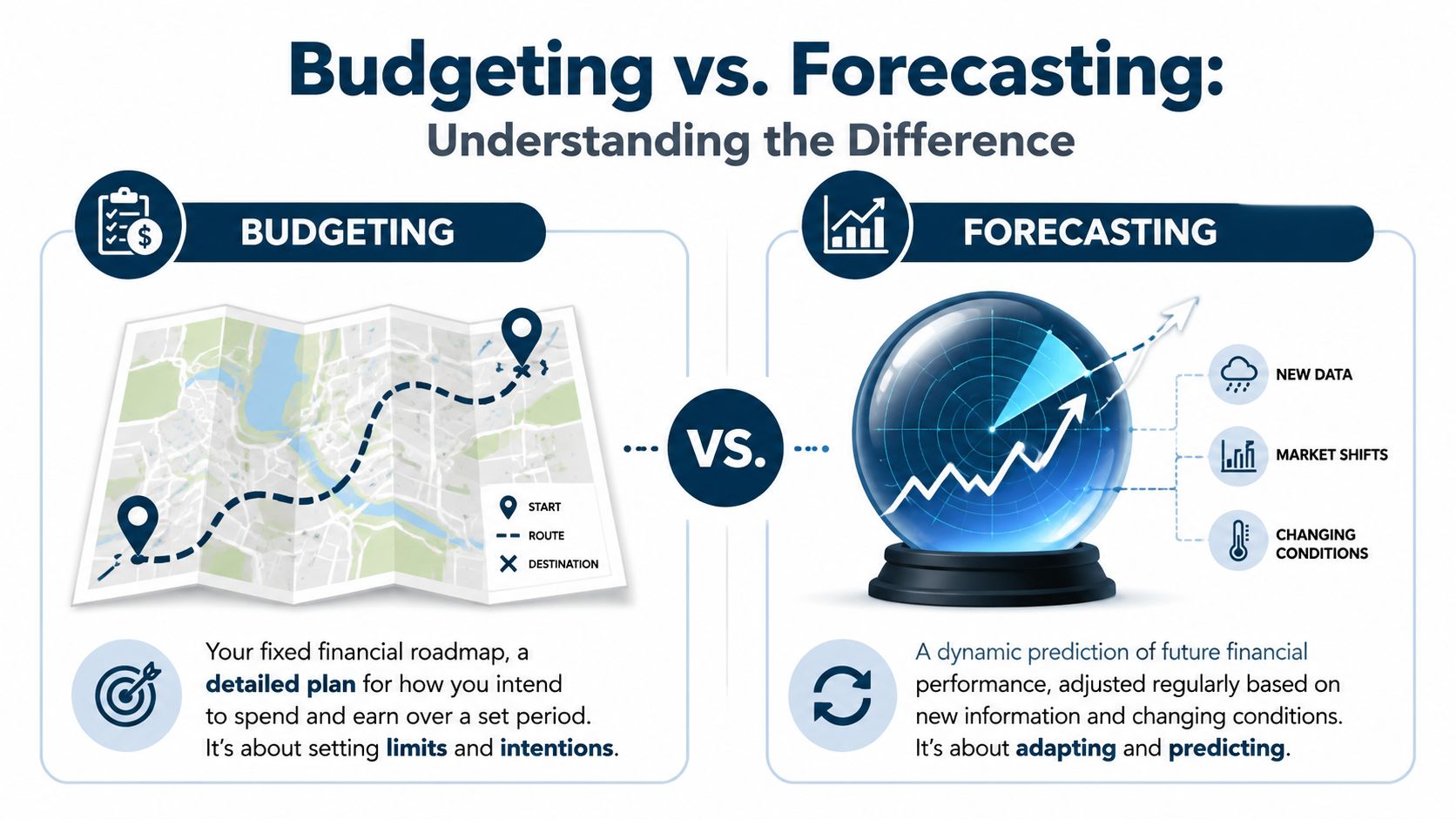
A budget is your plan. A forecast is your update.
The easiest way to think about it is this. Your budget is the road map you made before the trip started. Your forecast is the live GPS that tells you traffic changed, fuel is running low, and your arrival time just moved.
Budgeting is fixed
A budget usually sets your targets for the year. It lays out what you expect to bring in, what you plan to spend, and where the limits are.
That's useful because it forces choices. You decide how much payroll you can carry, what overhead should look like, and how much profit the business needs to protect.
Forecasting is rolling
A forecast changes as reality changes. If sales slow down, expenses rise, or a major job gets delayed, the forecast should reflect that. It isn't about what you hoped would happen in January. It's about what looks likely now.
If you want a clearer example of how that process works, this short guide on a rolling forecast helps make the idea practical.
A lot of owners get stuck here. According to Centage, 70% of SMBs still use spreadsheets for forecasting because they're confused about whether they need one tool for budgeting and another for forecasting in a 2025 budgeting software guide.
Why the difference matters
If you only budget, you can end up defending a plan that no longer fits the business.
If you only forecast, you may react to every bump in the road and lose discipline.
The best approach is usually both.
| Tool | What it does | Best use |
|---|---|---|
| Budget | Sets the original plan | Annual targets, spending limits, hiring plan |
| Forecast | Updates the expected outcome | Monthly adjustments, cash visibility, decision-making |
Practical rule: Budget once with intention. Forecast often with honesty.
Modern budgeting and forecasting software should support both. If it only gives you static annual templates, it won't help much when payroll rises, collections slow down, or a large customer changes terms halfway through the year.
Key Software Features Your Business Actually Needs
Most software demos look great for ten minutes. Clean dashboard. Pretty charts. Smooth promises.
Then real life shows up. Payroll data doesn't sync cleanly. Department heads ignore the tool. Reports take too long to adjust. The owner still ends up asking the bookkeeper for a custom spreadsheet before every big decision.
That's why features matter less than usefulness.
Real-time integration and scenario planning
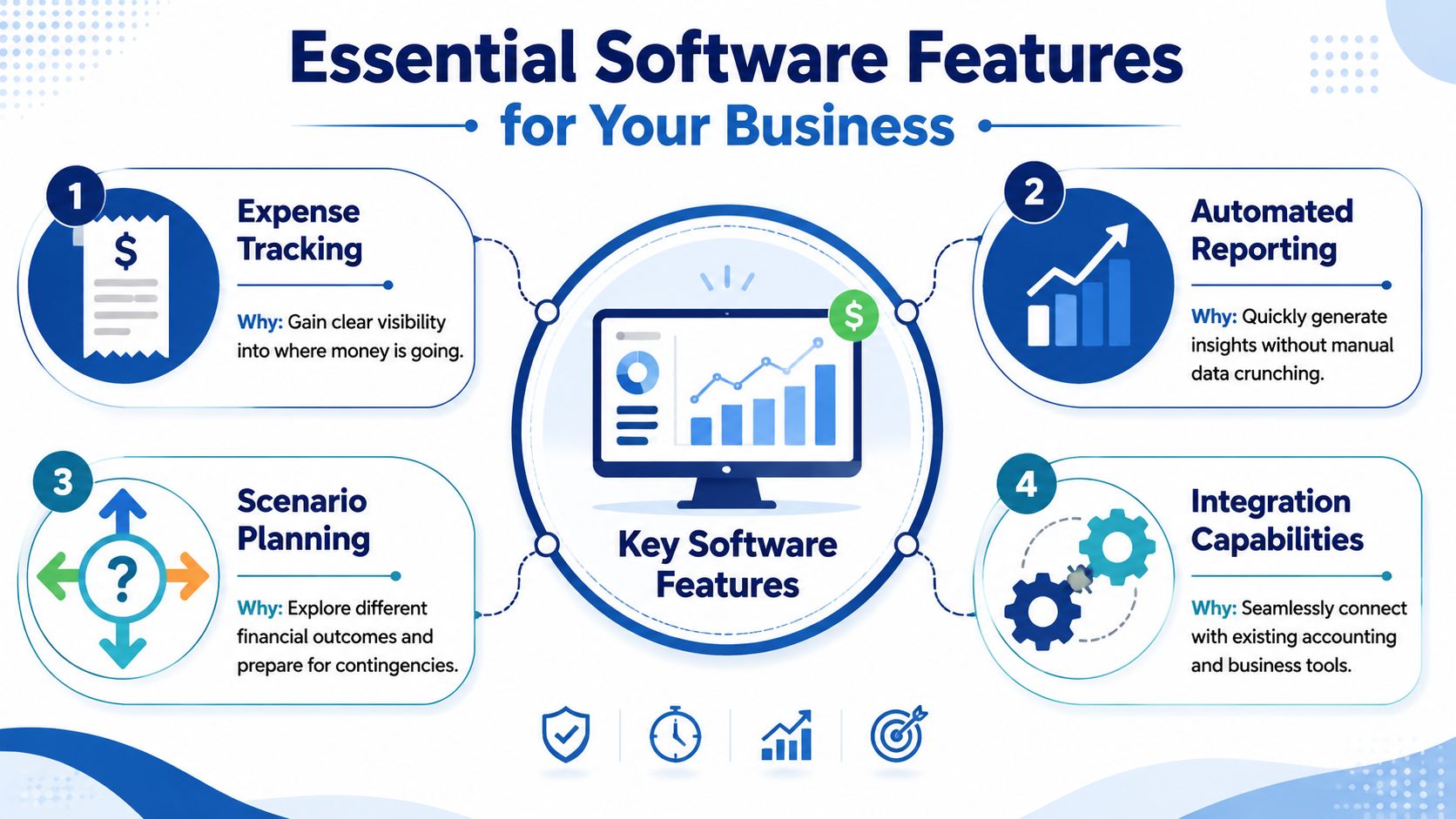
Centage points out that top forecasting tools need real-time data integration and scenario planning so plans reflect current information and users can test different outcomes in a financial forecasting software overview.
Those two features do the heaviest lifting.
Real-time integration means your software connects to the systems you already use, such as accounting, payroll, CRM, or job-cost tools. If that connection is weak, every report is built on stale information.
Scenario planning is what lets you ask practical questions like:
- Hiring question: What happens to cash if we add two employees next quarter?
- Sales risk: What if our biggest client cuts work?
- Growth test: Can we open a second location without straining operations?
- Pricing move: If wages rise, do current rates still make sense?
Features that solve actual problems
Here's what I'd look for before getting excited about dashboards.
- Clear integration paths: If the tool doesn't connect cleanly with QuickBooks, Xero, payroll, or your operating systems, your team will start exporting and reworking data by hand.
- Simple variance reporting: You need to see budget versus actual and forecast versus actual without digging through five menus.
- Cash flow visibility: Profit is not the same as cash. The software should make that obvious.
- Version control: Teams need one current model, not six emailed files with “final” in the file name.
- Scenario flexibility: A useful tool should let you change assumptions without rebuilding the whole model.
What sounds good but often disappoints
Some features look advanced but don't help much unless your business is ready for them.
| Feature | Helpful when | Not helpful when |
|---|---|---|
| Deep customization | You have complex reporting needs | Your team just needs clean monthly planning |
| AI insights | Your data is clean and connected | Core data is still inconsistent |
| Department workflows | Multiple managers own budgets | One owner makes all decisions |
A forecasting tool should shorten the distance between “What if?” and “Here's the impact.”
If the software can't answer your most common business questions quickly, it's probably adding work, not removing it.
A Practical Checklist for Choosing the Right Tool
Choosing budgeting and forecasting software isn't about finding the most popular platform. It's about finding the one your business will use after the demo ends.
A tool can be powerful and still be wrong for your team. I've seen owners buy software with enterprise-level features, then go right back to spreadsheets because no one wants to touch the system.
Start with your daily workflow
Before you compare tools, write down how decisions get made in your business.
Who reviews numbers each month?
Who owns payroll inputs?
Who needs project profitability, service-line margins, or location reporting?
How often do you revisit your plan?
That simple exercise usually narrows the field faster than any feature matrix.
For a helpful overview of software categories and fit, this guide to the best budgeting software for business is a good starting point.
The checklist that matters
Use this when you're evaluating any platform.
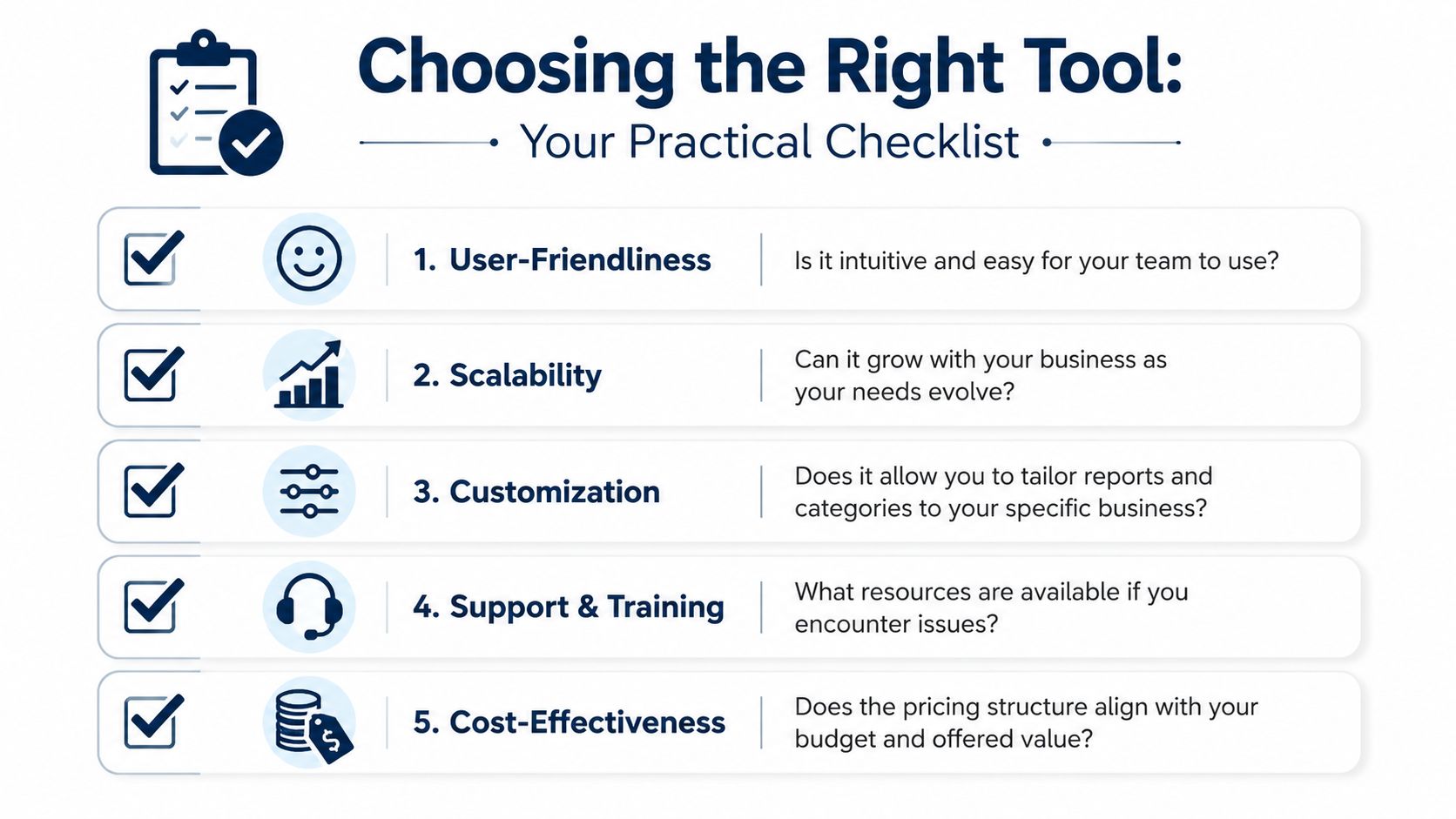
- Can it connect to your current systems? If your accounting data, payroll data, and operational data live in separate places, the tool needs to pull them together without forcing constant manual cleanup.
- Is it easy enough for non-finance people? If department heads or practice managers need to use it, the interface can't feel like a finance exam.
- Does it answer your core questions fast? You should be able to check cash runway, compare actuals to plan, and test a what-if decision without building a new spreadsheet every time.
- Can it grow with you? A firm with one office today may need location, service-line, or project-level planning later.
- How much setup work does it really need? Some tools are excellent after a long build. That's fine if you have time and support. It's a problem if you need answers this month.
Compare the decision like an owner
A short scorecard works well here.
| Question | Good sign | Warning sign |
|---|---|---|
| Adoption | Team can learn it quickly | Only one power user understands it |
| Reporting | Reports are clear and useful | Reports look polished but raise more questions |
| Maintenance | Assumptions are easy to update | Every small change breaks formulas |
| Support | Training and help are easy to access | You're on your own after onboarding |
If software saves time in theory but adds friction every week, it's the wrong tool.
The best choice is usually not the fanciest tool. It's the one that gives you a reliable planning rhythm with the least drag.
Software Alone vs Expert Financial Guidance
Software is a tool. It is not judgment.
That distinction matters more than most business owners expect.
A platform can show that gross margin slipped, payroll climbed, or cash is tightening. It usually won't tell you whether the problem came from pricing, staffing, billing speed, poor project mix, or a bad revenue assumption that should have been challenged three months ago.
Where software helps
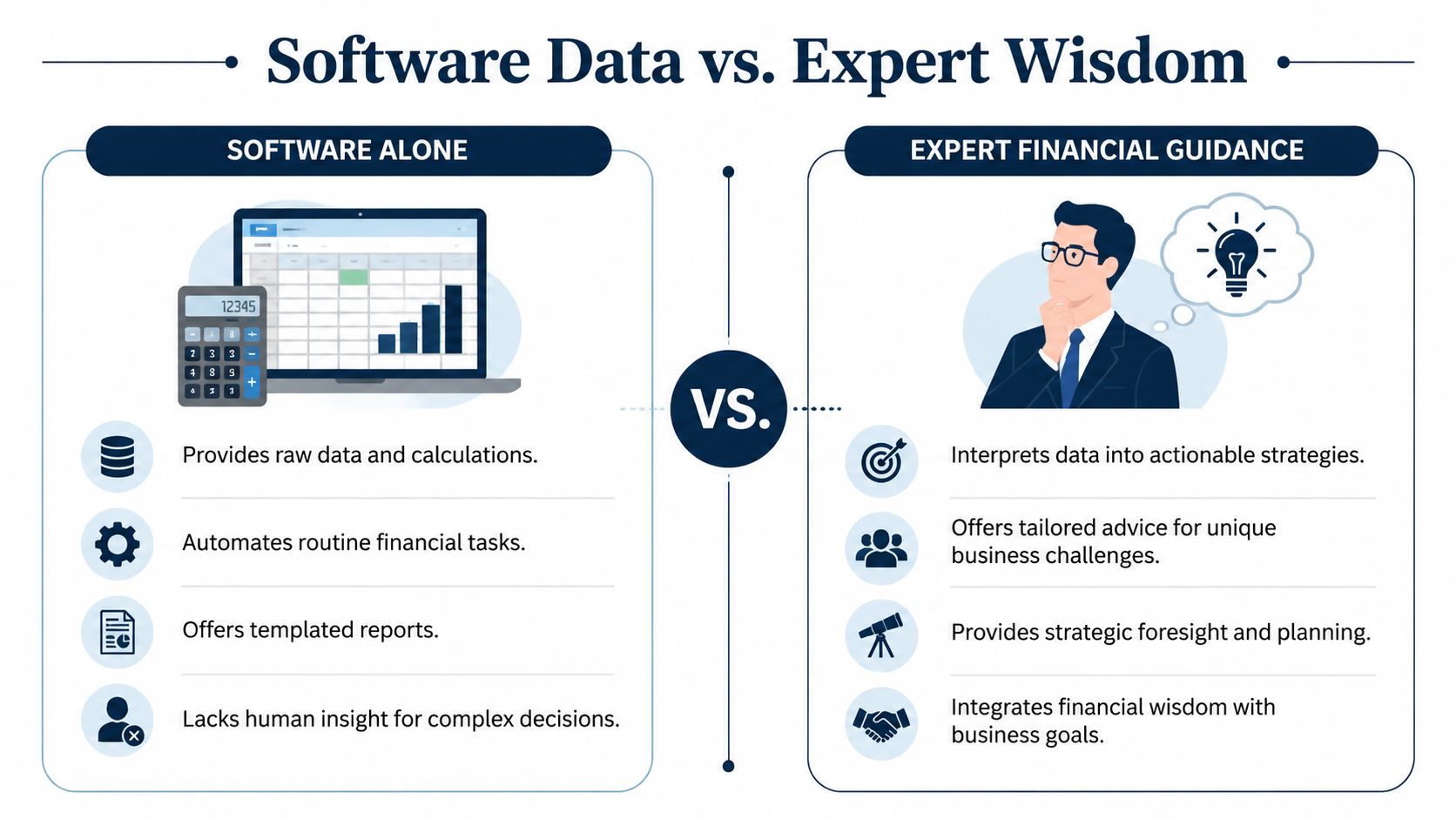
Software is excellent at repeatable work. It can collect data, organize it, calculate variances, and produce reports much faster than a manual process.
That matters. It reduces lag, creates consistency, and gives owners a better starting point for decisions.
Where software falls short
The weak spot is interpretation.
A system may say next quarter looks tight. An advisor asks the next questions. Which customer is slowing payments? Which jobs are underpriced? Are labor hours drifting because of scheduling, scope creep, or weak supervision? Does the forecast assume sales that haven't really matured?
This gap gets even bigger when “real-time” doesn't mean what owners think it means. Vena notes that 60% of SMBs still manually update forecasts because integration delays with systems like QuickBooks or Xero create a 3 to 5 day data lag, despite marketing around real-time visibility, in its budgeting and forecasting platform page.
Data tells you what happened. Advice tells you what to do.
This is why many businesses get better results from a combined model. Use software for structure and speed. Use expert guidance for decisions.
The clearest approach is as follows:
- Software gives outputs: reports, dashboards, assumptions, and alerts.
- An advisor challenges assumptions: Are sales targets realistic? Is headcount timing smart? Are margins healthy enough to support growth?
- Software tracks movement: budget to actual, forecast changes, cash timing.
- An advisor sets priorities: what to fix first, what can wait, and which issue is noise.
“The dashboard is useful. The conversation about what it means is where the value shows up.”
A business owner usually doesn't need another login. They need fewer blind spots. Software can reduce them. A strong advisor can explain them and help remove them.
How Budgeting Software Works in Your Industry
The value of budgeting and forecasting software gets clearer when you look at how different businesses use it.
The reports shouldn't be generic. A law firm, a medical practice, and a contractor don't run on the same drivers. Good planning reflects that.
Construction and trades
A contractor can look busy and still run into trouble fast. Cash often moves unevenly. Materials get purchased before payments come in. One delayed billing approval can create stress even when the job itself is profitable.
In that setting, the software needs to track jobs separately, compare estimated versus actual costs, and help the owner see whether upcoming work supports payroll, equipment payments, and vendor obligations. A plain profit and loss statement won't do that well.
Healthcare practices
A practice often has steady demand but messy timing. Patient volume shifts. Insurance reimbursements lag. Staffing costs move quickly when schedules change.
What helps most here is a planning setup that ties expected visits, collections, payroll, and overhead into one view. The owner or practice manager can then see whether a staffing change makes sense before costs hit the books. The software becomes a way to pressure-test decisions, not just report on them later.
In healthcare, a full schedule doesn't always mean healthy cash flow.
Professional services firms
Consulting, agencies, law, IT, and similar firms tend to win or lose on labor utilization and pricing discipline. Revenue may look strong, but profit disappears when teams spend too much time on low-margin work or scope grows without billing changes.
A good planning process links time, staffing, and revenue assumptions. If project hours rise faster than fees, the forecast should expose it early. That gives the owner a chance to adjust scope, pricing, or staffing mix before the quarter closes.
A useful way to think about industry fit is simple:
| Industry | What the owner needs to see |
|---|---|
| Construction | Job profitability, billing timing, cash between projects |
| Healthcare | Patient volume, payroll pressure, collections timing |
| Professional services | Utilization, labor margin, project profitability |
The software matters. But the setup matters just as much. A weak setup gives you polished reports that miss key pressure points.
Making Your Investment Pay for Itself
The return on budgeting and forecasting software isn't just lower admin time. It's better decisions.
When the system is set up well and connected to the tools you already use, modern budgeting software can reduce manual entry errors by 40 to 60 percent and improve forecast accuracy to within 5 to 10 percent of actuals, compared with a 15 to 25 percent drift in Excel-only models, according to this budgeting and forecasting tools overview.
That's a real benefit. But for most owners, the bigger payoff is confidence.
Confidence to hire without hoping cash will work itself out. Confidence to explain numbers to a lender. Confidence to spot margin problems before they become year-end surprises. Confidence to stop running the business from the checking account balance.
What a smart return really looks like
A strong return often shows up in ways that don't fit neatly on a software invoice.
- Cleaner decisions: You stop reacting and start planning.
- Better conversations: Managers can work from one set of numbers.
- Less rework: Finance stops rebuilding reports by hand every month.
- More control: You can see where the business is heading while there's still time to change course.
If you want to think through value in a more structured way, this guide on how to calculate return on investment is worth reviewing.
Financial clarity is one of the few investments that helps almost every other decision get better. Software can support that. Good advice can sharpen it. Together, they can give an owner something much more useful than a dashboard.
They can give them a plan they trust.
If you want help turning messy books, disconnected systems, and hard-to-read reports into clear financial decisions, MyOfficeOps can help. The team supports small and midsize businesses with bookkeeping, payroll integration, budgeting, forecasting, KPI reporting, and CFO-level guidance that makes the numbers easier to use in actual business scenarios.