
You finish a job in Bucks County or out near West Chester. The client is happy. The crew moved fast. You figure the job made money.
Then the bills keep coming in.
A supplier invoice lands a week later. Two extra equipment charges show up. Payroll runs higher than expected because some hours got dumped into the wrong phase. A change order you thought was covered never got tied back to labor and materials. By the time the dust settles, the “good job” barely made anything.
That's where a lot of contractors get stuck. The work looks solid in the field, but the books don't tell the same story until it's too late to fix it. Good construction cost tracking closes that gap. It gives you a running score while the game is still being played.
If your books are messy, if job costs hit late, or if you can't answer “Which jobs are making money?” without waiting on someone to build a report, the issue usually isn't effort. It's workflow. The numbers are coming in late, in pieces, and without a system.
Why Your Job Profit Is a Mystery Until It's Too Late
A lot of owners run jobs by feel.
That makes sense at first. You know your crew. You know how long framing should take. You can look at a site in Delco or South Philly and tell whether things are moving or dragging. The problem is that profit doesn't disappear in one big dramatic event. It leaks out in small misses.
One foreman forgets to code a day of labor correctly. A material receipt stays in someone's truck. A small client change gets handled in the field, but nobody tracks the added hours until payroll. None of that feels like a disaster in the moment.
Then the job closes, and the margin is gone.
Gut feeling breaks down when costs move fast
That old way of managing from memory gets even riskier when prices won't sit still. Construction input prices rose at a 9.7 percent annualized rate through Q1 2025, and material prices are up 40 percent since 2020, which is why even small tracking mistakes can turn into real overruns, according to Turner & Townsend's construction cost trends data.
If you're a Philly-area contractor doing kitchens, additions, tenant fit-outs, or light commercial work, you already know what that looks like in real life. The estimate was built with one price in mind. The job got bought at another. Labor drifted a little. One “small” field decision became three unbilled costs.
Practical rule: If you only learn the true job cost after the job ends, you're not tracking costs. You're doing an autopsy.
The rearview mirror problem
Most contractors don't have a profit problem first. They have a timing problem.
Their accounting file gets updated after payroll. Receipts come in after the card statement. Supplier bills land after the material has already been installed. By the time the office sees the numbers, the crew has moved on to the next job.
That's like driving down I-76 while looking in the rearview mirror. You still have information. It's just late information.
A real construction cost tracking process does something different. It tells you, while the job is active:
- Where labor is going
- Which phase is burning cash
- Whether the budget still matches reality
- Which changes are billable and which are eating margin
What owners usually want to know
Most owners aren't asking for fancy dashboards. They want straight answers.
| Question | What bad tracking sounds like | What good tracking sounds like |
|---|---|---|
| Are we making money on this job? | “I think so.” | “Yes, but framing is running hot.” |
| Why is payroll high this week? | “Not sure yet.” | “Too many hours hit punch list instead of finish carpentry.” |
| Did we bill that extra work? | “I have to check.” | “Yes, and the cost is tied to the change.” |
That's the shift. Cost tracking stops being bookkeeping in the past and starts acting like job control in the present.
Building Your Cost Tracking Foundation
Before you track a single hour or receipt, you need a clean place for the numbers to live.
Think of your accounting setup like the framing of a house. If the frame is crooked, everything you add later fights you. Doors stick. Floors slope. In the books, that means reports don't tie out, job costs get lumped together, and nobody trusts the numbers.
Start with a chart of accounts that fits construction
A generic small business chart of accounts usually isn't enough for a contractor. Construction businesses need a setup that separates job costs from overhead and gives direct costs a home that makes sense.
This visual shows the structure clearly.
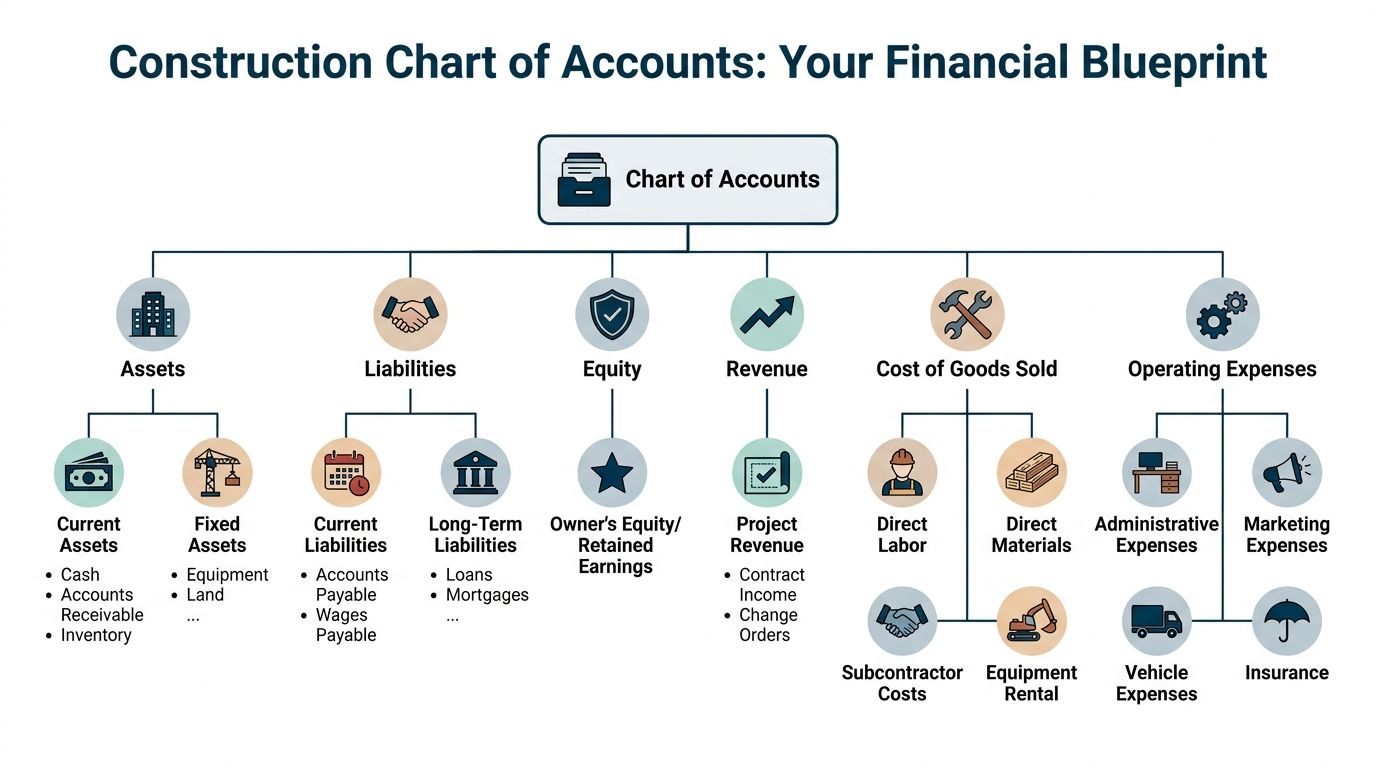
At a minimum, you want clean buckets for:
- Revenue: Contract income and approved change orders
- Direct labor: Field wages tied to jobs
- Direct materials: Lumber, drywall, fixtures, concrete, whatever gets installed
- Subcontractors: Trade partners billed to a job
- Equipment and rentals: Jobsite equipment costs
- Operating expenses: Office payroll, marketing, admin software, insurance, vehicles not billed direct to jobs
If your accounting file mixes field costs and office overhead together, job profitability gets muddy fast.
Build cost codes the way your jobs are actually run
Many shops make things harder than they need to be. They either use codes that are too broad, like “labor,” or too detailed, like a giant list nobody in the field will use correctly.
A better middle ground is to match cost codes to real job phases.
For a rowhome rehab in Philadelphia, that might look like this:
| Job phase | Typical cost types |
|---|---|
| Demo | Labor, dumpster, disposal |
| Framing | Labor, lumber, hardware |
| Electrical | Labor, materials, subcontractor |
| Plumbing | Labor, materials, subcontractor |
| Finish | Labor, trim, paint, punch items |
That way, when hours or receipts come in, they land where you can act on them.
For help cleaning up the bookkeeping side that supports this setup, this guide on bookkeeping for contractors is a solid starting point.
A good cost code list should help your foreman choose the right bucket in seconds. If it needs a training manual every time, it's too complicated.
Lock the budget before work starts
This part is not optional.
A critical best practice is to lock the original approved budget and require every change to go through a formal revision process. If a project manager casually adds $50,000 for extra work without documentation, budget variance becomes useless, as explained in Mastt's guide to construction project cost tracking.
That example is simple, but the point is huge. If the baseline keeps moving, you can't tell whether the job is improving or drifting.
Here's the plain-English version:
- Set the original budget before labor starts and before materials get purchased.
- Freeze it as the baseline.
- Track approved changes separately so you can see what moved and why.
- Review version history when a job starts slipping.
Without that discipline, “budget vs. actual” becomes a made-up report.
Keep the setup boring and consistent
The best systems usually aren't flashy. They're repeatable.
If every estimator names phases differently, if every PM uses their own cost codes, or if the office reclassifies transactions at month end from memory, the whole thing falls apart. Consistency matters more than cleverness.
Capturing Costs from the Field in Real Time
Most profit leaks start in the field and show up in the office later.
That's why construction cost tracking has to begin where the work happens. Not after the fact. Not at the end of the week. And definitely not from a stack of crumpled receipts pulled out on Friday afternoon.
This is the daily habit side of the system.

Time first, then everything else
Labor is usually where the mess starts. If hours are wrong, late, or assigned to the wrong phase, the rest of the job cost report is already shaky.
A foreman shouldn't need to remember on Friday whether three workers spent Tuesday morning framing or doing punch work. That decision should happen the same day, while the work is still fresh.
What works in practice:
- Workers log time daily: Same day is the standard. Waiting until week's end creates guesswork.
- Foremen approve hours by job and phase: Not just total time.
- The office reviews exceptions fast: Missing codes, duplicate entries, and odd labor swings should get flagged quickly.
If you're comparing tools for crews in the field, this overview of mobile construction time apps is useful because it focuses on how teams log hours on jobsites.
Make receipts easy to submit
Field teams won't follow a process that feels like punishment.
If you want better cost capture, give them the shortest path possible. A site lead buys fasteners, snaps a phone photo of the receipt, tags the job, and sends it in. That's the whole move. No envelope. No “I'll drop it off Monday.” No waiting for the credit card statement to tell the story later.
The easier it is to code a cost today, the less likely you are to misread it next month.
For many contractors, the right software is essential. The accounting side still needs structure, but the field tool needs to be simple enough that people consistently use it. If you're sorting through options, this roundup of best bookkeeping software for contractors can help you think through what belongs in the office system versus the field workflow.
Use a daily rhythm, not a heroic cleanup
Bad cost tracking usually depends on cleanup. Good cost tracking depends on routine.
A practical daily field workflow might look like this:
- Morning clock-in: Workers enter time on the right job.
- Midday purchase capture: Any counter purchase gets photographed and tagged.
- End-of-day foreman review: Hours get assigned to the right phase before people forget.
- Office check the next morning: Anything missing gets chased while the answer is still easy to get.
That rhythm matters more than whether you use one app or another.
Paper can work, but it usually slows everything down
Some smaller contractors still use paper timesheets, and yes, paper can work if the office is disciplined and the foreman is sharp. But it creates delays, and delays create blind spots.
Here's the trade-off in plain terms:
| Method | Good for | Problem it creates |
|---|---|---|
| Paper timesheets | Very small crews, simple jobs | Late entry, bad memory, missing codes |
| Spreadsheet tracking | Office review and custom reports | Manual updates and version confusion |
| Mobile field entry | Daily cost capture on active jobs | Needs crew buy-in and setup discipline |
The best field process is the one your crew will stick to every day. Fancy software with weak adoption is still weak tracking.
Connecting Your Tools into One Smart System
A lot of owners hit the same wall. Payroll is done. Bills are entered. The PM has a change order log. The foreman has hours in a time app. Then you ask a simple question. "What did we make on the Havertown job as of today?" Nobody can answer without pulling data from three places and arguing about which number is right.
That is not a software problem alone. It is a workflow problem.
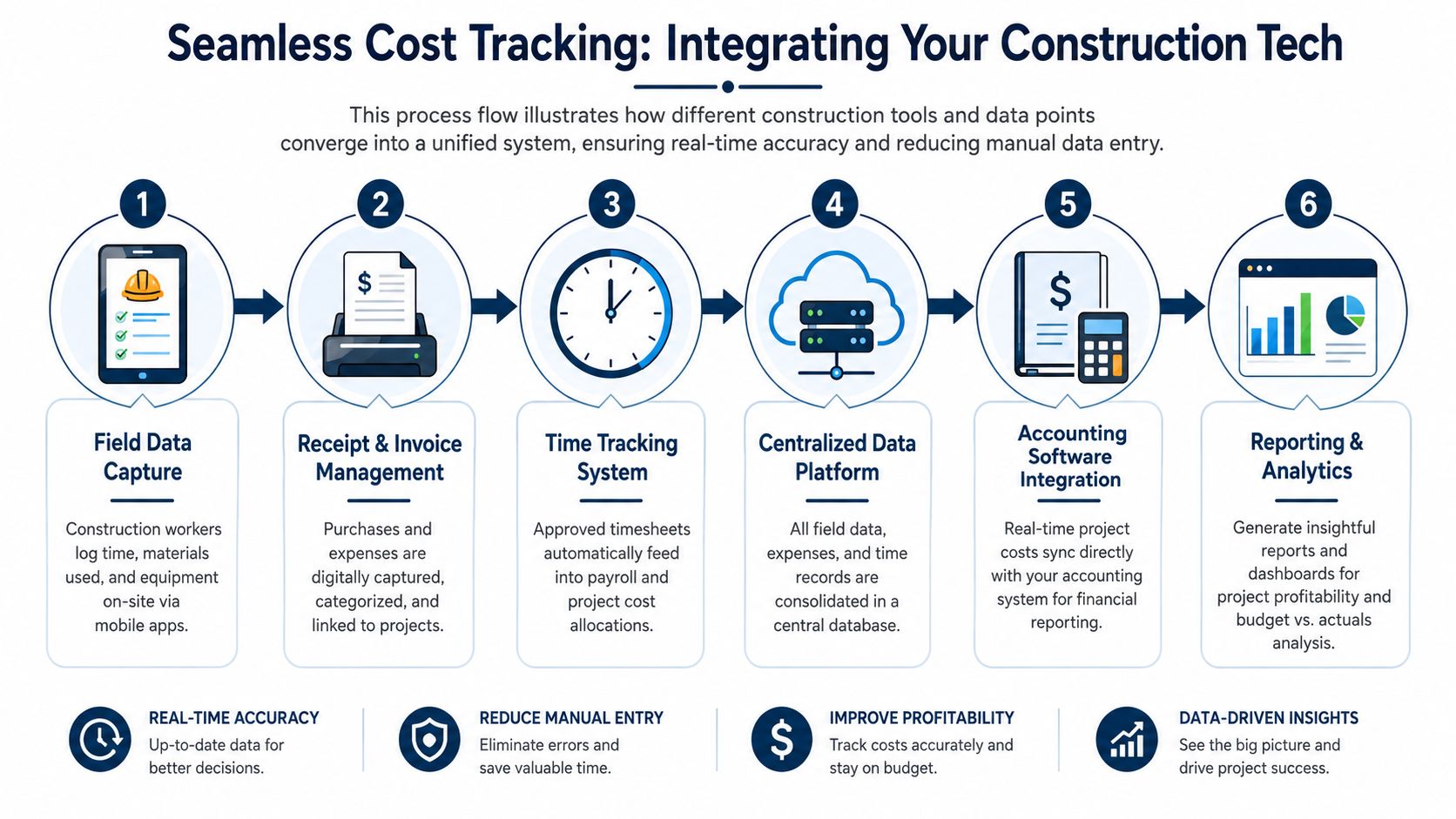
Most contractors already have enough tools to track costs well. The breakdown happens between the handoffs. Hours get entered in one system and recoded in another. Material purchases sit in somebody's text thread until the credit card statement shows up. Approved change work stays in email, so the field spends money before the office updates the job budget. By the time everything gets cleaned up, the job is already past the point where you could have fixed the margin.
Pick the record that counts
Every shop needs one final financial record. For many Philly-area contractors, that ends up being QuickBooks or another accounting system because that is where payroll, bills, customer invoices, and job cost reports come together.
The field app still matters. Payroll still matters. PM tools still matter. But those systems should feed the accounting record using the same customer names, job names, phases, and cost codes. If each tool has its own naming logic, your reports stop matching and the office goes back to manual cleanup.
A practical setup usually looks like this:
- Field app: Time, receipts, and daily job activity
- PM workflow: Change orders, approvals, and job progress notes
- Payroll system: Wages, taxes, and paycheck processing
- Accounting platform: Final posting and job cost reporting
Where good systems fall apart
The failure points are usually boring, which is why owners miss them.
A carpenter clocks time to "Lot 12 Custom." The accounting file says "Maple Ave Spec." The supplier receipt says only the vendor name and total. A PM approves extra work for a basement finish in an email chain, but nobody sets up a new cost code or updates the contract value. Now labor is in one bucket, materials are in another, and the extra work is nowhere. The books are technically current, but job profit is still wrong.
Change orders are where this hurts the most. If the field starts the work before the office logs it properly, you are carrying real cost against an outdated budget. That makes a decent job look bad, or worse, makes a bad job look fine until billing catches up.
Build the flow around decisions, not features
The best setup enters information once, at the point where somebody knows the answer.
Use a simple rule in the office and in the field. The person closest to the transaction creates the first record. The office reviews, codes, and posts it to the books.
| Step | Who should own it |
|---|---|
| Labor entry | Crew member or foreman |
| Receipt capture | Person who made the purchase |
| Change work approval | PM or owner |
| Cost code review | Office |
| Final posting to books | Accounting |
| Profitability review | Owner, PM, or bookkeeper |
That structure cuts down on duplicate entry, but it primarily speeds up decisions. If a Bucks County remodeler sees labor piling up on trim work, or notices three open change orders with costs already hitting the job, they can act this week instead of finding out at month-end.
Tool selection still matters. Fit matters more. A useful article on choosing the right construction software looks at how software lines up with real operating needs, which is the right way to evaluate it.
For contractors trying to tie together accounting, payroll, and job costing without constant rekeying, these integrated accounting solutions for contractors show what a cleaner system can look like.
Turning Your Cost Data into Smart Decisions
A lot of contractors collect job costs and still cannot answer a basic question on Thursday afternoon. Are we making money on this job, or just staying busy?
That happens when the books show history but not direction. By the time the full picture shows up in month-end reports, the crew has already burned the hours, the materials are already on site, and the chance to correct the job is smaller.
Use reports that lead to a decision
For small and midsize contractors, two reports usually do the heavy lifting.
The first is a job profitability report. It shows earned revenue, posted costs, and whether the margin still looks like what you expected when you took the job.
The second is a budget vs. actual report by phase or cost code. That report shows where the job is drifting so you can act before the drift turns into a write-down.
A Delaware County GC might review an active kitchen remodel and spot the core story fast. Demo is fine. Cabinet install labor is running hot. Flooring materials are in line. Paint is still a question mark because half the supplier receipts are sitting in a foreman's truck. That is enough to make a decision today. Chase the missing costs, check labor coding, and decide whether the problem is production, supervision, or estimate quality.
Keep the score in plain English
Owners do not need a wall of accounting terms. They need a short set of numbers that answer practical questions.
Use metrics like these:
- Cost performance: Are we spending faster than the job is progressing?
- Budget burn rate: How much of the budget is gone compared to how much work is finished?
- Labor productivity: Are the hours producing the output we estimated?
- Projected final cost: If current performance continues, where does the job land?
The label matters less than the action behind it.
If trim labor is 70 percent spent and the phase looks 40 percent complete in the field, that job needs attention now. A report like that should trigger a phone call, a site walk, or a crew change. It should not sit in an inbox until month-end.
Check for causes, not just variances
A bad number by itself is not very useful. The useful part is finding out why it moved.
Here is a practical way to read the report:
| What you see | Question to ask | Likely next step |
|---|---|---|
| Labor climbing in one phase | Are hours being burned, or posted to the wrong code? | Review time entries with the foreman and correct coding before payroll closes |
| Material costs ahead of schedule | Did we buy early, over-order, or miss waste? | Compare purchase dates, delivery tickets, and installed progress |
| Margin weakening on several similar jobs | Is the estimate off, or is production inconsistent? | Review the estimate template and field execution side by side |
| Job costs rising with no billing change | Is there unpriced extra work happening? | Stop and tie field activity to pending change orders |
That last one gets missed all the time.
In construction, hidden costs usually arrive disguised as small decisions. A supplier substitution. Extra dumpster pulls. More delivery coordination than expected. Time spent dealing with access, traffic, or logistics. For crews running around the Philly region, even the cost of truck parking searches can show up as lost labor time, fuel, and schedule drag if nobody accounts for it at the job level.
Set a review rhythm your team will actually keep
Monthly reporting helps with closing the books. It does not help much on a fast-moving job.
A weekly review works better for most contractors. Keep it short. Pull active jobs, compare budget to actual, look at labor from the last payroll, check unposted receipts, and review any work performed outside the original scope. In my experience, that simple habit does more for profit than another software subscription.
The goal is not prettier reports. The goal is faster correction while the job is still fixable.
Finding and Fixing Hidden Profit Leaks
A job can look under control on paper and still lose money in the cracks.
That usually happens with costs that don't show up cleanly in the original budget. The biggest one is change orders. Not the approved ones sitting nicely in a signed document. The little field changes, billable hour adjustments, and “while we're here” requests that start small and then spread across labor, materials, and schedule.
Change orders can quietly wreck a good job
Many systems track the original estimate well enough but fall short by not connecting extra work to real-time cost codes.
That's a problem because 68% of midsize construction firms in major U.S. markets report change order overruns as their top profitability drain, yet only 22% use automated cost code tracking to flag them instantly, based on CBIZ's write-up on the hidden cost of cost cutting and missed tracking opportunities.
If the field performs the change before the office tracks it, your margin starts shrinking before anyone notices.
Hidden leaks usually look small at first
Not every leak is dramatic.
Some look like this:
- Miscoded labor: Finish hours posted to framing, which hides where the job really slipped
- Material overuse: Extra stock gets bought without anyone comparing purchased quantities to installed work
- Billable hours that never get billed: T&M work gets done, but backup is weak
- Cheap substitutions: A lower-cost product creates rework later
CBIZ also notes that sacrificing quality through value engineering can lead to 15 to 20 percent higher long-term expenses due to rework, delays, and warranty claims in the same article linked above. That's why “saving money” on paper can backfire hard in the field.
Watch closely: If a cost-saving move creates call-backs, punch issues, or warranty work, it probably wasn't savings.
Don't ignore support costs around the edges
Profit leaks also show up in places owners dismiss as “just part of doing business.” Truck time is a good example. If drivers waste time hunting for parking, staging, or access, labor gets burned without obvious production.
This piece on the cost of truck parking searches is about trucking, but the lesson carries over. Small, repeated delays around vehicle movement and site access can add up fast when nobody tracks them as a real cost issue.
A simple filter for hidden costs
When a cost feels fuzzy, ask three questions:
- Was it in the original budget?
- Was it tied to a job and cost code right away?
- Can you bill it, defend it, or learn from it later?
If the answer is no on any of those, it's a likely profit leak.
Construction cost tracking works best when it catches those leaks while the job is still live, not after the closeout folder is already sitting in a cabinet.
If your jobs look busy but profit still feels unpredictable, MyOfficeOps can help you clean up the books, connect payroll and job costing, and build reporting that shows where your money is going. We work with contractors who need straight answers, not accounting fluff.