
A payroll problem rarely announces itself when you have time to fix it. It shows up on payday, when an employee asks why the deposit is short, a tax payment doesn't match the books, or the bank balance looks different from the payroll approval screen.
A payroll reconciliation report gives you a simple control before that happens. It compares what HR and managers approved, what the payroll system calculated, what the bank paid, and what accounting recorded. You don't need a dedicated payroll clerk to use one. You need a repeatable report, clear owners, and enough time to review exceptions before money moves.
The Payday Surprise Nobody Wants
The owner of a small two-person roofing company opened the payroll screen on the morning of payday and saw two problems. A returning worker wasn't on the payroll register at all. The lead carpenter was listed, but the overtime calculation didn't match the approved time sheet.
Neither issue came from an unusual payroll system. One employee's status change had arrived after the roster was prepared. The overtime hours had been entered manually, and the calculation had been rounded differently from the time record. The owner, the payroll provider, and the bookkeeper had each looked at part of the process. Nobody had compared the source records before money moved.
That comparison is the job of a payroll reconciliation report. It places the gross-to-net payroll totals beside the bank payout and the journal entry sent to the general ledger. If the returning worker is missing, the employee roster and payroll register won't agree. If overtime is wrong, the approved hours, gross wages, and net pay will show a variance.
Practical rule: Don't wait for an employee complaint to become your first reconciliation.
The need is more than theoretical. A 2024 global payroll report found that 53% of surveyed employees had experienced a payroll issue at some point, while 40% had encountered an error in the prior year. Among workers who had an error in the prior year, 43% said it happened only once, but more than 18% said they had experienced at least three mistakes in one year. A report like this doesn't tell you what happened in your business, but it does show why a payroll check needs to catch both one-off mistakes and repeated failures.
The rest of this guide gives you a practical way to build that control with a spreadsheet, your payroll software, and a few defined handoffs. You can use it even if one person handles HR, payroll, and bookkeeping.
What a Payroll Reconciliation Report Actually Is
A payroll register can balance on its own and still fail to match the cash leaving your bank account. A payroll reconciliation report exposes that gap by comparing payroll, banking, and accounting records before the cycle is closed. The comparison works like matching a supplier invoice with its purchase order and receiving record.
The three primary records are the payroll register, the bank disbursement file, and the general ledger entry. HR confirms who should be paid and their status. Managers and timekeeping systems support hours and approvals. Benefits and other integrations explain deductions. Finance confirms that the resulting costs and liabilities reached the books.
The report is a control shared across functions, not just an accounting worksheet.
A pay stub answers one employee's question about earnings and deductions. A payroll register lists what the payroll system calculated for everyone. The reconciliation report connects those calculations to the payment file funded by the bank and the journal entry posted to accounting.
A practical report can use these lines:
- Pay period and run date: Identifies the work period and payroll event under review.
- Employee roster and status: Shows active employees, new hires, leave changes, and leavers.
- Gross earnings: Covers salary, hourly wages, overtime, bonuses, commissions, and allowances.
- Pre-tax and post-tax deductions: Separates retirement contributions, benefits, garnishments, and other deductions.
- Employer taxes and contributions: Records costs paid by the employer rather than withheld from employee pay.
- Net pay: Shows what employees should receive.
- Bank file totals: Confirms what the payment file instructed the bank to release.
- Journal entry: Shows how wages, taxes, benefits, and liabilities reached the general ledger.
- Variance: Displays differences between the records and gives you a place to explain them.
A variance does not automatically indicate an error. A late settlement or approved off-cycle payment may account for it. Still, each nonzero variance needs an owner, a reason, and supporting evidence before you close the cycle.
| Source Record | What It Contains | Role in Reconciliation |
|---|---|---|
| Payroll register | Earnings, deductions, taxes, and net pay by employee | Shows what the payroll system calculated |
| Bank payout file | ACH or other payment instructions and settlement totals | Shows what the business funded or paid |
| General ledger entry | Wage expense, employer taxes, benefits, and payroll liabilities | Shows what accounting recorded |
The payroll process accuracy data provides useful context. One global survey reported 78% overall payroll process accuracy, leaving roughly 22% of processes with errors or corrections. It also reported that 32% of organizations needed two or more pay cycles to resolve underpayments, while 22% faced mid-cycle issues requiring supplementary runs and tax recalculation. Use those findings as a reason to set a review threshold, not as proof that your business has the same error rate.
Where Discrepancies Usually Hide
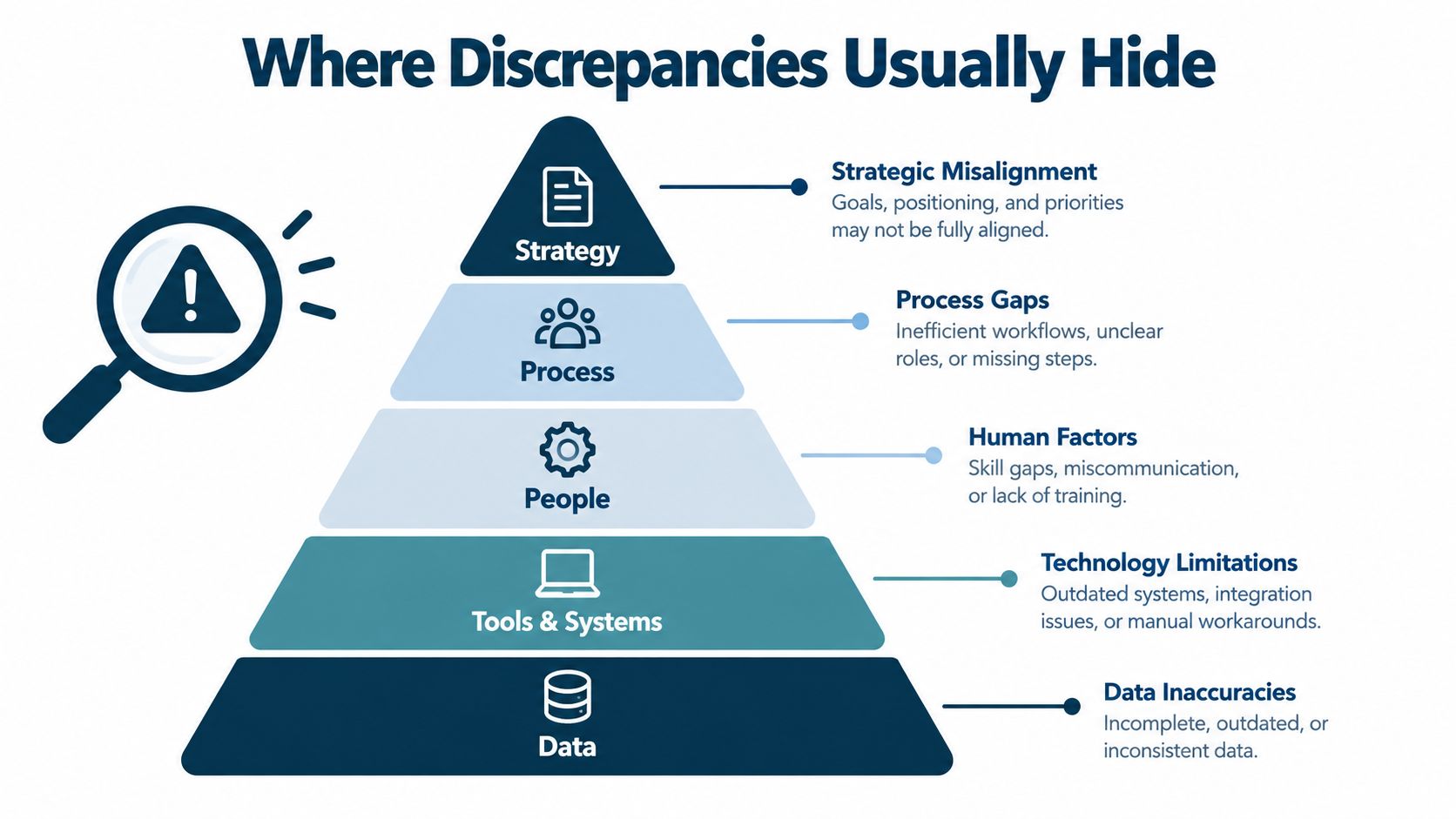
A payroll difference usually has a cause that belongs to one of four areas. Sorting the issue first helps you investigate the right record instead of staring at one total and guessing.
Timing differences
Payroll records do not always move on the same schedule. A pay period may close before the check date, while a late-approved time sheet, retroactive adjustment, or off-cycle bonus arrives afterward. The payroll register may therefore differ from the bank file for a short time. A journal entry may also include an accrual that is not part of the current payment.
Record the effective date and settlement date for each item. That simple check often explains a variance without changing the payroll calculation.
Calculation errors
Overtime, blended rates, garnishments, and manual salary edits create calculation risk. A lead carpenter might have the correct approved overtime hours, while a manual rate change produces the wrong gross wage. The difference can then appear in the tax calculation or cause net pay to drift from the bank total.
Check the calculation from the input outward: approved hours and rates, gross wages, taxable wages, deductions, taxes, and net pay. Each figure should follow logically from the one before it.
Classification issues
Payroll depends on how people, earnings, and locations are coded. A worker may be entered as a contractor even though the payroll process treats that person as an employee. An exempt employee may receive an overtime code, or work performed in one state may be assigned to another jurisdiction.
These coding problems often surface as unexpected tax liabilities, incorrect deductions, or a missing employee in a jurisdiction report. HR and payroll should review the employee setup before finance treats the variance as an accounting problem.
Integration gaps
A timekeeping tool may omit hours. A benefits platform may fail to send a deduction change. HR may submit a hire or termination after payroll freezes the roster. The bank total can still be correct while the employee detail is wrong.
Field mapping creates another risk. If a department or account code is dropped between payroll and accounting, the journal may not match the register even though the employee payments are accurate. Reconciliation therefore acts as a shared control across HR, payroll, finance, and the systems connecting them.
A separate payroll survey found that 62% of multinational payroll teams spent two to five hours manually consolidating payroll and payment data during each cycle, while 13% spent six to ten hours. Smaller businesses may handle fewer records, but repeated manual checks still make small differences easier to miss.
The same source identified currency fluctuations and compliance differences at 47% each, along with manual processing and reconciliation errors at 41%, among major global payroll risks. A domestic business can face similar issues on a smaller scale when its time app, benefits platform, payroll system, and accounting file use different timing or codes.
Several small issues can combine in one pay run: missed hours, a stale deduction, and rounding may all affect the final result. A structured report gives every difference a reason, owner, and resolution record. If a variance resembles an unexplained payment pattern rather than a timing issue, review guidance on preventing payroll fraud can provide broader control ideas.
A Simple Template You Can Build This Week
A fixed template saves time because you don't rebuild the same columns every pay cycle. It also makes the review consistent. The three source records should be the approved time and attendance summary, the payroll register generated by the payroll software, and the general ledger payroll journal entry posted to the accounting system.
Start with one row per employee, then add total rows for taxes, employer contributions, and the full payroll. Your column structure can look like this:
| Line Item | Time & Attendance | Payroll Register | General Ledger | Variance |
|---|---|---|---|---|
| Employee identifier | Employee and approved hours | Employee and calculated pay | Employee or department coding | Difference between sources |
| Gross wages | Approved regular and overtime wages | Calculated gross wages | Wage expense posting | Register minus ledger or source |
| Pre-tax deductions | Approved benefit or retirement change | Deduction calculated | Liability or expense posting | Difference |
| Taxable wages | Taxable basis from approved data | Taxable wages calculated | Tax basis or liability support | Difference |
| Employer taxes | Expected employer cost | Employer tax calculation | Employer tax expense and liability | Difference |
| Net pay | Not usually held here | Employee payment amount | Bank or payroll clearing entry | Difference |
| Total payroll | Sum of approved inputs | Sum of payroll output | Sum of journal lines | Final control difference |
For a simple worked example, suppose the approved time summary shows $1,250.00 in overtime wages for a group, while the payroll register shows $1,300.00. The $50 difference goes in the variance column. The reviewer then checks the employee's hours, rate, and any rounding or manual adjustment instead of approving the total blindly. This is an illustrative example, not a benchmark.
Keep the template separate from the payroll register. The register tells you what the software did. The template asks whether the software's result agrees with the records around it.
You can build the sheet in Excel, Google Sheets, or another spreadsheet tool, then export it as CSV when another system needs a clean file. A financial reporting template resource can also help you keep payroll reporting aligned with the rest of your financial close process.
Before you mark the cycle closed, the rows must sum to the same total across the three sources, or each difference must have a documented explanation. For every unresolved item, record the amount, source document, root cause, correction, and clearance date. That record turns a spreadsheet into an audit trail.
Setting Thresholds That Match Your Business
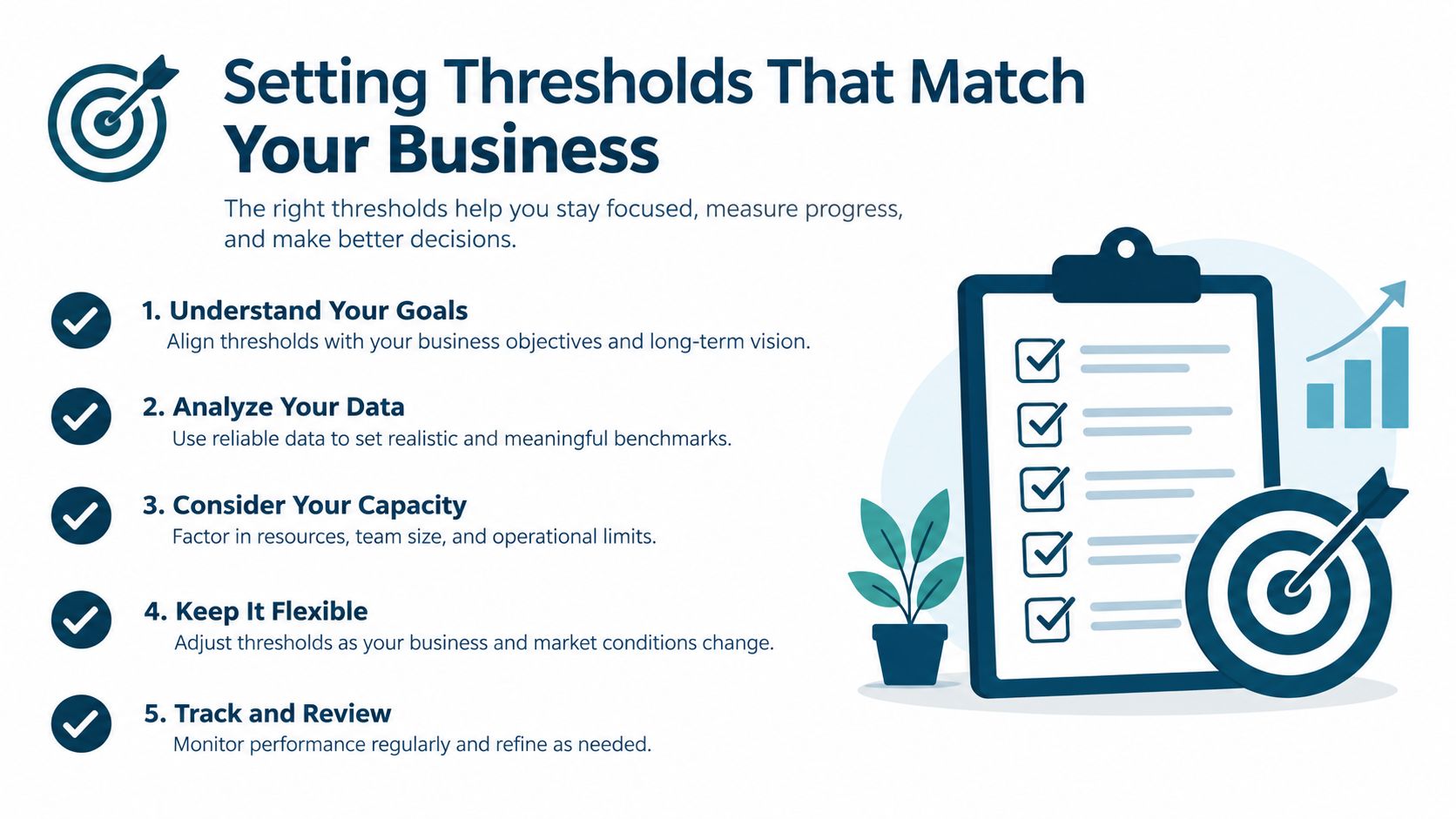
A variance threshold is a design choice. It tells the reviewer which differences require investigation and which small changes can be accepted with a documented reason. A $10 difference can matter a great deal in a five-person shop, while the same amount may be rounding noise in a fifty-person operation.
Use three inputs when setting your first threshold:
- Average gross pay per employee: Larger individual payments may justify an employee-level review when the change is unusual.
- Number of pay cycles per year: Frequent payroll gives you more review points and more chances for a small issue to repeat.
- Investigation cost: If a manager must spend hours tracing every tiny rounding difference, the threshold may be too tight.
Start with your prior six months of cycle data. Sort the variances by frequency and size. Mark which ones came from normal events, such as tax-rate changes, foreign-exchange timing, benefits elections, or approved bonuses. Then choose a tolerance that catches real errors without flooding the reviewer with false positives.
Some small businesses use one to two percent of gross wages per cycle as a rule of thumb. Treat that only as a starting point, not as a universal standard. A payroll-control guide cites a 0.05% of gross pay manual investigation trigger, while another approach uses employee-level pre-approval checks around plus or minus 5% against the prior comparable period for mid-market, multi-country teams. Those figures come from different control designs, so they shouldn't be copied without testing your own history. The guidance is summarized in payroll reconciliation threshold guidance.
A threshold should direct attention, not excuse a mismatch. A difference below the limit still needs a reason if it points to a missing employee, duplicate payment, or tax problem.
Review the threshold quarterly. Headcount changes, overtime patterns, new benefits, payroll software updates, and new integrations can shift your normal baseline. You may also need separate limits for employee-level pay changes, total payroll, tax liabilities, and bank settlement differences.
How Integrations Create Payroll Reconciliation Reports
A fictional twelve-person landscaping company added a new time-tracking connection to its payroll system. After a sync update, two employees' hours arrived twice. The duplicate records inflated overtime by $340 before the payroll reconciliation report flagged the repeated entries. The payroll team removed the duplicates and checked the integration log before approving the file.
The lesson isn't that integrations are bad. Each connection creates a useful checkpoint, but each handoff can also drop, duplicate, or transform data. A report becomes more valuable when it checks those boundaries instead of waiting until the final bank total.
Time tracking to payroll
The report should compare approved hours and pay codes with the payroll register. Common failures include a late sync, a duplicate time entry, or a mapping error that turns regular hours into overtime. Look at employee identifiers, dates, pay codes, and total hours, not just the final wage amount.
HR to payroll
HR sends new hires, terminations, status changes, salary updates, and work locations. A late roster update can leave a returning worker unpaid, while an old termination date can create an unauthorized payment. Compare the payroll roster with the approved HR change file before processing.
Payroll to the general ledger
Payroll software usually sends a journal entry containing wage expense, employer taxes, benefits, and liability accounts. An account-mapping error may post a department's wages to the wrong cost center, or a deduction may reach the register without reaching the correct liability account. Match the journal totals and account detail to the final register.
Bank to payroll
The bank confirmation checks whether the amount funded and settled agrees with the approved payment file. The bank may show a timing difference, return, or failed payment that the payroll system hasn't updated yet. Keep the settlement confirmation with the report.
A useful payroll integration overview can help owners understand what should move between systems and where a review still belongs. For businesses operating across jurisdictions, an ispezione INPS guida HR can provide additional context on HR and payroll records in an Italian compliance setting.
Run a monthly review of integration logs alongside the reconciliation report. Check failed jobs, duplicate records, changed field mappings, and late syncs. Automation can move the data, but someone still needs to confirm that the data arrived correctly and means the same thing in every system.
Your End of Cycle Reconciliation Checklist
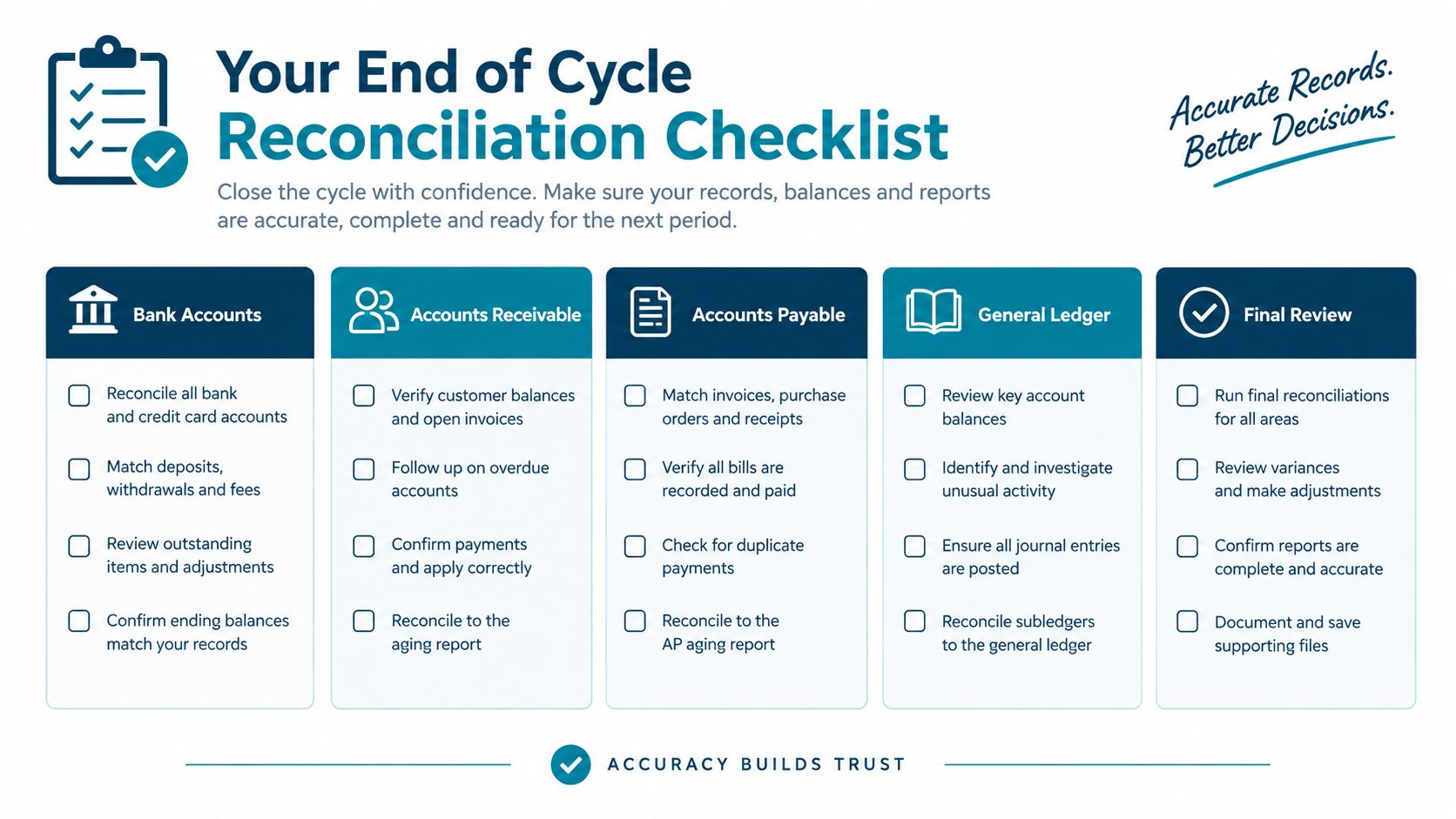
Print this checklist and assign a person to each step. An integrated system may complete the transfer automatically, but automatic movement isn't the same as approval. The reviewer still needs to confirm that the result makes sense.
T-3 days, HR owner, freeze the roster. Confirm active employees, new hires, returning workers, terminations, pay-rate changes, work locations, and approved leave. An HR system can provide a change report automatically, but a person should review late submissions and unusual status changes.
T-3 days, manager, approve time and pay codes. Match time sheets to the correct employee, job, location, regular-hours code, overtime code, and one-time payment. Timekeeping software can route approvals, but managers must resolve missing or duplicated entries.
T-1 day, payroll owner, pull the payroll register. Export gross earnings, deductions, employer taxes, taxable wages, and net pay. Compare current figures with the previous comparable cycle and explain significant changes before approval.
T-1 day, payroll and finance, check deductions and benefits. Tie benefit deductions to the current enrollment information and carrier invoice. Review retirement contributions, garnishments, and other deductions separately. An integration may populate these fields, but it won't know whether a late enrollment change was valid.
T-1 day, finance owner, export the general ledger posting. Confirm wages expense, employer taxes, benefits, and payroll liabilities. Check account and department mapping rather than relying only on the journal's total.
Pay day, finance owner, pull bank or ACH confirmation. Match the funded amount and payment status to the approved payroll file. Investigate returned payments, rejected items, and settlement timing differences.
Pay day, reviewer, compare all three sources. Use the approved time summary, payroll register, and general ledger entry. Add the bank file as the payment confirmation, then flag every variance above the selected threshold.
Pay day, payroll owner, investigate exceptions. Record the amount, source document, root cause, correction, and expected clearance date. Don't overwrite the original value. Keep the before-and-after evidence.
T+1 to T+3, owner and reviewer, obtain two-person sign-off. One person confirms the correction and another confirms the final result. A two-person check is especially useful when the payroll preparer also controls bank access.
T+1 to T+3, finance owner, archive the report. Save the final spreadsheet, source exports, bank confirmation, approval record, and correction notes with a consistent file name and version number. A month-end close guide can help place this archive in your wider closing calendar.
- T+3, payroll and HR, schedule the next cycle. Confirm the next cutoff dates, approvers, bank funding date, and owner for open corrections. Carry unresolved items forward rather than letting them disappear between cycles.
A report is complete when the totals agree or each remaining difference has a named reason, owner, and follow-up date. That standard is simple enough for a small business and strong enough to support a later review.
Bringing It All Together and Common Questions
A payroll reconciliation report works best as a cross-functional control. HR confirms who should be paid. Managers confirm the hours and pay codes. Payroll confirms the gross-to-net calculation. Finance confirms the journal entry and liabilities. Integration owners confirm that data moved between systems without being lost or duplicated.
That division of work creates three practical outcomes. Your team can close the payroll cycle faster because it uses a fixed report instead of rebuilding the review. Tax filings become cleaner because payroll liabilities are checked against the underlying register and deposits. Integration drift appears earlier, before a small mapping problem becomes a repeated correction.
Tax review should include each applicable jurisdiction and filing. The payroll system's federal, state, and local tax amounts should match deposits made to the relevant agencies, and quarterly payroll totals should be compared with Form 941, as explained in this payroll reconciliation guidance. A report can also compare tax forms, bank activity, approved headcount, and payroll records when an unexplained payment needs deeper investigation.
How often should you run a reconciliation?
Run a review before payroll approval, during the processing stage, and after the payment and journal posting are complete. If payroll runs weekly or biweekly, you can still use a monthly summary, but don't use the monthly report as a reason to skip the checks that protect the next payday.
What should you do with a mid-cycle variance?
Pause approval for the affected item if possible. Trace it to the source record, correct the underlying data, rerun the calculation, and record why the original value changed. If the payment already went out, document the correction and its expected treatment in the next cycle.
Can one template work for biweekly and monthly payroll?
Yes. Keep the same columns and change the pay-period dates, source files, and review calendar. For monthly payroll, add a clear field for accruals or timing differences so the report distinguishes earned costs from cash paid.
Start your next payroll cycle by creating the template, naming the reviewer, and agreeing on the cutoff time. If you want help connecting payroll postings, bank reconciliations, and financial reporting into one repeatable process, visit MyOfficeOps to discuss bookkeeping, payroll integration, and reconciliation support for your business.