
You priced the job. The margin looked fine. Then the project got moving and the numbers started slipping.
A supervisor spent extra time on calls. Your office manager chased approvals. A client asked for “one small change” three times. Materials came in a little off from the estimate. Nobody thought those things were a big deal in the moment. Put them together, and the profit you expected is suddenly thin or gone.
That's the primary issue with project budget tracking for small businesses. It's rarely one giant mistake. It's a pile of small costs that never got tracked clearly enough, early enough, to help you make a better decision.
For owners in construction, healthcare, IT, and professional services, this isn't just an accounting issue. It's a decision issue. If you can't see what a project is really costing while it's still in motion, you can't fix staffing, pricing, scope, or timing before the damage is done.
Why Most Project Budgets Fail and How Yours Won't
A budget usually fails long before the project ends.
It fails when the original estimate is built from rough guesses. It fails when labor only means field labor or billable hours, but not the time your internal team spends coordinating the work. It fails when expenses sit in email inboxes, receipts stay in trucks, and nobody compares actual cost to the plan until month-end.
I've seen this play out in simple ways. A contractor starts a profitable-looking job, then adds a few site visits, a few owner calls, and a few rush purchases. A clinic rolls out a new system and tracks the vendor bill, but not the admin time spent on training, scheduling, and follow-up. An IT firm prices the delivery work correctly, then loses margin because project management time keeps growing in the background.
The real issue isn't overspending alone
Most owners think the problem is spending too much. Usually, the deeper problem is not knowing where the money is going in real time.
A spreadsheet can hold numbers. It can't force timely updates. It can't stop people from coding costs inconsistently. It can't give you a clean view when labor, materials, approvals, and change requests are moving every day.
That matters because disciplined systems change outcomes. Organizations that implement project management software with robust budgeting features improve their project success rates by up to 28%, according to Meegle's project budget tracking analysis.
Practical rule: If your budget only tells you what happened last month, it's not a control tool. It's a history lesson.
What works better than gut feel
Good project budget tracking is less complicated than most owners expect. You need a few basics done well:
- A real baseline: Include labor, materials, overhead, and a cushion for known risk.
- Fast cost capture: Time, receipts, and purchases need to hit the system quickly.
- Clear ownership: Someone has to review the numbers every week.
- Action thresholds: Small problems should trigger review before they become expensive.
Here's the trade-off. A loose system feels faster at the start. A disciplined system feels slower for a week or two. After that, the disciplined system usually saves time because your team stops arguing about whose number is right.
Clarity protects profit
When owners hear “budget tracking,” they often picture more admin work. The better way to look at it is this: tracking gives you permission to decide earlier.
You can stop a bad pattern before it becomes normal. You can price future work based on what really happened. You can tell whether a project is underperforming because of labor, delays, scope change, or poor planning.
That's how a budget stops being a static file and starts acting like a management tool.
Building a Budget That Actually Reflects Reality
Most project budgets fail because they're built from the top down. Someone picks a number that feels reasonable, adds a little cushion, and hopes the team can make it work.
That approach hides the very costs that hurt small businesses most. The safer method is bottom-up estimating, where the people doing the work estimate the cost of each task. PRINCE2 explains that bottom-up estimating requires team members to estimate labor, materials, equipment, and overhead for the work they'll perform.
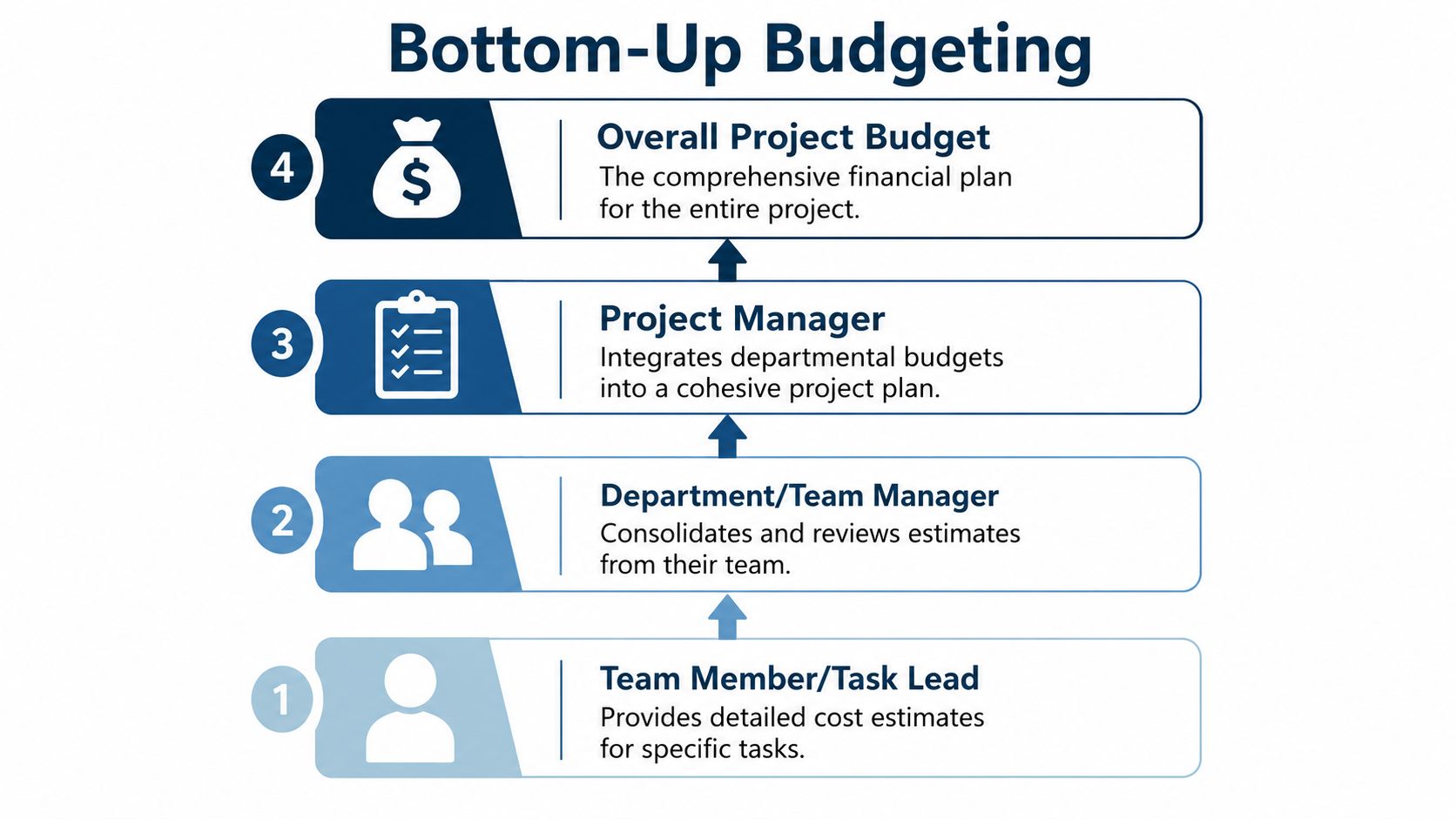
Start with the work, not the total
A realistic budget starts with the task list.
If the project is an office move, don't begin with “relocation budget.” Start with cabling, equipment transport, setup, downtime planning, vendor coordination, and post-move support. If you need a practical example of cost categories that often get missed in these jobs, this guide to IT fit-out expenses is a useful reference because it forces you to think beyond the obvious invoices.
Then ask the people closest to the work for input. Your estimator, department lead, PM, technician, office admin, or clinician manager will usually spot costs that an owner or finance lead won't.
Hidden labor is where many budgets break
This is the part many guides skip.
You probably already budget direct labor. What often gets missed is internal management time. That includes scheduling, check-ins, approvals, procurement follow-up, change order handling, client communication, and cleanup after mistakes.
A 2025 PMI report revealed that 38% of budget overruns stem from untracked internal labor markups, leading SMBs to underestimate true project costs by 15–25%, as cited in Bitrix24's write-up on budget drift.
That finding lines up with what owners describe all the time. The payroll line looks close to plan, but the project still underperforms because salaried staff spent hours supporting it and nobody assigned those hours to the job.
Hidden labor doesn't feel expensive because it rarely shows up as one invoice. It shows up as ten people losing small chunks of time.
Build your budget in layers
A solid budget usually includes four layers:
Direct delivery costs
Labor on the actual work, materials, equipment, subcontractors, and software tied to the job.Internal support costs
Project management, admin support, purchasing, approval time, scheduling, and internal meetings.Overhead allocation
The share of general operating cost you need to carry if the project uses company resources.Contingency and change exposure
A reasonable reserve for known uncertainty and likely friction points.
If you don't already separate those layers, your job costing will stay muddy. A clear job costing resource from MyOfficeOps can provide the framework needed.
Set a baseline you can defend
Your cost baseline is the approved budget you measure against during the job. ProjectManager's explanation of cost tracking makes an important point: once the baseline is approved, it should not change without formal change control approval.
That matters more than most owners think. If anyone can casually revise the budget midstream, you lose the ability to tell whether the team improved performance or just moved the goalposts.
A simple rule works well: estimate carefully, approve once, then change only with sign-off and a reason. That protects the budget from becoming fiction after the project starts.
Setting Up Your Real-Time Tracking System
A good budget won't help if costs hit your books three weeks late.
You need a system that captures labor, purchases, and expenses close to the moment they happen. For most small businesses, that doesn't mean buying a giant enterprise platform. It means connecting a few tools so they feed one clean record.

What your tracking stack should do
Think in functions, not brands first. Your setup should:
- Track time by project and task: Staff should log hours against the right job code.
- Capture expenses quickly: Receipts, vendor bills, and card charges need a project tag.
- Route approvals: Purchases should get reviewed before money leaves the business when possible.
- Sync to accounting: Data should land in QuickBooks, Xero, or your core accounting system without retyping.
That last point matters. Re-entering numbers in multiple places is where reporting gets slow and errors multiply.
One source of truth beats five partial records
When time lives in one app, receipts in another, purchasing in email, and accounting in a separate ledger, nobody trusts the final report. The owner asks finance for the number. Finance asks operations. Operations asks the PM. The PM says a few invoices haven't posted yet.
That's not a reporting problem. It's a system design problem.
A stronger setup creates one flow from request to approval to spend to accounting. It also gives you cleaner management reporting. If you want a practical view of how that reporting layer helps owners make faster calls, this piece on business intelligence reporting is worth reading.
The tools don't need to be fancy
Plenty of teams get better results with a modest stack than others get with expensive software they never fully adopt.
The key is behavior. Staff need simple time entry. Project managers need live budget visibility. Finance needs consistent coding. Owners need a dashboard they can understand in a minute.
77% of high-performing projects utilize project management software for tracking, compared to only 23% of organizations using such tools generally, according to Runn's IT project management statistics roundup.
Here's the practical takeaway: the advantage isn't the software logo. It's the discipline the software makes possible.
A simple setup most SMBs can manage
A workable model looks like this:
| Function | What to capture | Why it matters |
|---|---|---|
| Time tracking | Hours by person, task, and project | Shows real labor cost |
| Expense capture | Receipts, mileage, small purchases | Stops cost leakage |
| Purchasing | Requests, approvals, vendor coding | Prevents messy spend |
| Accounting sync | Bills, payroll, reimbursements | Keeps reports current |
If you're exploring ways automation can reduce manual chasing and improve handoffs between systems, this article on AI for smarter business operations gives useful context without overcomplicating it.
Key Metrics to Watch on Your Dashboard
A dashboard should answer one question fast: is this project healthy, drifting, or already in trouble?
Most businesses clutter the screen with too many numbers. Owners don't need a wall of charts. They need a short set of metrics that tells a clean story.
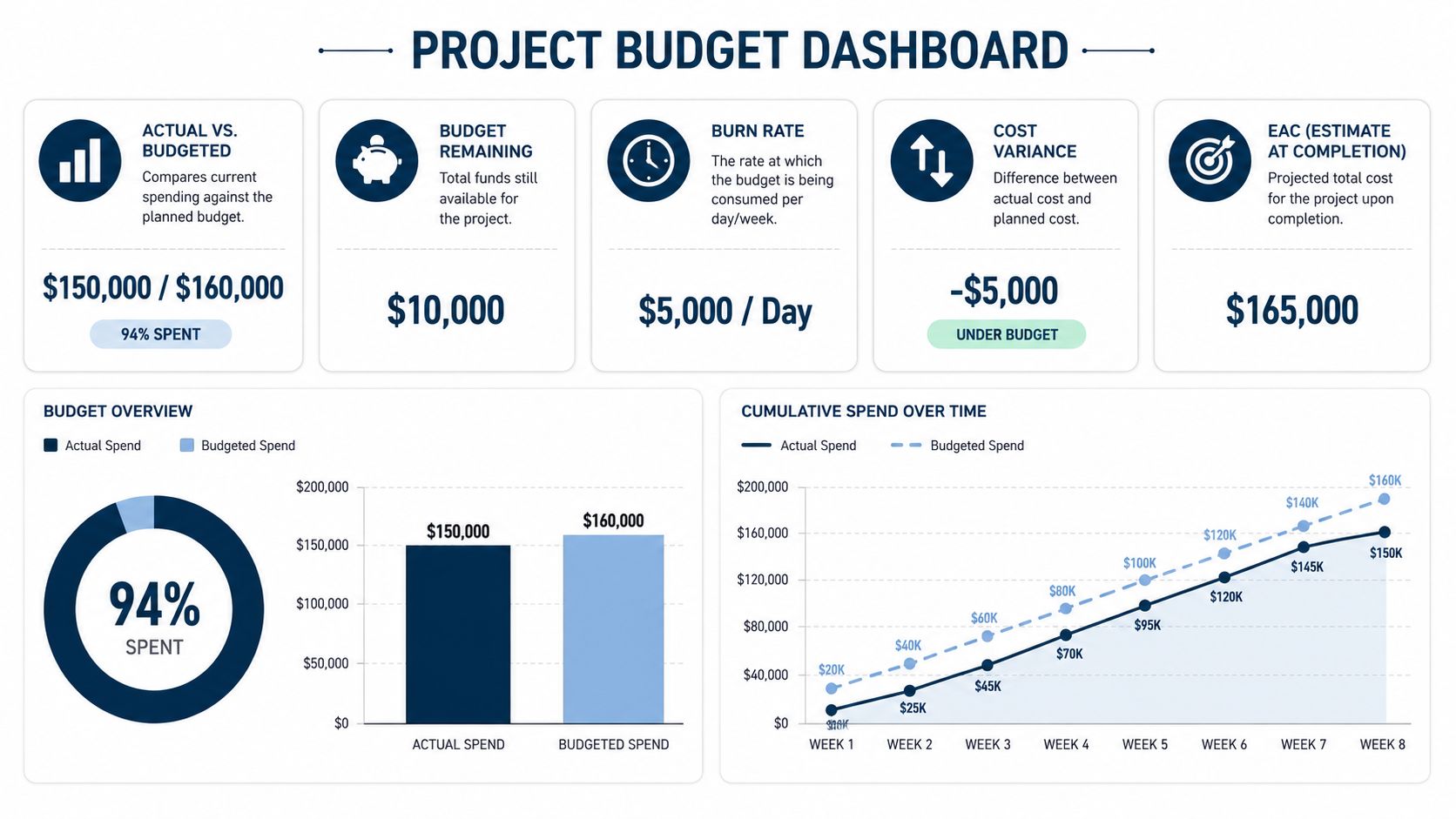
The three numbers I'd put first
Start with these:
Budget vs. actuals
This shows what you planned to spend and what you've spent so far.Cost variance
This tells you the gap between planned cost and actual cost at this point in the project.Estimate at completion
This is your current best view of where the total cost will land if current patterns continue.
Those three together tell you whether the issue is current overspend, a timing mismatch, or a larger trend that will hit margin by the end.
CPI is the quick read for efficiency
If you only add one performance metric beyond the basics, make it Cost Performance Index, or CPI.
A simple way to explain CPI is this: it tells you whether you're getting the amount of work you expected for the money you've already spent. Monday.com's cost tracking guide puts it plainly. If your CPI is 1.0, you're on budget. If it drops to 0.8, you're spending $1.25 for every $1 of work done.
That's a useful owner metric because it cuts through noise. You don't need to inspect twenty line items first. You can see that efficiency is off, then ask why.
Quick test: If CPI drops below 1.0 and keeps falling, don't wait for month-end. Review labor mix, rework, delays, and scope handling right away.
Read the story, not just the number
No metric works alone. A project can be over budget today and still recover. Another can look fine on actual spend while labor is subtly burning faster than progress.
Here's a simple way to read the dashboard:
| Metric | Healthy signal | Warning signal | Likely question |
|---|---|---|---|
| Budget vs. actuals | Spend is close to plan | Spend is pulling ahead | What changed operationally? |
| Cost variance | Small, explainable gap | Growing gap with no owner | Who owns correction? |
| CPI | At or near 1.0 | Below 1.0 and declining | Are we buying progress efficiently? |
| EAC | Stable forecast | Final cost keeps rising | Can margin still be protected? |
Keep the dashboard readable
A dashboard should be built for action, not decoration.
That means:
- Use plain labels: “Labor over plan” is better than a technical phrase nobody uses.
- Show trends: A line over time often tells more than a single snapshot.
- Tag the cause: If a project is off track, label whether the issue is labor, materials, delay, or scope.
A useful dashboard helps a PM run the job, helps finance trust the numbers, and helps the owner decide whether to intervene.
The Rhythm of Reporting and Forecasting
The businesses that control project cost well don't rely on heroic catch-up at the end of the month. They run on rhythm.
That rhythm can be simple. A short weekly review is enough for many small and midsize teams. The point isn't to create another meeting. The point is to create a habit where the team looks at fresh numbers, explains variance, and decides what changes now.
Weekly review beats monthly surprise
When owners skip regular review, small misses pile up. By the time the P&L shows the full damage, the job is often too far along to fix.
A better pattern is a brief weekly check with the project lead and whoever owns financial review. Look at actual spend, open commitments, labor trend, and any decisions that could move the forecast.
The key is setting thresholds that trigger action. In project budget management, a 5% variance typically prompts an internal team review, while a 10% variance escalates to mandatory stakeholder attention, according to Monday.com's project budget template guidance.
What the weekly review should cover
Keep it tight. A useful review can fit on one page.
Current position
Are we over, under, or near the approved plan right now?Reason for variance
Was it labor, material pricing, extra admin time, delay, or scope change?Next likely impact
Is this a one-time issue or the start of a trend?Decision needed
Reassign staff, pause work, approve a change order, or update the forecast.
If your team struggles to present this cleanly, a simple budget vs actual reporting reference can help standardize what gets reviewed.
A forecast should answer, “Where are we headed if nothing changes?” If that answer is bad, the next question is, “What are we changing today?”
Forecast forward, don't just report backward
A lot of companies “report” but omit forecasting. They compare actuals to budget, note the problem, and stop there.
That's not enough. Owners need a current estimate of final cost, not just a snapshot of spend to date. If labor is running hot now, your estimate at completion should change now. If purchasing came in lower than expected, that should also show up now.
Project budget tracking becomes strategic, helping you decide whether to:
- absorb the overrun,
- push a scope change through,
- shift resources,
- slow the work,
- or use savings from another area to protect the result.
Without that rhythm, you're managing by hindsight.
Avoiding the Most Common Budget Killers
The same patterns wreck budgets over and over. Different industries, same story.
The biggest one is scope creep. It starts small. One extra request. One revision nobody priced. One “quick” add-on that the team handles to keep the client happy. Then the labor hours pile up and the budget no longer matches the work being delivered.
Scope creep affects 52% of projects and leads to an average budget overrun of 27%, according to SpeakWise's summary of project management statistics.
The killers to watch for
Some budget problems are dramatic. Most aren't. They look ordinary.
Unapproved scope changes
If the work changed, the budget needs to change too. No exceptions.Slow decisions from management
Waiting too long to approve staffing, purchasing, or change requests usually costs more than making a timely call.Hidden internal hours
PM time, admin cleanup, owner involvement, and approval loops can drain margin even when field or billable labor looks fine.Outdated tools
If your team is still stitching together reports by hand, you'll keep finding out too late.
Put guardrails around change
A simple change order process does more than protect revenue. It protects clarity.
When the client asks for more, document the request, estimate the added cost, assign ownership, and get approval before the team moves forward when possible. That protects both the relationship and the margin.
This matters in financed projects too, especially when soft costs are involved. If you work in construction or buildout environments, this overview of how private lenders finance soft costs is useful because it highlights how non-hard-cost items can affect planning and reimbursement.
Treat budget discipline as a growth tool
Owners sometimes hear all of this and think it sounds rigid.
It isn't rigid. It's mature.
Good project budget tracking helps you quote more accurately, protect staff time, make cleaner decisions, and build a business that isn't guessing at job profitability. It also gives you better evidence when pricing needs to change, when clients are causing margin erosion, or when internal processes need cleanup.
That's the bigger win. Better tracking doesn't just cut waste. It helps you build a company that knows where profit comes from and how to keep it.
If you want clearer job profitability, cleaner reporting, and better decisions without turning your team into full-time spreadsheet managers, MyOfficeOps can help. We work with small and midsize businesses that need practical bookkeeping, budgeting, reporting, and CFO-level guidance that owners can use.