
You log into your store, see sales coming in, and still have no clean answer to a basic question. “Did we make money on those orders?”
That's the trap. Your sales system says one thing. Your shelves say another. Your spreadsheet says something else entirely. Then month-end shows up, and you're hunting through receipts, purchase orders, and product counts trying to figure out what you own, what you sold, and what it really cost.
I see this with small business owners all the time. A contractor has materials sitting in a shop, on a truck, and at a job site. A clinic has supplies in three closets, plus orders in transit. An online seller has Shopify orders, Amazon orders, returns, and a bookkeeping file that doesn't match any of it. Everybody's busy. Nobody trusts the numbers.
The fix usually isn't “buy the fanciest software.” The fix is getting the right accounting software for small business with inventory, then setting it up so your daily work and your financial reports finally line up. That changes your whole week. Fewer late-night corrections. Fewer ugly surprises. Better buying decisions. Better pricing. Better cash control.
Tired of Guessing About Your Inventory and Profits
A lot of owners think their problem is bookkeeping. It usually starts earlier than that.
A West Chester contractor buys materials for three jobs in the same week. Some items go straight to the site. Some stay in the shop. One invoice gets entered right away, another sits in email, and a crew member grabs extra parts from the truck without telling anyone. At the end of the month, the books show profit, but the owner still feels broke. That feeling is usually a clue. The reports might be clean on the surface, but the workflow underneath is messy.
The same thing happens in a small clinic. Supplies get ordered by different people. Boxes get opened and moved around. One system tracks bills. Another tracks usage. Nobody has a simple view of what's on hand or what's already been committed. Then someone asks whether it's time to reorder, and the answer is a guess.
What this looks like in real life
Here's the pattern I keep seeing:
- Sales look healthy: Revenue is coming in, so you assume the month was good.
- Inventory counts drift: What's in the software stops matching what's on the shelf.
- Costs get cleaned up late: You make adjustments after the fact instead of recording things right the first time.
- Profit becomes fuzzy: You know top-line sales. You don't know true margin.
That last point matters most. If your inventory is off, your profit is off. If your profit is off, your pricing, purchasing, and hiring decisions are off too.
You can survive bad numbers for a month or two. You can't build a steady business on them.
The real problem isn't the report
The report is just where the pain shows up. The core issue is that the work happening in your business isn't flowing into your accounting cleanly.
That means the answer isn't another spreadsheet. It's a better system. One that captures purchases, sales, stock movement, and costs in a way that matches how you operate day to day.
When owners finally get this right, they stop asking, “Why doesn't QuickBooks match the shelf?” and start asking better questions. Which products move fastest? Which jobs are profitable? Which items tie up cash? Those are growth questions. That's where you want to be.
Why Your Accounting and Inventory Must Talk to Each Other
If your accounting system and inventory system don't connect, you're driving with bad gauges.
Your sales report might tell you business is moving fast. Your balance sheet might show inventory as a healthy asset. But if costs haven't updated correctly, if returns haven't synced, or if items were received but never recorded properly, those reports are lying to you.

A disconnected setup creates the same kind of confusion as a car dashboard that isn't hooked up to the engine. The speedometer says you're cruising. The tank says you're full. Meanwhile, the car is sputtering because the data isn't real.
What connected systems actually do
When the system is set up right, a sale does more than create revenue. It also reduces stock, updates cost, and pushes the right entry into your books. When you receive a vendor order, your quantities go up and your accounting has the right value to work from. That's the connection you need.
This is one big reason the market keeps moving toward integrated tools. The global small business accounting software market reached $12.5 billion in 2025, driven in large part by e-commerce and multichannel integration needs, and Xero serves 3.8 million subscribers through a broader ecosystem of 800+ third-party apps for inventory and operations, according to ERP Software Blog's 2025 market overview.
That tells you something important. Owners aren't just buying accounting tools anymore. They're building systems that connect operations to finance.
Why this changes daily decisions
When your tools talk to each other, you stop managing by memory.
You can answer basic operating questions faster:
| Question | Disconnected setup | Connected setup |
|---|---|---|
| Do we have enough stock? | Someone checks three places | One live view |
| Did that sale make money? | Wait until month-end cleanup | See margin sooner |
| Should we reorder now? | Guess based on habit | Use current quantities and demand |
| Why is cash tight? | Hard to trace | Purchases, sales, and inventory value line up |
Practical rule: If a sale changes inventory in one system but not your books, the workflow is broken.
For a contractor, that means materials used on a job should flow into job cost tracking. For a clinic, supply purchases should show up in both stock and expense logic without double entry. For an online seller, website orders, returns, and payouts should feed one clean financial picture.
If you skip this connection, every report takes extra interpretation. And small business owners don't need more interpretation. They need numbers they can trust.
Core Features Your Business Actually Needs
Most software demos are a feature parade. That's not helpful. You don't need a giant checklist. You need the few things that stop errors and make the week easier.
Start with this truth. QuickBooks Online holds about 80% of the US small business market, and it includes basic inventory in Plus and Advanced plans. But its inventory features are described as “intentionally light,” which is why 74% of growing SMBs pair it with specialized inventory extensions for needs like barcode scanning and multi-location tracking, based on Intuit's QuickBooks accounting overview.
That matches what I see in the field. QuickBooks is often a solid accounting base. It just isn't always enough on the inventory side once the business gets more active.
The features that fix real problems
Here's what matters most in an accounting software for small business with inventory setup.
- Real-time quantity tracking: You need to know what's on hand without waiting for someone to update a spreadsheet later. If you sell in-store and online, both channels need to pull from the same stock picture.
- Purchase orders: This sounds simple, but it matters. A good PO process tells your team what was ordered, what arrived, and what's still missing.
- Reorder points: These help you stop stockouts before they happen. They're not fancy. They're practical.
- Sales orders: Helpful when customers order now and you fulfill later. This keeps commitments visible.
- Kits and bundles: If you sell a package made of multiple items, the system should reduce all the right components automatically.
- Multi-location tracking: If stock sits in a warehouse, a truck, a back room, or a second office, you need separate visibility by location.
- Barcode scanning: This cuts receiving and counting mistakes in a very direct way.
Match the feature to the workflow
A local contractor might not care about bundles, but they absolutely care about materials by job and by location. A clinic might not need fancy warehouse rules, but they do need clean supply counts and reordering. An e-commerce seller with growing order volume should spend time learning about scaling e-commerce inventory workflows because the strain usually shows up first in fulfillment and stock accuracy.
Buy for the work your team does every day, not for the feature grid on the sales page.
Don't overbuy on day one
You also don't need to jump straight to a giant ERP because your current system is annoying.
A lot of small businesses do well with a two-part setup. Accounting software handles the books. A dedicated inventory app handles stock movement, scanning, locations, and order flow. That's often cleaner than trying to force one tool to do everything badly.
The best feature is the one your team will use correctly on a Tuesday afternoon when they're busy.
Connecting Your Software to Your Daily Operations
Software either helps or becomes dead weight.
A good system doesn't just store information. It moves information from one part of your business to another without making your team retype the same thing all day. That's the workflow issue most owners miss.
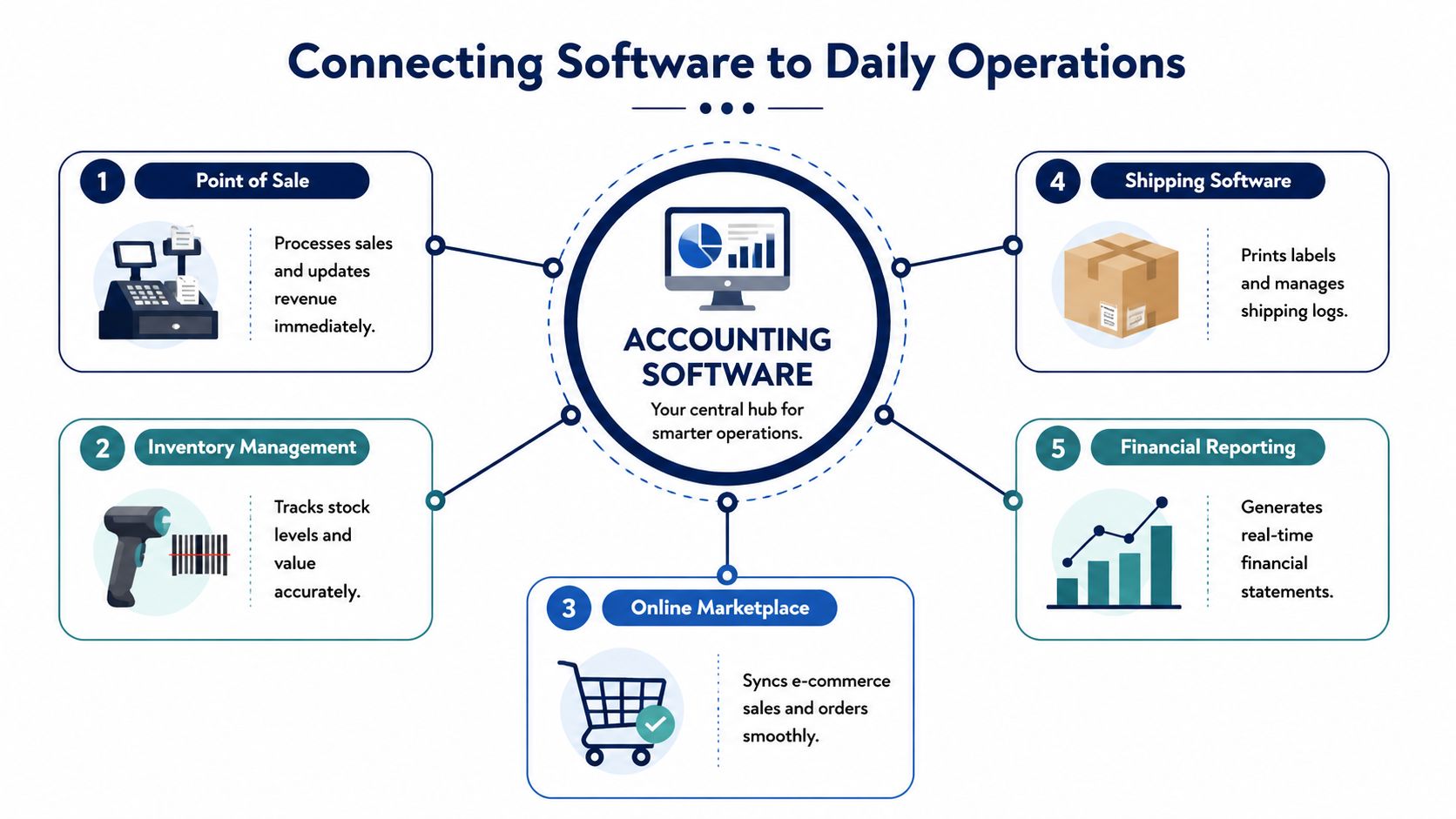
Follow one sale from start to finish
Let's say a customer buys an item from your Shopify store.
In a clean workflow, the order enters your inventory system right away. Stock goes down. The system knows what was sold. The accounting side gets the sale recorded properly, along with the cost tied to that item. If shipping software is connected, the order moves to fulfillment without someone copying addresses into another screen.
Now compare that to the messy version. Shopify shows the order. Someone exports a report. Another person updates inventory later. Bookkeeping gets the payout days after that. Cost gets adjusted at month-end. That's how errors pile up.
The core connections that matter
Your accounting software for small business with inventory should sit in the middle of these moving parts:
- Point of sale: In-store sales should post quickly and cleanly.
- Online store: Website orders need to update stock and revenue without delay.
- Inventory app: Quantities, locations, and order status often reside here.
- Shipping tool: Labels, tracking, and shipment status should tie back to the order.
- Bank and payment feeds: Deposits and fees need to reconcile against actual sales.
If one of those links is weak, people start doing side work in spreadsheets again.
Why API connections matter
You don't need to be technical to care about API sync. It means your systems can pass data to each other automatically instead of relying on manual entry.
According to Stripe's guide to accounting and inventory software integrations, Xero's API-driven sync with tools like Cin7 Core can reduce bank feed matching time by 70%, and Stripe benchmark data shows businesses using these integrations see 40% faster accounts receivable collections.
That's not just a feature win. It's a workflow win. Less matching. Fewer delays. Faster cash.
Where barcode scanning earns its keep
Barcode scanning is one of those things owners often treat as optional until they've lived without it too long.
It helps in three places:
- Receiving stock so the team records what arrived.
- Picking orders so the right item leaves the building.
- Cycle counts so small count checks happen during the month instead of one painful cleanup later.
A contractor can scan materials going onto a truck. A clinic can scan supply receipts into the right storage area. A retail team can count shelves faster without handwritten notes.
If your team still writes counts on paper and fixes them later, your software isn't connected to the work.
Some owners also confuse connected software with “fully automated.” That's not the goal. You still need clear responsibilities, review steps, and someone watching exceptions. If you want a plain-English breakdown of that role, this guide on what a bookkeeper does for a small business is worth reading.
The point is simple. Software should remove repeated data entry and make the truth easier to see. If it adds more cleanup work, the setup is wrong.
Understanding How Inventory Costing Works
This is the part owners avoid because it sounds technical. Don't skip it. Costing changes the profit you report.

If your costs move around, and most do, the method your system uses to value inventory affects your cost of goods sold and your margin. That means two businesses can sell the same item at the same price and still report different profit depending on how their systems handle cost.
FIFO in plain English
FIFO means first in, first out.
Think of milk at the grocery store. The older cartons get sold first. In software, that means the first units you bought are treated as the first units you sold. QuickBooks Online's native inventory uses basic FIFO.
That can be fine for some businesses. It's simple. It's common. But simplicity can become a problem when the workflow around it is still manual.
Weighted average in plain English
Weighted average costing blends your costs together.
Think of a big coffee container where beans from different deliveries all end up mixed. Instead of tracking each purchase layer one by one, the system uses an average cost across available units.
That approach can be easier to live with when purchase prices move around a lot.
Why the choice matters
Finale Inventory's guide to inventory and accounting software notes that QuickBooks Online's default FIFO method can lead to 20% to 30% error rates in inventory valuation when managed manually, and pairing it with a dedicated app that supports weighted-average costing can reduce COGS reconciliation time by up to 85% through real-time automation.
That's a big reason some owners feel like they're always fixing gross margin after the month is already over.
Here's the everyday version of the issue:
| Situation | What goes wrong |
|---|---|
| Material costs jump | Old cost assumptions distort margin |
| Staff enter adjustments late | COGS doesn't match actual usage |
| Items move between locations | Inventory value gets muddy |
| Returns aren't handled cleanly | Profit gets overstated or delayed |
If you sell direct to consumer and want a simple explainer on automated reconciliation for DTC brands, that's a useful companion topic because reconciliation problems often show up right alongside costing problems.
And if you want the plain version of the accounting side, this article on what cost of goods sold means helps connect the dots.
Good costing doesn't just make the accountant happy. It tells you whether a sale was worth making.
For a Philadelphia contractor with changing material prices, this matters fast. For a clinic buying supplies at different costs through the year, it matters too. If your reported margin swings for reasons you can't explain, start here.
A Practical Checklist for Choosing Your Software
Most owners shop for software backwards. They start with brand names, then pricing, then a demo. That's how you end up buying something that looks polished but doesn't fit the way your business runs.
Start with your workflow. Then score the software against that.

Map the work before you shop
Take one product or one supply item and track it through your business.
Where does it start? Vendor order. Receiving. Storage. Sale or use on a job. Return. Reorder. Financial reporting. Write down every handoff. You'll quickly see where things break.
Common break points include:
- Ordering without visibility: Staff reorder because they feel low, not because the system says so.
- Receiving without matching: Items arrive, but no one confirms what was received.
- Selling from the wrong stock count: The system says available. The shelf says empty.
- Month-end corrections: Accounting fixes what operations didn't record cleanly.
That map is more useful than any software comparison chart.
Use a simple scorecard
Don't overcomplicate this. Score each option against the basics that matter to your business.
| Requirement | Must have or nice to have | Notes |
|---|---|---|
| Syncs with your sales channels | Must have | No manual export routine |
| Tracks inventory by location | Depends on your setup | Critical for shops, trucks, multiple sites |
| Handles your costing method | Must have | Don't patch this later |
| Supports purchase orders | Must have | Needed for receiving control |
| Easy for staff to use | Must have | If they avoid it, it fails |
| Good reporting | Must have | You need clear numbers, not just transactions |
Ask tougher demo questions
Sales reps love broad promises. Ask specific questions tied to your workflow.
Try these:
- How does a sale move from order to inventory reduction to accounting entry?
- What happens when part of a purchase order arrives, but not all of it?
- How are returns handled?
- Can we track stock in more than one location?
- What does month-end cleanup usually look like in this system?
- Which steps still require manual work?
Don't ask whether the software “does inventory.” Ask how it handles the ugly parts.
Look past the monthly fee
The monthly price is only part of the cost. You also need to think about setup time, training, app add-ons, user access, and the staff time spent keeping the system clean.
Sometimes a cheaper tool costs more because your team has to babysit it. Sometimes a more expensive setup saves money because it cuts repeated mistakes.
A good buying process also includes one more step. Let the software vendor show your exact use case, or something very close to it. If they can't show a contractor workflow, a clinic supply workflow, or an e-commerce order workflow similar to yours, be careful.
If you want a broader framework for evaluating options, this guide on how to choose accounting software is a strong next read.
The best software choice is the one that fits the way work moves through your business, not the one with the loudest marketing.
When to Stop Buying Software and Hire a Partner
There's a point where more software stops helping.
It usually shows up when the owner becomes the translator between systems. You're checking sync errors. You're reviewing duplicate entries. You're asking the inventory app why it doesn't match the books, then asking the bookkeeper why the books don't match the shelf. That's not leadership. That's unpaid systems support.
The tipping point is easy to spot
You've probably crossed it if any of this feels familiar:
- You spend more time fixing data than using it
- Month-end closes feel like cleanup projects
- You don't trust the margin on jobs, products, or service lines
- Cash flow decisions still rely on instinct
- Your team uses the software differently, so the output is inconsistent
At that stage, another tool usually just adds another login.
What a partner changes
A good bookkeeping and advisory partner doesn't just “keep the books.” They own the process of making the numbers usable.
That means they help set up the flow between accounting, inventory, payroll, sales systems, and reporting. They make sure the workflow makes sense. They clean up what's not working. Then they turn the output into decisions you can use, like whether pricing is too low, whether stock is tying up cash, or whether you can afford a hire.
Software records activity. A good partner helps you act on it.
This matters most when the business is growing and the old DIY process can't keep up. If your operation includes multiple locations, jobs, channels, or product lines, someone needs to manage the financial stack with discipline. Otherwise, the owner keeps carrying that burden.
And owners should not be the backup inventory clerk, part-time reconciler, and accidental CFO all at once.
If you're tired of messy books, inventory confusion, and reports you can't trust, MyOfficeOps can help you clean up the workflow behind the numbers. They work with small and midsize businesses in Greater Philadelphia and beyond to handle bookkeeping, payroll integration, reporting, and CFO-level guidance, so you can stop chasing data and start using it.