A lot of owners hit the same wall at the same time. Revenue is coming in. Bills are going out. Payroll has to run on Friday. Someone asks whether you can afford to hire, buy equipment, or open a new location, and suddenly nobody trusts the numbers sitting in front of them.
One report says sales are strong. Another says cash feels tight. A spreadsheet from last week says one thing, your bookkeeping file says another, and your bank app gives you a third answer. By the time you piece it all together, the moment to make the decision has already passed.
That mess usually isn't a sign that you're bad at business. It's a sign that your systems don't talk to each other.
The Financial Chaos Every Business Owner Knows
You sell a job on Monday. Your team starts work on Tuesday. Payroll hits on Friday. A vendor invoice shows up the same afternoon. Then your bookkeeper asks whether that cost belongs to this job, last month's job, or overhead.
Meanwhile, your sales data lives in one place. Payroll sits in another. Expenses may be in your accounting software, or maybe half of them are still in email. If you track projects, those job costs often live in a spreadsheet someone updates when they have time.
By the time you sit down to answer a simple question like "Did we make money on that work?" you're stitching together clues from four different places.
What that looks like in real life
For a contractor, the pain shows up when materials, labor, and billing don't line up cleanly.
For a medical practice, it shows up when payroll, vendor costs, and patient payment timing all affect cash, but nobody sees the full picture in one place.
For a law firm or agency, it shows up when hours are tracked in one system, invoices are created in another, and collections get reviewed only after a client is already late.
When business owners say they need better reports, they usually mean they need fewer disconnected systems.
The old way of doing things was common for a reason. A company starts small. One app handles invoicing. Another handles payroll. A spreadsheet fills the gaps. That can work for a while.
Then growth makes the cracks obvious.
Why scattered data creates stress
When your financial information is spread out, you get three problems at once:
- Slow answers: Basic questions take too long to answer.
- Mixed numbers: Different people pull different reports and reach different conclusions.
- Bad timing: You often learn the truth after the month is over, when you can't change much.
That last part matters most. If your accounting only tells you what happened weeks ago, it can't help you manage pricing, staffing, or cash flow today.
Integrated accounting solutions are meant to fix that. Not by giving you more screens to look at, but by helping your business create one reliable financial picture instead of five partial ones.
What Are Integrated Accounting Solutions Really
The simplest way to think about integrated accounting solutions is this. Your business systems share information automatically instead of making people retype the same thing over and over.
Your phone already works this way. Add a contact once, and your email, messages, and calendar can all use that same contact. You don't enter the same name in four apps.
A connected financial system works in a similar way. You enter a transaction once, and the right parts of the business update from that same record.
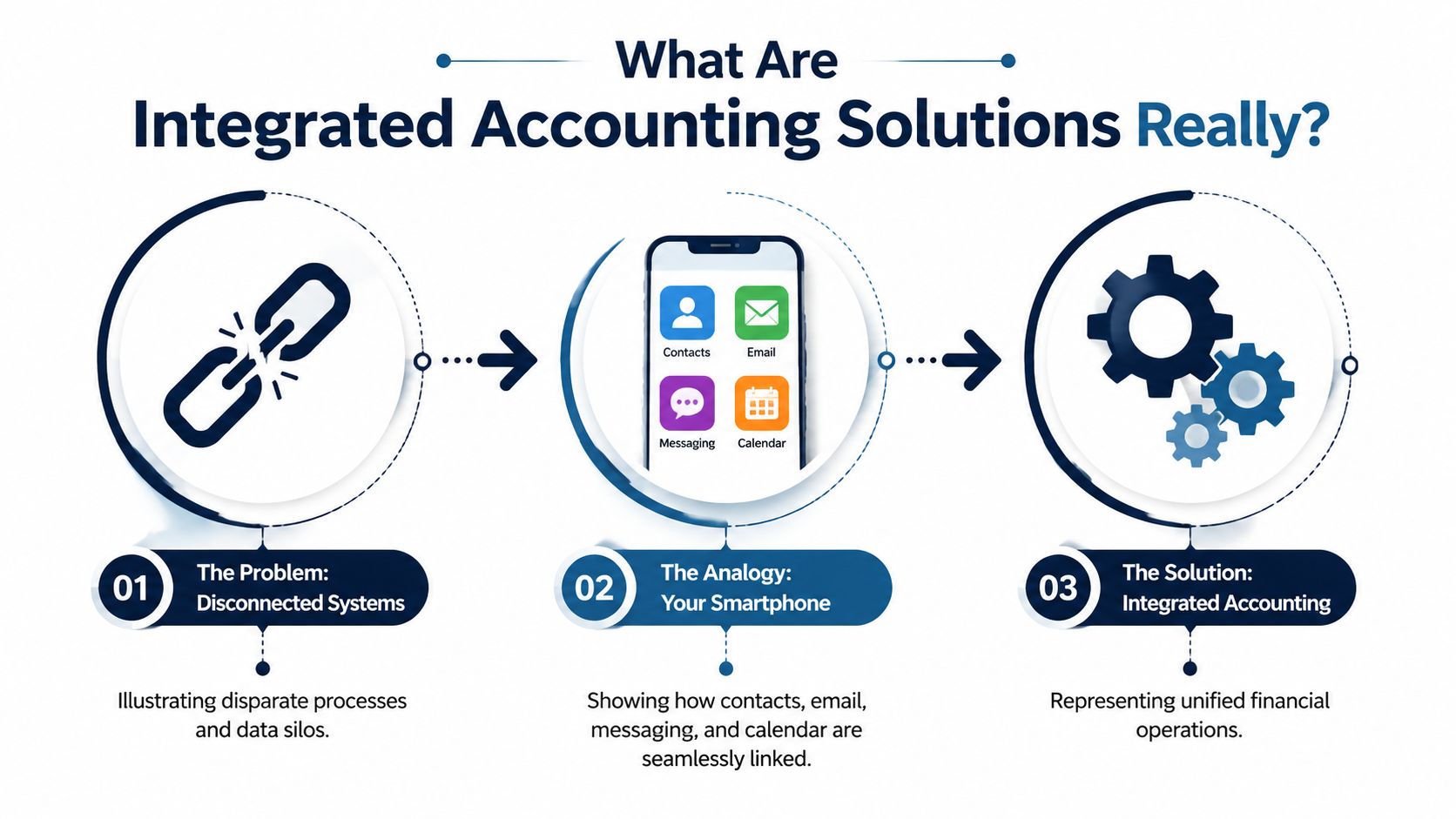
The old way versus the connected way
In a disconnected setup, a sale might start in your invoicing system, then someone updates a spreadsheet, then someone else enters part of that information into accounting, and payroll or inventory gets adjusted later.
Every handoff creates risk. Someone types the wrong amount. A date gets missed. A customer name is slightly different in two systems. Then the reports stop matching.
In an integrated setup, the system is built around a consolidated, real-time database. Once a transaction is entered, related records and reports across areas like the general ledger, accounts payable, accounts receivable, and payroll update automatically, which reduces manual data entry and supports timely reporting, as described in NetSuite's explanation of integrated accounting systems.
What people mean by single source of truth
This phrase gets tossed around a lot, so let's make it plain.
A single source of truth means the business isn't arguing over whose spreadsheet is right. The same transaction feeds the books, reports, and downstream processes. Sales, payroll, payables, and reporting all pull from connected records instead of separate islands of data.
Practical rule: If two people in your company can answer the same financial question with two different reports, you probably don't have a true single source of truth.
That doesn't mean every business needs one giant piece of software that does everything. Some companies use QuickBooks Online plus payroll, bill pay, reporting tools, and a CRM. Others use Xero, NetSuite, or an ERP. The key isn't the brand name. The key is whether the tools work together cleanly enough that your numbers stay consistent.
The Core Parts of a Connected Financial System
Most owners don't need to understand every technical detail. They do need to know the main moving parts, because each one answers a different business question.
This is the setup under the hood.
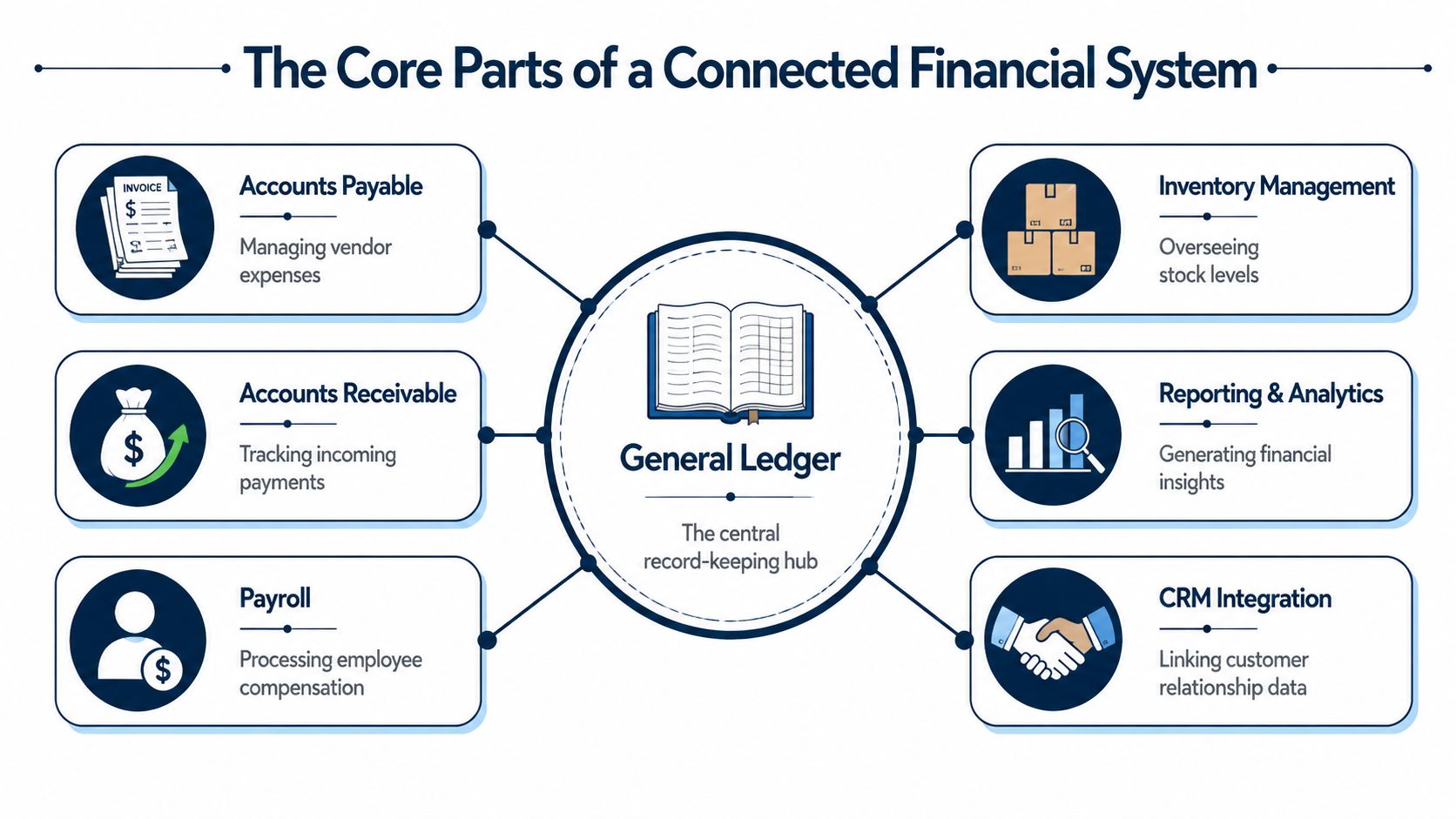
The general ledger is the hub
If the system were a wheel, the general ledger would be the center.
It's the main financial record. Income, expenses, assets, liabilities, and equity all land there in the right structure. If that core record is clean, reports can tell the truth. If it's messy, every dashboard built on top of it is just nicer-looking confusion.
Accounts payable and accounts receivable
These are the parts that track who you owe and who owes you.
Accounts payable helps you manage vendor bills, due dates, and outgoing cash. Accounts receivable handles invoices, customer payments, and collections. When those pieces connect to the ledger, the cash picture gets clearer. You can stop guessing whether you're profitable but cash-poor, or just slow to collect.
A service business often feels this difference quickly. A client invoice shouldn't live in one system while the accounting team waits to enter it somewhere else later.
Payroll and time data
Payroll is where many businesses get tripped up, because payroll touches wages, taxes, benefits, job costing, and compliance all at once.
If payroll isn't integrated, someone usually exports hours, cleans up the file, imports it elsewhere, and then posts summary entries into accounting. That creates room for errors and delays. If you're sorting through this piece, this plain-English guide to payroll integration helps explain what should connect and why.
Inventory, jobs, or project tracking
This part changes by industry.
A retailer or contractor may need inventory and job cost data tied closely to accounting. A law firm or consultancy may care more about time, utilization, and client profitability. A healthcare practice may focus on payroll, vendor costs, and collections timing.
What matters is that operational activity can flow into financial reporting without constant re-entry. Integrated accounting became especially important as businesses moved away from disconnected spreadsheets and standalone ledgers toward systems that create a single real-time financial record, including links across payroll, AP, AR, inventory, and the general ledger, as outlined in NetSuite's historical overview.
Dashboards and reporting
This is the part owners usually see first. Cash reports. Profit and loss. Budget versus actual. Customer or project profitability.
But reporting only helps if the underlying flow is solid. A pretty dashboard can't rescue bad process.
For businesses outgrowing basic bookkeeping, some teams look at ERP-style tools to connect finance with operations. If you're comparing options in that category, this overview on how to streamline operations with Dynamics NAV gives useful context on a more connected business system.
Real-World Benefits That Go Beyond the Numbers
Most owners don't buy integrated accounting solutions because they love software. They buy them because they want fewer surprises.
The true value shows up in everyday moments. A hiring decision feels less risky. A large purchase gets evaluated with more confidence. A month-end close stops swallowing half the next month.
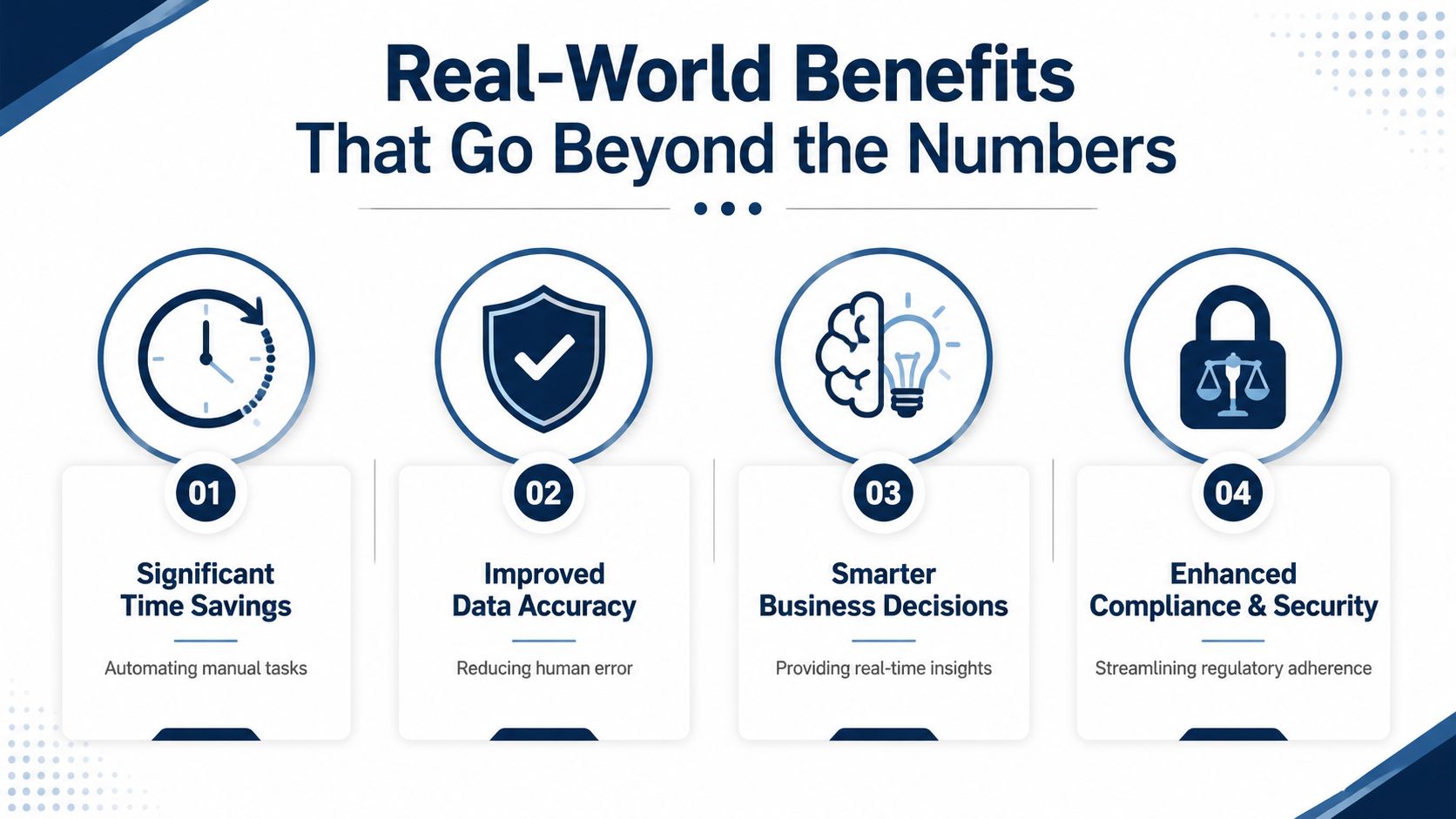
Time comes back first
Before integration, a manager sends over job numbers. Someone in the office updates a spreadsheet. The bookkeeper compares that sheet to accounting, then asks payroll for another export.
After integration, much of that handoff work disappears. The gain isn't abstract. It often means fewer late nights chasing mismatched entries and fewer Monday mornings spent asking, "Which file is the right one?"
Accuracy stops being a hope
Manual workflows are where duplicate entries, lost records, and small mistakes pile up.
Integrated systems are designed to automate repetitive data entry and reduce reconciliation delays. By centralizing data and allowing items like a sales invoice or payroll event to flow through the ledger automatically, they reduce the risk of manual errors, duplicate entries, and lost records, as explained in HBL CPA's overview of integrated accounting.
A business can survive bad news faster than it can survive unclear numbers.
That sounds harsh, but it's true. If a month is weak, you can respond. If the reports are wrong, you respond to the wrong problem.
Cash flow gets easier to read
A business owner doesn't need twenty reports. They need to know whether cash is tight, whether receivables are slipping, and whether upcoming payroll will create pressure.
Here is where connected systems help in a very human way:
- Before: You check the bank balance and hope it's enough.
- After: You can see open invoices, expected collections, upcoming bills, and payroll obligations in context.
That doesn't remove uncertainty. It reduces blind spots.
Profit becomes more visible
A lot of small businesses think they know their profitable work. Sometimes they're right. Sometimes the favorite client is the least profitable one because labor, revisions, rush fees, or material costs never got tied back properly.
A few examples make this clear:
- Construction firm: A project looked strong based on billings alone. Once labor and materials were tied in properly, the owner saw that change orders were saving the margin.
- Marketing agency: Revenue looked healthy, but one client consumed far more staff time than the retainer justified.
- Medical practice: Collections timing, staffing costs, and vendor spend became easier to compare side by side, which made scheduling and hiring decisions less reactive.
That kind of visibility helps owners act sooner. Raise prices. Change payment terms. Cut waste. Keep the clients and services that support the business.
Choosing the Right Solution and Partner
A lot of people start this search by asking which software is best. QuickBooks Online, Xero, NetSuite, Sage Intacct, Microsoft Dynamics, and industry-specific tools all have a place.
The better question is narrower. Which setup fits your business, your team, and your decision-making needs without creating more upkeep than value?
Software matters, but fit matters more
A ten-person consulting firm doesn't need the same setup as a contractor with crews, equipment, and job costing. A healthcare practice has different reporting and workflow needs than a real estate group.
That means the right answer often depends on:
- How your business makes money
- How complex payroll and operations are
- Whether you need project, inventory, or location-level visibility
- How much internal admin capacity your team has
Many businesses adopt digital tools but still struggle with integration complexity and data quality. The biggest challenge often isn't the lack of software features. It's turning automation promises into measurable improvements in areas like close speed, error reduction, or cash flow visibility for a small or midsize business, as discussed at Integrated Solutions CPA.
The partner is part of the solution
Owners often get stuck. They think they need to become software experts.
You don't.
You need someone who understands accounting workflow, data cleanup, reporting logic, and your industry's pressure points. A good partner helps you think through software selection, but also through chart of accounts design, payroll flow, approval steps, and what reports you'll use every month.
If you're still comparing basic platform options, this guide to choosing accounting software is a helpful starting point.
Good integration work isn't just connecting apps. It's deciding how your business should operate once the apps are connected.
What to look for in a partner
Some questions are simple and revealing:
| What to ask | Why it matters |
|---|---|
| Have you worked with businesses like mine? | Industry workflow affects setup more than most owners expect. |
| Who handles onboarding and cleanup? | A messy handoff creates messy books. |
| Will you help interpret reports, not just produce them? | Owners need decisions, not just documents. |
| How do you handle payroll, AP, AR, and reporting together? | These functions affect each other every week. |
One practical option in this space is MyOfficeOps, which provides bookkeeping, payroll integration, financial analytics, and CFO-level advisory for small and midsize businesses. The useful part isn't just the service list. It's that the accounting setup and the business advice sit together instead of in separate silos.
How to Avoid Common Implementation Mistakes
Most integration problems don't happen because the software is terrible. They happen because the rollout was rushed, the data was messy, or the team kept old habits while expecting new results.
That should be good news. These are avoidable mistakes.
Bad data doesn't get better when you automate it
If your customer names are inconsistent, your chart of accounts is cluttered, or jobs aren't coded the same way every time, integration will move that mess faster.
Owners sometimes assume the new system will clean everything up by itself. It won't. Software can automate flow. It can't decide whether your old data was entered with discipline.
Standard definitions come before automation
One team says a job is closed when work is done. Another says it's closed when the final invoice goes out. Payroll codes use one naming style, project tracking uses another, and the CRM uses a third.
Then someone connects the systems and hopes it sorts itself out.
A major operational risk is failing to standardize data definitions and controls across connected systems. Rushed rollouts can increase exposure to bad-field mappings and weak audit trails, especially in industries like construction and healthcare where reporting errors can distort cash flow decisions, according to Integrated Companies' discussion of integration risk.
The fastest way to lose trust in a new system is to automate confusion.
People need new habits, not just new logins
A connected system changes daily behavior. Sales may need to enter customer records more carefully. Managers may need to approve expenses differently. Admin staff may need to stop keeping shadow spreadsheets on the side.
If no one trains the team on those new habits, the old workarounds come back fast.
Here is a simple roadmap that keeps the transition grounded.
Simple Implementation Checklist
| Phase | Key Action | Why It Matters |
|---|---|---|
| Before setup | Clean customer, vendor, employee, and chart of accounts data | Clean input makes the new reports more reliable |
| Before setup | Decide naming rules and coding standards | Consistent definitions reduce mapping problems |
| System design | Map how invoices, bills, payroll, and approvals should flow | The system should match real work, not wishful thinking |
| System design | Choose which reports owners and managers will actually use | Reporting should support decisions, not create noise |
| Training | Show each role what changes in their daily process | People need clear expectations, not vague announcements |
| Go-live | Test a small set of transactions end to end | Early testing catches workflow issues before they spread |
| After launch | Review exceptions, errors, and manual workarounds regularly | This is how you keep the system honest |
| Ongoing | Keep one owner accountable for process discipline | Shared ownership often becomes no ownership |
A better way to phase the rollout
Trying to integrate everything at once sounds efficient. It usually isn't.
A calmer sequence works better:
- Start with the financial core: Get bookkeeping, AP, AR, and bank processes clean.
- Add payroll and job or project detail: Bring in the pieces that most affect weekly decisions.
- Layer on dashboards and forecasting: Build reports after the transaction flow is trustworthy.
That phased approach helps owners see progress without betting the whole back office on one stressful launch.
How a Partner Delivers Financial Clarity
The software is only part of the story. The primary work is turning scattered financial activity into a system you can trust, then using that system to make better decisions.
A good partner starts by looking at what's happening now. Where does data enter the business? Who touches it? Which numbers do you trust, and which ones always seem to need "a little cleanup" before a meeting? From there, the work becomes practical. Clean up the books. Connect the right systems. Train the people involved. Build reporting around the choices the owner has to make.
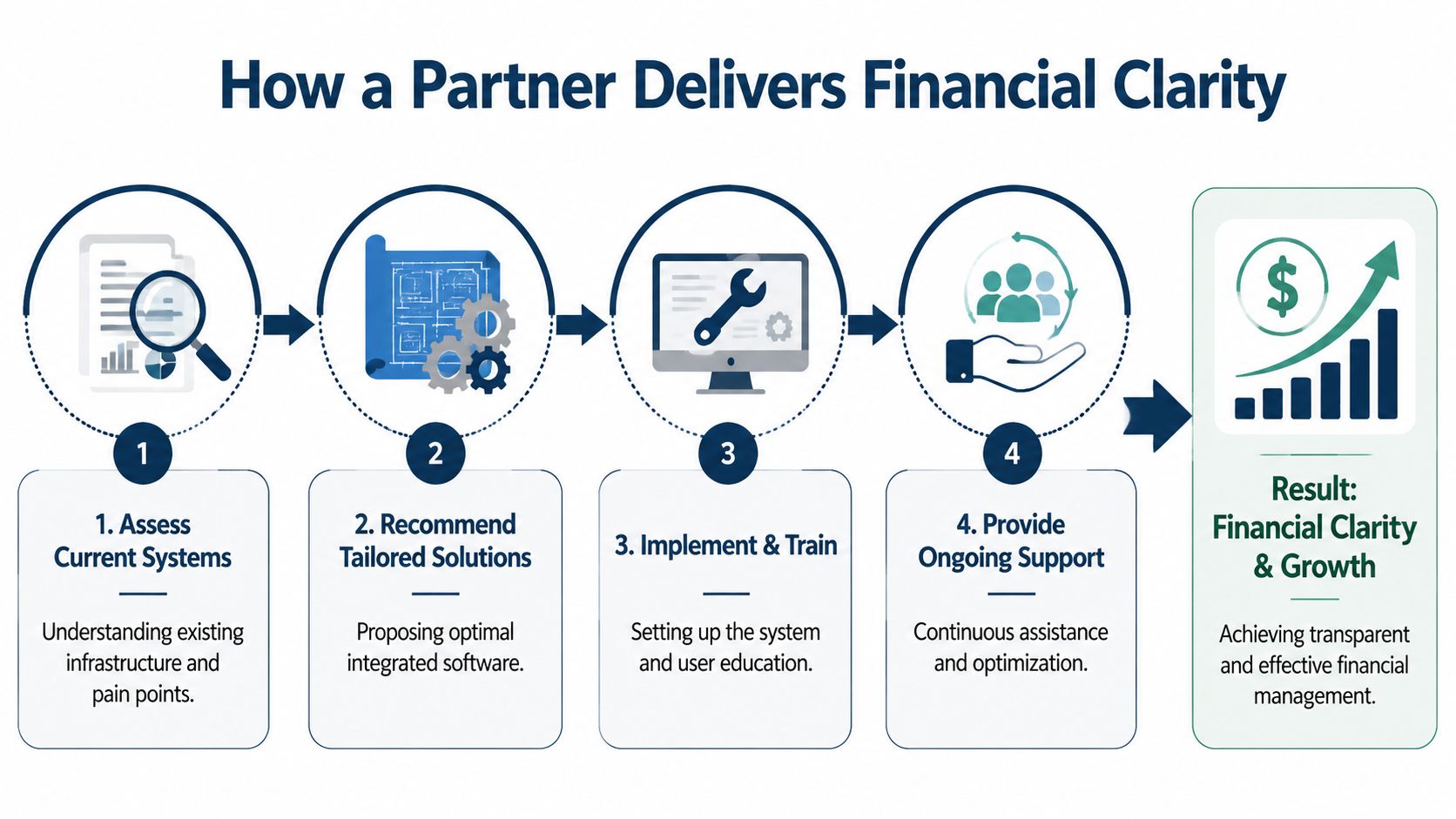
That kind of support matters most after go-live. Businesses change. New services get added. Staff turns over. Reporting needs shift. If nobody is watching the system, small process drift turns into unreliable numbers again.
For owners who want outside help without building a full internal finance department, outsourced accounting support for small business can fill that gap. It combines ongoing bookkeeping and reporting with a more useful layer of guidance around cash flow, profitability, and planning.
The practical path is usually simple. First, get the core accounting right. Then use better reporting to improve profit decisions. After that, use clean financial data to plan growth, transition, or even a future sale. That's how integrated accounting stops being a software project and starts becoming a management tool.
If you're dealing with scattered reports, delayed answers, or numbers that don't quite line up, MyOfficeOps can help you sort out the accounting side in plain English. The team works with small and midsize businesses on bookkeeping, payroll integration, reporting, and advisory support so owners can spend less time chasing data and more time running the business.