
A 12-person HVAC company outside Philadelphia sits down in March to review its January-through-December budget. The plan says fuel costs should be steady, two large service contracts should land on schedule, and payroll should follow the original staffing plan. None of that is true anymore. The contracts moved, fuel got more expensive, and a new hire changed the payroll line before the owner had time to update the spreadsheet.
That budget isn't helping the owner decide whether to hire another technician, adjust service pricing, or protect cash. It's describing a business that existed months ago.
Rolling forecasts solve that problem by keeping the view pointed forward. Each month, the business replaces the closed period with actual results and adds a new future period, creating a living outlook instead of a plan that dies after January. By the end of this guide, you'll know how rolling forecasts work, how they compare with static budgets, whether your company is ready, how to build one in the first 90 days, and where a hybrid approach makes more sense.
The Moment Every Owner Recognizes
The HVAC owner isn't facing a finance theory problem. They're facing a decision problem.
The question isn't, “Did January match the budget?” That answer may be useful for a report, but it doesn't tell the owner what to do next. The useful questions are more immediate: Can the company afford another technician? Should it delay equipment purchases? Will collections cover payroll during a slow stretch? Does the business need a line of credit before cash gets tight?
A static annual budget can't answer those questions well after the assumptions have changed. It can show the gap between the original plan and actual results, but that's backward-looking. The owner needs a current estimate of what the next several months may bring.
Practical rule: A budget explains where you expected to go. A forecast helps you decide what to do now.
Think of the difference between driving by watching the rearview mirror and driving with the windshield in front of you. The rearview mirror still matters. You need it to understand what just happened. But it won't show the traffic ahead, the road closure, or the turn you need to make.
Rolling forecasts give a small business that windshield view. They refresh the outlook as new actuals arrive, known contracts change, employees join or leave, and customers pay earlier or later than expected. The model won't remove uncertainty. It will make uncertainty visible soon enough to act on it.
The approach became mainstream rather than niche by the 2020s. A 2024 industry survey reported that 49% of companies used rolling forecasts, up 2 percentage points from the prior year, while 45% still relied on static methods, according to Pigment's overview of rolling forecasts. That split matters for SMB owners because it shows the planning model is no longer limited to large corporate finance departments.
The rest of this guide stays practical. You'll get a plain-English definition, a side-by-side budget comparison, a readiness test, a first-90-days build plan, real decision scenarios, and a candid look at the process's weak spots.
What Rolling Forecasts Actually Are
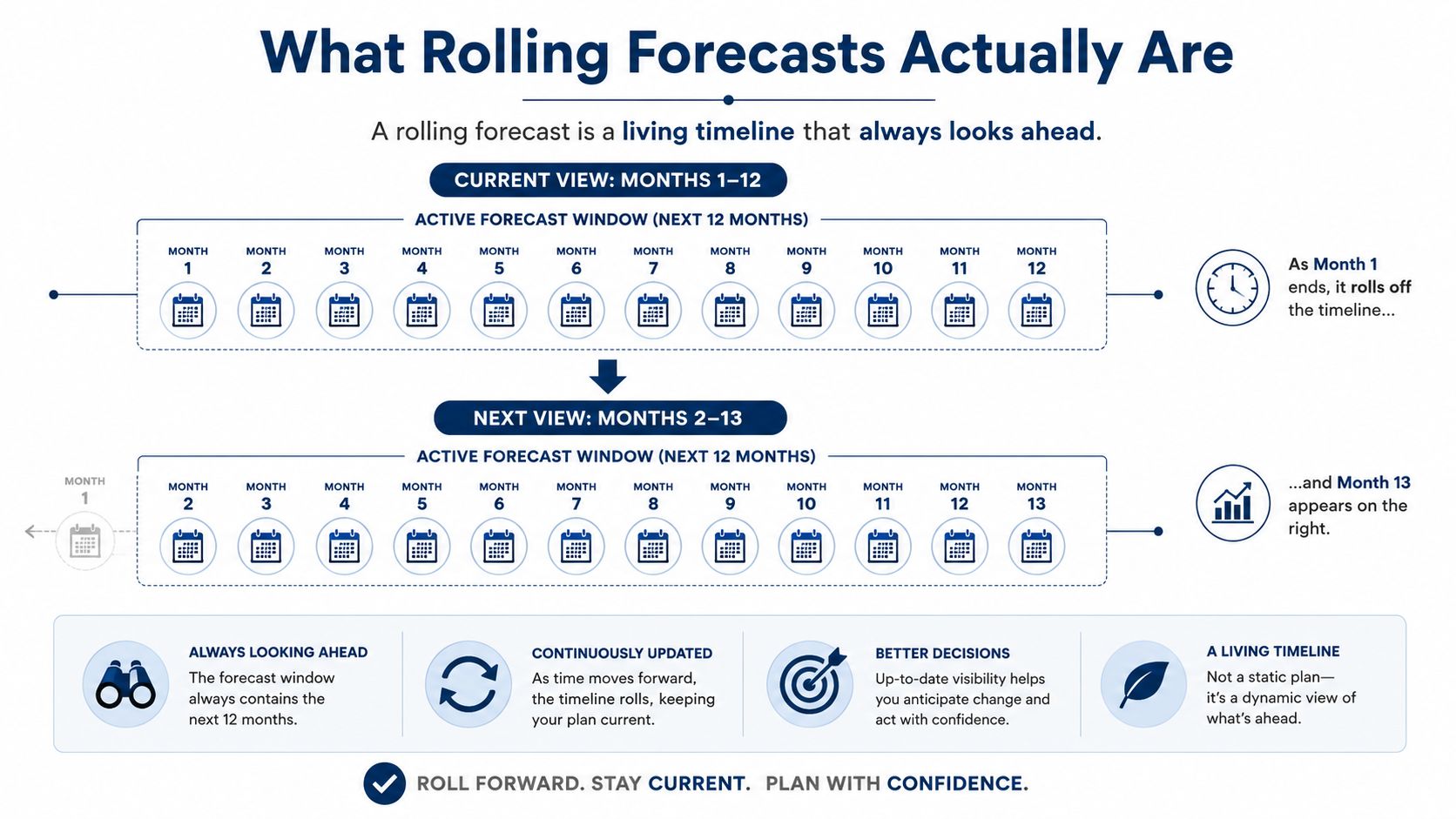
A rolling forecast is a financial outlook that always covers the same amount of time ahead.
Suppose your company starts with a 12-month forecast. When January ends, January leaves the forecast and actual January results take its place in the records. A new month, January of the following year, gets added at the far end. The business still has a full 12 months of forward visibility.
That's the whole mechanical idea. The window slides forward as time passes. Authoritative guidance from Microsoft on recurring forecast processes describes updates that can run daily, weekly, or monthly, including a process scheduled for the first day of each month. For most SMBs, monthly or quarterly updates are enough.
The windshield view
An annual budget is like writing down the route before leaving home and refusing to change it. A rolling forecast is the windshield. It keeps showing the road ahead while preserving the trip history behind you.
Most businesses use a 12- to 18-month horizon, refreshed monthly or quarterly. A 12-month horizon works well for a company making near-term hiring, pricing, and cash decisions. An 18-month horizon can help when contracts, staffing plans, or capital choices take longer to develop. A 24-month model may be appropriate in businesses with long planning cycles, but it creates more room for weak assumptions.
You can find a related plain-English explanation in MyOfficeOps' guide to financial forecasting. The point isn't to predict every future transaction. The point is to maintain a useful forward view.
Drivers beat guesswork
A pure extrapolation says revenue will follow a broad growth pattern because it did something similar before. That can be quick, but it doesn't tell you what changed.
A driver-based forecast connects financial results to operating activity. A service firm might use revenue per technician, billable utilization, average ticket size, close rate, or recurring contract value. When the number of billable hours changes, the revenue projection changes. When headcount changes, payroll and cash needs change with it.
For most SMBs, driver-based forecasting creates the decision value. Keep the model focused on the few operating measures that move revenue, costs, and cash. A complicated spreadsheet with dozens of assumptions isn't more professional. It's harder to maintain and easier to ignore.
Rolling Forecasts vs Static Budgets
A static budget still earns its place. It sets goals, controls planned spending, supports board discussions, loan requirements, and tax planning. The problem starts when an owner treats that original plan as a current prediction after seasonal demand, invoice timing, or staffing has changed.
| Criterion | Static Budget | Rolling Forecast |
|---|---|---|
| Time horizon covered | Fixed period that gets shorter as the year advances | Constant forward-looking window |
| Update frequency | Usually created once for the year | Refreshed monthly or quarterly |
| Effort to maintain | Simple after approval, but difficult to rebuild | Ongoing work, with a repeatable update cycle |
| Accuracy after 90 days | Depends on how stable the business remains | Incorporates recent actuals and changed assumptions |
| Fit with seasonal businesses | Useful as a baseline, weak when seasonality shifts | Better suited to changing demand and timing |
| Cash-flow decision usefulness | Shows the original plan | Shows the current expected cash path |
| Cost to build | Lower initial effort | Higher ongoing effort |
| When reality diverges | Variance grows until someone formally revises the plan | Assumptions can be changed in the next update |
Rolling forecasts respond faster. Static budgets cost less to maintain and are easier to explain. That tradeoff matters in a 10-person company, where bookkeeping, payroll, customer work, and operations often sit with the same people.
A steady business with predictable revenue and annual decisions may not need a monthly rolling process. A service firm facing seasonal demand, lumpy invoices, project billing, or frequent hiring decisions usually benefits from one. Market Edge forecasting methods can help owners choose an approach that matches demand patterns, but no method replaces assumptions grounded in how the company operates.
The practical answer is often a hybrid. Keep the annual budget for goals, spending limits, and formal commitments. Use the rolling forecast for current cash expectations, staffing choices, and changes in customer timing. That approach avoids rebuilding the budget every time one new hire or delayed invoice changes the near-term picture.
Pair the forecast with budget versus actual reporting. Budget-versus-actual reporting shows where the plan missed. The rolling forecast shows what those misses mean for the months ahead.
Use the table as a diagnostic, not a verdict. If the static budget fails around cash, seasonality, hiring, or customer timing, a rolling process may justify its upkeep. If the business stays stable, the annual budget may remain the better tool.
When an SMB Is Ready to Make the Switch
Don't choose rolling forecasts because a finance software sales page says every modern company needs one. Choose them because your decisions have outgrown an annual plan.
Start with the operating signals. A business with roughly 10 or more employees may have enough moving parts for monthly forecasting to pay off, especially when the founder is making hiring, pricing, and cash decisions personally. Headcount alone doesn't decide the issue. A small company with stable revenue may be fine with less frequent updates, while a smaller project business may need more visibility.
Cash behavior matters more than revenue size. Seasonal swings above 30%, lumpy project billing, or receivables that take several months to arrive can make a static budget misleading. So can a business that keeps rewriting its plan more than once a quarter because the original assumptions stop matching reality.
The softer warnings
Some signs show that the company is already doing forecasting work, just without a reliable system:
- Surprise renewals: Vendor contracts or software bills appear after the budget was approved.
- Financing requirements: A lender asks for forecasts or loan covenants refer to forecast performance.
- Monthly variance requests: A controller or bookkeeper keeps asking management to explain the same monthly gaps.
- Founder intuition: Leadership makes cash or hiring decisions from memory because current projections aren't ready.
- Repeated rework: Someone keeps editing totals without changing the operational assumptions underneath them.
If those tasks keep appearing, the business is already paying for forward-looking analysis. It just isn't capturing the benefit in one usable model.
A quick self-test
Mark each signal you recognize:
- Outdated plan: Does the budget feel wrong by the second quarter?
- Frequent revisions: Do you revise forecasts more than twice a year?
- Unsteady cash: Is cash flow hard to predict?
- Slow planning: Does planning consume too much of the team's time?
- Gut decisions: Do owners rely on instinct more than recent data?
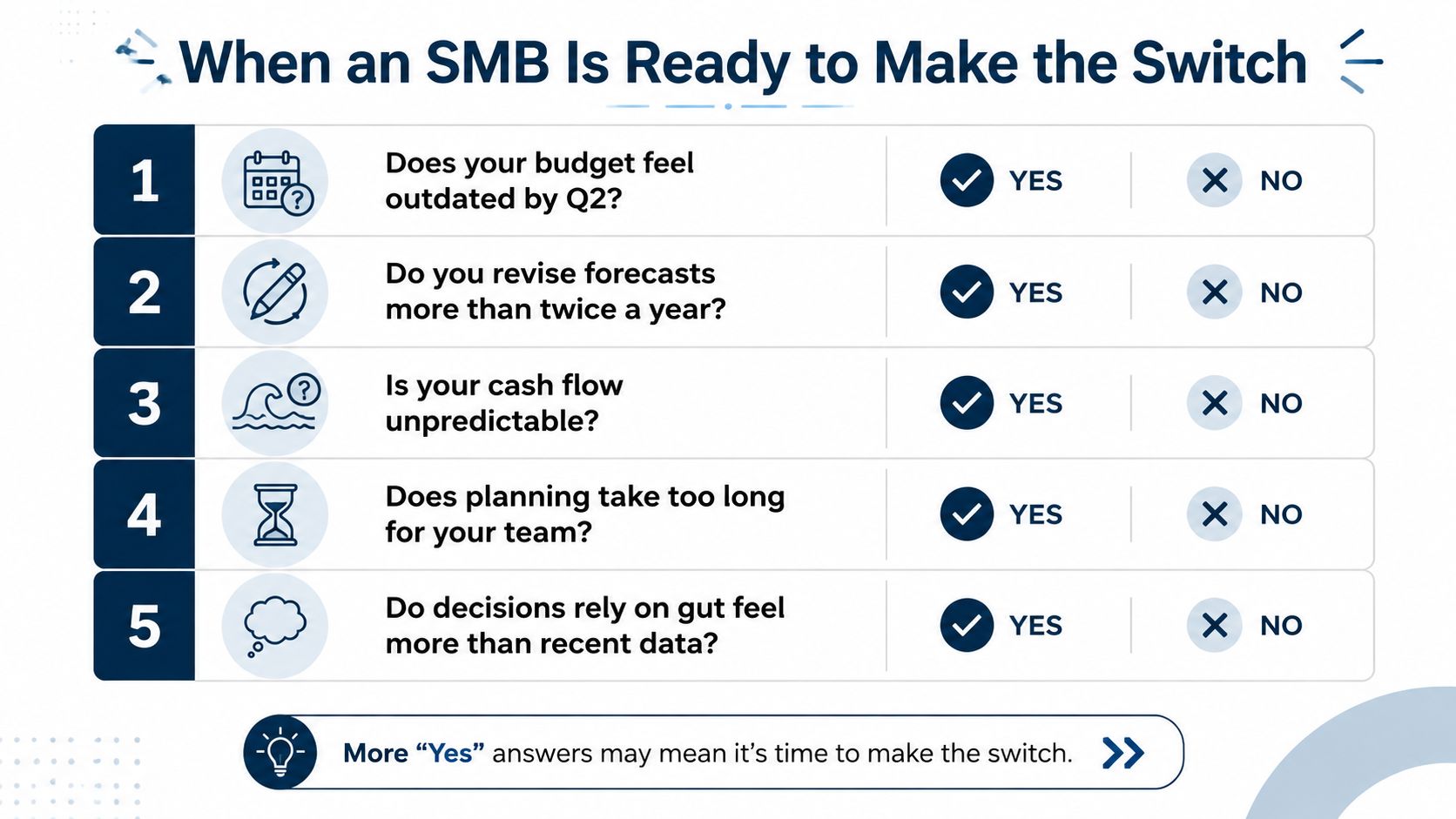
If only one or two signals apply, a quarterly refresh may be enough. If several apply, start with a simple rolling forecast rather than waiting for a perfect system.
How to Build Your First Rolling Forecast
Your first forecast shouldn't become a finance transformation project. A small team needs a repeatable process that one person can own and other people can support.
Start with the window and cadence
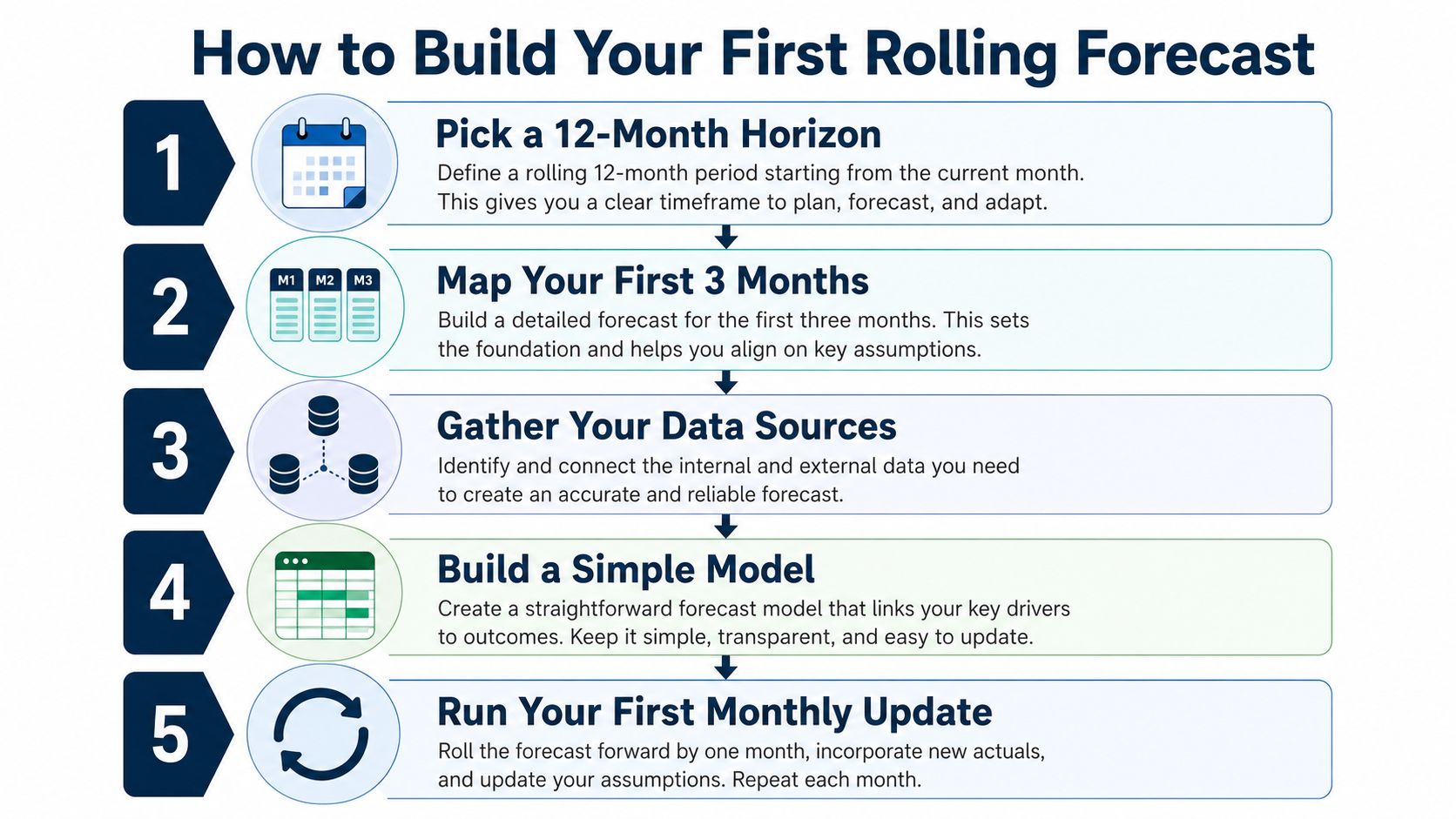
Choose a 12-month horizon unless your decisions clearly require something else. Monthly updates should be the default for a business with active hiring, shifting demand, or tight cash. A very lean team may begin with quarterly updates, provided the owner understands that the outlook will change less often.
Then select three to five drivers. Good choices include:
- Billable hours: Useful for agencies, consultants, trades, and professional services.
- Average project size: Useful when each contract has a material effect on revenue.
- Close rate: Useful when the sales pipeline drives staffing and cash decisions.
- Headcount: Essential for payroll, capacity, and hiring scenarios.
- Recurring contract value: Useful when service agreements provide a stable revenue base.
Don't forecast every account in detail. Start with the measures that explain how money enters and leaves the business.
Build a plain template
Use one spreadsheet or a lightweight FP&A tool. The first version needs three sections:
- Actuals: Closed-month results from the accounting system.
- Forecast: Future periods driven by operating assumptions.
- Variance: The difference between what you expected and what happened.
Populate the first month with real numbers. Project the next 11 months from the selected drivers, last quarter's results, and known pipeline. Separate confirmed work from probable work. Don't treat a hopeful sales conversation like signed revenue.
Run the first refresh
Within 30 days, compare the forecast with actual results. If revenue missed, do not just overwrite the revenue total. Ask whether billable hours, average project size, close rate, or collection timing caused the gap. Change the driver that moved.
One owner can run the meeting. A bookkeeper can pull actuals, while the person responsible for sales, staffing, or operations supplies the assumptions. Once the template works, the full monthly cycle should take four to six hours, as outlined in the operating plan for this process.
Owners also need to connect forecasting with financing and growth choices. Guidance on using capital tools to forecast business growth can help frame borrowing and expansion decisions around expected cash needs rather than urgency.
For practical software considerations, review budgeting and forecasting software options, but don't buy a platform before you know which decisions the model must support.
Using the Forecast to Make Real Decisions
A forecast earns its keep only when it changes a decision. The spreadsheet itself has no value if it sits in a folder while the owner keeps guessing.
Pricing a new service
A design studio is considering a new retainer tier. The owner models three price points against expected utilization, delivery capacity, and margin. The lowest price produces more interest but leaves less room for contractor costs. The higher price protects margin but may slow sales.
The owner reads the utilization and cash lines for the next quarter and chooses the price that keeps cash positive without overloading the team. The forecast didn't choose the price. It showed the tradeoff clearly.
Approving a hire
A 12-person agency is considering a senior project manager. The owner builds a six-month scenario using the fully loaded employment cost, expected ramp time, current bookings, and the additional bookings needed to break even.
The model shows that the hire is affordable only if certain work closes within the expected period. The owner makes the offer with a clear sales condition and a review date instead of treating the hire as an emotional bet.
Preparing for a slow quarter
A contractor knows a slow quarter is coming. The rolling view shows when the cash trough is likely to arrive and how customer payment timing affects the bank balance. The owner negotiates a retainer with the largest client and arranges a line of credit before the cash is needed.
The key forecast line is ending cash by month. That line triggers action while the company still has choices.
| Scenario | Forecast Input Read | Decision Made |
|---|---|---|
| New design retainer | Utilization, price, delivery cost, and near-term cash | Select a price that protects cash and capacity |
| Senior project manager | Fully loaded cost, ramp time, bookings, and break-even timing | Approve the hire with a bookings test |
| Contractor slow quarter | Collections, client retainer revenue, and ending cash | Negotiate recurring work and arrange financing early |
That's the operating difference. The value isn't the report. The value is the pricing change, hiring decision, vendor negotiation, or financing move the report makes possible.
Where Rolling Forecasts Fall Short
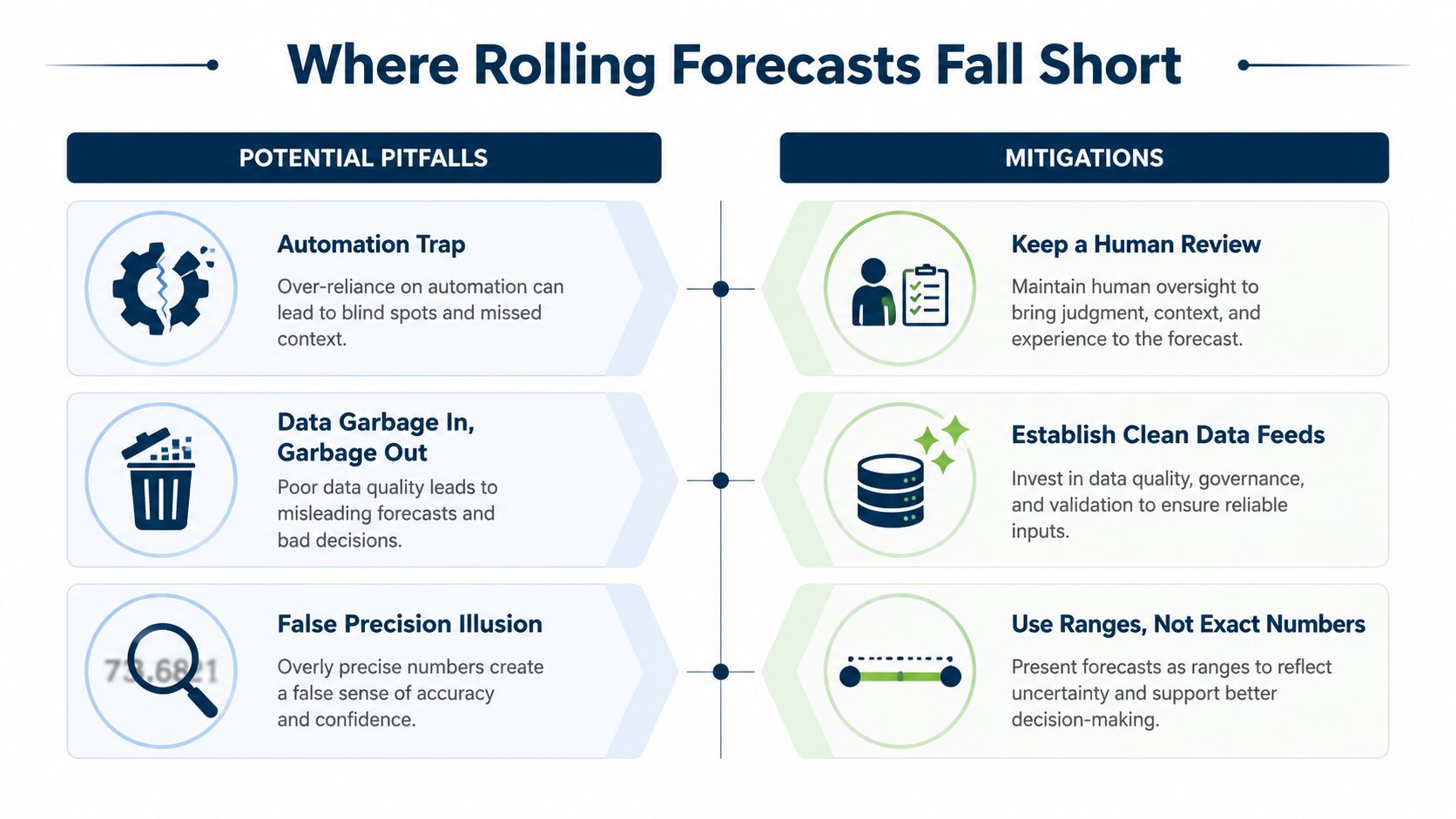
Rolling forecasts expose a small business's weak data habits quickly. A 12-month model needs dependable inputs from accounting, payroll, and sales. If those feeds break, someone exports files, fixes categories, and reconciles numbers by hand. The monthly close turns into a cleanup project, and the forecast can be stale before anyone reviews it.
Don't confuse detail with accuracy
Forecast confidence usually drops as the horizon extends. Recent coverage reports that 63% of surveyed companies struggle to forecast accurately beyond six months, while 53% take more than five days to finalize each update, according to Lumel's coverage of forecasting beyond the annual budget.
The outer months still have a job. Treat month eleven as a directional view, not a promise. Use specific assumptions for near-term revenue, staffing, and collections, then use wider ranges farther out. False precision gives an owner less useful guidance than an honest range.
Bandwidth creates another constraint. A two-person finance function can run a rolling forecast, but someone must own the refresh and leadership must protect the time. Without that discipline, the model becomes another spreadsheet that worked at launch and faded from use.
The hybrid model usually wins
For most SMBs, I recommend a hybrid approach:
- Keep a lean annual budget for board reporting, loan covenants, tax planning, and broad targets.
- Use a six-month rolling forecast for operating decisions, hiring, pricing, collections, and cash management.
- Expand to a fuller rolling model only after management reviews it consistently and acts on the results.
The 2024 adoption data supports caution. Usage reached 49%, while other survey coverage reported that only 25% of organizations use rolling forecasts as a primary planning tool, as reported in the same Lumel analysis. Adoption does not prove disciplined use. For a 10-person service firm, a reliable hybrid usually beats a detailed model nobody updates.
Bringing It All Together
A small business can turn rolling forecasts into a practical operating habit with seven moves:
- Confirm cash volatility: Identify seasonal swings, collection gaps, project timing, and upcoming obligations.
- Choose the horizon: Start with six to 12 months, based on how far ahead your real decisions require visibility.
- Pick the drivers: Select four to six revenue and cost drivers, not every line in the chart of accounts.
- Use the tool already available: Build one shared template in a spreadsheet or lightweight planning tool before adding complexity.
- Assign ownership: Set a fixed monthly cadence and name the person responsible for gathering actuals and updating assumptions.
- Tie the meeting to a decision: Review a price, hire, vendor, collection plan, or financing need every cycle.
- Review the model choice: Revisit the hybrid versus full-rolling approach every six months.
The habit that separates useful forecasts from fancier spreadsheets is simple:
Every forecast cycle must end with a named decision, a dollar amount, and an owner.
No decision means the meeting didn't happen. A forecast should move work forward, not just produce another report.
Pick one upcoming decision this month, a price change, a hire, or a vendor renegotiation. Run it through a six-month rolling forecast, write down the assumptions, and assign one person to act on the result.
MyOfficeOps helps small and midsize businesses turn clean bookkeeping, payroll data, budgeting, and financial reporting into practical forecasting and CFO guidance. Visit MyOfficeOps to discuss the next decision your business needs to make with better numbers.