
The bank statement says one thing. Your general ledger says another. The owner wants to know whether cash is available, payroll is covered, and the month can be closed before lunch. Someone opens a spreadsheet, starts highlighting transactions, and hopes the difference is just a timing issue.
That moment is where balance sheet reconciliation earns its keep. Done properly, it replaces guessing with a clear explanation of what each balance contains, what remains open, and what needs to be corrected.
Why Your Numbers Don't Match and What That Really Means
A balance sheet reconciliation is a comparison between each balance sheet account and the records that support it. Cash gets checked against bank statements. Accounts receivable gets tied to the customer sub-ledger. Loans get checked against lender records and repayment schedules. Equity gets traced through contributions, distributions, and retained earnings activity.
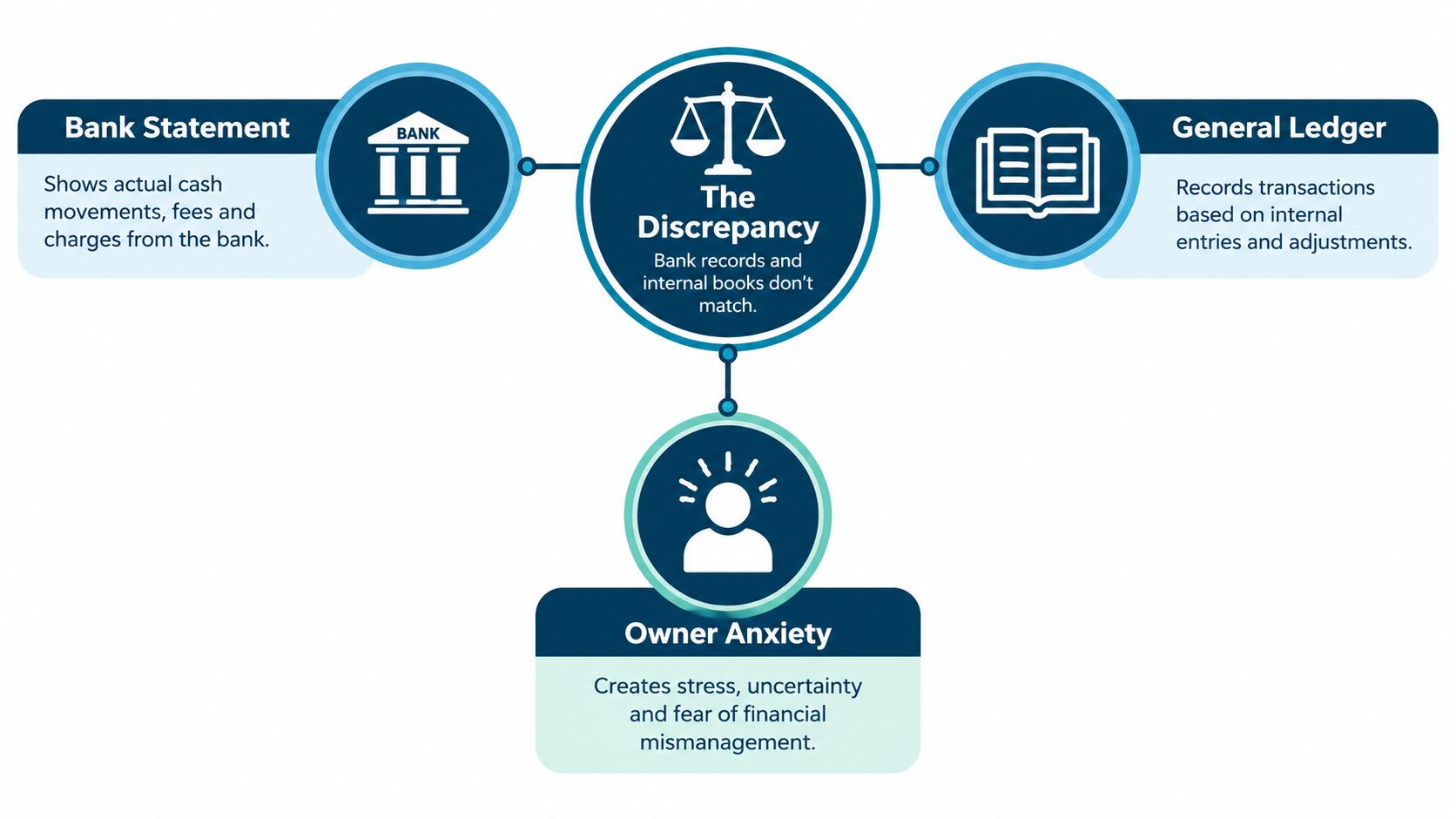
The supporting record might be an external statement, an internal sub-ledger, an invoice, a contract, an inventory count, or another system that holds the original detail. The point isn't just to make two totals look alike. You need to explain why they differ and record an adjustment when the books are wrong.
Practical rule: A difference isn't automatically an error. An unexplained difference is the problem.
A deposit can sit in transit. A check can be recorded in the books before it clears the bank. A credit card fee may post after the purchase. These timing differences are normal, but they shouldn't remain open forever. Each one needs an owner, a reason, and a plan for clearing it.
The balance sheet is a snapshot at a specific date, so a total without support doesn't tell the whole story. Reconciliation confirms the accuracy, completeness, and validity of the assets, liabilities, and equity shown in that snapshot, as explained by Stanford's balance sheet account reconciliation guidance.
That makes reconciliation a control, not a cosmetic spreadsheet exercise. It compares the general ledger with external or supporting records and serves as the final checkpoint before financial statements are finalized, according to this financial reconciliation overview from HighRadius.
If you want a plain-language refresher on the statement itself, this guide on how to read a balance sheet is a useful starting point. Once the account balances are understood, the reconciliation work becomes much easier to organize.
The Monthly Reconciliation Workflow That Actually Works
A reliable workflow doesn't need to be fancy. It needs to make it hard for an account to disappear, an old exception to be forgotten, or a late transaction to slip into a closed period.
Start with a controlled account list
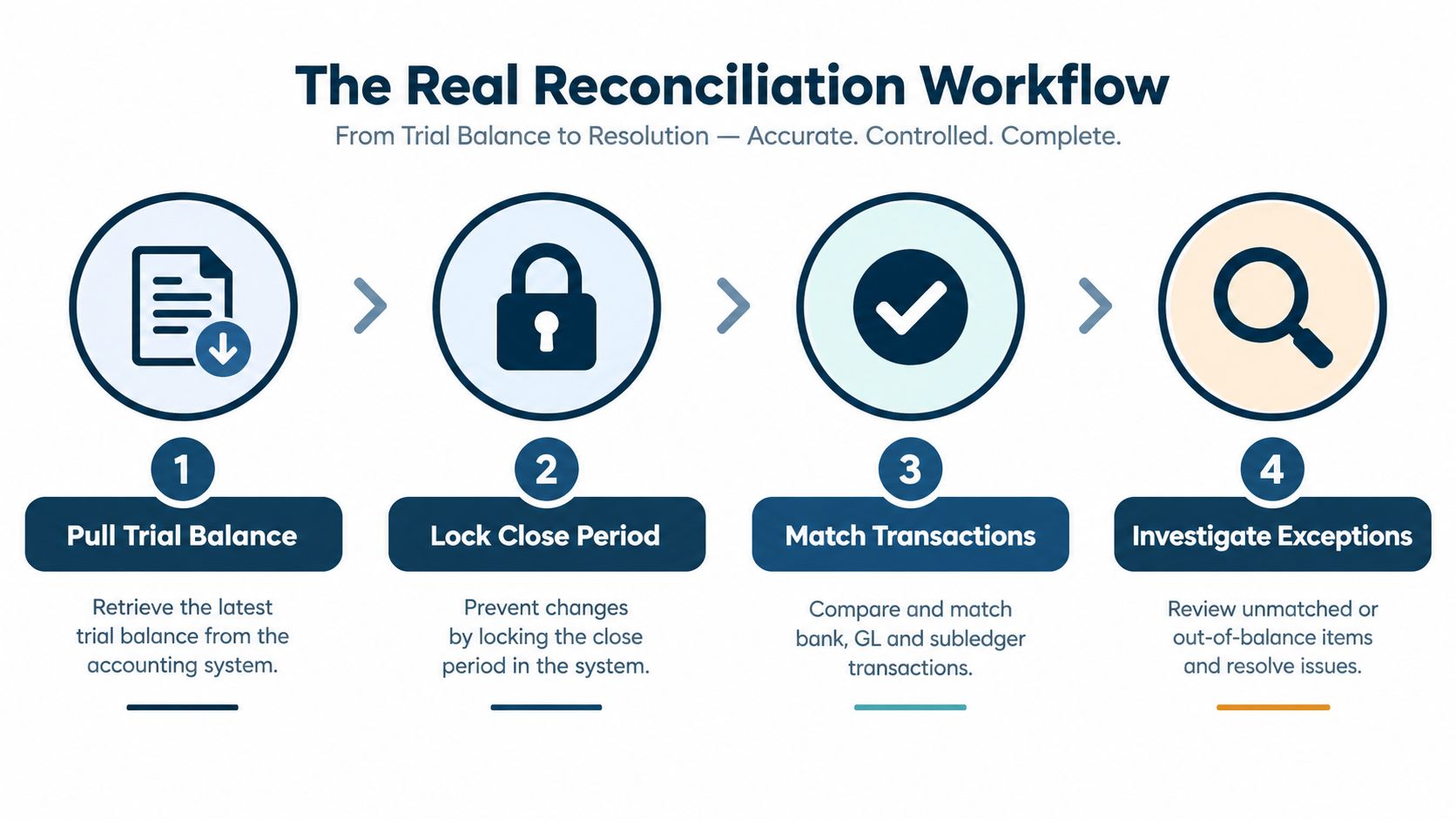
Pull the month-end trial balance and list every balance sheet account that needs support. Assign one person to each account, even if the same person owns several. Record the account owner, due date, supporting source, review status, and open items in a reconciliation log.
Lock the close period before matching. If people can keep posting into the month while you're reconciling it, you'll keep chasing a moving target. Define the cutoff, tell the operating team, and document any approved late entries.
Work from risk, not from account number
Start with accounts that can create the biggest problem if they're wrong. Cash, credit cards, payroll liabilities, taxes, debt, inventory, and intercompany balances usually deserve early attention. Smaller prepaid or accrual accounts can follow once the high-risk work is under control.
Use the same account template each month. Include the ending ledger balance, supporting balance, reconciling items, preparer sign-off, reviewer sign-off, and links to evidence. A good template lets you compare the current month with the prior month without rebuilding the file from scratch.
Match, investigate, and document
Match transactions from the source record to the general ledger. Where possible, use rules based on date, amount, reference number, vendor, customer, or bank description. Batch similar accounts together, but don't batch the explanation. Each variance still needs its own reason and support.
A practical sequence looks like this:
- Pull the trial balance: Save the period-end version so the starting point can't change without a record.
- Lock the close period: Set the posting cutoff and control late entries.
- Match source to ledger: Compare line by line, then review the ending balance.
- Clear exceptions: Trace missing items, correct errors, and attach support.
- Review and sign off: Have someone else challenge unusual balances and old open items.
Manual reconciliation takes a large share of finance time. Teams report spending 30% to 70% of their time on manual reconciliation, with reported manual error rates of 10% to 20%. Rule-based automation is associated with reducing those error rates to about 1% to 2%, as described in Abacum's account reconciliation software analysis.
Automation helps with repeatable matching. It doesn't decide whether a stale deposit is real, whether an accrual is still needed, or whether a journal entry has the right business explanation. Leave those judgments visible in the reconciliation file.
Walking Through the Big Accounts One at a Time
Every account has a different failure pattern. A clean reconciliation starts by knowing what good support looks like for that account, rather than applying one generic matching rule to everything.
Cash and bank accounts
Match the ledger to the bank statement, then list deposits in transit, outstanding checks, bank fees, interest, and items the bank recorded but the books missed. If the difference is caused by a fee, post the fee. If it's a deposit in transit, keep it on the reconciliation and confirm that it clears in the next period.
For example, a payment may appear in the ledger on the final day of the month but reach the bank after the statement cutoff. That's a timing difference. A bank charge with no corresponding ledger entry is a missing transaction.
A clear bank reconciliation process should show both the book balance and the adjusted balance, not just a checkmark that says “done.”
Accounts receivable
Tie the accounts receivable sub-ledger to the control account in the general ledger. Then review the aging, unapplied cash, credit memos, disputed invoices, and customer balances that have been sitting unchanged.
A customer payment applied to the wrong invoice can make one customer look current while another appears overdue. The total may still look reasonable, but the detail is wrong. Fix the application and investigate whether the problem points to a wider posting issue.
Accounts payable
Compare the AP sub-ledger to the general ledger and review vendor statements for major suppliers. Look for invoices received but not entered, payments posted to the wrong vendor, duplicate bills, and credit notes that never reached the books.
A vendor may show an invoice that isn't in your AP listing because it arrived after your internal cutoff. That doesn't automatically mean you should backdate it. Decide which period owns the liability, document the choice, and post it consistently.
Loans and credit facilities
Use lender notices and the amortization schedule. Separate principal from interest, check the current portion against the long-term portion, and confirm that payments agree with the lender's record.
A common break occurs when the payment clears the bank as one amount but the ledger posts the full amount to principal. The cash may reconcile while the debt and interest balances remain wrong.
Inventory
Compare the recorded inventory to count records and investigate differences caused by damage, shrinkage, receiving delays, returns, or items shipped but not relieved from inventory. Review the reserve as well. A count can agree with the system while slow or unusable stock still needs attention.
Equity
Trace owner contributions, distributions, share activity, and retained earnings. Equity often gets treated as a plug, which is dangerous. A balance that makes the balance sheet balance isn't evidence that the underlying entries are correct.
| Account | Match Against | Common Variance Culprit |
|---|---|---|
| Cash | Bank statement and cash activity | Deposits in transit, outstanding checks, bank fees |
| Accounts receivable | Customer sub-ledger and aging | Misapplied receipts, credits, missing invoices |
| Accounts payable | Vendor sub-ledger and statements | Unentered bills, duplicate invoices, payment errors |
| Loans | Lender notice and amortization schedule | Principal and interest split errors |
| Inventory | Count records and inventory system | Receiving delays, shrinkage, damaged stock |
| Equity | Ownership records and retained earnings rollforward | Unrecorded distributions or owner entries |
How Reconciliation Timing Shapes Your Close
A fast close isn't valuable because the calendar looks impressive. It's valuable because the owner gets usable information while there's still time to act. If cash, debt, receivables, or liabilities remain unresolved, an early report can be less useful than a slightly later report with clear support.
APQC-based reporting puts the range in practical terms. Top-performing organizations complete monthly consolidated financial statements in about 5 days or less, the median performer takes around 6 days, and bottom performers take 10 or more days, according to Bluecopa's month-end close benchmark discussion.
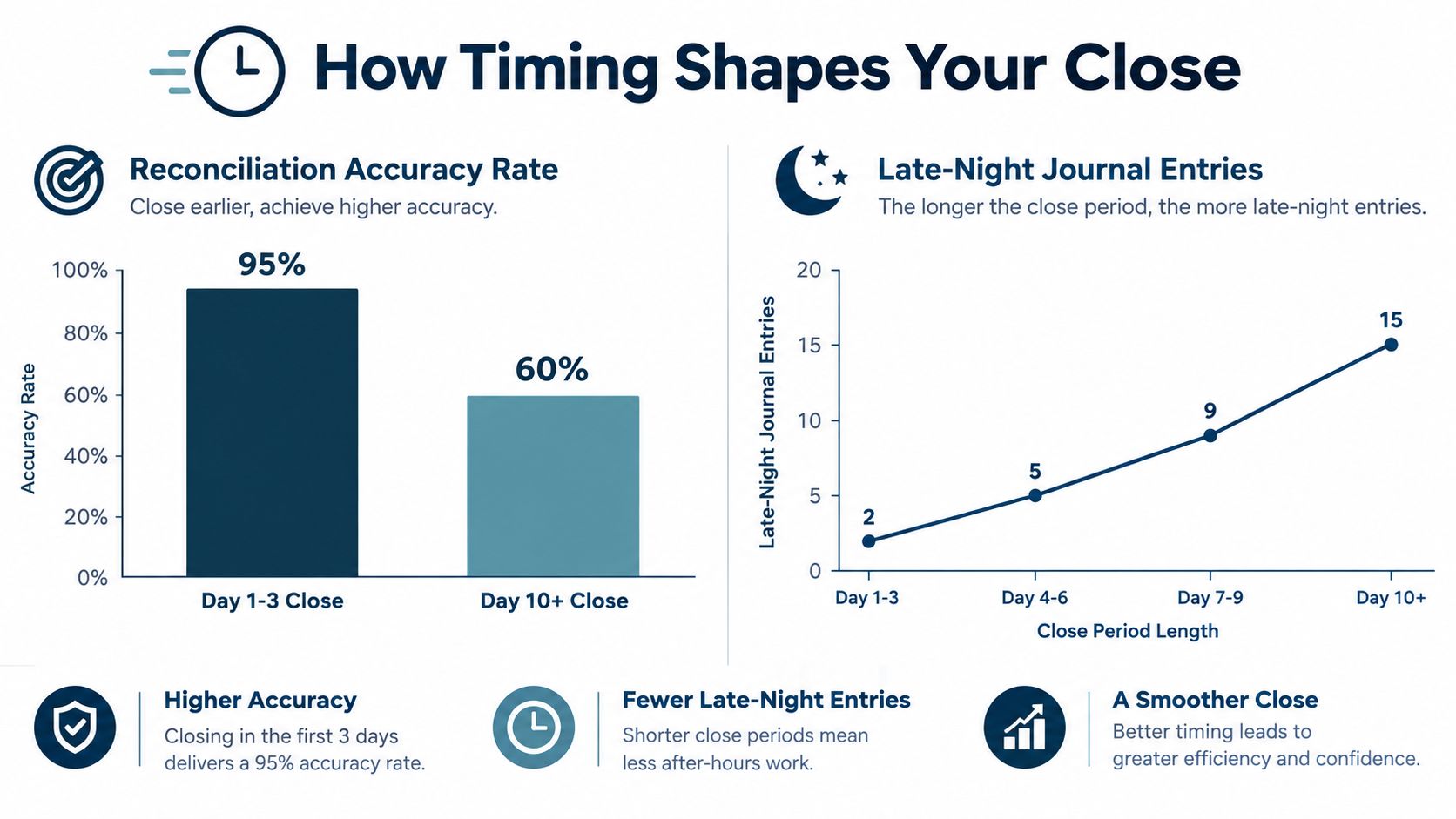
The gap usually isn't solved by telling the accounting team to work faster. It comes from moving preparation earlier, setting clear cutoffs, and resolving recurring breaks at their source. Bank statements, lender schedules, payroll reports, inventory reports, and recurring accrual support can often be prepared before the books are officially closed.
Track a few measures that show where the close is slowing:
- Completion by account: Show which accounts are reconciled by the cutoff and which are late.
- Open exception age: Separate new items from items that have survived several close cycles.
- Exception rate by account: A high rate points to weak source data or a poor posting process.
- Post-close adjustments: Watch for journals posted after sign-off.
- Days to close: Compare the calendar result with the quality of the support.
Set completion targets by account criticality. Key cash, debt, payroll, tax, and intercompany accounts should be complete before sign-off, with documented exceptions rather than silent gaps. A reconciliation marked complete while its major variance is unexplained only moves the work into the next meeting.
The Exception Problem Nobody Talks About
Matching is the part software handles well. The hard part starts when the transaction doesn't match anything cleanly.
Recent 2025 benchmarks found that cash reconciliation was the number one most time-consuming close activity, taking an average of 20 to 50 hours per month. The same survey data found that 41% of reconciliation time went to transaction matching, while 59% went to exception investigation and resolution, as reported by Ledge's month-end close benchmarks.
That changes the question. Instead of asking only, “How do we reconcile faster?” ask, “Why are so many items reaching the exception queue?”
Triage the queue before it takes over
Start by sorting exceptions into three groups:
- Timing items: The transaction is valid but recorded at different times. Give it an expected clearing date.
- Book errors: The ledger is wrong. Correct the entry and attach the support.
- Source or integration failures: The transaction is missing, duplicated, unmapped, or formatted differently between systems.
Timing differences deserve attention when they keep returning. A deposit that clears next month is normal. A deposit that remains open for several months may point to a missing receipt, an incorrect bank account, or a transaction that was never deposited.
The usual troublemakers are familiar. Transposed digits change an amount. Bank fees arrive without a matching ledger entry. One system uses a different date format from another. A payment crosses the cutoff, and nobody records why. These aren't interesting problems, but they consume hours when the team has to rediscover them every month.
The exception list is not a side file. It is a map of where the accounting process is breaking.
Fix the upstream cause
If the same vendor invoice fails to map every month, adding another spreadsheet check is a weak fix. Review the vendor setup, account mapping, import rule, or approval step. If cash is missing payment details, change the payment workflow so the reference travels with the transaction.
Use an exception log that records the account, amount, date, owner, reason, action, expected clearing period, and reviewer. Escalate items that lack support or keep rolling forward. Automation can reduce the matching workload, but judgment still decides whether an exception is harmless, incorrect, or a sign of a larger control problem.
Automation, Internal Controls, and Reports That Earn Their Keep
Automation pays off when the work follows a pattern. Bank feeds can import activity. Rules can match recurring transactions. A system can route a reconciliation to the right owner, flag an unmatched item, and preserve the review trail.
It doesn't replace judgment. Unusual payments, old reconciling items, intercompany differences, and entries with unclear business context still need a person who understands what happened.
Keep the control simple enough to use
A small team can protect the process with a short control set:
- Separate preparation and approval: The person who prepares a reconciliation shouldn't be the only person approving an adjustment.
- Require evidence: Attach the statement, schedule, report, or other support used to reach the balance.
- Review old items: Ask why an exception remains open and whether the original explanation still holds.
- Protect the close period: Restrict late postings and record approved changes.
- Keep an audit trail: Save who prepared, who reviewed, what changed, and why.
For a broader structure around risk, responsibilities, and control activities, the COSO framework for SMBs gives smaller companies a practical way to think about internal controls without copying a large public-company process.
The reporting layer should help an owner decide what to do next. A dashboard showing completion by account, open exceptions by age, recurring variance types, and days to close is useful. A dashboard full of attractive charts that doesn't show who owns the unresolved cash item is not.
You can use internal controls for small businesses as a working reference when documenting responsibilities and review steps. The strongest process is the one a new team member can follow without relying on one person's memory.
When to Outsource and What to Look For in a Partner
Outsourcing starts to make sense when reconciliation has become an owner task, when open items carry from one quarter to the next, or when the business has more systems and entities than the internal team can control comfortably.
Multi-entity work often exposes the limit first. In a 2025 survey, 51% of finance teams said integrating data from multiple ERPs or general ledgers was a major close friction point, 45% reported data reconciliation issues, and 43% struggled with complex intercompany transactions and eliminations, according to Planful's consolidation and close checklist.
That complexity isn't solved by adding another spreadsheet tab. Each entity may use different account mappings, posting dates, currencies, approval rules, or supporting systems. Intercompany balances then need to agree before eliminations can be trusted. The tipping point is usually complexity, not transaction volume.
Look for a partner that can do more than enter transactions:
- Clean accounting first: Bank, credit card, sub-ledger, loan, and balance sheet accounts should be reconciled on a defined calendar.
- Clear ownership: The partner should manage deadlines, exceptions, documentation, and review rather than waiting for the owner to chase updates.
- Useful advice: Reports should support decisions about pricing, hiring, cash flow, and profitability.
- Relevant experience: Ask how the team handles your systems, entities, industry rules, and intercompany activity.
- Human access: You should be able to reach someone who can explain the numbers in plain English.
MyOfficeOps provides bookkeeping, bank reconciliation, accounting support, payroll integration, financial analytics, and CFO-level advisory for small and midsize businesses. Its service model covers core accounting, profit optimization, and exit strategy, with support for the reconciliation work that keeps monthly reporting dependable.
If your balance sheet still depends on Saturday catch-up work, MyOfficeOps can help organize the reconciliation calendar, clean up open items, and turn the finished books into reports you can use. Visit MyOfficeOps to discuss your current close process and build a practical support plan.