
Payroll accounting is the process of turning time and compensation data into recorded wages, withholdings, employer taxes, and liability entries that connect paychecks to the general ledger. On $2,000 of taxable wages, for example, the employee's basic Social Security and Medicare withholding is $153, and the employer owes another $153 separately.
That matters when you're looking at your bank balance after payday and wondering why it doesn't match the payroll expense in your books. Employees received their money, but you still need to account for tax deposits, benefit deductions, and wages earned before month-end but paid afterward.
A successful direct deposit tells you the payment went through. It doesn't tell you whether your books are right.
The Moment a Payroll Mistake Becomes a Real Problem
It's Monday morning, and a crew member tells you their overtime is missing. You check the payroll platform. The payment says completed, the bank withdrawal looks familiar, and nothing on the dashboard appears wrong.
But the approved time never made it into payroll. The software paid exactly what someone entered.
For a construction owner, that mistake can affect more than the employee's check. If the missing hours belong to a specific project, you may also be reviewing a job-cost report that leaves out work your crew performed. Correcting the paycheck without correcting the project allocation leaves you with an incomplete picture of the job.
A completed payment isn't a completed process
Payroll mistakes aren't limited to businesses using spreadsheets. A 2025 survey of 1,000 small-business leaders found that 84% had experienced payroll errors and 40% incurred penalties; respondents reported incorrect wage calculations (48%), late or missing payments (38%), incorrect hours (36%), and incorrect tax calculations (27%), as detailed in the International Accounting Bulletin's reporting on small-business payroll compliance.
Those findings don't prove that a particular platform causes mistakes. They show why owners need a check beyond the payment confirmation.
Practical rule: Don't close a payroll issue just because the employee has been paid. Confirm that the correction reached the accounting records and any affected labor reports.
The same problem can show up in different clothes. An agency owner might question a client's margin. A clinic manager might wonder why staffing expense looks unusually low.
Payroll accounting gives someone responsibility for following the transaction all the way through, not just pressing the button that sends the money.
A Plain-English Definition and the Gross-to-Net Walkthrough
The easiest answer to what is payroll accounting is this: it's keeping track of what employees earned, what you withheld, what the business owes, and where those amounts belong in your books.
Start with the pay stub. Gross pay is the employee's earnings before deductions. Net pay is what reaches their bank account after deductions.
Build the paycheck from approved time
For an hourly worker, begin with approved hours and the correct pay rate. Keep regular earnings and overtime earnings separate so someone can check both. A construction employee who works 46 hours in a workweek should have records showing regular hours, six overtime hours, overtime earnings, and deductions, consistent with the Department of Labor's FLSA recordkeeping guidance.
That guidance also requires covered employers to preserve each non-exempt worker's identifying information, workweek start day, daily and weekly hours, pay rate, straight-time and overtime earnings, additions or deductions, and total wages paid. Payroll records generally need three years of retention, while supporting timecards and work schedules generally need two years, under the same guidance.
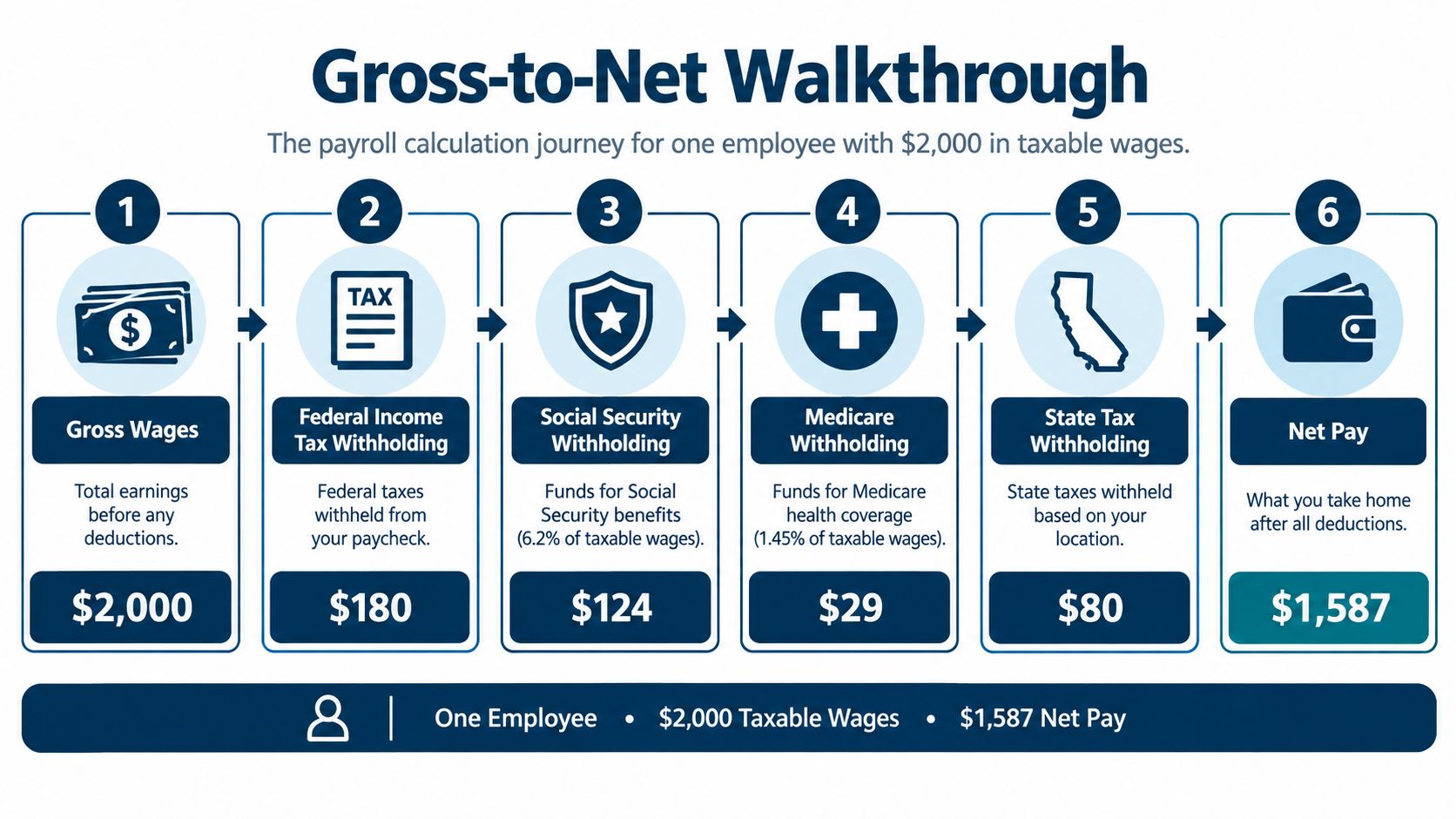
For the dollar walkthrough, assume the approved earnings total the taxable wages shown below. The income-tax amounts are illustrative, not fixed withholding rules.
Read each deduction separately
For 2026, Social Security is 6.2% per side, up to the $184,500 wage base, and Medicare is 1.45% per side, with no wage limit; on the example's $2,000 taxable wages, employee withholding is $124 for Social Security and $29 for Medicare, using the IRS Publication 15 payroll-tax rules.
Federal income-tax withholding depends on the employee's Form W-4 and IRS tables. The graphic assumes $180 of federal withholding and $80 of state withholding, leaving illustrative net pay of $1,587. Those assumed income-tax amounts aren't rates you should reuse for another employee.
Benefits or retirement deductions may change the result, too. Always read the actual payroll register rather than treating a sample paycheck as a universal calculator.
From Paycheck to Ledger Entry
A pay stub explains the employee's payment. The general ledger, your business's master accounting record, explains the business's expense and what remains unpaid.
The important distinction is between expense and liability. An expense records a cost. A liability records money you owe someone.
Separate the employee side from the employer side
Gross wages become personnel expense, while employee withholdings become liabilities until remitted; employer Social Security, Medicare, and employer-only obligations such as federal unemployment tax are separate expenses and liabilities, not employee deductions, as explained in the IRS guidance on depositing and reporting employment taxes.
For the running example, the bookkeeping follows this pattern:
- Record earnings: Debit wage expense for gross pay. In accounting language, that increases the expense.
- Record what's owed: Credit withholding accounts and net wages payable. Those credits record obligations.
- Add employer costs: Record employer payroll-tax expense and the matching tax payable separately.
- Record settlement: When employees and agencies receive payment, reduce the relevant payable and record the cash leaving the bank.
You don't need to memorize debit and credit rules to supervise this. You do need to ask whether employee deductions were mistakenly recorded as additional business expenses, or whether employer taxes were left out.
The bank withdrawal is a payment record, not a complete measure of payroll expense.
Watch the month-end boundary
On accrual-based books, wages belong in the period employees earned them, even if payday falls later. Accrued payroll records that unpaid obligation. Without it, a monthly profit report can look better because payday has not yet arrived.
Businesses with variable schedules may also find operational ideas in AnchOps' payroll best practices for restaurants. Restaurant workflows aren't identical to clinic or construction workflows, so use the resource for comparison rather than treating it as your accounting policy.
Filings, Deposits, and the Records You Are Required to Keep
Paying employees, depositing taxes, and filing tax returns are separate tasks. Don't assume completing one means the others are finished.
Federal income tax withheld and both sides of Social Security and Medicare generally require electronic deposits. Your applicable deposit schedule determines when payment is due, while the returns explain the wages and taxes behind those payments.
Keep payments and reports on separate tracks
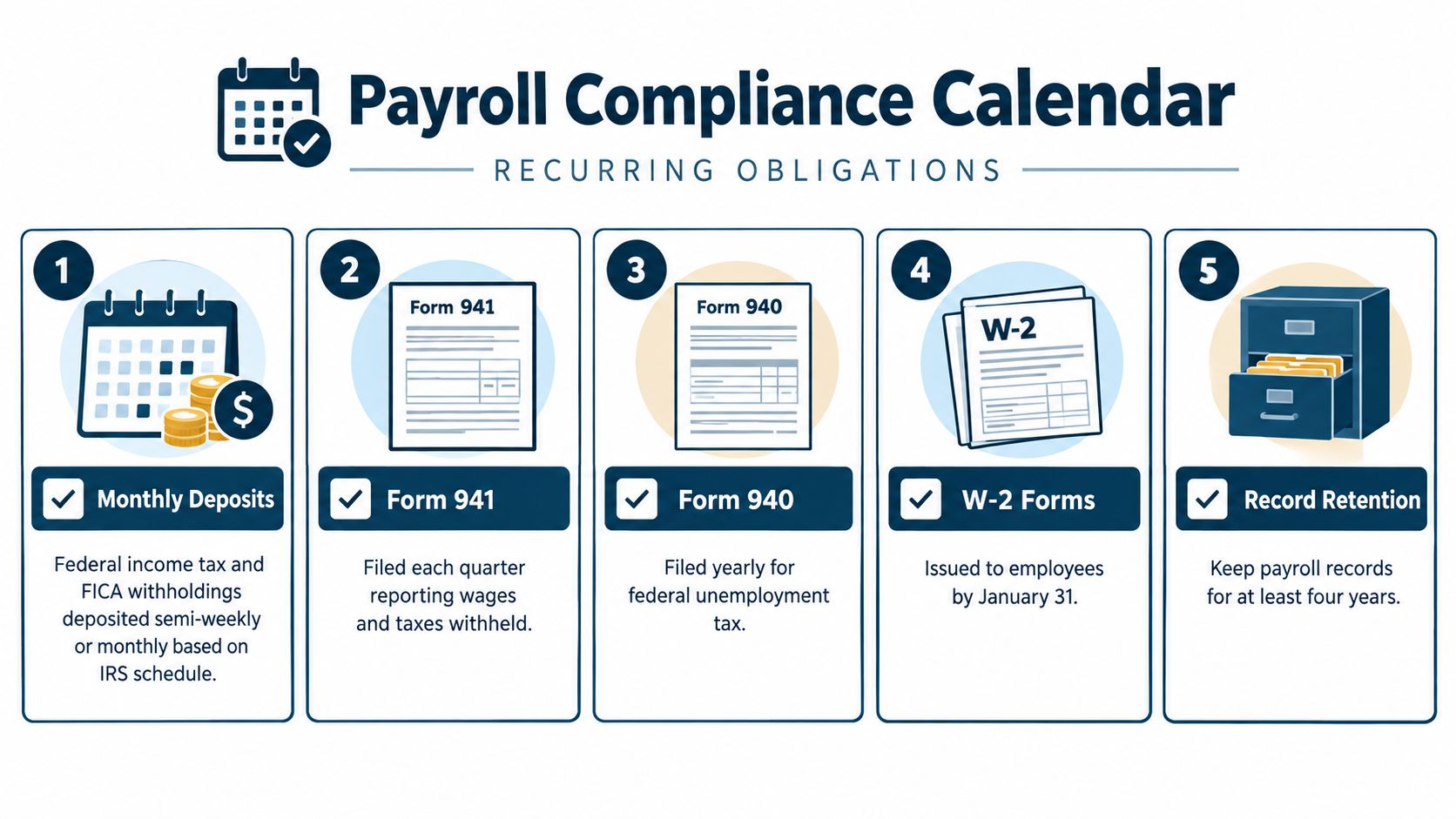
- Tax deposits: Federal schedules may be monthly or semiweekly. Confirm your assigned schedule and actual due dates rather than guessing from payday.
- Form 941: This is the recurring quarterly federal employment-tax report. Filing it doesn't replace making the required deposits.
- Form 940: This annual return covers federal unemployment tax, an employer obligation.
- Year-end reporting: Prepare employee Forms W-2 and the related W-3 submission. Review any applicable Form 1099-NEC reporting separately for nonemployee payments, rather than putting contractors through employee payroll by default.
W-2 and applicable 1099-NEC reporting generally have January deadlines. Check the current filing instructions for exact dates, submission methods, and any calendar adjustments.
Build a file that explains the payment
The IRS requires employment-tax records for at least four years after filing the fourth-quarter return for the year, including employer and employee identification, wage-payment dates and amounts, Forms W-4, filed returns, deposit confirmations, tips, fringe benefits, and sick-pay or third-party payment records, according to its employment-tax recordkeeping requirements.
Keep payroll registers, employee tax forms, returns, benefit records, and payment confirmations together. The Department of Labor retention windows discussed earlier cover different records, so don't apply a single disposal date to everything.
A bank statement can establish that cash left your account. It won't, by itself, explain the employee calculation or identify the tax period you paid.
Use a payroll compliance checklist to assign each obligation an owner, due date, and completion record. Save the confirmation when the task is done, not when a notice arrives.
How Payroll Data Connects to Your Books and Your Jobs
A payroll register answers, “What did we calculate for this employee?” Your ledger answers, “What did the business spend or incur?” A job-cost report answers, “Which work used that labor?”
Those are different questions about the same underlying transaction. A reliable system preserves employee identity, hours, wages, classifications, and adjustments as both a financial subledger and a labor-compliance trail, consistent with the Department of Labor's hours-and-wages recordkeeping requirements.
Where the Same Payroll Record Lands in Three Different Views
| View | What it tracks | Example number on $2,000 gross wage | Who reads it |
|---|---|---|---|
| Payroll software | Employee earnings, deductions, and net pay | The full example gross wage, broken into pay components | Payroll administrator and employee |
| General ledger | Wage expense, employer costs, liabilities, and payments | The same gross wage as expense, with employer costs separate | Bookkeeper, controller, and owner |
| Job-cost report | Labor assigned to projects or departments | Only the portion supported by approved project coding | Project manager and owner |
The table uses the earlier wage example without assuming that all the employee's time belongs to a single job. That allocation needs evidence from the time record.
Follow the hours to the work
Suppose a contractor's employee works on a customer project and also helps organize the shop. If every hour goes to the customer job, the owner overstates that job's direct labor and understates overhead. If every hour goes to overhead, the job looks cheaper than it was.
An agency has a similar choice between client-engagement work and internal work. A healthcare practice may separate clinical hours from administrative payroll. These are illustrative reporting choices, not claims about any particular company.
The chart of accounts names your accounting categories. Project and department codes add detail without requiring an expense account for every employee.
Before setting up a connection, decide which system owns time approval and which owns project codes. A guide to payroll integration can help frame those handoffs.
Good allocation supports pricing and staffing discussions. It doesn't prove productivity by itself. You still need to consider the work delivered, revenue earned, and quality of service.
Why Payroll Software Does Not Eliminate Payroll Accounting Mistakes
Software can calculate correctly using incorrect inputs. It can also send a correct payroll total to the wrong accounting account.
The small-business error survey discussed earlier is a reason to maintain checks, not evidence that you should abandon automation. The better question is what a person will review after the software finishes.

Test the handoffs, not just the calculation
An employee leaves, but their status stays active. A recurring payment may still run. Compare the pay roster with approved personnel changes before releasing payroll.
A bonus uses the wrong expense mapping. Total wages can be correct while a department's report is wrong. Review the earning code's destination, especially when adding a new pay type.
A tax deposit clears the bank, but the payable remains. Someone may have coded the payment to expense instead of reducing the liability. Match the deposit confirmation to the specific ledger entry before concluding you still owe the money.
Before buying another tool: Ask which review will catch an error that the software has no reason to recognize.
Integrate with a purpose
In payroll research, 55% of surveyed HR professionals identified greater payroll, HR, and attendance integration as a major trend for the next two years, 43% cited digitization or automation, and 35% cited embedded AI; larger organizations were also more likely to report high automation, according to the Future of Payroll 2025 research report.
Those are respondents' expectations, not proof that integration guarantees accurate books.
For a tutoring business with variable compensation, a tool to track commissions and earnings automatically, such as Tutorbase, may address a specific calculation workflow. It still needs approved inputs and a checked accounting handoff.
Prioritize connections that remove a troublesome handoff. Payroll-to-accounting or time-to-payroll may be more useful than buying features nobody has time to configure or review.
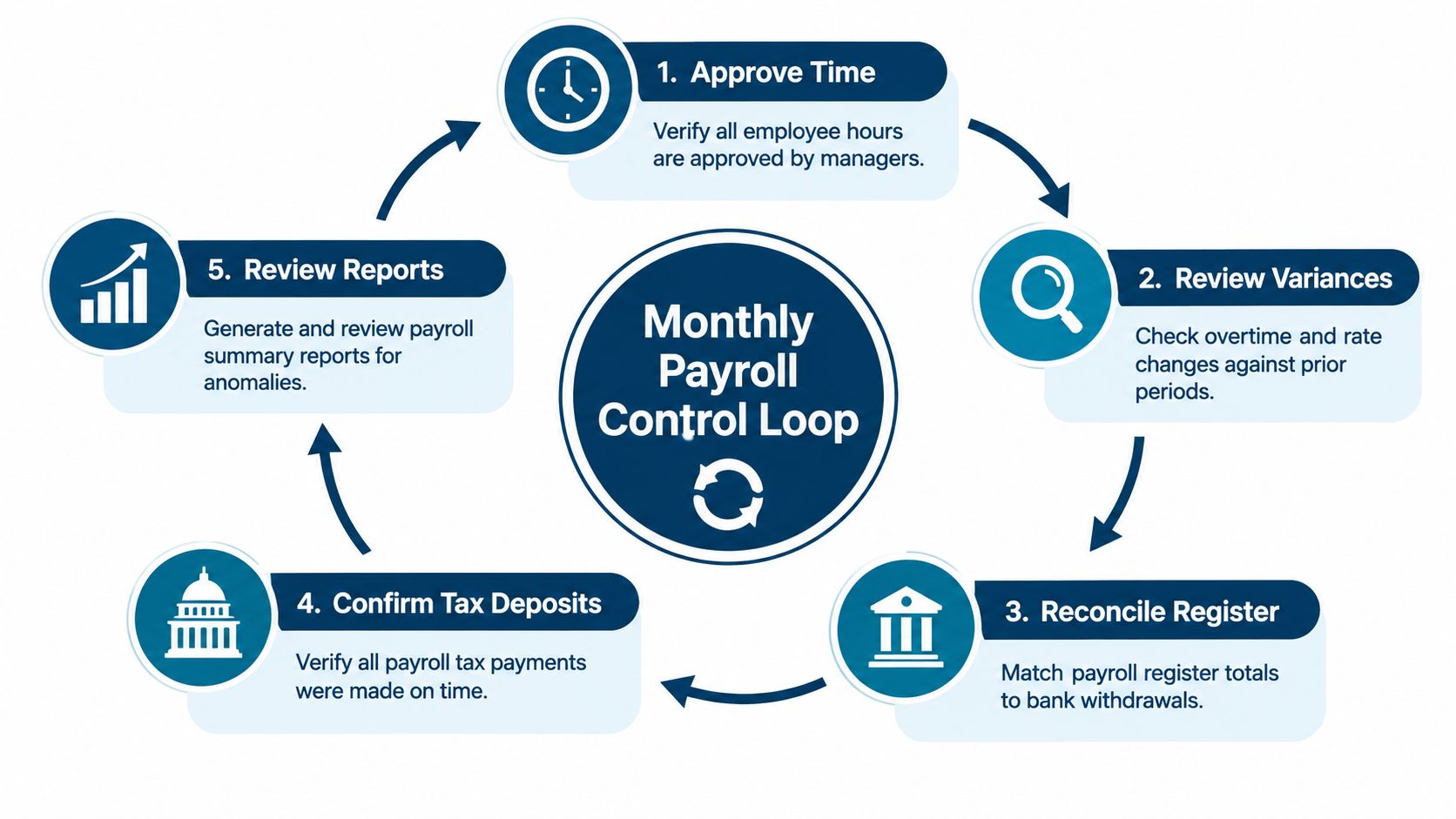
The Monthly Payroll Accounting Control Loop
A monthly close should leave you able to explain every payroll balance. That includes balances that remain because payment is legitimately due later, not just accounts that happen to reach zero.
Give the routine a named owner. The person preparing it can be your bookkeeper, but someone with approval authority should review unresolved items.
Run the checks in order
- Approve the source: Confirm time approval, personnel changes, and authorized compensation adjustments. Use the detailed hours-and-earnings records described earlier, not a manager's memory.
- Review unusual changes: Investigate overtime, rate changes, bonuses, reimbursements, and PTO treatment. A difference may be valid, but someone should explain it.
- Match register to bank: Separate employee payments, agency withdrawals, benefits, and processing charges. Investigate rejected or delayed payments rather than forcing totals to agree.
- Support liability balances: Match tax accounts to deposit confirmations and filed or scheduled amounts. Compare benefit deductions with invoices and remittances.
- Finish the financial tie-out: Agree payroll totals to wage expense and employer-tax expense on the income statement. Support accrued payroll on the balance sheet and investigate stale payroll-clearing items.
A payroll-clearing account is a temporary holding account used during payment processing. An old balance needs an explanation, not a journal entry made solely to erase it.
Document the exception and its resolution
Use a payroll reconciliation report to record differences, supporting documents, the responsible person, and the correction. Preserve the original transaction and document adjustments instead of overwriting payroll history without a record.
Once the balances are supported, review the business questions. Is overtime concentrated on a difficult project? Do upcoming deposits require a cash reserve? Does the staffing forecast include the employer's full labor cost?
That's the point of the routine. You're not checking boxes for their own sake. You're making the numbers dependable enough to use.
Putting It Together and Knowing When to Bring in Help
Payroll accounting means keeping the paycheck calculation, ledger entries, and reconciliation routine connected. An owner doesn't have to prepare every entry, but someone must be able to explain the records and resolve differences.
These records matter beyond your business. The Bureau of Labor Statistics' Current Employment Statistics program uses monthly establishment payroll records, while its Quarterly Census of Employment and Wages uses employer reports covering more than 95% of U.S. jobs subject to unemployment-insurance laws, as described in the BLS overview of employment data programs.
Recognize the limits of a do-it-yourself setup
Consider getting help when your team can run payroll but can't reliably explain the resulting balances. Watch for these warning signs:
- Worker classification uncertainty: Get the employee-versus-contractor treatment reviewed before relying on it.
- Work across state lines: Unresolved withholding questions need jurisdiction-specific guidance, not copied settings.
- Unreviewed PTO and bonuses: Missing or inconsistent accrual treatment can distort period costs where accruals apply.
- Unexplained clearing balances: An unresolved balance may hide a posting error, failed payment, or duplicate entry.
An outside bookkeeper, payroll provider, or controller can help, but define the responsibilities before handing over access. Ask who approves inputs, posts journals, files returns, verifies deposits, and handles notices.
Request a sample reconciliation and a plain-English explanation of an unresolved balance. If a provider only promises to process payroll, don't assume monthly accounting review is included.
You can hand off the work without handing off oversight. Keep access to reports, know who approves changes, and expect documented answers when something doesn't match.
MyOfficeOps offers bookkeeping, payroll integration, reconciliation support, and financial advisory for small and midsize businesses. If payday runs smoothly but your payroll balances or job margins remain hard to explain, visit MyOfficeOps to discuss your current workflow and the support needed to connect payroll with dependable books.