
Your banking app says there's money available. Your inbox has supplier bills waiting for approval, payroll is coming up, and your bookkeeper wants a receipt you're sure you already sent. You can see the balance, but you still can't tell what's safe to spend.
That's the problem account management online should solve. A useful setup connects the numbers with the people responsible for them, so you know who can approve a payment, where its supporting records live, and how much cash is available.
What Online Account Management Actually Covers
Your personal banking app puts balances, bills, and transfers within reach. Online business account management does a broader version of that job, bringing bank activity, card spending, bills, payroll, and customer invoices into a connected workspace.
It doesn't have to mean putting everything inside one app. Your bank, payroll service, and accounting software can remain separate, provided they exchange information and your team knows where to do each task.
Web banking began taking shape in the mid-1990s, and by early 2004, about 33 million U.S. households, roughly 31%, used online banking, according to EBSCO's history of online and mobile banking. Owners now expect similar access to business finances, without waiting for a branch visit or an office computer.
Core functions of online account management
Say you run a small consulting firm. A software payment arrives in the bank feed, a supplier sends an invoice, and a customer pays an outstanding bill. Each event needs a different action.
| Function | What it covers | Example |
|---|---|---|
| Daily bookkeeping | Recording and sorting transactions as they happen | A $48 software charge sorted into Software |
| Bank and card reconciliation | Matching bank and card activity to your books | Matching a card payment to its receipt and statement entry |
| Bill pay and payments | Paying vendors online with a clear approval trail | A $3,000 supplier invoice approved before payment |
| Invoicing and collections | Sending invoices and tracking who owes you | Flagging an overdue customer invoice for a reminder |
| Payroll | Running pay and tax withholding | A biweekly pay run with taxes withheld automatically |
| Reporting and dashboards | Cash, profit, and trends in one view | Cash on hand, profit, and overdue invoices on one screen |
| Access and approvals | Who can see, enter, and release money | An office manager can enter bills but not release payments |
These are illustrative workflows, not promises that every tool includes every function. Payroll still needs approved hours and checked settings, while imported transactions still need review.
The real value isn't seeing a balance. It's knowing who approved the transaction and where the proof lives.
For that supplier invoice, keep the original document, approval, payment confirmation, and accounting entry connected. An approval buried in someone's email is much harder to find when a vendor questions payment.
List which of these seven functions you still handle through paper, email, or memory. Those are your gaps to close before buying another tool.
Why Owners Are Moving Their Books Online
Say it's Tuesday at a dental practice. Between patients, the office manager checks three supplier bills on her phone, opens the attached invoices, and approves the ones within her authority. She doesn't have to leave them until Friday's desk work.

What changes in the working week
Time savings come from handling work while it's fresh. For a consulting firm, attaching receipts and sorting transactions during the month can replace a long month-end search. In a simple hypothetical case, a week of chasing documents might become a few hours of checking completed work, but software alone won't produce that result.
Earlier warnings give owners room to act. A construction owner who notices during week three that a client is 30 days late can call before the next payroll creates a cash squeeze. That's more useful than discovering the overdue invoice after closing the month.
Regular review makes mistakes easier to spot. An agency manager checking card activity can question a duplicate payment or forgotten subscription while the details are still familiar. A feed makes the charge visible; a person still has to challenge it.
Mobile access needs a proper test
In Deloitte's global customer survey, 73% of respondents used online banking at least monthly, while 59% used mobile banking applications. Those are consumer figures, but they underline why mobile access deserves a place in your buying checklist.
Test the actual work on a phone. Can you read the invoice, see its approval history, and reject it with a reason? A screen showing only the total isn't enough.
Our accounting services are designed to grow with clients from startup through expansion. The setup should accommodate added staff and locations without rebuilding the entire process.
There are trade-offs. The first month takes effort, staff need training, and paper approvals beside a digital portal can leave you with conflicting records.
Count the decisions you currently postpone until month-end. That's a better starting point than counting software features.
Security Basics Every Owner Should Set Up
A shared finance login creates an immediate problem: nobody can reliably tell who changed a vendor's bank details. It also makes removing access awkward when someone leaves.
Give each person a named account. Then protect both the login and the actions that person can take.

Protect identity before granting permissions
Multi-factor authentication, or MFA, combines different kinds of proof, such as a password and a physical security key. NIST's small-business MFA guidance distinguishes separate factors from two passwords, which still count as single-factor authentication.
For owners, finance administrators, and outside accountants, choose phishing-resistant FIDO/WebAuthn options where available. These credentials are tied to the legitimate website, rather than relying on a code someone could enter into a fake login page.
If you're deciding where to begin, MY CYBER GUARD explains how to prioritise business accounts for multi-factor authentication. Start with accounts that can move money or reset other accounts.
Identity isn't permission. Proving who you are shouldn't automatically let you change payroll, create vendors, and release payments. That separation supports the stronger authentication and limited-access approach described in NIST's digital identity framework.
Who should do what in your online accounts
| Role | Can do | Should not do |
|---|---|---|
| Owner | Approve payments, see all reports, set up banking | Share their login with anyone |
| Accounts payable clerk | Enter bills and prepare payments | Release payments or change vendor bank details alone |
| Payroll specialist | Run payroll and view pay records | Change owner bank credentials |
| Outside accountant | View reports and reconcile accounts | Start payments or move money |
| Office manager | Track receipts and record expenses | Approve their own purchases |
Use these as starting roles, then narrow access to the work each person handles. For sensitive employee and client records, include data privacy and compliance in that review.
Practical rule: A vendor bank-detail change needs a second person to confirm it by phone, using a number already on file.
Don't rely on a reply to the email requesting the change. Apply the same independent check to unexpected payroll destination changes.
Check access whenever someone changes roles or leaves, and retain activity logs showing who changed what and when. If a trusted login is compromised:
- Stop access first. Disable the user and revoke active sessions.
- Restore control. Reset the password and replace compromised MFA credentials.
- Trace changes. Review vendors, bank details, and payments since the last known clean login.
- Verify independently. Call every vendor whose details changed using an established number, never one supplied in the new email.
Contact your bank immediately if you find an unauthorized payment. Account cleanup shouldn't delay an attempt to stop the money.
Connecting Bank, Payroll and Accounting Tools
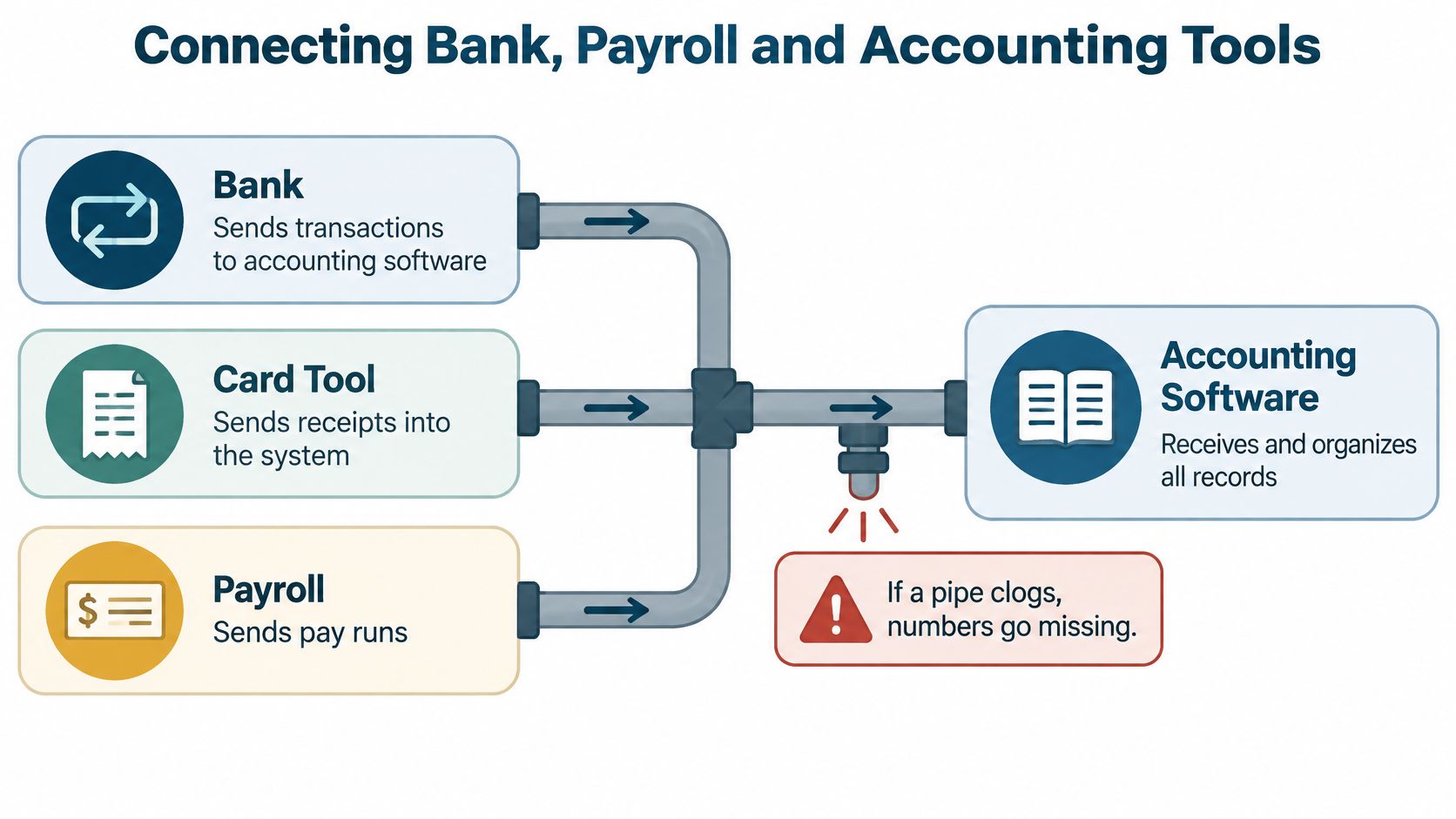
Think of your connections as pipes. The bank sends transactions, the card tool sends receipts, and payroll sends completed pay runs to the accounting software. When a pipe clogs, records go missing.
A changed password can interrupt a feed. Connecting two tools that both import the same payment can create a duplicate instead.
Bank balance isn't usable cash
A 2025 survey of U.S. businesses with up to 1,000 employees reported that nearly two-thirds couldn't access their current cash position on demand, and 20% said obtaining real-time cash data could take days or weeks, as described in BILL's financial automation findings. A connected dashboard still needs a completeness check.
Consider this hypothetical landscaping business:
- Bank balance: $18,000 appears in the account.
- Upcoming payroll: $6,500 goes out Friday.
- Tax reserve: $4,000 is already set aside.
- Uncleared check: $1,500 hasn't left the account yet.
- Usable cash: $6,000 remains after those commitments.
That calculation assumes the commitments don't overlap and no other payments are due. Your dashboard should separate posted balances, pending items, restricted funds, and money already committed.
Give each number a home
Write down your actual update schedule. This sample connection list shows what to document, not what every product guarantees:
- Bank feed: Check daily imports; use the bank's posted balance as the source for cash held there.
- Card feed: Check daily imports and receipt matches; use the card statement for the amount owed.
- Payroll: Import after each completed run, or upload manually; use the payroll register for wages and withholding.
- Bill pay: Check daily status updates, or upload manually; use the payment tool for release status.
- Accounting ledger: Update through imports and reviewed entries; use the reconciled ledger for profit reporting.
For payroll connections, Benely's guide to the core features of employee portals helps identify what staff should handle through self-service. Keep employee access separate from finance approval rights.
When planning accounting software integration, assign a person to investigate failed feeds and unmatched entries. Each week, confirm completeness, resolve exceptions, and document manual adjustments with their reasons.
Automation sorts faster. It can also repeat a wrong category across hundreds of rows, so review a rule's output before applying it broadly.
Checking a Provider Before You Sign
Score every provider against the same criteria. Ask for a demonstration using a sample transaction, not just a tour of polished dashboard screens.
You're buying a working process as much as software. The person answering a bookkeeping question matters just as much as the button used to upload a receipt.
Provider checklist for online account management
| Criterion | Strong sign | Red flag |
|---|---|---|
| Login security | MFA on every login and individual user accounts | Shared logins or no MFA option |
| Access control | Role-based permissions with approval limits | Every user gets full admin rights |
| Data freshness | Bank and card feeds update daily | Reports arrive weeks after month-end |
| Audit trail | Change history for vendors, bank details, and payroll | No record of who changed what |
| Record retention | Invoices and payment support can be pulled on request | Only summary PDFs are kept |
| Accounting basis | Clearly states cash or accrual reporting | Basis is never mentioned |
| Human support | A named accountant who knows your books | Ticket queue only |
| Exit path | Full data export in standard formats | Data can only be viewed inside the tool |
Daily feeds are a useful starting point, but ask what happens when an import fails. Likewise, an export button is useful only if the files include the records you need.
At MyOfficeOps, you get direct access to a dedicated team that knows your business. We handle all work online and can meet by video call when you need us.
Test the accounting basis and supporting records
Cash and accrual reports answer different timing questions. The Small Business Administration's business finance guidance explains that cash accounting records money when paid or received, while accrual accounting records the transaction when the sale is completed.
Say a consulting firm completes a project in June and collects payment in July. Accrual reporting can show the revenue in June; cash reporting shows it in July. Neither display means the customer paid sooner, so the report must clearly state its basis.
Next, choose a past transaction and ask the provider to retrieve its invoice, payment record, and any relevant payroll support while you watch. IRS Publication 583 says electronic recordkeeping systems must index, store, preserve, retrieve, and reproduce readable records, providing a complete and accurate record.
A summary report tells you the result. Supporting records let you check whether the result is right.
A monthly PDF may be useful for a review meeting, but it shouldn't be your only way to answer a current question. Ask for a sample report and give yourself five minutes to find cash, profit, and overdue invoices, as a practical usability test.
Use the same care when choosing accounting software. Compare subscription charges, extra-user fees, payment fees, setup work, training, and export support in writing. A lower subscription doesn't save money if your staff must rebuild missing records each month.
How to Set Up Your Online Accounts in Six Steps
Set up accounts in an order that keeps existing payments running while you test the replacement workflow. Don't disconnect a working system before you've checked where its records and scheduled payments will go.
The Federal Trade Commission's small-business cybersecurity guidance recommends MFA for every employee, contractor, and other person with access to a company network or device. Include outside bookkeepers and payroll providers in your rollout.
Build, test, then rely on it
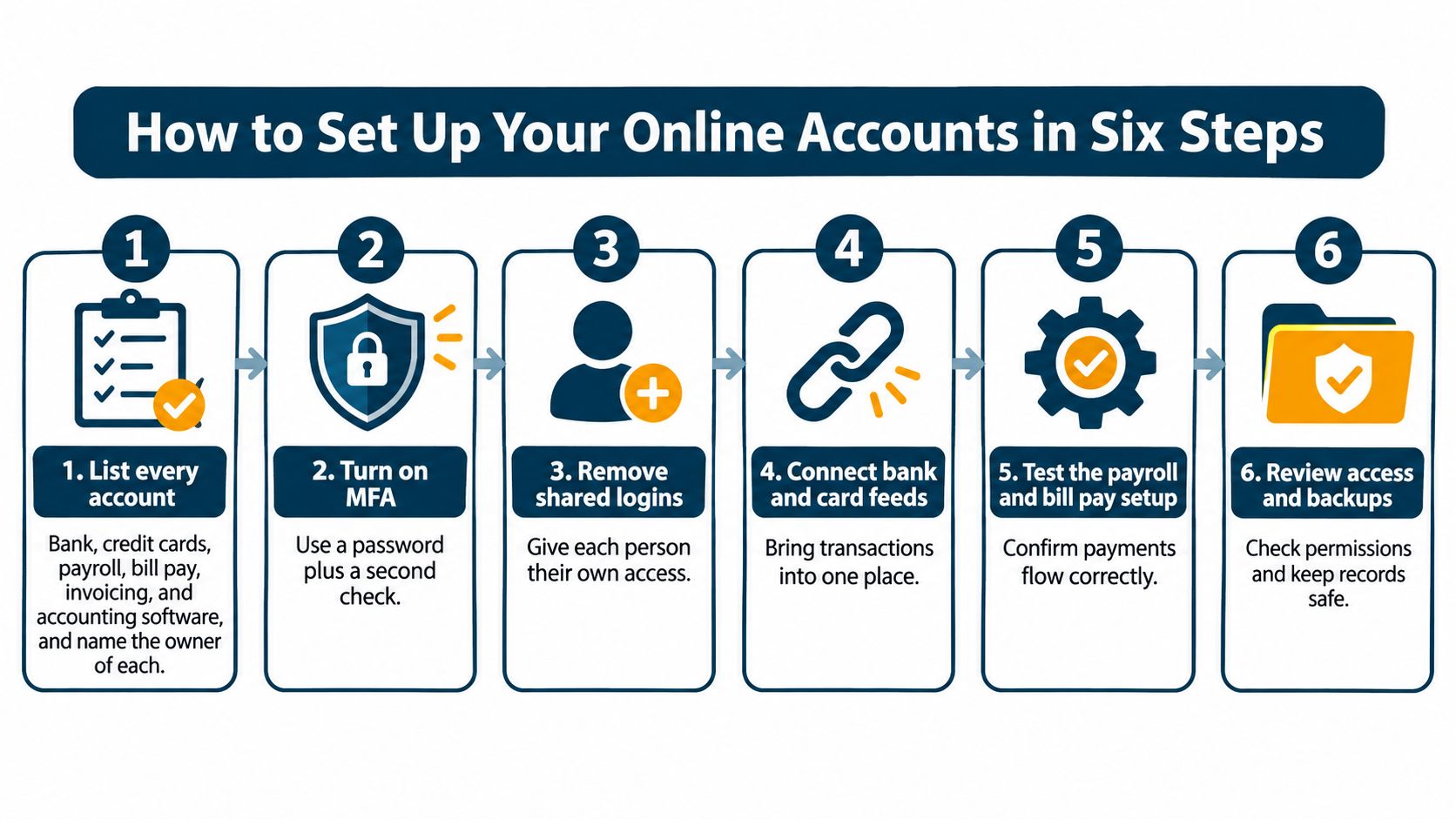
List every account and its owner. Include banks, credit cards, payroll, bill pay, invoicing, and accounting software, plus the person responsible for each. Record renewal dates, connected tools, and recovery contacts without putting passwords in the list.
Create individual logins and enable MFA. Start with the owner and anyone who can move money, then include every remaining user. Give each outside adviser separate access so removing one person won't disrupt everyone else.
Assign roles and approval limits. Apply permissions to actual duties, and test them by signing in through a limited user account. For example, you might require a second approver for payments over $2,500, an internal control you choose rather than a legal threshold.
Connect feeds one at a time. Compare the first month's imported transactions and totals with bank and card statements before adding more connections. Test payroll and bill-pay workflows carefully, including whether completed payments return to the ledger without duplicates.
Start a weekly close routine. Confirm feeds updated, investigate unmatched items, and record every manual adjustment with a reason and responsible person. Finish with a cash review that accounts for upcoming commitments, rather than accepting the dashboard total without checking it.
Schedule access and backup reviews. Review permissions quarterly and remove access on the day someone leaves. Test that exported records and supporting documents can be opened, and confirm a recovery route that doesn't depend on a former employee's phone.
Keep a short issue list during setup. Write down the problem, who owns the fix, and how you'll confirm it's resolved, rather than letting errors disappear into email threads.
Make the handover part of the setup
If you're switching accountants, transfer more than login details. Include outstanding invoices, unpaid bills, prior reconciliations, payroll records, tax documents, and explanations for unresolved balances.
We manage the entire transition when a client switches from their current accountant. Our order is to put the books in order first, create clear reports showing where the business stands, and then provide guidance for important decisions.
Let the system run for a full month before relying on its reports without parallel checks. Time alone doesn't prove accuracy: the transactions must reconcile, payment tests must work, and exceptions must have named owners.
Choose Your First Step This Week
The decision comes down to time and trust. If your team spends hours chasing transactions, or nobody can explain the cash figure without rebuilding it in a spreadsheet, compare outside help with the full cost of doing it yourself.
That cost includes staff time, software, corrections, and the decisions you postpone. It doesn't automatically mean a provider will be cheaper, but it gives you an honest comparison.
Decide what you need help with
Keep the work in-house while the accounts are manageable, responsibilities are clear, and reports make sense. Consider a provider when payroll, another location, or a possible sale adds work your team can't review properly.
Bring useful records to the first conversation:
- Your account list: Include each tool, its owner, and the connections between systems.
- Recent statements: Gather the last three months of bank and card statements as a starting pack.
- Delayed decisions: Write down three choices you've postponed because you don't trust the numbers.
Our accounting team is based in Philadelphia and works remotely, so owners in West Chester and beyond can begin the same way. Fill out the contact form on the MyOfficeOps site, and one of our experienced accountants will get back to you.
This week, pick the account you check least often. Confirm its feed works, assign its permissions, and put a recurring review on the responsible person's calendar.
MyOfficeOps helps owners manage bookkeeping, payroll, bill payments, and financial reporting through a secure online setup backed by a dedicated team. Visit MyOfficeOps and use the contact form to discuss your current accounts, missing records, and the decisions you need clearer numbers to make.