It is Thursday afternoon, payroll hits tomorrow, and three vendor invoices are due before the weekend. The bookkeeper is out. You are staring at the bank app, trying to remember which bills you already scheduled and which ones still need a yes. That pile used to be checks on the counter. Now it is a queue on a screen, and the queue moves whether you look at it or not.
Electronic bill pay services can take the stamps and the late fees off your plate. They do not take the decisions off your plate. Faster money needs a matching check, an approval, or a deadline. This is how I set that up for small firms so the speed helps instead of hurting.
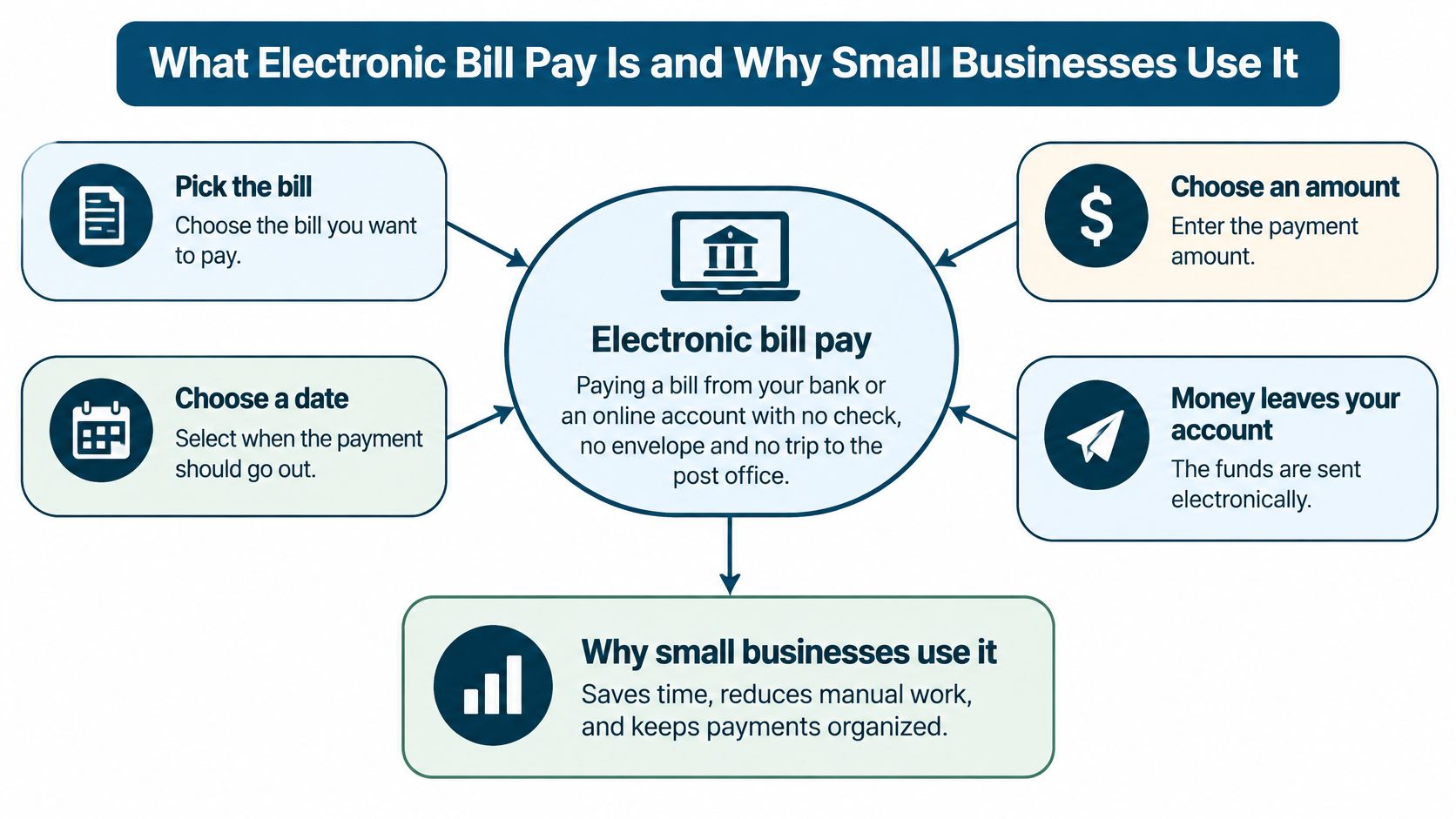
What Electronic Bill Pay Is and Why Small Businesses Use It
Electronic bill pay means paying a bill from your bank or an online account with no check, no envelope, and no trip to the post office. You pick the bill, choose a date and an amount, and the money moves to the payee. It is closer to sending a text than mailing a letter. The other side gets it fast and can match it on their books.
This is not a new trick. In 1997, U.S. consumers paid about 283 million bills electronically, a 150% jump from 1996, as the Federal Reserve Bank of Philadelphia's 1998 annual report recorded. By the end of 1998, the U.S. federal government was making 75% of its roughly 1 billion yearly payments electronically, and the Federal Reserve processed 80% of electronic payments then. Banks, utilities, and the ACH network (a batch system that moves money bank to bank) made the model stick. You authorize a transfer. The biller gets electronic settlement. You reconcile a record, not a canceled check.
A shop that stopped mailing Fridays
Say a six-person HVAC company pays about 30 supplier invoices a month. On the old Friday, someone writes checks, someone else drops them in the mail, and two vendors still charge late fees because the envelopes land late. With bill pay, each payment is set for its due date. Rent, the electric bill, software, insurance, and supplier invoices all sit on one calendar.
That shop receives five things if someone watches the queue.
Fewer late fees. The due date is on the schedule, not in someone's head.
A digital record. Tax season and an audit stop being a hunt through check stubs.
A sign-off before money leaves. The owner approves, then the payment goes.
Less time at the bank. Stamps and Friday counter trips drop off the week.
A cash picture you can see. Scheduled payments show up before they hit the account.
Automation helps most when a person still looks at the queue. A schedule nobody checks is just a faster way to pay the wrong bill.
Payment Methods Compared for Business Bills
A supplier invoice due tomorrow needs a different route from monthly rent. Small businesses often use several payment channels, so choose the method by bill type, deadline, and the control that should happen before money leaves.
Research from the Federal Reserve Bank of Boston found that the average share of bills paid by check fell from 30% in 2008 to 10% in 2018. Electronic bill payments from a bank account rose from 14% in 2009 to 22% in 2018. The figures show a move away from checks, but businesses still need a process that handles more than one payment route.
How to read the comparison
How money moves describes the route, through your bank, the vendor's website, a card network, or the mail. Typical speed means when the payee can treat the payment as received, not when you click send. Best for identifies bills that fit the method's timing and regularity. ACH, or Automated Clearing House, transfers move in batches, so they can take longer than an instant transfer.
| Method | How Money Moves | Typical Speed | Best For |
|---|---|---|---|
| Online banking bill pay | Your bank sends the payment on your behalf by ACH or check | Same day to several business days | Recurring bills to vendors you pay monthly |
| ACH transfer | Direct bank-to-bank transfer grouped into batches | Usually same or next banking day, sometimes two | Payroll, rent, supplier invoices |
| Biller-direct portal | You log in to the vendor's site and pay from a bank account or card | Often the same day once the portal accepts it | Utilities and vendors with customer portals |
| Card payment | Charged to a credit or debit card | Fast for the payee; card fees may apply | Small one-off bills, bills paid for rewards |
| Instant payment (FedNow) | Real-time account-to-account transfer | Seconds, any day of the year | Urgent invoices and emergency vendor payments |
| Paper check | Mailed and deposited by the payee | Several days to weeks | Vendors that refuse electronic payment |
Online banking bill pay works well for rent and regular suppliers you already trust. Check the payment details and approval before scheduling. Your bank may still mail a paper check when a vendor cannot receive ACH, even though you initiated the payment online. To understand the difference between an electronic check and a bank-to-bank ACH credit, compare eCheck and ACH for CEFs.
Match the route to the deadline and the approval needed. Schedule ACH or bank bill pay for recurring vendor invoices, and review the payee and amount before the payment is released. An urgent invoice may justify an instant transfer, but set a dollar cap and require a person to approve it. Keep paper checks for vendors that refuse electronic payment. Use a card for a small one-off bill when the rewards or payment timing justify any fee. Large supplier invoices are usually a poor card default when fees outweigh those benefits.
How to Connect Bill Pay to Your Bookkeeping and Payroll
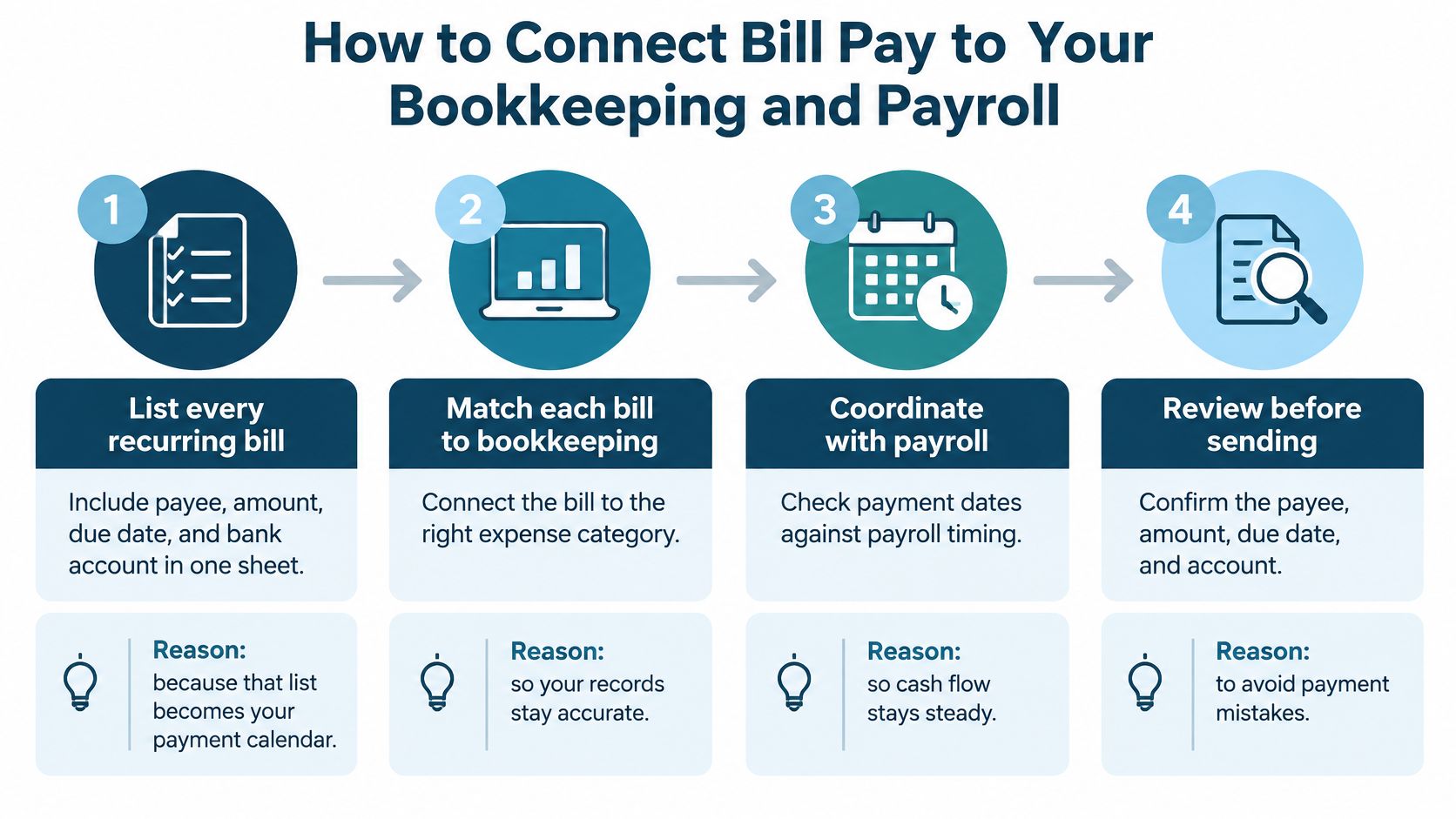
A payment that never lands in the right expense account is not finished. I connect the pay calendar to the books before I turn on autopay.
- List every recurring bill in one sheet. Payee, amount, due date, and bank account. That list becomes the payment calendar, and it is the only place a new owner should look on day one.
- Connect the bank and the bill pay account to your bookkeeping software. Transactions should flow in on their own. QuickBooks Online and Xero both take bank feeds. If the feed and the bill pay tool do not talk, you will type the same payment twice. Teams comparing tools can start with this guide to accounting software integration for SA SMEs, and the same matching problem shows up in a practical look at accounting software integration.
- Map each payee once. Pick the expense account and the tax category. The next twelve payments should code themselves. A new vendor gets mapped before the first send, not after month-end.
- Set the send date from settlement time, not from the due date alone. Most ACH payments are batched. Nacha estimates that about 80% of ACH payments, deposits and withdrawals together, settle in one banking day or less. ACH credits can settle the same day, the next banking day, or within two banking days. A bill marked paid in the app may not have left the account yet.
- Fund payroll and rent a day ahead of those dates. If Friday payroll and a large ACH credit share one balance, the second one can bounce even when Tuesday's spreadsheet looked fine.
- Match each payment to its invoice number. Sending money does not mean the invoice was approved, coded, or tied to a job. A construction draw and a retainer both fail this test when the amount is right and the job code is blank.
- Reconcile the bank feed at least weekly, and daily when cash is tight. You are looking for a payment with no bill, and a bill with no payment.
The slip that shows up at month-end
Owners who skip the invoice match end up with paid bills that never agree to the books. The bank is lower. The expense report is not. Then someone "fixes" it with a journal entry that hides a duplicate.
Practical rule: If the calendar says paid and the bill in the software is still open, stop scheduling the next run until those two agree.
Security Controls That Stop Payment Fraud
People treat a digital payment as safer than a check because there is no paper to steal. The rail can be clean and the instruction can still be wrong.
ACH fraud sat at 0.08 basis points by value in both 2012 and 2015, about $0.08 per $10,000 processed, in the Federal Reserve payments-fraud figures Nacha reported. That is a network average, not a promise for your firm. The loss usually starts when someone changes a vendor's bank details or poses as the owner. The payment then looks routine. Fraudsters rarely "break into the bank." They talk a busy person into typing a new routing number.
Controls that still work with a tiny staff
Call a number you already have. Any vendor bank-account change gets a call to a phone number already on file, not the number in the email that asked for the change. A short set of practical defenses against phishing scams is worth handing to whoever opens vendor email.
Two people on new or changed payees. One enters. One approves. If you are the only signer, wait until the next morning and reread the change before you release it.
A dollar cap per user. The person who enters bills should not be able to send a five-figure payment alone.
Split the jobs, even if one person wears two hats. Entering, approving, and reconciling should not all sit with the same login on the same day. A simple map of internal controls for a small business shows how to split those jobs without hiring a department.
Keep a change log. Who edited the payee, what changed, and when. If you cannot pull that in an audit, the control is only a habit.
Flag odd amounts and odd timing. A Saturday instant payment to a new account is not "just another bill."
Fence off instant rails. Predefined uses, a low limit, and a human yes for anything outside that list. You have less time to catch a bad instant payment than a batched ACH credit.
Keep a written authorization on file for every recurring debit. The payer has to agree before money moves. Keep payment records, approval logs, and bank statements for as long as your accountant sets, and make sure you can access them quickly. Do not store full card numbers in notes or spreadsheets. Let the bill pay provider or the card processor hold them. Consumer protections and business return windows are not the same, so check which rules fit the account you use.
If one stolen password could send a payment, the controls are too thin.
Error Deadlines and How to Get Money Back
A payment error noticed on the monthly statement may already be outside the business return window. The deadline depends on the payment type and account, so match each issue to its rule and act as soon as you spot it.
| Situation | Rule That Applies | Time Limit | First Action |
|---|---|---|---|
| Wrong amount or duplicate payment from a business account | Bank and card terms; Regulation E generally does not cover business accounts | Often the next banking day under bank terms | Call the bank the same day and keep the confirmation and statement |
| Unauthorized corporate ACH debit | Nacha-based banking return rules | Return by opening of business on the second banking day after settlement | Flag the debit and call the bank the same day |
| Unauthorized consumer ACH debit | Regulation E and Nacha consumer return rules | Up to 60 calendar days in some cases | Report in writing and keep records |
| Unauthorized card payment | Card issuer dispute process | Set by the card issuer | Call the issuer and dispute in writing |
| Instant payment sent in error | Bank and network agreements | Often no guaranteed recall | Contact the bank immediately |
Personal accounts and business accounts are not the same
Regulation E gives consumers a formal process for certain electronic errors, such as an unauthorized transfer or an incorrect one. After you give notice, the institution generally must investigate, report the result within three business days after it finishes, and correct a proven error within one business day, under the CFPB's Regulation E error rule. These rules can apply to problems with home-banking or bill-payment programs, but generally do not cover business accounts.
For an unauthorized or improper corporate ACH debit, the return deadline is the opening of business on the second banking day after settlement, as outlined in SouthState Bank's ACH guidance. Some unauthorized consumer debits can be returned for up to 60 calendar days. That difference makes daily bank matching more useful than waiting for the monthly statement. A regular bank reconciliation process helps surface a debit while the return window is still open.
What to do the hour you see it
Call the bank the same day. Keep the confirmation, date, amount, and statement, then note who approved the payment and which invoice it should match. For a card charge, contact the issuer and follow up in writing. If an instant payment went to the wrong account, contact the bank immediately. A recall may not be guaranteed, so check the payee and amount before sending.
Pricing Models and What Drives the Bill
Prices are hard to compare because providers bundle different things under the same words. One "bill pay plan" is a per-item bank fee. Another is a seat on an approval tool. A third is buried inside a bookkeeping retainer. Ask what is included before you ask what it costs.
| Pricing Model | How You Pay | Good Fit When | Watch Out For |
|---|---|---|---|
| Per-payment fee | Fixed fee for each payment sent | You pay only a few bills a month | Costs add up quickly with many vendors |
| Monthly subscription | Flat fee for a set number of payments or users | Your volume is steady and predictable | Paying for capacity you do not use |
| Bundled with bookkeeping | Included in a monthly bookkeeping package | You want one provider for books and payments | Whether you keep your records if you leave |
| Per-user seat | Fee for each person with approval access | A few staff with clear roles | Approval-heavy teams pay more |
| Pass-through costs | Bank, ACH, or card fees charged at cost | Bank-based bill pay with simple volume | Rush fees, returned-payment fees, and card surcharges |
Run the math on your own volume
Say a firm pays 40 bills a month. On a per-payment fee, the bill rises with every vendor you add. On a flat monthly plan, the cost stays put until you pass the plan's volume cap, then a second tier kicks in. Plug your count into both and you will see which one is cheaper at 40, and which one gets ugly at 80. Exact prices differ by provider and region, so get the quote in writing at your real monthly count, not at a sample of ten bills.
Costs that do not show on the sales page
Returned payments, same-day surcharges, and card fees when you pay a vendor by card all sit outside the headline price. Extra approval users do too. A bundled bookkeeping offer is convenient, and I would still ask what you keep if you leave: a full data export, payee history, and the approval log. A cheap plan you cannot exit with your records is not cheap.
Pick a Provider and Start Onboarding
Pick a provider only after you can answer five questions. If any answer is "we'll figure that out later," wait.
Does it connect to the accounting software you already use? A CSV you upload by hand will die in month two.
Are approval rules, audit logs, and vendor-change checks built in? A pretty send button without those is a faster way to pay a fake invoice.
Can you export every record if you leave? Payees, payments, and approvals, not a PDF of last month.
Is the price written out at your monthly volume? Include rush fees and extra users.
Does a real person answer when a payment fails? A chatbot at 4 p.m. on payroll day is not support.
The first month, in order
- Book a discovery call and bring the bill list and the payee list. Do not start from a blank form on the call.
- Agree on a written plan: who approves, what the dollar limits are, and which bills may use an instant rail.
- Move payees over and verify every bank detail by phone, using a number you already trust.
- Run one small test payment and confirm it matches the bill in the books before you load the rest.
- Review the first 30 days together and tighten limits where the queue looks loose.
If you want bookkeeping, bill pay, and account management with one team, MyOfficeOps handles those together, and the path runs Discovery Call, Custom Plan, Smooth Onboarding, then a Growth Partnership. That order matches the steps above. Show up to the discovery call with the bill list already filled in.
MyOfficeOps handles day-to-day bookkeeping, bill pay, and account management for small and midsize firms that are tired of chasing due dates alone. If your payment queue, payroll, and books need one team that will pick up the phone, visit MyOfficeOps and book a discovery call with your bill list ready.