
You hire your first employee and feel good about it for about ten minutes.
Then the paperwork starts. W-4s. Direct deposit forms. Pay schedules. Tax withholding. Overtime rules. State notices. Local taxes. Questions like, “Can I just pay them with Zelle?” or “Why doesn't their paycheck match their hourly rate times hours worked?”
That's usually the moment a small business owner realizes payroll isn't just sending money to staff. It's a system. If that system is loose, your books get messy, taxes get missed, cash flow gets tight, and employees lose trust fast.
More Than Just Writing a Paycheck
A lot of owners think payroll is one task that happens every other Friday. In real life, it's a chain of tasks that has to line up in the right order. You collect employee information, confirm hours, check changes, calculate pay, withhold taxes, move money, file forms, and record everything properly in the books.
That's why so many businesses hand it off. In 2024, one industry review reported that 61% of companies outsource some or all payroll operations, while another 2026 summary found 34% of small businesses use an external firm to prepare payroll according to NAWBO's payroll statistics roundup. That doesn't mean every company should outsource. It does tell you this problem is common.

What payroll really includes
Payroll starts with two kinds of information.
- Fixed employee data: legal name, address, bank details, base pay, tax setup, benefit elections
- Changing pay period data: hours worked, PTO used, bonuses, pay changes, updated personal details
That split matters because payroll isn't “set it and forget it.” As explained in Lano's breakdown of payroll data, payroll services work with fixed data in the system and changing data that must be updated before every run. If either side is wrong, the paycheck can be wrong.
Practical rule: Most payroll mistakes don't come from math. They come from bad inputs.
Why owners get tripped up
The owner is busy running jobs, serving clients, ordering inventory, and making payroll itself. So they rush the setup or approve hours without checking them. Then a few pay runs later, there's a problem. Someone's overtime was missed. A deduction didn't start when it should have. The payroll hit the bank earlier than expected and squeezed cash.
That's the part people don't talk about enough. Payroll is a financial control process. It affects your labor cost, your tax obligations, your timing of cash outflows, and the accuracy of your books.
If you want the short answer to how do payroll services work, here it is. They take a repetitive, error-prone process and turn it into a controlled routine. Done right, that routine protects both your team and your bank account.
From Hours Worked to Money in the Bank
To simplify payroll, visualize it as an assembly line. Raw materials go in. Finished product comes out. In payroll, the raw materials are employee data, hours, salary amounts, deductions, and tax settings. The finished product is net pay, tax filings, and clean records.
A payroll service works that same way. The business supplies data, and the provider calculates gross pay, applies deductions, withholds taxes, and then disburses wages while filing required tax forms. The technical value is in this strict sequence, ensuring all inputs are validated before payment, as described by TCWGlobal's explanation of managed payroll services.
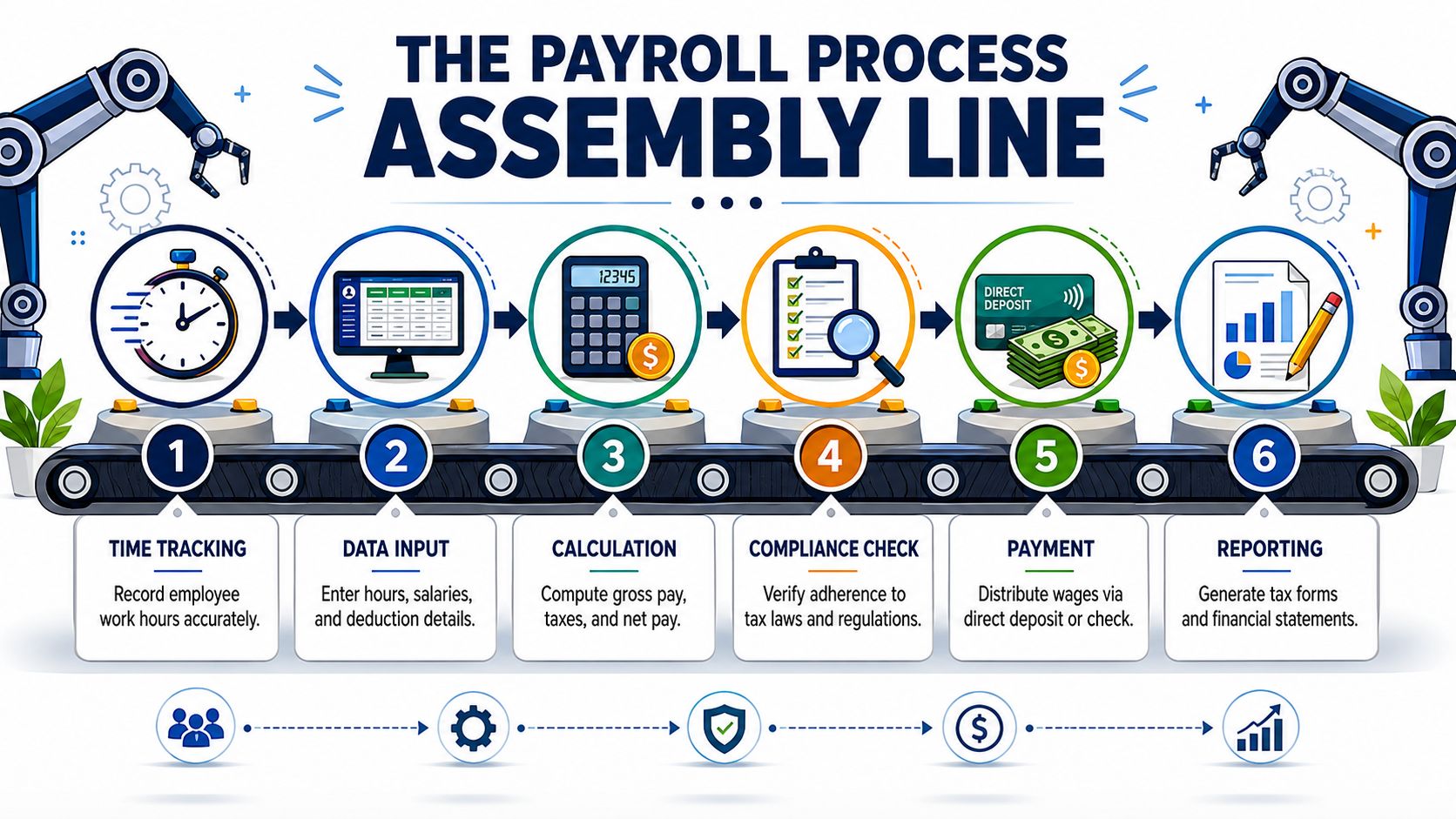
Step one starts before payday
Before anybody gets paid, somebody has to collect the right information.
For an hourly team, that usually means approved timecards. For salary employees, it might mean checking for PTO, bonuses, commissions, reimbursements, or benefit changes. For a new hire, it means getting them into the system correctly from day one.
If your team works overtime, shift premiums, or double time, you also need clean rules for labor cost tracking. A plain-language explainer on AnchOps labor cost prevention is useful if you're trying to understand where wage calculations can go sideways before payroll is run.
Then the service calculates gross pay and net pay
This is the part people picture when they think about payroll. But it only works if the first step was clean.
Here's the basic flow:
- Start with gross pay. That's wages before deductions.
- Apply pre-tax and post-tax deductions. Things like benefits and other authorized withholdings.
- Withhold employee taxes and account for employer payroll taxes.
- Arrive at net pay. That's what lands in the employee's account.
A good payroll service doesn't just do the arithmetic. It checks whether the inputs make sense before finalizing the run.
A payroll run should feel boring. If every pay period feels like a scramble, the process is broken upstream.
Payment is only half the job
After calculations are approved, the service sends wages by direct deposit or check. But that isn't the finish line.
The provider also has to handle the back-office side:
- Tax remittance: moving withheld taxes to the right agencies
- Required filings: submitting the forms tied to payroll activity
- Pay records: creating pay stubs or employee self-service records
- Year-end support: maintaining the data needed for forms such as W-2s
Owners often underestimate the job. Paying employees is visible. Filing and recordkeeping are quieter. Those quiet parts are what cause headaches later if they're mishandled.
Where small businesses usually feel friction
The messy spots are predictable.
| Trouble spot | What goes wrong | What works better |
|---|---|---|
| Time entry | Hours come in late or incomplete | Set a hard approval cutoff |
| Employee changes | Raises, deductions, or bank updates get missed | Use a standard change form and deadline |
| Overtime | Rules are applied inconsistently | Tie timekeeping to payroll rules |
| Cash timing | Payroll drafts surprise the owner | Review funding dates before each run |
| Reporting | Payroll doesn't match the books | Post payroll entries to accounting promptly |
When people ask how do payroll services work, the answer is this. They work well when the data comes in clean, the approval process is clear, and the timing is managed on purpose. They fail when payroll gets treated like an afterthought.
Finding the Right Payroll Service Model
There isn't one “right” payroll setup for every company. Picking a payroll model is a lot like deciding how to handle dinner. You can cook from scratch, use a meal kit, or hire someone to take over the whole thing.
Each option can work. The wrong option usually shows up as wasted time, weak controls, or confusion about who owns the risk.
The three common models
Do it yourself with software is the cook-from-scratch version. You use a payroll platform, enter the data, run payroll, and make sure filings happen. This gives you control, but it also puts more on your plate.
Full-service payroll provider is the meal-kit version. The system gives structure, handles calculations and filings, and reduces manual work. You still need to provide good inputs and review reports.
PEO is closer to hiring a private chef. A Professional Employer Organization can take on a broader HR and payroll role. That can help if your company is growing and wants more support beyond just pay processing.
Payroll Service Model Comparison
| Model | Best For | Key Feature | Typical Liability |
|---|---|---|---|
| DIY software | Very small teams with simple payroll | Lower direct involvement from outside providers | Business keeps most of the responsibility for setup, accuracy, approvals, and review |
| Full-service payroll provider | Small and midsize companies that want structure | Provider handles calculations, payments, and filings based on your inputs | Shared practical responsibility, but the business still owns accurate employee data and approvals |
| PEO | Firms that want payroll plus broader HR support | Broader administrative support under one relationship | Business still has obligations, but more functions are handled through the service model |
What usually works and what usually doesn't
DIY can work if your payroll is simple. A couple of salaried employees. Stable pay. One state. No odd deductions. No frequent changes. Once you add hourly staff, overtime, multiple pay types, or workers in different places, DIY gets harder fast.
Full-service payroll is usually the best fit for the typical small business owner who wants reliability without building an internal payroll department. Common examples include Gusto, ADP, Paychex, and local bookkeeping firms that manage payroll operations as part of a broader accounting relationship. MyOfficeOps is one example of a firm that handles payroll alongside bookkeeping and advisory work, which can be useful when you want payroll tied closely to reporting and cash flow review.
The best payroll model is the one your team can run correctly every single pay period, even during a busy month.
PEOs make more sense when payroll is only one part of the problem. If you also need deeper HR support, benefits administration, and a more bundled setup, that route can be worth a look.
One practical filter
If you're comparing options, ask one simple question. “Who is checking what before money leaves my account?”
That answer tells you a lot. It tells you how much control you keep, how much admin work stays on your team, and where mistakes are most likely to happen.
If you want a side-by-side look at software choices, this guide to small business payroll software options is a solid next step.
Making Payroll Talk to Your Other Tools
Payroll gets much easier when it isn't living on an island.
The businesses that struggle most are usually copying the same information into too many places. Hours sit in one app. employee records sit somewhere else. Payroll runs in another system. Then somebody retypes payroll totals into QuickBooks. That's where errors creep in.
Connect payroll to timekeeping
A payroll system works better when hours flow in directly from the timekeeping tool. That cuts down on duplicate entry and helps the payroll run start with approved data instead of a spreadsheet someone patched together at the last minute.
As noted by Business News Daily's payroll overview, payroll systems reduce manual variance by automating repeatable calculations. For teams spread across different states or jurisdictions, the harder issue is compliance logic. The system has to apply different wage and tax rules correctly, which is why payroll platforms lean on rule-based automation.
That matters in practice. If one employee works in Pennsylvania and another works elsewhere, you don't want a manual process guessing its way through withholding and pay rules.
Connect payroll to accounting
This is the part I care about most as a bookkeeping person. If payroll doesn't feed cleanly into your accounting system, your financial reports won't tell the truth.
Labor is often one of the biggest costs in a small business. If payroll entries hit the wrong accounts, or hit late, your profit and loss statement gets distorted. Then you make decisions off bad numbers. You might think a department is profitable when it isn't. You might think cash is tighter than it really is, or the opposite, which is worse.
Here's what a good connection usually gives you:
- Cleaner books: wage expense, payroll taxes, and benefits land in the right places
- Faster month-end close: fewer manual journal entries and fewer cleanup adjustments
- Better cash planning: you can see labor cost patterns instead of guessing
- Stronger job or client tracking: if your system supports classes, departments, or projects
What integration looks like in practice
For a lot of owners, “integration” sounds technical. It usually just means this: enter the data once, let the systems pass it where it needs to go, then review the results.
A common stack might look like this:
- Timekeeping tool: tracks hours and PTO
- Payroll platform: calculates pay and files taxes
- Accounting software: records payroll expense and liabilities
If you're trying to sort out how those pieces should connect, this plain-English guide on payroll integration walks through the basics.
If you have to retype payroll numbers into your books every pay period, your process is costing you more than the software fee.
Why Good Payroll Is Good for Business
A lot of payroll sales pitches stop at “it saves time.” Sure, it does. But that undersells the point.
Good payroll protects the business in four ways. It supports compliance, keeps the books clean, helps you manage cash, and builds trust with employees. That's why I tell owners to stop treating payroll like a side chore.
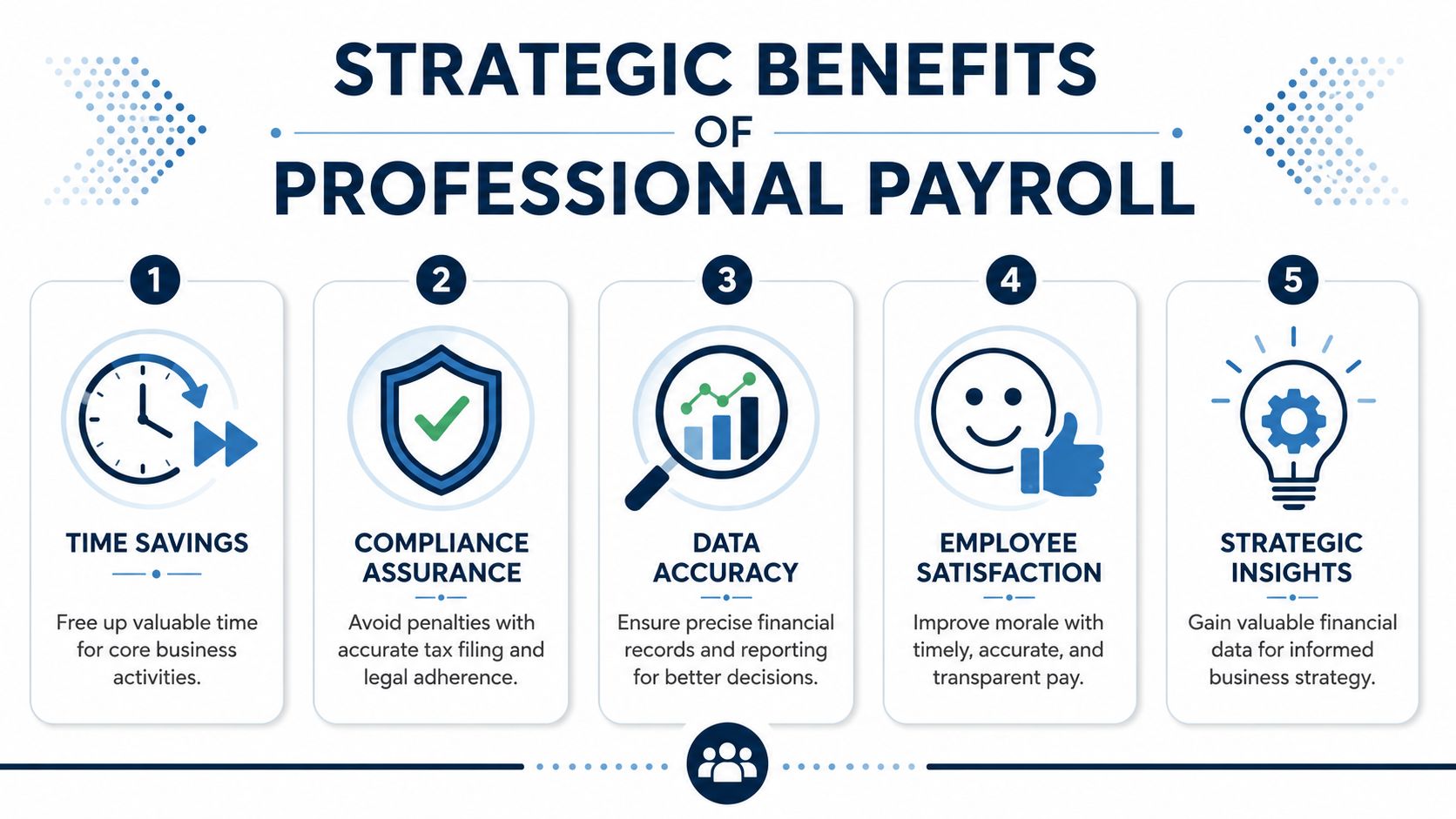
It helps you stay in control
Payroll processing includes collecting registrations, remitting taxes, and logging payroll expenses in the general ledger, according to Paylocity's explanation of payroll processing. That matters because payroll is tied directly to accounting and treasury work. Mistakes don't just create compliance issues. They can create cash-flow strain too.
That's the connection many owners miss. Payroll is one of the few recurring expenses where timing, tax handling, and bookkeeping all collide at once.
The business benefits are practical
- Compliance gets less fragile. You're less likely to miss a filing, overlook a registration, or forget a remittance.
- Cash movement becomes more predictable. You know when wages and related tax payments are scheduled to leave the account.
- Your reports improve. Clean payroll entries make it easier to budget and understand labor cost.
- Employees trust the operation more. People notice when pay is late, short, or inconsistent.
Bad payroll creates hidden costs
A payroll error rarely stays small. First you fix the check. Then you fix the tax side. Then you fix the books. Then you answer the employee's questions. Then you lose half a day figuring out what happened.
That's why professional payroll isn't just an admin convenience. It's a basic operating control.
Good payroll is quiet. Employees get paid correctly. Taxes are handled. The books reconcile. Nobody has to chase a problem on Friday afternoon.
Your Payroll Setup Checklist for Philadelphia
If you're setting up payroll around Philadelphia, don't wing it. Federal, state, and local requirements all matter. Missing one piece can slow down onboarding or create cleanup work later.
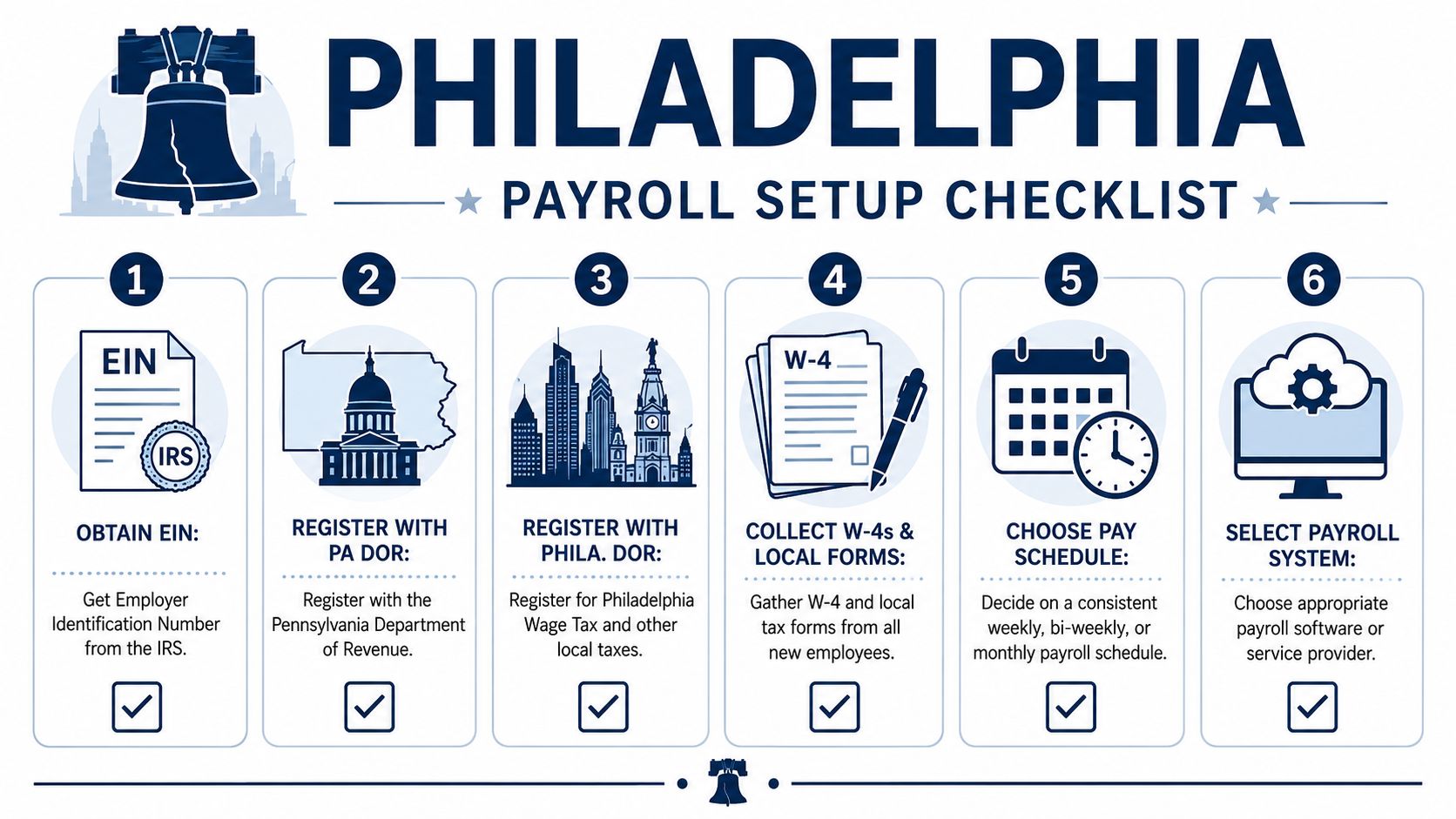
Start with the registrations
- Get your EIN. If you're hiring employees, you need an Employer Identification Number from the IRS.
- Register with Pennsylvania. Make sure you're set up for the state payroll-related accounts your business needs.
- Register with the City of Philadelphia. If you have employees working in the city, local wage tax obligations matter.
Then build the process
After registration, gather your employee paperwork and choose how payroll will run.
- Collect employee forms: W-4, direct deposit details, and any local or company forms you need
- Set a pay schedule: weekly, biweekly, or another schedule that fits your operation
- Choose a payroll system: software, a payroll provider, or a bookkeeping partner
- Connect timekeeping if needed: especially if you have hourly staff
- Test the chart of accounts mapping: so payroll lands correctly in your books
Don't skip the local details
Philadelphia-area businesses sometimes focus on federal and state setup and forget city requirements until later. That's a mistake that can get expensive in time and cleanup.
If you want a more complete walk-through, this guide on setting up payroll for a small business is a helpful starting point.
Frequently Asked Payroll Questions
How much do payroll services cost?
It depends on the model, headcount, and complexity. A simple salaried team costs less to manage than a mixed workforce with hourly staff, overtime, multiple states, reimbursements, and benefit deductions. The right question isn't just the fee. It's what manual work and risk you're removing.
What if the payroll service makes a tax mistake?
First, figure out whether the mistake came from bad source data, a setup issue, or the provider's processing. That distinction matters. Even with a service involved, the business still needs to review payroll, keep employee data current, and approve runs carefully.
Is it easier to pay everyone as a contractor?
It may look easier at first, but misclassifying workers creates bigger problems. If someone should be an employee, calling them a contractor doesn't make the rules go away. Worker classification is one of those areas where “cheap and fast” can turn into “expensive and messy.”
Can I run payroll myself if I'm small?
Yes, if your setup is simple and you're willing to stay organized. But simple has a short shelf life. Once you add hourly work, changing schedules, multiple workers, or local tax complexity, many owners find the admin burden stops being worth it.
If payroll feels heavier than it should, that usually means it isn't connected well to the rest of your financial system. MyOfficeOps helps small businesses tie payroll, bookkeeping, reporting, and cash-flow visibility together so owners can make decisions from clean numbers instead of guesswork.