
You check your bank app, see a solid balance, and think, “Good. We can cover payroll, buy that equipment, and move on.”
Then your accounting software shows a different number.
That's the moment most owners realize cash is a little slippery. The bank is showing one version of the story. Your books are showing another. Neither one is automatically wrong, but if you don't know why they differ, you're making decisions with a cloudy windshield.
The reconciliation of bank accounts clears that up. It turns two imperfect snapshots into one reliable cash picture. Done well, it's less like admin work and more like checking your rearview mirror before changing lanes. It helps you move with confidence because you can see what's behind you.
Why Your Bank Balance Can Be Misleading
A business owner sees $18,000 in the bank and assumes that's available cash. On the same day, the books show less. Panic follows, or worse, false confidence.
Usually, the answer is simple. The bank balance only shows what the bank has processed. Your books show what your business has recorded. Those are not always in sync on any given day.
Two records, one cash story
Take a normal week in a small service business. You deposit customer checks late in the month. The team records them right away because the money was received. But the bank may not finish processing that deposit until the next business day.
Or maybe you paid a vendor by check, entered it in QuickBooks, and moved on. If the vendor hasn't cashed it yet, your books already reflect the payment while the bank account does not.
That gap doesn't always mean fraud or bad bookkeeping. Often, it just means timing.
Your bank balance is a snapshot. Your books are a running log. Reconciliation is how you make them tell the same story.
Why owners get tripped up
Most owners look at the bank first because it feels official. That makes sense. But the bank statement doesn't know your intent. It doesn't know that you mailed a check, recorded a deposit, or made an entry that still needs to clear.
Your accounting file has the opposite problem. It knows what you entered, but it may not yet reflect bank fees, interest, returned payments, or errors.
That's why the reconciliation of bank accounts matters. It closes the information gap between what your business believes happened and what the bank confirms happened.
A clean reconciliation gives you a cash number you can depend on. That matters when you're deciding whether to hire, buy equipment, pay down debt, or sleep more soundly before month-end.
The Goal of Bank Reconciliation Explained
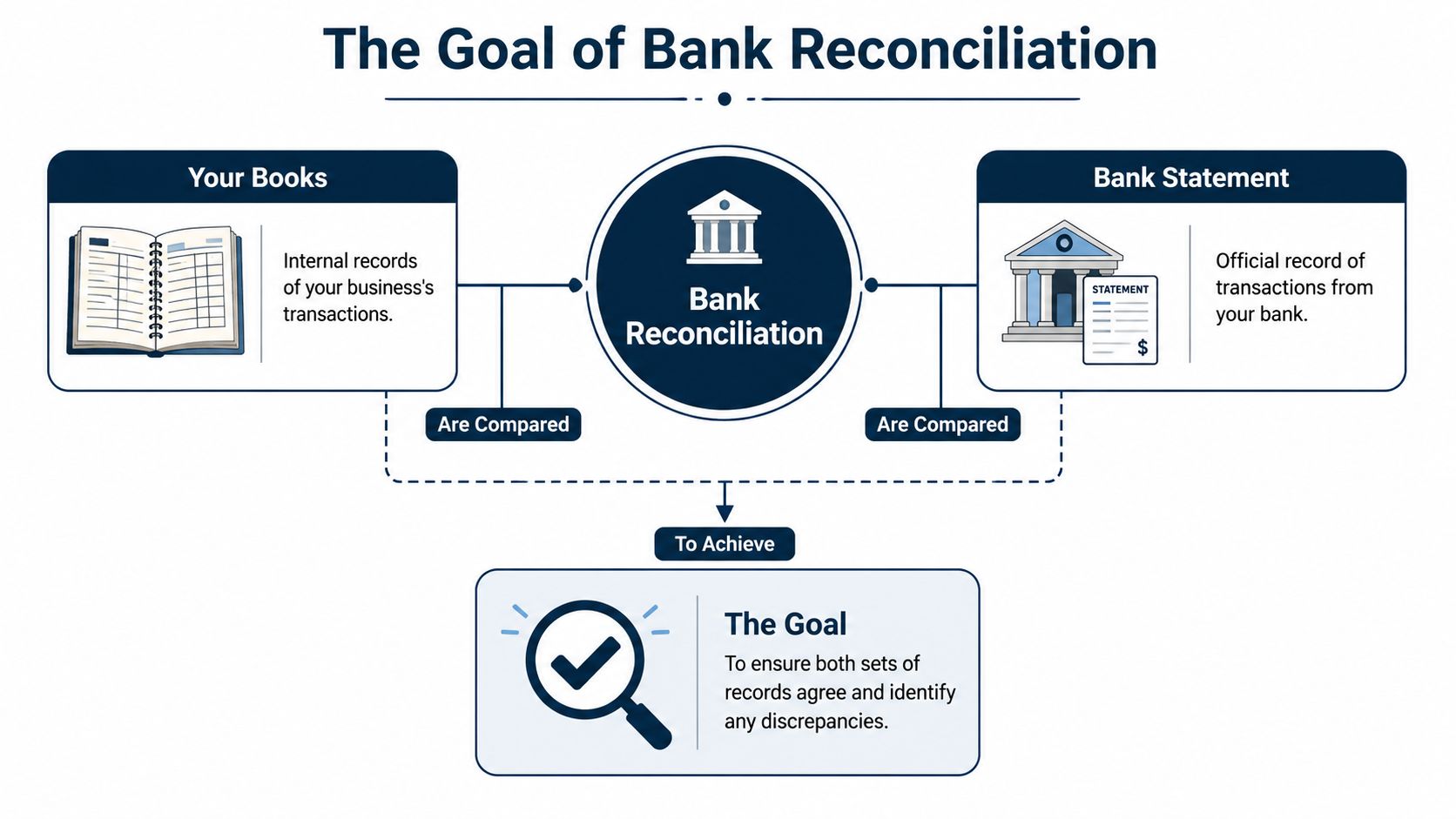
Bank reconciliation sounds technical, but the idea is simple. You compare your books to the bank statement, explain every difference, and end with one trusted cash balance.
That's why bank account reconciliation is still treated as a routine control. Monthly reconciliation is commonly recommended as a baseline, and the purpose is practical. It catches timing differences and posting errors like deposits in transit, outstanding checks, bank fees, interest, bounced checks, and transposition errors before they distort reported cash, as outlined in public financial management guidance from UNC School of Government.
What you are trying to prove
It's comparable to balancing your personal checkbook, just with more moving parts.
You start with two numbers:
- the ending balance on your bank statement
- the cash balance in your accounting system
If they don't match, that's normal. Your job is to find out why.
After you account for all valid differences, the adjusted bank balance and the adjusted book balance should match. In public-sector guidance, the reconciliation process is expected to end with an unreconciled amount of $0, which is a clear way to define the control objective. Every difference should be explained and resolved.
The most common differences in plain English
Some differences are timing issues, not mistakes.
| Item | What it means | What usually happens |
|---|---|---|
| Deposit in transit | You recorded a deposit, but the bank hasn't posted it yet | It clears shortly after the statement date |
| Outstanding check | You recorded a check, but the vendor hasn't cashed it yet | It stays open until the check clears |
| Bank fee | The bank charged your account | You need to record it in your books |
| Interest | The bank added earnings to the account | You need to record it in your books |
| Returned payment | Money you expected didn't stick | You investigate and update the books |
A lot of owners hear these terms and tune out. Don't. They're just labels for ordinary business activity.
Practical rule: If a difference has a clear reason and supporting detail, it's a reconciling item. If it has no clear reason, it's a problem.
What “good” looks like
A good reconciliation doesn't just say, “Close enough.” It shows why the numbers differ and what needs to be updated.
Software can help with matching, but the thinking still matters. If you want another plain-English walkthrough, Resolut's reconciliation insights are a useful companion read because they keep the focus on what owners need to understand, not just what bookkeepers click.
At the end of a proper reconciliation, you should be able to answer one simple question without guessing: How much cash is really available?
A Practical Workflow for Reconciling Your Accounts
Most reconciliations go off the rails for one reason. People jump straight into fixing differences before they've lined up the right records.
A cleaner approach is to work in phases. Gather the period, match what's obvious, investigate what's left, then post the needed corrections.
Gather the right records first
Use the bank statement and the bookkeeping records for the same period. That sounds obvious, but a surprising amount of confusion starts when someone compares a statement ending on one date to a ledger report pulled on another.
For a small coffee shop, that usually means:
- the month-end bank statement
- the cash account detail from QuickBooks, Xero, or your ERP
- supporting items like deposit slips, check images, and notes about unusual transactions
If the account structure is messy, cleanup gets harder fast. A well-organized ledger helps because you can spot whether a transaction was posted to the right place in the first place. If your chart of accounts needs work, this guide on how a chart of accounts supports clean bookkeeping is worth reviewing before you dig deeper into reconciliations.
Match the easy items first
Start with what appears in both places. Check off deposits and payments that match by amount and date, or close enough to make sense if processing lag is common.
Modern workflows often begin by importing bank statement files into software and clearing matched entries there. That shift from paper statements to software-assisted workflows is a major change in how businesses handle the reconciliation of bank accounts. The process still comes down to comparing bank transactions to the general ledger or cashbook, then making adjustments where needed, as described in this overview of modern reconciliation workflows.
For the coffee shop example, the obvious matches usually include card deposits, routine supplier payments, rent, and payroll.
Investigate the unmatched items
The actual work starts.
Say the coffee shop books show a deposit on the last day of the month, but it isn't on the bank statement. That may be a normal timing issue. Then there's a small bank service charge on the statement that no one entered in the books. That needs a bookkeeping adjustment.
You may also find:
- A payment in the books with no bank match. That could be an outstanding check or a duplicated entry.
- A withdrawal on the statement with no book entry. That might be a bank fee, loan payment, or automatic draft someone forgot to record.
- A transaction with the right date but wrong amount. That often points to a typo or transposition mistake.
A simple checklist helps here:
- Look at dates: Was it recorded at month-end but cleared after the statement cutoff?
- Look at amount: Is it the same transaction with digits reversed?
- Look at source: Did the bank post it, or did someone enter it manually?
- Look at support: Is there a receipt, invoice, deposit detail, or check image?
If you want another grounded walkthrough of the process from start to finish, Grain's reconciliation steps are a practical reference.
When a reconciliation stalls, the problem usually isn't arithmetic. It's missing context.
Adjust your books, not reality
Once you identify valid differences, update the accounting records where needed.
Typical adjustments in the books include:
- Bank charges that hit the account without being entered internally
- Interest earned that appears on the statement
- Returned payments that reduce cash
- Bookkeeping errors such as wrong amounts or duplicate entries
What you don't do is force the books to match by posting mystery entries. If you can't explain it, don't hide it.
Finish with documentation
A completed reconciliation should show:
- the statement ending balance
- the book ending balance
- each reconciling item
- the final adjusted balances
- notes for anything unusual or still in process
The strongest benchmark data in this area is less about a universal industry number and more about operational quality. How quickly exceptions get resolved, whether records can be normalized and auto-matched, and whether all deposits in transit, outstanding checks, and unrecorded bank items are explicitly identified matter more than pretending a simple balance check is enough, as explained in Modern Treasury's discussion of reconciliation design and exception handling.
If your file is clean, next month gets easier. If this month ends with loose ends and undocumented guesses, next month turns into archaeology.
Solving Common Reconciliation Mysteries
Some reconciliation issues are routine. Others make you question every entry you've posted for the last month.
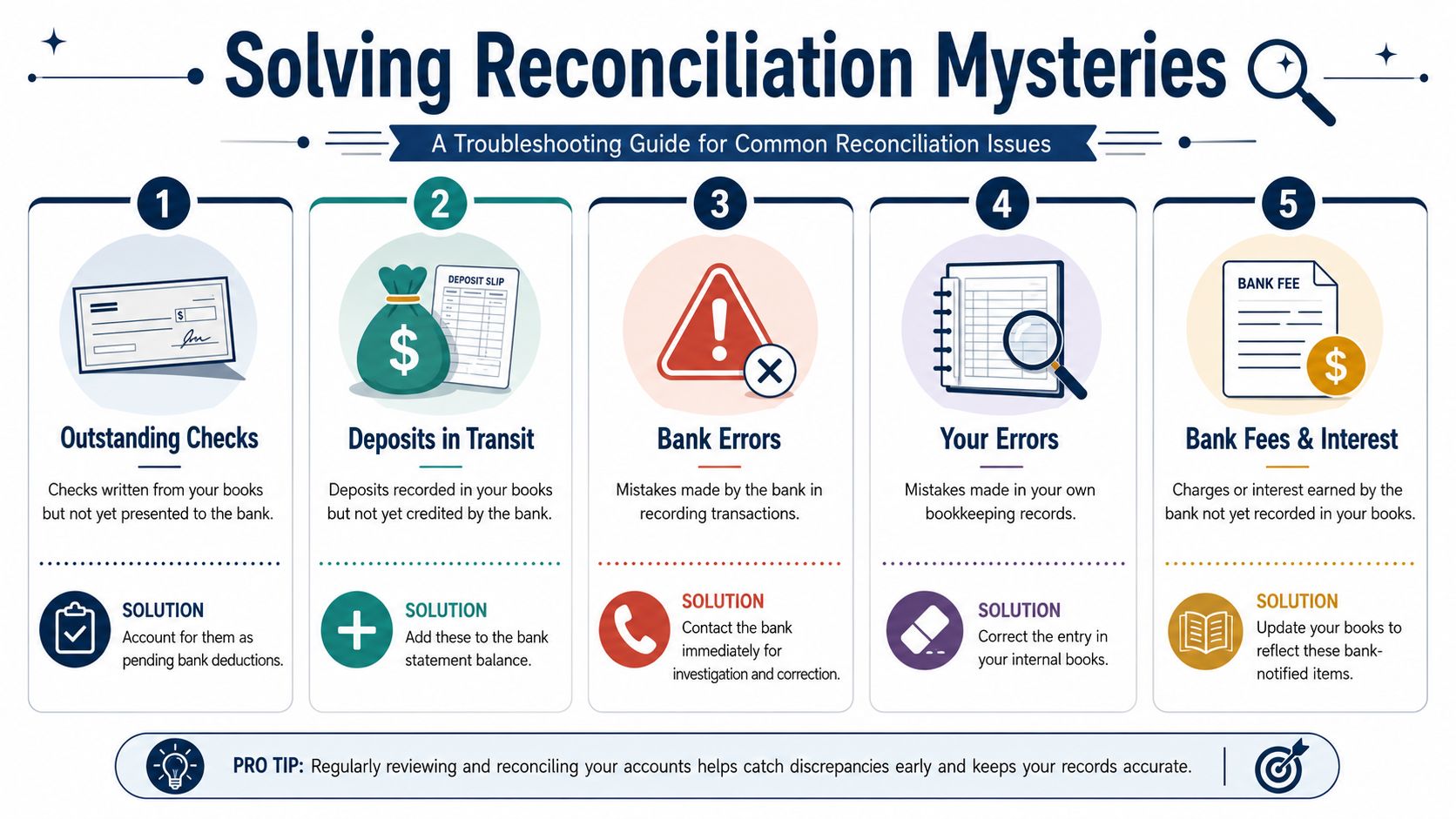
The trick is to sort the mismatch into the right bucket before you try to fix it. Most problems fall into four groups: timing, bank-notified items, your own data entry mistakes, or a true bank error.
Timing issues that are annoying but normal
A deposit hits your books on the last business day of the month. The bank posts it after the statement closes. That's a deposit in transit.
A vendor sits on a check for weeks. Your books show the payment, but the bank does not. That's an outstanding check.
Neither one is a bookkeeping failure by itself. The fix is to carry the item as a reconciling difference and watch it in the next period.
| What you see | Likely cause | What to do |
|---|---|---|
| Deposit in books, missing from statement | Deposit in transit | Add it to the bank side of the reconciliation and confirm it clears later |
| Check in books, missing from statement | Outstanding check | Keep it on the reconciliation until it clears or needs follow-up |
Small statement items that get missed
These are the little transactions owners often overlook because nobody physically enters them when they happen.
Common examples include:
- Bank fees deducted automatically
- Interest credits added by the bank
- Returned items that reverse a prior deposit
The fix is straightforward. Record the item in your books so the ledger catches up to what the bank already did.
Your own entry mistakes
This category creates the most frustration because the numbers often look almost right.
You may have entered $125 instead of $152. You may have posted a payment twice. You may have recorded a deposit to the wrong bank account or to the wrong month.
A useful clue: If the difference makes no business sense, review your own entries before assuming something strange happened at the bank.
When this happens:
- correct the amount
- remove duplicates
- move the transaction to the right account if it was misposted
- attach support so the correction is easy to follow later
If expense coding is part of the problem, good transaction tracking upstream saves a lot of cleanup later. This resource on how to track business expenses can help tighten that side of the process.
Actual bank errors and stale records
Real bank errors do happen, but they're not the first thing to assume. More often, the issue is stale or incomplete transaction capture. If the feed is delayed, if someone bypassed the normal process, or if an entry never made it into the books, the reconciliation breaks.
Best practice is to explicitly identify every deposit in transit, outstanding check, and unrecorded bank charge, reconcile more often for high-volume accounts, and escalate unresolved breaks right away instead of letting them sit until the next close. That's the main operational warning highlighted in the guidance cited earlier.
When it really is the bank, gather the statement line, your supporting records, and contact the bank quickly. The longer you wait, the harder it gets to unwind.
Making Bank Feeds and Software Work for You
Bank feeds are useful. They save time, reduce hand entry, and make routine matching faster.
But they don't think.
That's the part many owners miss when software vendors make reconciliation sound automatic. Automation is strong at spotting records that appear to match. It is much weaker at judging why something doesn't match.
What software does well
Modern accounting platforms can import bank activity, suggest matches, and clear a large share of day-to-day transactions without much effort from a human.
That's a meaningful improvement over old paper-statement workflows. Importing statement files, comparing transactions inside the system, and clearing matched entries is now standard in many accounting environments. It's one reason reconciliation is still foundational for fraud prevention, error detection, and audit readiness in both public and private settings.
For straightforward activity, software works well at:
- matching known deposits and payments
- flagging obvious duplicates
- bringing bank activity into one screen
- speeding up month-end review
Where automation stops helping
The hard part is exception handling.
A transaction may look close enough for the system to match, but still be wrong. A duplicate payment might slip through because the dates differ. A returned payment may need a business decision, not just a coding change. An old outstanding item may signal a stale check, a customer issue, or a control problem.
That's why the current direction is a hybrid model. Software handles high-volume matching, while people investigate discrepancies, document adjustments, and maintain control. Microsoft's own guidance for Business Central reflects that split. The system can match and post balances, but discrepancies still need human review, and a second person should review the reconciliation for control purposes, as described in Microsoft's bank reconciliation guidance.
Automation clears transactions. People clear doubt.
How to use tools without getting lazy
The best setup treats software as an assistant, not a substitute for financial oversight.
Use bank feeds to remove the repetitive work. Then spend your attention where it matters:
- review unmatched items
- scan for anything unusual
- confirm old reconciling items are still valid
- make sure someone else reviews the finished reconciliation if your team size allows it
That's also where a bookkeeping partner can fit. For example, MyOfficeOps includes regular bank reconciliations within its core accounting work, which is useful when the matching is easy but the exceptions keep piling up.
If your software says the account is reconciled but you still can't explain the cash position, the process isn't finished.
When Your Time Is Worth More Than the Task
There's a point where doing your own books stops being a smart use of time.
That point usually doesn't arrive because reconciliation is impossible. It arrives because your business gets busy enough that unfinished exceptions, delayed reviews, and nagging uncertainty start costing more than the task itself.
Signs you should stop doing it yourself
You may be ready to hand it off if any of this sounds familiar:
- You keep postponing it: The statement arrives, and you tell yourself you'll reconcile it next week. Then next month starts.
- Old differences stay unresolved: The same uncleared items show up again and again, and no one is sure whether they're normal or wrong.
- You don't trust the answer: Even after you finish, you still aren't confident enough to use the cash number for decisions.
- The work steals focus: Your time is better spent selling, managing staff, serving clients, or improving operations.
Some owners try to patch that with more apps. That can help at the edges. If you're exploring automation more broadly, this roundup of top AI tools for task automation gives a useful view of what software can streamline across admin work. It also highlights the obvious truth. Tools can reduce effort, but they don't replace judgment.
Outsourcing is a control decision
Handing off reconciliation isn't giving up. It's choosing a cleaner process.
A good outsourced bookkeeping setup gives you:
- regular reconciliations
- documented exception handling
- a clearer month-end close
- more confidence in cash reporting
If you're weighing that move, this overview of outsourced bookkeeping for small business can help you decide what to delegate and what to keep in-house.

Clarity is the benefit. When the reconciliation of bank accounts is handled well, your books stop acting like a history file and start supporting real decisions.
If your cash balance feels harder to trust than it should, MyOfficeOps can help you tighten the process, keep reconciliations current, and turn messy bank activity into financial reporting you can effectively use.